
ROCm/rpp
ROCm/rpp has 74 GitHub stars and 55 forks. GitHot measured 0 stars in 24 hours. Last checked 2026-11-14 20:25 UTC. Last push 2026-11-13.
实测星标增长
- 24小时
- 0
- 7天
- 正在收集历史
- 15天
- 正在收集历史
- 1个月
- 正在收集历史
各周期内的星标净变化,周期相互重叠,并非每日新增。缺失的测量保持空白。星标代表关注度,不代表软件质量。
关于
AMD ROCm Performance Primitives (RPP) library is a comprehensive high-performance computer vision library for AMD processors with HIP/OpenCL/CPU back-ends.
开发工具README.md
原文


[!NOTE] The published documentation is available at ROCm Performance Primitives (RPP) in an organized, easy-to-read format, with search and a table of contents. The documentation source files reside in the
docsfolder of this repository. As with all ROCm projects, the documentation is open source. For more information on contributing to the documentation, see Contribute to ROCm documentation.
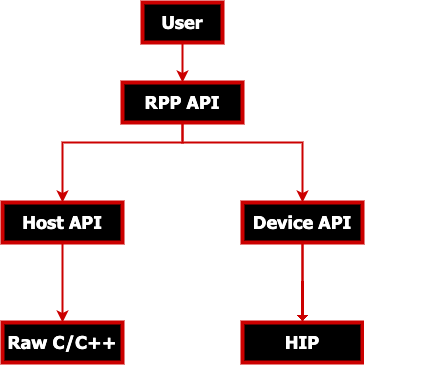
AMD ROCm Performance Primitives (RPP) library is a comprehensive, high-performance computer
vision library for AMD processors that have HIP, or CPU backends.
Latest release

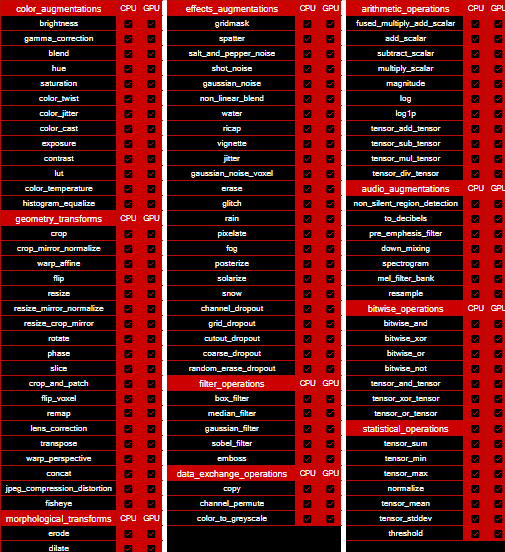
Supported Augmentations / Primitives
RPP supports various 2D image, 3D image (voxel), audio and miscellaneous augmentations and primitives as listed below.
Supported 2D Image Augmentations Samples

Supported 3D Image Augmentations Samples
| Input (3D voxel image) |
||
|---|---|---|
 |
||
| add_scalar (3D scalar addition) |
subtract_scalar (3D scalar subtraction) |
multiply_scalar (3D scalar multiplication) |
 |
 |
 |
| fused_multiply_add_scalar (brightened 3D image) |
gaussian_noise (3D noise augmentation) |
flip (3D flip augmentation) |
 |
 |
 |
slice (3D slice - 100x200 from 240x240x155):

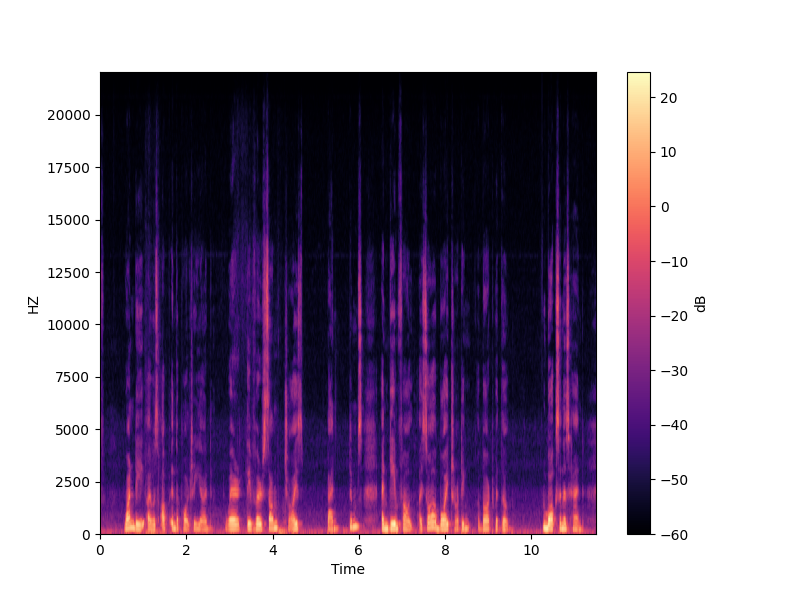
Supported Audio Augmentations Samples
Spectrogram functionality output represented as an image:
Prerequisites
Operating Systems
- Linux
- Ubuntu -
22.04/24.04 - RedHat -
8/9 - SLES -
15 SP7
- Ubuntu -
Hardware
- CPU: AMD64
- GPU: AMD Radeon™ Graphics / AMD Instinct™ Accelerators
[!IMPORTANT]
- ROCm-supported hardware required for HIP backend
gfx908or higher GPU required
- Install ROCm
7.0.0or later with amdgpu-install: Required usecase:rocm
[!IMPORTANT]
sudo amdgpu-install --usecase=rocm
Compiler
- AMD Clang++ Version 18.0.0 or later - installed with ROCm
[!NOTE]
- For CPU only backend use Clang Version
5.0.1or latersudo apt install clang- To use GNU compiler or custom compilers use
-D CMAKE_CXX_COMPILERduring build
Libraries
CMake Version
3.10or latersudo apt install cmakeHIP
sudo apt install hip-devOpenMP
sudo apt install openmp-extras-devHalf-precision floating-point library - Version
1.12.0or latersudo apt install half
[!IMPORTANT]
- Required compiler support
- C++17
- OpenMP
- Threads
- On Ubuntu 22.04 - Additional package required: libstdc++-12-dev
sudo apt install libstdc++-12-dev
[!NOTE]
- All package installs are shown with the
aptpackage manager. Use the appropriate package manager for your operating system.
Installation instructions
The installation process uses the following steps:
ROCm-supported hardware install verification
Install ROCm
7.0.0or later with amdgpu-install with--usecase=rocm
[!IMPORTANT] Use either package install or source install as described below.
Package install
Install RPP runtime, development, and test packages.
- Runtime package -
rpponly provides the rpp librarylibrpp.so - Development package -
rpp-dev/rpp-develprovides the library, header files, and samples - Test package -
rpp-testprovides CTest to verify installation
[!NOTE] Package install will auto install all dependencies.
Ubuntu
sudo apt install rpp rpp-dev rpp-test
RHEL
sudo yum install rpp rpp-devel rpp-test
SLES
sudo zypper install rpp rpp-devel rpp-test
Source build and install
Clone RPP git repository
git clone https://github.com/ROCm/rpp.git
HIP Backend
mkdir build-hip
cd build-hip
cmake ../rpp
make -j8
sudo make install
Running Tests
After installing RPP, refer to the Verify installation section below for instructions on running tests.
Verify installation
The installer will copy
- Libraries into
${ROCM_PATH}/lib - Header files into
${ROCM_PATH}/include/rpp - Samples, and test folder into
${ROCM_PATH}/share/rpp - Documents folder into
${ROCM_PATH}/share/doc/rpp
Verify with rpp-test package
Test package will install CTest module to test rpp. Follow below steps to test package install
mkdir rpp-test && cd rpp-test
cmake ${ROCM_PATH}/share/rpp/test/
ctest -VV
[!NOTE]
- Ubuntu: Install Nifti-Imaging to run all tests
git clone https://github.com/NIFTI-Imaging/nifti_clib.git
cd nifti_clib
git reset --hard 84e323cc3cbb749b6a3eeef861894e444cf7d788
mkdir build && cd build && cmake ..
sudo make -j$nproc install
- SLES/RHEL: Install prerequisites to run all tests
Test Functionalities
To test latest Image/Voxel/Audio/Miscellaneous functionalities of RPP using a python script please view AMD ROCm Performance Primitives (RPP) Test Suite
Adding RPP to your CMake project
To add RPP to your CMake project, you can use the following code after installation:
find_package(rpp REQUIRED)
target_link_libraries(your_target PRIVATE rpp::rpp)
HIP backend support is automatic: rpp::rpp transitively propagates the HIP include paths and link libraries, and rpp/rpp.h includes rpp_backend.h which sets RPP_BACKEND_HIP for your compiled sources.
[!NOTE]
find_package(rpp REQUIRED)sets the following variables in your CMake project:
rpp_BACKEND_TYPE- "HIP" or "CPU" — useful for conditional CMake logic (e.g. adding HIP-specific sources)rpp_AUDIO_AUGMENTATIONS_SUPPORT- ON or OFF
[!TIP] If CMake is unable to find RPP, the following fixes can be tried:
- Ensure
${ROCM_PATH}/binis in yourPATH:export PATH=${ROCM_PATH}/bin:$PATH.- Ensure
CMAKE_PREFIX_PATHincludes${ROCM_PATH}/lib/cmake.
MIVisionX support - OpenVX extension
MIVisionX RPP extension vx_rpp supports RPP functionality through the OpenVX Framework.
Technical support
For RPP questions and feedback, you can contact us at [email protected].
To submit feature requests and bug reports, use our GitHub issues page.
Documentation
You can build our documentation locally using the following code:
Sphinx
cd docs
pip3 install -r .sphinx/requirements.txt
python3 -m sphinx -T -E -b html -d _build/doctrees -D language=en . _build/html
Doxygen
doxygen .Doxyfile
Release notes
All notable changes for each release are added to our changelog.
Tested configurations
- Linux distribution
- Ubuntu -
22.04/24.04 - RedHat -
8/9 - SLES -
15 SP7
- Ubuntu -
- ROCm: rocm-core -
7.0.0+ - CMake - Version
3.10+ - AMD Clang++ - Version
18.0.0+ - Half - IEEE 754-based half-precision floating-point library - Version
1.12.0/ package V1.12.0 - OpenCV - 4.6.0