项目 在 GitHub 查看

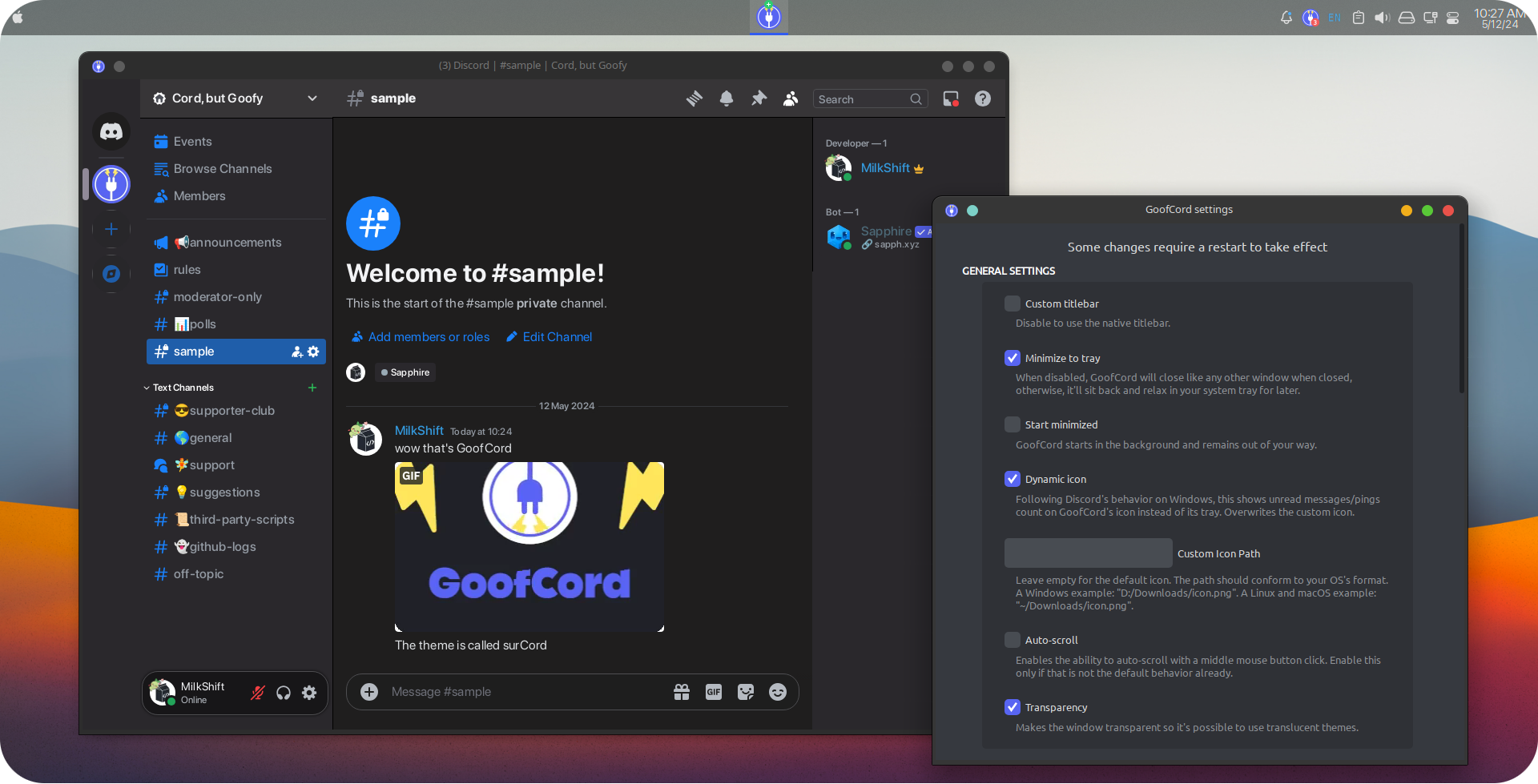
Take control of your Discord experience with GoofCord – the highly configurable and privacy-focused Discord client.



Milkshiift/GoofCord
Milkshiift/GoofCord has 1,013 GitHub stars and 30 forks. GitHot measured -1 stars in 24 hours and -2 in 7 days. Last checked 2026-11-12 08:43 UTC. Last push 2026-10-28.
:shield: Take control of your Discord experience with GoofCord – a highly configurable and privacy minded discord client.
可以做什么
- :lock: With Privacy in mind: GoofCord blocks as much tracking as possible and uses multiple techniques like message encryption to improve your privacy and security. Learn more
- :chart_with_upwards_trend: Fast and Performant: Noticeable speed and responsiveness improvement compared to the official client.
- :bookmark: Standalone: GoofCord is a standalone application, not reliant on the original Discord client in any way.
- :electric_plug: Plugins & Themes support: Easily use client mods like Vencord, Equicord or Shelter for plugins and themes.
实测星标增长
- 24小时
- -1
- 7天
- -2
- 15天
- 正在收集历史
- 1个月
- 正在收集历史
各周期内的星标净变化,周期相互重叠,并非每日新增。缺失的测量保持空白。星标代表关注度,不代表软件质量。
README.md
原文
Take control of your Discord experience with GoofCord – the highly configurable and privacy-focused Discord client.
Based on Legcord
Features :sparkles:
- :lock: With Privacy in mind: GoofCord blocks as much tracking as possible and uses multiple techniques like message encryption to improve your privacy and security. Learn more
- :chart_with_upwards_trend: Fast and Performant: Noticeable speed and responsiveness improvement compared to the official client.
- :bookmark: Standalone: GoofCord is a standalone application, not reliant on the original Discord client in any way.
- :electric_plug: Plugins & Themes support: Easily use client mods like Vencord, Equicord or Shelter for plugins and themes.
- ⌨️ Global Keybinds: Set up keybinds and use them across the system. Learn more
- 🐧 Linux support: Screensharing with audio and native Wayland support on Linux.
Installation
Windows 🪟
- Install with prebuilt binaries from the releases page.
ChooseGoofCord-Setup-<YOUR ARCHITECTURE>.exefor an installer, orGoofCord-<VERSION>-win-<YOUR ARCHITECTURE>.zipto manually unpack into a directory of your choice. - Install using winget:
winget install GoofCord - Install using Scoop:
scoop install extras/goofcord
Linux 🐧
- Install with prebuilt binaries from the releases page.
- Install from Flathub
- Install from AUR if you run an Arch-based OS. Here's an example using yay:
yay -S goofcord-bin
Keep in mind that the AUR package is not maintained by the developers of GoofCord. - Install in NixOS from nixpkgs.
macOS 🍏
Note: As I don't have a macOS device, macOS support is limited.
- Install with prebuilt binaries from the releases page.
Choose the file ending withmac-arm64.dmgif your computer uses an Apple Silicon processor. Mac computers with Apple Silicon
Otherwise, choose the file that ends withmac-x64.dmg - If you get an error like "GoofCord is damaged and can't be opened" see this issue
- If GoofCord is crashing on launch, run this command:
xattr -cr /Applications/GoofCord.app && codesign --force --deep --sign - /Applications/GoofCord.app
To explore plugins and themes, head over to the Vencord category in the Discord settings.
Building from source 🔧
- Install Bun.
- Download the source code from the latest release. Getting it from the main branch is not recommended for a stable experience.
- Open a command line in the directory of the source code
- Install the dependencies with
bun install - Package GoofCord with either
bun run packageWindows,bun run packageLinuxorbun run packageMac - Find the compiled app in the
distfolder.
Short FAQ
Need Support? Join Our Discord!
Where is the long FAQ?
How do I develop GoofCord?
- See the development guide
Can I get banned from using GoofCord?
- While using GoofCord goes against the Discord ToS, there are no known bans from using it or any client mods.
How can I access the settings? ⚙️
- Multiple ways:
- Right-click on the tray icon and click
Open Settings - Click the "Settings" button in the "GoofCord" category in the Discord settings
- Press
Ctrl+Shift+'shortcut.
- Right-click on the tray icon and click
Why Electron?
- It's the right tool for this job. While Electron may not be the perfect choice for all applications, achieving a user experience on par with the official Discord client inherently requires embedding its web version within a browser/webview. Currently, no other frameworks come close to Electron in providing this capability and covering all of GoofCord's needs.
Check out our wiki if you've got questions left
Donations
If you like GoofCord, you can support me with crypto:
- XMR (Monero):
44FyEbizgCbCaghrtCp2BGQ7WZcNRkwAMNEf9fUzgu6A3wmQq8yqrHiAMu2jT784k6NcSByJUApk8jMREMmUJQeu9g6Dxbq - USDT (Arbitrum/BEP20):
0xcacf4a4089c5a68657f2b39d8935a1ec01f999b8 - BTC:
3PRgLrYWzojWHur8WKKNRwpXwzG6J5Zf3K
探索相关项目
trimstray/the-book-of-secret-knowledge
汇集各类启发灵感的清单、手册、速查表、博客、技巧、单行命令、CLI/Web 工具等内容。
257,937 星标Hack-with-Github/Awesome-Hacking
面向黑客、渗透测试人员与安全研究人员的各类 Awesome 清单合集。
125,254 星标swisskyrepo/PayloadsAllTheThings
一份用于 Web 应用安全以及渗透测试/CTF 的实用 payload 与绕过方法列表。
82,623 星标caddyserver/caddy
快速、可扩展的跨平台 HTTP/1-2-3 Web 服务器,支持自动 HTTPS
79,020 星标