
Mattbusel/Every-Other-Token
Mattbusel/Every-Other-Token has 27 GitHub stars and 1 forks. GitHot measured 0 stars in 24 hours. Last checked 2026-11-16 04:16 UTC. Last push 2026-11-15.
实测星标增长
- 24小时
- 0
- 7天
- 更新延迟
- 15天
- 更新延迟
- 1个月
- 更新延迟
各周期内的星标净变化,周期相互重叠,并非每日新增。缺失的测量保持空白。星标代表关注度,不代表软件质量。
关于
See how sure an LLM is about each word.
人工智能README.zh-CN.md
原文
every-other-token
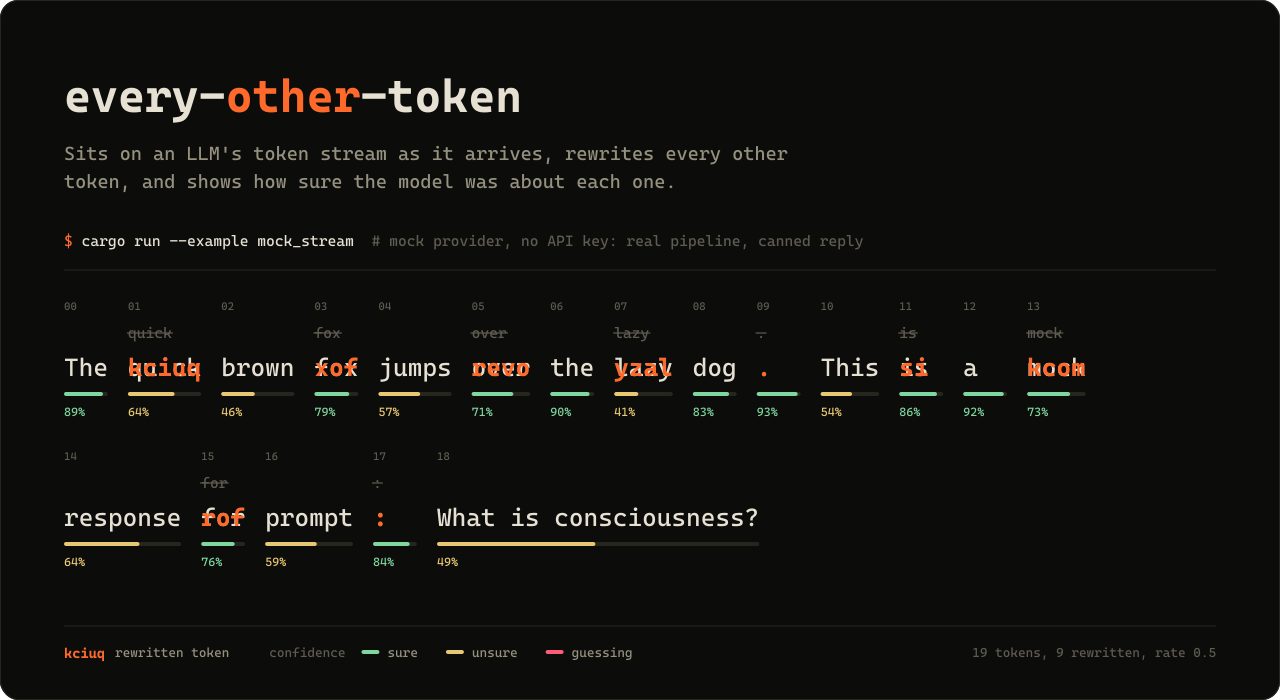
看清 AI 大模型对自己写下的每一个词有多大把握,还能在它边写边输出的时候改掉它的词。
下载 Windows 版 (.exe) · Linux 和 macOS · 项目主页 · 文档


直接在浏览器里试用,无需安装,也不用 API key:every-other-token.vercel.app/play。输入一段提示词(prompt),就能看到每隔一个 token 被反转后输出。
every-other-token 是一款免费的大模型(LLM)token 流查看与拦截工具,支持命令行和浏览器。它接入 OpenAI、Anthropic、Gemini、OpenRouter 或你本机上的模型(Ollama、llama.cpp、vLLM、LM Studio)的实时流式输出,根据 logprobs 显示每个词元(token)的置信度和困惑度(perplexity),还能在 token 到达时改写每隔一个 token(或任意比例)。内置的 mock 模拟提供方让你不需要 API key 就能体验全部功能。
适合谁用:所有好奇语言模型如何选词的人,以及从事大模型可解释性研究、红队测试和提示词工程的开发者。
工作原理
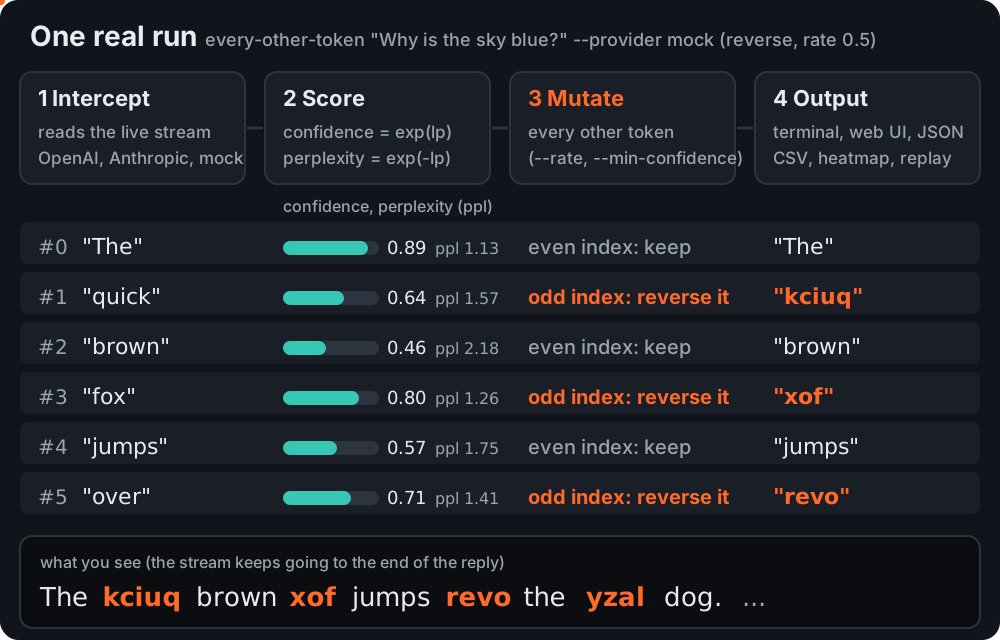
- 拦截。它自己建立与模型的流式连接(SSE),因此每个数据块一到达就能看到。
- 打分。每个 token 都会得到
confidence = exp(logprob)和perplexity = exp(-logprob),以及模型考虑过的其他候选词。 - 变换。被选中的 token(默认每隔一个,或者只选模型没把握的那些)会经过一种变换:反转、大写、加噪声、删除、同义词替换等等。
- 输出。你可以在终端里观看(普通模式,或用
--tui打开全屏视图),也可以在 Web 界面里看,或者保存为 JSON lines、CSV 或 HTML 热力图。
安装
Linux(x86_64,Ubuntu 20.04+ / Debian 11+)。一行命令,无任何依赖,安装到 ~/.local/bin:
mkdir -p ~/.local/bin && curl -fsSL https://gitlab.com/mattbusel/Every-Other-Token/-/releases/permalink/latest/downloads/every-other-token-linux-x86_64.tar.gz | tar xz --strip-components=1 -C ~/.local/bin --wildcards '*/every-other-token'
| 其他系统 | |
|---|---|
| Windows | 下载 every-other-token-windows-x86_64.exe 后直接运行。(程序未签名,SmartScreen 可能会弹出提示:点击更多信息,再点仍要运行。) |
| macOS,或从源码安装 | cargo install --locked every-other-token |
双击 Windows 的 .exe,Web 界面就会在浏览器中打开。所有发布版本及其 SHA-256 校验值见:Releases。
示例
下面全部是 mock 提供方的真实输出(固定的回复和固定的 logprobs,跑的是真实的处理流程),所以不用 API key 也能原样复现。
1. 每隔一个 token 反转一次(默认行为)
$ every-other-token "Why is the sky blue?" --provider mock
The kciuq brown xof jumps revo the yzal dog. This si a kcom response rof prompt: Why si the yks blue?
24 tokens streamed, 12 transformed
2. 只改写模型没把握的词(置信度小于等于 0.6)
$ every-other-token "Why is the sky blue?" uppercase --provider mock --rate 1 --min-confidence 0.6
The quick BROWN fox JUMPS over the LAZY dog. THIS is a mock response for PROMPT: WHY IS THE SKY BLUE?
24 tokens streamed, 11 transformed
"brown"(0.46)、"jumps"(0.57)、"lazy"(0.41)、"This"(0.54)和 "prompt"(0.59)低于阈值。末尾回显的提示词在 mock 中不带 logprobs,因此退回到普通的比例规则。
3. 以 JSON 格式获取数据,每个 token 一行
$ every-other-token "Why is the sky blue?" uppercase --provider mock --json-stream
{"text":"The","original":"The","index":0,"transformed":false,"importance":0.8869204521179199,"confidence":0.88692045,"perplexity":1.1274968,"is_error":false,"arrival_ms":0}
{"text":" QUICK","original":" quick","index":1,"transformed":true,"importance":0.6376281380653381,"confidence":0.63762814,"perplexity":1.5683122,"is_error":false,"arrival_ms":0}
...
4. 在终端里全屏观看,运行 every-other-token "Why is the sky blue?" --provider mock --tui。回复会按置信度着色流式输出(绿色表示有把握,黄色表示不确定,红色表示在猜),被改写的 token 带下划线,侧边面板显示实时统计、置信度迷你走势图,以及模型对最新一个 token 考虑过的其他候选词。按 q 退出,回复内容会保留在终端里。
5. 在你本机的模型上运行。只要 Ollama 在运行,every-other-token "Why is the sky blue?" --provider ollama 就会从 llama3.2 流式输出,不需要 API key。任何兼容 OpenAI API 的服务也都可以:every-other-token "Why is the sky blue?" reverse my-model --base-url http://localhost:8080/v1。
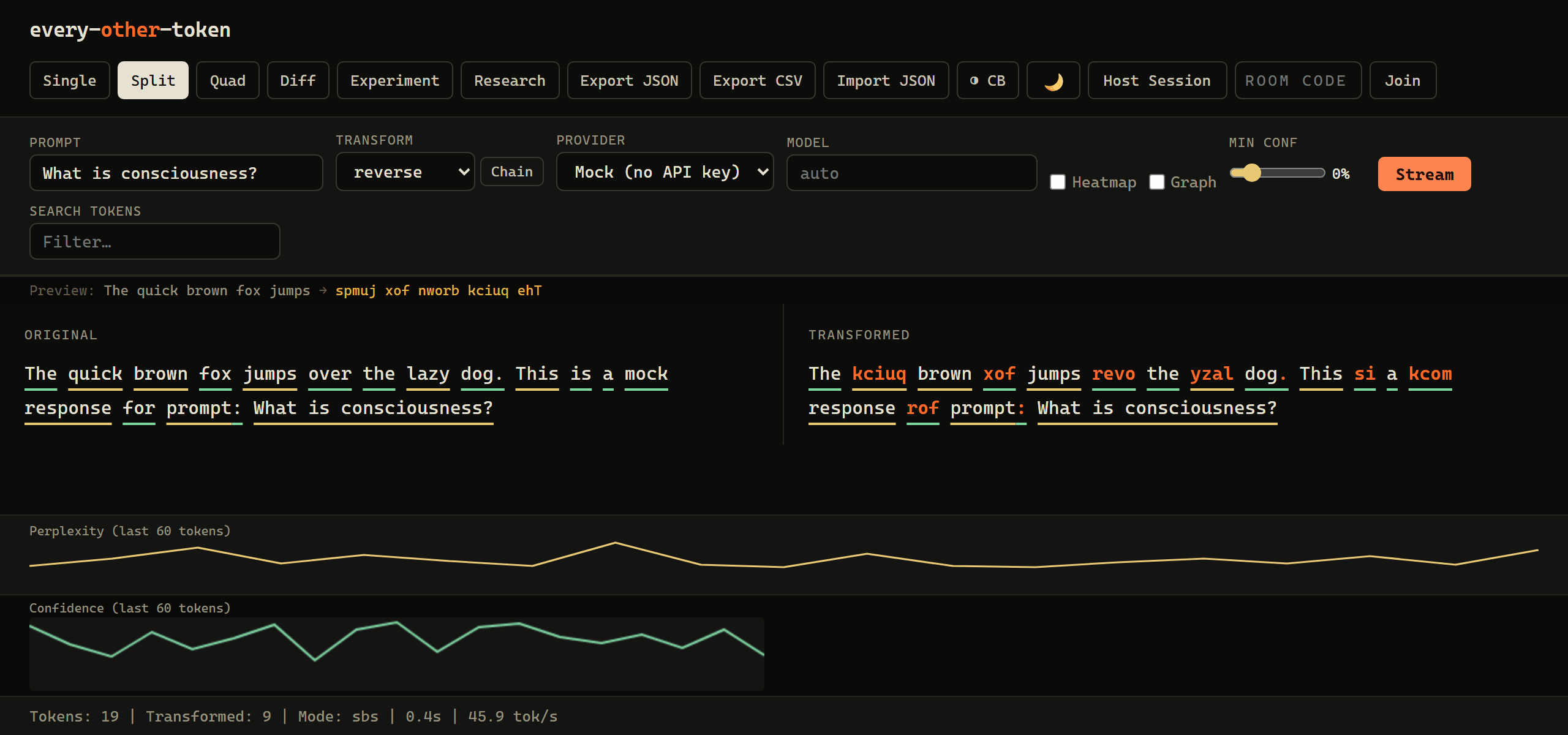
6. 在浏览器里观看,运行 every-other-token --web --provider mock(或者直接双击 .exe)。分屏视图:左边是原始流,右边是改写后的流,每个 token 下方的下划线表示它的置信度。
不用 API key 也能拿到精确概率:--provider local
托管的 API 要么根本不返回 token 概率(Anthropic、Gemini),要么无法告诉你提示词中哪些词起了作用。而在工具内部运行的模型两件事都能做到。用 local feature 编译后,它会下载一次 SmolLM2-135M-Instruct(269 MB,存到你的缓存目录),并借助 candle 在 CPU 上运行:
cargo install every-other-token --features local
every-other-token "Reply with only the city name. Capital of France?" --provider local --attribute
真实输出:
The latipac of ecnarF is siraP.
How much the reply depended on each prompt word (drop in total log-probability when the word is removed):
    Reply   +1.432  #########
     with   +1.108  #######
     only   +1.875  ############
      the   +0.357  ##
     city   +3.499  ######################
    name.   +0.932  ######
  Capital   +3.229  #####################
       of   +0.857  #####
  France?   +4.689  ##############################
每个 token 都带有精确的对数概率(log-probability)和模型真实的前 5 个候选词,在终端、--tui、Web 界面和所有导出格式里都能看到。--attribute 会逐个去掉提示词中的词,对同一段回复重新打分,并报告概率下降了多少(遮挡归因,occlusion attribution)。--model 可以换成 Hugging Face Hub 上其他 Llama 架构的模型,--seed N 则改用采样而不是贪心解码。
对于不返回概率的提供方(Anthropic、Gemini 以及许多本地服务),工具不显示置信度,而不是编造一个。
三步上手
- 获取。使用上面的 Linux 一行命令或 Windows .exe(或者
cargo install)。 - 离线试用。运行
every-other-token "Why is the sky blue?" --provider mock,或者双击 .exe,在提供方菜单中选择 Mock (no API key)。 - 接入真实模型。设置
OPENAI_API_KEY或ANTHROPIC_API_KEY(或OPENROUTER_API_KEY、GEMINI_API_KEY),然后运行every-other-token "Why is the sky blue?" --visual(终端,按置信度着色),加上--tui打开全屏视图,或者运行every-other-token --web(浏览器)。用--provider openai|anthropic|ollama|openrouter|gemini选择提供方。真实的置信度数值来自 logprobs(OpenAI、OpenRouter、较新版本的 Ollama);对于 Anthropic 和 Gemini 这类不返回 logprobs 的提供方,则根据每个 token 到达的快慢给出估计值。
运行 every-other-token --help 查看全部参数,示例在帮助信息的末尾。
文档
| 文档 | 内容 |
|---|---|
| 使用指南 | 所有变换方式、--rate 和 --min-confidence、系统提示词 A/B 测试、提供方对比、研究模式、Web 界面视图、配置文件、shell 补全、从源码构建 |
| 库参考 | CLI 背后的 Rust 模块(归因导出、漂移检测、变换实验室、因果图等),附示例 |
| 架构 | 流、变换和输出是如何组合在一起的 |
| HTTP API 和 WebSocket 房间 | Web 服务端点和多人协作编辑 token |
| Feature 开关 | 可选的 Cargo features |
| docs.rs | 作为库使用时的完整 API 文档 |
| 更新日志 和 贡献指南 | 版本历史,以及如何提交改动 |
许可证
MIT,见 LICENSE。
雇用作者
你的产品也需要这类工程能力?我会接少量客户项目:大模型(LLM)功能、iOS 应用和性能优化,固定报价。服务与报价 · 邮件 · LinkedIn