
MattMcManis/Axiom
MattMcManis/Axiom has 1,716 GitHub stars and 124 forks. GitHot measured -1 stars in 24 hours, +1 in 7 days, and +2 in 15 days. Last checked 2026-11-22 13:30 UTC. Last push 2021-11-09.
可以做什么
- The Power of FFmpeg in a Minimal Interface
- Convert any media file to multiple formats
- Cut Video and Audio timeline
- Resize Video to standard aspect ratios
实测星标增长
- 24小时
- -1
- 7天
- +1
- 15天
- +2
- 1个月
- 正在收集历史
各周期内的星标净变化,周期相互重叠,并非每日新增。缺失的测量保持空白。星标代表关注度,不代表软件质量。
关于
适用于 Windows 的 FFmpeg 图形界面。
创作与媒体README.md
原文
Axiom
An FFmpeg GUI for Windows
Overview
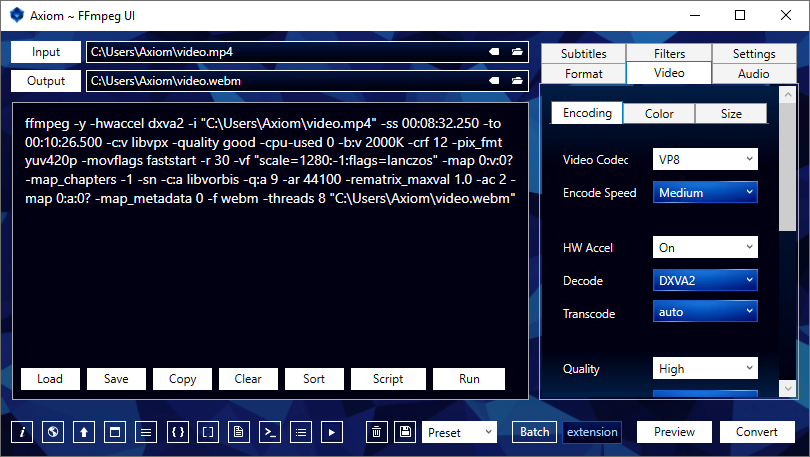
Axiom generates command scripts to be processed by the multimedia encoder, FFmpeg, and streams analyzer, FFprobe.
Convert to webm, mp4, mkv, avi, ogv, mp3, m4a, ogg, flac, wav, png, jpg, webp and more.
Features
- The Power of FFmpeg in a Minimal Interface
- Convert any media file to multiple formats
- Cut Video and Audio timeline
- Resize Video to standard aspect ratios
- Lossless, Constant and Variable Quality
- Auto-Quality and Copy Modes
- Advanced Batch Processing
- Video to Image Sequence
- Custom User Defined Settings
- Command Script Generator
Downloads
Axiom
Included Files
- Axiom UI
- FFmpeg
- youtube-dl
- Install Instructions
- User Guide pdf
- Troubleshooter
Requirements
- Extract 7z file with 7-Zip
- Axiom Microsoft .NET Framework 4.5
- youtube-dl Visual C++ 2010 x86 & Python (2.6, 2.7, or 3.2+)
FFmpeg Builds
https://www.gyan.dev/ffmpeg/builds
https://github.com/BtbN/FFmpeg-Builds/releases
Installation
Axiom is portable and can be run from any location on the computer.
- Extract
Axiom.FFmpeg.7zto a location of your choice. - Run
Axiom.exeor create a shortcut on the Desktop. - It will automatically detect
ffmpeg.exeandffprobe.exein the includedffmpegfolder. - If you move the
ffmpegfolder, set the Windows Environment Variable or specify a path in the Axiom Settings Tab.
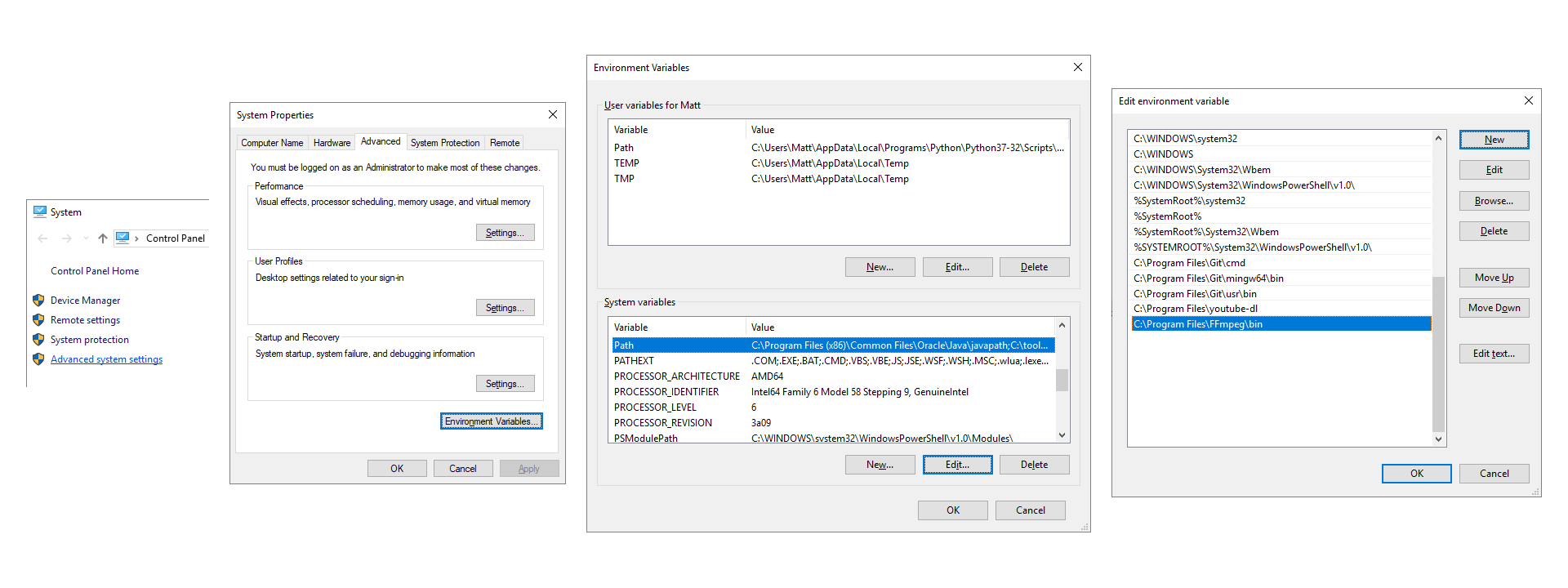
Add FFmpeg to Environment Variables (optional):
- Move the
ffmpegfolder to a location of your choice, such asC:\Program Files\. - Go to Control Panel → System and Security → System → Advanced system settings
- Advanced Tab → Environment Variables → System variables → Path
- Add
C:\Program Files\ffmpeg\bin\ - Separate multiple paths with a semicolon
;(Windows 7, 8, 8.1) - Typing
ffmpegin Command Prompt will now execute without needing to specify a direct path.
YouTube Download
youtube-dl.exe is included in Axiom.FFmpeg.7z.
Requires Microsoft Visual C++ 2010 x86 & Python (2.6, 2.7, or 3.2+) installed.
Axiom will auto-detect it in its included folder. You can also add it to Windows Environment Variables or specify a path in the Axiom Settings Tab.
- Paste a YouTube URL into the Input TextBox
- Download file only:
- Select Preset:
YouTube-DL→VideoorMusic, PressDownload
- Select Preset:
- Download and Convert:
- Select any Presets or Settings you need and Press
Convert
- Select any Presets or Settings you need and Press
- Generate a Script without Downloading:
- Select any Settings you need and Press
Script
- Select any Settings you need and Press
Resources
- Axiom Wiki
- FFmpeg Wiki
- FFmpeg Documentation
- FFmpeg Filters
- Video Codecs VP8, VP9, x264, x265, AV1
- Audio Codecs AC3, AAC, Opus, Vorbis, MP3, FLAC
- CRF Quality Guide
- VBR Quality Guide
- Scaling Algorithms
- x264/x265 Profiles, Levels, Tune
- Color Space
- Hardware Acceleration
Build
Visual Studio 2015
WPF, C#, XAML
Visual C++ 19.0 Compiler

Thank you for your support.
探索相关项目
加载中…