
KuroLabs/stegcloak
KuroLabs/stegcloak has 3,936 GitHub stars and 254 forks. GitHot measured 0 stars in 24 hours, +2 in 7 days, and +7 in 15 days. Last checked 2026-11-12 09:44 UTC. Last push 2024-10-01.
使用密码,通过不可见字符将秘密安全地隐藏在纯文本中 🧙🏻♂️⭐
可以做什么
- Protect your invisible secret using passwords and HMAC integrity
- Cryptographically secure by encrypting the invisible secret using AES-256-CTR.
- Uses 6 Invisible characters in unicode characters that works everywhere in the web - Tweets, Gmail, WhatsApp, Telegram, Instagram, Facebook, and many more!
- Maximum Compression to reduce the payload (LZ, Huffman).
实测星标增长
- 24小时
- 0
- 7天
- +2
- 15天
- +7
- 1个月
- 正在收集历史
各周期内的星标净变化,周期相互重叠,并非每日新增。缺失的测量保持空白。星标代表关注度,不代表软件质量。
README.md
原文

StegCloak




The Cloak of Invisibility for your texts
StegCloak is a pure JavaScript steganography module designed in functional programming style, to hide secrets inside text by compressing and encrypting the secret before cloaking it with special unicode invisible characters. It can be used to safely watermark strings, invisible scripts on webpages, texts on social media or for any other covert communication. Completely invisible! See how it works in-depth in this Medium article or watch our demo to know what it does.

Features
- Protect your invisible secret using passwords and HMAC integrity
- Cryptographically secure by encrypting the invisible secret using AES-256-CTR.
- Uses 6 Invisible characters in unicode characters that works everywhere in the web - Tweets, Gmail, WhatsApp, Telegram, Instagram, Facebook, and many more!
- Maximum Compression to reduce the payload (LZ, Huffman).
- Completely invisible, uses Zero Width Characters instead of white spaces or tabs.
- Super fast! Hides the Wikipedia page-source for steganography (800 lines and 205362 characters) within a covertext of 3 words in under one second.
- Hiding files in strings can be achieved by uploading the file to cloud and stegcloaking the link in the string
- Written in pure functional style.
- Usage - Available as an API module, a CLI and also a Web Interface (optimized with web workers).

Installing
Using npm,
$ npm install -g stegcloak
Using npm (to use it locally in your program),
$ npm install stegcloak
How it works
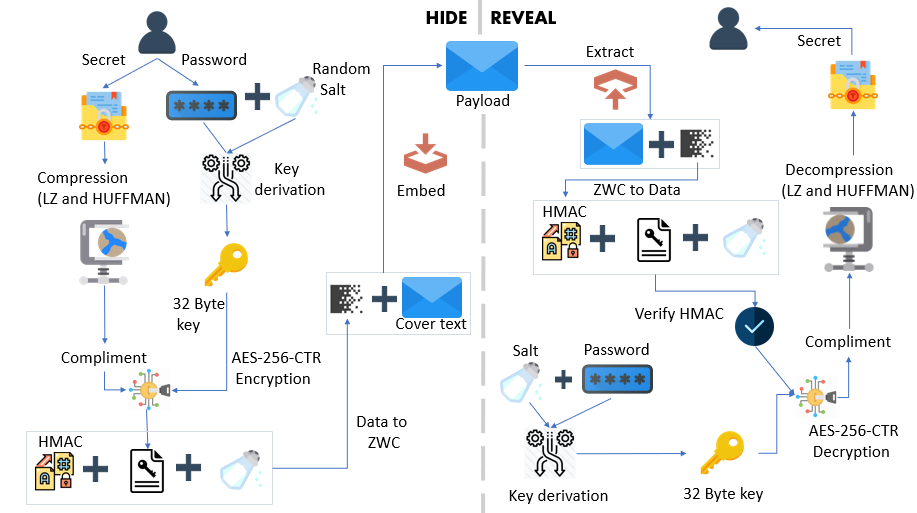
CLI Usage
Hide
$ stegcloak hide
Options:
  hide [options] [secret] [cover]

  -fc, --fcover <file>      Extract cover text from file
  -fs, --fsecret <file>     Extract secret text from file
  -n, --nocrypt             If you don't need encryption (default: false)
  -i, --integrity           If additional security of preventing tampering is needed (default: false)
  -o, --output <output>     Stream the results to an output file
  -c, --config <file>       Config file
  -h, --help                display help for command
Reveal
$ stegcloak reveal
Options:
  reveal [message]

  -f, --file <file>       Extract message from file
  -cp, --clip             Copy message directly from clipboard
  -o, --output <output>   Stream the secret to an output file
  -c, --config <file>     Config file
  -h, --help              display help for command
Additional support
STEGCLOAK_PASSWORD environment variable, if set, will be used by default as password.
Configuration file support to configure StegCloak CLI and to avoid prompts. Read the config docs here.
API Usage
const StegCloak = require('stegcloak');

const stegcloak = new StegCloak(true, false);  // Initializes with encryption true and hmac false for hiding

// These arguments are used only during hide

// Can be changed later by switching boolean flags for stegcloak.encrypt and stegcloak.integrity
What's HMAC and do I need it?
HMAC is an additional fingerprint security step taken towards tampering of texts and to verify if the message received was actually sent by the intended sender. If the data is sent through WhatsApp, Messenger or any social media platform, this is already taken care of! However, if you are using StegCloak in your program to safely transmit and retrieve, this option can be enabled and StegCloak takes care of it.
Hide
stegcloak.hide(secret, password, cover) -> string
const magic = stegcloak.hide("Voldemort is back", "mischief managed", "The WiFi's not working here!");

// Uses stegcloak.encrypt and stegcloak.integrity booleans for obfuscation

console.log(magic);  // The WiFi's not working here!
Reveal
stegcloak.reveal(data, password) -> string
const secret = stegcloak.reveal(magic, "mischief managed");

// Automatically detects if encryption or integrity checks were done during hide and acts accordingly

console.log(secret); // Voldemort is back
This amazing blog by Francesco Soncina shows how you could use the StegCloak API to watermark any text on your website.
Important
StegCloak doesn't solve the Alice-Bob-Warden problem, it's powerful only when people are not looking for it and it helps you achieve that really well, given its invisible properties around the web! It could be safely used for watermarking in forums, invisible tweets, social media etc. Please don't use it when you know there's someone who is actively sniffing your data - looking at the unicode characters through a data analysis tool. In that case, even though the secret encoded cannot be deciphered, the fact lies that the Warden (middle-man) knows some secret communication took place, because he would have noticed an unusual amount of special invisible characters.
Contributing
Pull requests are welcome. For major changes, please open an issue first to discuss what you would like to change.
License
MIT - Copyright (c) 2020 Jyothishmathi CV, Kandavel A, Mohanasundar M
Acknowledgements
The StegCloak logo was designed by Smashicons.
探索相关项目
trimstray/the-book-of-secret-knowledge
汇集各类启发灵感的清单、手册、速查表、博客、技巧、单行命令、CLI/Web 工具等内容。
257,942 星标Hack-with-Github/Awesome-Hacking
面向黑客、渗透测试人员与安全研究人员的各类 Awesome 清单合集。
125,254 星标swisskyrepo/PayloadsAllTheThings
一份用于 Web 应用安全以及渗透测试/CTF 的实用 payload 与绕过方法列表。
82,623 星标caddyserver/caddy
快速、可扩展的跨平台 HTTP/1-2-3 Web 服务器,支持自动 HTTPS
79,020 星标