
KeenThera/SECSE
KeenThera/SECSE has 91 GitHub stars and 19 forks. GitHot measured 0 stars in 24 hours. Last checked 2026-11-19 17:50 UTC. Last push 2026-11-10.
实测星标增长
- 24小时
- 0
- 7天
- 正在收集历史
- 15天
- 正在收集历史
- 1个月
- 正在收集历史
各周期内的星标净变化,周期相互重叠,并非每日新增。缺失的测量保持空白。星标代表关注度,不代表软件质量。
关于
Systemic Evolutionary Chemical Space Exploration for Drug Discovery
机器学习README.md
原文SECSE
SECSE: Systemic Evolutionary Chemical Space Explorer
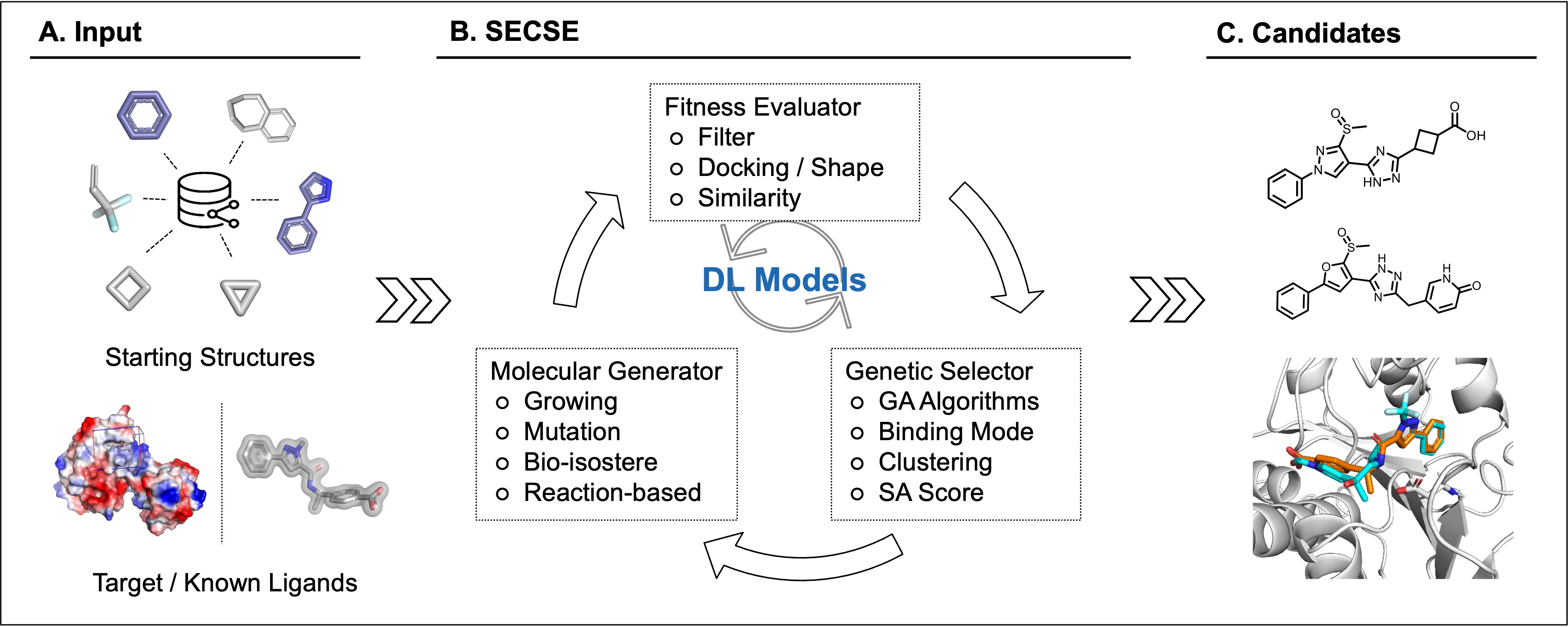
SECSE grows small molecules from seed fragments in a protein pocket. In each generation, it applies growth rules, filters the new molecules and uses docking scores to select seeds for the next round. You can use Chemprop to predict scores and decide which additional candidates to dock.
Installation and first run
Use Linux with Conda installed. For a CPU-only machine, choose Vina.
Step 1. Download SECSE
git clone https://github.com/KeenThera/SECSE.git
cd SECSE
Run the following commands from this directory.
Step 2. Install a docking program
Choose one option. Each command creates the secse environment and installs the shared dependencies.
Vina (CPU)
./setup.sh vinaUni-Dock (NVIDIA GPU)
Installs Uni-Dock 1.2.0 in a separate engine environment. A compatible NVIDIA driver is required.
./setup.sh unidockAutoDock GPU
Install AutoDock GPU first. Replace the path below with its installation directory, which contains
bin/autodock_gpu_128wi../setup.sh autodock-gpu --install-dir /path/to/autodock-gpuGlide
Use an existing licensed Schrödinger installation. Replace the path below with its installation directory.
./setup.sh glide --install-dir /path/to/schrodinger
Already have a SECSE environment? Use Add another docking program.
To create an environment with a different name, append --env NAME to the setup command.
Step 3. Activate and check the environment
conda activate secse
python -m secse doctor
If you chose a different environment name, replace secse with that name.
Step 4. Run the PHGDH example
Run the command for your docking program. Vina and Uni-Dock use the bundled receptor. For AutoDock GPU and Glide, prepare a PHGDH grid and replace the example path.
Vina
python -m secse demo phgdh --backend vinaUni-Dock
python -m secse demo phgdh --backend unidockAutoDock GPU (
.maps.fldand its accompanying maps)python -m secse demo phgdh --backend autodock-gpu --target /path/to/phgdh.maps.fldGlide (grid
.zip)python -m secse demo phgdh --backend glide --target /path/to/phgdh-grid.zip
The command prints the result directory. Open selected.sdf for docked structures, the CSV for scores,
and secse.ini for the settings used.
PHGDH grid settings for AutoDock GPU and Glide
The tests used a grid center of 20.9, -10.4, 3.0. AutoDock GPU used an AutoGrid grid of
40 × 40 × 40 points at 0.375 Å spacing. Glide used PDB 6RJ3 chain A prepared with Protein Preparation Wizard,
with an OPLS3e grid and inner and outer boxes of 10 Å and 20 Å.
Run your own inputs
Prepare an SMI file with one molecule per line: SMILES, a tab, then the molecule ID. Omit the header.
For Vina, replace the input filenames and box center below with your own values:
python -m secse run --backend vina --fragments seeds.smi --target receptor.pdbqt \
  --center 20.9 -10.4 3.0 --workdir results
Use an empty output directory. This runs one growth generation; add --generations 0 to dock only the input
fragments. Uni-Dock uses the same options with --backend unidock. AutoDock GPU and Glide use their prepared
grid as --target; omit --center.
To use an existing INI, replace the path below:
python -m secse run --config /path/to/secse.ini
SECSE reads the docking program from the INI. To resume, set start_gen to the last completed generation
and keep the previous workdir. The original python secse/run_secse.py --config /path/to/secse.ini
command also works with the engine's environment variables.
Add another docking program (optional)
With your SECSE environment active, run the commands for the program you want to add.
Uni-Dock in a separate Conda environment
conda create -n secse-unidock --override-channels -c conda-forge unidock=1.2.0
python -m secse backend add unidock --conda-env secse-unidock
An existing Vina executable
python -m secse backend add vina --executable /path/to/vinaAn existing Uni-Dock executable
python -m secse backend add unidock --executable /path/to/unidockIf it needs a separate shared-library directory, append
--library-dir /path/to/lib.An existing AutoDock GPU installation
python -m secse backend add autodock-gpu --install-dir /path/to/autodock-gpuAn existing Glide installation
python -m secse backend add glide --install-dir /path/to/schrodinger
Check the registered programs:
python -m secse backend list
python -m secse doctor --all
Adding a program keeps your current default. For example, use Uni-Dock for one run:
python -m secse demo phgdh --backend unidock
Or make it the default for commands without --backend:
python -m secse backend default unidock
Settings are saved in ~/.config/secse/backends.json, or $XDG_CONFIG_HOME/secse/backends.json when set.
Score prediction (optional)
Install Chemprop in the active SECSE environment:
python -m pip install 'chemprop~=2.1.0'
python -m secse doctor --prediction
Then set mode = 1 or mode = 2 in the INI's [prediction] section.
Advanced INI settings
Start with the example INI. It runs five growth generations with four CPUs and prediction disabled. Its relative paths assume you run SECSE from the repository root. Relative paths in an INI are resolved from the working directory where you launch SECSE. In shell commands, quote paths containing spaces. Use the example rule file if you want to supply your own growth rules.
[general]
project_codeis the prefix for generated molecule IDs.workdiris where SECSE writes results. Use a fresh directory for a new project and the previous directory when resuming.fragmentsis the path to the input SMI file.num_per_gensets the target number of molecules to dock per growth generation.seed_per_gensets the number of seeds selected by tournament ranking. The default is 1,000.start_genis the last completed generation when resuming. Use0for a new run.num_genis the number of additional growth generations. Use0to dock the input fragments only on a new run.cpucontrols CPU parallelism.gpucontrols GPU concurrency for AutoDock GPU.rule_dbaccepts a rules JSON or SQLite database. Use0for the bundled rules. Custom JSON rule IDs use the formG-001-0001.
[docking]
docking_programselectsvina(the default),unidock,autodock-gpuorglide.targetis the receptor PDBQT for Vina or Uni-Dock, the AutoGrid.maps.fldfor AutoDock GPU, or the grid.zipfor Glide.x,yandzgive the box center for Vina and Uni-Dock.box_size_x,box_size_yandbox_size_zgive the side lengths in ångströms and default to 20.rmsdanddelta_scoreset the thresholds for comparing each new molecule's pose and docking score with its parent's.score_cutoffsets the docking score threshold.
[prediction]
modedefaults to0(off). Use1to train and predict each generation or2to train and predict at the end. SECSE skips prediction if fewer than eight scored molecules are available for training.dl_per_genis the number of top predictions sent to docking.dl_score_cutoffis the score cutoff for predicted molecules in the final report in mode2.
[properties]
- mw sets the molecular weight cutoff (integer, default 450).
- logp_lower and logp_upper set the logP range (floats, defaults 0.5 and 7).
- chiral_center caps the number of chiral centers (integer, default 2).
- heteroatom_ratio caps the fraction of heteroatoms (float, default 0.35).
- rdkit_rotatable_bound_num caps the number of rotatable bonds counted by rdkit.rdMolDescriptors.CalcNumRotatableBonds (integer, default 5).
- keen_rotatable_bound_num caps the number of rotatable bonds under the KEEN definition (integer, default 3).
SMARTS:
[C^3!D1;!$(C(F)(F)F)]-!@[!Br!F!Cl!I!H3&!$(*#*)!D1;!$([!Br!F!Cl!I](F)(F)F)] - rigid_body_num caps the number of rigid bodies under the KEEN definition (integer, default 2).
SMARTS:
[C^3!D1;!$(C(F)(F)F);!R;!$(C=O(N));!$(NC(=O));!$(C(=O)O);!$(C(=O)O)]-!@[!Br!F!Cl!I!H3&!$(*#*)!D1;!$([!Br!F!Cl!I](F)(F)F);!R;!$(C=O([N,O]));!$(NC(=O));!$(C(=O)O)] - hbd caps the number of hydrogen bond donors counted by rdkit.rdMolDescriptors.CalcNumHBD (integer, default 5).
- hba caps the number of hydrogen bond acceptors counted by rdkit.rdMolDescriptors.CalcNumHBA (integer, default 10).
- tpsa caps the topological polar surface area calculated by rdkit.Chem.Descriptors.TPSA (float, default 200).
- lipinski_violation caps the number of Lipinski rule of five violations counted by RDKit (integer, default 1).
- qed sets the QED cutoff calculated by rdkit.Chem.QED.qed (float, default 0.5).
- max_ring_size caps the size of a ring (integer, default 7).
- max_ring_system_size caps the number of rings in a single ring system (integer, default 3).
- ring_system_count caps the number of separate ring systems (integer, default 4).
- bridged_site_count, spiro_site_count and fused_site_count cap the corresponding ring junction counts (integers, defaults 2, 1 and 3).
- rdkit_sa_score sets the RDKit synthetic accessibility score cutoff (float, default 5).
- substructure_filter takes the path to an "*.xls" file of SMARTS for unwanted substructures. Include the
columns
Pattern,IDandMax, with a uniqueIDfor each SMARTS. Use 0 (the default) to skip custom filters. The built-in PAINS filter still applies. See the example spreadsheet.
Successful runs and normal early stops return status 0. Invalid command-line arguments return 2.
Configuration and runtime failures return 1.
Dependencies
The setup script creates a Python 3.12 Conda environment and checks its dependencies after installation.
It installs Open Babel through Conda. The pip requirements use openbabel-wheel, which provides the Python
bindings and the obabel command in a virtual environment.
For a pip installation, use Python 3.12 and run these commands from the repository root:
python3.12 -m venv .venv
source .venv/bin/activate
python -m pip install -r requirements.txt
python -m pip check
The requirements file installs Python dependencies. Install GNU Parallel, Perl and your
chosen docking engine separately. Register the engine as described above,
then run python -m secse doctor. Run SECSE from the repository root with this environment active.
Install GNU Parallel and Perl using the command for your distribution, or build GNU Parallel from source.
- CentOS / RHEL
sudo yum install parallel perl - Ubuntu / Debian
sudo apt-get install parallel perl - From source: https://www.gnu.org/software/parallel/
Vina can run on a CPU-only server with prediction disabled. Chemprop 2.1 requires Python 3.11 or newer. AutoDock GPU and Uni-Dock need a compatible GPU, and Glide needs a Schrödinger license.
Run the regression suite with python -m unittest discover -s tests -v. The tests use substitute docking programs
to check how SECSE calls each engine and handles its output. The PHGDH runs used the installed engines.
What's new
- Added native Conda setup, a PHGDH demo and commands to register docking engines and select a default. Uni-Dock can run from a separate Conda environment.
- Added command-line input options and saved INI settings for each run. Existing INI files and the original
--configcommand still work. Chemprop 2.1 is an optional dependency. - To resume, set
start_gento the last completed generation. SECSE loads the saved results and seeds for that generation and continues from the next one. It writes a report even if screening stops after generation 0. Configuration and tool failures return a nonzero exit code so batch jobs can detect them. - Candidate clustering used less peak memory in the benchmark and assigned the same molecules to the same clusters. The PHGDH tests covered all four docking engines. The clustering benchmark compares assignments using fixed inputs.
Citation
Lu, C.; Liu, S.; Shi, W.; Yu, J.; Zhou, Z.; Zhang, X.; Lu, X.; Cai, F.; Xia, N.; Wang, Y. Systemic Evolutionary Chemical Space Exploration For Drug Discovery. J Cheminform 14, 19 (2022).
https://doi.org/10.1186/s13321-022-00598-4
License
SECSE is released under Apache License, Version 2.0.
SECSE is in active development. For questions or suggestions, please contact: [email protected] or [email protected]