
Kaelio/ktx has 1,631 GitHub stars and 112 forks. GitHot measured +1 stars in 24 hours, +2 in 7 days, and +7 in 15 days. Last checked 2026-11-12 07:43 UTC. Last push 2026-10-22.
ktx is an executable context layer for data and analytics agents 🐙 Allow Claude Code, Codex, or other AI agents to query analytical databases accurately and with full context of your company
实测星标增长
- 24小时
- +1
- 7天
- +2
- 15天
- +7
- 1个月
- 更新延迟
各周期内的星标净变化,周期相互重叠,并非每日新增。缺失的测量保持空白。星标代表关注度,不代表软件质量。
README.md
原文
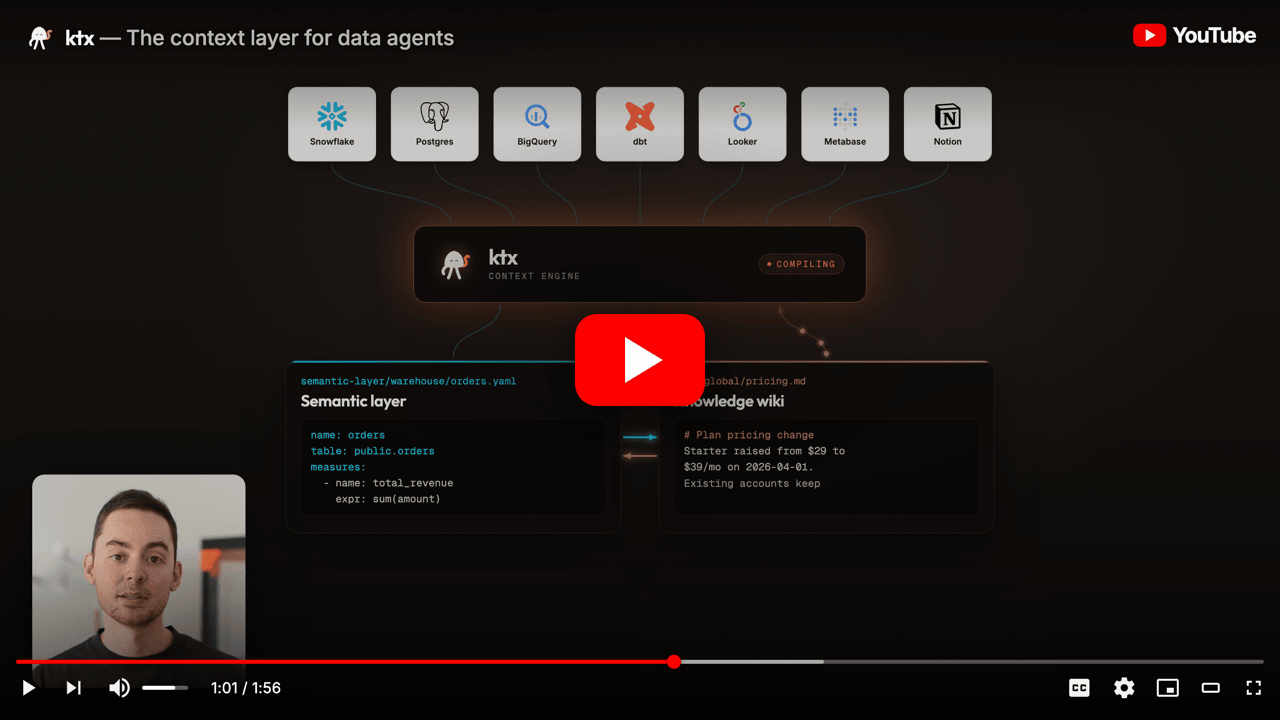
The context layer for data agents





Quickstart · CLI Reference · Agent Setup · Slack
Built and maintained by Kaelio
ktx is a self-improving context layer that teaches agents how to query your warehouse accurately - from approved metric definitions, joinable columns, and business knowledge it builds and maintains for you.
[!NOTE] Run ktx with your own LLM API keys or a local agent sign-in — a Claude Pro/Max subscription through Claude Code, or your local Codex authentication. No extra usage billing from ktx.
Why ktx
General-purpose agents struggle on data tasks. They re-explore your warehouse on every question, invent their own metric logic, and return numbers that don't match approved definitions.
Traditional semantic layers don't fix this. They demand constant manual upkeep and don't absorb the rest of your company's knowledge.
ktx does both, automatically:
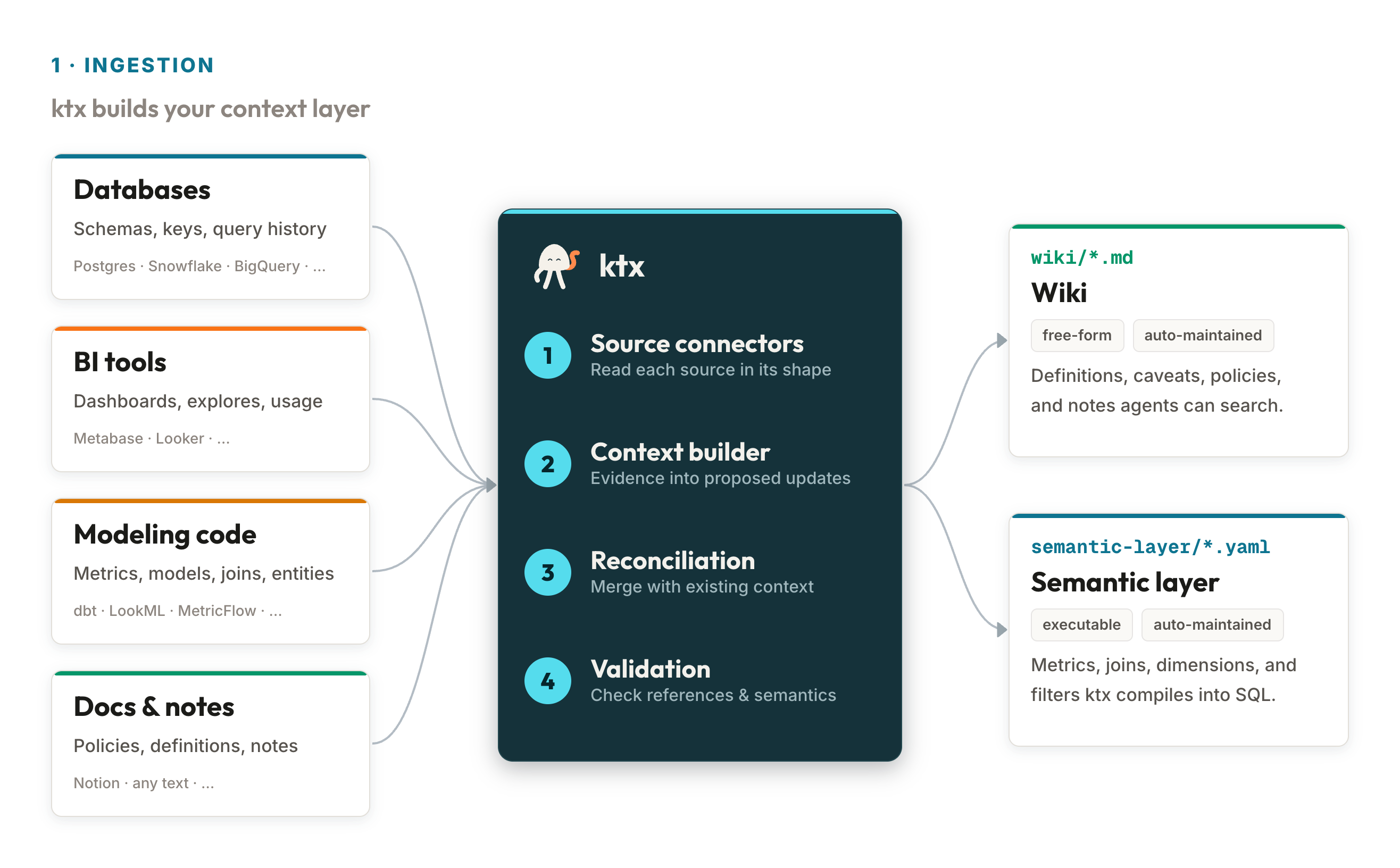
- Learns from company knowledge. Ingests wiki content, organizes it, removes duplicates, and flags contradictions for human review.
- Maps the data stack. Samples tables, captures metadata and usage patterns, detects joinable columns, and annotates sources so agents write better queries.
- Builds a semantic layer. Combines raw tables and high-level metrics through a join graph that automatically resolves chasm and fan traps, so agents fetch metrics declaratively instead of rewriting canonical SQL each time.
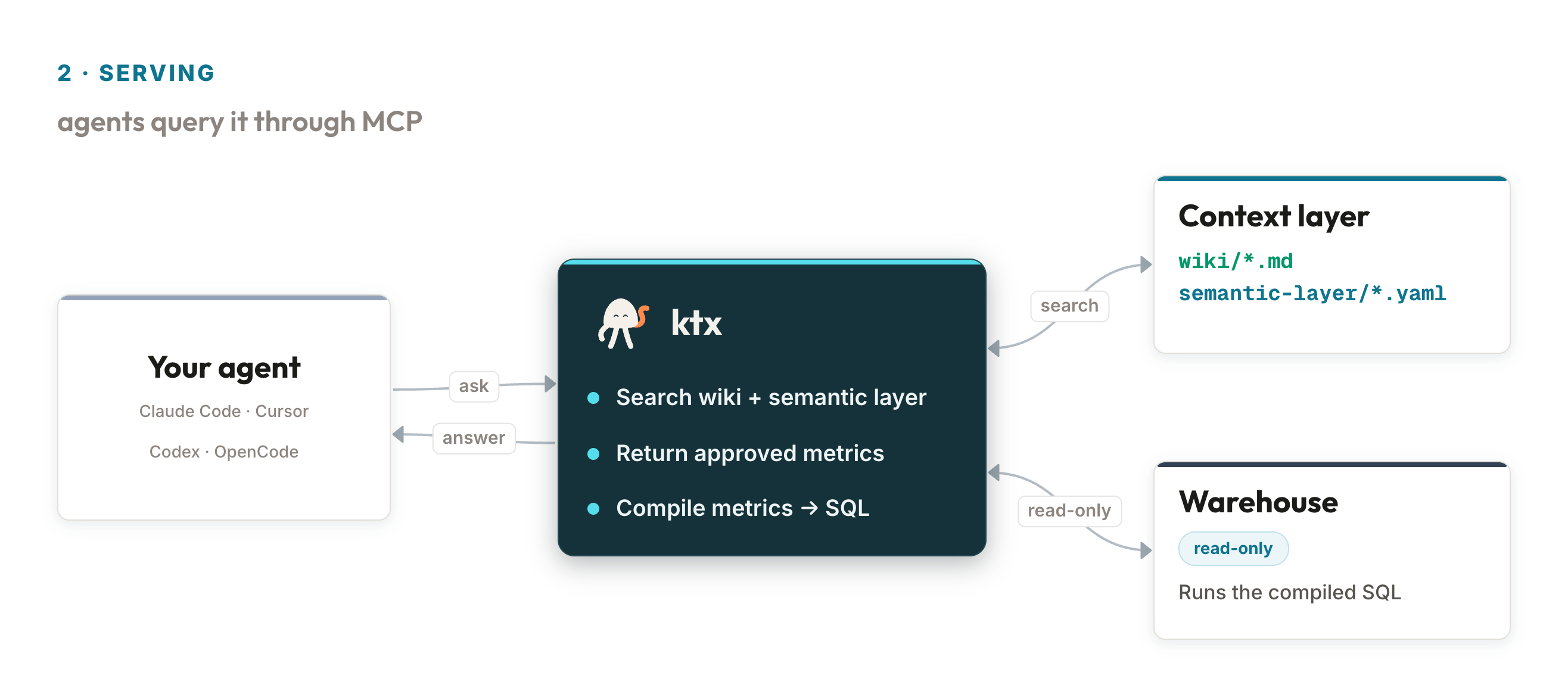
- Serves agents at execution. Exposes CLI and MCP tools with combined full-text and semantic search across wiki and semantic-layer entities.
How ktx compares
| General-purpose agent | Traditional semantic layer | ktx | |
|---|---|---|---|
| Builds warehouse context automatically | — | — | ✓ |
| Detects joinable columns + resolves fan/chasm traps | — | Manual | ✓ |
| Approved, reusable metric definitions | — | ✓ | ✓ |
| Absorbs wiki / Notion / team knowledge | — | — | ✓ |
| Flags contradictions across sources | — | — | ✓ |
| Ships CLI + MCP for agent execution | Partial | — | ✓ |
| Read-only by design | n/a | n/a | ✓ |
Who is ktx for
Use ktx if you:
- Want agents like Claude Code, Codex, Cursor, or OpenCode to query your warehouse with approved metric definitions
- Have business knowledge scattered across dbt, Looker, Metabase, Notion, and team wikis
- Need agents to reuse canonical SQL instead of inventing it on every prompt
Skip ktx if you:
- You don't have a SQL warehouse - ktx sits on top of one
- You only need one ad-hoc query -
psqlor a notebook will do
Works with PostgreSQL, Snowflake, BigQuery, ClickHouse, MySQL, SQL Server, SQLite, DuckDB, Amazon Athena, and MongoDB. Integrates with dbt, MetricFlow, LookML, Looker, Metabase, Sigma, Notion, and Google Drive.
Quick Start
npm install -g @kaelio/ktx
ktx setup
ktx status
ktx setup creates or resumes a local ktx project, configures providers
and connections, builds context, and installs agent integration.
Example ktx status after setup:
ktx project: /home/user/analytics
Project ready: yes
LLM ready: yes (claude-sonnet-4-6)
Embeddings ready: yes (text-embedding-3-small)
Databases configured: yes (warehouse)
Context sources configured: yes (dbt_main)
ktx context built: yes
Agent integration ready: yes (codex:project)
[!TIP] Already using an agent? Ask Claude Code, Codex, Cursor, or OpenCode from your project directory:
Run npx skills add Kaelio/ktx --skill ktx and use the ktx skill to install
and configure ktx in this project.
[!IMPORTANT] If
ktx statusprintsktx mcp start --project-dir ..., run it before opening your agent client.
Upgrading
Re-run the global install with the @latest tag:
npm install -g @kaelio/ktx@latest
First commands
| Command | Purpose |
|---|---|
ktx setup |
Create, resume, or update a ktx project |
ktx status |
Check project readiness |
ktx ingest |
Build context for every configured connection |
ktx sl "revenue" |
Search semantic sources |
ktx wiki "refund policy" |
Search local wiki pages |
ktx mcp start |
Start the MCP server for agent clients |
See the CLI Reference for every command, flag, and option.
Project Layout
my-project/
├── ktx.yaml                         # Project configuration
├── semantic-layer/<connection-id>/  # YAML semantic sources
├── wiki/global/                     # Shared business context
├── wiki/user/<user-id>/             # User-scoped notes
├── raw-sources/<connection-id>/     # Ingest artifacts and reports
└── .ktx/                            # Local state and secrets, git-ignored
Commit ktx.yaml, semantic-layer/, and wiki/. Keep .ktx/ local.
Project resolution defaults to KTX_PROJECT_DIR, then the nearest ktx.yaml,
then the current directory. Pass --project-dir <path> when scripting.
FAQ
- Does ktx send my schema or query results to a hosted service? No. ktx runs locally. The only data leaving your machine is what you send to the LLM provider you configured.
- Which LLM backends are supported? Anthropic API, Google Vertex AI, AI Gateway, the local Claude Code session through the Claude Agent SDK, and your local Codex authentication through the Codex SDK. See LLM configuration.
- How is ktx different from a dbt or MetricFlow semantic layer? ktx ingests those layers and combines them with raw-table introspection and wiki content. Agents get one searchable surface instead of three disconnected ones - and ktx flags contradictions across sources.
- Does ktx need a running server?
There is no hosted service. The local MCP daemon runs on demand via
ktx mcp startwhen an agent client needs it. - Is my warehouse safe? Yes. Connections are read-only - ktx never writes to your database.
Docs
Community
- Slack — ask questions, share what you're building, and chat with maintainers.
- GitHub Issues — report bugs and request features.
- Contributing — set up the repo, run tests, and open a PR.
Development
git clone https://github.com/kaelio/ktx.git
cd ktx
pnpm install
uv sync --all-groups
pnpm run build
pnpm run check
ktx is a pnpm + uv workspace:
| Path | Purpose |
|---|---|
packages/cli |
TypeScript CLI and published npm package source |
packages/cli/src/context |
Core context engine |
packages/cli/src/llm |
LLM and embedding providers |
packages/cli/src/connectors |
Database scan connectors |
python/ktx-sl |
Semantic-layer query planning |
python/ktx-daemon |
Portable compute service |
Local development CLI:
pnpm run setup:dev
pnpm run link:dev
ktx-dev --help
Useful checks:
pnpm run type-check
pnpm run test
pnpm run dead-code
uv run pytest -q
Telemetry
ktx collects privacy-conscious usage telemetry to understand installs and
improve setup, command reliability, and data-agent workflows. Catalog telemetry
events do not record file paths, hostnames, SQL, schema names, table names,
column names, error messages, raw environment values, or argv. Error reports use
PostHog Error Tracking and can include stack frames and raw error messages,
which may contain local file paths or the local username in those paths.
ktx redacts secrets, credentials, database URLs, auth headers, argv, raw
environment values, SQL text, row data, and user-typed prompt or MCP argument
text from the explicit $exception payload. See
Telemetry for the event
catalog and opt-out options.
License
ktx is licensed under the Apache License, Version 2.0. See LICENSE.
Star History

探索相关项目
Asabeneh/30-Days-Of-Python
30 Days of Python 编程挑战是一份循序渐进的指南,用于在 30 天内学习 Python 编程语言。这项挑战可能需要超过 100 天。请按自己的节奏进行。这些视频或许也有帮助:https://www.youtube.com/channel/UC7PNRuno1rzYPb1xLa4yktw
78,618 星标grafana/grafana
开放且可组合的可观测性与数据可视化平台。可对来自 Prometheus、Loki、Elasticsearch、InfluxDB、Postgres 等众多数据源的指标、日志和追踪进行可视化。
77,859 星标redis/redis
对于正在构建实时数据驱动应用的开发者而言,Redis 是首选、速度最快且功能最丰富的缓存、数据结构服务器和文档与向量查询引擎。
77,472 星标apache/superset
Apache Superset 是一个数据可视化与数据探索平台
75,495 星标