
JeroenMols/LandscapeVideoCamera
JeroenMols/LandscapeVideoCamera has 1,208 GitHub stars and 287 forks. GitHot measured 0 stars in 24 hours, -1 in 7 days, and -2 in 15 days. Last checked 2026-11-24 22:20 UTC. Last push 2020-05-28.
可以做什么
- Forces the users to rotate their device to landscape
- Allows to specify the filename, or have the library generate one for you
- Max video duration
- audio/video codec
实测星标增长
- 24小时
- 0
- 7天
- -1
- 15天
- -2
- 1个月
- 正在收集历史
各周期内的星标净变化,周期相互重叠,并非每日新增。缺失的测量保持空白。星标代表关注度,不代表软件质量。
关于
功能强大的自定义 Android 相机,可细粒度控制视频质量和文件大小,并将录制限制为横屏模式。
创作与媒体README.md
原文LandscapeVideoCamera


Highly flexible Android Camera which offers granular control over the video quality and filesize, while restricting recordings to be landscape only.

There are a number of issues with the default Android intent to capture videos (MediaStore.ACTION_VIDEO_CAPTURE) which led me to create this library project:
- The default intent only accepts integer quality parameters of 0 (MMS quality) or 1 (highest available quality), using the intent extra
MediaStore.EXTRA_VIDEO_QUALITY. - The default intent does not return the URI of the recorded file if it was specified when launching the intent.
- The default intent doesn't care whether users capture their video in portrait mode or landscape.
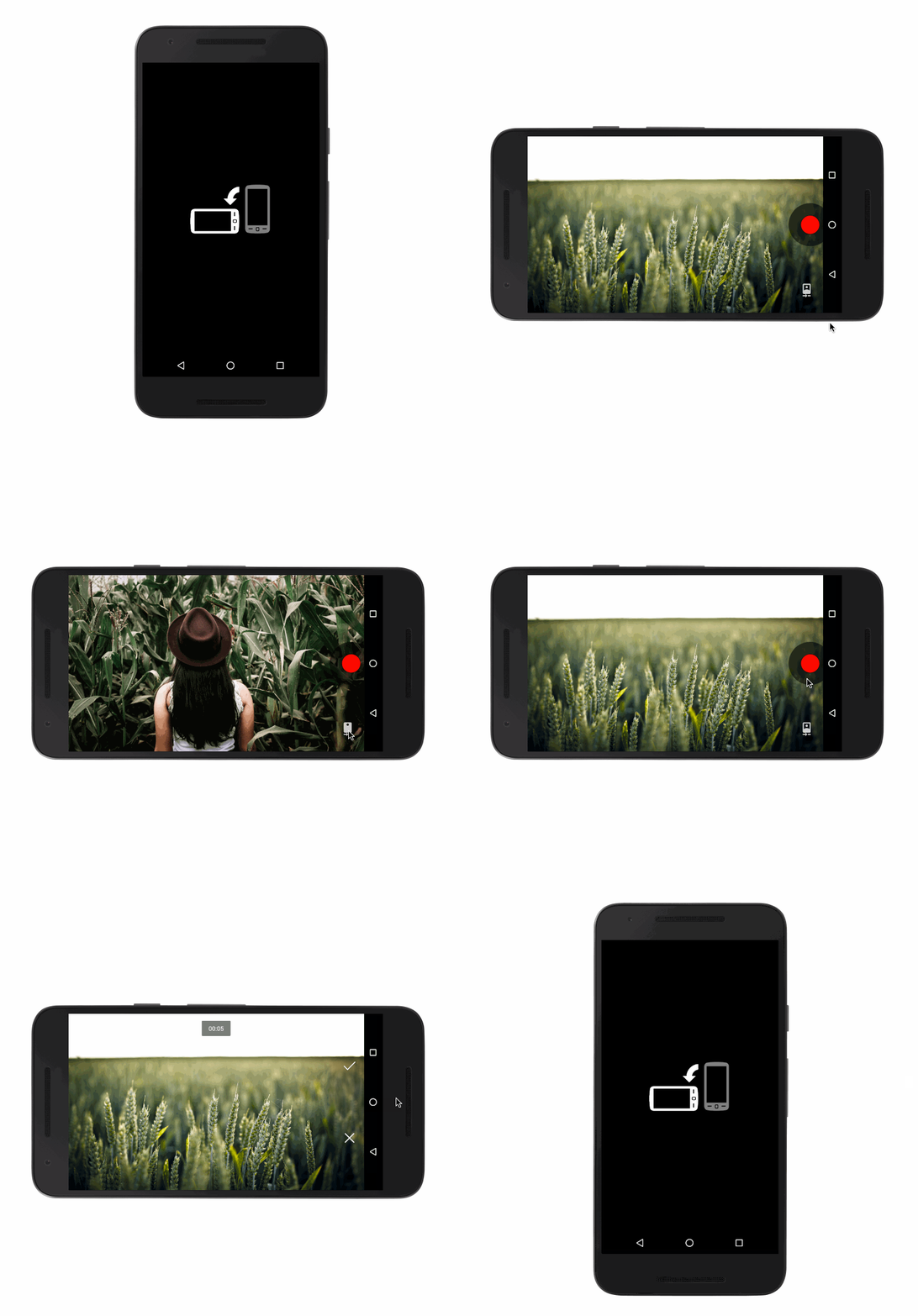
Features
This library provides a full and reusable custom camera, which:
- Forces the users to rotate their device to landscape
- Allows to specify the filename, or have the library generate one for you
- Allows very granular control over the capture settings:
- Resolution
- Bitrate
- Max filesize
- Max video duration
- audio/video codec
- switch between front and rear facing camera
- ...
How to use
- Add the Jitpack repository to your project:
          repositories {
              maven { url "https://jitpack.io" }
          }
- Add a dependency on the library:
compile 'com.github.jeroenmols:LandscapeVideoCamera:1.3.0'
- Specify the VideoCaptureActivity in your manifest:
         <activity
             android:name="com.jmolsmobile.landscapevideocapture.VideoCaptureActivity"
             android:screenOrientation="sensor" >
         </activity>
- Request the following permissions in your manifest:
         <uses-permission android:name="android.permission.RECORD_AUDIO" />
         <uses-permission android:name="android.permission.CAMERA" />
         <uses-permission android:name="android.permission.WRITE_EXTERNAL_STORAGE" />
- Create a CaptureConfiguration using the Builder
         // Choose one of both
         CaptureConfiguration.Builder builder = new CaptureConfiguration.Builder(CaptureResolution resolution, CaptureQuality quality);
         CaptureConfiguration.Builder builder = new CaptureConfiguration.Builder(int videoWidth, int videoHeight, int bitrate);

         // Optional
         builder.maxDuration(maxDurationSec);
         builder.maxFileSize(maxFileSizeMb);
         builder.frameRate(framesPerSec);
         builder.showRecordingTime();         // Show the elapsed recording time
         builder.noCameraToggle();            // Remove button to toggle between front and back camera

         // Get the CaptureConfiguration
         CaptureConfiguration configuration = builder.build();
Note: When no CaptureConfiguration is specified, a default configuration will be used.
Note 2: Subclass the CaptureConfiguration class to set more advanced configurations. (codecs, audio bitrate,...)
- Launch the
VideoCaptureActivityfor result, add the CaptureConfiguration as an parcelable extraEXTRA_CAPTURE_CONFIGURATIONand optionally add a String extraEXTRA_OUTPUT_FILENAME.
         final Intent intent = new Intent(getActivity(), VideoCaptureActivity.class);
         intent.putExtra(VideoCaptureActivity.EXTRA_CAPTURE_CONFIGURATION, config);
         intent.putExtra(VideoCaptureActivity.EXTRA_OUTPUT_FILENAME, filename);
         startActivityForResult(intent, RESULT_CODE);
- Check the resultcode (
RESULT_OK,RESULT_CANCELLEDorVideoCaptureActivity.RESULT_ERROR) and in case of success get the output filename in the intent extraEXTRA_OUTPUT_FILENAME.
Questions
Thanks

探索相关项目
加载中…