
EvotecIT/ConsoleMonster
EvotecIT/ConsoleMonster has 55 GitHub stars and 7 forks. GitHot measured +22 stars in 24 hours. Last checked 2026-11-09 08:33 UTC. Last push 2026-11-04.
Console rendering for .NET and PowerShell: tables, trees, panels, charts and live dashboards, with no package dependencies. Runs on Windows PowerShell 5.1 and PowerShell 7.
实测星标增长
- 24小时
- +22
- 7天
- 更新延迟
- 15天
- 更新延迟
- 1个月
- 更新延迟
各周期内的星标净变化,周期相互重叠,并非每日新增。缺失的测量保持空白。星标代表关注度,不代表软件质量。
README.md
原文ConsoleMonster
Everyday output in one line. The monster when you need it.
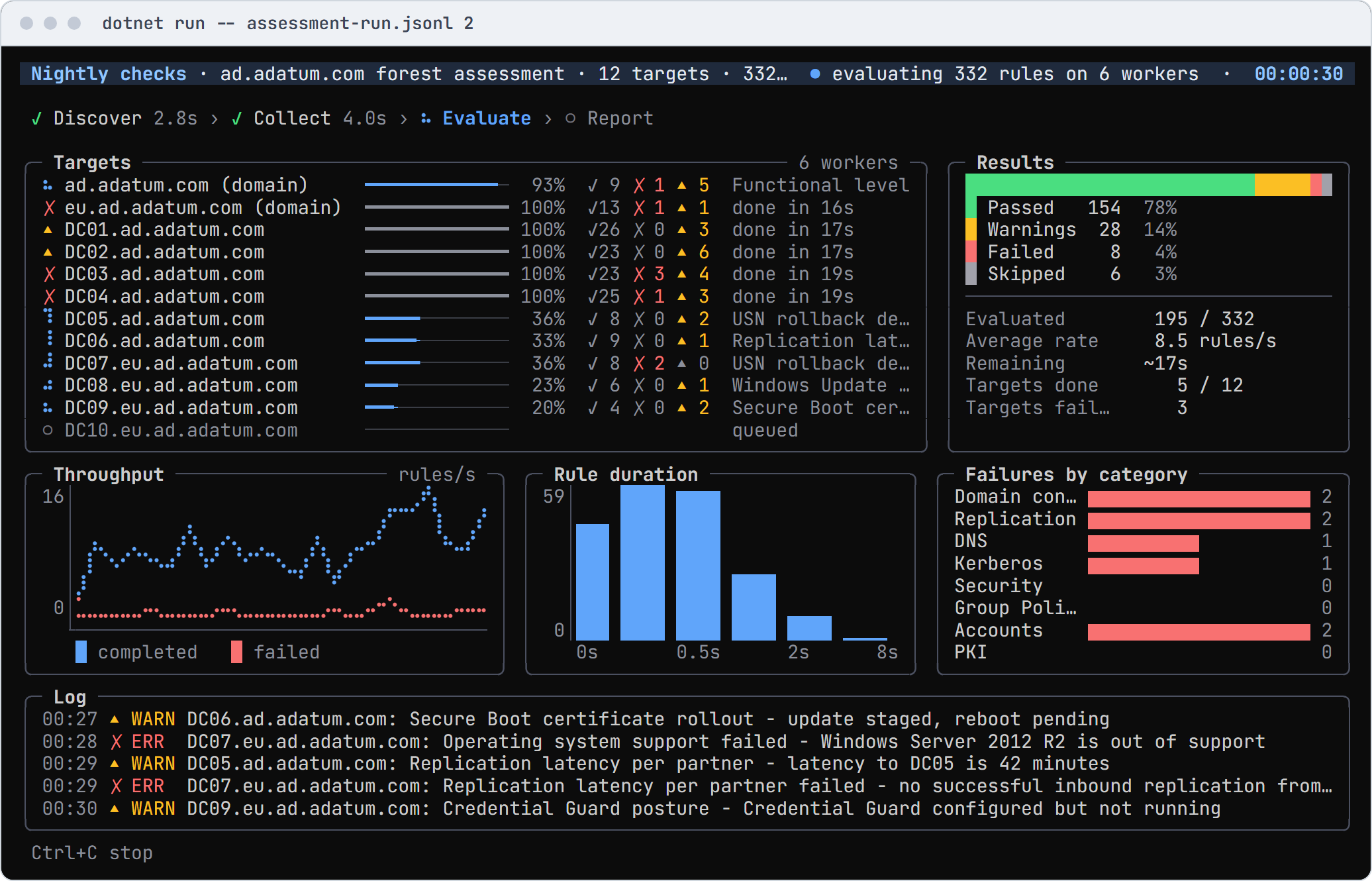
ConsoleMonster makes the output of the commands you already run readable, and draws tables, trees, charts, live
runs, dashboards, menus and forms when you need more. It is one engine for Windows PowerShell 5.1, PowerShell 7 and
.NET, with no package dependencies. A setting has one name everywhere (-Title in PowerShell, Title = and
.Title() in C#), and when the output goes to a file, a log or CI, it writes plain lines instead of escape codes.
Website · Documentation · Demos · Widgets · .NET API · PowerShell commands
Start in PowerShell
Install-Module ConsoleMonster -Scope CurrentUser
Import-Module ConsoleMonster
Get-Process | Sort-Object CPU -Descending | Select-Object -First 8 | Show-ConsoleTable
Show-ConsoleDemo lists the gallery's demos, grouped by what they are for, and runs the one you pick.
Get-Command -Module ConsoleMonster lists every command, and Get-Help <command> -Examples shows how to use it.
Start in C#
dotnet new console -n FirstTable
cd FirstTable
dotnet add package ConsoleMonster
Replace Program.cs, then dotnet run:
using ConsoleMonster;
using ConsoleMonster.Widgets;

var files = new DirectoryInfo(".").GetFiles().Select(f => new { f.Name, f.Length });
Table.For(files).Title("Files").Show();
Install ·
Three ways to write it in C# ·
The dotnet new template, which starts a project from any gallery demo
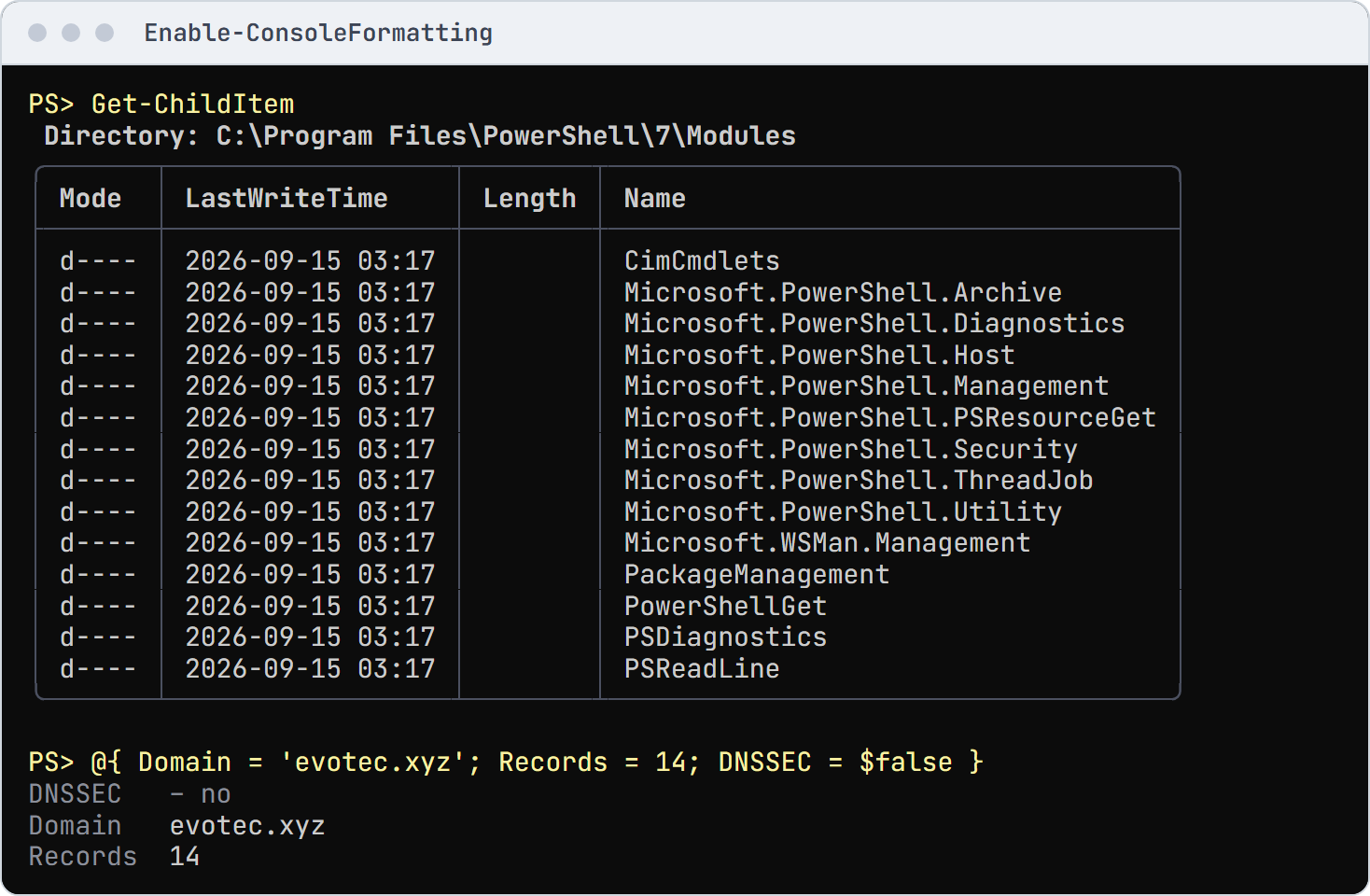
Nicer default output in one line
Files, processes, services, hashtables and more read as tables and records; the objects, pipelines, files and transcripts stay PowerShell's.
Enable-ConsoleFormatting
To keep it in every session, add the lines -ProfileSnippet prints to your profile:
if (-not (Test-Path -Path $PROFILE)) {
    $null = New-Item -ItemType File -Path $PROFILE -Force
}
Enable-ConsoleFormatting -ProfileSnippet | Add-Content -Path $PROFILE
Tables, lists and trees
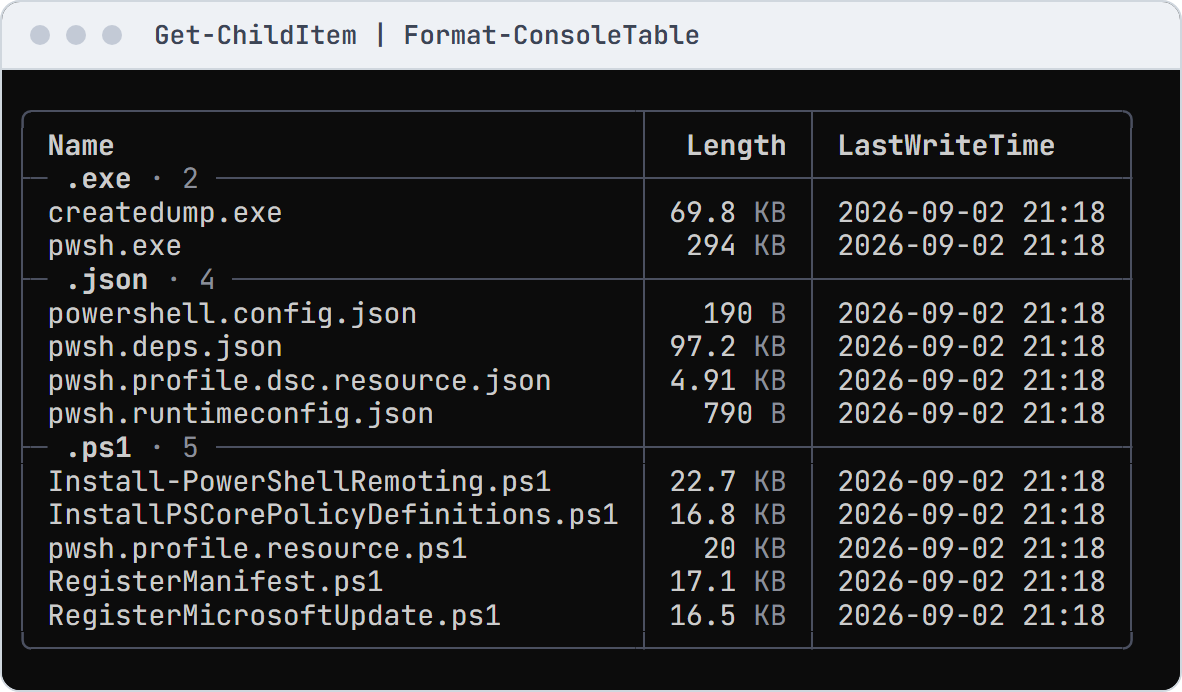
Show-ConsoleTable, Show-Console -View List and Show-Console -View Tree take pipeline input and fit the window.
Enable-ConsoleFormatting styles direct console output from Format-Table, Format-List and Format-Wide by default,
while keeping PowerShell's column choices. Use -Exclude FormatCommands to leave their output native.
Import-Module ConsoleMonster

# Invented package artifacts with fixed sizes and UTC timestamps.
$recordedAt = [datetimeoffset] '2026-10-21T12:00:00Z'
$files = @(
    [pscustomobject] @{
        Name = 'ConsoleMonster.dll'; Length = 1048576
        LastWriteTime = $recordedAt; Extension = '.dll'
    }
    [pscustomobject] @{
        Name = 'ConsoleMonster.deps.json'; Length = 4096
        LastWriteTime = $recordedAt; Extension = '.json'
    }
    [pscustomobject] @{
        Name = 'start.ps1'; Length = 512
        LastWriteTime = $recordedAt; Extension = '.ps1'
    }
)
$files | Show-ConsoleTable -Property Name, Length, LastWriteTime `
    -GroupBy Extension -Presentation @{ TimeZone = [TimeZoneInfo]::Utc }
Coming from Format-Table · Tables at six widths
Widgets
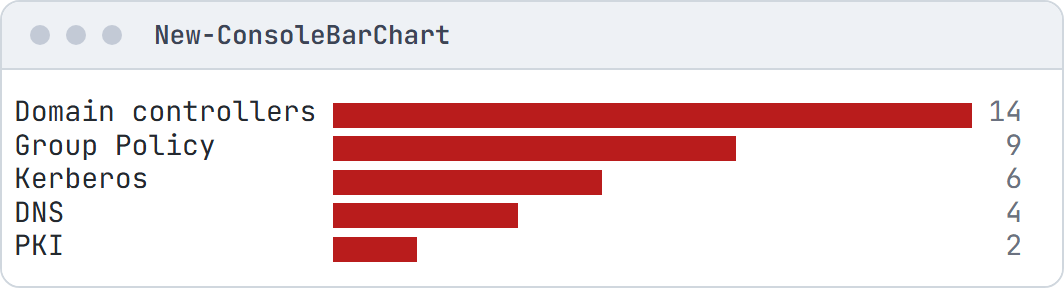
Every widget is a New-Console* command: panels, trees, charts, logs, lanes and more. Containers take a script block
of children, and items share -Status, -Detail and -Role.
Import-Module ConsoleMonster

New-ConsoleChart -Role Fail -InputObject ([ordered] @{
    'Domain controllers' = 14
    'Group Policy'       = 9
    'Kerberos'           = 6
    'DNS'                = 4
    'PKI'                = 2
}) -Type Bar | Show-Console
The widget gallery: every widget at every colour and glyph tier, in PowerShell and C#.
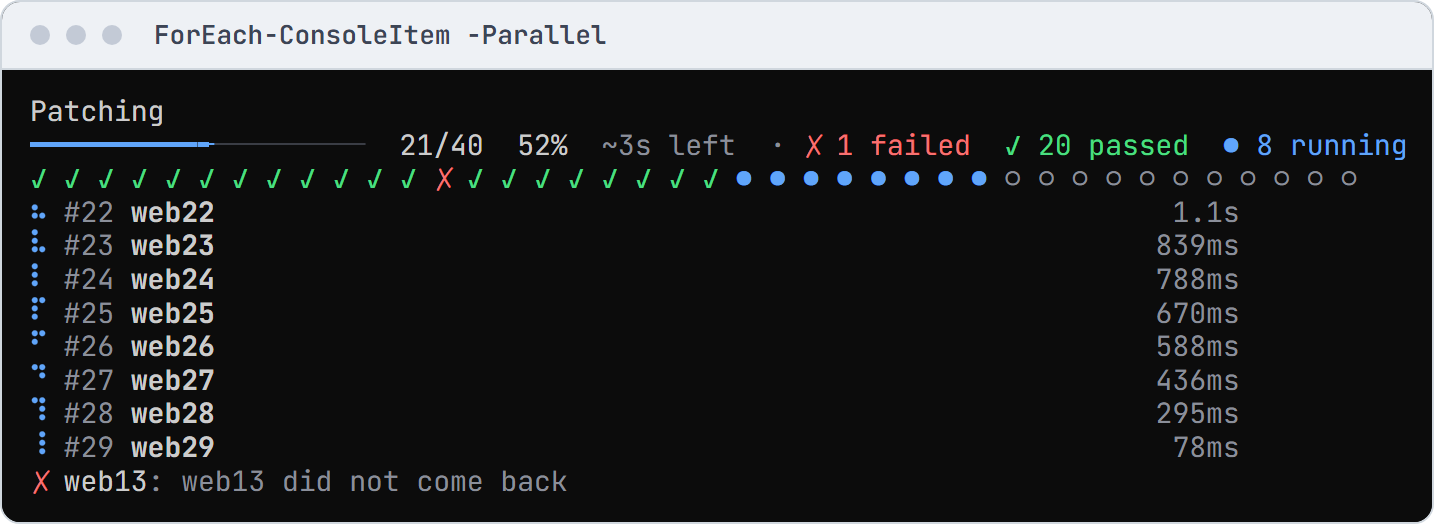
Live progress for long-running work
Import-Module ConsoleMonster

# Forty servers, eight at a time: three fail and one hangs past the four-second limit.
$servers = 1..40 | ForEach-Object { 'web{0:d2}' -f $_ }
$run = @{ Parallel = $true; ThrottleLimit = 8; TimeoutSeconds = 4; Title = 'Patching' }
$results = $servers | Invoke-ConsoleRun @run -ErrorAction SilentlyContinue {
    Start-Sleep -Milliseconds (500 + ([int] $_.Substring(3) * 137) % 900)
    if ($_ -in 'web13', 'web26', 'web39') { throw "$_ did not come back" }
    if ($_ -eq 'web22') { Start-Sleep -Seconds 10 }
    "$_ patched"
}
C# and the fluent API
The same engine as a .NET library. Every widget takes an object initializer or fluent calls named after its
properties (.Title("Build")), and Ui.Panel(), Ui.Table() and the other Ui factories start a fluent chain.
All three draw the same cells.
using ConsoleMonster;
using ConsoleMonster.Styling;
using ConsoleMonster.Widgets;

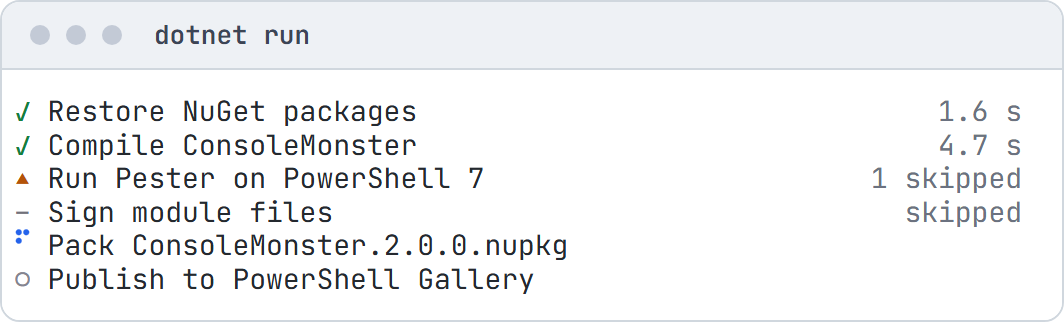
Terminal.Write(new StatusList()
    .Add("Restore NuGet packages", StatusKind.Pass, "1.6 s")
    .Add("Compile ConsoleMonster", StatusKind.Pass, "4.7 s")
    .Add("Run Pester on PowerShell 7", StatusKind.Warn, "1 skipped")
    .Add("Sign module files", StatusKind.Skip, "skipped")
    .Add("Pack ConsoleMonster.2.0.0.nupkg", StatusKind.Running)
    .Add("Publish to PowerShell Gallery", StatusKind.Pending));
Three ways to write it in C# · Logging · Hosting dashboard · dotnet new template
Save, replay and test
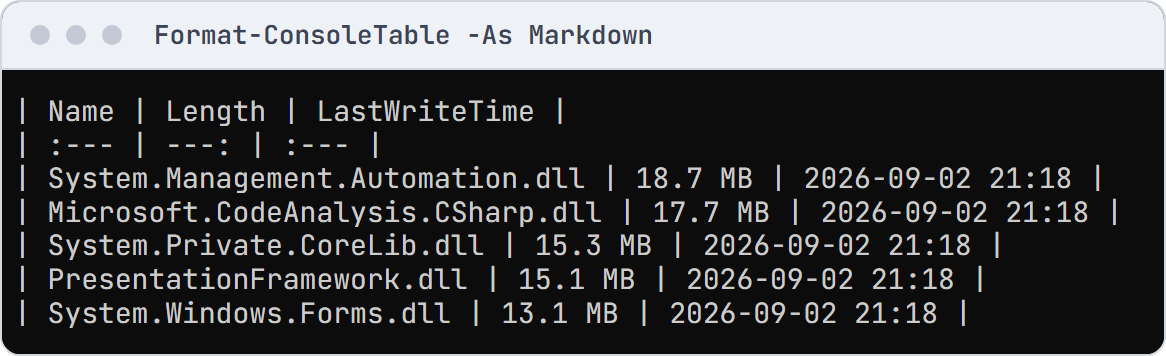
Views export to Markdown, HTML, SVG and text, live runs record and replay, and Assert-ConsoleOutput checks output in
tests.
Import-Module ConsoleMonster

# Invented package artifacts, exported as a Markdown table for a report.
$recordedAt = [datetimeoffset] '2026-10-21T12:00:00Z'
$files = @(
    [pscustomobject] @{
        Name = 'ConsoleMonster.dll'; Length = 1048576; LastWriteTime = $recordedAt
    }
    [pscustomobject] @{
        Name = 'ConsoleMonster.deps.json'; Length = 4096; LastWriteTime = $recordedAt
    }
    [pscustomobject] @{
        Name = 'start.ps1'; Length = 512; LastWriteTime = $recordedAt
    }
)
$files | New-ConsoleTable -Property Name, Length, LastWriteTime `
    -Presentation @{ TimeZone = [TimeZoneInfo]::Utc }  |
    Export-ConsoleFrame -Format Markdown
Recording and replay · Testing your output
Thread safety
Any thread can update the screen and one thread draws it, so parallel work never tears the view.
Import-Module ConsoleMonster

$dashboard = New-ConsoleDashboard -Title 'Workers' -Content {
    New-ConsolePanel -Title 'Log' -Fill -Content { New-ConsoleLogRegion }
}
1..8 | Invoke-ConsoleDashboard $dashboard -Parallel -ThrottleLimit 8 {
    param($Number)
    Start-Sleep -Milliseconds (Get-Random -Maximum 800)
    Write-Host "worker $Number finished"
}
Threads and concurrency: what is safe from which thread, and the stress test.
Compatibility
- PowerShell 5.1 and 7, with net472 and net8.0 payloads. On 5.1 one ConsoleMonster version loads per session; restart it after an upgrade.
- .NET netstandard2.0, net472, net8.0 and net10.0, no package dependencies, AOT compatible on net8.0 and net10.0 (trimming notes).
- Consoles are detected (colour, glyphs, size, CI, redirection);
NO_COLORandCONSOLEMONSTER_*override it (hosts and CI).
Benchmarks · Changelog · Contributing · MIT license · Maintained by Evotec.