
Dsadd4/AgentFigureGallery
Dsadd4/AgentFigureGallery has 178 GitHub stars and 4 forks. GitHot measured +2 stars in 24 hours and +3 in 7 days. Last checked 2026-11-09 21:58 UTC. Last push 2026-09-05.
Drop-in scientific plotting skill for Claude Code, Codex, Cursor, and other coding agents.
实测星标增长
- 24小时
- +2
- 7天
- +3
- 15天
- 正在收集历史
- 1个月
- 正在收集历史
各周期内的星标净变化,周期相互重叠,并非每日新增。缺失的测量保持空白。星标代表关注度,不代表软件质量。
README.zh-CN.md
原文AgentFigureGallery


AgentFigureGallery 以 Nature 及其子刊的精美科研图表为主要参考,汇集相关优质开源项目的绘图代码,为你和你的 AI 智能体提供科研绘图的视觉模板与代码参考。
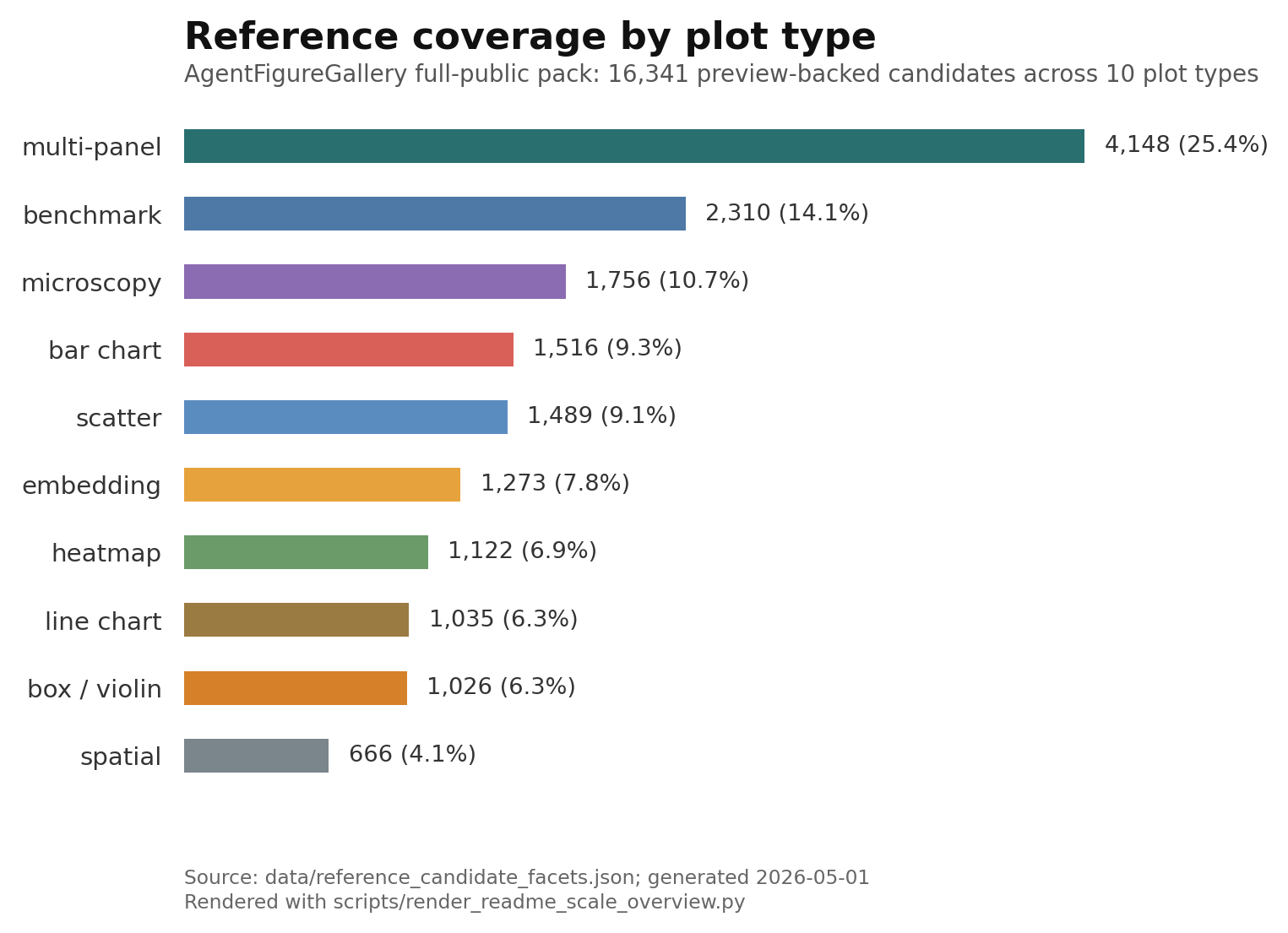
完整公开参考池收录 16,341 个视觉候选,覆盖 10 类常见科研图形(见规模统计)。你可以从中挑选喜欢的配色、布局和表达方式,让 Codex、Claude Code、Cursor 等代码智能体结合可用的源码,将这些参考应用到自己的数据与绘图任务中。
本页是简体中文用户入口;英文 README.md 是默认 GitHub 文档。命令、路径、issue 链接和代码块应与英文版保持一致;贡献和维护者文档暂以英文为准。
推荐:一行安装 Codex 技能:
curl -fsSL https://raw.githubusercontent.com/Dsadd4/AgentFigureGallery/main/scripts/install.sh | bash
这条命令会把仓库克隆或更新到 $HOME/AgentFigureGallery,创建 Python 虚拟环境,安装软件包,并安装 Codex 技能封装。使用脚本安装后,请通过 ~/AgentFigureGallery/.venv/bin/agentfiguregallery 运行命令行工具,或先激活虚拟环境:
source ~/AgentFigureGallery/.venv/bin/activate
如果你想用可编辑模式手动安装,见 手动安装。
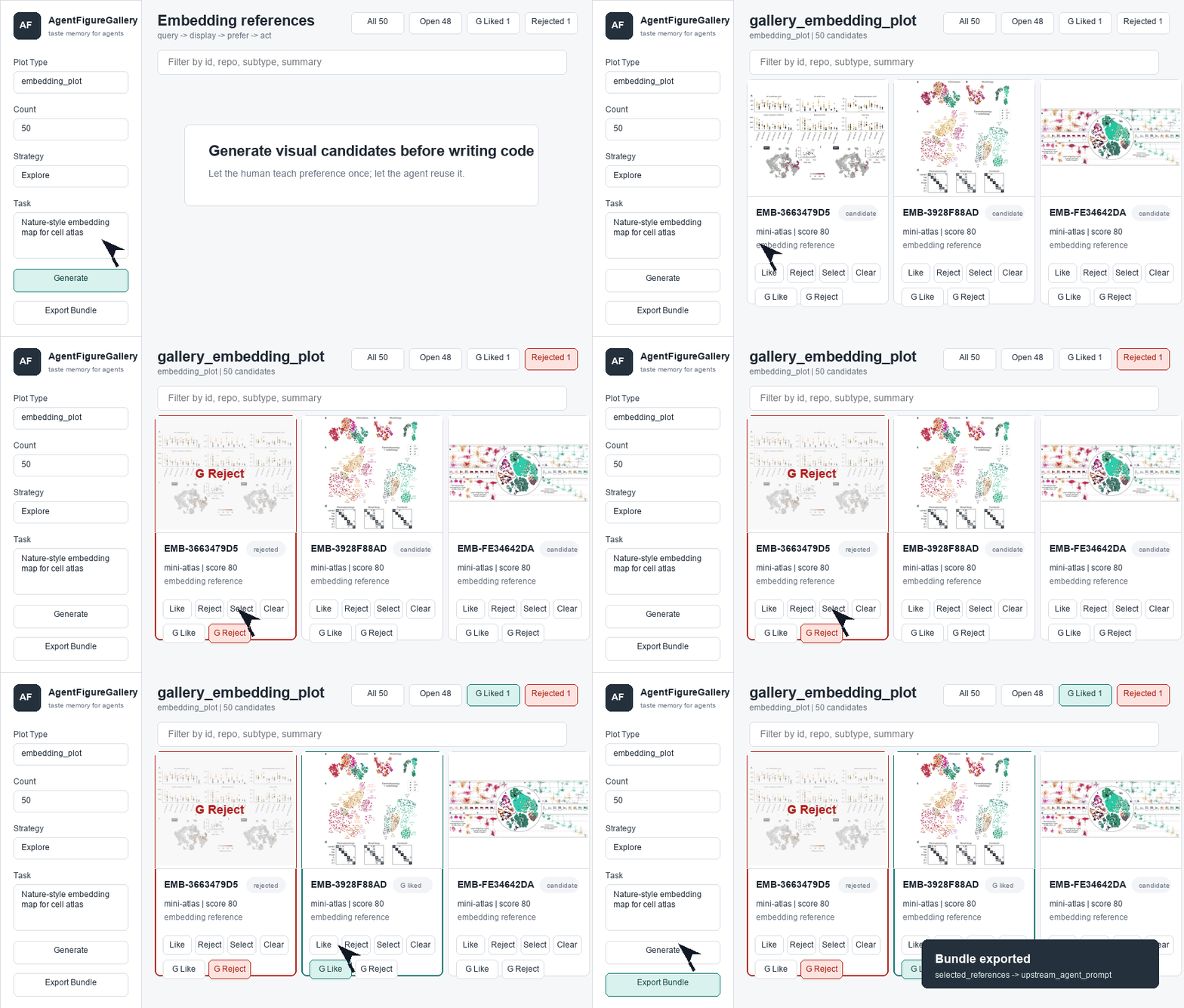
agent query -> browser gallery -> human like/reject/select -> reference bundle -> plotting code
流程是:智能体先查询视觉参考,浏览器图库展示候选图,用户选择偏好的例子,AgentFigureGallery 导出参考包,最后由智能体据此完成绘图任务。
快速入口
| 目标 | 命令或链接 |
|---|---|
| 安装后完成第一次本地运行 | ~/AgentFigureGallery/.venv/bin/agentfiguregallery first-run --open |
| 一键安装 Codex 技能 | curl -fsSL https://raw.githubusercontent.com/Dsadd4/AgentFigureGallery/main/scripts/install.sh | bash |
| 通过 Awesome Skills 安装 | npx add-skill Dsadd4/AgentFigureGallery |
| 安装前先看脚本会做什么 | 安装可信说明 |
| 打开 Hugging Face 展示页 | AgentFigureGallery Space |
| 贡献参考图包 | Community Packs |
手动安装
git clone https://github.com/Dsadd4/AgentFigureGallery.git
cd AgentFigureGallery
python -m venv .venv
source .venv/bin/activate
pip install -e .
agentfiguregallery doctor
agentfiguregallery install-skill --target codex
默认安装适合冒烟测试和小型内置参考包。要使用完整的 16k+ 公开参考池,请运行下面的 setup 命令。
完整公开参考池
从 Hugging Face 安装完整 full-public 包:
agentfiguregallery setup --pack full-public --manifest-url https://huggingface.co/datasets/dsadd4/AgentFigureGallery/resolve/main/resource_manifest.json
如果 Hugging Face 无法访问,可以使用 GitHub API 备用清单:
agentfiguregallery setup --pack full-public --manifest manifests/resource_manifest.github-api.json
也可以在脚本安装时直接下载完整参考池:
curl -fsSL https://raw.githubusercontent.com/Dsadd4/AgentFigureGallery/main/scripts/install.sh | env AFG_INSTALL_FULL_PUBLIC=1 bash
浏览器图库流程
创建一次参考会话并打开浏览器图库:
agentfiguregallery gallery --plot-type embedding_plot --limit 50 --serve
# 然后打开 http://127.0.0.1:8765/
命令会在启动本地服务前打印 session id。打开浏览器后,你可以把候选参考图标记为喜欢、不喜欢或选中;这些偏好会被后续会话复用。
选中参考图后,导出给代码智能体使用的参考包:
agentfiguregallery bundle --session <session_id>
参考包会写入:
outputs/reference_sessions/<session_id>/export_bundle/reference_bundle.json
之后如果只想重新打开已有前端、不重新生成候选参考,运行:
agentfiguregallery serve --host 127.0.0.1 --port 8765
验证 Codex 技能
安装 Codex 技能后,Codex 可以发现本地的 AgentFigureGallery 技能。

然后让你的代码智能体按图形类型执行一次冒烟测试:
Use AgentFigureGallery to test your installed plotting skill. Generate one Nature-style example for each supported plot type, then export PNG/PDF/SVG and a combined preview.
结果应当类似这样:每种支持的图形类型都有一个 Nature 风格示例图。
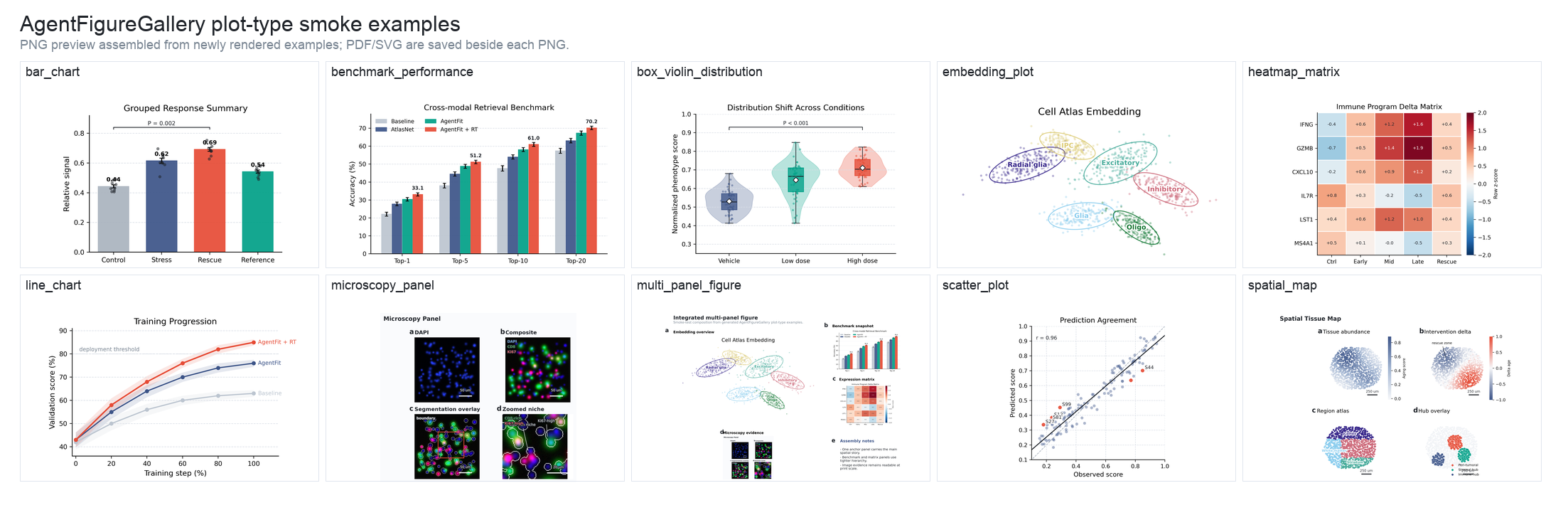
可运行脚本、源数据和 PNG/PDF/SVG 输出见 examples/plot_type_examples/。
给代码智能体使用
pip install -e . 完成后,可以这样告诉 Codex、Claude Code、Cursor 或其他代码智能体:
Read skills/agent-figure-gallery/SKILL.md, then use AgentFigureGallery before writing publication figure code.
你可以一次安装多个个人技能封装:
curl -fsSL https://raw.githubusercontent.com/Dsadd4/AgentFigureGallery/main/scripts/install.sh | env AFG_AGENT_TARGETS="codex claude-code cursor" bash
Cursor 项目规则需要项目路径,所以要显式传入:
curl -fsSL https://raw.githubusercontent.com/Dsadd4/AgentFigureGallery/main/scripts/install.sh | env AFG_AGENT_TARGETS="cursor" AFG_CURSOR_PROJECT=/path/to/your-cursor-project bash
也可以手动安装各个封装:
agentfiguregallery install-skill --target codex
agentfiguregallery install-skill --target claude-code
agentfiguregallery install-skill --target cursor
agentfiguregallery install-cursor-rule --project /path/to/your-cursor-project
Codex 会安装到 ~/.codex/skills,Claude Code 会安装到 ~/.claude/skills,Cursor 兼容技能会写入 ~/.cursor/skills,Cursor 项目规则(Project Rules)会写入 .cursor/rules/agent-figure-gallery.mdc。更多信息见 docs/AGENT_QUICKSTART.md 和 examples/agent_prompt.md。
端到端示例:
examples/end_to_end_embedding.mdexamples/generated_embedding_plot/README.mdexamples/before_after_benchmark/README.md
Dynamic Gallery
浏览器图库可以按图形类型浏览候选参考图,排除不合适的参考,保存某一类图形的偏好,并把选中的例子导出给智能体。安装 full-public 包后,图库可以使用 16,341 个公开视觉候选图,覆盖常见科学图形类型。
agentfiguregallery query --task "Nature-style embedding map for cell atlas"
agentfiguregallery gallery --plot-type embedding_plot --limit 100 --serve
扩展你的 Gallery
AgentFigureGallery 安装后可以继续扩展。你可以让智能体遵循扩展指南,也可以自己添加一个小型本地参考包,然后在浏览器图库中检查新增候选参考图。
下面这段英文提示可以直接复制给智能体:
Read ExtendAgent/README.md, then expand AgentFigureGallery for <plot type or style>. Discover high-quality public scientific plotting sources, render every useful reference as a visible preview, preserve stable candidate IDs and source license metadata, rebuild the candidate index, and report candidate counts plus private-path scan results.
手动扩展时,最重要的规则是:
- 只添加带有可见 preview PNG 的参考。
- 保留稳定的
candidate_id、plot_type、预览路径、来源元数据,以及可用的许可证说明。 - 不要把大型预览包、原始上游仓库、私有路径或 token 放进 Git。
完整扩展规范和质量门槛见 ExtendAgent/README.md。
社区包
社区包是用户贡献可复用绘图参考的公开渠道。基础 full-public 包仍是 Dsadd4 维护的 16k+ 标准参考池;社区贡献会先进入 community_pool/,审核通过后定期发布为可安装的资源包。
贡献路线:
- 打开 Community Pack issue,提出公开来源、图形类型或资源包想法。
- 按文档结构在
community_pool/packs/<pack_name>/下提交 PR。 - 不要把大文件资产放进 Git;审核通过的资源包会通过资源清单分发。
社区发布清单发布后,用户可以选择性安装社区包:
agentfiguregallery setup --pack community-latest --manifest-url <community_resource_manifest_url>
agentfiguregallery gallery --plot-type embedding_plot --limit 50 --serve
贡献规则、结构示例、审核门槛和安装模式见 docs/COMMUNITY_PACKS.md 与 community_pool/README.md。
项目包含什么
- 覆盖 10 种科学图形类型的 16,341 个 full-public 视觉候选图。
- 浏览器图库反馈,用于保存个人或实验室图形偏好。
- 一个小型精选最小参考包,可用于快速冒烟测试。
- 配备 Codex 的按图形类型冒烟测试示例,包含 PNG/PDF/SVG 输出。
- 后端命令行工具、浏览器图库、Codex 技能封装和智能体扩展指南。
- 稳定的候选图 ID、已保存的偏好,以及用于智能体交接的导出包。
- 用户提交绘图参考的社区包路径,以及周期性资源包发布模式。
Roadmap
- Curated Cell and Science style reference packs
- Faster full-public mirror for China and restricted networks
已完成:
- One-command Codex skill install
- Generated embedding plot from a reference bundle
- Before/after benchmark: prompt-only vs reference-guided plotting
Docs
用户文档:
docs/AGENT_QUICKSTART.md:给代码智能体的最小使用说明。docs/COMMUNITY_PACKS.md:社区贡献规则和发布模式。community_pool/:社区包暂存区和结构示例。ExtendAgent/:用于扩展图库的智能体指令。docs/REMOTE_FULL_VALIDATION.md:首次远端 full-public 验证和当前镜像速度说明。
维护者文档:
docs/DISCOVERY_PLAYBOOK.md:发布和 star 增长检查清单。docs/releases/v0.1.0.md:首次公开 release notes。docs/HF_SYNC.md:Hugging Face dataset card 和资源同步命令。docs/PYPI_RELEASE.md:Python package 发布路径。docs/HF_DATASET_CARD.md:Hugging Face dataset card draft。docs/LAUNCH.md:公开发布文案和渠道。docs/FULL_KB_DISTRIBUTION.md:公开资源包分发策略。
探索相关项目
affaan-m/ECC
智能体执行与控制框架的性能优化系统。面向 Claude Code、Codex、Opencode、Cursor 等,涵盖技能、本能、记忆、安全与研究优先的开发。
300,269 星标NousResearch/hermes-agent
与你一同成长的智能体
262,100 星标multica-ai/andrej-karpathy-skills
一个用于改进 Claude Code 行为的 CLAUDE.md 文件,源自 Andrej Karpathy 对 LLM 编程陷阱的观察。
231,390 星标firecrawl/firecrawl
借助来自网络及其他来源的数据,强化你的 AI 智能体。正在构建面向超级智能的资料库。🔥
200,178 星标