
DevinoSolutions/anotifier-for-claude-codex-cursor
DevinoSolutions/anotifier-for-claude-codex-cursor has 36 GitHub stars and 4 forks. GitHot measured 0 stars in 24 hours and +1 in 7 days. Last checked 2026-11-20 08:23 UTC. Last push 2026-11-15.
可以做什么
- Desktop toast notifications -- Windows (BurntToast), macOS (Notification Center), Linux (libnotify)
- WSL toast routing -- toasts from inside WSL are routed to Windows over PowerShell interop instead of a Linux notification daemon (see the proof boundary below)
- Phone push notifications -- Android & iOS via ntfy (free, no account required)
- Webhook notifications -- Slack, Discord, Telegram, or any HTTP endpoint, with an optional auth header
实测星标增长
- 24小时
- 0
- 7天
- +1
- 15天
- 正在收集历史
- 1个月
- 正在收集历史
各周期内的星标净变化,周期相互重叠,并非每日新增。缺失的测量保持空白。星标代表关注度,不代表软件质量。
关于
Desktop & phone notifications for AI coding agents (Claude Code, Codex, Gemini CLI, Cursor). Native VS Code support. Toast + ntfy push. Zero dependencies.
开发工具README.md
原文anotifier
Desktop & phone notifications for AI coding agents
One tool. One config. Every agent. Never miss when your AI finishes or needs input.





anotifier.io · Documentation · Discord · Support the project






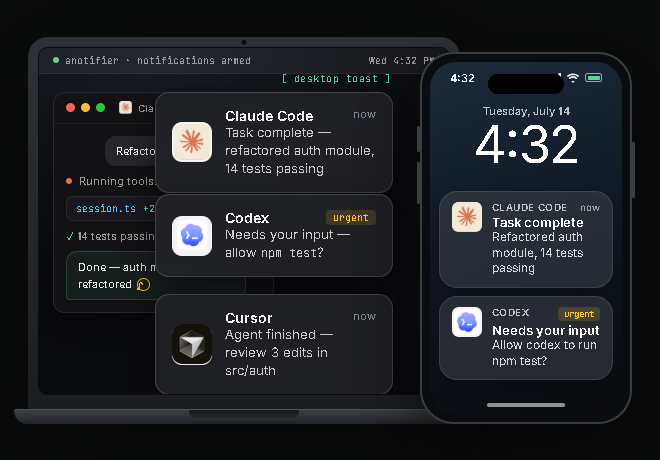
Demo
https://github.com/user-attachments/assets/5714b528-7e04-478e-abfd-2a3d05db562c
Quick Start
npx anotifier@latest setup
That's it. The setup wizard detects your platform and installed AI tools, wires the hooks, and optionally configures phone push notifications. Restart your AI tools to activate.
Features
- Desktop toast notifications -- Windows (BurntToast), macOS (Notification Center), Linux (libnotify)
- WSL toast routing -- toasts from inside WSL are routed to Windows over PowerShell interop instead of a Linux notification daemon (see the proof boundary below)
- Phone push notifications -- Android & iOS via ntfy (free, no account required)
- Webhook notifications -- Slack, Discord, Telegram, or any HTTP endpoint, with an optional auth header
- Rich notification content -- Claude Code toasts and webhooks show what the agent actually said or asked, not a generic line
- Terminal bell -- audible ding in the terminal that launched the agent (works over SSH/tmux)
- Click-to-focus -- click the toast to jump back to the terminal or VS Code window (Windows)
- Turn length -- "task complete" says how long the turn took (
took 4m 12s), andminDurationSecondscan skip quick turns (Claude Code, Codex, Gemini CLI) - Codex approval alerts -- get notified the instant Codex asks for permission, not just when it finishes
- Per-tool branded icons -- each tool gets its own logo in the notification
- One unified config -- shared
~/.anotifier/config.jsonacross all tools - Atomic deduplication -- prevents double notifications (e.g. Cursor's duplicate hook fires)
- Zero dependencies -- pure Node.js built-ins only, no npm production packages
Supported Tools
| Tool | VS Code | CLI | Task Complete | Needs Input |
|---|---|---|---|---|
| Claude Code |
Native | Native | Stop |
Notification |
| Codex CLI |
Native | Native | Stop |
PermissionRequest |
| Cursor |
Native | -- | stop |
-- |
| Gemini CLI |
-- | Native | AfterAgent |
Notification |
| Antigravity CLI | -- | Native | Stop |
-- |
All five tools are wired automatically by the setup wizard. No manual config editing needed. For Claude Code, Codex and Gemini CLI setup also adds a small timing hook (UserPromptSubmit for Claude Code and Codex CLI, BeforeAgent for Gemini CLI) that only records when a turn started, see Turn length. Codex's PermissionRequest hook fires the same "needs your input" alert when Codex asks for approval to run a command -- verified with Codex CLI >=0.144.0.
Antigravity CLI (Google's successor to Gemini CLI for Google AI Pro/Ultra and free Code Assist users) reads hooks from its own file, ~/.gemini/config/hooks.json. Setup wires it when ~/.gemini/antigravity-cli exists, adding one group named anotifier with a Stop handler and leaving your other groups alone; anotifier uninstall removes only that group. Google's docs say the Antigravity 2.0 app and Antigravity IDE read the same global ~/.gemini/config/hooks.json, so a handler setup wrote should fire there too, but setup only wires Antigravity when ~/.gemini/antigravity-cli exists and neither app has been tested. The Stop handler answers {"decision":"stop"} so it can never keep the agent running. The notification is the generic "Task complete" line, and a Stop caused by an error or a cancel says "Task complete" too: anotifier does not read terminationReason (its values are not fully documented) or fullyIdle, so every Stop alerts. Antigravity has no notification or permission event (its events are PreToolUse, PostToolUse, PreInvocation, PostInvocation and Stop), so there is no "needs input" alert for it. What is verified: hook wiring and payload parsing are unit-tested against the format in Google's hooks docs. What is not: there is no live Antigravity CLI lane in CI yet, so it has not been exercised against a real Antigravity CLI run.
VS Code Native Support
Claude Code, Codex, and Cursor all run inside VS Code. anotifier hooks directly into each tool's native hook system -- no VS Code extension required. The setup wizard detects installed tools and patches their configs automatically. On Windows, click a notification toast to jump straight back to your VS Code window (Cursor alerts are the exception: anotifier doesn't read a project folder from Cursor's event). More on the VS Code page.
Installation
npm (recommended)
# One-shot setup (no install needed)
npx anotifier@latest setup

# Or install globally
npm i -g anotifier
anotifier setup
Claude Code Plugin
Add the marketplace, then install the plugin from it:
/plugin marketplace add DevinoSolutions/anotifier-for-claude-codex-cursor
/plugin install anotifier@anotifier
Hooks auto-register. Use /anotifier:setup to wire other tools.
Standalone (no npm)
Windows (PowerShell):
irm https://raw.githubusercontent.com/DevinoSolutions/anotifier-for-claude-codex-cursor/main/setup/install.ps1 | iex
macOS / Linux:
curl -fsSL https://raw.githubusercontent.com/DevinoSolutions/anotifier-for-claude-codex-cursor/main/setup/install.sh | bash
CLI Commands
anotifier setup            # First-time setup wizard
anotifier status           # Show wired tools, config, backends
anotifier test [channel]   # Fire test notification (toast | ntfy | webhook | bell | both)
anotifier config [section] # Interactive settings (ntfy | webhook | sounds | events | sentry)
anotifier doctor [--deep]  # Diagnose delivery per channel (--deep verifies real delivery)
anotifier snooze [dur]     # Silence every channel for a while (30m | 2h | 90s | 45 = 45 minutes)
anotifier snooze off       # Cancel the snooze early
anotifier telemetry        # Show or change the opt-in anonymous usage stats (on | off); 1.3.0 and later
anotifier uninstall        # Remove hooks from all tools
anotifier snooze with no argument prints the current state (Snoozed until 14:32 or Not snoozed); anotifier status shows the same thing. A snooze silences every channel -- toast, ntfy, webhook and the terminal bell -- until it expires on its own, and it survives across sessions because the deadline is stored in ~/.anotifier/.snooze.json.
Configuration
Config lives at ~/.anotifier/config.json. Abbreviated — see config/default-config.json for every key and default:
{
  "ntfy": {
    "enabled": true,
    "server": "https://ntfy.sh",
    "topic": "anotifier-<random>",
    "click": ""
  },
  "toast": {
    "enabled": true,
    "clickToFocus": true
  },
  "terminalBell": {
    "enabled": true
  },
  "webhook": {
    "enabled": false,
    "url": "",
    "format": "generic"
  },
  "sentry": {
    "enabled": false,
    "dsn": ""
  },
  "updateCheck": {
    "enabled": true
  },
  "telemetry": {
    "enabled": false,
    "asked": false
  },
  "usageAlerts": {
    "enabled": true,
    "thresholds": [70, 85, 95]
  },
  "contextAlerts": {
    "enabled": true,
    "threshold": 85
  },
  "quietHours": {
    "enabled": false,
    "from": "22:00",
    "to": "08:00"
  },
  "events": {
    "task_complete": { "toastSound": "IM", "priority": "default", "minDurationSeconds": 0 },
    "needs_input": { "toastSound": "Reminder", "priority": "urgent" },
    "session_start": {
      "toastSound": "Default",
      "priority": "low",
      "toastEnabled": false,
      "ntfyEnabled": false,
      "terminalBellEnabled": false,
      "webhookEnabled": false
    }
  }
}
ntfy.click is the URL opened when you tap a phone notification (empty = no link). ntfy.fallbackServer (optional, 1.7.0 and later) is a second ntfy server for the same topic: when ntfy.server fails (unreachable, a timeout, or an error such as a 429 daily limit), the same push is sent there once instead. For example, run your own server as server and keep https://ntfy.sh as the fallback, then subscribe your phone to the topic on both. With a fallback set, each attempt waits at most 3 s instead of 5 s, so both fit in the hook's time budget. If the main server accepts a push but answers too slowly, the fallback sends it too and a phone subscribed on both servers buzzes twice; a missed push is the worse failure. anotifier test ntfy says when only the fallback delivered. terminalBell rings the terminal that launched the agent -- for Claude Code (>=2.1.141) it rings through Claude Code's own terminal write path (hook JSON terminalSequence), which is safe in tmux, GNU screen, and on Windows per Claude Code's docs; other agents get a direct TTY/console bell. webhook posts to Slack, Discord, Telegram, or any URL (see below). sentry is opt-in error reporting (see Error visibility). updateCheck announces a newly published anotifier through whichever of your toast / ntfy / webhook channels are already on (never the terminal bell) -- it asks the npm registry at most once per day, tells you at most once per version, and stays silent on any error; set enabled to false to turn it off entirely, and no check or state write happens at all. telemetry (1.3.0 and later) is the opt-in anonymous usage-stats choice: enabled is the choice (default false), and asked records that you made it (setup and anotifier telemetry on|off set it) so re-running setup does not ask again -- see Usage stats. usageAlerts warns before a Claude Code usage limit (see Usage-limit warnings): enabled turns it off, thresholds are the percentages (1-100) that trigger a warning. contextAlerts warns once per chat before Claude Code auto-compacts it (see Context warnings): enabled turns it off, threshold is the percentage (1-100) of the auto-compact window that triggers it. quietHours is a recurring nightly version of snooze (see Quiet hours). Per-event toastSound is a sound name or the path of your own audio file (see Custom sound files). A name is a Windows BurntToast sound; on macOS it is mapped to the closest built-in system sound (Windows names like IM/Reminder are translated, and Default or unrecognized names fall back to the system default), while on Linux a name is ignored; priority (min / low / default / high / urgent) drives both the ntfy push priority and the Linux notify-send urgency.
Quiet hours
Off by default. Set quietHours.enabled to true and every channel goes silent inside the window, every day:
{
  "quietHours": {
    "enabled": true,
    "from": "22:00",
    "to": "08:00"
  }
}
- Times are
"HH:MM"on a 24-hour clock, in your machine's local time. - The start is inclusive and the end is exclusive:
22:00is silenced,08:00is not. - Windows may span midnight.
22:00->08:00covers 22:00-23:59 and 00:00-07:59. A same-day window like08:00->22:00works the same way. fromequal totois a zero-length window and turns the feature off, rather than silencing you for a full 24 hours.- A time that isn't a valid
HH:MMdisables the whole block instead of falling back to the default window -- a typo should never silence you -- and the problem is reported byanotifier status.
anotifier status shows the window and whether you are currently inside it.
How quiet hours and snooze interact: they are independent, and either one alone silences the run -- there is no per-channel scoping, it is all channels or none. A silenced run is silenced completely: no toast, no ntfy push, no webhook POST, no terminal bell, and no update notice either. What does not change is the hook contract -- the hook still exits successfully and still returns the response its agent expects, so silencing notifications can never stall or break Claude Code, Codex, Cursor, Gemini CLI or Antigravity CLI. The daily update check simply runs on the next un-silenced run.
ntfy -- Phone Push Notifications
ntfy sends free push notifications to your phone -- no account needed.
- Install the ntfy app (Android / iOS)
- Subscribe to your topic (shown during setup)
- All your AI tools' notifications appear in one stream
Webhook -- Slack, Discord, Telegram, or anything
Set webhook.enabled: true and a webhook.url to POST a notification to any HTTP endpoint. format selects the payload shape:
Slack (setup guide):
{
  "webhook": {
    "enabled": true,
    "url": "https://hooks.slack.com/services/...",
    "format": "slack"
  }
}
Discord (setup guide):
{
  "webhook": {
    "enabled": true,
    "url": "https://discord.com/api/webhooks/...",
    "format": "discord"
  }
}
Telegram:
{
  "webhook": {
    "enabled": true,
    "url": "https://api.telegram.org/bot<token>/sendMessage",
    "format": "telegram",
    "chatId": "123456789"
  }
}
Generic (anything else):
{
  "webhook": {
    "enabled": true,
    "url": "https://example.com/hook",
    "format": "generic",
    "authorization": "Bearer <token>"
  }
}
Generic POSTs {title, message, source, project, event, timestamp} as JSON. authorization, if set, is sent as the Authorization header for any format, not just generic.
Webhook failures are logged with the URL's origin only, never the full URL -- a Slack/Discord webhook URL or a Telegram bot token is a secret, and errors.log can be mirrored to Sentry.
Test it with anotifier test webhook, or turn it off for one event type with "events": {"task_complete": {"webhookEnabled": false}}.
Rich notification content
For Claude Code, toast and webhook notifications show what actually happened instead of a generic "task complete" line: a "needs input" notification carries Claude's own question, and a "task complete" notification carries the last assistant message, both read from the Claude Code transcript and trimmed to a short snippet. Session-start notifications stay generic (nothing to show yet). Other agents (Codex, Cursor, Gemini, Antigravity) always get the generic text -- transcript reading is Claude Code-only.
Controlled per channel:
| Channel | Config key | Default |
|---|---|---|
| Toast | toast.richContent |
true |
| Webhook | webhook.richContent |
true |
| ntfy | ntfy.richContent |
false |
ntfy.richContent defaults to false for privacy: the default ntfy.sh server is public, ntfy topic names are guessable rather than access-controlled secrets, and a snippet of your conversation would leak to anyone who guesses or stumbles on your topic. Only enable ntfy.richContent if you run your own private ntfy server, or you've deliberately accepted that risk on the public one.
Usage-limit warnings (Claude Code)
Get a heads-up before Claude Code stops you at a usage limit. anotifier watches your subscription's 5-hour and weekly usage and sends one notification as each window crosses 70%, 85% and 95%. The title names the window and the percentage (for example Claude Code · 5-hour limit at 72%), and the body names the chat that saw it, the threshold crossed, and when the window resets. Priority rises with the level: default at 70%, high at 85%, urgent at 95%. A window that jumps from 60% straight to 96% sends the 95% warning only, not three in a row.
- Account-wide, once. Usage limits belong to your account, not to a chat. However many Claude Code chats you have open, each threshold warns once per window across all of them (the first chat to see it sends it and the others stay quiet), and the warning names the chat that saw it. When a window resets, its warnings start over.
- Claude.ai Pro/Max only. Claude Code reports usage (
rate_limits) only to Claude.ai Pro and Max subscribers. With API-key or other billing it sends nothing, so there is nothing to warn about and no warning is ever sent. - Channels. Warnings go to your toast, ntfy and webhook channels, whichever are on. They never ring the terminal bell. Snooze and quiet hours hold them back (see below).
- How it gets the numbers. Claude Code only hands usage to your statusline command, never to hooks.
anotifier setuptherefore points the Claude CodestatusLineatsrc/statusline.mjs. If you already had a statusline, it is wrapped: your command still runs with the same input and its output is still what you see, and the original is stored (base64) in the new command. With no statusline of your own, a shortOpus · 5h 42% · 7d 12%line (the model name first) is shown.anotifier uninstallputs your originalstatusLineback exactly, or removes it if setup created it. AstatusLinethat is not acommandis left alone.anotifier statusshows whether the statusline is wired. - Plugin install, or setup not run? Wire it by hand in
~/.claude/settings.json, pointing atsrc/statusline.mjsinside the installed package (npm root -gshows the global location):
{
  "statusLine": {
    "type": "command",
    "command": "node \"/path/to/anotifier/src/statusline.mjs\""
  }
}
To keep a statusline you already have, append --wrap-b64 and the base64 of your existing command (for example printf '%s' '~/my-line.sh' | base64):
node "/path/to/anotifier/src/statusline.mjs" --wrap-b64 <base64>. A hand-wired command is only recognized by status and uninstall when the path contains anotifier.
Configure it in ~/.anotifier/config.json; this is the default:
{
  "usageAlerts": {
    "enabled": true,
    "thresholds": [70, 85, 95]
  }
}
thresholds is a list of percentages above 0 and at most 100 (an invalid list is reported and the default applies). Set "enabled": false to turn the warnings off. The statusline keeps working, it just stops checking usage.
Snooze and quiet hours. While you are snoozed or inside quiet hours, no warning is sent and none is recorded, so a threshold you crossed in that time is announced once it ends, provided your usage is still over it and a Claude Code statusline refresh happens after that.
Context warnings (Claude Code)
Get a heads-up before Claude Code auto-compacts a long chat. anotifier sends one notification per chat when its context passes 85% of the auto-compact window, so you can wrap up or run /compact on your own terms instead of having it happen mid-task. The title carries the percentage (Claude Code · context at 87%) and the body names the chat and the size: my-app [3f9a1c2e] is at 87% of its auto-compact window (174K of 200K tokens). It will compact soon — wrap up or /compact now. Priority is high.
- Once per session. Each chat (Claude Code
session_id) warns once and never again, even after/compactbrings its context back down./clearstarts a new session, so a later chat in the same terminal can warn again. The warned sessions are remembered in~/.anotifier/.context-alerts.json, written before the notification is sent; entries older than 14 days are trimmed when the next warning is recorded. - Which window. Claude Code compacts before the model's full window is used, so anotifier measures against the auto-compact window, resolved in this order: the payload's
auto_compact_window(undocumented and speculative: used only if a future Claude Code reports it), then theCLAUDE_CODE_AUTO_COMPACT_WINDOWenvironment variable (read likeparseInt, so500kreads as 500; clamped to 100,000-1,000,000, and it overrides the settings), then theautoCompactWindowsetting that/autocompact <n>writes (clamped the same way), then the model's own window. The setting is read from the first of these files that has one:<project>/.claude/settings.local.json,<project>/.claude/settings.json, thensettings.jsonin$CLAUDE_CONFIG_DIR(default~/.claude). In each file the per-model value (modelSettings.<model id>.autoCompactWindow, written by Claude Code 2.1.288 and later) wins over the top-levelautoCompactWindow(older versions); a per-model"auto"means the model's own window. The result never exceeds the model's window; a chat already past it just shows 100%. Claude Code'sused_percentageis not used: it is measured against the full model window. - Blind spots. The
--autocompactcommand-line flag and managed (enterprise) settings are invisible to a statusline, so with either in play the warning can come late or not at all. - Skipped when auto-compact is off. If
DISABLE_AUTO_COMPACTorDISABLE_COMPACTis set, orautoCompactEnabledisfalsein the first settings file above that defines it, nothing will compact and no warning is sent. - No subscription needed. Unlike usage-limit warnings, this works with API-key and proxy sessions too, since the context numbers come with every statusline refresh. It uses the same statusline wiring as the usage warnings (see above), so
anotifier setupcovers both. - Channels, snooze and quiet hours work exactly as for usage warnings: toast, ntfy and webhook, never the terminal bell, and while snoozed or in quiet hours nothing is sent and nothing is recorded.
{
  "contextAlerts": {
    "enabled": true,
    "threshold": 85
  }
}
threshold is a percentage above 0 and at most 100 (an invalid value is reported and 85 applies). Set "enabled": false to turn the context warning off; usage-limit warnings are unaffected, and so is the statusline. anotifier status shows whether it is on and the threshold.
Per-Event Settings
| Event | Default toastSound |
Default priority |
Description |
|---|---|---|---|
task_complete |
IM | default | Agent finished its task |
needs_input |
Reminder | urgent | Agent needs your input or permission |
session_start |
Default | low | New session started (all channels off by default, webhook included) |
Only Claude notifications that wait on you are urgent. Claude Code's Notification hook fires for many kinds of notification and names each one in its notification_type field. anotifier reads that field and alerts as follows:
Claude notification_type |
What you get |
|---|---|
permission_prompt |
"Needs your permission" at the needs_input priority (urgent by default) |
elicitation_dialog, elicitation_url_dialog, agent_needs_input |
"Needs your input" at the needs_input priority |
quota_auto_resume_stale |
"Needs you to resume" at the needs_input priority (Claude Code is waiting for Enter after a usage-limit reset) |
idle_prompt |
"Needs your input" at the idle-reminder level, default unless you set idleReminderPriority (see below) |
agent_completed, quota_auto_resume_fired, quota_auto_resume_disabled |
A short notice at default priority with an info tag. It is never urgent. These use a fixed normal priority, tags and sound and do not inherit events.needs_input overrides. |
auth_success, elicitation_response, elicitation_complete |
No alert, because each one follows something you just did at the keyboard |
| Any other value | "Needs your attention" at the needs_input priority (urgent by default), so a type added in a future Claude Code release can never go quiet while Claude waits on you |
No notification_type (older Claude Code) |
Same as before: urgent "Needs your input", with the idle-reminder wording check below |
Claude's idle reminder is quieter than a real prompt. About a minute after a turn ends, Claude Code sends a second notification along the lines of "Claude is waiting for your input" (idle_prompt). Nothing is blocked -- the work is done -- so anotifier delivers that one at default priority with a calm tag instead of the urgent needs_input treatment. A genuine permission prompt is untouched and still arrives urgent. The reminder is never suppressed, only turned down. On older Claude Code that sends no notification_type, the reminder is recognized by its wording, and if Claude ever changes that wording the reminder simply goes back to being urgent -- it can never go silent. To pick your own level for it, set idleReminderPriority on the event:
{
  "events": {
    "needs_input": { "idleReminderPriority": "low" }
  }
}
It takes the same min / low / default / high / urgent scale as priority, and applies only to the idle reminder.
Custom sound files
toastSound can also be the path of your own audio file, per event:
{ "events": { "task_complete": { "toastSound": "~/sounds/done.wav" }, "needs_input": { "toastSound": "C:\Sounds\ask.mp3" } } }
A value is read as a file, not a name, when it starts with ~/, is an absolute path, contains a / or \, or ends in .wav, .mp3, .aiff, .aif, .m4a, .aac, .ogg, .oga, .opus or .flac. ~ is your home folder, and a relative path is relative to ~/.anotifier. A path containing a double quote is not used. The sound names above never match, so existing configs keep working.
When the file exists, it plays instead of the toast's own sound and the toast is silent, so you hear one sound. It plays in the background: the hook does not wait for it to finish.
- Windows:
.wavplays through the Windows sound player; other formats go through Windows Media (.mp3,.m4a,.aacand.flacnormally work;.ogg,.ogaand.opusneed a codec Windows may not have). Any clip is cut off after 30 seconds. On macOS and Linux a long file plays to the end. - macOS:
afplay, so any format macOS plays (not.ogg,.ogaor.opus). - Linux: the first of
pw-play,paplayandaplaythat starts (aplayis used for.wavonly). Linux toasts have no sound otherwise, so this is the only case where Linux plays one. - WSL: Windows plays it, like the toast, and the toast is silenced when the alert starts, before the player has launched. A Linux path or a
/mnt/c/...path works; write/mnt/c/Sounds/ask.mp3, notC:\Sounds\ask.mp3, because aC:\...value is not a path Linux can open.
If the file is missing or unreadable, anotifier does not try to play it. The toast then keeps the default sound on Windows and macOS (Linux has none), and one line goes to ~/.anotifier/errors.log. The same line is written when no player can be started. On WSL the toast is already silent by then, so a failed player leaves that alert without a sound. The log never contains the path, and the path is never sent to usage stats or Sentry. A file that exists but cannot be decoded only fails inside the player: on Windows a short system sound plays instead; on macOS and Linux nothing plays.
anotifier doctor warns about a missing file, anotifier config sounds checks that a file exists when you type its path, and anotifier test toast plays the first one configured.
Turn length and the minimum duration filter
A "task complete" notification says how long the turn took when anotifier knows it, for example app: Task complete (took 4m 12s). With Claude Code's rich content on, the assistant's own words are shown and the same (took ...) is appended to them. The notification title is never changed. When the length is not known, the message is exactly what it was before this existed.
events.task_complete.minDurationSeconds (default 0, off) skips the "task complete" alert for a turn shorter than that many seconds, on every channel:
{
  "events": {
    "task_complete": { "minDurationSeconds": 30 }
  }
}
- Only completions are ever filtered. Permission prompts, questions and every other
needs_inputnotification are always sent, and the key is rejected (and reported byanotifier status) anywhere exceptevents.task_complete. - A turn of exactly the threshold is sent; only shorter turns are skipped.
- A turn whose length is unknown is never skipped.
- A turn's clock starts at its first prompt; a prompt sent while the turn is still open does not restart it. Claude Code sends no
Stopfor a turn you interrupt with Esc, so the next prompt in that session counts from the interrupted turn's start and its length can read longer than it was. That only ever errs toward sending the alert. - Set it with
anotifier config events, or by editing~/.anotifier/config.json.anotifier statusshows the current value asMin duration.
How a turn is measured depends on what each tool's hooks offer. The start time is recorded by a second, tiny hook that runs when you submit a prompt, writes ~/.anotifier/turns.json (atomically, under a lock) and prints only {}. It never blocks the agent: it has a 5-second timeout, ignores every error, and a start that could not be saved just means that turn has no length (a lock that cannot be taken is logged to errors.log, which anotifier status shows). A prompt sent while a turn is still running does not restart its clock. anotifier uninstall removes the hook and deletes turns.json.
| Tool | Start | End | Length shown and filter applied |
|---|---|---|---|
| Claude Code | UserPromptSubmit |
Stop |
Yes |
| Codex CLI | UserPromptSubmit |
Stop (paired by turn_id) |
Yes |
| Gemini CLI | BeforeAgent |
AfterAgent |
Yes |
| Cursor | none used | stop |
No |
| Antigravity CLI | none used | Stop |
No |
Cursor's beforeSubmitPrompt hook can block a prompt unless it answers correctly, and its docs do not promise that it and stop share an id, so Cursor is left untimed rather than guessed. Antigravity has no event documented as once per user turn. Neither is ever filtered and neither shows a length. Setup must be re-run once after upgrading (npx anotifier setup) to add the timing hook to the tools that use it; until then nothing is timed and nothing is filtered. A Stop that fires while Claude Code still has background work running is held back as before and does not end the turn.
Per-project overrides
A projects list in ~/.anotifier/config.json changes settings for the workspaces you name. Each rule has a match and the settings it overrides:
{
  "projects": [
    {
      "match": "~/work/acme",
      "ntfy": { "topic": "acme-alerts" },
      "webhook": { "enabled": true, "url": "https://example.com/acme-hook" },
      "events": { "task_complete": { "toastSound": "Alarm", "minDurationSeconds": 60 } },
      "quietHours": { "enabled": true, "from": "18:00", "to": "09:00" }
    }
  ]
}
A hook run whose working folder is ~/work/acme, or anything inside it, uses those settings on top of your top-level ones. Every other folder is exactly as before.
- Where rules live. Only in your own
~/.anotifier/config.json. There is deliberately no per-repo file (such as.anotifier.jsonin a project): a repository you clone could otherwise point your alerts, with your prompt and the message text, at its own webhook or ntfy topic. match. An absolute path (/home/me/acme,C:/work/acme) or one starting with~/(your home folder). A rule matches that folder and everything inside it, so a hook running in~/work/acme/srcmatches too, while~/work/acme-twodoes not.*stands for any text within one folder name and**for any number of folders:~/work/*/app,~/clients/**. Paths are compared without regard to case on Windows and macOS. A relativematch(.,src/app) is rejected, because it would have nothing to anchor to.- What a rule can override.
ntfy,toast,terminalBell,webhook,quietHours,events(sound, priority, tags, which channels,minDurationSeconds) andsources.sentry,updateCheck,telemetry,usageAlertsandprojectsare machine-wide and are rejected inside a rule (reported byanotifier status, and left out of the rule).contextAlerts(enabled,threshold) is accepted and applies to the context warning of a session whose folder matches. - How rules combine. Your defaults, then your top-level config, then every matching rule in the order it appears in the list, so a later rule wins. Objects merge key by key; a list or a single value is replaced. A rule only needs the keys it changes.
- Telegram. A rule that sets
"webhook": { "format": "telegram" }takeschatIdfrom your top-levelwebhookwhen it has one. If the top level has nochatId, put it in the same rule asformat; otherwiseanotifier statusreports it as missing. - Where the folder comes from. The
cwdthe agent sends with the hook; for Cursor and Antigravity CLI, which can omit it, the first workspace folder. With no folder in the hook input, no rule applies. - What it covers. The notifications your agents send through hooks: task complete, needs input and session start, including quiet hours and the minimum duration filter. Snooze is not per project:
anotifier snoozestill silences everything. - The statusline warnings. The usage-limit and context warnings come from Claude Code's statusline, not a hook, so the folder is read from its input:
workspace.current_dir, thenworkspace.project_dir, thencwd(Claude Code statusline fields). A matching rule changes the context warning for that session only (contextAlerts.enabledandcontextAlerts.threshold) and how both warnings are delivered:toast,ntfy,webhookandquietHours. The usage-limit warning belongs to your account, not to a folder, and is recorded once for all your chats, so its thresholds, its on/off switch and its state stay global (usageAlertsis not allowed in a rule). What a rule changes is only where that one warning goes: it is sent by whichever chat sees the limit first, so it uses that chat's folder's rule. Quiet hours from a rule keep a chat in that folder from sending (or recording) a warning, so another chat or a later refresh still announces it. The same goes for a rule that turns every channel off (toast,ntfyandwebhook): a chat in that folder leaves the usage warning to your other chats. The folder is the one the session is in when the statusline refreshes, so it follows acdor a worktree switch. Remote approvals read your top-level settings only. - The CLI.
anotifier status,doctorandconfigwork on your top-level settings. A rule's overrides are never applied there.
Error visibility
Hook and channel errors never interrupt your agent -- they're appended to ~/.anotifier/errors.log and surfaced by npx anotifier status, so a misconfigured toast backend or unreachable ntfy topic shows up as a logged error instead of a silent no-op. Set sentry.enabled to true (with a sentry.dsn) to also mirror those errors to Sentry through a built-in, zero-dependency envelope client: no SDK is bundled, nothing leaves your machine unless you opt in, and only error data is sent.
Usage stats
Version 1.3.0 and later can share anonymous usage stats. They are off unless you say yes, and 1.2.6 and earlier send nothing.
- Who is asked, and when. The first
anotifier setupyou run in an interactive terminal asks (the default answer is Yes). A setup that is not run in a terminal -- piped input, or driven by an agent such as the/anotifier:setupcommand -- never asks and leaves stats off, and so does a setup whose input closes before you answer. Re-runningsetupnever changes a choice you already made. A plugin-only install never runs setup, so it never sends anything. - Change it any time:
anotifier telemetry        # on/off, your install id, and the exact counts waiting to be sent
anotifier telemetry off    # stop; deletes the local install id and pending counts
anotifier telemetry on
- Where it goes. Events are sent to the project's own self-hosted PostHog at
posthog.devino.ca, which the anotifier maintainers can read. Every event carries a random install id (created on first use, stored in~/.anotifier/.telemetry.json, derived from nothing about you or your machine) and$geoip_disable: true. Your IP address necessarily reaches the server, as with any connection, but the server is configured to discard client IP addresses, and no location is derived from them. - Deleting what was sent.
anotifier telemetryshows your install id, andanotifier telemetry offprints the id it just deleted. To have the data already stored under an id removed, open a GitHub issue with that id. Without it there is no way to tell which events are yours. - Always off regardless of the setting when
DO_NOT_TRACK=1,ANOTIFIER_TELEMETRY=0, orCIis set.
Never sent: message text, project names, file paths, ntfy topics or servers, webhook URLs, hostnames, usernames, session ids, or error messages. Anything that is not on a fixed list below is sent as other, or as a name clamped to at most 40 letters, digits, _, . and - (which is how an unrecognized hook event name or an error class name is handled -- see unmapped_events and cli_error).
Every event, and every property it carries. All events also carry the install id, a timestamp, and these base properties: $lib (anotifier), $lib_version and anotifier_version (the anotifier version), os (win32, darwin, linux), os_release (the OS kernel/build version string), arch (x64, arm64, ...), node_version, and $geoip_disable (true). When a command produces two events they travel in one request.
| Event | Sent when | Properties |
|---|---|---|
cli_command |
a CLI command finishes (not for telemetry) |
command (setup, status, test, config, doctor, snooze, uninstall), args (a list; each is one of --deep, --json, --strict, toast, ntfy, webhook, bell, both, sounds, events, sentry, off, and anything else you typed -- a snooze duration, a typo -- is other), exit_code, duration_ms |
cli_error |
a command throws | command (as above, or other), error_name (the error class name, clamped; Error if it does not fit), error_code (e.g. ENOENT, clamped; null if there is none). Never the error message. |
setup_completed |
setup finishes |
tools_detected (any of claude, codex, cursor, gemini, antigravity), toast_backend_ready, icon_ready, config_rebuilt, ntfy_enabled (booleans) |
setup_failed |
setup finds no tool, or cannot patch one |
step (no_tools or patch); for patch also tools_detected and failed_tools (same names as above) |
telemetry_enabled |
you run anotifier telemetry on |
via (command) |
test_result |
anotifier test |
channel (toast, ntfy, webhook, bell, both, or all), outcomes (per channel: sent, failed, not_configured or skipped) |
doctor_result |
anotifier doctor |
deep, strict (booleans), checks (check id -> ok, info, warn or fail; ids: toast-backend, toast-auth, toast-deep, deep-probe, bell, ntfy-config, webhook-config, config, sound-files, focus). Never the check's detail text. |
uninstall_result |
anotifier uninstall |
removed, failed (lists of Claude Code, Codex CLI, Cursor IDE, Gemini CLI, Antigravity CLI, agentfocus://) |
hook_daily_summary |
at most once per 24 hours, from the end of a hook run | runs; outcomes (counts of dispatched, suppressed_snooze, suppressed_quiet, held_back, skipped, duplicate, unmapped, error); sources (claude, codex, cursor, gemini, antigravity, other); events (task_complete, needs_input, session_start, other); unmapped_events (counts per unrecognized hook event name, clamped as above, at most 10 distinct names, the rest under other); channels (toast, ntfy, webhook, bell, each with ok and fail counts); latency (counts per bucket: lt_250ms, lt_500ms, lt_1s, lt_2500ms, ge_2500ms); window_start, window_hours; and config, which says which features are on: toast_enabled, toast_rich, ntfy_enabled, ntfy_rich, ntfy_custom_server (whether the server is not ntfy.sh -- never which server), webhook_enabled, webhook_format (generic, slack, discord, telegram, other, or null), bell_enabled, quiet_hours_enabled, update_check_enabled, sentry_enabled |
Hook runs themselves send nothing: each only bumps counters in ~/.anotifier/.telemetry.json, and the end of a hook run sends the daily summary (waiting at most 0.8 seconds for the server; the limit covers the network send, and a failure never changes what the hook returns to your agent). CLI commands send their events in one request at the end of the command, waiting at most one second.
How It Works
Each AI tool's hook system pipes event data to notify.mjs:
Hook fires (stdin JSON + --source flag)
  -> parse-input.mjs   (normalize across tools)
  -> turn-timer.mjs    (task_complete: how long was the turn, skip short ones)
  -> router.mjs        (map event to notification type)
  -> transcript.mjs    (Claude Code only: derive rich message text)
  -> platform toast    (Windows / macOS / Linux / WSL)
  -> ntfy push         (phone notification)
  -> webhook POST      (Slack / Discord / Telegram / generic)
  -> terminal bell     (Claude Code: terminalSequence in the hook reply;
                        other tools: BEL to the controlling terminal)
Platform Details
Windows
- BurntToast PowerShell module for rich toast notifications
- Click-to-focus via custom
agentfocus://URI protocol (registered under HKCU on the first toast;anotifier uninstallremoves it) - BurntToast auto-installed during setup if missing
- Requires PowerShell 7+ (pwsh); Windows PowerShell 5.1 alone is not enough, and
anotifier doctorfails the toast check until pwsh is installed
macOS
- Uses built-in
osascript-- zero additional dependencies
Linux
- Uses
notify-send(libnotify) -- available on most desktop distributions - If
setupcannot findnotify-sendit turns the toast channel off (toast.enabled: false, withtoast.disabledBySetup: true) and tells you what to install;statusanddoctorthen show "toast: off, no backend". Install it and re-runanotifier setupto turn toasts back on. The same applies on Windows without PowerShell 7 / BurntToast and on WSL without reachable Windows PowerShell. Toasts you turned off yourself are never turned back on. - On headless systems without a GUI the toast fails and is logged to
~/.anotifier/errors.log; the other channels still deliver (see WSL below for WSL2)
WSL
- Auto-detected -- no config needed
- Toast notifications are routed to Windows via PowerShell interop (
powershell.exe/pwsh.exeacross the/mnt/cboundary) instead ofnotify-send/D-Bus, so no Linux notification daemon is needed - Needs WSL2 interop enabled and a Windows PowerShell present -- both are on by default
anotifier setup,statusanddoctorreport WSL as its own platform and check the interop path (wslpathplus a reachable PowerShell); a toast that fails is recorded in the hook error log thatanotifier statusshows- Terminal bell and ntfy behave exactly as on native Linux
- Proof boundary: WSL detection and the interop invocation are unit-tested (
tests/platforms-wsl.test.mjs), but — unlike the native Linux/macOS/Windows toast lanes — no hosted CI runner proves a toast reaches the Windows host end to end, so this path is not claimed in the Testing table below
Requirements
| Requirement | Details |
|---|---|
| Node.js | >= 18.0.0 (already present for all supported AI tools) |
| Windows | PowerShell 7+ (pwsh) |
| macOS | osascript (built-in) |
| Linux | notify-send (optional, for desktop toasts) |
Uninstall
anotifier uninstall
Removes all managed hooks from every tool's config. Original configs are backed up at ~/.anotifier/backups/.
Testing
Everything below is verified against the real thing — no mocks, no stubs, no fakes. Real ntfy.sh push delivery, a real Linux notification daemon receiving the exact payload, the real agent CLIs installed from npm and driven end to end, and the real native OS toast backends firing — then read back out of the OS's own notification store (dunst on Linux, Notification Center's database on macOS, wpndatabase.db on Windows) to prove the payload actually landed, not just that the call returned 0. Every job is required and hard-fails: a broken key, a renamed secret, or a hook that doesn't deliver turns CI red instead of skipping silently.
What CI verifies on every run — all real, all platforms
Each job runs as its own GitHub Actions workflow. The badge in every row is its live status on main — not a screenshot — so click any badge to see the actual run and its per-test logs.
| Job | Live status | Platforms | What is actually exercised (no mocks) |
|---|---|---|---|
| Unit |  |
Linux · macOS · Windows | The full unit + integration suite against the real exported code (not inline copies) |
| E2E real-world |  |
Linux · macOS · Windows | Real setup/uninstall subprocesses against an isolated HOME · real notify.mjs hook invocation per source · real ntfy.sh round-trip (push sent, then read back off the server) |
| Install + smoke-load |  |
Linux · macOS · Windows | Installs the real Claude, Codex, Gemini (and Cursor where available) CLIs from npm, asserts they launch, and smoke-loads each hook (Codex classification pinned — drift fails CI) |
| Live Claude |  |
Linux · macOS | Drives the real Claude CLI end to end (on our proxy when its key is set, else a real Anthropic key); hard-fails if the Stop hook doesn't deliver a real ntfy push · on macOS it also does a best-effort Notification Center read-back (logged, non-blocking — the hard osascript→NC delivery proof is the dedicated Toast macOS lane) |
| Live Gemini |  |
Linux · macOS | Drives the real Gemini CLI end to end; hard-fails if the hook doesn't deliver a real ntfy push · on macOS it also does a best-effort Notification Center read-back (logged, non-blocking — the hard NC delivery proof is the dedicated Toast macOS lane) |
| Live Codex |  |
Linux · macOS | Validates OPENAI_API_KEY against the live OpenAI API, boots the real Codex config + PermissionRequest hook wiring, and drives a real completed codex exec turn (asserts it echoes a unique token) ¹ |
| Live Cursor |  |
Linux | Validates the real Cursor config-patch wiring (BYO key) ¹ |
| TUI Proofs |  |
macOS | Drives the real Claude and Codex TUIs in a live tmux session. F1: the Claude terminal bell sets tmux's window_bell_flag. F2: a real Codex approval modal appears, our PermissionRequest notification fires, we approve via send-keys, and the guarded command runs — the full approval decision loop that codex exec structurally can't exercise |
| Live Toast Linux |  |
Linux | Fires through the real notify-send backend into a real dunst daemon, then reads its history and asserts it captured the exact title + body — and goes one layer further, proving the notification is rendered on-screen: it captures the X display and reads the banner's text back with OCR (nonce present in a during-display frame, absent from the pre-fire frame) ² |
| Live Toast macOS (delivery capture) |
 |
macOS | Fires the real osascript backend, then reads the delivery back out of Notification Center's own SQLite DB and asserts the exact payload was recorded — so it fails when a real user would have seen nothing (the silent-drop an exit-code check misses). Also runs anotifier doctor --deep as an independent second check |
| Live Toast Native |  |
Windows | Fires the real BurntToast backend, then reads the notification back out of the Windows notification platform's own store (wpndatabase.db) and asserts the exact nonce was recorded in the toast's title and body — so it fails when a real user would have seen nothing (the silent-drop an exit-code check misses) ³ |
¹ The Live Codex lane completes a real codex exec turn, but non-interactive exec structurally can't exercise the approval decision loop — with no TTY, codex forces approval: never + a read-only sandbox, so the PermissionRequest hook never fires. That loop is proven end to end by the TUI Proofs lane (F2), which drives the interactive TUI. Cursor is a GUI editor (BYO key), so its lane validates the live key + real config wiring; its hook delivery is fully covered by the unit + e2e suites.
² The on-screen render proof draws the banner with our tuned dunstrc (large mono font, high contrast) on a virtual X display (Xvfb), so it proves the product path renders legible, machine-readable pixels — not that every user's desktop theme renders identically. macOS has no equivalent lane: on the hosted runner a real notification records in Notification Center but never presents a banner, and the accessibility/screen-capture routes are walled off by TCC, so layer 2 (recorded in Notification Center) is the honest macOS CI ceiling — on-screen rendering there is a real-machine concern (npm run toast:demo), while anotifier doctor --deep verifies real delivery on your own machine by reading that same Notification Center database back. See docs/research/2026-07-15-layer3-render-proof.md.
³ Like macOS, Windows is proven to layer 2 in CI: the hosted windows-latest runner is a headless Session-0 environment with no interactive desktop, so the toast is recorded by the Windows notification platform but no banner is presented on a screen. The gate reads the record back out of wpndatabase.db (WAL-aware — a freshly fired toast lives in the DB's write-ahead log, so an immutable=1 open would miss it and falsely report absence) and asserts the exact nonce in the title and body. On-screen rendering is a real-machine concern; for it anotifier doctor runs a static backend check (PowerShell + BurntToast + execution-policy state) — Windows has no delivery-record read-back in --deep, unlike macOS (Notification Center DB) and Linux (dunst history). See docs/research/2026-07-15-layer3-render-proof.md.
WSL has no row above on purpose. WSL toast routing (PowerShell interop across the /mnt/c boundary) is unit-tested for detection and interop invocation (tests/platforms-wsl.test.mjs, fully deps-injected), but a hosted CI runner cannot host both a WSL guest and an interactive Windows desktop to prove a toast crosses the boundary and lands — so, matching how the Codex exec lane doesn't claim the approval-decision loop (¹), that end-to-end delivery is deliberately not asserted here.
Run it yourself
npm test            # offline: the full unit + integration suite
npm run test:e2e    # real ntfy.sh round-trip, needs network
npm run toast:demo  # fire real desktop toasts, every event
The one thing CI can't prove
CI goes further than "the call returned 0." On Linux it reads the payload back out of a real dunst daemon and captures the X display to OCR the banner's text off the screen — pixels, not just a database row. On macOS it reads the delivery back out of Notification Center's own database, and on Windows out of the notification platform's wpndatabase.db — so a notification that was silently dropped for lack of permission records nothing and turns CI red instead of green. What no headless runner can prove is the last millimetre: a human's eyes actually seeing the banner. On macOS and Windows the on-screen banner can't be captured in CI at all (the hosted runner records the notification but never presents it — layer 2 is the ceiling ² ³), and everywhere Do Not Disturb / Focus can suppress the on-screen banner while the notification is still recorded as delivered. So "reached the notification store" is not always "a person saw it." To confirm with your own eyes — and to check your own machine's notification setup — run npm run toast:demo and anotifier doctor --deep. --deep fires a real test notification and reads it back where the OS allows: on macOS from Notification Center's database, on Linux from the dunst daemon's history (where dunstctl is present; other daemons honestly report dispatched-but-unverified). On Windows, anotifier doctor runs a static backend check (PowerShell + BurntToast + execution-policy).
Website
The source of anotifier.io (docs, guides, comparison page, llms.txt) lives in landing/ — a static Next.js export, so a fix to the site is a normal PR here. The site asks before it loads any analytics: PostHog, Google Analytics and Sentry load only after a visitor accepts, and anotifier.io/privacy describes what they collect. It is not part of the npm package.
cd landing && npm ci
npm run dev            # local preview
npm run lint && npm run format:check && npm run knip && npm run typecheck && npm run build
The Landing workflow runs those same checks on every PR that touches landing/; merging to main deploys the site.
Community
Questions, a notification that never arrived, an agent or channel you want
supported? Ask in the anotifier Discord.
anotifier --help prints the same invite, and anotifier doctor points there
whenever a check warns or fails.
Support the project
anotifier is free, open source, and has no account and no paid tier. Version 1.3.0 and later add opt-in usage stats; with them off (the default unless you answer Yes at an interactive setup), nothing is collected. It is built and maintained by DevinoSolutions. If it saves you time, consider supporting its development: github.com/sponsors/DevinoSolutions. The same link is printed once at the end of anotifier setup and anotifier status; it never appears in a notification or on the hook path. A successful setup also ends with one line asking for a GitHub star, since that is how other developers find the project. That line is printed nowhere else.
Contributing
Contributions are welcome. Please open an issue first to discuss what you'd like to change — see CONTRIBUTING.md. For a quicker chat about an idea, find us in the Discord.
Changelog
Release history is in CHANGELOG.md.
License
AGPL-3.0 -- Copyright (c) 2026 DevinoSolutions