项目 在 GitHub 查看
ChenYilong/CYLDeallocBlockExecutor
关于
Hello block,byebye dealloc!一行代码代替dealloc完成“self-manager”
开发工具实测星标增长
- 24小时
- 0
- 7天
- 0
- 15天
- 正在收集历史
- 1个月
- 正在收集历史
各周期内的星标净变化,周期相互重叠,并非每日新增。缺失的测量保持空白。星标代表关注度,不代表软件质量。
README.md
原文CYLDeallocBlockExecutor【你好 block,再见 dealloc】/ Hello block, bye-bye dealloc
Hello block,byebye dealloc!一行代码代替 dealloc 完成“self-manager”。
Hello block, bye-bye dealloc! One line replaces dealloc for "self-management".




中英文对照:每段先中文,后英文;代码只写一份。更详细的用法见 docs/(相对路径链接)。
Chinese first, English second in every pair; code is written once. Details are in docs/ (relative links).
导航 / Contents
- 与其他框架的区别 / Differences
- 平台与文档 / Platforms and documents
- 各平台基本用法 / Basic use per platform
- 应用场景:CYLTabBarController 换肤 / Scenario: skin switching in CYLTabBarController
- 运行 Demo / Run the demo
与其他框架的区别 / Differences
| 中文 | English | |
|---|---|---|
| 1 | 轻量、无污染:基于 NSObject 扩展,适用于任何对象,只用 dealloc block 时不做任何 hook。 |
Light and clean: an NSObject extension for any object; with only dealloc blocks nothing is hooked. |
| 2 | 高性能:对象关联随对象销毁而自动执行 block。 | Fast: the associated object runs the block by itself when the owner is destroyed. |
| 3 | 简单:一行代码代替 dealloc;自动检测销毁时机。 |
Simple: one line replaces dealloc; the destruction moment is detected for you. |
| 4 | 把分散的代码集中:addObserver 与 removeObserver 写在同一处,即使在分类里。 |
Keeps code together: addObserver and removeObserver live in one place, even in a category. |
| 5 | 生命周期 block(1.4.0,未发布):UIViewController 的 15 个事件,可选时机、只执行一次、按 key 替换。 |
Lifecycle blocks (1.4.0, unreleased): 15 UIViewController events, with timing, run-once and replace-by-key. |
| 6 | 多平台(1.4.0,未发布):同一套设计,Android、Flutter、React Native、HarmonyOS、微信小程序。 | Cross-platform (1.4.0, unreleased): one design for Android, Flutter, React Native, HarmonyOS and the WeChat Mini Program. |
(学习交流群:523070828 / Discussion group: 523070828)
平台与文档 / Platforms and documents
| 平台 / Platform | 位置 / Location | 详细用法 / Details |
|---|---|---|
| iOS (Swift) | CYLDeallocBlockExecutor/ |
docs/Usage-iOS.md, docs/Lifecycle-Callbacks.md |
| Android (Kotlin) | Android/ |
docs/Usage-Android.md |
| Flutter (Dart) | Flutter/ |
docs/Usage-Flutter.md |
| React Native (TypeScript) | ReactNative/ |
docs/Usage-ReactNative.md |
| HarmonyOS (ArkTS) | HarmonyOS/ |
docs/Usage-HarmonyOS.md |
| WeChat Mini Program | MiniProgram/ |
docs/Usage-MiniProgram.md |
| 中文 | English |
|---|---|
| 监听任意时机、自定义行为、调试日志:docs/Observing-and-Debugging.md。每个功能在每个平台上的对应接口和测试证据,以及评分:docs/Cross-Platform-API.md。已解决的 GitHub issues:docs/Issues.md。 | Observing any moment, inserting your own behavior, the debug log: docs/Observing-and-Debugging.md. Every feature's matching API and test evidence on each platform, with the score: docs/Cross-Platform-API.md. Resolved GitHub issues: docs/Issues.md. |
各平台基本用法 / Basic use per platform
| 中文 | English |
|---|---|
所有平台的概念相同:给对象添加 block;block 收到 owner 和自己的标识;可以添加多个、按标识或 key 取消;key 相同则替换。销毁块在对象销毁时运行(没有确定销毁的平台上,在明确的销毁事件里运行)。 |
The idea is the same everywhere: add blocks to an object; a block gets owner and its own identifier; add several, cancel by identifier or key; the same key replaces. Teardown blocks run when the object is destroyed (on platforms without deterministic destruction, in the explicit teardown event). |
iOS (Swift)
pod 'CYLDeallocBlockExecutor'
// Replace dealloc
foo.cylWillDealloc { owner, identifier in
    NotificationCenter.default.removeObserver(owner.takeUnretainedValue())
}
// A lifecycle block
cylAddLifecycleCallback(for: .viewWillAppear) { owner, identifier, info in /* ... */ }
Android (Kotlin)
AndroidBinding.install(application)            // once, in Application.onCreate
LifecycleRegistry.of(activity).addLifecycleCallback<MainActivity>(LifecycleEvent.viewWillAppear) { owner, id, info -> /* ... */ }
Flutter (Dart)
class _PageState extends State<Page> with CYLLifecycleMixin<Page> {
  // lifecycle.addLifecycleCallback<_PageState>(LifecycleEvent.viewWillAppear, (owner, id, info) { ... });
}
React Native (TypeScript)
const { registry, onLayout } = useLifecycle(owner);
registry.addLifecycleCallback('viewWillAppear', (o, id, info) => { /* ... */ });
HarmonyOS (ArkTS)
private lifecycle = new LifecycleController<Page>(this);   // forward aboutToAppear, onPageShow, ...
this.lifecycle.registry.addDeallocCallback((owner, id, info) => { /* ... */ }, { key: 'theme' });
WeChat Mini Program (JavaScript)
Page(withLifecycle({ onLoad() { this.cylController.registry.addDeallocCallback((page) => { /* ... */ }); } }));
应用场景:CYLTabBarController 换肤 / Scenario: skin switching in CYLTabBarController
| 中文 | English |
|---|---|
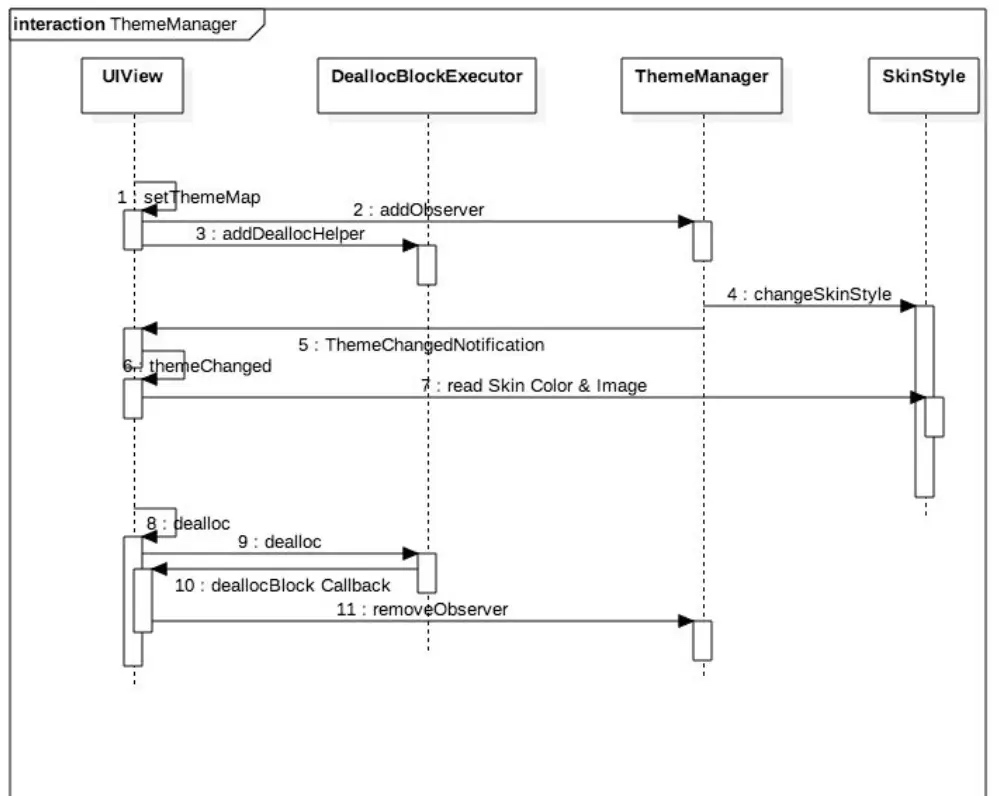
原来的换肤 Demo:所有操作都在 setter 里,无需 dealloc。把它用到 CYLTabBarController(假设它已依赖本库):监听与移除配对、深色模式变化时重新换肤、换肤后让只执行一次的布局 block 重新执行。六个平台的写法见 docs/Scenario-Theme-CYLTabBarController.md。 |
The original skin demo keeps everything in a setter, with no dealloc. Applied to CYLTabBarController (assuming it already depends on this library): pair the observer with its removal, re-apply the skin on dark-mode changes, and let the one-time layout block run once more after a skin change. The shape on all six platforms is in docs/Scenario-Theme-CYLTabBarController.md. |
var themeMap: [String: Any]? {
    get { objc_getAssociatedObject(self, &themeMapKey) as? [String: Any] }
    set {
        objc_setAssociatedObject(self, &themeMapKey, newValue, .OBJC_ASSOCIATION_COPY_NONATOMIC)
        guard let themeMap = newValue else {
            NotificationCenter.default.removeObserver(self, name: kThemeDidChangeNotification, object: nil)
            return
        }
        // the removal is paired with the add, replaced by key: setting the map twice keeps one block
        cylWillDealloc(key: "theme.removeObserver") { owner, _, _ in
            NotificationCenter.default.removeObserver(owner.takeUnretainedValue())
        }
        NotificationCenter.default.removeObserver(self, name: kThemeDidChangeNotification, object: nil)
        NotificationCenter.default.addObserver(self, selector: #selector(themeChanged(_:)), name: kThemeDidChangeNotification, object: nil)
        themeChanged(with: themeMap)
    }
}
| 中文 | English |
|---|---|
时序图从第 8 步开始看:本库从这里起作用。其他场景(KVO、模拟 weak、取代 flag、观察者比控制器活得久)见 docs/Usage-iOS.md。 |
In the sequence diagram start at step 8: that is where this library acts. The other scenarios (KVO, simulating weak, replacing flags, an observer that outlives its controller) are in docs/Usage-iOS.md. |
运行 Demo / Run the demo
| 中文 | English |
|---|---|
Example 演示自动换肤:用 UIView 的扩展管理皮肤,用通知触发,所有 addObserver 与 removeObserver 都在 setter 里。运行后点击屏幕换主题(背景)。CYLTabBarControllerTestDemo 演示没有 flag 的 KVO。 |
Example shows automatic skin switching: a UIView extension manages the skin, a notification triggers it, and every addObserver / removeObserver is in the setter. Tap the screen to change the theme (background). CYLTabBarControllerTestDemo shows KVO without a flag. |
Posted by 微博@iOS程序犭袁 原创文章,版权声明:自由转载-非商用-非衍生-保持署名 | Creative Commons BY-NC-ND 3.0
探索相关项目
加载中…