
BalestraPatrick/WhatsNew
BalestraPatrick/WhatsNew has 1,492 GitHub stars and 87 forks. GitHot measured 0 stars in 24 hours, 0 in 7 days, and -1 in 15 days. Last checked 2026-11-25 13:23 UTC. Last push 2019-05-10.
实测星标增长
- 24小时
- 0
- 7天
- 0
- 15天
- -1
- 1个月
- 正在收集历史
各周期内的星标净变化,周期相互重叠,并非每日新增。缺失的测量保持空白。星标代表关注度,不代表软件质量。
关于
在应用更新后展示新功能,类似 Pages、Numbers 和 Keynote。
开发工具README.md
原文WhatsNew


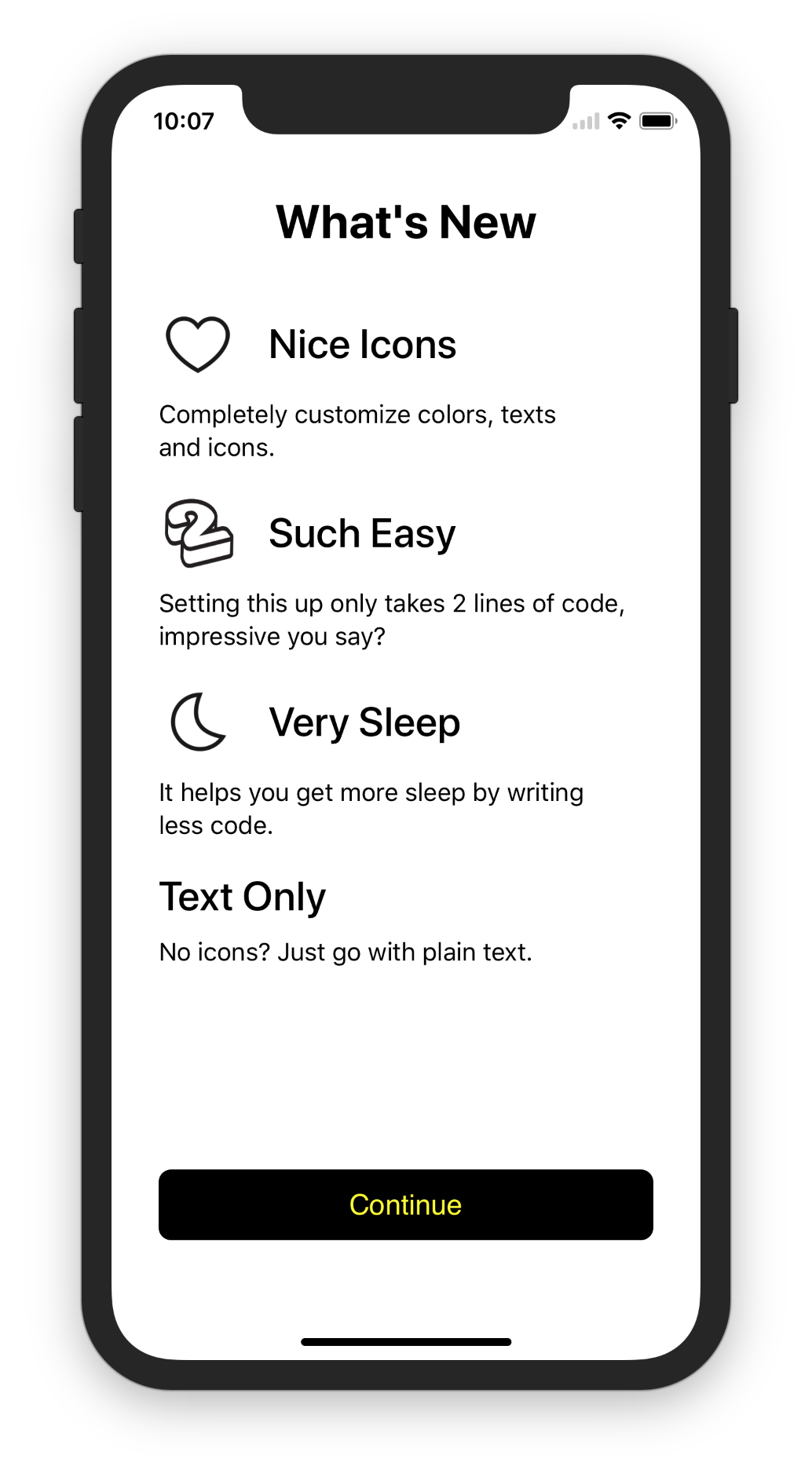
Description
WhatsNew automatically displays a short description of the new features when users update your app. This is similar to what happens in Apple's apps like Pages, Numbers, Keynote, iMovie and TestFlight.
Simply list your new features (with optional icons), customize the appeareance and when to show it (only on major updates for example).
Usage
Run the example project from the Example directory and check out ViewController.swift.
import WhatsNew

let whatsNew = WhatsNewViewController(items: [
	WhatsNewItem.image(title: "Nice Icons", subtitle: "Completely customize colors, texts and icons.", image: #imageLiteral(resourceName: "love")),
	WhatsNewItem.image(title: "Such Easy", subtitle: "Setting this up only takes 2 lines of code, impressive you say?", image: #imageLiteral(resourceName: "threed")),
	WhatsNewItem.image(title: "Very Sleep", subtitle: "It helps you get more sleep by writing less code.", image: #imageLiteral(resourceName: "night")),
	WhatsNewItem.text(title: "Text Only", subtitle: "No icons? Just go with plain text."),
])
whatsNew.presentIfNeeded(on: self)
Some of the apps using WhatsNew in production are:
If you're using WhatsNew in your app, please let me know and I will make sure to add it to the list of apps that use this library!
Customizations
There are a bunch of customizable properties with corresponding documentation.
/// This method allows marking the current version as presented. This is useful in case you want to avoid showing WhatsNew to first-time users for example.
public static func markCurrentVersionAsPresented()

/// Defines when to present the What's New view controller. Check the `PresentationOption` enum for more details.
public var presentationOption: PresentationOption = .always

/// Closure invoked when the user dismisses the view controller.
public var onDismissal: (() -> Void)?

/// Text of the top title.
public var titleText: String = "What’s New"

/// Color of the top title.
public var titleColor: UIColor = .black

/// Font of the top title.
public var titleFont: UIFont = UIFont.systemFont(ofSize: 26, weight: .bold)

/// Title color of the feature items.
public var itemTitleColor: UIColor = .black

/// Subtitle color of the feature items.
public var itemSubtitleColor: UIColor = .black

/// Title font of the feature items
public var itemTitleFont: UIFont = UIFont.systemFont(ofSize: 20, weight: .bold)

/// Subtitle font of the feature items
public var itemSubtitleFont: UIFont = UIFont.systemFont(ofSize: 16, weight: .regular)

/// Text of the bottom button that dismisses the view controller.
public var buttonText: String = "Continue"

/// Text color of the bottom button that dismisses the view controller.
public var buttonTextColor: UIColor = .yellow

/// Text font of the bottom button that dismisses the view controller.
public var buttonFont: UIFont = UIFont.systemFont(ofSize: 16, weight: .regular)

/// Background color of the bottom button that dismisses the view controller.
public var buttonBackgroundColor: UIColor = .black
Installation
WhatsNew is available through CocoaPods. To install
it, simply add the following line to your Podfile:
pod 'WhatsNew'
You can also use Carthage if you prefer. Add this line to your Cartfile.
github "BalestraPatrick/WhatsNew"
Android version available here.
Requirements
iOS 9.0 and Swift 4.0 are required.
Author
I'm Patrick Balestra. Email: [email protected] Twitter: @BalestraPatrick.
License
WhatsNew is available under the MIT license. See the LICENSE file for more info.
探索相关项目
加载中…