
BVantur/inspektify
BVantur/inspektify has 250 GitHub stars and 11 forks. GitHot measured 0 stars in 24 hours. Last checked 2026-11-21 20:42 UTC. Last push 2026-08-28.
实测星标增长
- 24小时
- 0
- 7天
- 正在收集历史
- 15天
- 正在收集历史
- 1个月
- 正在收集历史
各周期内的星标净变化,周期相互重叠,并非每日新增。缺失的测量保持空白。星标代表关注度,不代表软件质量。
关于
KMP library for Android, iOS and Desktop targets for observing real-time network traffic of the app
开发工具README.md
原文





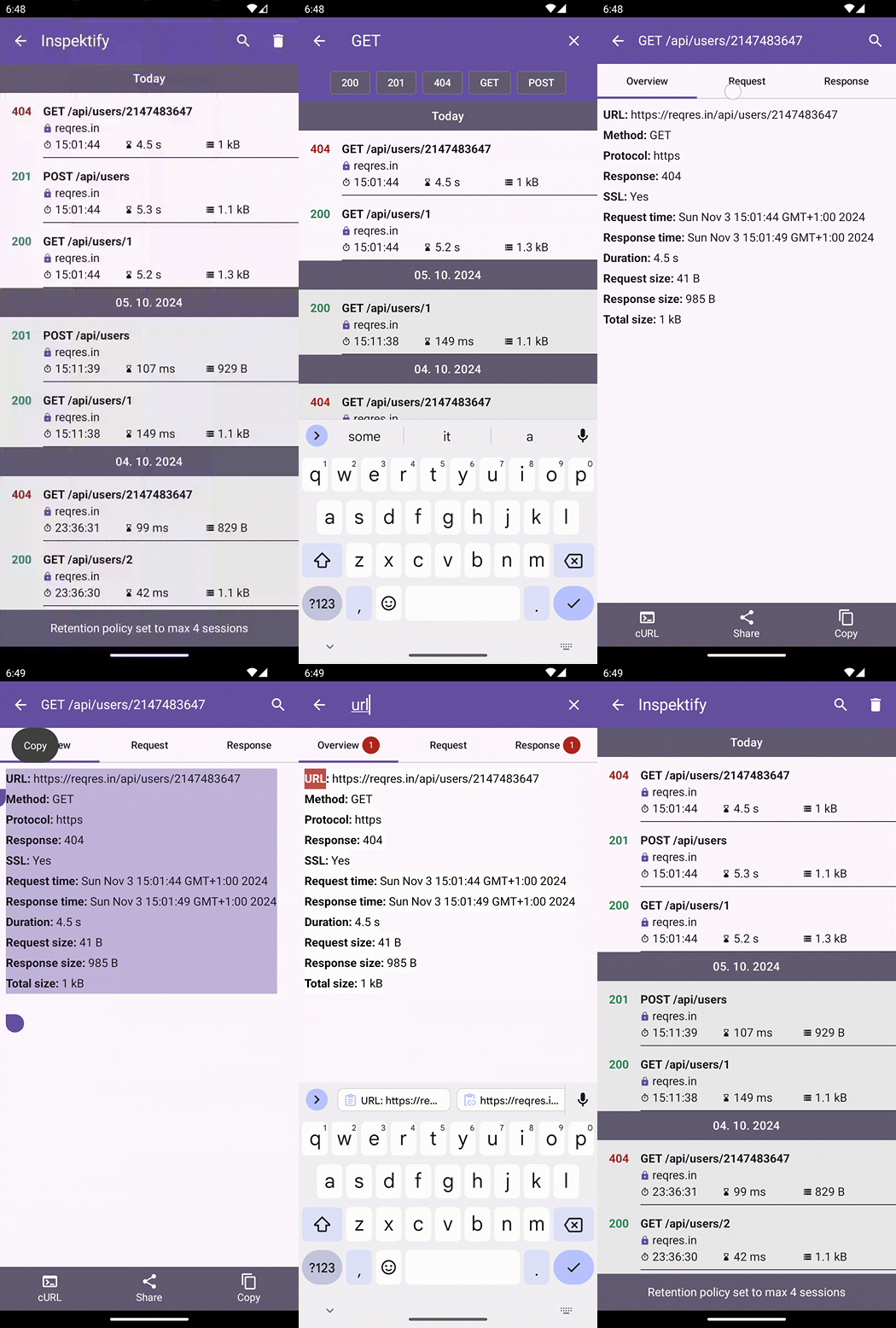
Inspektify is Kotlin Multiplatform Library for iOS, Android and Desktop platforms. It allows you to observe the network of your application in real-time directly on your device.
Getting started
This library can be used only on projects that are using Ktor for network communication. If there is a need to support a different networking library besides Ktor open an issue for it. Inspektify is supported only for projects that are using the Ktor library equal to or greater than 2.3.1.
1. Gradle
This library is available on mavenCentral. To use it in your project add the following repository if you don't have it yet.
repositories {
    ...
    mavenCentral()
}
Ktor 3.x.x
If your project is using Ktor version in the 3.x.x family add Inspektify with this line:
commonMain.dependencies {
    ...
    implementation("io.github.bvantur:inspektify-ktor3:{mavenVersion}")
}
Ktor 2.3.1 - 3.0.0
If your project is using Ktor version between 2.3.1 and 3.0.0 add Inspektify with this line:
commonMain.dependencies {
    ...
    implementation("io.github.bvantur:inspektify-ktor2:{mavenVersion}")
}
No-op variant (Android projects)
Each artifact has a matching no-op variant that exposes the exact same API but does nothing at runtime. Android projects can swap the dependency per build type with no code changes required:
// Ktor 3.x.x
dependencies {
    debugImplementation("io.github.bvantur:inspektify-ktor3:{mavenVersion}")
    releaseImplementation("io.github.bvantur:inspektify-ktor3-no-op:{mavenVersion}")
}

// Ktor 2.3.1 - 3.0.0
dependencies {
    debugImplementation("io.github.bvantur:inspektify-ktor2:{mavenVersion}")
    releaseImplementation("io.github.bvantur:inspektify-ktor2-no-op:{mavenVersion}")
}
See Excluding Inspektify from Release Builds for
the full guide, including the if (isDebug()) approach for KMP projects.
iOS target
Depending on your project setting there are 2 different ways that need to be done to make it work on iOS target.
Static Framework (isStatic = true)
If your iOS targets are set as static you need to follow the next steps:
- Open your iOS project in Xcode
- Select your root element in your iOS project directory tree(usually named with iosApp by default)
- Select your TARGET
- Go to Build Settings
- Search for Other Linker Flags
- Add
-lsqlite3to it
Dynamic Framework (isStatic = false)
If your iOS targets are set to be dynamic, then it is necessary to add this additional gradle configuration to your project:
iosTarget.binaries.all {
  linkerOpts("-lsqlite3")
}
The sample project is currently configured as dynamic, so you can see how this approach can be implemented there.
2. Kotlin
You need to configure the library wherever you are creating a Ktor client in your project. Configuration follows the defined design of the Ktor library by installing a plugin directly to the Ktor client. The minimum code for including the Inspektify library in the project is:
HttpClient() {
    ...
    install(InspektifyKtor)
}
Additional configuration
This library was built with flexibility in mind. We don't want to force the behavior of the library upon the developer who uses this library, so we implemented a couple of configurations for the library to make it more flexible. The library also tracks which network transactions are from current active app sessions and highlights them in the list with a different background color. Network transactions from previous sessions have a background in light gray color.
- Auto detect configuration
- Log level
- Data retention policy
- Shortcut for mobile clients
- Excluding Inspektify from Release Builds
- Redact data from Inspektify
- Ignore endpoints configuration
- Payload too large policy
- Extensions
- Request tags
Sample project
A sample project is included where you can test the behavior of the Inspektify library. By default, the sample is configured to use Ktor from the 3.x.x family, but if you want to test with Ktor from 2.3.1 to 3.0.0 versions you need to change the next line in gradle.properties:
inspektify.ktorVersion=v2
API key setup
The sample app makes requests to reqres.in, which requires an API key.
- Create a free account and generate a key at https://app.reqres.in/api-keys
- Copy
secrets.properties.exampletosecrets.propertiesin the root of the project:cp secrets.properties.example secrets.properties - Open
secrets.propertiesand replace the placeholder with your key:reqres.api.key=your_reqres_api_key_here
secrets.properties is gitignored and will never be committed.
Contact me

Sponsor my work

探索相关项目
加载中…