项目 在 GitHub 查看
BCsl/GalleryLayoutManager
BCsl/GalleryLayoutManager has 1,010 GitHub stars and 145 forks. GitHot measured 0 stars in 24 hours, -1 in 7 days, and -1 in 15 days. Last checked 2026-11-25 00:15 UTC. Last push 2022-08-23.
实测星标增长
- 24小时
- 0
- 7天
- -1
- 15天
- -1
- 1个月
- 正在收集历史
各周期内的星标净变化,周期相互重叠,并非每日新增。缺失的测量保持空白。星标代表关注度,不代表软件质量。
关于
在 Android 中使用 RecyclerView 实现 ViewPager/Gallery 的新方法
开发工具README_CN.md
原文GalleryLayoutManager
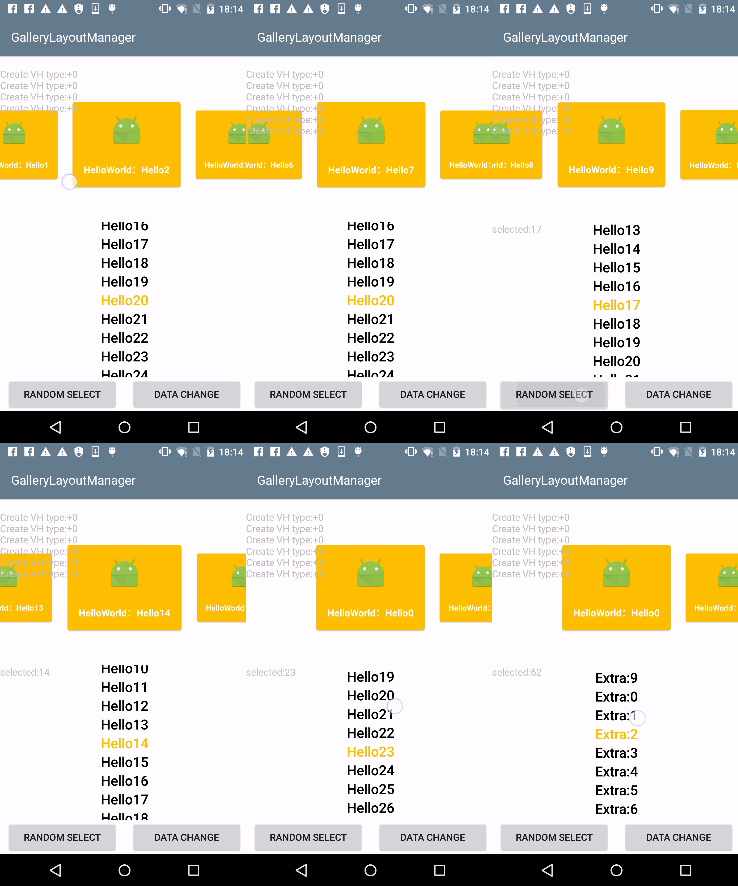
使用自定义 LayoutManager 实现 Android 中 Gallery 或者 ViewPager 控件的效果,支持垂直和水平两个方向,支持 RecycleView 的试图回收机制
效果

使用方法
1、添加依赖
Gradle
implementation 'github.hellocsl:GalleryLayoutManager:{latest-release-version}'
2、代码
基本使用
不要使用 RecycleView#setLayoutManager 方法,而是使用 GalleryLayoutManager#attach 方法来绑定RecycleView 和 GalleryLayoutManager
GalleryLayoutManager layoutManager = new GalleryLayoutManager(GalleryLayoutManager.HORIZONTAL);
//layoutManager.attach(mPagerRecycleView);  // 默认选中位置为0
//不要使用 RecycleView#setLayoutManager 方法,而是使用 GalleryLayoutManager#attach 方法
layoutManager.attach(mPagerRecycleView, 30);

//...
//为 RecycleView 绑定 adapter
mPagerRecycleView.setAdapter(imageAdapter);
监听 Item 选中
//添加视图选中监听
layoutManager.setOnItemSelectedListener(new GalleryLayoutManager.OnItemSelectedListener() {
    @Override
    public void onItemSelected(RecyclerView recyclerView, View item, int position) {
        //.....
    }
});
和 ViewPager 一样添加Item转换器
继承实现 GalleryLayoutManager.ItemTransformer
public class ScaleTransformer implements GalleryLayoutManager.ItemTransformer {

    @Override
    public void transformItem(GalleryLayoutManager layoutManager, View item, float fraction) {
        item.setPivotX(item.getWidth() / 2.F);
        item.setPivotY(item.getHeight() / 2.F);
        float scale = 1 - 0.3F * Math.abs(fraction);
        item.setScaleX(scale);
        item.setScaleY(scale);
    }
}
//添加 Item 转换器,和 ViewPager 一样使用
layoutManager.setItemTransformer(new ScaleTransformer());
License
Copyright [2017] [Hello Csl]

Licensed under the Apache License, Version 2.0 (the "License"); you may not use this file except in compliance with the License. You may obtain a copy of the License at

<http://www.apache.org/licenses/LICENSE-2.0>

Unless required by applicable law or agreed to in writing, software distributed under the License is distributed on an "AS IS" BASIS, WITHOUT WARRANTIES OR CONDITIONS OF ANY KIND, either express or implied. See the License for the specific language governing permissions and limitations under the License.
探索相关项目
加载中…