项目 在 GitHub 查看
Aspsine/MultiThreadDownload
关于
Android 多线程下载库
开发工具实测星标增长
- 24小时
- 0
- 7天
- 0
- 15天
- 正在收集历史
- 1个月
- 正在收集历史
各周期内的星标净变化,周期相互重叠,并非每日新增。缺失的测量保持空白。星标代表关注度,不代表软件质量。
README.md
原文MultiThreadDownload
Android Multi-Thread Download library.
Note
The lib hasn't been fully tested and released yet. If you find some bugs, welcome to post issues to me.
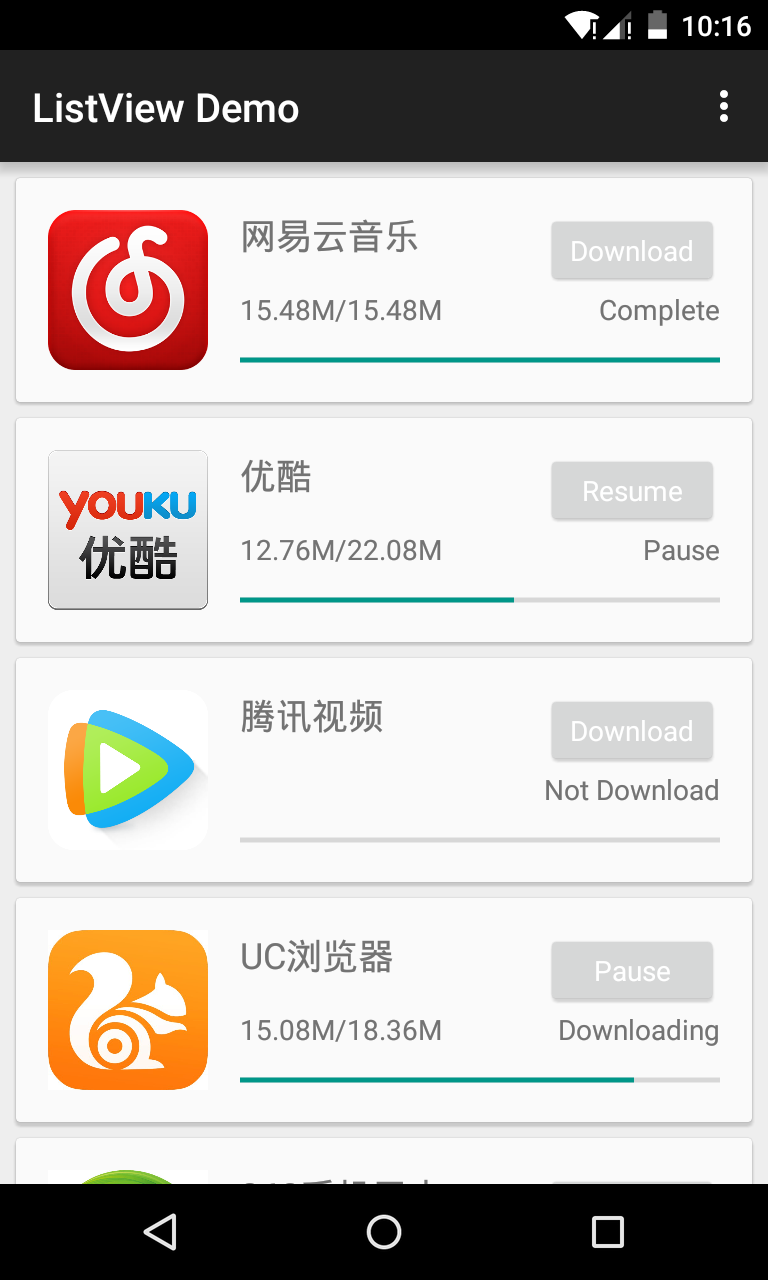
Demo
Demo ScreenShot
How to use
- Step 1: Add permission in 'AndroidManifest.xml'
<uses-permission android:name="android.permission.INTERNET" />
<uses-permission android:name="android.permission.WRITE_EXTERNAL_STORAGE" />
- Step 2: Add "compile project(':library')" in your 'build.gradle' file.(Maven or jCenter support will be coming soon)
- Step 3: Config it in your Application class
private void initDownloader() {
    DownloadConfiguration configuration = new DownloadConfiguration();
    configuration.setMaxThreadNum(10);
    configuration.setThreadNum(3);
    DownloadManager.getInstance().init(getApplicationContext(), configuration);
}
- Step 4: Just use it!
// first: build a DownloadRequest:
final DownloadRequest request = new DownloadRequest.Builder()
            .setName(appInfo.getName() + ".apk")
            .setUri(appInfo.getUrl())
            .setFolder(mDownloadDir)
            .build();

// download:
// the tag here, you can simply use download uri as your tag;
DownloadManager.getInstance().download(request, tag, new CallBack() {
    @Override
    public void onStarted() {

    }

    @Override
    public void onConnecting() {

    }

    @Override
    public void onConnected(long total, boolean isRangeSupport) {

    }

    @Override
    public void onProgress(long finished, long total, int progress) {

    }

    @Override
    public void onCompleted() {

    }

    @Override
    public void onDownloadPaused() {

    }

    @Override
    public void onDownloadCanceled() {

    }

    @Override
    public void onFailed(DownloadException e) {

    }
});

//pause
DownloadManager.getInstance().pause(tag);

//pause all
DownloadManager.getInstance().pauseAll();

//cancel
DownloadManager.getInstance().cancel(tag);

//cancel all
DownloadManager.getInstance().cancelAll();

//delete
DownloadManager.getInstance().delete(tag);
Contributing
If you would like to contribute code you can do so through GitHub by forking the repository and sending a pull request.
Thanks
- link: http://www.imooc.com/learn/363
- Google Volley.
Contact Me
- Github: github.com/aspsine
- Email: [email protected]
- Linkedin: cn.linkedin.com/in/aspsine
License
Copyright 2015 Aspsine. All rights reserved.

Licensed under the Apache License, Version 2.0 (the "License");
you may not use this file except in compliance with the License.
You may obtain a copy of the License at

    http://www.apache.org/licenses/LICENSE-2.0

Unless required by applicable law or agreed to in writing, software
distributed under the License is distributed on an "AS IS" BASIS,
WITHOUT WARRANTIES OR CONDITIONS OF ANY KIND, either express or implied.
See the License for the specific language governing permissions and
limitations under the License.
探索相关项目
加载中…