
AirtestProject/Airtest
AirtestProject/Airtest has 9,645 GitHub stars and 1,457 forks. GitHot measured 0 stars in 24 hours and +8 in 7 days. Last checked 2026-11-11 21:58 UTC. Last push 2026-03-23.
UI Automation Framework for Games and Apps
可以做什么
- Write Once, Run Anywhere: Airtest provides cross-platform APIs, including app installation, simulated input, assertion and so forth. Airtest uses image recognition technology to locate UI elements so that you can automate games and apps without injecting any code.
- Fully Scalable: Airtest cases can be easily run on large device farms, using commandline or python API. HTML reports with detailed info and screen recording allow you to quickly locate failure points. NetEase builds Airlab on top of the Airtest Project.
- AirtestIDE: AirtestIDE is an out of the box GUI tool that helps to create and run cases in a user-friendly way. AirtestIDE supports a complete automation workflow: create -> run -> report.
- Poco: Poco adds the ability to directly access object(UI widget) hierarchy across the major platforms and game engines. It allows writing instructions in Python, to achieve more advanced automation.
实测星标增长
- 24小时
- 0
- 7天
- +8
- 15天
- 正在收集历史
- 1个月
- 正在收集历史
各周期内的星标净变化,周期相互重叠,并非每日新增。缺失的测量保持空白。星标代表关注度,不代表软件质量。
README_zh.md
原文Airtest · 
跨平台的UI自动化框架,适用于游戏和App
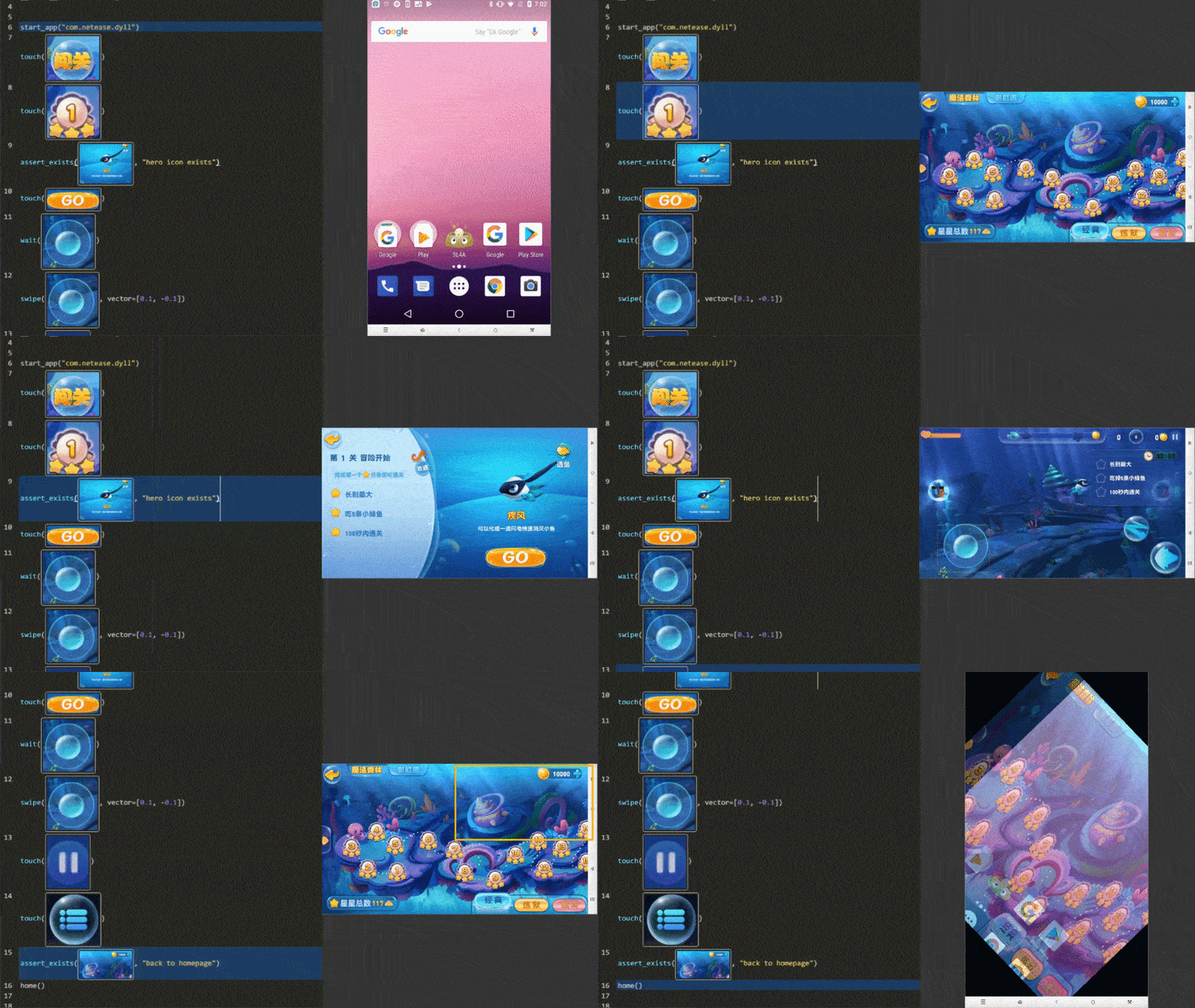
快速开始
各种运行: Airtest提供了跨平台的API,包括安装应用、模拟输入、断言等。 基于图像识别技术定位UI元素,你无需嵌入任何代码即可进行自动化。
扩展性: Airtest提供了命令行和python接口,可以很容易地在大规模设备集群上运行。自动生成的HTML报告,包含详细步骤和录屏,让你迅速定位失败点。
AirtestIDE: 是一个强大的GUI工具,可以帮助你录制和调试自动化脚本。 AirtestIDE支持了完整的自动化流程:
录制脚本->真机回放->生成报告。Poco: Poco 框架可以直接访问UI控件,支持主流平台和游戏引擎。通过Python API操作UI控件,可以实现更强大的自动化控制。
跨平台支持
安装
使用 pip 安装Airtest框架
pip install -U airtest
在Mac/Linux系统下,需要手动赋予adb可执行权限
# mac系统
cd {your_python_path}/site-packages/airtest/core/android/static/adb/mac
# linux系统
# cd {your_python_path}/site-packages/airtest/core/android/static/adb/linux
chmod +x adb
如果你需要使用GUI工具,请从 官网 下载AirtestIDE。
文档
完整的Airtest文档请看 readthedocs。
例子
Airtest希望提供平台无关的API,让你的自动化代码可以运行在不同平台的应用上。
- 使用 connect_device 来连接任意Android设备或者Windows窗口。
- 使用 模拟操作 的API来自动化你的游戏或者App。
- 不要 忘记 声明断言 来验证结果。
from airtest.core.api import *

# 通过ADB连接本地Android设备
init_device("Android")
# 或者使用connect_device函数
# connect_device("Android:///")
connect_device("Android:///")
install("path/to/your/apk")
start_app("package_name_of_your_apk")
touch(Template("image_of_a_button.png"))
swipe(Template("slide_start.png"), Template("slide_end.png"))
assert_exists(Template("success.png"))
keyevent("BACK")
home()
uninstall("package_name_of_your_apk")
更详细的说明请看 Airtest Python API 文档 或者直接看 API代码 。
用命令行运行 .air 脚本
使用AirtestIDE你可以非常轻松地录制一个自动化脚本并保存为 .air 目录结构。
Airtest命令行则让你能够脱离IDE,在不同宿主机器和被测设备上运行自动化脚本。
# 在本地ADB连接的安卓手机上运行脚本
airtest run "path to your air dir" --device Android:///

# 在Windows应用上运行脚本
airtest run "path to your air dir" --device "Windows:///?title_re=Unity.*"

# 生成HTML报告
airtest report "path to your air dir"

# 也可以用python -m的方式使用命令行
python -m airtest run "path to your air dir" --device Android:///
试试样例airtest/playground/test_blackjack.air,更多用法看命令行用法。
贡献代码
欢迎大家fork和提pull requests。
致谢
感谢以下仓库让Airtest变得更好:
关于我们
访问我们的官网获得更多信息,同时欢迎大家扫描下方二维码关注我们的微信公众号:AirtestProject

探索相关项目
n8n-io/n8n
具备原生 AI 能力的 Fair-code 工作流自动化平台。可将可视化构建与自定义代码相结合,支持自行部署或使用云服务,并提供 400 多种集成。
210,229 星标langgenius/dify
在同一个协作工作区中构建智能体工作流和 RAG 流水线,并提供丰富的 AI 模型与工具支持。可部署到云端、VPC 或自行部署,团队无需重建技术栈即可从原型进入生产。
160,951 星标microsoft/PowerToys
Microsoft PowerToys 是一组提升 Windows 生产力和自定义能力的实用工具
140,888 星标stablyai/orca
Orca 是使用智能体集群开展工作的地方(例如 Grok Bot、Claude Code)。可使用你自己的订阅运行任意编程智能体。支持桌面端、移动端和远程运行时。
122,533 星标