
bearlyai/OpenADE
Sobre
Agentic Development Environment for Devs Who Don't Ship Slop
Ferramentas de desenvolvimentoCrescimento medido de estrelas
- em 24 h
- 0
- em 7 dias
- 0
- em 15 dias
- Coletando histórico
- em 1 mês
- Coletando histórico
Variações líquidas em períodos sobrepostos, não totais diários. Medições ausentes ficam em branco. Estrelas indicam interesse, não qualidade.
README.md
Original

OpenADE
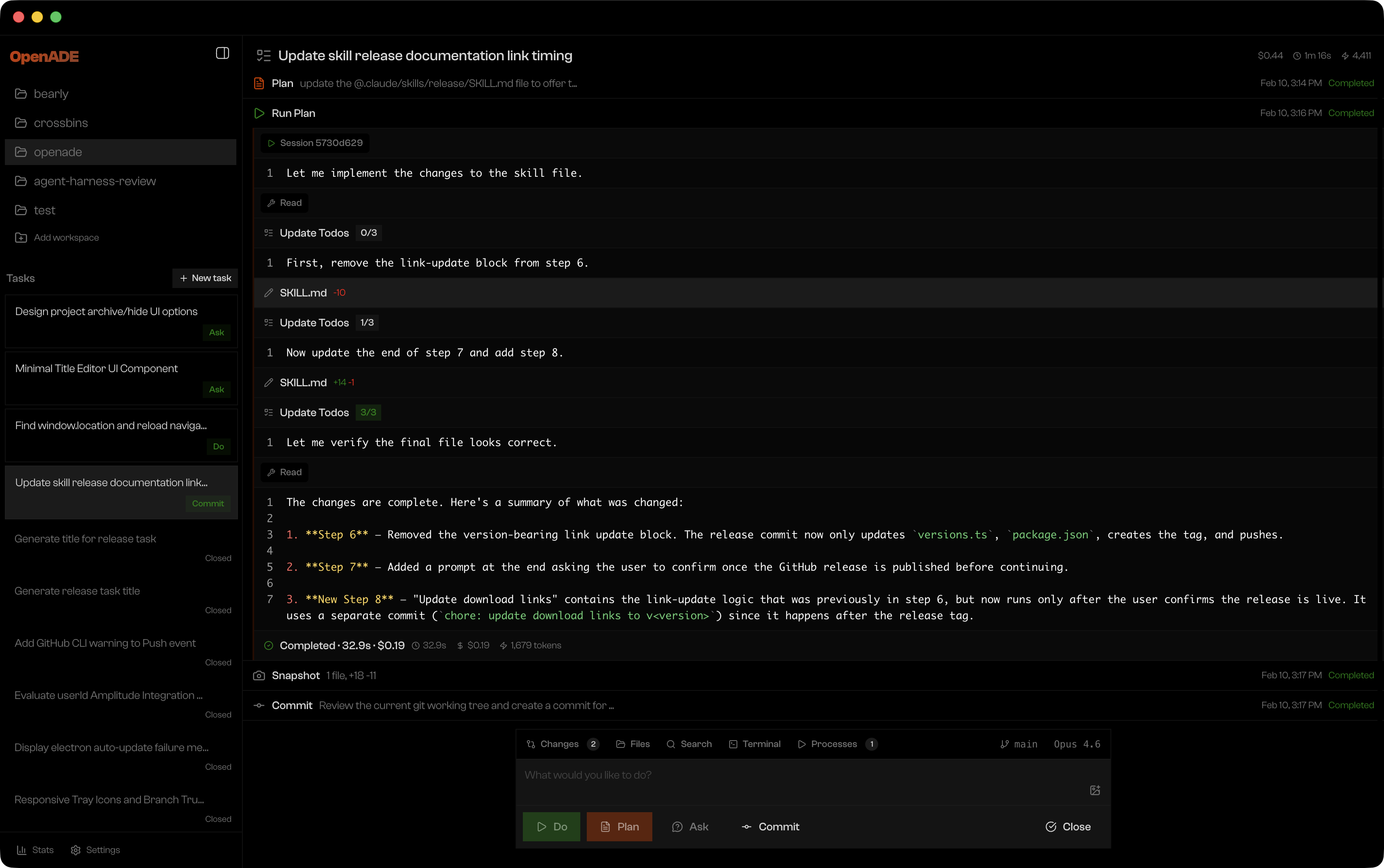
Agentic Development Environment for Devs Who Don't Ship Slop
100% Free & Open Source · Powered by Claude Code & Codex




Website • Features • Why OpenADE • Download • Contributing • Discord
Download


🪟 Windows (Experimental)
Windows support is early and largely untested — you will likely hit rough edges. If you're patient and willing to report bugs, we'd love your help shaking things out:

Tip: For a more reliable experience on Windows, you can run the Linux build inside WSL (Windows Subsystem for Linux) instead.
Why OpenADE?
Most AI coding tools throw agents at your codebase and hope for the best. You end up babysitting, fixing hallucinations, and wondering if the "AI-assisted" code is actually worse than writing it yourself.
OpenADE takes a different approach: Plan → Revise → Execute.
By spending time upfront to craft and refine your implementation plan, you can run agents linearly with confidence. No more context-switching. No more "wait, what did it just do?" moments. Just saturated throughput and maximal work done.
We built this as a side project at Bearly AI over a few weeks—within days it was building itself. The ability to drill down on plans makes agent execution feel almost deterministic. It killed todo lists for us—we just fire off initial plans and come back when we're ready. It's now 90% of our screen time, replacing our IDE and terminal.
Features
🎯 Plan → Revise → Do Workflow
Describe your task, get a detailed implementation plan, refine it with inline comments, then execute with a single click. Your agents work from a shared understanding—not vibes.
⚡ HyperPlan — Multi-Agent Planning
Run multiple AI agents in parallel — even across providers — then reconcile their plans into one. Choose Ensemble or Cross-Review strategies to get the best plan before executing.
💬 Comment on Anything
Files, diffs, changes, agent messages—everything is commentable. Point the agent directly at what you want to fix or improve. Type less, iterate faster, ship better.
🖥️ Built for Terminal Lovers
Information-dense, text-heavy, sharp corners, great syntax colors. If you love the terminal aesthetic, you'll feel right at home.
🔌 MCP Servers & Connectors
First-class support for 15+ integrations out of the box: Linear, Notion, Asana, Stripe, Vercel, GitHub, and more. Bring your whole workflow into the loop.
🔒 100% Local & Offline
Your code never leaves your machine. No cloud. No syncing to someone else's servers. Works without an internet connection.
Telemetry: Optional anonymous telemetry. Easily disabled in settings.
⌨️ Thoughtful UX
- Beautiful drafting input with rich text and @ mentions
- Single-key actions for common workflows
- @ file references, skills, and slash commands
🗂️ IDE Essentials Built In
Diff viewer, file browser, fast search, full terminal, and process manager—all without leaving the app.
💸 100% Free — No Catch
No subscription. No per-seat licensing. No payment to us, ever. OpenADE is free, open-source software. You just need your own Claude Code or Codex API access.
🔀 Multi-Harness: Claude Code & Codex
Switch between Claude Code and OpenAI Codex as your execution engine. Same UI, same workflow, different models under the hood.
⚡ Fast & Lean
Snappy & Clean. We use the app 8+ hours a day so we make sure it is.
📸 Automated Git Snapshots
Every execution creates a patch snapshot. Rollback to any point with a click. Never lose work.
🌳 Worktree Support
Isolate experiments in git worktrees. Keep your main branch clean while agents explore.
🔔 Notifications
Fire off a task, go scroll X and TikTok, get pinged when it's done. We don't judge.
📊 Usage Stats & Scoreboards
Track your throughput. See what's working. Optimize your flow.
🎨 Fully Themeable
Dark, light, synthwave, or roll your own. Make it yours.
🛠️ Make It Your Own
Clean architecture. TypeScript throughout. MobX state management. Built to be extended.
The Anti-Feature
You can't edit code directly in OpenADE.
We know, we know. Here's the thing: after working this way for a while, we've found that agents are fast at making small changes—and they respect your automations, docs, and conventions while doing it. Often they'll catch something you would have missed.
Let them cook. 🧑🍳
Download Links
| Platform | Download |
|---|---|
| macOS (Universal) | OpenADE-0.81.2-universal.dmg |
| Linux (arm64) | OpenADE-0.81.2-arm64.AppImage |
| Windows (Experimental) | OpenADE-Setup-0.81.2.exe |
Note: The Windows build is experimental and largely untested — expect rough edges. For a smoother experience, try running the Linux build via WSL.
Linux Wayland: OpenADE defaults Linux Wayland sessions to X11/XWayland for AppImage startup stability. To test native Wayland, launch with
OPENADE_LINUX_OZONE_PLATFORM=wayland.
Contributing
We'd love your help making OpenADE better.
Development
git clone [email protected]:bearlyai/OpenADE.git && cd OpenADE
cd projects/web && yarn && yarn start
cd projects/electron && yarn && yarn start
Or, if you're feeling meta: clone it, open it in OpenADE, and start the processes from there. 🔄
Community

Questions? Ideas? Found a bug? Come hang out.
License
MIT © Bearly AI
Explore projetos relacionados
Carregando…