
badoo/Chatto
Sobre
A lightweight framework to build chat applications, made in Swift
Ferramentas de desenvolvimentoO que você pode fazer
- Calculation of collection view changes and layout in background
- Supports pagination in both directions and autoloading
- Message count contention for fast pagination and rotation with thousands of messsages
- Accessory view revealing by swiping from right
Crescimento medido de estrelas
- em 24 h
- 0
- em 7 dias
- -1
- em 15 dias
- -1
- em 1 mês
- Coletando histórico
Variações líquidas em períodos sobrepostos, não totais diários. Medições ausentes ficam em branco. Estrelas indicam interesse, não qualidade.
README.md
OriginalChatto 



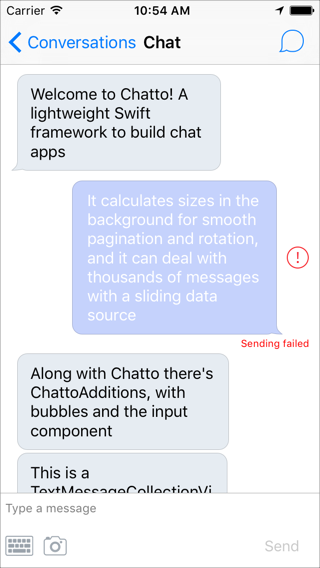
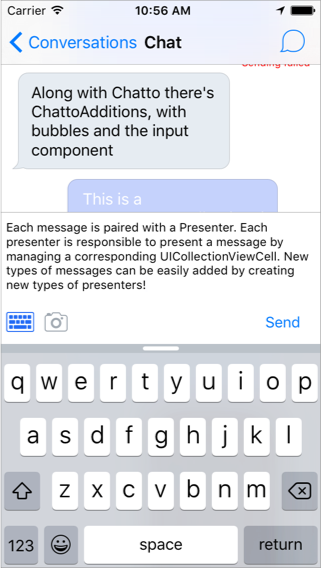
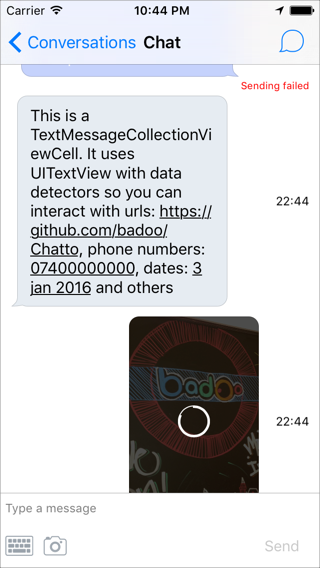
Chatto is a Swift lightweight framework to build chat applications. It's been designed to be extensible and performant. Along with Chatto there is ChattoAdditions, a companion framework which includes cells for messages and an extensible input component. You can find more details about how it was implemented in our blog. See them in action!

Features
- Calculation of collection view changes and layout in background
- Supports pagination in both directions and autoloading
- Message count contention for fast pagination and rotation with thousands of messsages
- Accessory view revealing by swiping from right
- Interactive keyboard dismissal
- Text bubbles
- Photo bubbles
- Extensible input bar
How to use
Check the wiki!
How to contribute
If you just have a question, please reach us in our gitter room
If you'd like to file a bug report, suggest changes or submit a pull request, please check our contribution guide
How to install
CocoaPods
Make sure
use_frameworks!is added to yourPodfile.Include the following in your
Podfile:
# Swift 5
pod 'Chatto', '= 4.1.0'
pod 'ChattoAdditions', '= 4.1.0' # if you want to use the cells or the input component
# Swift 4.2
pod 'Chatto', '= 3.4.0'
pod 'ChattoAdditions', '= 3.4.0' # if you want to use the cells or the input component
# Swift 4
pod 'Chatto', '= 3.3.1'
pod 'ChattoAdditions', '= 3.3.1' # if you want to use the cells or the input component
# Swift 3
pod 'Chatto', '= 3.2.0'
pod 'ChattoAdditions', '= 3.2.0' # if you want to use the cells or the input component
# Swift 2.x
pod 'Chatto', '= 2.1.0'
pod 'ChattoAdditions', '= 2.1.0' # if you want to use the cells or the input component
If you like living on the bleeding edge, you can use the master branch with:
pod 'Chatto', :git => 'https://github.com/badoo/Chatto', :branch => 'master'
pod 'ChattoAdditions', :git => 'https://github.com/badoo/Chatto', :branch => 'master'
- Run
pod install
Carthage
If you’re using Carthage, simply add Chatto to your Cartfile:
# Swift 5
github "badoo/Chatto"
# Swift 2.x
github "badoo/Chatto" "swift-2"
Manually
- Clone, add as a submodule or download.
- Drag and drop
Chattoand/orChattoAdditionsproject to your workspace - Add
Chattoand/orChattoAdditionsto Embedded binaries
License
Source code is distributed under MIT license.
Blog
Read more on our tech blog or explore our other open source projects
Explore projetos relacionados
Carregando…