
zywe03/realm-xwPF
zywe03/realm-xwPF has 1,309 GitHub stars and 184 forks. GitHot measured +2 stars in 24 hours and +13 in 7 days. Last checked 2026-11-12 01:16 UTC. Last push 2026-09-03.
Realm 全功能一键中转脚本,终端可视化界面构建网络转发服务.Realm: Full-featured one-click network relay — configure and manage forwarding rules from an interactive TUI.
Measured star growth
- in 24h
- +2
- in 7 days
- +13
- in 15 days
- Collecting history
- in 1 month
- Collecting history
Net star changes over overlapping periods, not daily totals. Missing measurements are left blank. Stars measure attention, not software quality.
docs/README_EN.md
OriginalRealm Full-Featured One-Click Network Forwarding Management — Pure Script Relay Server Setup
中文 | English | Port Traffic Dog Introduction
🚀 Network Forwarding Management Script — Tracks every feature of the latest official Realm release, network link testing, Port Traffic Dog, stays true to a minimalist core, visual rule management for maximum efficiency, built entirely with shell scripts
Script Interface Preview
Click to view interface screenshots
xwPF.sh Realm Forwarding Script
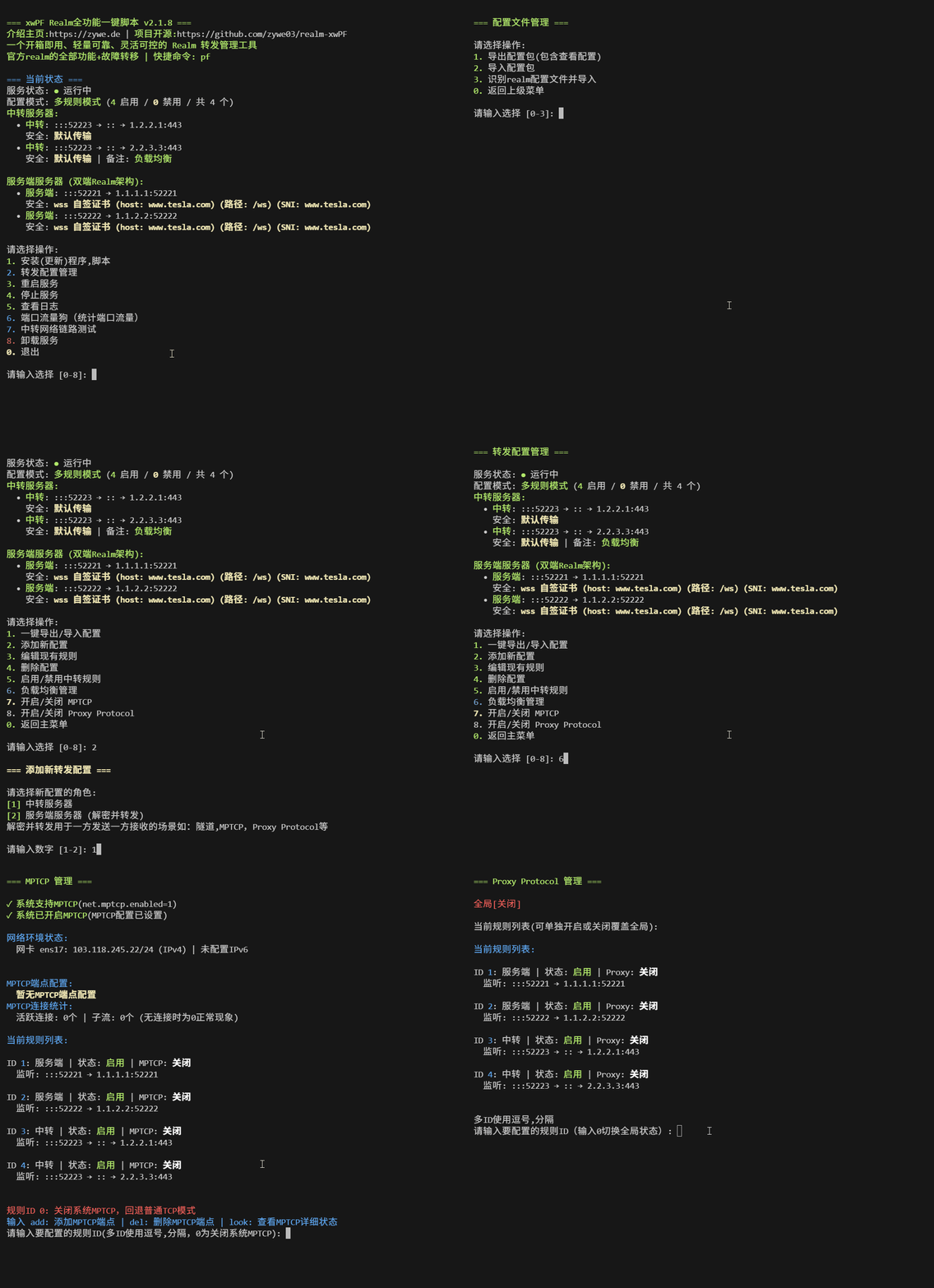
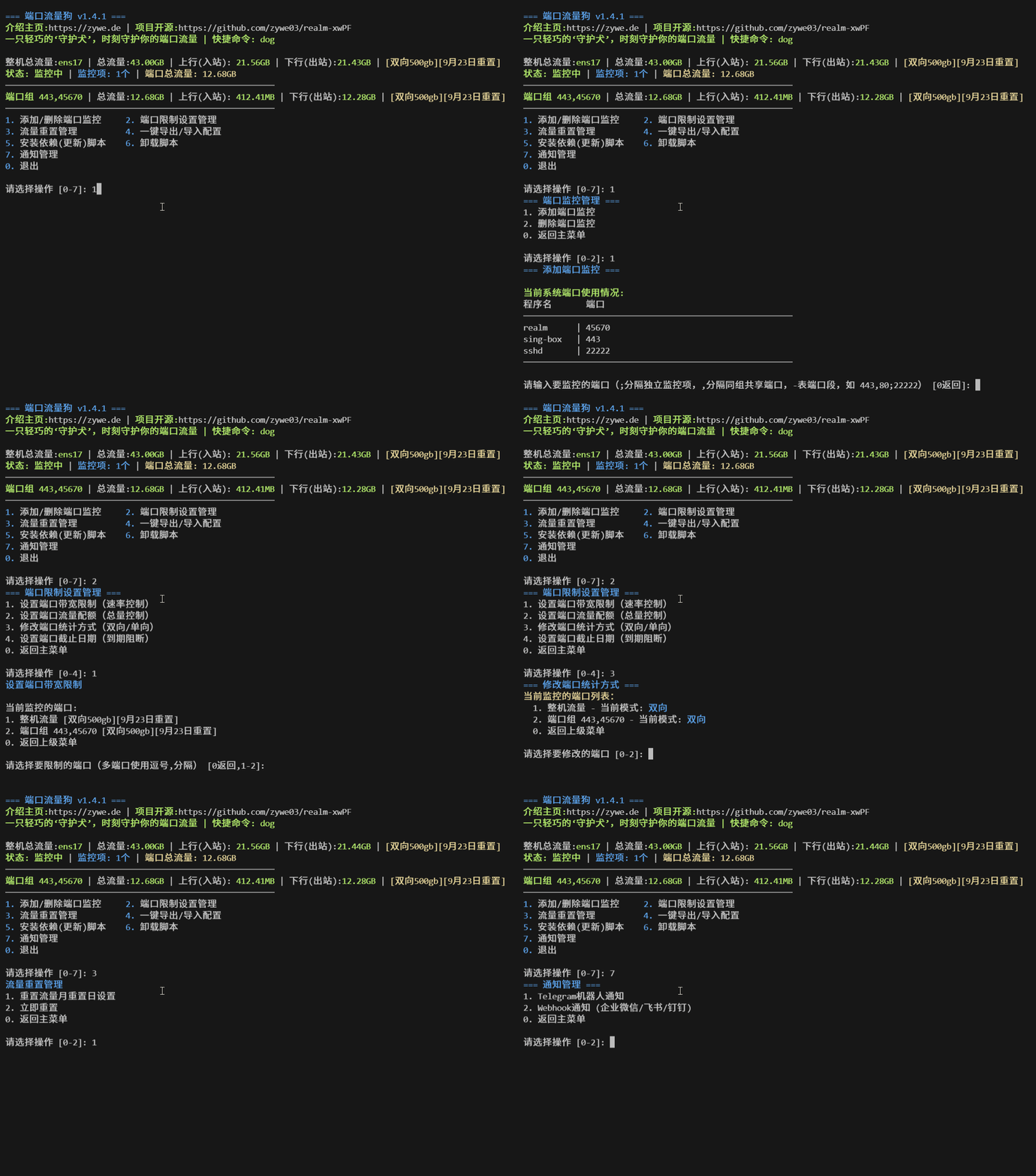
Port Traffic Dog
Relay Network Link Testing Script
===================== Network Link Test — Full Report =====================

✍️ Parameter Test Report
─────────────────────────────────────────────────────────────────
  Initiated from local machine (client)
  Target: 92.112.*.*:5201
  Direction: Client ↔ Server
  Duration per test: 30 seconds
  System: Debian GNU/Linux 12 | Kernel: 6.1.0-35-cloud-amd64
  Local: cubic+htb (congestion control + qdisc)
  TCP receive buffer (rmem): 4096   131072  6291456
  TCP send buffer (wmem): 4096   16384   4194304

🧭 TCP Large-Packet Route Analysis (via nexttrace)
─────────────────────────────────────────────────────────────────
 AS path: AS979 > AS209699
 ISP: Private Customer - SBC Internet Services
 Geo path: Japan > Singapore
 Map: https://assets.nxtrace.org/tracemap/b4a9ec9f-8b69-5793-a9b6-0cd0981d8de0.html
─────────────────────────────────────────────────────────────────
🌐 BGP Peering Analysis (via bgp.tools)
─────────────────────────────────────────────────────────────────
Upstreams: 9 │ Peers: 44

AS979       │AS21859     │AS174       │AS2914      │AS3257      │AS3356      │AS3491
NetLab      │Zenlayer    │Cogent      │NTT         │GTT         │Lumen       │PCCW

AS5511      │AS6453      │AS6461      │AS6762      │AS6830      │AS12956     │AS1299
Orange      │TATA        │Zayo        │Sparkle     │Liberty     │Telxius     │Arelion

AS3320
DTAG
─────────────────────────────────────────────────────────────────
 Image: https://bgp.tools/pathimg/979-55037bdd89ab4a8a010e70f46a2477ba7456640ec6449f518807dd2e
─────────────────────────────────────────────────────────────────
⚡ Link Parameter Analysis (via hping3 & iperf3)
─────────────────────────────────────────────────────────────────────────────────
    PING & Jitter             ⬆️ TCP Upload                        ⬇️ TCP Download
─────────────────────────  ─────────────────────────────  ─────────────────────────────
  Avg: 72.3ms              220 Mbps (27.5 MB/s)             10 Mbps (1.2 MB/s)
  Min: 69.5ms              Total transferred: 786 MB        Total transferred: 35.4 MB
  Max: 75.9ms              Retransmits: 0                   Retransmits: 5712
  Jitter: 6.4ms

─────────────────────────────────────────────────────────────────────────────────────────────
 Direction  │ Throughput               │ Packet Loss              │ Jitter
─────────────────────────────────────────────────────────────────────────────────────────────
 ⬆️ UDP Up   │ 219.0 Mbps (27.4 MB/s)    │ 2021/579336 (0.35%)       │ 0.050 ms
 ⬇️ UDP Down │ 10.0 Mbps (1.2 MB/s)      │ 0/26335 (0%)              │ 0.040 ms

─────────────────────────────────────────────────────────────────
Completed: 2025-08-28 20:12:29 | Source: https://github.com/zywe03/realm-xwPF
Quick Start
One-Click Install
wget -qO- https://raw.githubusercontent.com/zywe03/realm-xwPF/main/xwPF.sh | sudo bash -s install
Behind a Restricted Network? Use an Accelerated Mirror
wget -qO- https://v6.gh-proxy.org/https://raw.githubusercontent.com/zywe03/realm-xwPF/main/xwPF.sh | sudo bash -s install
If the mirror is down, retry a few times or switch to another proxy with built-in acceleration.
Offline Installation (No Internet Access)
Click to expand offline installation method
For servers with absolutely no network connectivity.
1. Download the following files on a machine that does have internet access
Main script: xwPF.sh
Module files (all required): https://github.com/zywe03/realm-xwPF/tree/main/lib
Realm binary (pick the one matching your architecture):
| Architecture | Typical Systems | Download Link | Detection |
|---|---|---|---|
| x86_64 | Standard 64-bit servers | realm-x86_64-unknown-linux-gnu.tar.gz | uname -m → x86_64 |
| aarch64 | ARM64 servers | realm-aarch64-unknown-linux-gnu.tar.gz | uname -m → aarch64 |
| armv7 | ARM32 (e.g. Raspberry Pi) | realm-armv7-unknown-linux-gnueabihf.tar.gz | uname -m → armv7l / armv6l |
2. Place the files on the target server
/usr/local/bin/            ← Script install directory (fixed path)
├── xwPF.sh                ← Main script
└── lib/                   ← Create this subdirectory
    ├── core.sh
    ├── rules.sh
    ├── server.sh
    ├── realm.sh
    └── ui.sh

~/                         ← Put the Realm tarball anywhere else
└── realm-xxx.tar.gz
3. Run the offline installation
chmod +x /usr/local/bin/xwPF.sh
ln -sf /usr/local/bin/xwPF.sh /usr/local/bin/pf
bash /usr/local/bin/xwPF.sh
Select 1. Install & Configure, then:
- When prompted Update script? (y/N): → Press Enter to skip (cannot update offline)
- When prompted Enter full path for offline Realm installation (press Enter to download automatically): → Provide the full path to the Realm tarball
✨ Core Features
Full Native Realm Feature Set — Tracks every feature in the latest Realm release
- TCP / UDP
- WS / WSS / TLS encryption, decryption, and forwarding
- Single relay → multiple exits
- Multiple relays → single exit
- Proxy Protocol
- MPTCP
- Bind specific entry or exit IP on the relay (for multi-IP, one-to-many, many-to-one)
- Bind specific entry or exit NIC on the relay (for multi-NIC setups)
- More at zhboner/realm
Multi-Distro Support — Works on Debian/Ubuntu, Alpine, CentOS/RHEL and derivatives, auto-detects package manager and init system (systemd / OpenRC)
Service Self-Healing — Auto-restart on crash for both systemd and OpenRC units, with a built-in breaker to prevent log-flooding on repeated crashes
Quick Start — One-click install, lightweight, get up and running with network forwarding fast
Smart Detection — Auto-detects system architecture, port conflicts, and connection availability
Forwarding Protocol Selection — Per-rule choice of pure TCP / pure UDP / dual-stack (both, default); pure UDP auto-downgrades to standard and skips WS/TLS selection (the TCP ConnectOpts on transport are invalid for pure UDP); status label shows [TCP] / [UDP], both shows no label
Tunnel Building — Dual-Realm architecture with TLS, WS, WSS tunnel support
Load Balancing — Round-robin, IP hash, and configurable weight distribution
Failover — Automatic failure detection using native system tools, keeping things lightweight
Rule Annotations — Clear labeling for every rule — no more memorizing port mappings
Port Traffic Dog — Per-port and whole-server traffic stats (whole-server enabled by default), port/whole-server rate limiting, throttling, with configurable notifications
Intuitive MPTCP Configuration — Clean, visual MPTCP interface
Network Link Testing — Measure latency, bandwidth, stability, and large-packet routing (powered by hping3, iperf3, nexttrace, bgp.tools)
One-Click Export — Bundle everything into a tarball for seamless migration (annotations and all)
One-Click Import — Recognize and restore from an exported bundle
Batch Import — Parse and import custom Realm rule configs for easy rule-set management
Clean Uninstall — Phased, thorough cleanup — "I leave as quietly as I came"
Architecture Diagrams — How It Works in Different Scenarios (Recommended Reading)
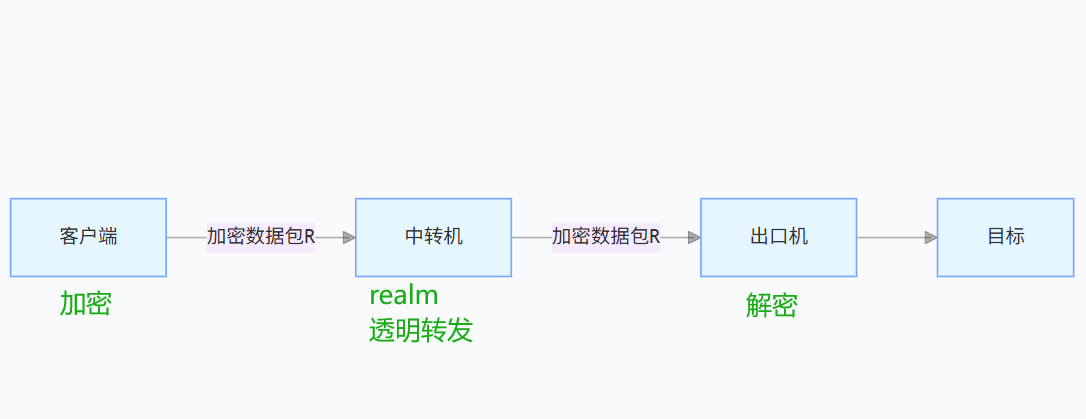
Single-End Realm: Forward-Only (Most Common)
The relay server runs Realm; the exit server runs your application.
Realm on the relay simply passes packets received on the configured listen IP:port straight through to the exit — encryption and decryption are handled entirely by the application on the exit server.
The encryption protocol for the entire link is therefore determined by the exit server's application.
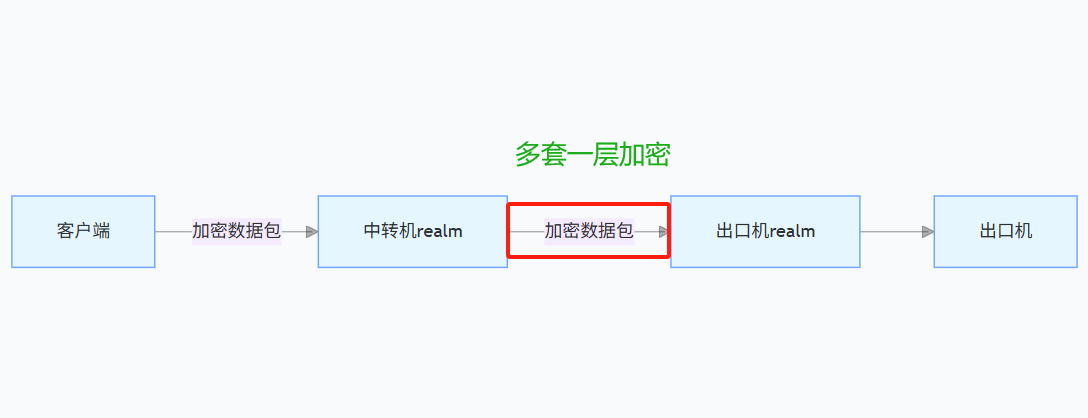
Dual-End Realm: Building Tunnels
The relay server runs Realm; the exit server runs both Realm and your application.
An extra Realm-to-Realm encrypted transport layer is added between the two Realm instances.
The relay's encryption type, SNI domain, etc. must match the exit server's — otherwise decryption will fail
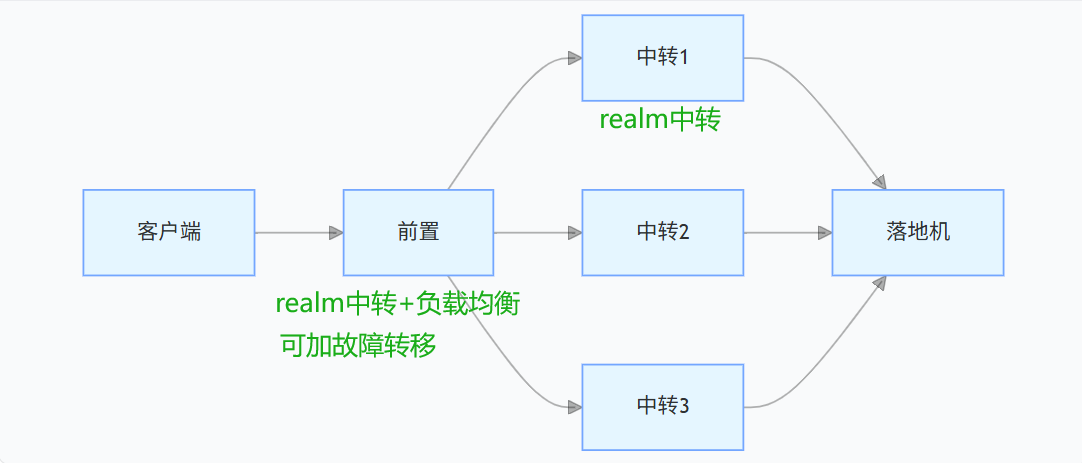
Load Balancing + Failover
Same port forwarding across multiple exit servers
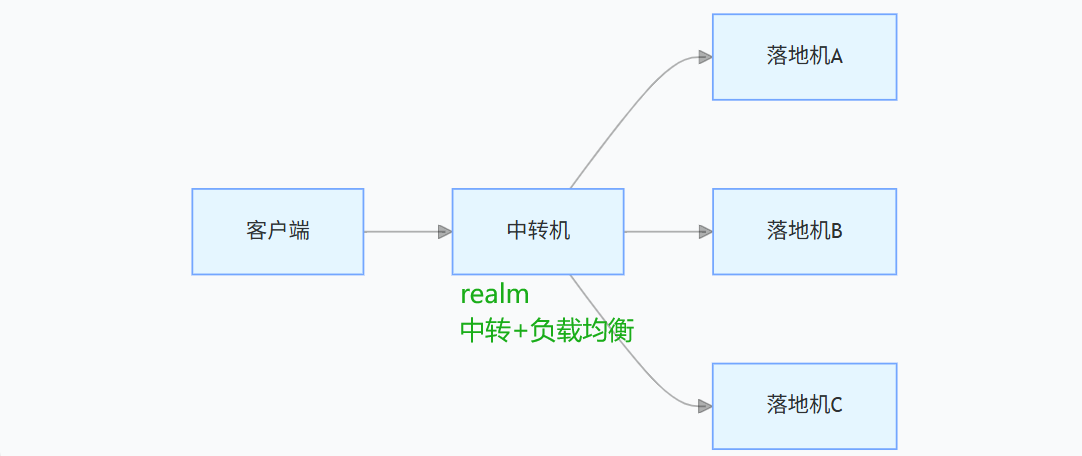
Frontend > Multiple Relays > Single Exit
Round Robinmode (roundrobin)
Continuously rotates traffic across exit servers in the rule group
IP Hashmode (iphash)
Routes traffic based on a hash of the source IP, ensuring the same client always hits the same exit server
Weight = allocation probability
Failover
When an exit is detected as down, it is temporarily removed from the load-balancing pool. Once it recovers, it is automatically added back.
Native Realm does not currently support failover.
- How the script implements it
1. systemd timer fires (every 4 seconds)
   ↓
2. Run health-check script
   ↓
3. Read rule configuration files
   ↓
4. TCP connectivity probe for each target
   ├── nc -z -w3 target port
   └── Fallback: telnet target port
   ↓
5. Atomically update health status file
   ├── Success: success_count++, fail_count=0
   └── Failure: fail_count++, success_count=0
   ↓
6. Evaluate state transitions
   ├── 2 consecutive failures → mark as DOWN
   └── 2 consecutive successes + 120 s cooldown (prevents flapping) → mark as UP
   ↓
7. If state changed, create an update marker file
Monitor IP changes in real time from the client:
while ($true) { (Invoke-WebRequest -Uri 'http://ifconfig.me/ip' -UseBasicParsing).Content; Start-Sleep -Seconds 1 } or while true; do curl -s ifconfig.me; echo; sleep 1; done
Dual-End Realm with System MPTCP
Q: Does an MPTCP endpoint create a new virtual NIC? No. It tells the MPTCP protocol stack: this IP address is available for MPTCP connections on a specific path — data can flow through this IP and its associated NIC. This lets a single TCP connection use multiple network paths simultaneously.
Q: Why do you need to specify both IP and NIC?
NIC: the kernel needs to know which physical interface this IP maps to for routing decisions.
IP: the MPTCP stack needs to know which addresses it may use to establish subflows.
192.168.1.100 dev eth0 subflow fullmesh = MPTCP may establish subflows via eth0 at this IP
10.0.0.50 dev eth1 subflow fullmesh = MPTCP may establish subflows via eth1 at this IP
For finer-grained control, consider also configuring signal endpoints on the server side.
Port Forwarding vs. Chained Proxies (Segmented Proxy)
Two concepts that are easy to confuse.
In a nutshell
Port forwarding simply relays traffic from one port to another.
A chained (segmented) proxy splits the connection into two separate proxy hops — also called a two-tier proxy. (Detailed setup may be covered in a future guide.)
Each approach has its strengths — it depends on the use case | Note: some regional servers prohibit installing proxy software | That said, chained proxies can be very flexible in certain scenarios
| Chained Proxy | Port Forwarding |
|---|---|
| Every hop in the chain needs proxy software | Relay runs a forwarder (no proxy needed), exit runs the proxy |
| Higher configuration complexity | Lower complexity (L4 forwarding) |
| Unpack / repack overhead at each hop | Native TCP/UDP passthrough — theoretically faster |
| Finer outbound control (per-hop exit config) | Limited outbound control |
Dependencies
All dependencies are native Linux lightweight tools — keeping the system clean and minimal.
| Tool | Purpose | Tool | Purpose |
|---|---|---|---|
curl |
Downloads & IP lookup | wget |
Fallback downloader |
tar |
Archive extraction | unzip |
ZIP extraction |
bc |
Arithmetic | nc |
TCP connectivity probe |
bash /dev/tcp |
TCP connectivity probe (built-in) | inotify |
File-change markers |
grep/cut |
Text processing | jq |
JSON processing |
iproute2 |
MPTCP endpoint mgmt | nftables |
Per-port traffic stats |
tc |
Traffic shaping |
File Structure
The script fetches components on demand — additional features are downloaded only when you select them from the menu.
Core Install (included by default)
System Files
├── /usr/local/bin/
│   ├── realm                    # Realm binary
│   ├── xwPF.sh                  # Management script entry point
│   ├── lib/                     # Module directory
│   │   ├── core.sh              # Core utilities (system detection / deps / network / validation)
│   │   ├── rules.sh             # Rule management (CRUD / load balancing / weights)
│   │   ├── server.sh            # Server config (relay & exit interaction / MPTCP management)
│   │   ├── realm.sh             # Realm install / config generation / service management
│   │   └── ui.sh                # Interactive menu / status display / uninstall
│   └── pf                       # Quick-launch shortcut
│
├── /etc/realm/                  # Realm configuration directory
│   ├── manager.conf             # State management file
│   ├── config.json              # Realm working config
│   └── rules/                   # Forwarding rules directory
│       ├── rule-1.conf          # Rule 1 config
│       └── ...
│
└── /etc/systemd/system/
    └── realm.service            # Realm service unit
Downloaded on Demand (fetched when you select the feature)
Failover (downloaded when failover is enabled)
├── /usr/local/bin/xwFailover.sh         # Failover management script
├── /etc/realm/health/
│   └── health_status.conf               # Health status file
└── /etc/systemd/system/
    ├── realm-health-check.service       # Health check service
    └── realm-health-check.timer         # Health check timer

Port Traffic Dog (downloaded when selected)
├── /usr/local/bin/port-traffic-dog.sh   # Port Traffic Dog script
├── /usr/local/bin/dog                   # Quick-launch shortcut
└── /etc/port-traffic-dog/
    ├── config.json                      # Monitoring configuration
    ├── traffic_data.json                # Traffic data backup
    ├── vps_traffic.json                 # Whole-server traffic collection data
    ├── notifications/                   # Notification modules
    │   ├── telegram.sh                  # Telegram notification module
    │   └── webhook.sh                   # Webhook notification module (WeCom / Feishu / DingTalk)
    └── logs/                            # Log directory

Relay Network Link Test (downloaded when selected)
└── /usr/local/bin/speedtest.sh          # Network link test script

Config Recognition Import (downloaded when selected)
└── /etc/realm/xw_realm_OCR.sh           # Realm config recognition script

MPTCP (created when MPTCP is enabled)
└── /etc/sysctl.d/90-enable-MPTCP.conf   # MPTCP sysctl config
🤝 Support
- More Projects: https://github.com/zywe03
- Learn more: https://zywe.de
- Bug Reports: GitHub Issues
- Linux.do https://linux.do/
⭐ If this project is useful to you, a Star would be much appreciated!
💖 If this helps you

Explore related projects
codecrafters-io/build-your-own-x
Master programming by recreating your favorite technologies from scratch.
561,886 starspublic-apis/public-apis
A collective list of free APIs
498,266 starsmorluto/rea
Reverse engineer anything with agents, from app behavior down to native binaries.
452,855 starsopenclaw/openclaw
The AI that really does things. Any OS. Any Platform. The lobster way. 🦞
394,367 stars