
zwaetschge/plum-code-webui
zwaetschge/plum-code-webui has 28 GitHub stars and 6 forks. Star changes are not measured yet. Last checked 2026-11-11 10:07 UTC. Last push 2026-11-11.
Self-hosted web interface for the Codex, and OpenCode CLIs and Claude Code. Real-time streaming, tool execution tracking, multi-session management, integrated git/GitHub, file browsing, and ComfyUI image generation — all behind a single Docker container.
Measured star growth
- in 24h
- Collecting history
- in 7 days
- Collecting history
- in 15 days
- Collecting history
- in 1 month
- Collecting history
Net star changes over overlapping periods, not daily totals. Missing measurements are left blank. Stars measure attention, not software quality.
README.md
OriginalPlum Code WebUI
Self-hosted control center for Codex, Pi, Mistral Vibe, and Claude Code — with two first-class clients: a browser workspace and a native Android app (Kotlin/Jetpack Compose, plus a Wear OS companion). Both talk to the same backend: streaming chat, tool approvals, file and git panes, provider analytics, shared agents/skills/plugins, preview tooling, and built-in MCP servers inside one Docker deployment.
Default provider: Codex. Anthropic is restricting
claude -p/ introducing a credit system, so Codex is now the primary CLI. Claude stays available as a legacy option.



Screenshots
Desktop
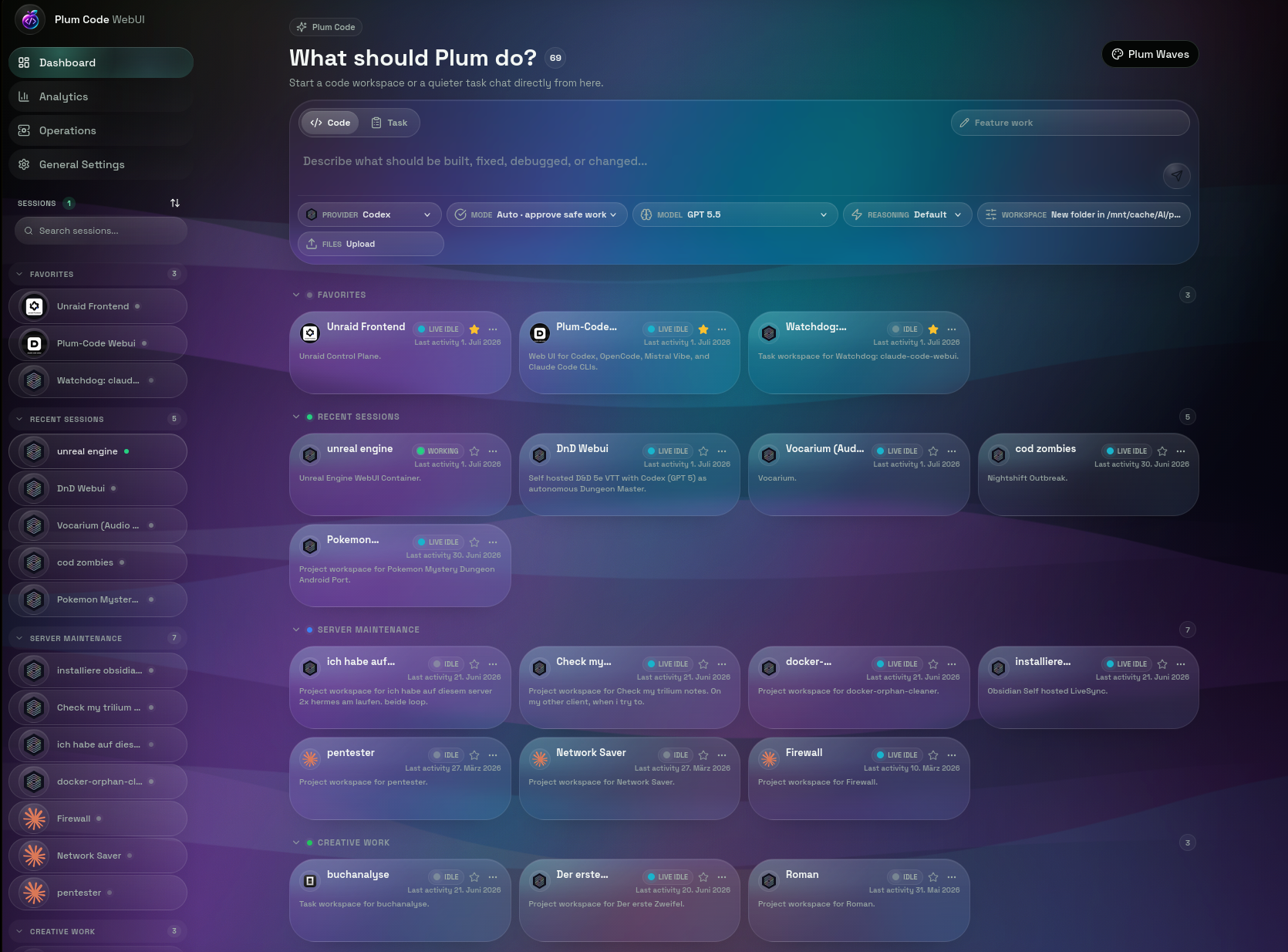 Sessions dashboard - create or resume projects, filter by provider, and start Codex/Pi/Claude sessions from one place.
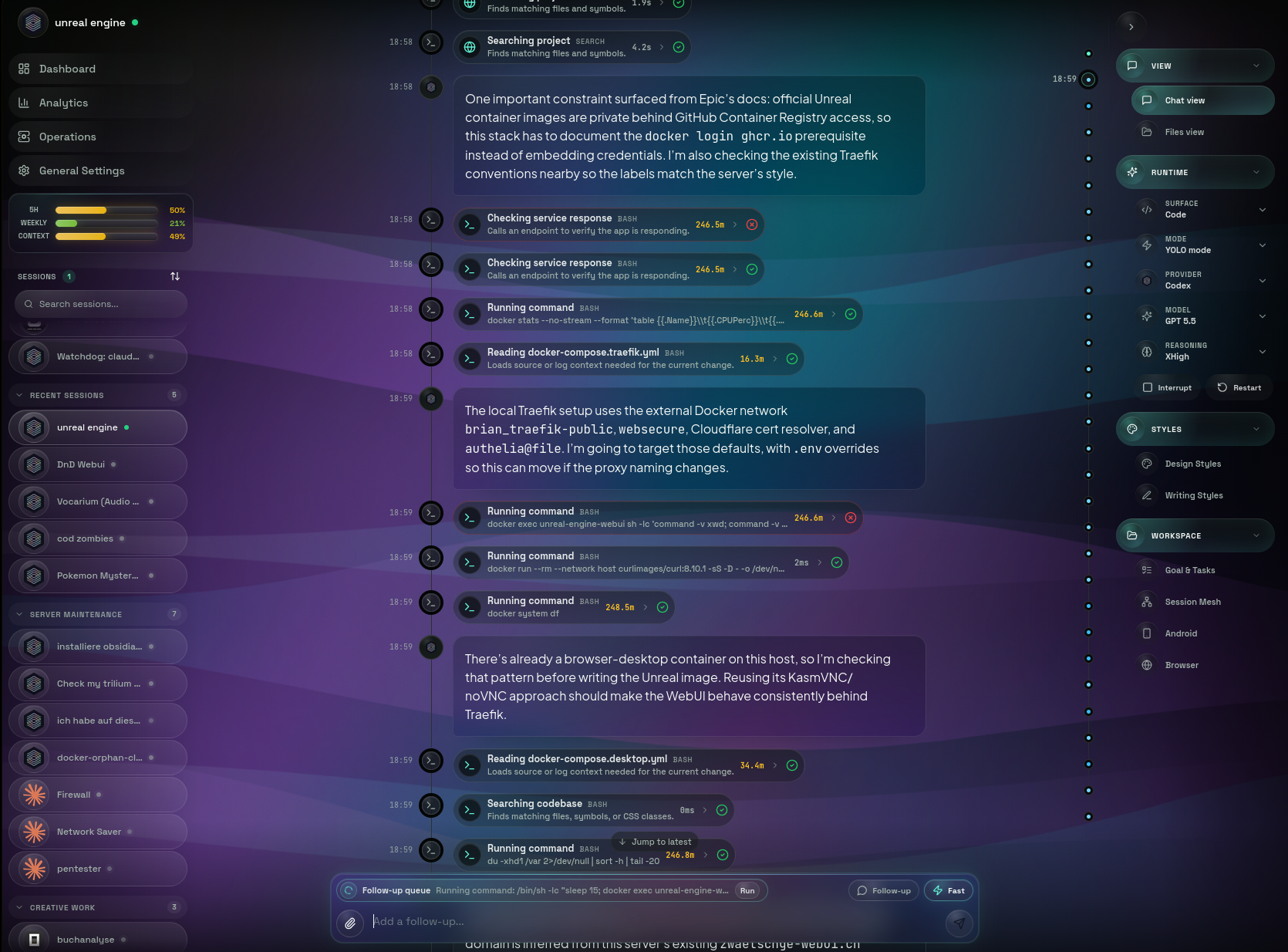 Codex chat - streaming output, tool execution, provider/model controls, YOLO mode, usage limits, and right-rail workspace controls.
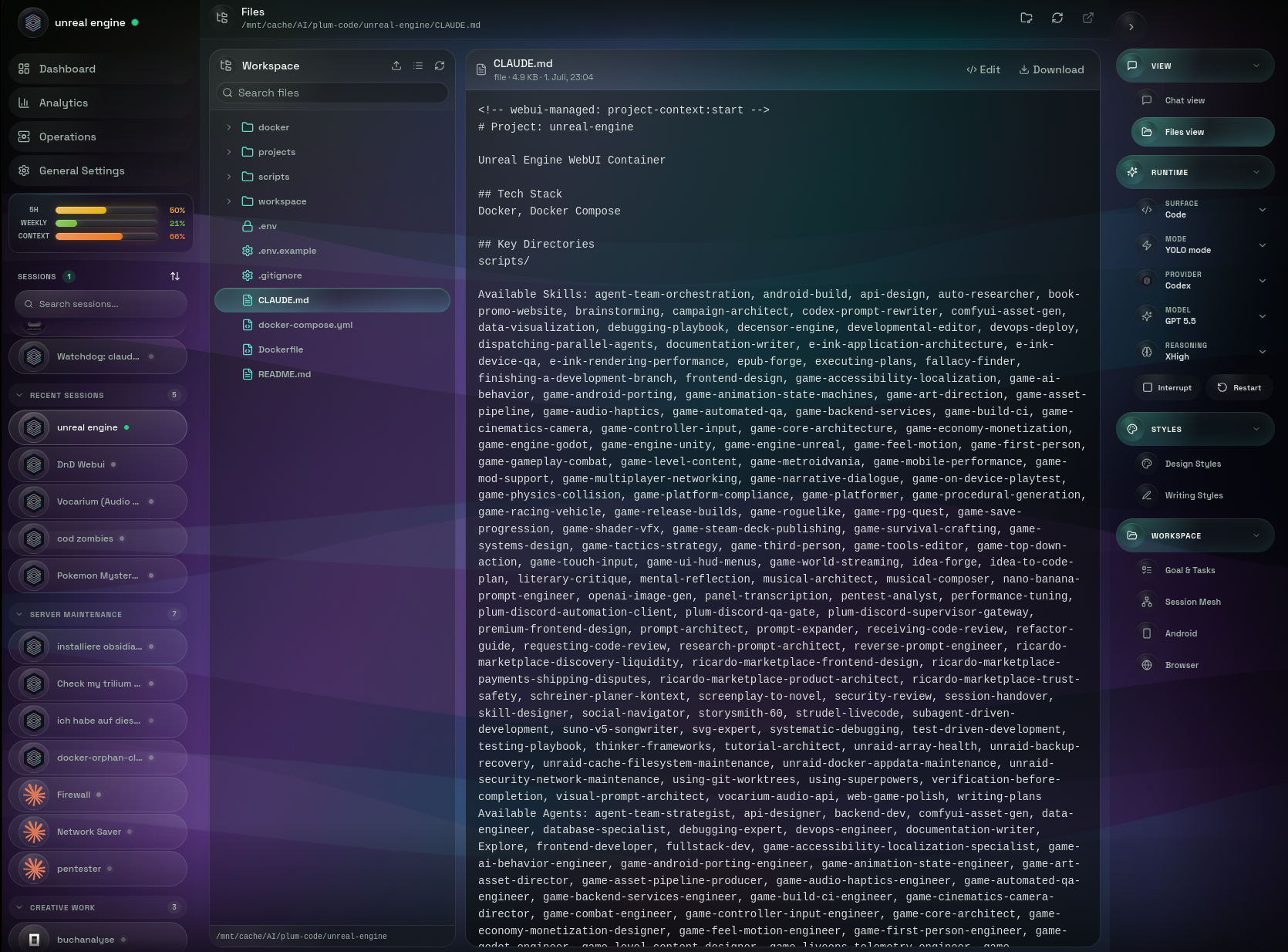 Files view - browse the active workspace, inspect files, and switch between chat and project context without leaving the session.
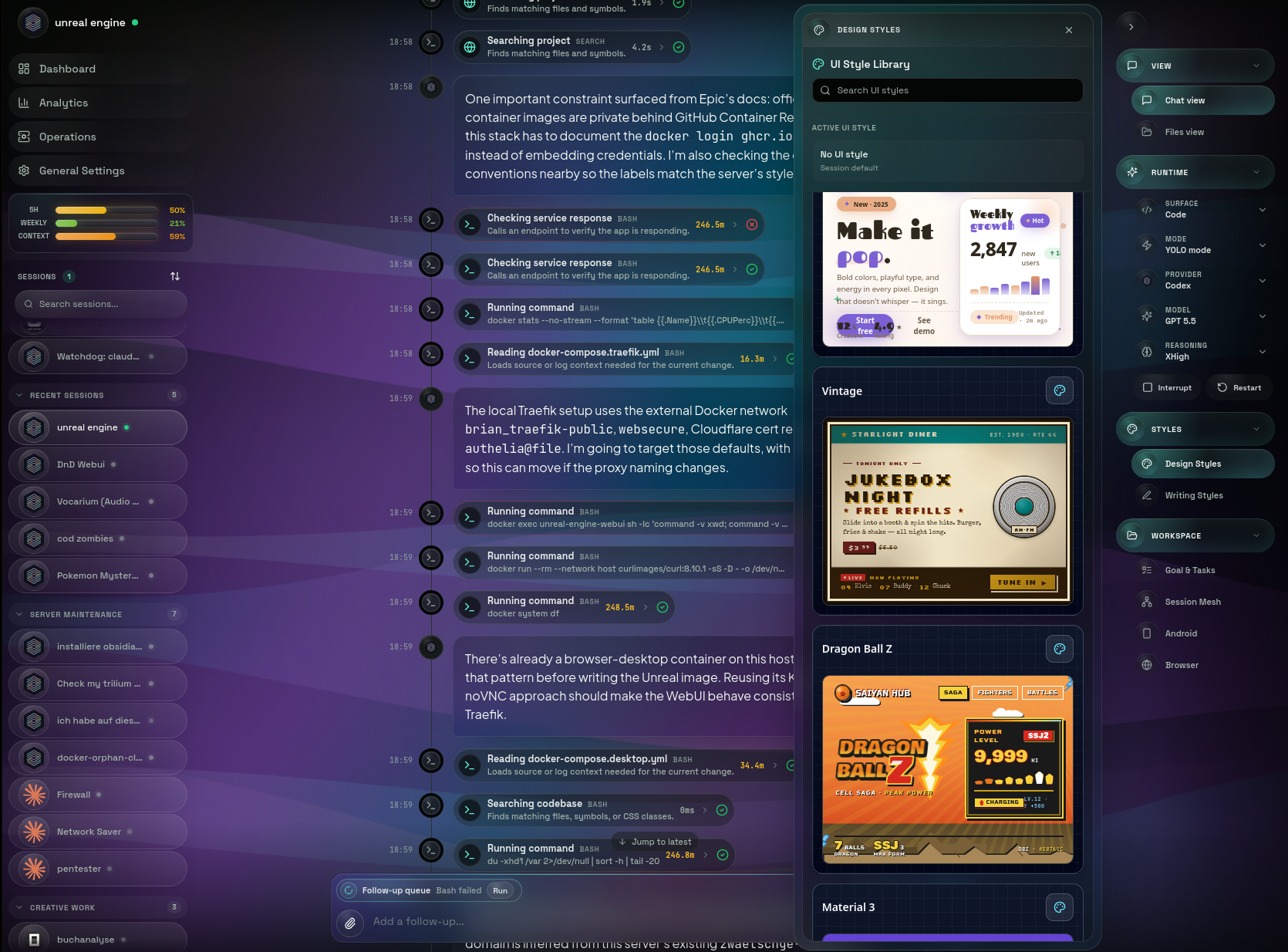 Style library - pick design and writing styles from the in-session library while keeping the active provider context visible.
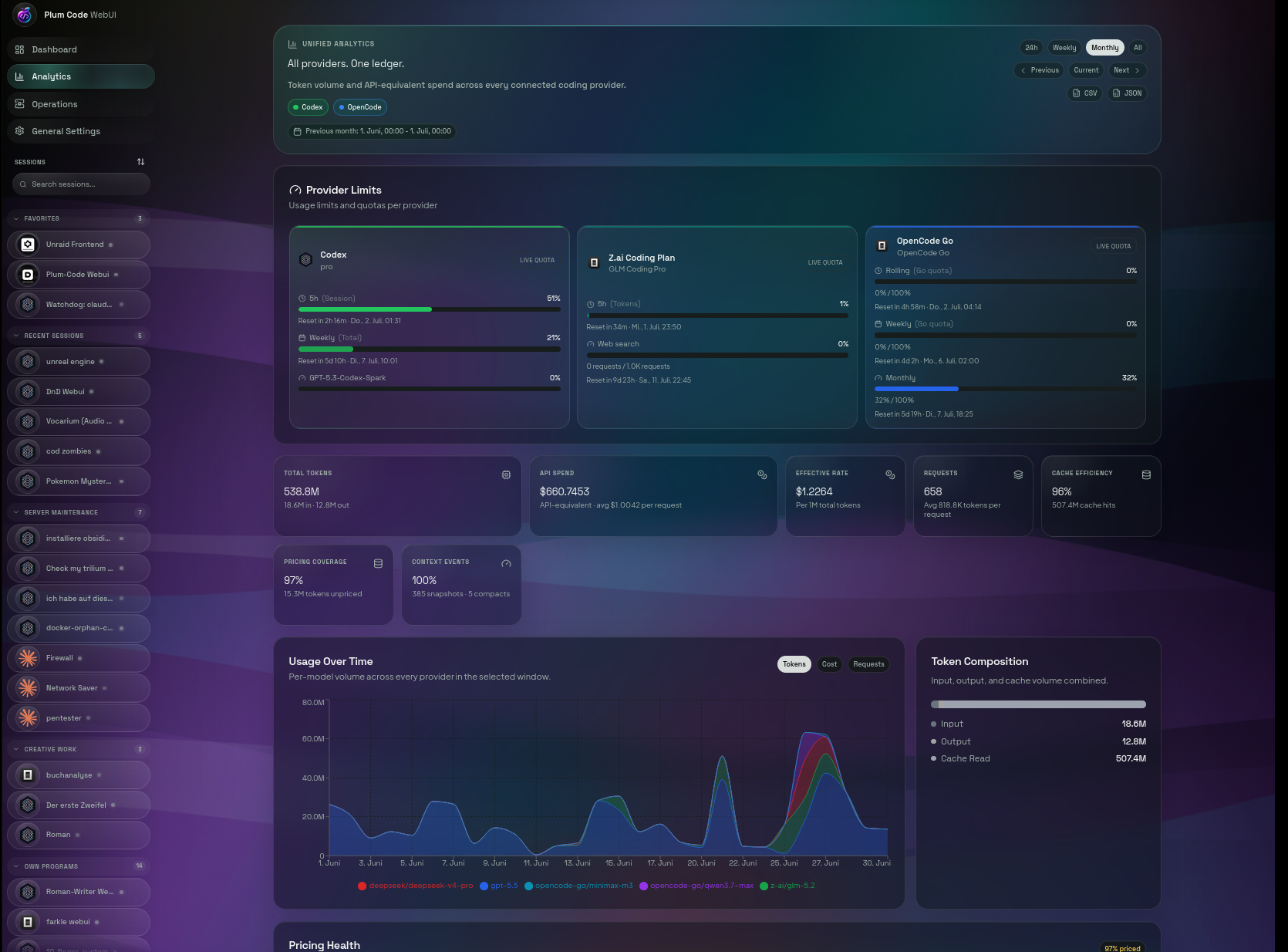 Analytics - unified token volume, API-equivalent spend, cache efficiency, provider mix, pricing health, and per-model breakdown.
Mobile
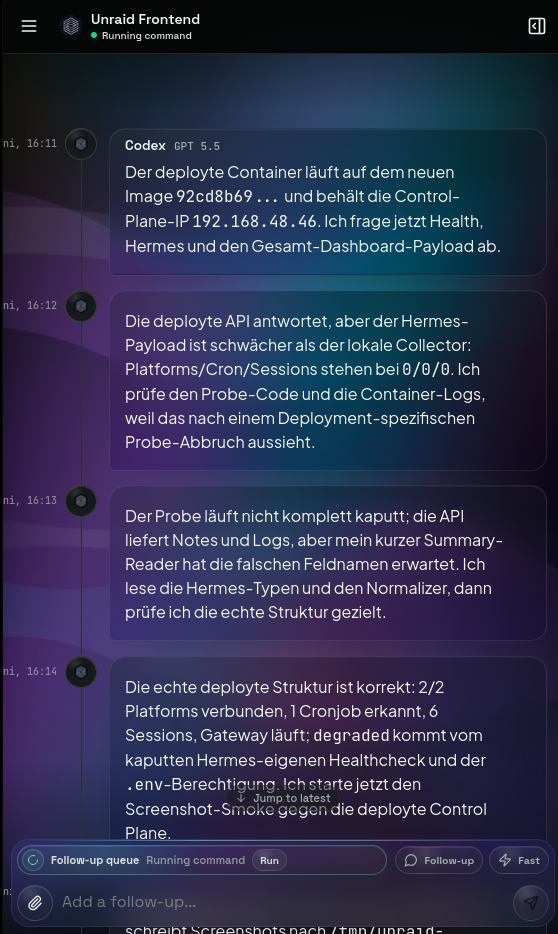
Responsive chat with the same provider-aware UI on phone-sized viewports.
Android client
A native client ships in packages/android — Kotlin and Jetpack Compose, talking to the same
backend as the browser. It is a full client, not a web view: a sessions dashboard with search,
category and status filters, streaming chat with tool cards and Chat/Files/Git/Checks/Stats tabs,
and an analytics view with live per-provider quota and reset windows.
Screenshots are being recaptured; see scripts/capture-android-screenshots.sh.
Features
Chat Interface
- Provider-aware streaming responses over WebSocket
- Multi-session management with history, starring, groups, provider badges, and running-state indicators
- Per-session provider, model, reasoning, service-tier, web-search, and permission-mode controls
- Per-session Home Assistant status lights with green success pulses, red problem pulses, and a blue question heartbeat
- Image attachments plus inline image generation/editing through ComfyUI MCP
- LaTeX/Math rendering with KaTeX
- Interactive choice prompts and permission approvals
- Context & token popover with live progress bar
- Usage limit bar for providers that expose quotas
- Todo and subagent lifecycle rendering when the active CLI emits them
- Shared
/agents,/skills,/subagents, and slash-command discovery - Lean capability catalog: a small active core plus searchable on-demand skills, styles, personas, and domain packs
DevTools Integration
- Context Popover: Inline progress bar showing context window usage (green -> yellow -> red), click to see full token breakdown (input/output/cache read/cache write), cost, and model
- Tool-Log Panel: Full tool execution timeline with filter buttons (All, Read, Write, Bash, Web, Agent), duration tracking per tool, live timers for running tools, expandable input/output details
- Compaction Boundary Cards: Visual separators in chat when context is compacted, with expandable summary text
- Preview Tooling: Start local dev servers, inspect output, and keep process logs redacted before they are returned to the UI/API
Multi-Provider Support
- Codex (OpenAI) - default provider, per-turn
codex execprocess model with auto-respawn, chunk-level streaming, transcript-prefix resume, and model discovery from~/.codex/models_cache.json - Pi - persistent JSONL RPC harness for GLM (
z-ai/glm-*), DeepSeek, Mistral, the Anthropic API and custom OpenAI-compatible endpoints, configured per user in the model provider registry („Modellanbieter“), plus shared skills, agents, and MCP servers - Kimi Code - Moonshot's native persistent ACP agent with device-code login, live token/tool streaming, queued follow-ups, cancel, and persisted native sessions
- Claude Code (Anthropic) - legacy persistent stream-json provider with a configurable Anthropic-compatible API endpoint
- Per-session provider selection; switching providers restarts the underlying CLI cleanly
- Dedicated auth routes:
/auth/codex,/auth/pi,/auth/vibe,/auth/claude - Independent harness state with persisted config (
~/.codex,~/.pi,~/.vibe,~/.claude); Pi takes its API keys from the model provider registry - Admin/helper LLM calls, such as commit message generation, route through the same Codex-first provider preference
Analytics
- Idempotent
usage_historyledger keyed by provider and turn; historical OpenCode rows keep their own label next to Pi - Token volume, request count, cache efficiency, pricing coverage, and API-equivalent spend
- Per-model pricing with explicit unpriced-model handling
- Provider grouping shared between backend analytics and frontend charts
- Codex usage limits from the ChatGPT Codex usage endpoint when OAuth tokens are available
File Management
- File Tree Browser with lazy loading and git status
- Monaco Code Editor with syntax highlighting
- Create, edit, delete, and rename files
- Three view modes: Simple, Compact, Detailed
Git Integration
- Full Git Panel (staging, commits, diffs, history)
- Visual branch management (create, publish, delete)
- Commit history with diff viewer
- AI-powered commit message generation
- Pull/Fetch with remote status (ahead/behind)
GitHub Integration
- Create new repositories
- Clone repositories (with repo browser)
- Push to GitHub with remote management
- Token-authenticated operations
Custom Commands
- Built-in commands:
/help,/clear,/model,/status,/cost,/compact - User commands from
~/.claude/commands/*.md - Project commands from
{project}/.claude/commands/*.md - Autocomplete dropdown when typing
/
Project Management
- Project Auto-Discovery from
~/.claude/projects - Working directory navigation
- Session starring and filtering
- PTY Reconnect with 30-minute buffer
MCP Servers (built-in)
- comfyui-images - text-to-image and image-edit tools backed by ComfyUI workflows, rendered inline in chat
- android-builder - ~25 tools for building, installing, launching, and testing Android apps via the
android-app-creatorbackend (project lifecycle, build, ADB, emulator, on-device testing) - godot - create, inspect, validate, script, and export Godot projects through a local MCP bridge
- blender - create, inspect, export, and render 3D assets through Blender Python in background mode
- Settings can also list and test global MCP servers from the provider config, such as audio or project-specific bridges
Admin
- Admin pages: user list, role management, audit log
AUTH_ALLOWED_EMAILSenv-var allowlist (gates both OAuth and basic-auth)- First-login admin bootstrap via
SEED_ADMIN_EMAIL
Extensions
- Shared agents from
~/.claude/agents - Active core skills from
~/.claude/skills; on-demand workflows remain under~/.claude/skill-catalog, and optional design/writing presets remain under~/.claude/style-library - CLI discovery command:
node /app/scripts/capability-catalog.mjs search "<task>"andshow <name> - Consolidated legacy names stay discoverable through aliases; retired packages are blocked from external re-import
- Plugin management for user and marketplace plugins
- Codex plugin browser/install flow for OpenAI-curated plugins
- Auto-sync of external skill packs
Mobile Support
- Progressive Web App (PWA)
- Bottom tab navigation
- Swipe gestures for panel navigation
- Responsive design
- Native Android client — see Android client
Settings
- Tabbed settings interface
- Theme configuration
- Per-provider API key / OAuth management (Codex, Claude, Mistral Vibe, GitHub, Google) and the model provider registry („Modellanbieter“) for Pi and model chat
- MCP Server management with connection testing
- Per-user Claude API URL, encrypted token, and optional model mappings for Anthropic-compatible services such as Z.AI
- ComfyUI URL testing and persistence
- Home Assistant connection testing, encrypted token storage, and per-session light assignment
- Memory viewer for session context
Android client
packages/android is a full native client for the same server — not a web view. ~170 Kotlin files
of Jetpack Compose UI covering sessions, streaming chat, approvals, analytics, and offline behavior
on phones, tablets, and Wear OS. Feature work lands in the web and Android clients together, so the
app tracks the WebUI closely.
- Sessions — list, search, categories, archive, bulk actions, and a jump-back row for the last five you touched (also available as launcher long-press shortcuts)
- Chat — streaming output, tool cards, permission approvals, turn diffs, voice input, quoting, and an outbox that queues messages while offline
- Tablet layout — two panes at expanded window sizes: session list beside the chat, with a navigation rail for Activity, Analytics and Library
- Notifications — a durable feed with inline approve/deny, plus push and configurable home-screen widgets for sessions and pending approvals
- Analytics — token volume, spend against your alert threshold, and per-provider limits
- Wear OS companion —
packages/android/wearships a watch app with a tile, a pending-approvals complication, and phone-synced session snapshots, so you can approve a tool call from your wrist
Requirements: Android 8.0+ (minSdk 26, targetSdk 35).
Build it
cd packages/android
./gradlew assembleDebug          # app/build/outputs/apk/debug/app-debug.apk
./gradlew :wear:assembleDebug    # optional Wear OS companion
Install the APK, enter your Plum Code URL on first launch, and sign in with the same account you use in the browser.
Tech Stack
Backend
- Express.js - HTTP server
- Socket.IO - Real-time communication
- Postgres 17 (
pg) - Database - node-pty - interactive CLI process management
- simple-git - Git operations
- @octokit/rest - GitHub API
Frontend
- React 18 - UI framework
- Vite - Build tool with code splitting
- Radix UI - Accessible components
- Tailwind CSS - Styling
- Zustand - State management
- TanStack Query - Data fetching
- KaTeX - Math rendering
Android
- Kotlin + Jetpack Compose - native UI for phone, tablet, and Wear OS
- Socket.IO client - the same realtime stream the browser uses
- Home-screen widgets - sessions and approvals as configurable app widgets
Shared
- TypeScript - Type safety across all packages
Installation
Quick start (Docker)
git clone https://github.com/zwaetschge/plum-code-webui.git
cd plum-code-webui
./scripts/install.sh
The installer walks you through:
- Prereq check - docker, docker compose plugin, openssl, daemon connectivity.
- Interactive
.env- public URL, port, allowlisted login emails, host paths for data/config/workspace. Auto-generatesSESSION_SECRET+JWT_SECRET. docker compose build+up -d- first run takes a few minutes.- Health wait - polls
/health/ready(or the container's healthcheck) for up to 2 min. - Optional Codex login - runs
codex logininside the container because Codex is the default provider. Other providers can be authenticated later from Settings or their dedicated/auth/<provider>route. Can be skipped with--skip-login.
Re-run any time to reconfigure (existing .env values are preserved unless you pass --reset). Non-interactive mode (--non-interactive) takes all defaults and is useful for CI bootstraps.
Requirements: Docker 24+, Docker Compose plugin, openssl. The container ships Node 22 plus the codex, pi, vibe, and claude harnesses.
Site-specific deployment (Traefik, Unraid, etc.)
The repo's docker-compose.yml is intentionally portable: no Traefik labels, no absolute paths, no external networks. Site-specific overrides go into docker-compose.override.yml (gitignored), which Compose auto-merges. A copy-paste starting point lives at docker-compose.override.yml.example and shows Traefik labels, absolute host paths, a read-only Docker socket proxy, and the repair-bot sidecar. Never mount the raw Docker socket into the main WebUI. A trusted, admin-only deployment may selectively enable the proxy's BUILD, IMAGES, CONTAINERS, and NETWORKS groups together with POST=1; Compose needs NETWORKS to inspect external networks. This is host-equivalent authority and must not be exposed to untrusted CLI users. Plum's own controlled rebuild continues to run through the repair-bot.
Manual Docker (no installer)
cp .env.example .env       # then edit: SESSION_SECRET, JWT_SECRET, AUTH_ALLOWED_EMAILS, FRONTEND_URL
docker compose up -d --build
Access the WebUI at the FRONTEND_URL you configured (default http://localhost:4545).
Development setup (no Docker)
pnpm install                # workspace deps
pnpm dev                    # backend (3006) + frontend (5173) in parallel
# or:
./scripts/start-webui.sh    # generates ephemeral secrets, kills stale PIDs, tails logs
Prerequisites: Node 22.19+, pnpm 9+, and whichever harnesses you want to run locally (codex, pi, vibe, claude).
Production build (no Docker)
pnpm build
pnpm start
Rebuild / redeploy
For deployed Docker instances, use the repair-bot sidecar instead of recreating the main container from inside itself:
bash scripts/plum-rebuild.sh
The script writes data/rebuild-trigger.json, waits for repair-bot to rebuild and recreate the main container from outside, then runs a sanity check. The sidecar protects the previous image, requires candidate image identity plus /health/ready, and automatically rolls back a failed candidate. Use --no-cache, --no-wait, or --timeout=N when needed.
Create and verify a Postgres backup, then preview retention changes:
node scripts/plum-maintenance.mjs
node scripts/plum-maintenance.mjs --dry-run
If the repair sidecar also runs its emergency WebUI against the shared provider config, set WEBUI_EXTERNAL_SKILL_SYNC=false on that service. The main WebUI remains the single owner of external skill imports and catalog reconciliation.
Configuration
Environment Variables
Full schema in packages/backend/src/config.ts (zod-validated, fails fast on startup). scripts/install.sh writes the common values into .env; the rest are optional deployment or provider overrides.
| Variable | Description | Required |
|---|---|---|
SESSION_SECRET / JWT_SECRET |
Express session and JWT signing secrets (min 32 chars each). Installer auto-generates. | Yes |
AUTH_ALLOWED_EMAILS |
Comma-separated email allowlist enforced for both OAuth and basic-auth. Empty = no allowlist, only safe behind a private network or SSO proxy. | Recommended |
SEED_ADMIN_EMAIL |
First user with this email gets role=admin on first login. Defaults to the first allowlist entry when unset. |
No |
FRONTEND_URL / CORS_ALLOWED_ORIGINS / TRUST_PROXY |
Public URL, extra CORS origins, and Express proxy trust. TRUST_PROXY=true is unsafe without a trusted reverse proxy in front. |
No |
WEBUI_PORT / WEBUI_SHM_SIZE / TZ |
Host port (default 4545), Chromium shared memory (default 1gb), and timezone. |
No |
DATA_DIR / CONFIG_DIR / WORKSPACE_DIR / ALLOWED_BASE_PATHS |
Host paths bind-mounted to persistent data, provider homes, and workspaces. | No |
GITHUB_CLIENT_ID / GITHUB_CLIENT_SECRET / GITHUB_CALLBACK_URL |
Optional GitHub OAuth. Callback: ${FRONTEND_URL}/auth/github/callback. |
No |
GOOGLE_CLIENT_ID / GOOGLE_CLIENT_SECRET / GOOGLE_CALLBACK_URL |
Optional Google OAuth. Callback: ${FRONTEND_URL}/auth/google/callback. |
No |
ENCRYPTION_KEY |
Enables encrypted storage for provider API tokens, including the per-user Claude custom API token managed in Settings. | Recommended |
CLI_RUNNER_ACCESS / CLI_RUNNER_ALLOWED_EMAILS |
Runner execution defaults to admin-only while processes share one Unix/provider home. Allow only explicitly trusted non-admin emails; trusted-users is an intentional private-deployment opt-in. |
No |
CLI_PROVIDER_<PROVIDER>_MODELS |
Override model menus for CODEX, PI, or CLAUDE; empty means auto-discover or use provider fallback. |
No |
CLI_PROVIDER_<PROVIDER>_DEFAULT_MODEL |
Override defaults such as Codex gpt-5.5, Pi z-ai/glm-5.1, or Claude sonnet. |
No |
CLI_AUTO_UPDATE / CLI_AUTO_UPDATE_PROVIDERS / CLI_AUTO_UPDATE_INTERVAL_HOURS |
Runtime CLI autoupdater. Docker Compose defaults to Codex-only updates on boot and every 24 hours; set providers to a comma-separated list to opt in more CLIs. | No |
ADMIN_LLM_PROVIDER |
Pin admin/helper calls to codex or claude. Default preference is Codex first. |
No |
CODEX_WEBUI_SANDBOX_MODE / CODEX_WEBUI_APPROVAL_POLICY |
Codex Docker defaults. The image defaults to danger-full-access / never because Codex's Landlock workspace-write sandbox is unreliable inside Docker. |
No |
CODEX_USAGE_URL / CODEX_USER_AGENT |
Override the ChatGPT Codex usage endpoint or User-Agent used for /api/usage/limits?provider=codex. |
No |
CODEX_USAGE_TIMEOUT_MS / CODEX_USAGE_CACHE_TTL_MS |
Bound Codex quota requests and singleflight-cache successful responses. Defaults: 10 seconds / 60 seconds. | No |
COMFYUI_URL |
Fallback ComfyUI base URL. Settings can override it without restart. | No |
OPENAI_API_KEY |
Exposes OpenAI API billing to CLI sessions and scripts/openai-image.sh when no key is stored in app settings. |
No |
HOME_ASSISTANT_URL / HOME_ASSISTANT_TOKEN |
Optional fallback Home Assistant connection for physical session status lights. Settings can store an encrypted token instead. | No |
GODOT_BIN / GODOT_TIMEOUT_MS |
Optional Godot 4 binary and timeout for the built-in Godot MCP. Scaffolding works without it; validation/export require it. | No |
BLENDER_BIN / BLENDER_TIMEOUT_MS |
Blender binary and timeout for the built-in Blender MCP. The runtime image defaults to blender-headless. |
No |
PREVIEW_HOSTNAME |
Optional hostname used by the dev-server preview proxy. | No |
CHROME_BIN / PLAYWRIGHT_CHROMIUM_EXECUTABLE_PATH / PUPPETEER_EXECUTABLE_PATH |
System Chromium wrapper exposed to CLI sessions (default: /usr/local/bin/plum-chromium). |
No |
PLUM_BACKUP_RETENTION_DAYS / PLUM_LOG_RETENTION_DAYS / PLUM_SESSION_RETENTION_DAYS |
Retention windows used by scripts/plum-maintenance.mjs for validated backups and managed runtime artifacts. |
No |
GPT-5.6 WebUI sessions use one root agent by default to avoid delegation loops. Set CODEX_WEBUI_AGENT_MODE=parallel or configure CODEX_WEBUI_AGENT_MAX_DEPTH / CODEX_WEBUI_AGENT_MAX_THREADS when parallel Codex agents are intentional.
CLI Integration
The backend spawns each provider as a child process and bridges its stream over Socket.IO:
# Codex - default, single-shot per turn; WebUI respawns after turn.completed
codex exec --json --skip-git-repo-check --cd /workspace/my-project ...

# Pi - persistent JSONL RPC harness over the per-user model provider registry
pi --mode rpc --approve --model z-ai/glm-5.1 ...

# Claude Code - legacy persistent stream-json provider
claude --print --verbose --output-format stream-json --input-format stream-json \
       --include-partial-messages --dangerously-skip-permissions
All harnesses ship inside the container; their auth/state directories (~/.codex, ~/.pi, ~/.vibe, ~/.claude) survive rebuilds via the ${CONFIG_DIR} bind mount. Pi receives a per-user generated agent directory (~/.pi/webui-users/<user>/agent) that references the encrypted per-user model provider registry; API keys reach the process as environment variables and are never written into its config. The runtime image also includes system Chromium, Chromedriver, fonts, and Xvfb; sessions inherit CHROME_BIN=/usr/local/bin/plum-chromium plus Playwright/Puppeteer executable-path env vars for headless browser checks.
Project Structure
packages/
├── backend/              # Express + Socket.IO server
│   ├── src/
│   │   ├── routes/       # REST API endpoints (~30 modules)
│   │   ├── services/
│   │   │   └── claude/   # Legacy folder name; owns Codex / Pi / Vibe / Claude lifecycle
│   │   ├── auth/         # Passport (GitHub, Google) + basic-auth + allowlist
│   │   ├── middleware/   # CSP, rate limiting, error handling
│   │   └── db/           # Postgres schema, dialect translation, migrations
├── frontend/             # React 18 + Vite SPA
│   ├── src/
│   │   ├── components/
│   │   │   ├── chat/     # Messages, tools, compaction cards, subagents
│   │   │   ├── session/  # Controls, tool log
│   │   │   └── ui/       # Radix-based primitives
│   │   ├── pages/        # Sessions, admin, settings
│   │   ├── stores/       # Zustand stores
│   │   ├── services/     # API + Socket.IO client
│   │   └── hooks/
├── shared/               # Shared TypeScript types
├── desktop/              # Desktop shell wrapper
├── android/              # Native Android client
└── scripts/
    └── mcp-servers/      # comfyui.mjs, android-builder.mjs, godot.mjs, blender.mjs (stdio MCP)
API Endpoints
Sessions
GET /api/sessions- List all sessionsPOST /api/sessions- Create new sessionGET /api/sessions/:id- Get session detailsPUT /api/sessions/:id- Update session metadataPATCH /api/sessions/:id/star- Toggle starPATCH /api/sessions/:id/provider- Switch provider for a sessionPATCH /api/sessions/:id/mode- Switch permission modeGET /api/sessions/:id/messages- Load session messagesPOST /api/sessions/:id/rewind- Rewind to an earlier message
Files
GET /api/files?path=- List directory contentsGET /api/files/content?path=- Read file contentPOST /api/files- Create filePUT /api/files- Update fileDELETE /api/files?path=- Delete file
Git
GET /api/git/status?path=- Get git statusPOST /api/git/stage- Stage filesPOST /api/git/commit- Create commitPOST /api/git/pull- Pull from remotePOST /api/git/push- Push to remotePOST /api/git/branch/create- Create branchPOST /api/git/generate-commit-message- AI commit message
GitHub
GET /api/github/repos- List user reposPOST /api/github/repos- Create repoPOST /api/github/clone- Clone repoPOST /api/github/push- Push to GitHub
Commands
GET /api/commands- List available commandsPOST /api/commands/execute- Execute command
Providers & Usage
GET /api/cli-providers- List configured CLI providersGET /api/cli-providers/available- Check provider availability/auth stateGET /api/cli-providers/diagnostics- Run provider diagnosticsGET /api/cli-providers/:id/models- List models for one providerGET /api/usage/limits?provider=codex- Fetch provider quota/limit data where supportedGET /api/analytics/summary- Usage summary and pricing totalsGET /api/analytics/timeline- Usage timeline for charts
Settings, Extensions & MCP
GET /api/settings/PUT /api/settings- User settingsGET/PUT/DELETE /api/settings/claude-api- per-user Claude API URL, encrypted token, and model mappingsGET/PUT /api/settings/integrations- OpenAI/ComfyUI integration settingsGET/POST/PUT/DELETE /api/mcp- MCP server management and testingGET/PUT /api/comfyui/settings- ComfyUI endpoint configurationPOST /api/comfyui/generate- Submit an image generation jobGET/PUT /api/home-assistant/settings- Home Assistant connection status and admin configurationPOST /api/home-assistant/test/GET /api/home-assistant/lights- Test the connection and list assignable lightsPUT /api/home-assistant/sessions/:id/light- Assign or remove a status light for one sessionPOST /api/home-assistant/sessions/:id/test- Preview success, problem, or question on the assigned lightGET/POST/PUT/DELETE /api/claude-config/agents- Shared agent filesGET/POST/PUT/DELETE /api/claude-config/skills- searchable active/on-demand skill catalog (library=all, optionalqueryandstatusfilters)GET/POST/PUT/DELETE /api/claude-config/plugins- User and marketplace pluginsGET /api/codex/plugins,POST /api/codex/plugins/install,POST /api/codex/plugins/:id- Codex plugin listing, install, and enable/disable flow
WebSocket Events
Client -> Server
session:send- Send a message to the session's active providersession:subscribe- Subscribe to session updatessession:interrupt- Interrupt the active CLI processsession:reconnect- Reconnect with buffer replay
Server -> Client
session:output- Streaming text deltassession:message- Complete persisted messagesession:thinking- Thinking indicator (boolean)session:tool_use- Tool lifecycle (started / completed / error) with duration trackingsession:todos- Todo list updatessession:usage- Token usage datasession:compact- Context compaction eventssession:agent- Subagent (Task tool) lifecycle eventssession:mode- Permission mode changessession:status- Session state changes
Contributing
- Fork the repository
- Create a feature branch
- Make your changes
- Run
pnpm typecheckandpnpm lint - Submit a pull request
License
MIT License - see LICENSE for details.
Acknowledgments
Explore related projects
freeCodeCamp/freeCodeCamp
freeCodeCamp.org's open-source codebase and curriculum. Learn math, programming, and computer science for free.
458,992 starsdonnemartin/system-design-primer
Learn how to design large-scale systems. Prep for the system design interview. Includes Anki flashcards.
377,576 starsreact/react
The library for web and native user interfaces.
252,470 starsvuejs/vue
This is the repo for Vue 2. For Vue 3, go to https://github.com/vuejs/core
212,535 stars