
zsio/netsgo
zsio/netsgo has 248 GitHub stars and 25 forks. GitHot measured 0 stars in 24 hours. Last checked 2026-11-15 23:31 UTC. Last push 2026-11-14.
Measured star growth
- in 24h
- 0
- in 7 days
- Collecting history
- in 15 days
- Collecting history
- in 1 month
- Collecting history
Net star changes over overlapping periods, not daily totals. Missing measurements are left blank. Stars measure attention, not software quality.
About
Self-hosted tunneling and node management platform / 开箱即用的内网穿透与节点管理平台
Self-hostedREADME.md
Original

NetsGo
Intranet tunneling and node management platform
Built-in Web console · Single-port access · Single-file deployment
English | 简体中文








NetsGo is an out-of-the-box intranet tunneling and node management platform. It combines the Web console, REST API, client access, and low-level network tunnels into a single-file binary, making deployment simpler, access more unified, and operations easier. You can use it to remotely access services inside private networks, or to centrally manage remote nodes distributed across different locations.
Contents
Preview
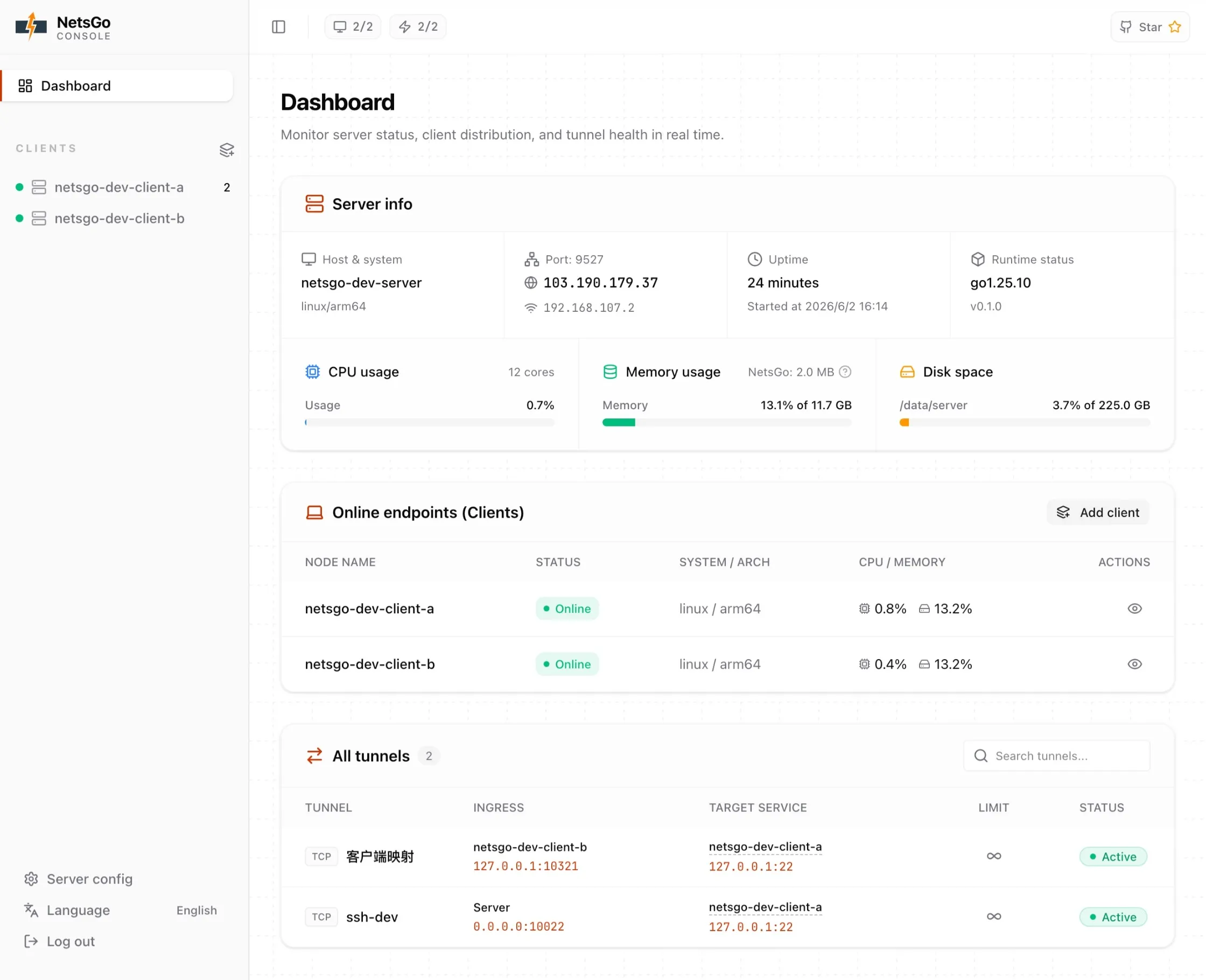
Web console overview
Quick Start
For more documentation and usage guides, visit the official website: https://netsgo.zs.uy.
One-line install
curl -fsSL https://netsgo.zs.uy/install.sh | sh
One-line upgrade
curl -fsSL https://netsgo.zs.uy/upgrade.sh | sh -s -- -y
After installation, follow the interactive prompts to initialize a Server or Client. Once the Client is online, you can create and manage tunnels in the Web console.
Forwarding connections and loop protection
Each Server and Client defaults to 10000 active forwarding connections/UDP associations shared across its tunnels. Excess new connections are closed without interrupting existing transfers; closing a connection returns its capacity. HTTP ingress returns 503 when the Server's capacity is full.
Configure netsgo server --max-connections 20000, netsgo client --max-connections 20000, or NETSGO_MAX_CONNECTIONS=20000. For systemd installations, set the variable in the relevant /etc/netsgo/services/server.env or client.env and restart that service. The value must be positive; connection capacity and bandwidth limits are separate.
On Linux, updated peers compare boot-scoped network namespace identities to reject a TCP target that points back to its own ingress listener. Checks run during configuration/provisioning and after DNS resolution before actual target connections, without probing target services. Equal port numbers on different machines or separate container networks remain valid.
Older peers, platforms without network identity evidence, and indirect cycles through multiple tunnels/external proxies retain connection limits as a fallback. A limit of 10000 does not guarantee memory safety; size it for the instance's available memory and workload.
Why NetsGo
If you want to start the server quickly, connect private-network machines, and then create tunnels, NetsGo focuses on exactly that:
- One binary is enough: run
./netsgo serverto start the server, and./netsgo clientto connect a remote node. - One port is enough: the Web console, control channel, and data channel share the same entry point, so firewalls and reverse proxies only need one shared access path. TCP/UDP tunnels use additional ports only when needed.
- A console is included by default: after a client connects, manage nodes, inspect status, and configure tunnels directly in the Web console.
- Keep HTTPS certificates on your private server: TLS SNI passthrough routes business TLS through the shared server port to an existing HTTPS service.
How It Differs From Common Alternatives
This table is a capability checklist, not a ranking. Cells intentionally use short labels:
Built-in: included in the product itselfPlatform: provided by a hosted platformPlugin: commonly implemented through a plugin or panelConfig: mainly handled through config files or commandsExternal: typically requires third-party monitoring, logging, or operations systems
| Item | NetsGo | frp | ngrok | cloudflared | rathole |
|---|---|---|---|---|---|
| Product focus | Self-hosted management platform | Self-hosted tunneling tool | Hosted platform | Cloudflare tunnel | Self-hosted lightweight tunnel |
| Self-hosted server | ✅ | ✅ | ❌ | Platform | ✅ |
| Web UI | Built-in | Built-in/plugin | Platform | Platform | External |
| API / automation | Built-in REST | Supported/plugin | Platform | Platform | Config |
| Client management | Built-in | Config/plugin | Platform | Platform | Config |
| Tunnel CRUD | Web/API | Config/plugin | Platform | Platform | Config |
| Shared Web/API/client entry | ✅ | Multiple entries | Platform | Platform | Config |
| HTTP tunnel | ✅ | ✅ | ✅ | ✅ | TCP-backed |
| TCP tunnel | ✅ | ✅ | ✅ | ✅ | ✅ |
| UDP tunnel | ✅ | ✅ | Plan/scenario-dependent | Scenario-dependent | ✅ |
| Login / key | Admin + Key | Token/OIDC | Account/Token | Account/policy | Token |
| Online status | Built-in | Built-in/plugin | Platform | Platform | Logs/external |
| Traffic statistics | Built-in | Built-in/plugin | Platform | Platform | External |
| Reconnect after disconnect | ✅ | ✅ | ✅ | ✅ | ✅ |
| Rate limiting | Built-in | Built-in | Platform/plan | Platform policy | External |
Usage Guidance
- NetsGo: for scenarios where you want to manage clients, tunnels, status, and traffic in one self-hosted Web console.
- frp / rathole: for configuration-driven, lightweight deployments where you compose your own operations tooling.
- ngrok / cloudflared: for hosted-platform scenarios where you want to use platform accounts and edge network capabilities directly.
License
First published on the linux.do forum.