
zolotukhin/zinc has 528 GitHub stars and 26 forks. GitHot measured 0 stars in 24 hours. Last checked 2026-11-09 14:49 UTC. Last push 2026-11-04.
Zig INferenCe Engine — Local LLM inference on AMD GPUs and Apple Silicon
Measured star growth
- in 24h
- 0
- in 7 days
- Update delayed
- in 15 days
- Update delayed
- in 1 month
- Update delayed
Net star changes over overlapping periods, not daily totals. Missing measurements are left blank. Stars measure attention, not software quality.
README.md
Original

ZINC
Run GGUF language models on your own GPU. ZINC gives you a command line and an OpenAI-compatible API in one native binary. Vulkan and Metal builds also include browser chat.


Get started · Documentation · Benchmarks · Discord
Get running
For published archives, runtime requirements and verified installation/rollback, see binary releases and GitHub Releases. Linux 0.1.0 is available for Vulkan and ROCm. The exact published binaries pass all three GPU profiles and public installation checks; see the release record. The commands below build from source.
Install the prerequisites for your GPU first. The default build uses Vulkan on Linux and Metal on macOS. The build wrapper downloads and verifies Zig 0.17.0 when needed; you do not need to replace your system compiler. Python 3 is needed for that initial compiler download.
git clone https://github.com/zolotukhin/zinc.git
cd zinc
./scripts/zig.sh build -Doptimize=ReleaseFast
On AMD with Vulkan, set export RADV_PERFTEST=coop_matrix in the same terminal
before the GPU check or inference. Then check your GPU, download a model, and
open the chat:
./zig-out/bin/zinc --check
./zig-out/bin/zinc model pull qwen35-9b-q4k-m
./zig-out/bin/zinc chat --model-id qwen35-9b-q4k-m
The example uses Qwen 3.5 9B. Check the
memory requirements
before downloading, or run ./zig-out/bin/zinc model list to browse the catalog.
You can also load an existing file with -m /path/to/model.gguf.
Choose your GPU path
| Hardware | Backend | Setup |
|---|---|---|
| AMD Radeon RDNA3 / RDNA4 | Vulkan | Linux Vulkan setup |
AMD Radeon AI PRO R9700 (gfx1201) |
ROCm/HIP | Validated ROCm setup |
| Apple Silicon | Metal · preview | macOS |
| Intel Arc Xe2 / Battlemage | Vulkan | Intel guide |
| NVIDIA RTX | CUDA · experimental | Requirements |
Each binary contains one backend; there is no runtime switch or automatic fallback between Vulkan and ROCm. For a validated AMD ROCm stack, choose HIP at build time:
ROCM_PATH=/opt/rocm ./scripts/zig.sh build -Dbackend=rocm -Doptimize=ReleaseFast
./zig-out/bin/zinc --check
Model coverage and performance vary by backend. The hardware guide lists validated cards, operating systems, drivers, and current limitations.
Use it your way
Browser chat in the default Vulkan or Metal build starts the UI and local API together:
./zig-out/bin/zinc chat --model-id qwen35-9b-q4k-m
One prompt from the terminal:
./zig-out/bin/zinc --model-id qwen35-9b-q4k-m --chat --prompt "Explain a ring buffer."
An existing app can connect to http://localhost:9090/v1 while the server
is running. The API guide has curl and
SDK examples; endpoint coverage differs by backend.
The managed catalog includes Qwen, Gemma, and other tested model families. See model selection for checkpoints, memory needs, and the exact Muse Glimmer GGUF used in testing.
Coding harnesses
Connect OpenCode to a running ZINC server with the setup script. It creates a portable config, checks chat and streaming tool calls, and runs headless tasks:
bun add --global --trust @opencode/[email protected]
bun tools/setup_opencode.mjs --project ../my-project --model qwen35-9b-q4k-m \
  --context auto --output 2048 --steps 16
bun tools/setup_opencode.mjs check --project ../my-project
bun tools/setup_opencode.mjs run --project ../my-project --auto \
  --verify 'bun test' -- "Fix the failing tests and run them."
Start Qwen 3.5 9B with -c 16384 --parallel 1 for this example. Setup-only
--context auto discovers the running server's capacity; it does not allocate
more GPU memory. The Intel model matrix
records each model's tested context, task outcomes and limits. Replace bun test
with the project's acceptance command. Failed checks feed real diagnostics
back into short editing rounds; a failed check cannot produce a successful
harness exit. The config uses localhost; custom endpoints
and API keys come from environment variables at runtime.
Setup, worktrees, and task evaluation ·
Download the standalone script
The end-to-end report records real repository trials, review findings, and incomplete deliveries. The technical write-up explains the failures, fixes, and reviewed feature result.
Qwen 3.8 27B supports a 262,144-token window. Its separate ROCm repository trials use 32K context; the native-context guide explains the opt-in Q8 cache, precision choices and larger-context validation on a 32GB ROCm card. Match the harness context to the server when changing it.
Inspect the performance
Compare prompt processing and token generation on one Radeon AI PRO R9700, with ROCm on both engines. Orange is ZINC; blue is llama.cpp. Speeds are tokens per second, and each badge shows ZINC speed divided by llama.cpp speed.
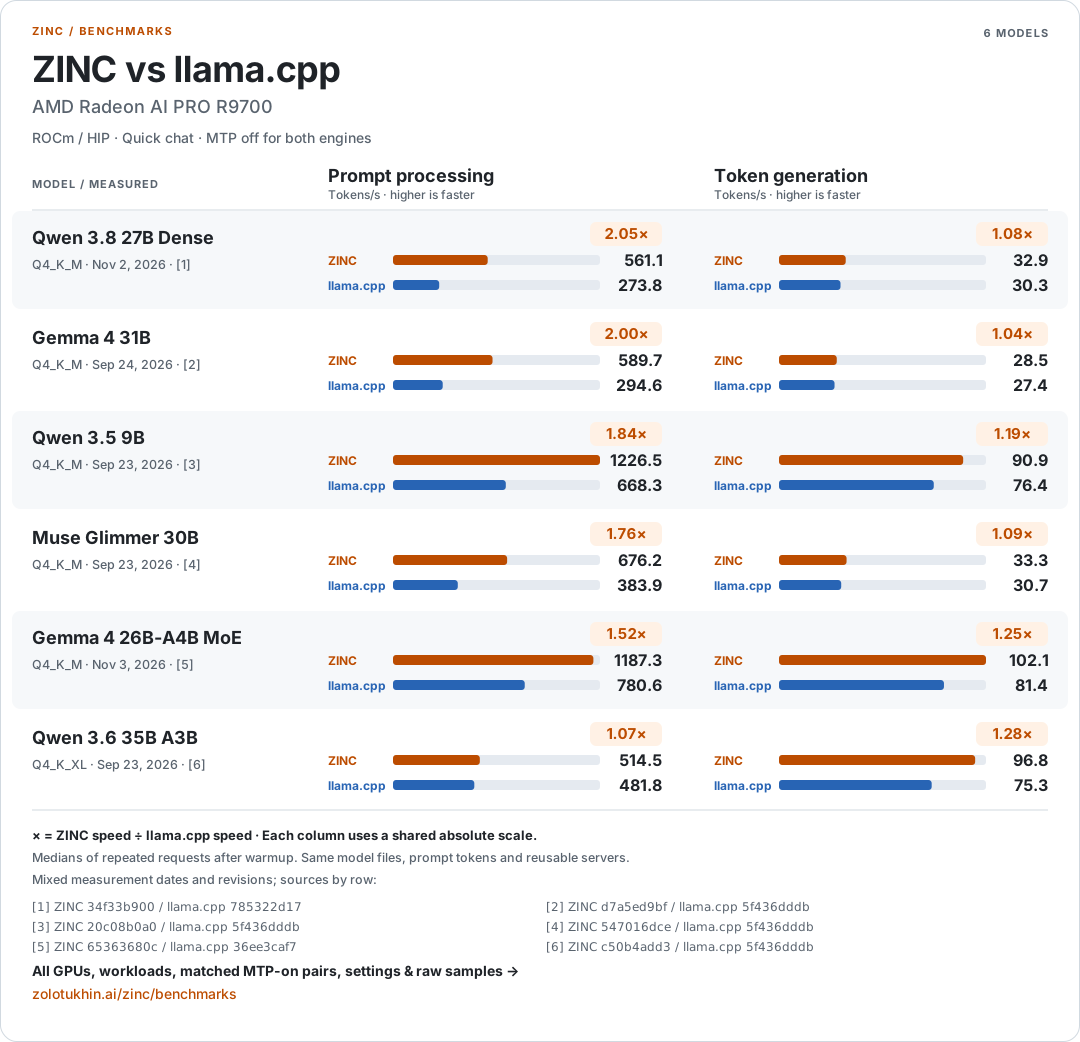
Speculative decoding is off for both engines in this chart. The benchmark dashboard includes every workload, GPU, sample spread, build revision, and the speculative-decoding on/off measurements. Each row shows both engines' MTP settings. Different or unrecorded settings and correctness cautions are excluded from ratios. It also retains incomplete results and cases where llama.cpp is ahead.
New campaigns refresh and verify the latest llama.cpp and measure on/on and off/off; older measurements retain their original build revisions and dates.
The chart uses the same GGUF files, prompt tokens, reusable servers, warmups,
and repeat counts for both engines. Dates and builds vary by model and are
shown in the graphic. Regenerate all four variants from
zinc-performance.json with
bun tools/render_benchmark_svg.mjs --readme.
Reproduce the suite, or read the
matched 27B MTP comparison against current
llama.cpp, including the output controls that still need investigation.
The fresh Gemma MoE measurements
include the partial-tile fix, full reference checks, and restored batched prefill.
The fresh Vulkan Gemma measurements
cover both Gemmas on AMD and Intel, with full reference/recovery checks and
matched MTP-off server comparisons against the latest pre-campaign llama.cpp.
The earlier Zig 0.17 MTP optimization study records a
separate comparison between two ZINC builds.
Build and contribute
JavaScript tooling requires Bun 1.4.4 or newer, pinned in .bun-version.
Use bun run format to format changed files with bun fmt.
./scripts/zig.sh build test
Development guide · Contributing · Zig 0.17 migration · Performance follow-up
Explore related projects
tensorflow/tensorflow
An Open Source Machine Learning Framework for Everyone
201,427 starshuggingface/transformers
🤗 Transformers: the model-definition framework for state-of-the-art machine learning models in text, vision, audio, and multimodal models, for both inference and training.
168,711 starsAUTOMATIC1111/stable-diffusion-webui
Stable Diffusion web UI
165,274 starsComfy-Org/ComfyUI
The most powerful and modular diffusion model GUI, api and backend with a graph/nodes interface. The fastest local inference engine in the world.
146,024 stars