
zmnpl/twad
zmnpl/twad has 53 GitHub stars and 3 forks. Star changes are not measured yet. Last checked 2026-11-08 13:08 UTC. Last push 2026-10-30.
a wad launcher for the terminal
What you can do
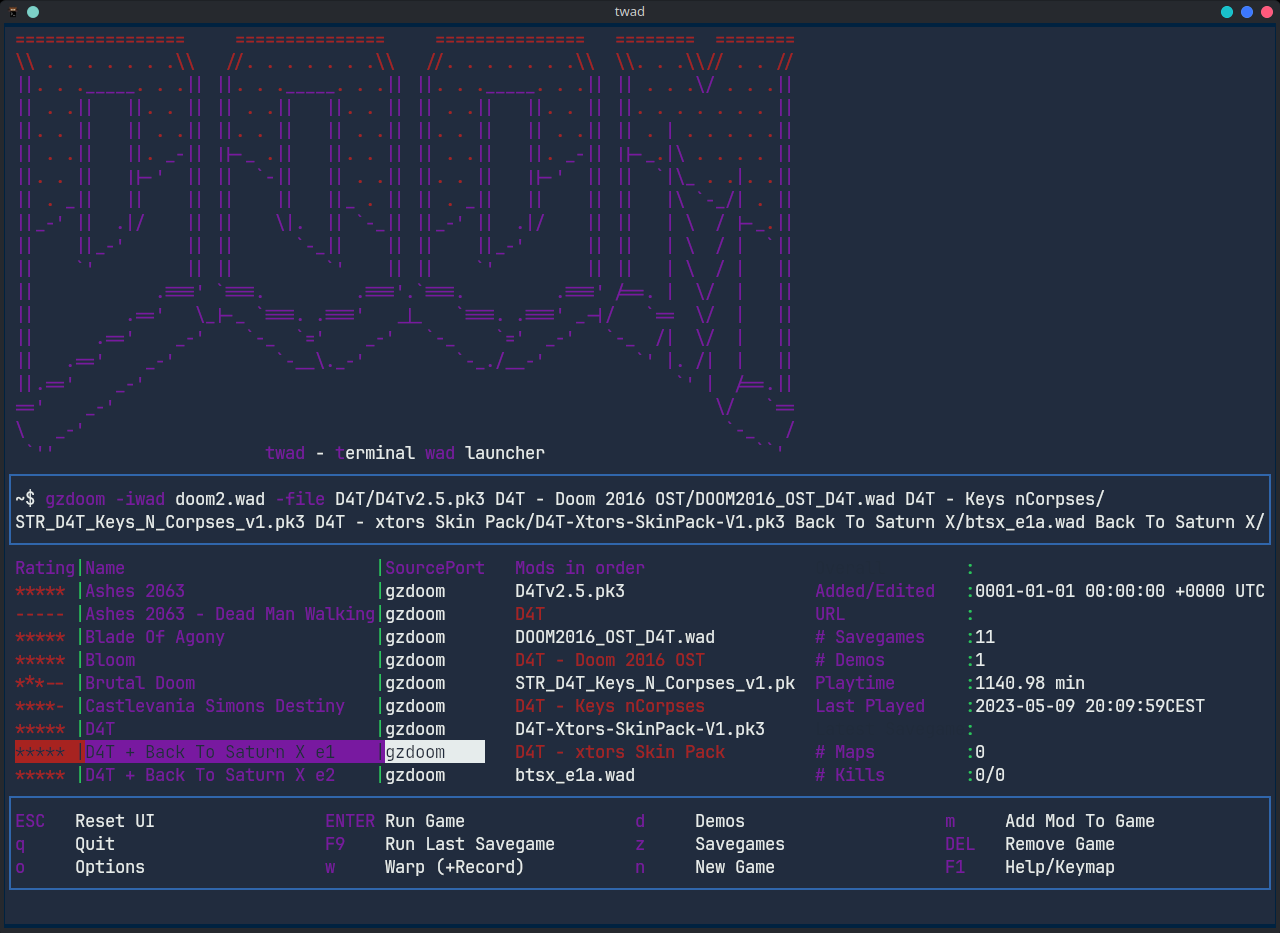
- Configure games you want to play (basically a combination of IWAD, Source Port and Mod Files)
- Quickload (start from latest savegame)
- Warp to specific episodes / levels
- Record/Watch/Delete demos
Measured star growth
- in 24h
- Collecting history
- in 7 days
- Collecting history
- in 15 days
- Collecting history
- in 1 month
- Collecting history
Net star changes over overlapping periods, not daily totals. Missing measurements are left blank. Stars measure attention, not software quality.
README.md
Originaltwad - terminal wad launcher
Launch classic DOOM with a classic retro style terminal user interface
If you love classic DOOM and want to manage modern source ports to play it along with the plethora of maps, skins and gameplay mods then twad is for you. twad lets you set up a multitude of WAD file combinations, store and launch them with a couple of keystrokes. It is lightweight and fast to use. If you are living in the terminal you'll feel right at home. And even on Windows, just double-click to get an intuitive, simplistic and fast retro style user interface to manage your ripping and tearing.
Compatibility
twad was mostly designed for *nix systems. However, since then I've added some OS-sensitive behaviour and cross compiled for Windows. Actually it works quite well. So...
Now with experimental Windows support
Watch Out: This tool is still in early state and might contain bugs.


Features
- Configure games you want to play (basically a combination of IWAD, Source Port and Mod Files)
- Run games
- Quickload (start from latest savegame)
- Warp to specific episodes / levels
- Record/Watch/Delete demos
- Collect some stats from the games console output as well as playtime and so on (not sending it anywhere)
- Collect stats from savegames
- Run games from rofi or dmenu
- Import .zip files containing mods
- Separate savegame / demo folders for games (in
~/.config/twad/...) - Separate configs per game and shared configs per source port
- IDGames search/browser and download + import
- Responsive layout (kind of)
Using terminal colors


Installation Options
a) Arch Linux: AUR
https://aur.archlinux.org/packages/twad-git
b) Binary Download
Precompiled binaries are added to the releases page. twad comes without dependencies, just download and run it.
c) Compile yourself
go install github.com/zmnpl/twad@latest
d) Windows
- Download the .exe from the releases page
- Double-click (you can do that)
Source ports
twad is a launcher, so you need at least one DOOM source port installed. Out of the box it is set up for uzdoom, gzdoom, zandronum and lzdoom. Further ports (e.g. crispy-doom, chocolate-doom, prboom-plus, dsda-doom, woof) can be added in the options.
Setup your environment
twad assumes you have one folder where your IWADs are located. All your PWADs (mapsets, gameplay mods, ...) need to be in the same folder or a subfolder of it. The folder where you put your IWADs is known to source ports as DOOMWADDIR.
- Setup your DOOMWADDIR as described above
- twad's first start will ask you to configure your DOOMWADDIR in the options
- Within twad create games
- Add mods to your games
666) Rip and Tear
An example DOOMWADDIR could look like this
~/DOOM ❯❯❯ tree
.
├── Ashes 2063
│   ├── Ashes2063Maps115.wad
│   └── Ashes2063Mod115.pk3
├── Back To Saturn X e1
│   ├── btsx_e1a.wad
│   ├── btsx_e1b.wad
│   └── btsx_e1.deh
├── D4T
│   └── D4Tv2.5.pk3
├── Sigil
│   ├── SIGIL_COMPAT.wad
│   └── SIGIL.wad
├── doom2.wad
└── doom.wad
Or this on Windows
C:\DOOM> tree /F
.
├── Ashes 2063
│   ├── Ashes2063Maps115.wad
│   └── Ashes2063Mod115.pk3
├── Back To Saturn X e1
│   ├── btsx_e1a.wad
│   ├── btsx_e1b.wad
│   └── btsx_e1.deh
├── D4T
│   └── D4Tv2.5.pk3
├── Sigil
│   ├── SIGIL_COMPAT.wad
│   └── SIGIL.wad
├── doom2.wad
└── doom.wad
More on DOOMWADDIR
Your DOOM source port needs to know about the base folder of your mods and IWADs to work properly, since twad uses relative paths. twad's default method for this is to set the DOOMWADDIR environment variable when starting a game. This is only set for the current game session. (Should you already have set DOOMWADDIR, twad will shadow it with whatever is set in its configuration.)
An alternative/additional method is to add paths to the respective source port's config. For zdoom ports it could look like this:
# in your doom engine .ini
[FileSearch.Directories]
# path to DOOMWADDIR
PATH=/home/doomguy/DOOM
Rofi Mode
You can use rofi or dmenu to launch your games. Run twad like this to use the respective program. This will open rofi/dmenu and show a list of all games you already have. Select one you want to play and hit enter. Of course this will also track your statistics.
twad --rofi
# or
twad --dmenu
For instant Rip & Tear bind this to a keyboard shortcut

Plans / Ideas
- Separate savegames folders per game
- AUR package
- Rofi mode
- Help area
- Savegame Count
- Unified Add/Edit dialog
- Options screen
- Ability to hide the header for screens with few rows
- Add button for path setup
- Quickload
- Warp to map
- Demo recording / viewing
- More statistics; Parse from savegames
- Zip-Import
- WSL support Windows support
- idgames download + autoinstall
- wad archive download + autoinstall
- All the TODO flags
- Error Handling
- Metadata scraping(?)
- Tagging / Searching / Filtering
Credit where credit is due
All the other Doom launchers
There have been great alternatives to manage and launch your WADs out there for many years and I give credit to all of them since I've taken a lot of inspiration and knowledge on their functionality. Especially Doom Launcher is a cool piece of software and the source code is well structured and good to read which helped me quite a lot.
Doom logo
The use of the DOOM ASCII logo has been kindly permitted by Frans P. de Vries. Find its history here
DOOM and Quake are registered trademarks of id Software, Inc. The DOOM, Quake and id logos are trademarks of id Software, Inc. The ASCII version of the DOOM logo is Copyright © 1994 by F.P. de Vries.
tview
tview is used for the terminal ui elements.
Explore related projects
codecrafters-io/build-your-own-x
Master programming by recreating your favorite technologies from scratch.
561,036 starspublic-apis/public-apis
A collective list of free APIs
497,273 starsmorluto/rea
Reverse engineer anything with agents, from app behavior down to native binaries.
443,300 starsopenclaw/openclaw
The AI that really does things. Any OS. Any Platform. The lobster way. 🦞
394,206 stars