
zihao-liu-qs/treekei
About
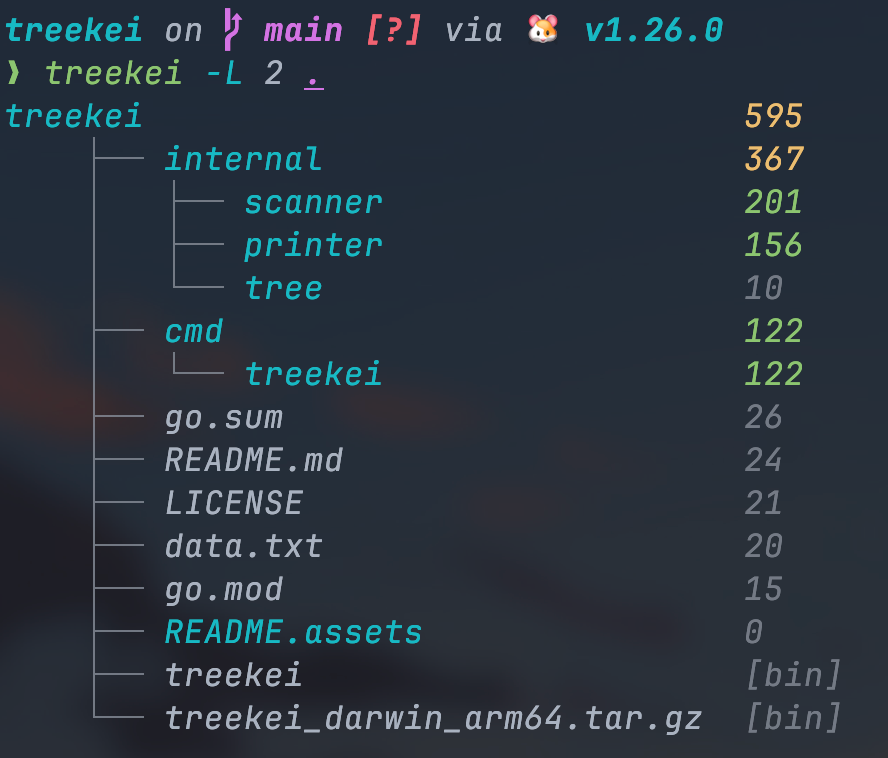
File tree with line counts in terminal.
Developer ToolsMeasured star growth
- in 24h
- 0
- in 7 days
- 0
- in 15 days
- Collecting history
- in 1 month
- Collecting history
Net star changes over overlapping periods, not daily totals. Missing measurements are left blank. Stars measure attention, not software quality.
README.md
OriginalTreekei - File Tree with Line Counts


Usage
Motivation
Existing command-line tools like tree can display the directory structure, and tokei can count lines of code by language. However, there isn’t a simple way to quickly understand how code is distributed across a project.
treekei combines a file tree with line counts, allowing you to quickly grasp the code distribution of a project when you first explore it.
| Tool | Tree | Line Count | Combined View |
|---|---|---|---|
| tree | ✅ | ❌ | ❌ |
| tokei | ❌ | ✅ | ❌ |
| treekei | ✅ | ✅ | ✅ |
Installation
macOS
brew update
brew tap zihao-liu-qs/treekei
brew trust --formula zihao-liu-qs/treekei/treekei   # Homebrew 7+ requires trusting third-party taps
brew install treekei
Linux (Debian / Ubuntu)
curl -fsSL https://zihao-liu-qs.github.io/treekei/treekei.gpg | sudo gpg --dearmor -o /usr/share/keyrings/treekei.gpg
echo "deb [signed-by=/usr/share/keyrings/treekei.gpg] https://zihao-liu-qs.github.io/treekei/ stable main" | sudo tee /etc/apt/sources.list.d/treekei.list
sudo apt update
sudo apt install treekei
Linux (Fedora / RHEL and others)
Download the .rpm from the latest release and install it:
sudo dnf install ./treekei-*.rpm
Windows
# Scoop
scoop bucket add treekei https://github.com/zihao-liu-qs/scoop-treekei
scoop install treekei

# Winget (will be supported soon)
winget install zihao-liu-qs.treekei
From source
With a Go toolchain installed:
go install github.com/zihao-liu-qs/treekei/cmd/treekei@latest
Options
--allInclude hidden files.--dir-onlyDisplay directories only.--lang stringOnly count code for the specified programming language.--level intSet the maximum depth of the output tree.--sort stringSorting method of the tree structure. Defaults to sorting by lines of code. Can be set to alphabetical order.--above intOnly show files count more than int lines.--helpUsage help.--lang str1\[,str2,...]Only show files in target language.--match regexpOnly show files whose path (relative to the scanned directory) matches the regex. Repeatable. Uses RE2 syntax (no lookaround or backreferences).--no-match regexpSkip files and prune directories whose relative path matches the regex. Repeatable.-i, --ignore-caseCase-insensitive regex matching for--matchand--no-match.list-langsList all languages can be filtered
Supported OP System
Currently tested on macOS (Apple Silicon). In theory, it should work on any kind of OP system
Color Support
If your terminal supports colors, treekei will display colored output.
Releasing (maintainers)
Releases are automated with GoReleaser through GitHub Actions. To cut a new release, just push a tag:
git tag v0.2.5
git push origin v0.2.5
The workflow then builds binaries for all supported platforms, publishes the GitHub Release, and updates the Homebrew tap (Formula/treekei.rb) automatically. It requires a HOMEBREW_TAP_GITHUB_TOKEN Actions secret with write access to the homebrew-treekei repository.
Linux packages (.deb / .rpm) are built by GoReleaser and the .deb files are additionally published to a signed APT repository hosted on GitHub Pages at https://zihao-liu-qs.github.io/treekei/. This job requires:
- an
APT_GPG_PRIVATE_KEYActions secret containing the ASCII-armored private key used to sign the repository, and - GitHub Pages enabled for this repository (Settings → Pages → Source: Deploy from a branch →
gh-pages/ root).
Contributors
License
MIT
If you find this tool useful, feel free to give it a ⭐ — it helps more people discover it!
Explore related projects
Loading…