
ziguishian/MxPage
ziguishian/MxPage has 492 GitHub stars and 119 forks. GitHot measured +6 stars in 24 hours, +26 in 7 days, and +53 in 15 days. Last checked 2026-11-10 02:04 UTC. Last push 2026-10-31.
开源 AI 电商图片工作台:商品主图与详情页、批量图片翻译、小红书图文、LangGraph Agent。支持 Windows / macOS 和本地部署,使用自己的模型 API。Open-source e-commerce image generator, translation & agent workspace.
Measured star growth
- in 24h
- +6
- in 7 days
- +26
- in 15 days
- +53
- in 1 month
- Collecting history
Net star changes over overlapping periods, not daily totals. Missing measurements are left blank. Stars measure attention, not software quality.
README.en.md
OriginalMxPage · AI e-commerce image workspace
Source update: storyboards enforce the requested hero/detail total and unique, complete page indices. Explicitly consenting to a potentially billed storyboard retry preserves the completed plan and retries only art direction. The recovered run waits for page-prompt approval before generating images.
Prompt review has its own /projects/[id]/prompts page before the final image preview. Saving stays on the review page; explicit generation approval opens the image preview. Pending prompt reviews automatically redirect there from the existing editor entry.
Workflow errors distinguish model requests, result queries and image downloads. Ambiguous model retries require explicit billing consent. Recovering existing images only queries saved task IDs or downloads saved result URLs, then pauses without generation or model review requests.
简体中文 · English · Desktop downloads · Release notes · AI documentation
MxPage is an MIT-licensed, locally deployable workspace for product hero images, complete e-commerce detail pages, batch image translation and Xiaohongshu / RED posts. Maintained by Lingju Huijing (灵矩绘境 / MatrixInspire).
Built for e-commerce operators, cross-border sellers, designers and self-hosting teams. Start with product reference photos and known facts, generate or edit images, translate existing visuals, then download a ZIP or a stitched detail image. The source is MIT-licensed; model calls use your own API account and are billed separately.
Download for Windows / macOS · Real output gallery · Source setup · FAQ · 中文说明
| Task | Entry point | Output |
|---|---|---|
| Product hero images and detail pages | One-click detail page | Images, per-image ZIP and stitched detail image |
| Multiple product sets | Batch mode, grouped by folder | Separate projects and progress per product |
| Translate existing product images | Image translation | Translated images and original/result comparison |
| Xiaohongshu / RED content | Xiaohongshu workspace | 1–8 portrait images, title, caption and hashtags |
| Approved conversation and file tasks | Agent workspace | Tool progress and downloadable artifacts |
Product detail generation uses the deterministic V4 workflow. The separate Agent workspace uses LangGraph.js + Deep Agents. See release notes, provider compatibility and live acceptance for tested scope. Features on main may not yet be included in the latest desktop archive; check the matching release notes.
Features
Reliability improvements separate failures, uncertain outcomes and pending upstream queries. New single-image/edit/RED operations retain query-only recovery information; documented capabilities constrain UI options while unknown providers retain compatibility. Agent monetary budgets reserve before dispatch and distinguish reported, estimated and unknown costs; these are local safeguards, not provider billing caps. Recent logs use bounded tail reads and idle pages poll less often. See scope and acceptance. Automated regression uses mocks. Separately authorized CloseAI and EvoLink live checks cover single-product and batch detail images, editing, whole-set and standalone translation, RED posts and Agent file exports; exact models and limits are documented in the live acceptance record.
Text/vision automatically support Responses, Chat Completions, Anthropic Messages and native Gemini. Images retain standard Images and existing Gemini routes, with documented EvoLink parameter contracts for GPT Image, Seedream, Nano Banana, Qwen Image and other families. Successful routes take priority; per-model protocols and contracts survive task snapshots and catalog refreshes. Detail/translation checkpoints retain upstream task IDs; resuming pending jobs only queries existing results. Business failures never trigger protocol switching or resubmission. Specialized operations and undocumented private APIs have explicit limits; see compatibility. Automated verification uses mock providers; separate live checks cover only the models and operations in the acceptance record.
Agent workspace at /agent uses LangGraph.js and Deep Agents for conversation, approved research/file/commerce tasks, durable checkpoints, streamed progress, previews and downloads. Configure capabilities at /settings/agent. This loop is independent of the existing deterministic V4 detail workflow.
Desktop drivers are integrated but control defaults to off. Windows input/save acceptance is blocked by strict focus checks; macOS ARM64/x64 have not been tested on real machines. None is marked GUI-accepted. See the linked acceptance record.
- Evidence-based product planning, buyer needs, selling points, scenarios, confirmed specifications and complete visual storyboards.
- Category/platform prompts, 0–10 hero images and 0–20 detail images per detail task; the combined count must be at least one.
- Sequential confirmation dialogs: concrete suggested answers plus custom input. Suggestions require selection; unknown dimensions are not silently treated as measured facts.
- First hero image precedes the rest; image concurrency is capped at two.
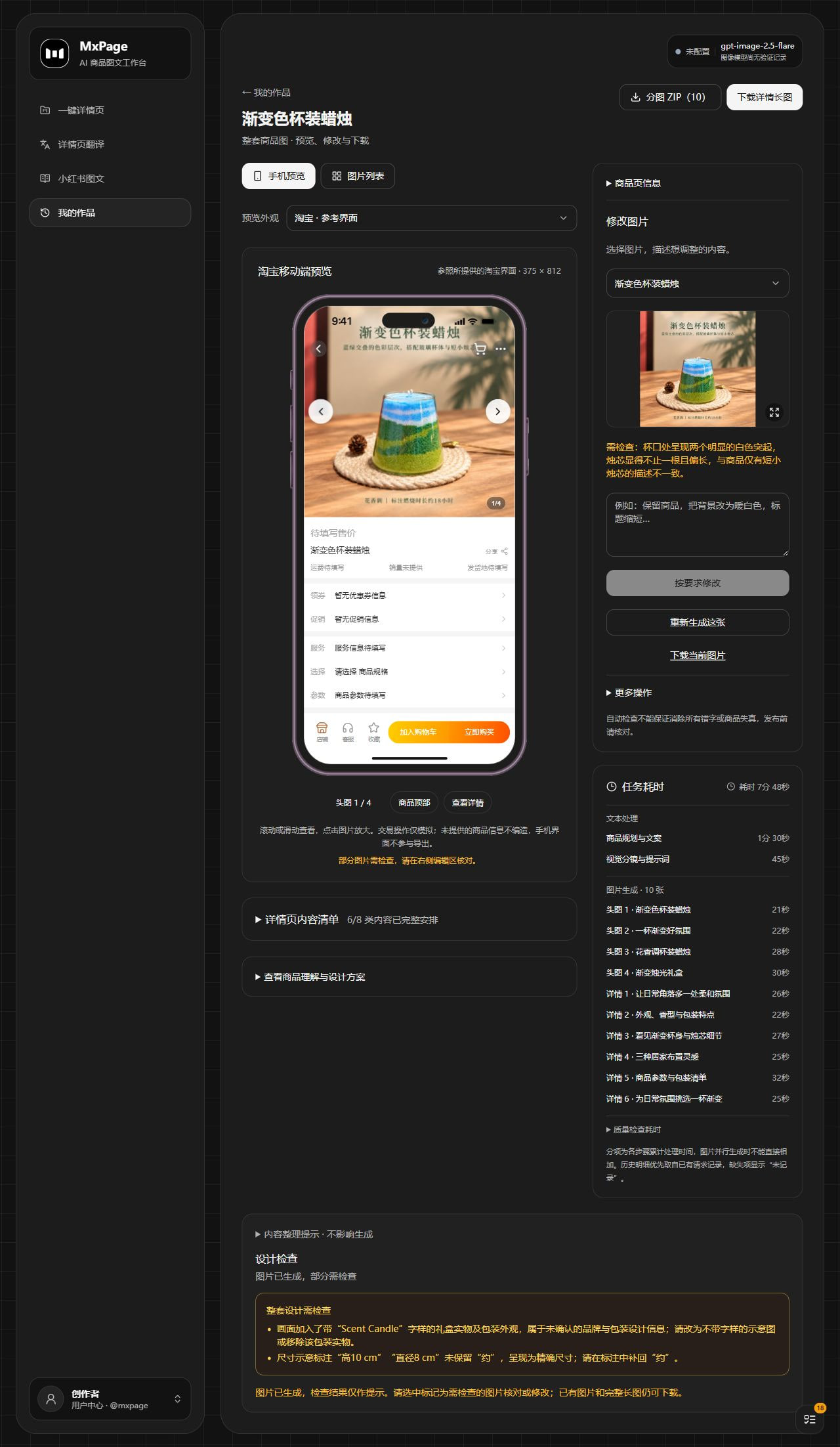
- Phone mockup preview, per-image editing/version history, ZIP and stitched detail-page exports.
- Independent fixed-prompt translation: single images, multiple images, folders, multiple languages and source/result comparison. Submission opens a dedicated progress and preview page; each image set saves one result project per language, without an extra source-only project. IndexedDB upload checkpoints survive refresh; stable request IDs prevent duplicate projects and uploads after lost responses. Legacy duplicate source-only uploads are hidden from work lists while their files and comparison sources remain intact. No product-planning Agent.
- Shared task queue, stage/per-image timing, API cost and stability charts, CNY estimates with editable conversion.
- Local avatar/profile, rolling 12-month usage heatmap, model settings and appearance.
Presets do not publish to marketplaces. This is an image-production workspace, not a storefront builder.
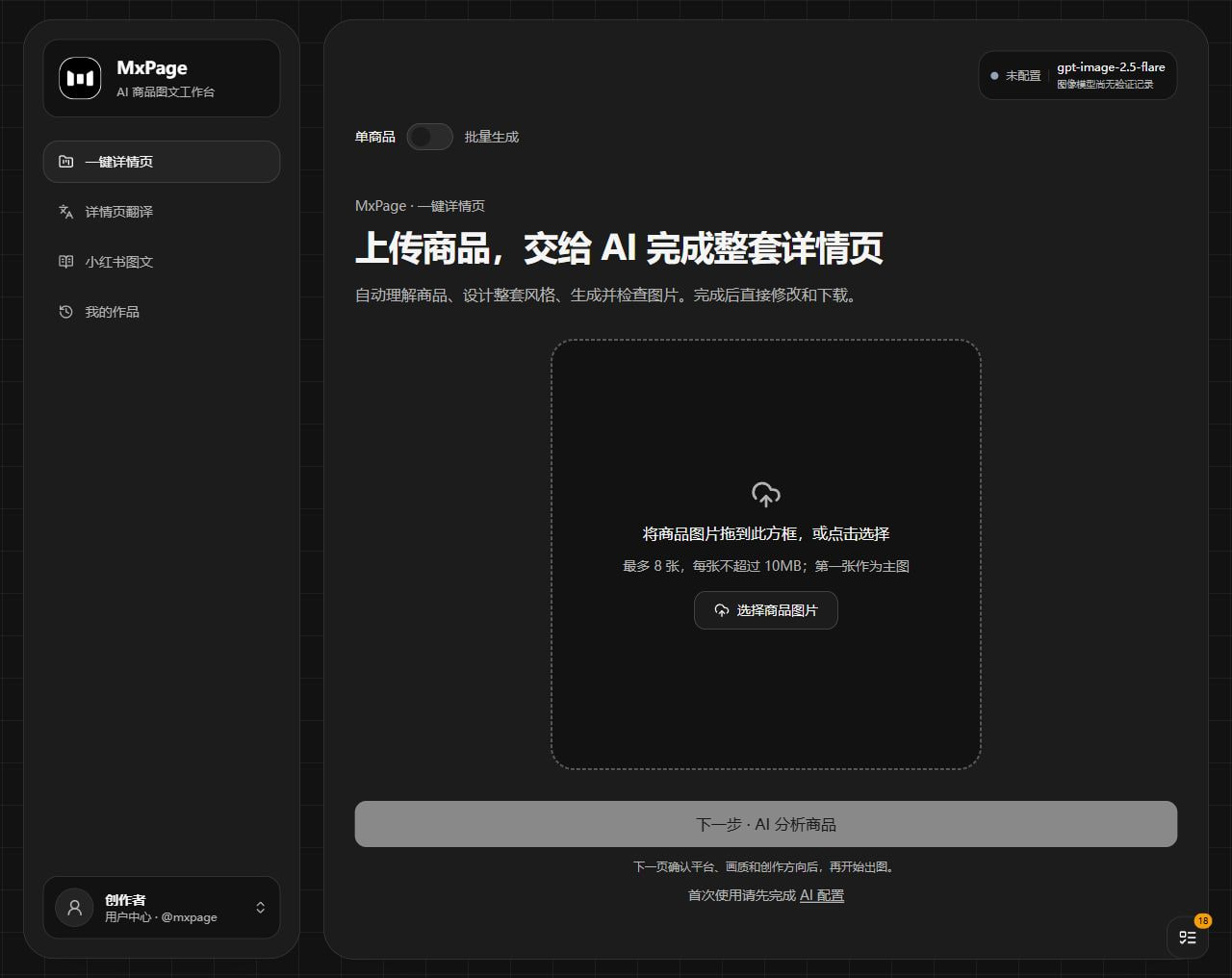
Current screenshots
Captured from the running v0.3.0 application on October 17, 2026. Only the homepage and result editor are shown. The editor uses the latest local candle project, including phone preview, image editing and per-stage/image timing.
Result editor — phone preview, editing and task timing
Full screenshots and capture notes
Real generated examples
These are actual local outputs, resized/compressed for documentation without retouching their content. Every case includes the source photo, all hero images, individual detail panels and the complete stitched page.
Latest local projects
| Gradient candle | Aroma burner | Wood-look desktop diffuser |
|---|---|---|
 |
 |
 |
| 4 heroes + 6 detail panels | 4 heroes + 6 detail panels | 3 heroes + 4 detail panels |
| Full page · 1080 × 8640 | Full page · 1080 × 8640 | Full page · 1080 × 5760 |
Gradient candle — all six detail panels

Aroma burner — all six detail panels

Desktop diffuser — all four detail panels

These three projects used gpt-6-luna and gpt-image-2.5-flare, with requested quality auto. Their recorded review status is PARTIAL. Some specifications came from user-selected model estimates; they are demonstration inputs, not measured product facts. Individual case pages preserve provenance and review limitations.
Tea set and mug studies
| Lidded tea vessel | Mug — complete-content retest | Mug — Round 2 |
|---|---|---|
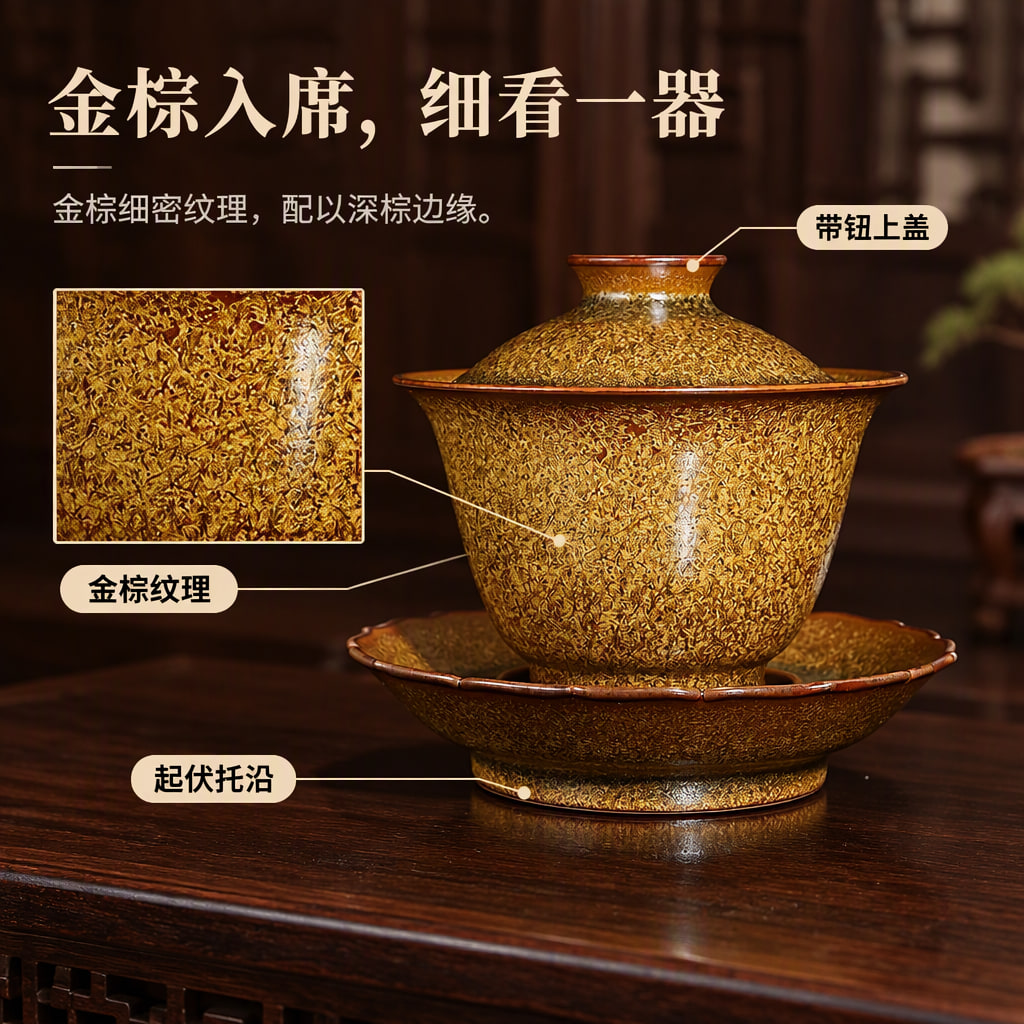 |
 |
 |
| 3 heroes + 8 detail panels | 3 heroes + 8 detail panels | 3 heroes + 4 detail panels |
| Full page · 1080 × 11520 | Full page · 1080 × 11520 | Full page · 1080 × 5760 |
Expand tea and mug detail-page overviews


These three studies used gpt-6-luna and gpt-image-2.5-flare at low quality. Outputs retain review warnings or incomplete reviews; they are not certified listing-ready assets. All cases, source photos and notes.
Desktop downloads
Download from Releases:
| Platform | v0.3.3 asset |
|---|---|
| Windows x64 | MxPage-0.3.3-windows-x64.zip |
| macOS Apple Silicon | MxPage-0.3.3-macos-arm64.zip |
| macOS Intel | MxPage-0.3.2-macos-x64.zip |
Extract the entire ZIP and open MxPage.exe or MxPage.app. No separate Node.js installation is needed. The Mac app can be moved to Applications. These are installation-free archives; user data stays in the OS data directory rather than beside the executable:
- Windows:
%APPDATA%/MxPage/ - macOS:
~/Library/Application Support/MxPage/
Quit and back up that directory before replacing application files. Packages have no commercial signing certificate or Apple notarization; macOS uses ad-hoc signing. The OS may require confirmation of the trusted source. Verify downloads with SHA256SUMS.txt.
First run
New CloseAI native-protocol checks use the documented /anthropic and /google prefixes and persist them in caches and task snapshots. Existing routes are preserved; GPT Image keeps the standard /v1/images endpoints. Protocol documentation does not establish which models the current key's catalog returns.
Catalog HTTP 401 means the provider did not accept the key; 403 means access was denied. Missing local credentials have a separate error and never reach the upstream. Failed refreshes/saves preserve browser credentials, and changing services does not reuse the previous service's key. Catalog-only refresh checks access without invoking models.
Business operations such as product recognition also report missing browser credentials as a configuration error (400), rather than a generic 500. The product configuration page links to credential settings. Browser storage is separate across browsers, devices, and localhost / 127.0.0.1 origins.
Catalog-listed Gemini Image / Nano Banana models support editing with images and instructions, making them available for editing and translation. This does not imply mask support. Detection preserves original provider IDs and never invents missing catalog entries.
Xiaohongshu tasks resolve 1–8 portrait cards independently (five by default). Chinese briefs accept counts using either “张” or “页”; references to the first or last page do not change the total. Start errors remain visible so the same project can continue after correction. Captions, titles and hashtags survive checkpoints. Agent document tools return downloadable artifact URLs; old replies containing exact files from the current session also link to their download endpoints.
New Xiaohongshu tasks include five layout prompt presets: editorial infographics, dark system magazines, photographic lifestyle magazines, whitespace handbooks and warm line-art stories. The planner selects by topic while respecting explicit user preferences. Planning controls content density; art direction sets a shared palette, typography and margins with distinct cover, process and comparison layouts, without extra model calls. Rules are saved with each task; existing tasks retain their original prompts. Results use a thumbnail overview and a full-image gallery with arrow-key navigation, thumbnail jumps, original-size viewing, individual downloads and ZIP export. Review notices match the current image version.
- Bottom-left avatar menu → API configuration: enter your own compatible endpoint/key.
- Discover models and check the connection. Use “仅刷新模型列表” (refresh catalog only) to update the catalog without text, vision or image calls. Options reflect the current key's returned catalog; a provider's pricing page does not establish that key's permissions. The badge shows connection state, image model and last validation time.
- Model choices save automatically. New operations use the selected role defaults; queued and resumed tasks keep their saved settings. Only discovered model IDs are listed. Lightweight text/vision checks automatically resolve protocols and output formats, without manual compatibility controls. Official native origins use their native formats; general gateways prefer Responses. Business requests never switch protocol or resend on failure. Responses image tools and specialized image operations are not supported. See provider compatibility.
- Upload references and known facts, then confirm supplemental answers. Specification tables may declare a shared unit in the question; invalid candidates show the validation reason, and existing valid choices need no regeneration.
- Start with a small set at low quality and review cost/output before scaling up.
Model credits and fees are separate. Discovering a model does not verify every image parameter supported by a gateway.
Either hero or detail image counts can be zero to generate only the other type; they cannot both be zero. Single-product, batch and Agent tasks share this validation, and saving, reopening or regenerating preserves zero.
Workflow and recovery
PREPARE → PLAN → WAITING_INPUT (if needed) → ART_DIRECTION
        → WAITING_PROMPTS (preview, edit and approve each page's prompt)
        → GENERATE → IMAGE_REVIEW → SET_REVIEW
        → COMPLETED / PARTIAL / FAILED
New single-product and batch detail tasks pause after storyboarding. All complete image prompts are expanded on one page for editing, with a shared save and approval action to begin generation. Saved edits survive refresh and resume; duplicate approvals do not dispatch images again. Older tasks and XHS keep their existing flow. Approved prompts override the original visual direction and visible copy during generation and review.
Resume reuses completed plans, storyboards, assets and reviews. Request IDs are persisted before dispatch; heartbeat leases guard writes. Stop prevents new dispatches while issued requests drain and retain results.
Product planning allows up to 180 seconds for a complete response. HTTP 200 or an opened stream does not imply completion. A local deadline reports the wait limit and pauses with an uncertain request; retry still requires explicit authorization.
Uncertain paid requests are not automatically resent. Timeouts, disconnects and invalid responses require explicit retry authorization. Review issues retain images rather than triggering paid regeneration. Canonical text comes from textBlocks[].text; local code wraps text and preserves known parameters, units and table cells while allowing natural rephrasing.
Up to 12 images receive one set review; larger sets use overlapping groups. Supplemental requests, manual edits and authorized retries may add calls. Earlier workflow versions remain viewable/exportable and do not enter V4 automatically. Recovery details.
Source setup
Requires Git, Node.js 24 and npm.
git clone https://github.com/ziguishian/MxPage.git
cd MxPage
npm ci
Copy .env.example to .env (Copy-Item .env.example .env in PowerShell or cp .env.example .env on macOS/Linux), set your own APP_SECRET, then:
npm run prisma:generate
npm run prisma:migrate
npm run docs:sync
npm run dev
Open http://localhost:3000. Source defaults: prisma/dev.db and storage/. Production uses npm run build then npm start; first stop any dev server sharing .next. Desktop output uses .next-desktop separately.
Repeated startup reuses the workspace service. Unrelated port conflicts fail without changing ports or clearing caches. The default binding is 127.0.0.1:3000; explicit --hostname / --port overrides are supported. Clearing browser site data removes unfinished IndexedDB upload drafts.
DATABASE_URL and STORAGE_ROOT configure data paths. LOCK_BASE_URL optionally fixes a private gateway. NEXT_PUBLIC_SITE_URL supplies an optional public origin for brand metadata; leave unset locally. It does not publish a marketing website: all workspace routes, including / and /agent, remain noindex and outside the sitemap. Only the static /llms.txt is crawlable when a public origin is configured. Robots directives are not access control: add authentication, TLS and isolation before publicly exposing this personal workspace.
Frequently asked questions
Is MxPage a free AI e-commerce image generator?
The source is MIT-licensed and can be self-hosted. Model credits are not included. Recognition, planning, image generation, editing and translation may incur provider charges. Start with one image and review your provider's bill before scaling up. Billing details.
Can I generate only hero images or only detail images?
Yes. Detail tasks accept 0–10 hero images and 0–20 detail images, with at least one image in total. Xiaohongshu tasks independently accept 1–8 portrait cards, defaulting to five.
Which providers and protocols work?
Configure an endpoint and your existing API key, discover models, then save role defaults. Text/vision support automatic Responses, Chat Completions, Anthropic Messages and Gemini compatibility. Images use standard Images, Gemini or documented EvoLink async contracts. A provider's pricing catalog does not prove access for your key. See compatibility limits and the separate live acceptance scope.
Does image translation rerun product planning?
No. Translation has its own fixed-prompt workflow and retains original/result comparison. Review generated wording and visual fidelity before publishing; pixel-perfect preservation is not guaranteed. Translation workflow.
Will resuming after a timeout repeat paid requests?
Completed steps reuse checkpoints. Saved upstream task IDs are queried instead of reposted. Uncertain requests are not automatically resent; they require explicit handling. The provider's bill remains authoritative. Recovery rules.
Does local deployment keep all images offline?
No. Projects and the database can stay local, but model requests send the needed images and descriptions to your configured provider. API keys stay in the current browser and are supplied to the local server per request. Browsers, devices and localhost / 127.0.0.1 have separate storage.
Does it publish to marketplaces or control my desktop?
Platform presets produce images and copy; they do not publish to seller accounts. Agent desktop control defaults off. Its Windows/macOS GUI acceptance limitations are documented in the Agent guide.
Develop and package
npm test
npm run test:detail
npm run typecheck
npm run build:desktop
npm run dist:green       # Windows x64 ZIP on Windows
npm run dist:mac         # Current native architecture ZIP on macOS
npm run smoke:desktop   # Packaged SQLite/Prisma/sharp and local HTTP routes
Future runs of the release pipeline build and smoke-test on native Windows x64 and macOS Apple Silicon runners, publishing both ZIPs and SHA256 sums only after all checks pass. The already-started v0.3.2 Intel Mac build follows the original pipeline; subsequent releases no longer produce Intel Mac packages. Developer data, keys and local test reports are excluded.
Stack: Next.js 14, React 18, TypeScript, Prisma/SQLite, OpenAI SDK and Electron. V4 is in lib/detail-runs/, translation in lib/translation/, usage/billing in lib/monitor/, desktop startup in desktop/.
Read AGENTS.md before code changes. llms.txt is the editable product/AI index; npm run docs:sync copies it to the app's /llms.txt. Older design documents remain historical; current code, tests and V4 documentation take precedence.
Costs and data
Upload checkpoints update small records while original Files are stored once, with legacy draft recovery. Work cards use cached WebP thumbnails without replacing original/result images. npm run test:all runs isolated service tests, type checks and browser regression. See Browser regression.
Settings → Data management shows storage paths, creates local database/asset backups, previews verified recovery of missing projects, and restores recycled works. Recovery preserves existing project IDs and edits. Uploads validate actual format, size and pixel limits without rewriting original bytes. See Data management.
Completed translation results stop polling and sync once when the page regains focus. The idle global queue checks every 30 seconds and pauses while hidden. Work covers prefer the current selected result in section order, falling back to the source image. Original comparison images and existing assets remain available.
- MIT software does not include model credits. Generation, edits, translation and authorized retries may cost money.
- Monitoring distinguishes returned amounts, usage-based estimates, rough estimates and unpriced records. CNY conversion is configurable, not a live settled bill. Billing.
- API keys stay in the current browser's local storage and request context, not the project database. Desktop and ordinary browser settings are separate.
- Files can remain local, but inference images/text go to the configured provider. Generation is not fully offline.
- Review product identity, translations, parameters and claims before publication. Selected simulated suggestions retain provenance and must not be represented as measured/certified facts.
Translation · Task queue · Issues · MIT license
Copyright © 2026 灵矩绘境 · MxPage / MatrixInspire.
Explore related projects
awesome-selfhosted/awesome-selfhosted
A list of Free Software network services and web applications which can be hosted on your own servers
335,547 starsimmich-app/immich
High performance self-hosted photo and video management solution.
118,645 starsStirling-Tools/Stirling-PDF
#1 PDF Application on GitHub that lets you edit PDFs on any device anywhere
96,149 starslouislam/uptime-kuma
A fancy self-hosted monitoring tool
93,425 stars