
zidoro/pomatez
zidoro/pomatez has 4,925 GitHub stars and 213 forks. GitHot measured +2 stars in 24 hours. Last checked 2026-11-08 13:49 UTC. Last push 2026-05-19.
Stay Focused. Take a Break.
What you can do
- Customizable rules - it allows you to modify the default Pomodoro configuration based on your personal preferences.
- Built-in task list - it allows you to create a simple list of todos and mark the items done when it's done.
- Full-screen breaks - once enabled, it will force you to not continue working during break time by occupying the whole screen of your desktop, but right now it doesn't support multiple monitors.
- None - no notification will be shown. default
Measured star growth
- in 24h
- +2
- in 7 days
- Collecting history
- in 15 days
- Collecting history
- in 1 month
- Collecting history
Net star changes over overlapping periods, not daily totals. Missing measurements are left blank. Stars measure attention, not software quality.
README.md
Original
Pomatez
Stay Focused. Take a Break.
Features
.
Discord
.
Development
.
Installation
.
Privacy
.
License




:sparkles: Features
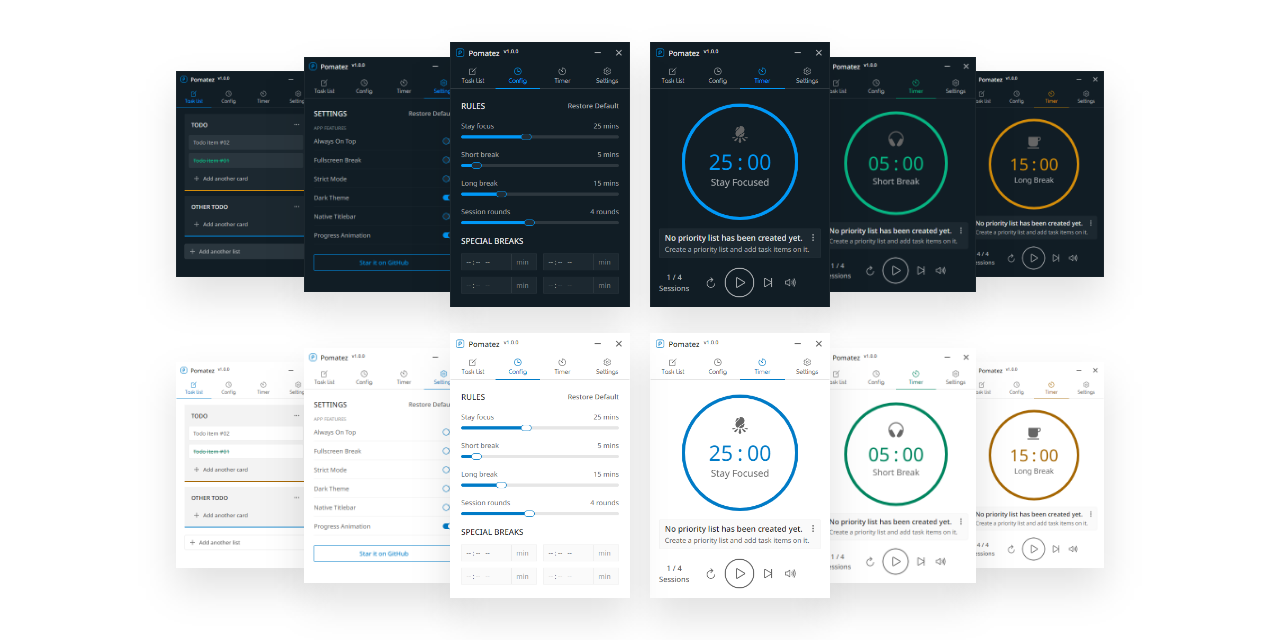
Customizable rules - it allows you to modify the default Pomodoro configuration based on your personal preferences.
Built-in task list - it allows you to create a simple list of todos and mark the items done when it's done.
Full-screen breaks - once enabled, it will force you to not continue working during break time by occupying the whole screen of your desktop, but right now it doesn't support multiple monitors.
Desktop notification - once enabled, you will get desktop notifications from time to time depending on the notification type you selected. Supported notification types are the following;
- None - no notification will be shown.
default - Normal - will show notification in every break.
- Extra - will show notification 60 seconds before the break starts, and 30s before the break ends, and the actual break starts.
- None - no notification will be shown.
Special breaks - a special feature that enables you to set specific times to take important breaks like lunch, snack, dinner and etc.. without updating the Pomodoro configuration.
Keyboard shortcuts - might be helpful for you depending on your use case but currently, these keyboard shortcuts are not yet customizable.
Auto updates - the app will automatically check for updates and download them in the background. You will be notified when the update is ready to be installed.
Always on top - once enabled, the app will always be on top of other apps running on your Operating System.
Minimize to tray - once enabled, the minimize action will not minimize the app. Instead, it will be hidden and sent to the tray.
Close to tray - once enabled, the close action will not quit the app. Instead, it will be hidden and sent to the tray.
Progress on tray - the app will show a progress indicator on your system tray. This feature can be activated if minimize to tray or close to tray feature is enabled also.
Progress animation - by default, you will get a smooth timer progress animation but if you're worried about the app's memory consumption on your computer, you can disable it by the way.
Toggle native titlebar - it allows you to switch between the custom title bar of the app to a native one provided by your Operating System and vice versa, depending on your personal preference.
Auto-start work time - once enabled, you will no longer need to manually start the work timer again after the break ends, it will automatically start for you.
Voice assistance - once enabled, your desktop notification will include a male voice to inform you of things related to your Pomodoro session. Useful sometimes especially when you're away from your computer during break time.
Dark theme - it allows you to use dark mode and helps you reduce eye strain and improves visibility if you are the type of person with low vision and high sensitivity to bright light.
Strict mode - once enabled, the app will strictly follow the rules you have set and prevent you from pausing, skipping, and resetting the timer when it started.
Compact Mode - once enabled, the app will occupy less space on your screen and it will be useful if you're using a small-screen device.
:computer: Installation
Available for Windows, macOS, and Linux.
Download the latest version from the Releases Page or from the :point_right: Download Page .
Package Managers
While it may be available on others, here are the officially maintained ones.
Linux
Mac

Please consider starring this project to show your :blue_heart: and support. Thank you so much :bowing_man:
🛠️ Contributing & Dev Setup
If you want to contribute to this project, feel free to open an issue or a pull request. Any kind of contribution is welcome!
See the CONTRIBUTING.md for more details.
:newspaper: License
MIT © Roldan Montilla Jr
Explore related projects
n8n-io/n8n
Fair-code workflow automation platform with native AI capabilities. Combine visual building with custom code, self-host or cloud, 400+ integrations.
209,821 starslanggenius/dify
Build Agentic workflows, RAG pipelines, with rich AI model and tool support on one collaborative workspace. Deploy on cloud, VPC, or self-hosted, so teams move from prototype to production without rebuilding the stack.
160,627 starsmicrosoft/PowerToys
Microsoft PowerToys is a collection of utilities that supercharge productivity and customization on Windows
140,710 starsstablyai/orca
Orca is the place for working with a fleet of agents (e.g. Grok Bot, Claude Code). Run any coding agent with your own subscription. Available on desktop, mobile and remote runtime.
119,088 stars