
zheltukheen/lanfi has 26 GitHub stars and 0 forks. Star changes are not measured yet. Last checked 2026-11-14 13:15 UTC. Last push 2026-11-13.
What you can do
- Scanning - Live CoreWLAN scan, Wi-Fi 4–7 generation detection, configurable interval, connected-network detection, inactive-network expiry
- Table - Fast AppKit table, reorderable/resizable/pinnable columns, custom titles, connected-network highlight, sortable fields
- Analysis - 0–100 quality score, signal/SNR/congestion/utilization/security sub-scores, overlap and co-channel counts
- Channels - Ranked 2.4/5/6 GHz recommendations, 20/40/80 MHz candidates, DFS labelling, per-band spectrum chart
Measured star growth
- in 24h
- Collecting history
- in 7 days
- Collecting history
- in 15 days
- Collecting history
- in 1 month
- Collecting history
Net star changes over overlapping periods, not daily totals. Missing measurements are left blank. Stars measure attention, not software quality.
About
LanFi (formerly WiFA) — free, open-source native macOS Wi-Fi analyzer with protocol blocks, diagnostics, channel recommendations and a security audit.
SecurityREADME.md
OriginalLanFi — native macOS Wi‑Fi analyzer





LanFi is a free, open-source Wi‑Fi analyzer for macOS built on Apple's public CoreWLAN framework. It scans nearby networks, decodes 802.11 information elements, and turns the raw radio data into quality scores, ranked channel recommendations and a security audit — then proves the path end-to-end with protocol blocks, a local network diagnostics engine and monitoring.
Why LanFi
Most analyzers show a table and leave the diagnosis to you. LanFi scores every network from 0–100 using signal, SNR, channel overlap, reported utilization and security posture, then recommends the quietest usable channel for each band. Open networks, WEP, legacy WPA, WPS and missing management-frame protection are surfaced with severity and remediation hints.
- Native and local-first. SwiftUI + AppKit table, no Electron, no account, no telemetry, no cloud.
- Public APIs only. Scanning uses
CWWiFiClient/CWNetwork; no private frameworks orairportCLI parsing. - Actual analysis, not just columns. Quality, congestion, overlap and security scores are unit-tested and explainable.
- Useful defaults. A clean table layout, persisted preferences, keyboard shortcuts, a menu bar extra and CSV/JSON export.
Features
| Area | What you get |
|---|---|
| Scanning | Live CoreWLAN scan, Wi-Fi 4–7 generation detection, configurable interval, connected-network detection, inactive-network expiry |
| Table | Fast AppKit table, reorderable/resizable/pinnable columns, custom titles, connected-network highlight, sortable fields |
| Analysis | 0–100 quality score, signal/SNR/congestion/utilization/security sub-scores, overlap and co-channel counts |
| Channels | Ranked 2.4/5/6 GHz recommendations, 20/40/80 MHz candidates, DFS labelling, per-band spectrum chart |
| Security | Open/WEP/legacy WPA findings, WPS and PMF (802.11w) detection, severity levels and remediation text |
| Charts | Per-band spectrum view and 3-minute signal history with hover/click selection |
| Raw data | 802.11 information-element table with expandable decoded fields (RSN, WPS, HT/VHT/HE, country, BSS Load…) |
| Workflow | Categorized bottom panel (Overview / RF / Network / Troubleshoot), all BSD interface analysis, live PCAP capture, remote SSH sensors, column profiles, search, filters, menu bar extra |
| Protocols | Block-oriented PHY, security, roaming, spectrum, format and vendor analysis; per-network capability coverage |
| Diagnostics | Wi-Fi link, IPv4/IPv6, gateway ICMP, DNS, captive portal, HTTPS and latency checks with 60-second monitoring |
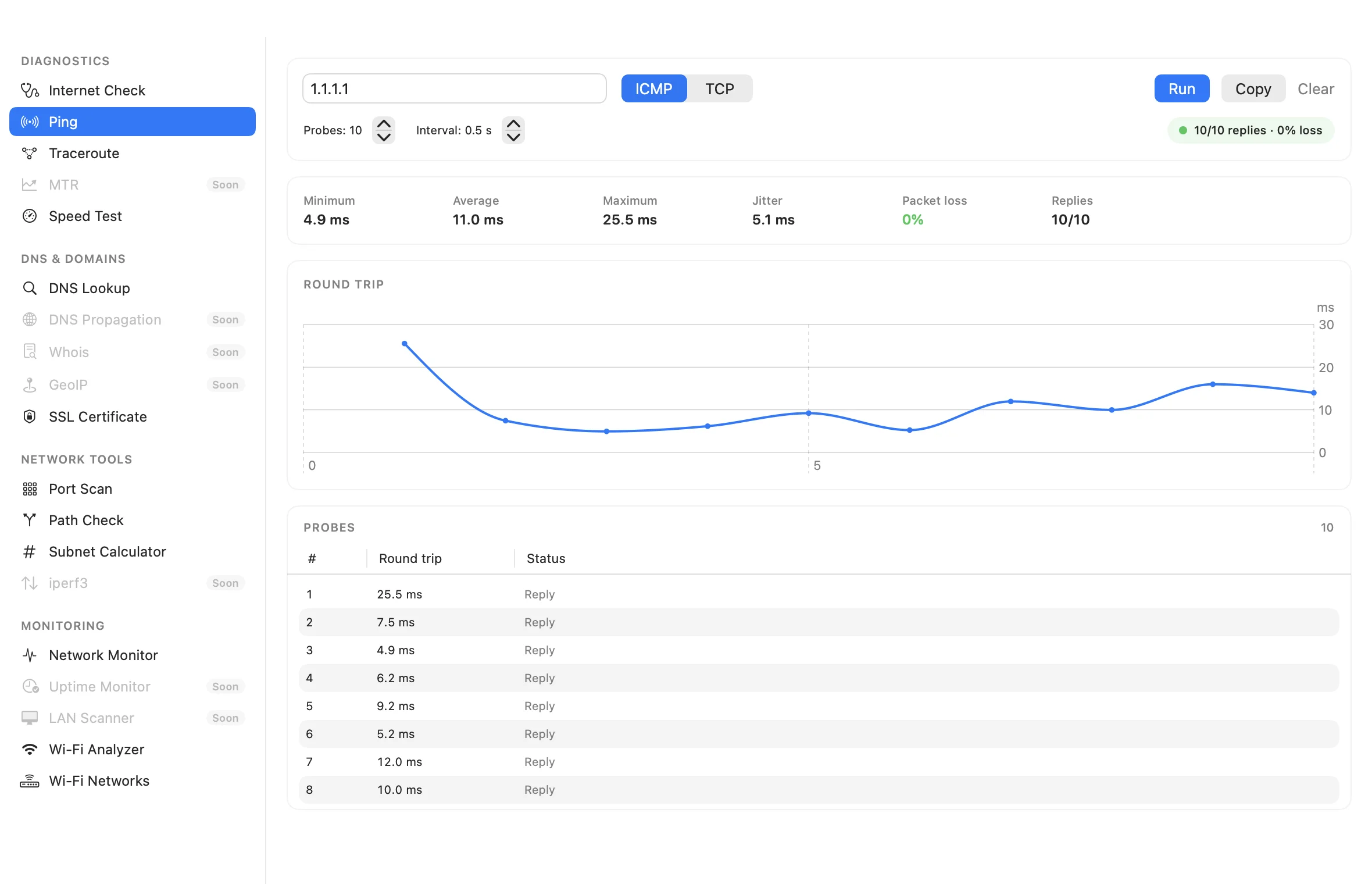
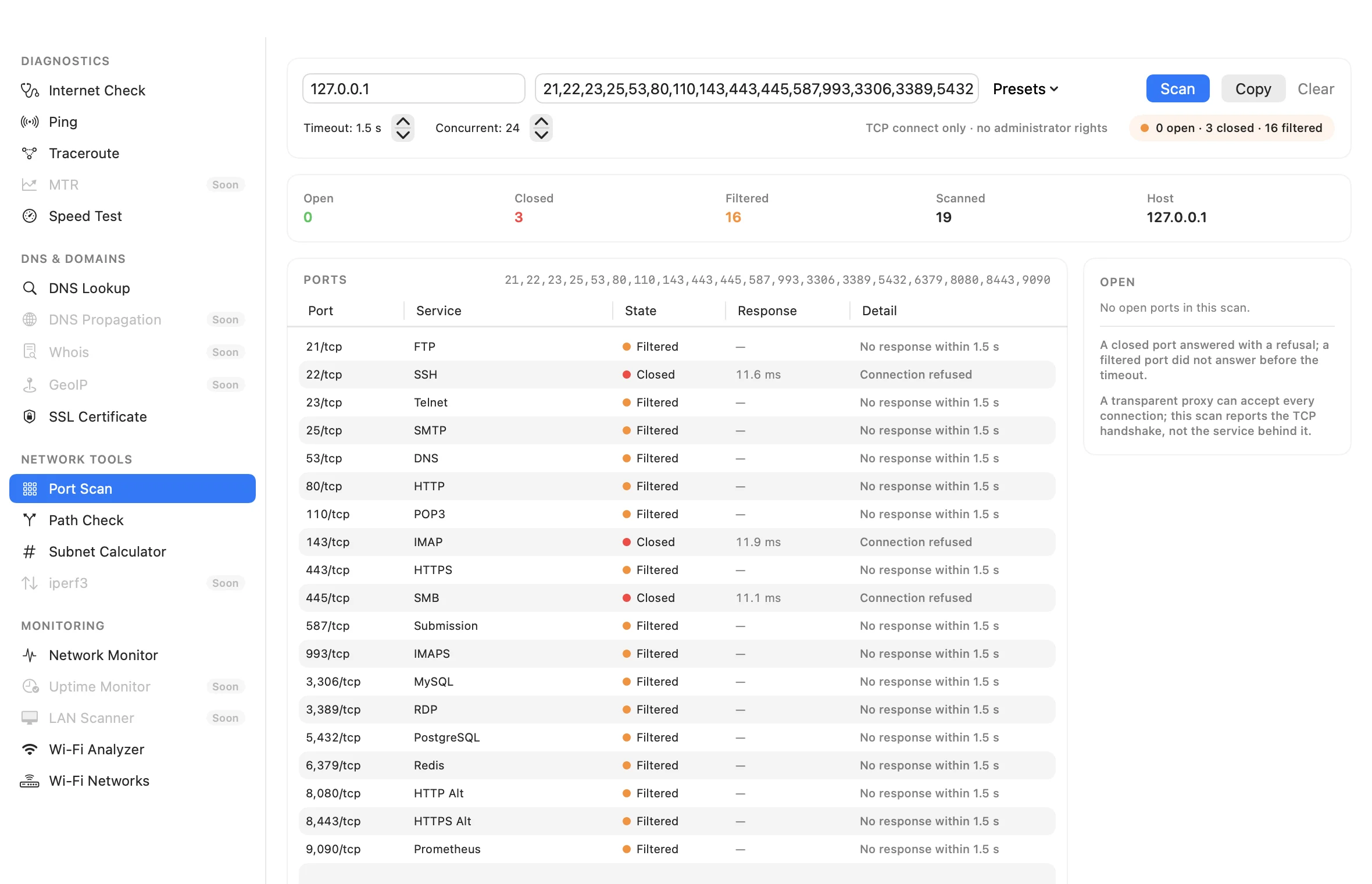
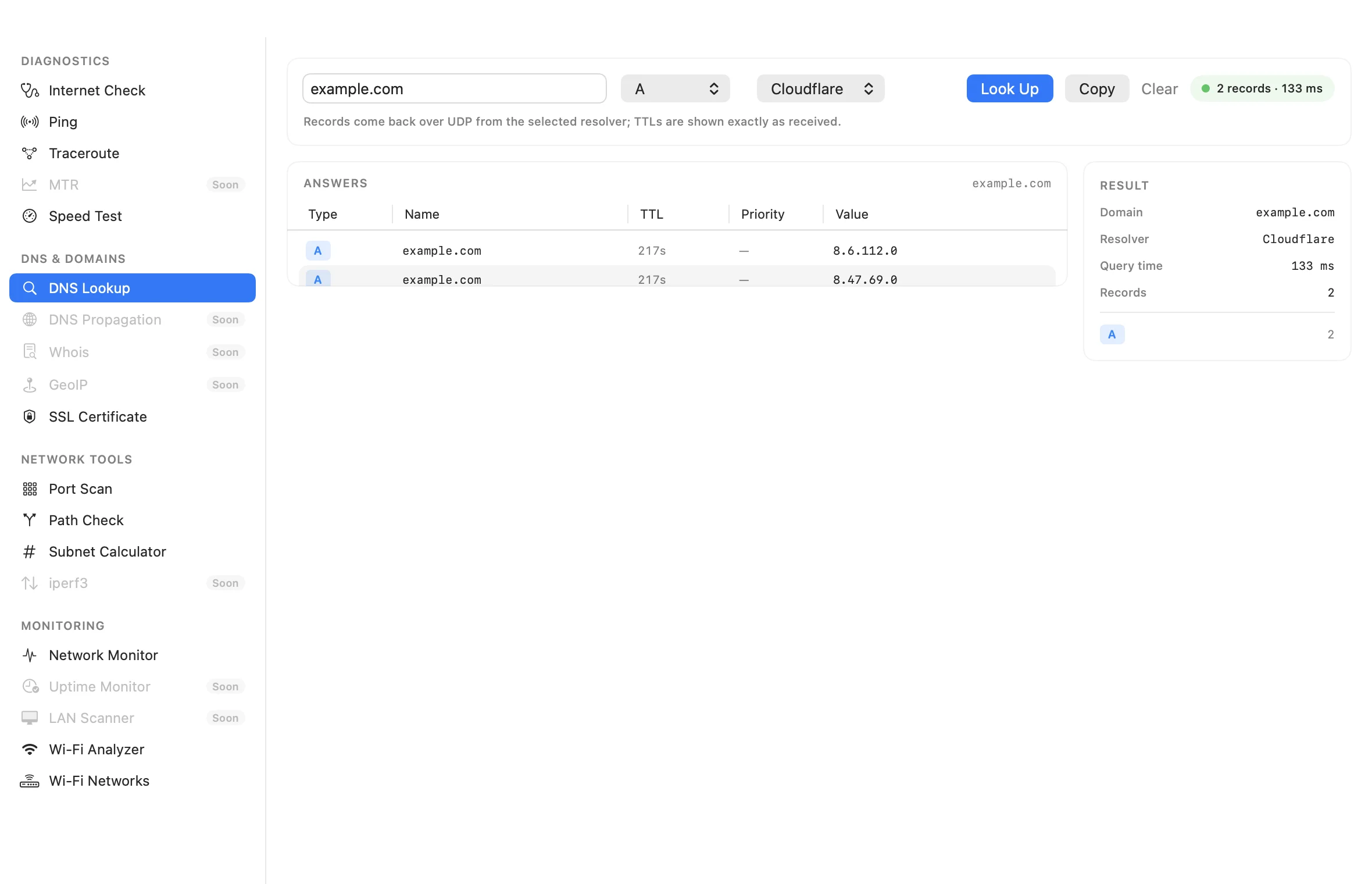
| Toolkit | One window with search and recents: Internet Check verdict, native ICMP/TCP ping, traceroute, visual traceroute, MTR, DNS lookup, DNS propagation, Whois/RDAP, GeoIP, port scan, path check, SSL certificate, subnet calculator, iperf3, speed-test history/schedule and network monitor |
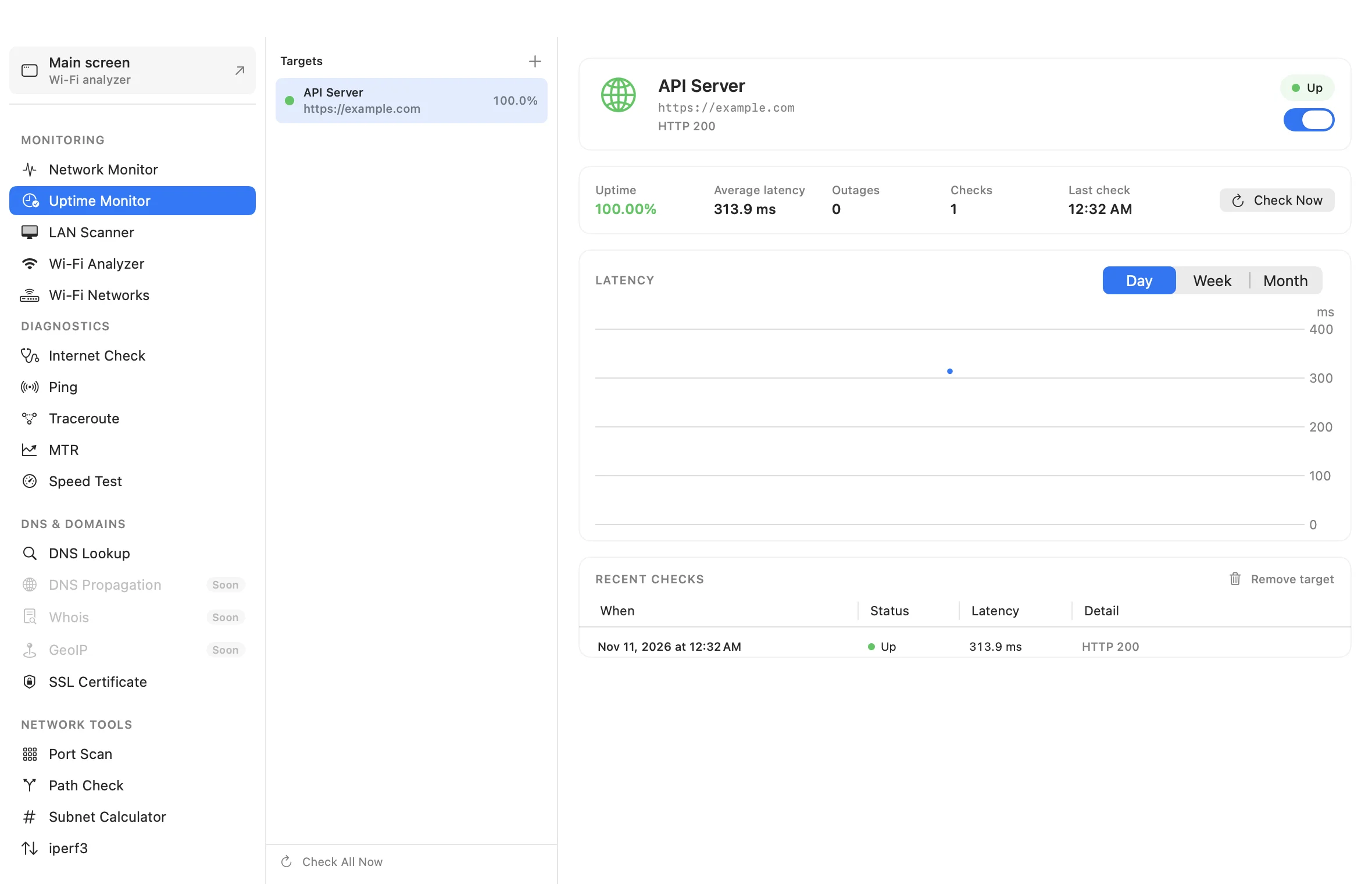
| Monitoring | Uptime Monitor for HTTP/TCP targets with notifications and menu-bar status; LAN Scanner with ARP/ICMP/TCP, Bonjour names, OUI vendors, open ports and Network Guard |
| Management | Editable aliases/tags/notes, grouping by SSID/band/vendor/security, saved sessions, annotations |
| Survey | Floor-plan import, click-to-sample RSSI and a heatmap overlay (survey-lite) |
| Vendors | 58k-prefix offline OUI database from IEEE and Wireshark, with 24/28/36-bit longest-prefix matching (sources) |
| Export | CSV, JSON and synthetic 802.11 beacon PCAP for offline inspection |
| Updates | Sparkle 2 signed appcast, Homebrew cask, universal builds |
| Privacy | No analytics/accounts/telemetry; only update and optional diagnostic requests; see PRIVACY.md |
Requirements
- macOS 13 Ventura or later (Apple Silicon and Intel)
- Location Services permission — macOS hides SSID/BSSID values from apps without it
- Xcode 16+ and XcodeGen only when building from source
Install
Download the latest build directly:
- Short link — https://zheltukheen.github.io/lanfi/download
- DMG — https://github.com/zheltukheen/lanfi/releases/latest/download/LanFi.dmg
- ZIP — https://github.com/zheltukheen/lanfi/releases/latest/download/LanFi.zip
- CLI — https://github.com/zheltukheen/lanfi/releases/latest/download/LanFi-CLI.zip
Those three links always point at the newest release. Every tagged release
keeps the same unversioned names, for example
https://github.com/zheltukheen/lanfi/releases/download/v4.12.0/LanFi.dmg,
which stays immutable for pinning. Browse everything in
Releases.
Drag LanFi to Applications, and launch it.
The current builds are ad-hoc signed, not notarized. If Gatekeeper warns,
right-click the app → Open, or allow it in
System Settings → Privacy & Security. Builds are universal (arm64 +
x86_64) and include SHA-256 checksums.
Or install via Homebrew:
brew tap zheltukheen/lanfi https://github.com/zheltukheen/lanfi
brew trust zheltukheen/lanfi
brew install --cask lanfi
LanFi is the renamed LanFi. Existing preferences, Sparkle updates and local
annotation/session/survey data are migrated automatically; macOS may ask for
Location Services again. If both apps are installed, remove the old LanFi.app.
On first launch, allow Location Services when macOS asks. If the prompt was dismissed, enable it in System Settings → Privacy & Security → Location Services → LanFi.
LanFi 1.5+ includes Sparkle auto-updates. Update checks fetch a signed appcast from GitHub Releases; no account or analytics data is sent.
Build from source
git clone https://github.com/zheltukheen/lanfi.git
cd lanfi
brew install xcodegen
xcodegen generate
./build.sh          # build/LanFi-Universal/LanFi.app (universal, ad-hoc signed)
open LanFi.xcodeproj # or develop in Xcode
Run the checks locally:
xcodebuild test -project LanFi.xcodeproj -scheme LanFi \
  -destination 'platform=macOS' CODE_SIGNING_ALLOWED=NO

./scripts/lint.sh
How the quality score works
Each network is scored 0–100 from the sub-scores that are available:
| Component | Weight | Input |
|---|---|---|
| Signal | 45% | RSSI, piecewise mapped from −95 to −50 dBm |
| SNR | 15% | Noise measurement when CoreWLAN exposes it |
| Congestion | 25% | Sum of overlapping airtime from other APs, weighted by their RSSI and channel utilization |
| Utilization | 10% | BSS Load channel utilization IE |
| Security | 10% | WPA3/OWE/WPA2/legacy/WEP/Open, PMF and WPS adjustments |
Missing sub-scores are removed and the remaining weights are renormalised.
Channel recommendations evaluate candidate 20/40/80 MHz spans against every
observed AP in the band, including partial spectral overlap, and penalise busy
channels. This is a heuristic, not a site survey: it cannot see non-Wi‑Fi
interference, airtime from clients, or spectrum analyzer data. The exact rules
live in Services/NetworkAnalyzer.swift and
are covered by tests in Tests/NetworkAnalyzerTests.swift.
Comparison
As of November 2026, against common macOS tools:
| LanFi | WiFi Explorer | NetSpot | Apple Wireless Diagnostics | |
|---|---|---|---|---|
| Price / license | Free, FSL-1.1-ALv2 | Paid (from ~$20; Pro) | Free tier; ~$19/mo or ~$179 one-time | Free |
| Native CoreWLAN scanning | ✅ | ✅ | ✅ | ✅ |
| Quality + congestion scores | ✅ | Partial | Partial | — |
| Ranked channel recommendations | ✅ | Partial | Partial | — |
| WPA3/OWE/PMF/WPS audit with remediation | ✅ | Partial | — | — |
| Network toolkit: ping, traceroute, MTR, DNS, ports, SSL, subnet, iperf3 | ✅ | — | Speed test only | Partial |
| Uptime Monitor + LAN Scanner + Network Guard | ✅ | — | — | — |
| Interfaces / gateway / DNS monitor | ✅ | Partial | — | Partial |
| Remote sensors over SSH | ✅ | ✅ (Pro) | — | — |
| CSV + JSON export | ✅ | CSV/PCAP | CSV/PDF | — |
| Raw information elements | ✅ | ✅ (Pro) | — | — |
| Menu bar extra | ✅ | — | — | — |
| Site survey / heatmap | IDW + wall attenuation | — | ✅ | — |
| Protocol blocks + diagnostics | ✅ | Partial | Partial | Partial |
| Grouping, saved sessions, annotations | ✅ | ✅ (Pro) | Partial | — |
| PCAP export | Synthetic + live capture | ✅ | — | ✅ |
| Auto-update | Sparkle signed appcast | ✅ | ✅ | ✅ |
| Notarized | Roadmap | ✅ | ✅ | ✅ |
Competitor capabilities change frequently; corrections via issues are welcome.
LanFi deliberately focuses on analysis, privacy and troubleshooting rather
than predictive enterprise design. The Netutilus-style toolkit coverage and
remaining gaps are tracked in
docs/NETUTILUS_PARITY.md.
Roadmap
LanFi already leads on interpretation (quality, channel advice, security audit).
The remaining gap to paid analyzers is distribution, workflow and survey
features. The prioritised plan — with sources and acceptance criteria — lives in
docs/COMMERCIAL_GAP.md.
Delivered through 4.12.1: protocol blocks, all-interface analysis, diagnostics with persisted monitoring history, annotations, grouping, sessions, column profiles, multi-select, synthetic + live + offline PCAP/PCAPNG, IDW survey heatmaps with walls and PDF reports, SSH remote sensors with polling, AP-name detection, EHT/320 MHz and Multi-Link IE decoding, menu-bar alerts, vendor DB updates, filter profiles, CLI, URL scheme, Sparkle, Homebrew cask, expanded localization and VoiceOver chart descriptors, plus the Network Toolkit (verdicts, ping, traceroute, MTR, DNS, ports, SSL, subnet, iperf3, speed-test history, Uptime Monitor and LAN Scanner).
Remaining outside the shipped code: actual Apple notarization (no Developer Program account/Developer ID certificate), hardware spectrum analyzer integration, full per-link MLO BSSID sets, external USB adapter measurement beyond CoreWLAN, and a manual VoiceOver audit of the remaining screens. The DNS Propagation, Whois/RDAP, GeoIP and Visual Traceroute are now implemented; running LAN Scanner needs Local Network permission for MAC, vendor and TCP results. Multi-select comparison/bulk edit, dynamic technical localization, PCAPNG/offline analysis, vendor DB updates, CLI, URL automation, alerts, survey reports and app-wide settings are implemented.
Project structure
LanFiApp.swift        App entry, window, menu bar extra
Models/                      NetworkModel and value types
Services/
  WiFiScanner.swift          CoreWLAN scan + model construction
  InformationElementParser   Pure 802.11 IE decoding
  NetworkAnalyzer.swift      Quality, overlap, recommendations, security
  ProtocolAnalyzer.swift     Block-oriented protocol profile
  DiagnosticsEngine.swift    Link, gateway, DNS, internet and latency checks
  PcapExporter.swift         Synthetic beacon pcap export
  NetworkColumnFormatter.swift  Pure table formatting/sorting
ViewModels/                  Analyzer, diagnostics and survey state
Views/                       SwiftUI + AppKit table, charts, protocols, diagnostics, survey
Utils/                       Location permission, OUI vendor lookup
Resources/                   OUI database, privacy manifest, Russian localization
Casks/lanfi.rb                Homebrew cask (tap: zheltukheen/lanfi)
CLI/LanFiCLI.swift            Offline CLI target (lanfi-cli)
Tests/                       XCTest coverage for pure logic and parsing
scripts/autopush.sh          Commit/push automation
project.yml is the source of truth for the Xcode project. Regenerate it with
xcodegen generate after adding or moving files.
Automation
scripts/autopush.sh keeps GitHub in sync after meaningful changes:
./scripts/autopush.sh --install-hook   # push every completed commit
./scripts/autopush.sh --watch          # debounced watcher: commit + push after 90s of quiet
./scripts/autopush.sh --status
AUTOPUSH_DRY_RUN=1 ./scripts/autopush.sh
The script ignores build output, refuses obvious credentials and files over 10 MB, rebases/retries on a non-fast-forward push, and never force-pushes. The installed post-commit hook skips itself while the watcher is operating.
Release process
- Add a
## X.Y.Z — YYYY-MM-DDsection toCHANGELOG.md. - Run
./release.sh X.Y.Z. - The script bumps
project.yml, regenerates the project, commits, pushesmain, and pushes tagvX.Y.Z. - GitHub Actions runs tests, builds a universal app, packages ZIP + DMG +
SHA-256, signs and attaches
appcast.xml, updates the Homebrew cask and publishes the release using the changelog section.
Contributing
Bug reports, feature ideas and pull requests are welcome. Read CONTRIBUTING.md and CODE_OF_CONDUCT.md first. Security issues should go through SECURITY.md, not the public issue tracker.
License
Functional Source License 1.1, ALv2 Future License (FSL-1.1-ALv2) © 2025–2026 zheltukheen and LanFi contributors.
LanFi is source-available, not OSI open source. You may use, modify and redistribute it, but you may not offer it as a competing commercial product or service. Internal use, non-commercial education/research and professional services for licensed users are permitted. Each release becomes available under Apache-2.0 on its second anniversary.
The LanFi name and logo are covered separately by TRADEMARK.md.
Signed/notarized distribution is documented in docs/DISTRIBUTION.md.
Wi-Fi, WPA2 and WPA3 are trademarks of their respective owners. LanFi is not affiliated with Apple or the Wi-Fi Alliance.
CLI and automation
lanfi-cli is built with the app and published as a separate release asset:
lanfi-cli summary scan.json
lanfi-cli summary scan.json --json
lanfi-cli protocols scan.json
lanfi-cli pcap capture.pcapng --json
Deep links: lanfi://toolkit/wifiAnalyzer, lanfi://toolkit/networkMonitor,
lanfi://search?q=AX55, lanfi://diagnostics/run (opens Internet Check).
Network Toolkit
Open the Network Toolkit from the main toolbar, or use Layout → Network Toolkit (⇧⌘T). The sidebar begins with Wi-Fi, where Wi-Fi Analyzer is selected by default: it summarises the current scan and hosts Site Survey, Hardware Spectrum, Live Capture, offline capture analysis and Remote Sensors as sheets. Monitoring, Diagnostics, DNS & Domains and Network Tools follow.
The toolkit uses its own probe layer: unprivileged ICMP and TCP ping, DNS over
UDP, a bounded TCP port scanner, TLS chain inspection, a traceroute runner and
an iperf3 JSON client. No shell commands are parsed for ping or DNS; traceroute
still uses the setuid system binary. Deep link: lanfi://toolkit/ping.
MTR repeats traceroute and aggregates loss/jitter per hop. Uptime Monitor keeps seven days of HTTP/TCP checks, notifies you on down/recovery and reports status in the same menu bar as Wi-Fi alerts. LAN Scanner prefers the ARP table, falls back to an ICMP/TCP sweep when macOS hides it, adds Bonjour names and OUI vendors, and Network Guard flags new devices. Network Monitor is the toolkit's Interfaces view; the main window no longer carries Interfaces or Diagnostics tabs.
Offline capture analysis
Open Network Toolkit → Wi-Fi Analyzer → Analyze Capture to decode pcap/pcapng files with radiotap or bare 802.11 frames. Beacon/probe-response SSID, BSSID, channel, RSSI, security and EHT presence are shown offline; no network is contacted.
Remote sensors
Open Network Toolkit → Wi-Fi Analyzer → Remote Sensors, add a Mac with Remote Login enabled and an authorized SSH key, then run a scan. Password prompts are not supported.
Explore related projects
trimstray/the-book-of-secret-knowledge
A collection of inspiring lists, manuals, cheatsheets, blogs, hacks, one-liners, cli/web tools and more.
258,416 starsHack-with-Github/Awesome-Hacking
A collection of various awesome lists for hackers, pentesters and security researchers
125,502 starsswisskyrepo/PayloadsAllTheThings
A list of useful payloads and bypass for Web Application Security and Pentest/CTF
82,675 starscaddyserver/caddy
Fast and extensible multi-platform HTTP/1-2-3 web server with automatic HTTPS
79,038 stars