
zcx960/AIA-selection-assistan
zcx960/AIA-selection-assistan has 55 GitHub stars and 6 forks. GitHot measured 0 stars in 24 hours. Last checked 2026-11-15 12:32 UTC. Last push 2026-10-20.
Measured star growth
- in 24h
- 0
- in 7 days
- Collecting history
- in 15 days
- Collecting history
- in 1 month
- Collecting history
Net star changes over overlapping periods, not daily totals. Missing measurements are left blank. Stars measure attention, not software quality.
About
A lightweight, system-wide AI text-selection assistant that supports custom LLM APIs and screenshot-based AI image recognition.轻量级系统全局ai划词助手,支持自定义大模型API,支持截图ai识图
AIREADME.en.md
Original

AIA Selection Assistant
Highlight text, snap a screenshot, ask AI — skip a few window switches, skip a lot of copy-pasting.





English | 中文


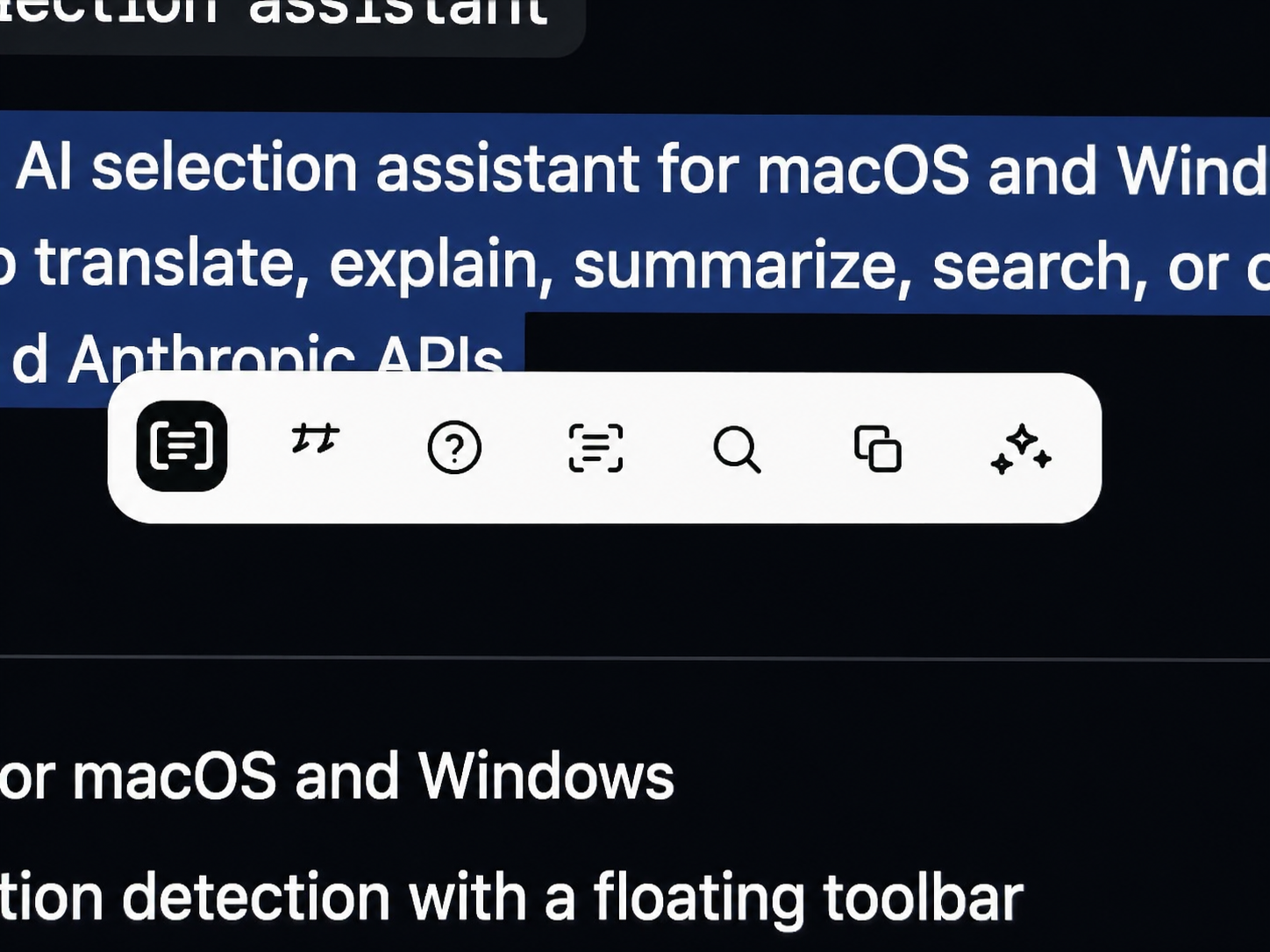
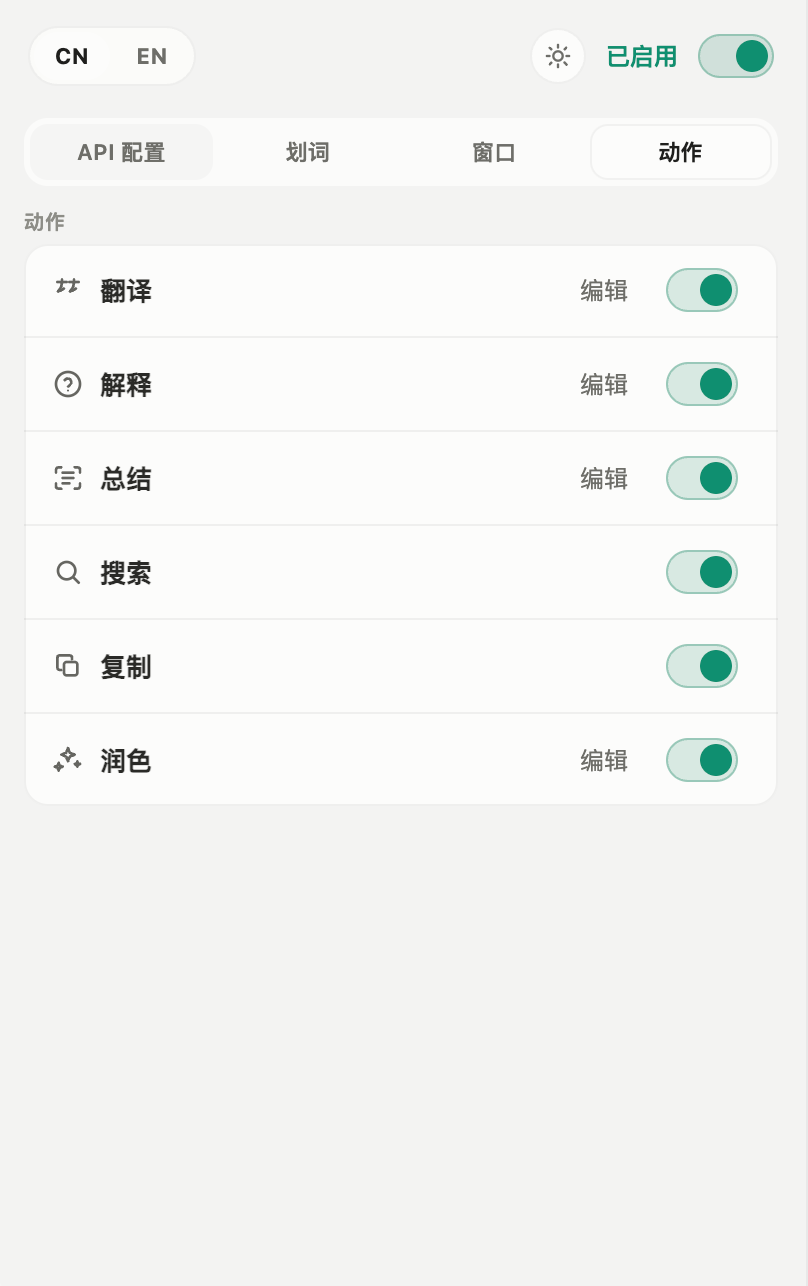
AIA Selection Assistant lives in your menu bar / system tray. Highlight some text in any app and a small toolbar slides in next to it — one click to translate, explain, summarize, rewrite, search, copy, or read aloud. Prefer the keyboard? A global shortcut works too. Toolbar actions can be added, renamed, re-iconed, reordered, edited, or deleted; each prompt action can also use its own model template, adjust reasoning intensity, or open a type-in window from its own shortcut. For actions that rewrite the original text, such as Polish, the result window also gets a Replace button that writes the AI output straight back over the selection in the source app — no copy-paste round trip (currently Windows x64, Polish action only).
It also ships a built-in region screenshot tool: drag to select an area, annotate with pen or arrows (brush size is a quick slider away), then save as PNG, copy to clipboard, pin to the desktop, or hand the image straight to AI for vision-based analysis. Pinned screenshots support wheel zoom, drag-to-move, opacity tweaking, and a right-click menu to re-send them to AI.
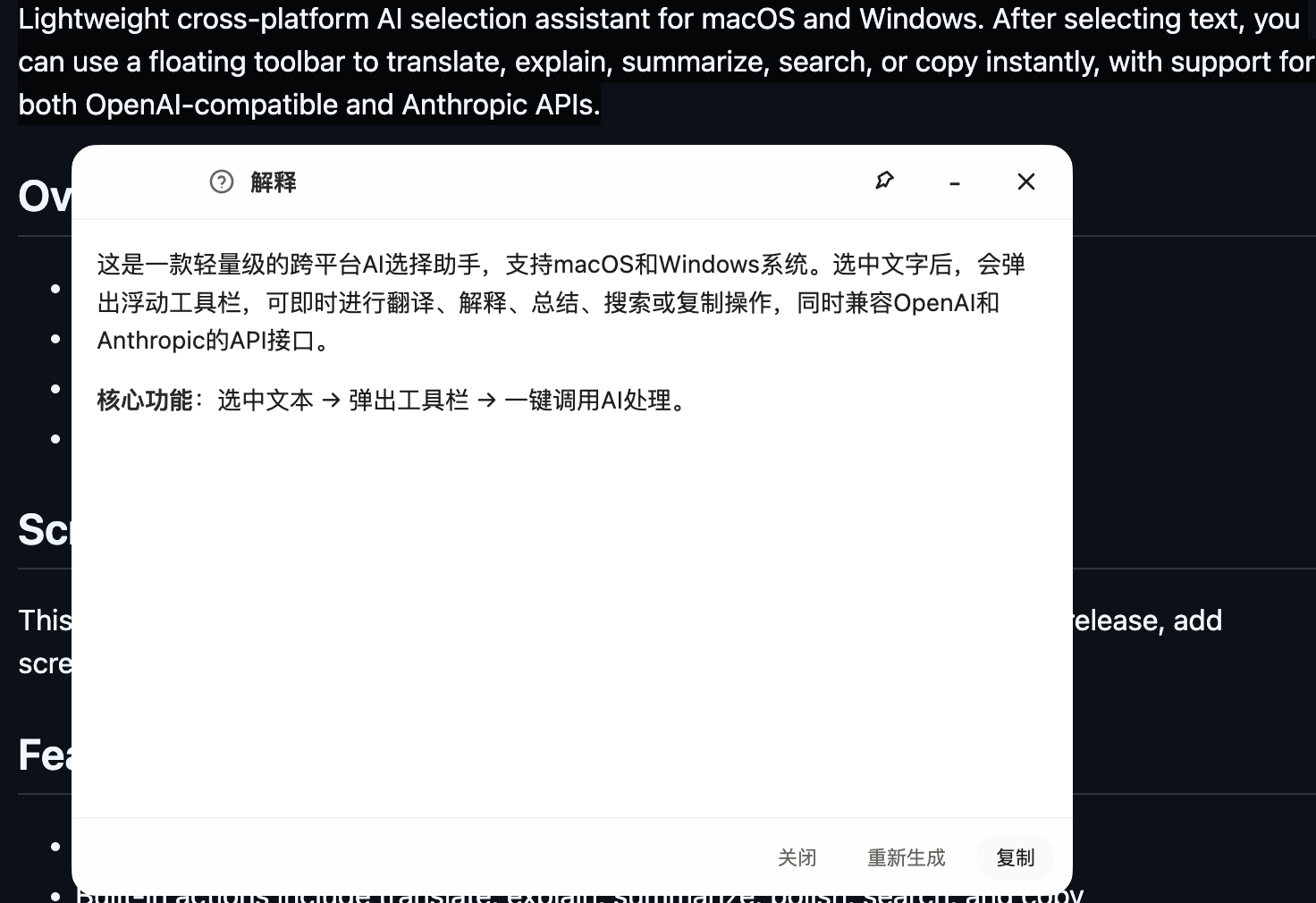
The result window is its own conversation — keep asking follow-ups, AI sees the earlier turns, and output streams in so you can interrupt any time. You can also carry selected text into the conversation as a quoted reference, or send images along: images are kept in the session history, so later follow-ups still see them. With thinking models, the chain of thought streams in live: the latest reasoning wraps and scrolls inside a few-row window, then collapses into a "Thought for Xs" summary once the answer starts. Flip on web search when you need fresh information; AI will fetch pages itself and cite the sources at the bottom of the answer.
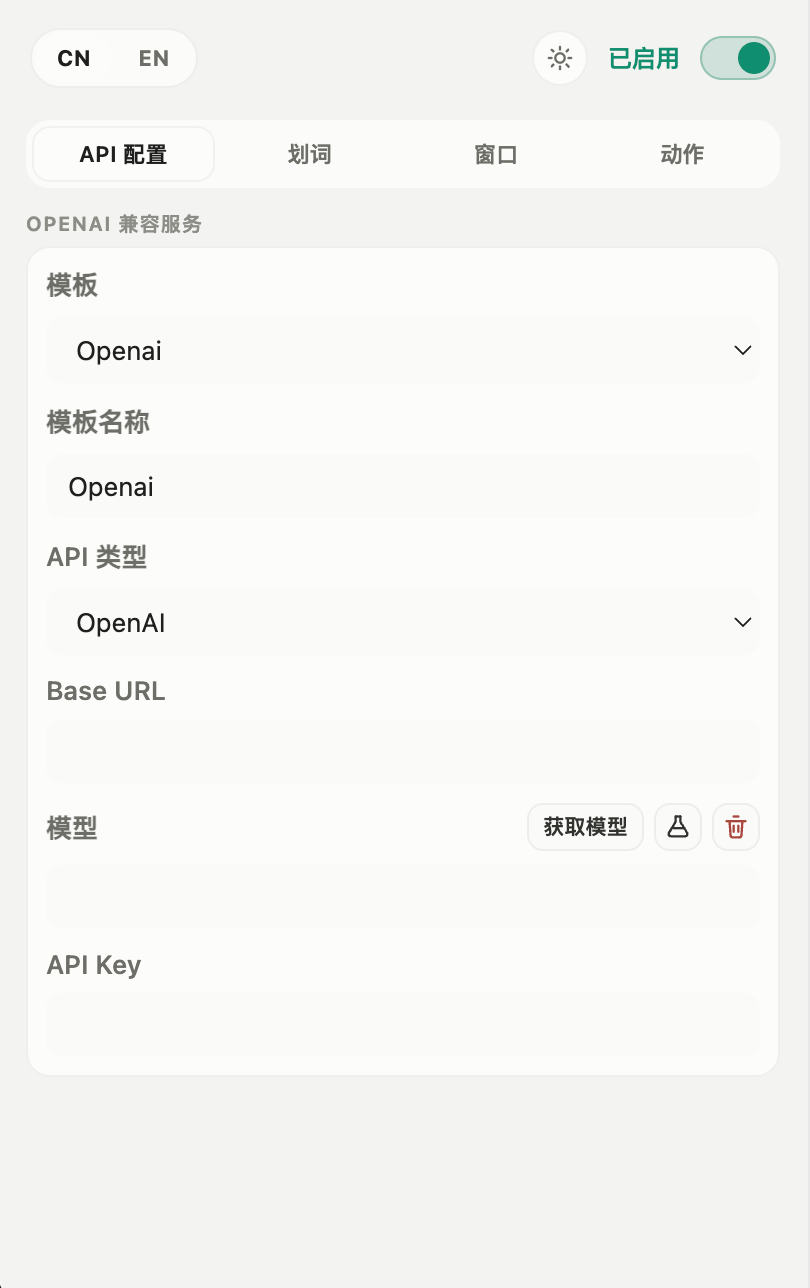
For models you can point it at either OpenAI-compatible endpoints (your own endpoint, OpenAI, DeepSeek, Moonshot, Zhipu, any third-party proxy) or the Anthropic API. Multiple templates let you swap endpoint / key / model in one click, and individual actions can bind to a specific template. API keys stay on disk. Light / dark / system theme modes are supported, the UI ships in English and Chinese, and the result window's default size, font family, and font size can be customized.
Currently runs on macOS and Windows.
Download
Latest published release v0.8.2 - grab the installer for your platform:
| Platform | Package | Link |
|---|---|---|
| macOS (Apple Silicon) | .dmg |
AIA-Selection-Assistant-0.8.2-arm64.dmg |
| macOS (Apple Silicon) | .zip |
AIA-Selection-Assistant-0.8.2-arm64-mac.zip |
| Windows x64 | Installer | AIA-Selection-Assistant-Setup-0.8.2.exe |
| Windows x64 | Portable | AIA-Selection-Assistant-Portable-0.8.2.exe |
v0.8.2 highlights
- Fixed the Windows portable login item pointing at the temp unpack directory (#9). Portable unpacks itself into
%TEMP%\<random>on every run, and the login item followedprocess.execPathinto that throw-away copy; once system cleanup swept the temp directory, the next login started a half-deleted tree and the main process threwENOENTwhile resolvingpackage.json, before any window existed. The login item now targets the.exeyou actually launched, and a stale entry written by an older version is overwritten on the next start - Packaging now verifies the native modules: if
selection-hook/uiohook-napi'spackage.json, JS entry, or the target platform's.nodeis not correctly placed underapp.asar.unpacked, the build fails instead of shipping a broken installer
For the v0.8.1 fix (white icon corners on Windows), see the CHANGELOG.
For older versions and full asset lists, see GitHub Releases.
The Windows portable build unpacks itself into the system temp directory (
%TEMP%) on every run. Its login item now points at the.exeyou actually double-clicked rather than the unpacked temp copy, but portable still isn't a good fit for permanent launch-at-login: if the temp directory gets cleaned up you have to run the.exeagain to recover. Use the installer if you want it to come up reliably at login.
This README describes the current
mainbranch. If you download a Release build, use that version's actual binaries as the source of truth.
The macOS builds are not code-signed — on first launch allow them via System Settings → Privacy & Security.
The Windows builds aren't signed either; if SmartScreen complains, choose “Run anyway”. If Smart App Control (SAC) is enabled it may block the installer outright — SAC has no per-app allowlist, so the only way through is to turn the feature off under Windows Security → App & browser control → Smart App Control settings. On older Windows 11 builds that switch is one-way (restoring it needs a reset); Windows 11 24H2/25H2 can toggle it freely after the April 2026 update (KB5083769).
Overview
- Electron desktop app for macOS and Windows
- Floating toolbar appears after text selection
- System TTS can read selected text aloud on macOS and Windows
- Built-in region screenshot: pin to desktop, copy, save, or hand it to AI for image understanding
- Standalone AI chat window with multi-turn context and streaming follow-ups
- Carry selected text into the conversation as a quoted reference; send images that persist in the session history
- Replace the original selection with the Polish result in one click (Windows x64, Polish action only)
- Live chain-of-thought display while the model thinks, collapsing into a time-spent summary
- Multiple API templates, with per-action model template and reasoning intensity
- Custom actions: add, rename, change icons, edit prompts, reorder, and delete
- Per-action input shortcuts: press a shortcut, type text, and run that action directly
- Light, dark, and follow-system theme modes
- Result window supports Markdown rendering, copyable code blocks, and wrapped long lines
Screenshots
Everyday Flow
API and Action Setup
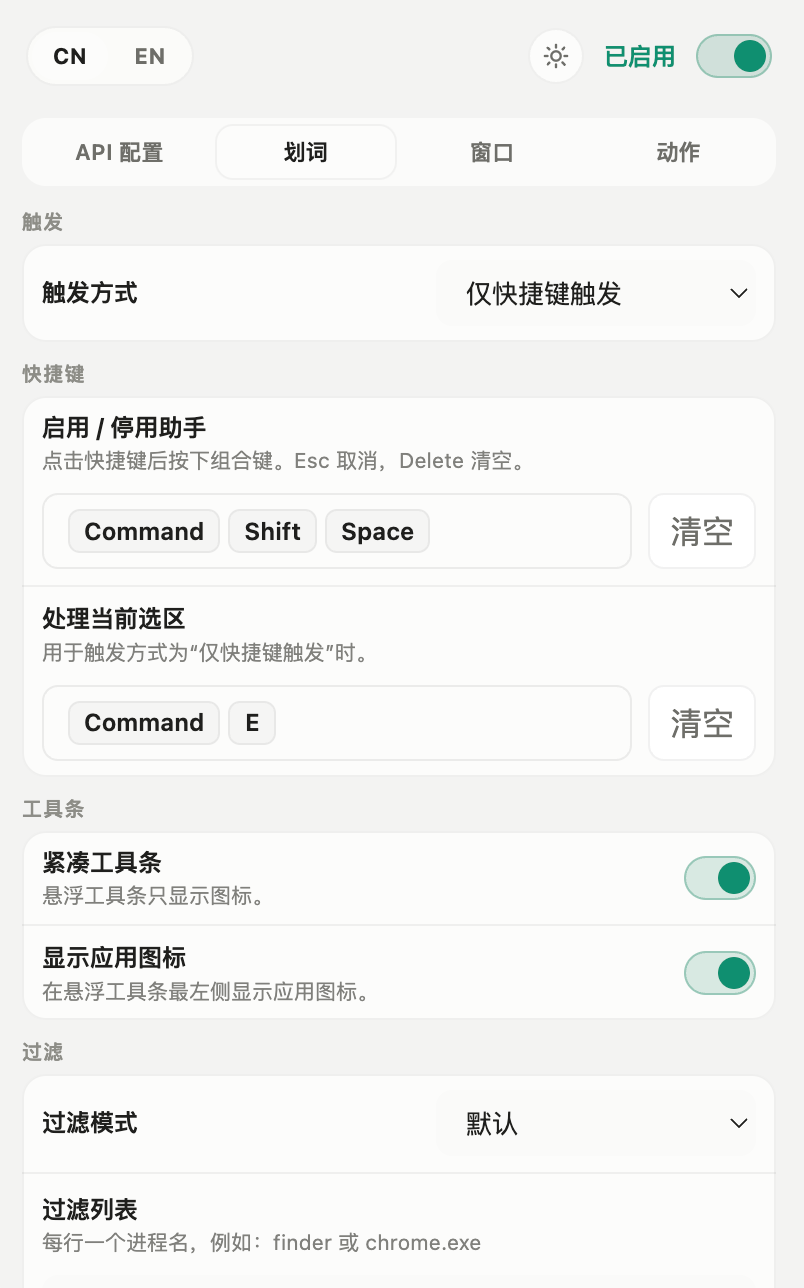
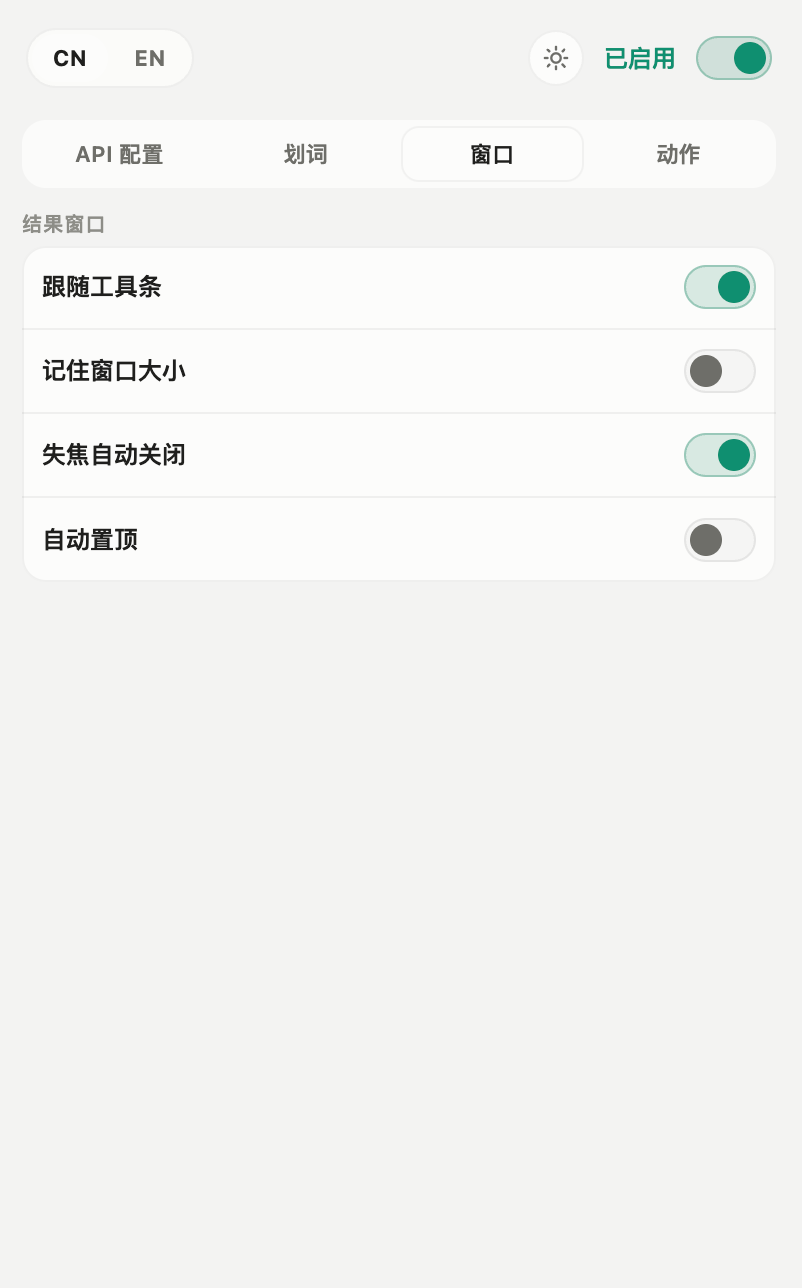
Selection and Window Settings
Features
- Shows a floating toolbar right after text selection
- Built-in actions for translate, explain, summarize, polish, search, copy, and read-aloud, plus your own custom actions
- Replace the original selection with the Polish result in one click (Windows x64, Polish action only)
- Supports multiple API templates for quick provider/model switching
- Each prompt action can choose its own API template and independently set reasoning intensity
- Each action can have an input shortcut, so it can run without a prior text selection
- On Windows, Ctrl+A also summons the toolbar (on by default)
- Toolbar can run in compact mode and can hide the app icon
- Closing the app minimizes it to the menu bar or system tray instead of quitting
Replace Selection (Windows x64)
- Only meaningful for actions that rewrite the original text, and currently wired to Polish only
- The Replace button on the result window writes the output back over the selection in the source app: result goes to the clipboard → focus returns to the source window → the selection is verified to still be the same text → Ctrl+V is synthesized
- If verification fails (source window changed, selection changed, or no window handle available) it never blind-pastes; it degrades to "copied, paste it manually"
- When the source app name or window handle is unavailable the button is disabled outright, and the tooltip explains why
- Other actions such as Translate, and macOS, are not covered yet
Screenshot
- Trigger region capture via a global shortcut and drag to select an area
- After capture: send to AI, copy to clipboard, save as PNG, or pin to the desktop
- Pinned images support wheel zoom, drag-to-move, and a right-click menu for opacity / reset / close
- The pin's right-click menu can also send the image straight into the AI image-understanding chat
AI Chat and Follow-up
- Dedicated chat window, decoupled from the toolbar's one-shot result popup
- Multi-turn context: keep asking follow-ups and the model sees the previous turns
- Selected text can be carried into the conversation as a quoted reference, with a pre-selection panel and mark picker
- Send images: they persist in the session history, so later follow-ups still see them
- Streaming output, rendered as it arrives, with interrupt support at any time
- When a stream is superseded by a new request or its window is destroyed, choose whether to abort or let it finish
- Live chain-of-thought for thinking models: newest reasoning wraps and scrolls, then folds into "Thought for Xs"
- Markdown code blocks include a copy button and wrap long lines
- The window can be pinned on top; closing it destroys the session so context never leaks
Platform Notes
macOS
- Accessibility permission is required for system-level text selection detection
- Closing the main window minimizes the app to the menu bar
- On first launch, it is worth testing text selection and popup behavior manually
Windows
- Supports staying resident in the system tray
- Closing the main window minimizes it to the tray instead of quitting
- Selection behavior can vary depending on the target app, elevation level, or IME state
- The installer is not code-signed: choose “Run anyway” at the SmartScreen prompt; if Smart App Control is enabled you must turn it off device-wide before installing (see the Download section above)
Installation and Local Development
Prerequisites
- Node.js 20+ recommended
pnpm10+- Use macOS or Windows if you want to test the full runtime behavior
Install
pnpm install
Development
pnpm dev
Test
pnpm test
pnpm typecheck
Build
pnpm build
Packaging
pnpm dist:mac
pnpm dist:win
Notes:
- Build artifacts should not be committed to the repository
- If you want to distribute binaries, GitHub Releases is the recommended path
Configuration
API Support
- OpenAI-compatible: uses
/chat/completionsand/models - For OpenAI-compatible providers, enter the API root when possible, such as
https://api.example.com/v1; if you paste a full/chat/completionsor/modelsendpoint, the app normalizes it automatically - Anthropic: uses
/v1/messagesand/v1/models - In Anthropic mode, you only need to enter the base URL;
/v1is appended automatically
API Templates
- Add, rename, and delete multiple API templates
- Each template stores API type, base URL, API key, and model
- Templates can fetch available models, test the configured model, and be marked as default
- Actions can follow the default template or bind to a specific template
Action Configuration
- Built-in actions can be edited, disabled, and reordered; custom actions can also be deleted
- Prompt actions support custom prompts, icons, provider templates, and reasoning intensity
- Search actions support custom search URL templates
- The read-aloud action uses system TTS, and the tray menu can stop current speech
- Action shortcuts open a type-in window, then run the selected action once against that input
Theme and UI
- Light, dark, and follow-system modes
- Compact toolbar mode is supported
- The app icon in the floating toolbar can be hidden
- The result window supports custom default width, height, font family, and font size
- Send key is configurable: Enter / Ctrl+Enter / Shift+Enter (plain Enter by default)
- Optional action-window pre-warming to cut first-trigger latency (on by default)
- Optional context injection (off by default): when enabled, attaches source app, local time, and time zone to the request
- Optional local usage stats (off by default)
- A global hotkey that collides with an action shortcut is rejected on save with an inline warning
- Packaged builds support launch-at-login; login launches start hidden in the menu bar / tray
- The settings window is organized into API, Selection, Window, and Actions sections
Privacy
- Selected text is only sent to the configured provider when you explicitly trigger an AI action
- API keys are stored locally through Electron Store
- Local usage stats are off by default. When enabled, each completed or aborted AI action appends one JSONL record to
userData/stats.jsonlon your machine, containing that request's source text and answer (for an aborted stream, the partial answer). The file is never uploaded and is never read back into AI requests; the selected text itself still travels with normal AI requests as before - Context injection is off by default. When off, no metadata is appended to the system prompt; when on, it attaches source app, local time, and time zone, and the
noSourceprivacy level drops just the app name - This repository should not contain your local settings, dependencies, or build artifacts
Known Limitations
- System-level selection depends on the third-party
selection-hookpackage; the project now bundles a fork of it (third_party/selection-hook) that no longer tracks upstream automatically, and behavior can vary across apps - Replace selection is currently Windows x64 only and covers the Polish action only
- Linux is not a first-class supported platform yet
- Selection position and follow-window behavior may differ in some apps or IME environments
- The current provider layer supports OpenAI-compatible and Anthropic APIs only
Contributing
Issues and pull requests are welcome. Please read CONTRIBUTING.md before contributing.
🙏 Acknowledgments
- LINUX DO — Community support and inspiration
Security
If you discover a security issue, please do not open a public issue first. See SECURITY.md.
License
This project is released under the MIT License.