
yzhou86/Data-Pilot
yzhou86/Data-Pilot has 48 GitHub stars and 1 forks. GitHot measured 0 stars in 24 hours and -3 in 7 days. Last checked 2026-11-10 04:44 UTC. Last push 2026-05-11.
A data analytics AI Agent - use LLM to drive machine learning algorithms on dataset
Measured star growth
- in 24h
- 0
- in 7 days
- -3
- in 15 days
- Update delayed
- in 1 month
- Update delayed
Net star changes over overlapping periods, not daily totals. Missing measurements are left blank. Stars measure attention, not software quality.
README.md
OriginalSciPilot
AI-first data and research workspace for students and researchers.
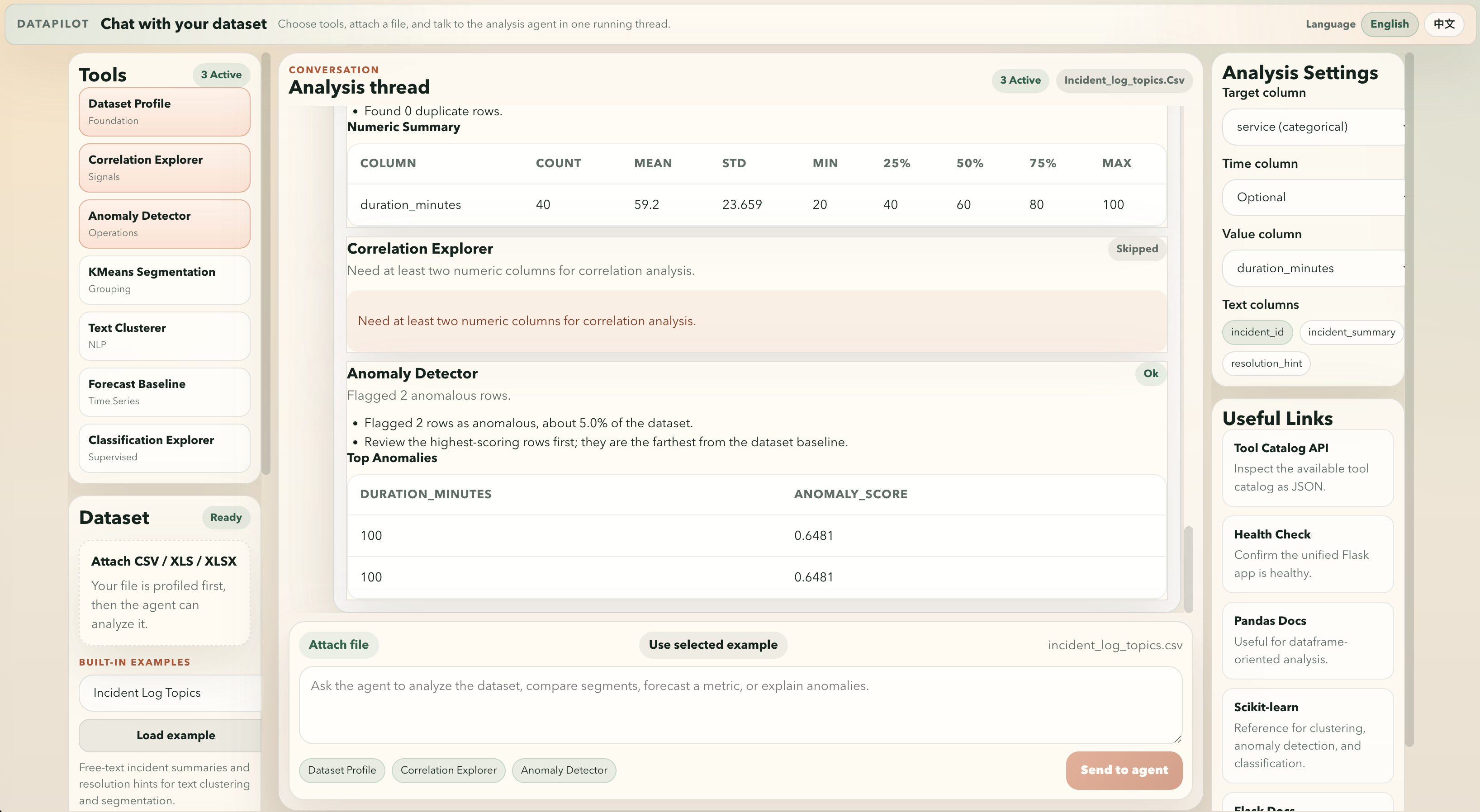
Default admin login after first startup:
- username:
admin - password:
nimda
The project now uses the AI agent app as the primary surface:
frontend/: Vue 3 chat-style analysis interface, built and served by Flaskbackend/: unified Flask app for API endpoints, LLM-backed answers, and static frontend servingbackend/data/datapilot.db: local SQLite database for users and admin-managed LLM settingstools/: the original ML/AI scripts, experiments, and reference assets preserved as supporting tools
What It Does
Upload a CSV or Excel file, or choose one of the built-in example datasets in the UI, then select the ML/AI tools you want to run, add a plain-language prompt, and let the agent analyze the dataset. The interface now supports English and Chinese switching, and the LLM answer path follows the selected UI language.
SciPilot is aimed at students, labs, and researchers. Phase 1 focuses on intelligent data Q&A. Later phases will expand into research exploration and deeper "deep researcher" workflows.
The chat backend now supports two LLM API styles:
- Qwen / DashScope
- OpenAI GPT-compatible chat completions APIs
It also now includes:
- Login page and session-based access control
- User workspace after sign-in
- Admin console for user management
- Admin-only LLM configuration stored in SQLite
- Export current chat history to PDF
Available analysis tools include:
- Dataset profiling
- Correlation exploration
- Isolation-forest style anomaly detection
- KMeans segmentation
- Text clustering with TF-IDF
- Baseline time-series forecasting
- Baseline classification exploration
Project Structure
AIOps-Delight/
├── backend/
│   ├── app.py
│   ├── analysis_tools.py
│   └── requirements.txt
├── frontend/
│   ├── src/
│   ├── package.json
│   └── vite.config.js
├── tools/
│   ├── python/
│   ├── java/
│   ├── anomaly-detection/
│   ├── fraud-detection/
│   ├── time-series-prediction/
│   └── ...
└── scripts/
    └── start/
        ├── backend.sh / backend.command / backend.bat
        ├── frontend.sh / frontend.command / frontend.bat
        └── start_all.sh / start_all.command / start_all.bat
Run Locally
The app now has one production-style startup point: the unified Flask server on http://127.0.0.1:5005.
Unified App
cd frontend
npm install
npm run build

cd backend
python3 -m venv .venv
source .venv/bin/activate
pip install -r requirements.txt
python3 app.py
This starts the only app runtime: Flask serves both the API and the built frontend from frontend/dist.
Frontend Dev Only
cd frontend
npm install
npm run dev
npm run dev is still available for frontend-only development and proxies API requests to the Flask server on http://127.0.0.1:5005.
Start Scripts
Startup scripts are now unified under scripts/start/.
The only real startup path is the unified Flask app.
Linux
./scripts/start/start_all.sh
macOS
./scripts/start/start_all.command
Windows
scripts\start\start_all.bat
Notes:
start_all.*is the main entrypoint on every platform.frontend.*builds the Vue assets only.backend.*builds the frontend and then starts the same unified Flask app.- The Flask app serves both the API and the built SPA from
frontend/dist.
Optional LLM Providers
If you want user questions to also get live LLM-generated chat answers, configure one of these modes:
Auto Mode
auto is the default. It checks providers in this order:
- Qwen / DashScope
- OpenAI-compatible API
export LLM_PROVIDER=auto
Qwen / DashScope Mode
export LLM_PROVIDER=qwen
export DASHSCOPE_API_KEY=your_key
export DASHSCOPE_MODEL=qwen-turbo
OpenAI-Compatible Mode
export LLM_PROVIDER=openai_compatible
export OPENAI_COMPATIBLE_API_KEY=your_key
export OPENAI_COMPATIBLE_BASE_URL=https://api.openai.com/v1
export OPENAI_COMPATIBLE_MODEL=gpt-4o-mini
The backend also accepts the standard aliases OPENAI_API_KEY, OPENAI_BASE_URL, and OPENAI_MODEL.
Without a valid LLM provider, the app still performs the local data science analysis and returns deterministic fallback answers and summaries.
Environment Variables
Use OS environment variables for external credentials. Do not hard-code secrets in the repository.
Quick Start
cp .env.example .env
Then edit .env and fill in your real keys.
export LLM_PROVIDER=auto
export DASHSCOPE_API_KEY=your_qwen_key
export DASHSCOPE_MODEL=qwen-turbo
export OPENAI_COMPATIBLE_API_KEY=your_openai_compatible_key
export OPENAI_COMPATIBLE_BASE_URL=https://api.openai.com/v1
export OPENAI_COMPATIBLE_MODEL=gpt-4o-mini
export QIANFAN_BEARER_TOKEN=your_baidu_qianfan_bearer_token
Recommended for production:
export APP_SECRET_KEY=replace_this_with_a_long_random_secret
Docker Deployment
Build and Run with Docker
docker build -t datapilot:latest .
docker run -d \
  --name datapilot \
  -p 5005:5005 \
  --env-file .env \
  -v $(pwd)/backend/uploads:/app/backend/uploads \
  datapilot:latest
Run with Docker Compose
docker compose up -d --build
Useful commands:
docker compose logs -f
docker compose ps
docker compose down
Notes:
backend/uploadsis mounted into the container so uploaded files persist across restarts.backend/datais mounted into the container so the SQLite database persists across restarts.- The container serves the unified Flask app and the built frontend together.
- The service reads secrets from the root
.envfile throughenv_file.
QIANFAN_BEARER_TOKEN is used by the legacy news-search tools and by the backend /api/news-search proxy.
Qwen Example
Project root .env:
PORT=5005
LLM_PROVIDER=qwen
DASHSCOPE_API_KEY=sk-your-real-dashscope-key
DASHSCOPE_MODEL=qwen-turbo
After saving .env, restart the unified Flask app:
./scripts/start/start_all.sh
If DASHSCOPE_API_KEY is present, each user message will try to call Qwen and produce a natural-language answer in the chat.
OpenAI-Compatible Example
Project root .env:
PORT=5005
LLM_PROVIDER=openai_compatible
OPENAI_COMPATIBLE_API_KEY=sk-your-real-openai-compatible-key
OPENAI_COMPATIBLE_BASE_URL=https://api.openai.com/v1
OPENAI_COMPATIBLE_MODEL=gpt-4o-mini
After saving .env, restart the unified Flask app:
./scripts/start/start_all.sh
If OPENAI_COMPATIBLE_API_KEY and OPENAI_COMPATIBLE_BASE_URL are present, each user message will try to call the configured OpenAI-compatible chat API and produce a natural-language answer in the chat.
Legacy AIOps Reference
The following original repository content is preserved here for reference.
Practice and experience collection of AI Ops - Operational AI and Machine Learning Utilities
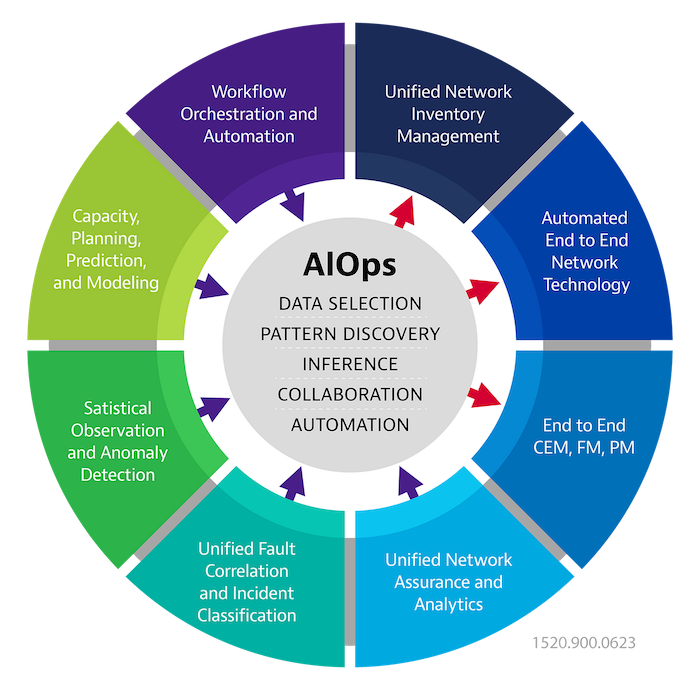
This repository collected some experiences of AI Ops topic, including:
- Classification
- Anti-fraud
- Anomaly detection
- Time-series prediction
- Service logs analysis using NLP
- LLM langchain use cases
- ML/AI databases and platforms
Most of them are useful in enterprise operation teams to handle their daily work cases using AI and ML mechanisms. There are also some useful code gists, including both Python and Java for a reference.
Classification
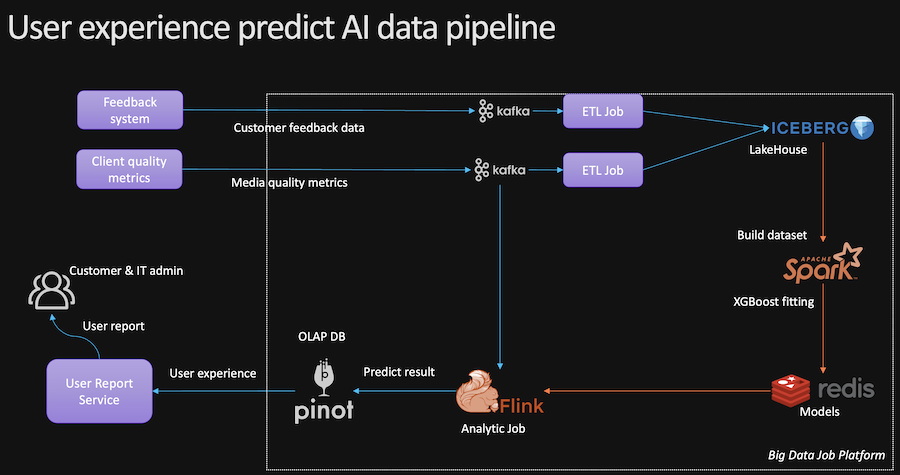
Classification is the most common case in data analysis
We ever used it to identify customers' service experience in a supervised way.
For structural dataset, tree-based model are most efficiency and scalable. We use XGBoost for such case.
https://github.com/dmlc/xgboost
Fraud Detection
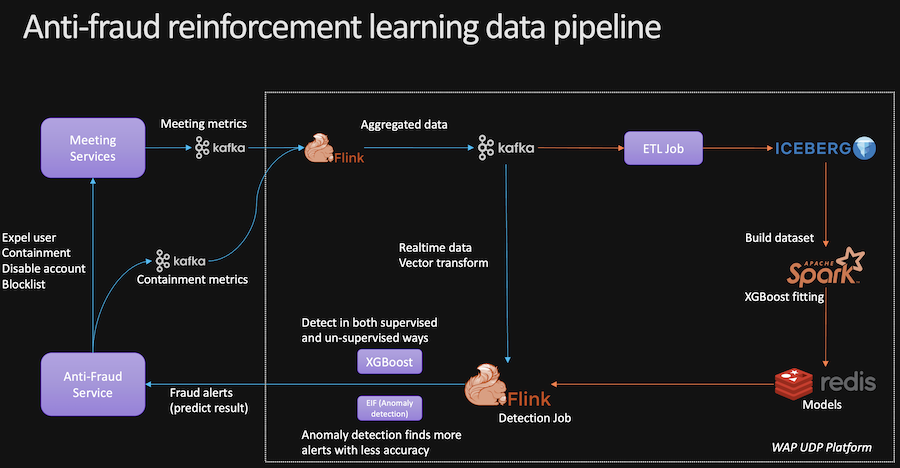
Fraud detection are widely required by service provider to identify fraudulent users and reduce loss of money.
There are three ways to implement:
Anomaly detection for fraud detection
Refer to the anomaly detection section below in this page.
By the way, anomaly detection in fraud, could result in many false negative alerts.
If we want an accurate model, supervised learning should be used.
Classification for fraud detection
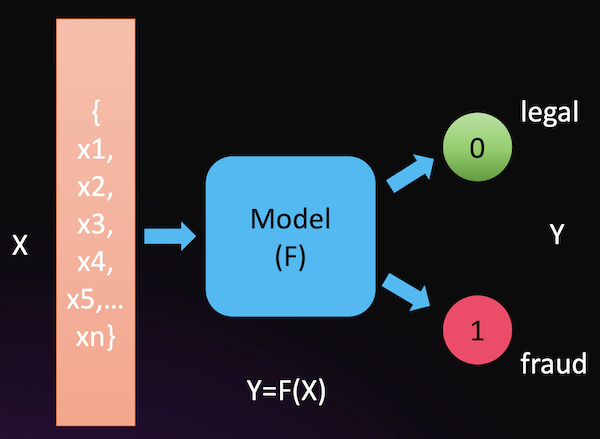
If we have a historical fraud dataset and features are clarified, XGBoost algorithm should be used.
One point to highlight is, fraud dataset always have data skew on volumes of fraud samples and legal samples. That means, there are more legal samples in historical dataset than fraud samples.
XGBoost has a hyper param "scale_pos_weight", which indicate high-class imbalance for faster convergence.
More, if we want to focus on the fraud samples accuracy, we must use a cross validation and calculate the fraud samples recall rate, and make sure model hyperparameters tuning should result in the best fraud sample recall.
XGBoost also can be integrated with Apache Spark and Flink, we can build a real-time detection pipeline.
LLM detect for fraud
Someone use LLM to detect fraud, this focus on the fraud contextual identify.
https://www.linkedin.com/pulse/fine-tuning-ai-models-creating-financial-fraud-detection-konda-ywdae/
Anomaly Detection
Anomaly detection are very useful in daily work of service maintain, as well as fraud detect.
Service and business metrics are monitored to track stability and make sure any issues, abnormal or incidents observation.
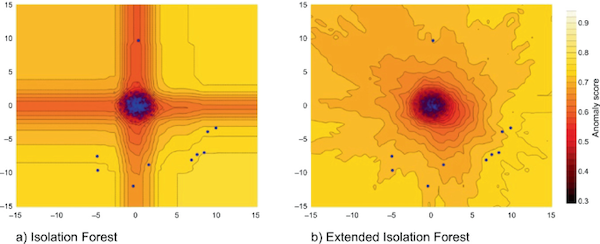
Unsupervised learning case, extended isolation forecast (EIF) is the most effectual anomaly detect algorithm.
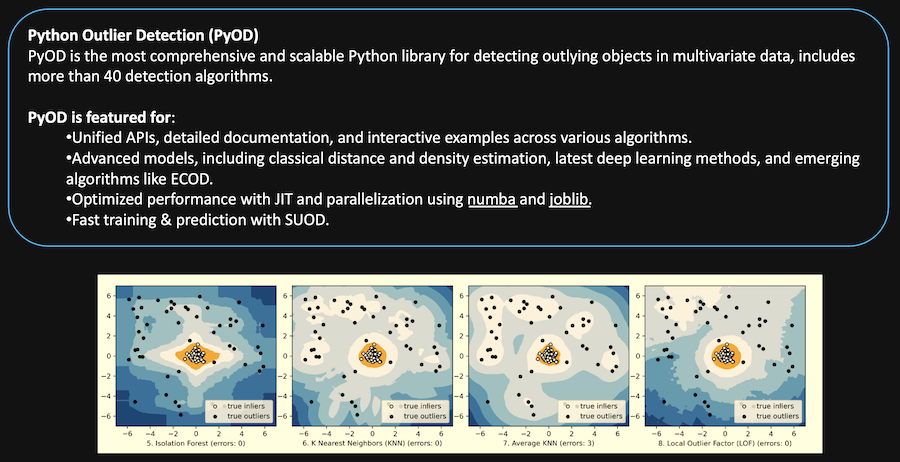
And Pyod is a versatile Python library for detecting anomalies in multivariate data.
https://github.com/sahandha/eif
https://github.com/yzhao062/pyod
Time Series Prediction
Sometimes, we want to predict a time-series metrics to get future values.
This is meaningful when we are estimating capacity growth or cost trending.
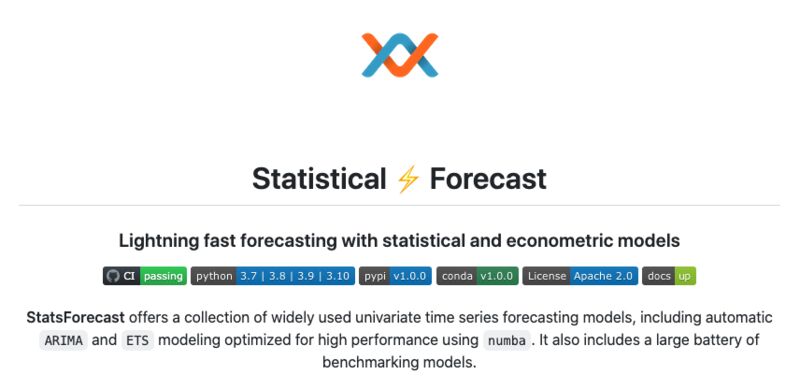
Statsforecast is the most powerful time-series prediction lib we ever used.
https://github.com/Nixtla/statsforecast
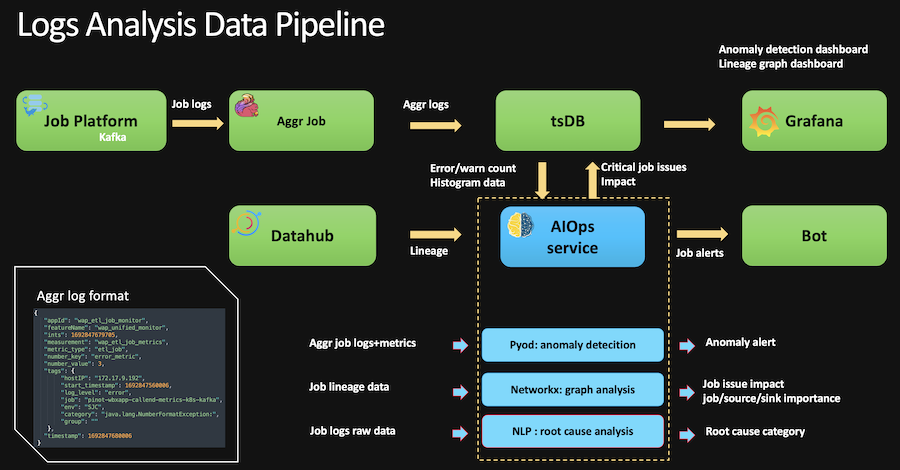
Service Logs Analysis
When we operate services, massive volume of logs in text format are generated.
How to analyze real-time and historical service logs to get insights for helping operation? Such as overall situation, service issue category identify, etc.
We use NLP to analyze services logs and fetch highlighted benefits, including:
- Logs keywords extraction
- Logs clustering by keywords and text vectors
- Anomaly detection on keywords highlight trending
LLM LangChain
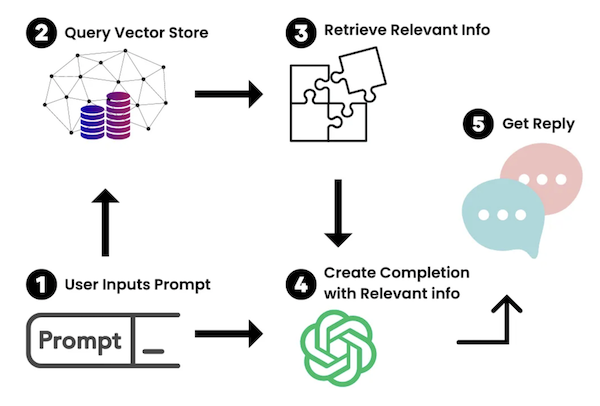
Large language model and LangChain available now. And big change in operations too.
We can use LLM to automatically triage service logs and indicate actions.
Also, we can build vector store persisting private knowledge documents and create help BOT that answer internal questions.
ML/AI Databases and Platforms
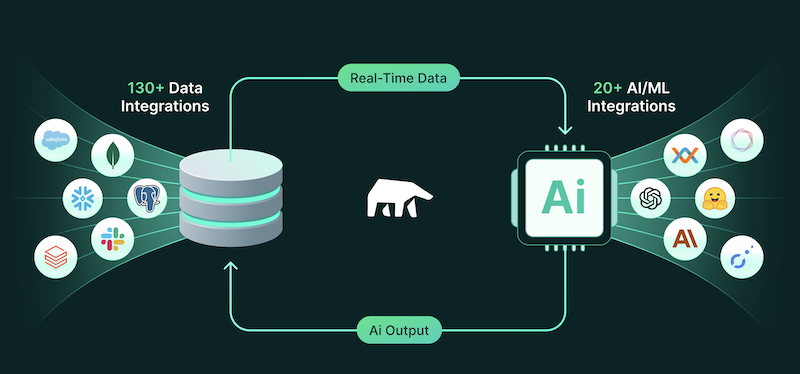
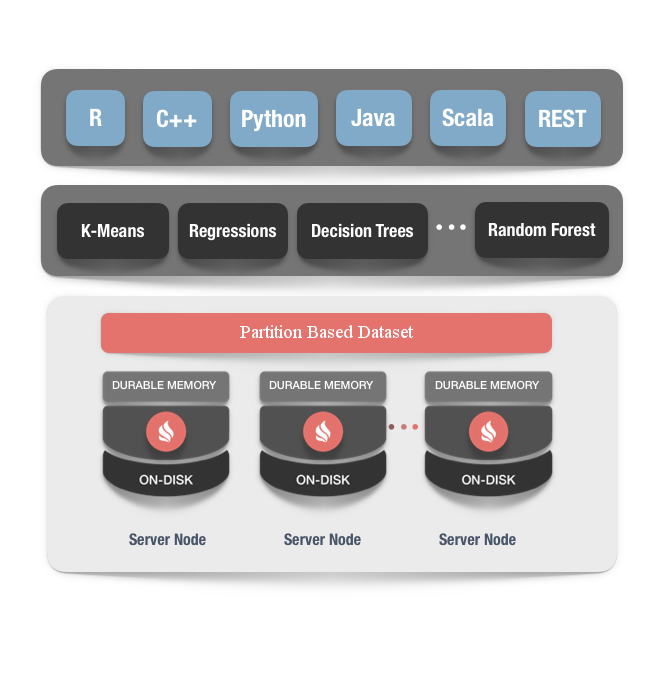
When data are in databases or big data lakehouse, how do we connect data and ML/AI more tightly?
There are AL/ML databases and platforms to leverage.
MindsDB
https://github.com/mindsdb/mindsdb
Apache Ignite
https://github.com/apache/ignite
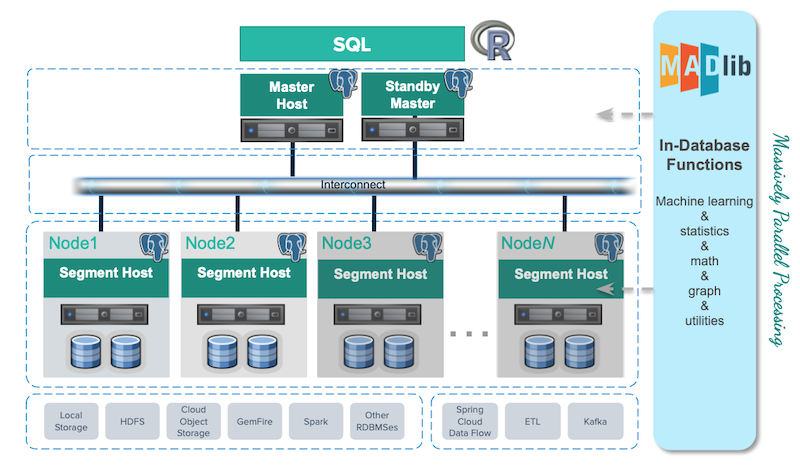
Greenplum
https://github.com/greenplum-db/gpdb
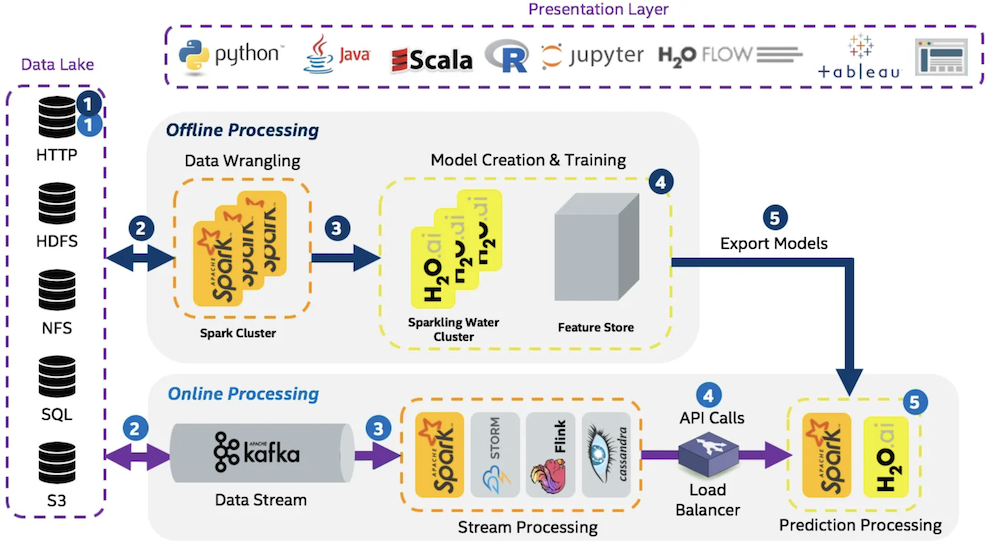
h2o.ai
Explore related projects
affaan-m/ECC
The agent harness performance optimization system. Skills, instincts, memory, security, and research-first development for Claude Code, Codex, Opencode, Cursor and beyond.
300,670 starsNousResearch/hermes-agent
The agent that grows with you
262,385 starsmultica-ai/andrej-karpathy-skills
A single CLAUDE.md file to improve Claude Code behavior, derived from Andrej Karpathy's observations on LLM coding pitfalls.
231,796 starsfirecrawl/firecrawl
Supercharge your AI agents with data from the web and beyond. Building the library for superintelligence. 🔥
200,178 stars