
yzhang-gh/vscode-markdown
yzhang-gh/vscode-markdown has 3,294 GitHub stars and 376 forks. GitHot measured -5 in 7 days. Last checked 2026-11-11 06:29 UTC. Last push 2026-06-13.
Markdown All in One
Measured star growth
- in 24h
- Update delayed
- in 7 days
- -5
- in 15 days
- Collecting history
- in 1 month
- Collecting history
Net star changes over overlapping periods, not daily totals. Missing measurements are left blank. Stars measure attention, not software quality.
README.md
OriginalMarkdown Support for Visual Studio Code


All you need for Markdown (keyboard shortcuts, table of contents, auto preview and more).
Note: VS Code has basic Markdown support out-of-the-box (e.g, Markdown preview), please see the official documentation for more information.
Table of Contents
- Features
- Available Commands
- Keyboard Shortcuts
- Supported Settings
- FAQ
- Changelog
- Latest Development Build
- Contributing
- Related
Features
Keyboard shortcuts
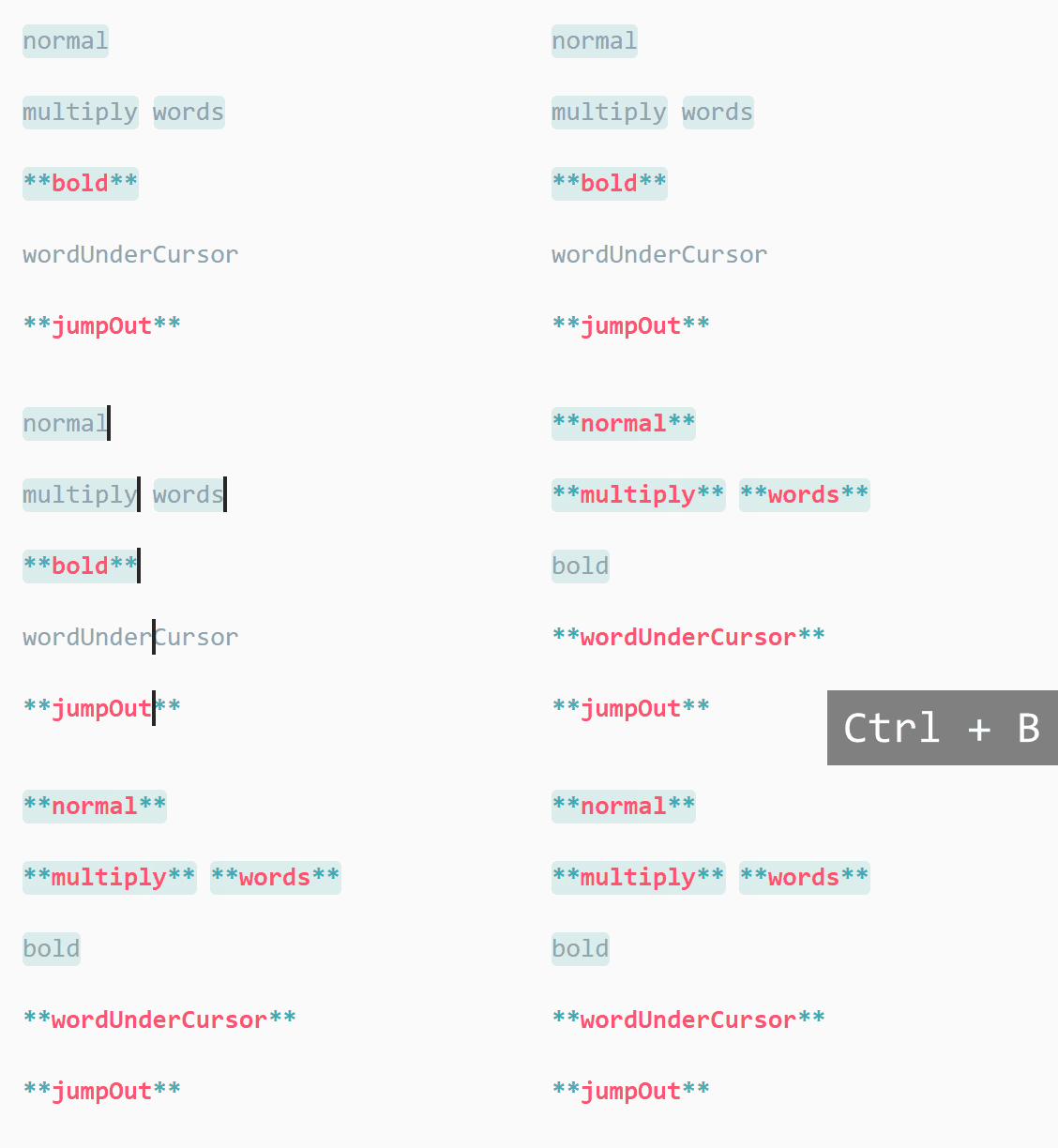
(Typo: multiple words)
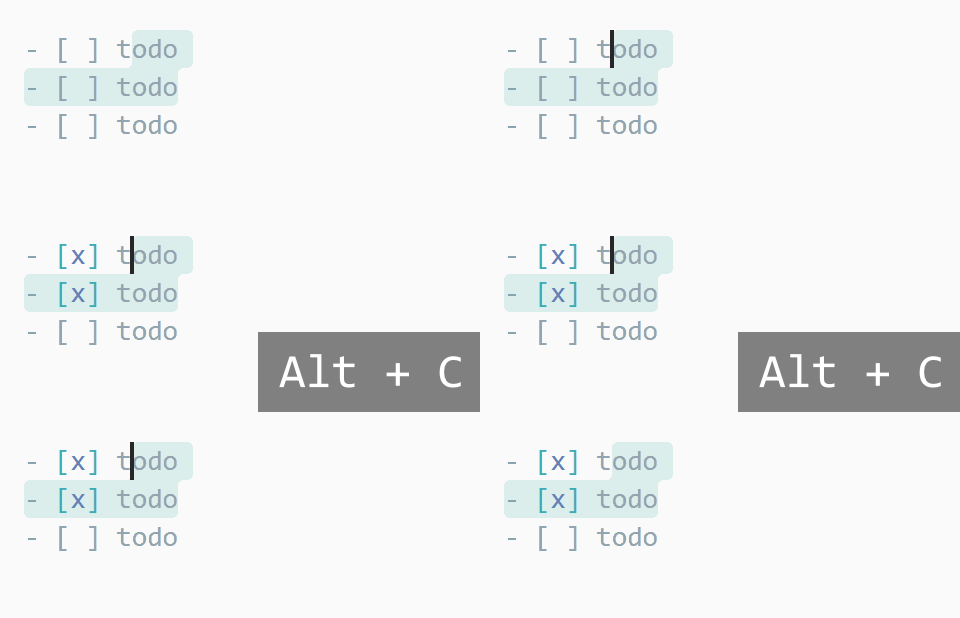
See full key binding list in the keyboard shortcuts section
Table of contents
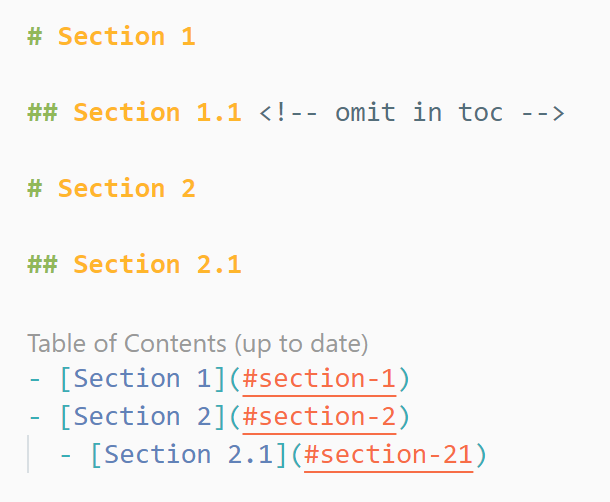
Run command "Create Table of Contents" (in the VS Code Command Palette) to insert a new table of contents.
The TOC is automatically updated on file save by default. To disable, please change the
toc.updateOnSaveoption.The indentation type (tab or spaces) of TOC can be configured per file. Find the setting in the right bottom corner of VS Code's status bar.
Note: Be sure to also check the
list.indentationSizeoption.To make TOC compatible with GitHub or GitLab, set option
slugifyModeaccordinglyThree ways to control which headings are present in the TOC:
Click to expand
Add
<!-- omit from toc -->at the end of a heading to ignore it in TOC
(It can also be placed above a heading)Use
toc.levelssetting.You can also use the
toc.omittedFromTocsetting to omit some headings (and their subheadings) from TOC:// In your settings.json "markdown.extension.toc.omittedFromToc": { // Use a path relative to your workspace. "README.md": [ "# Introduction", "## Also omitted", ], // Or an absolute path for standalone files. "/home/foo/Documents/todo-list.md": [ "## Shame list (I'll never do these)", ] }Note:
- Setext headings (underlined with
===or---) can also be omitted, just put their#and##versions in the setting, respectively. - When omitting heading, make sure headings within a document are unique. Duplicate headings may lead to unpredictable behavior.
- Setext headings (underlined with
Easily add/update/remove section numbering
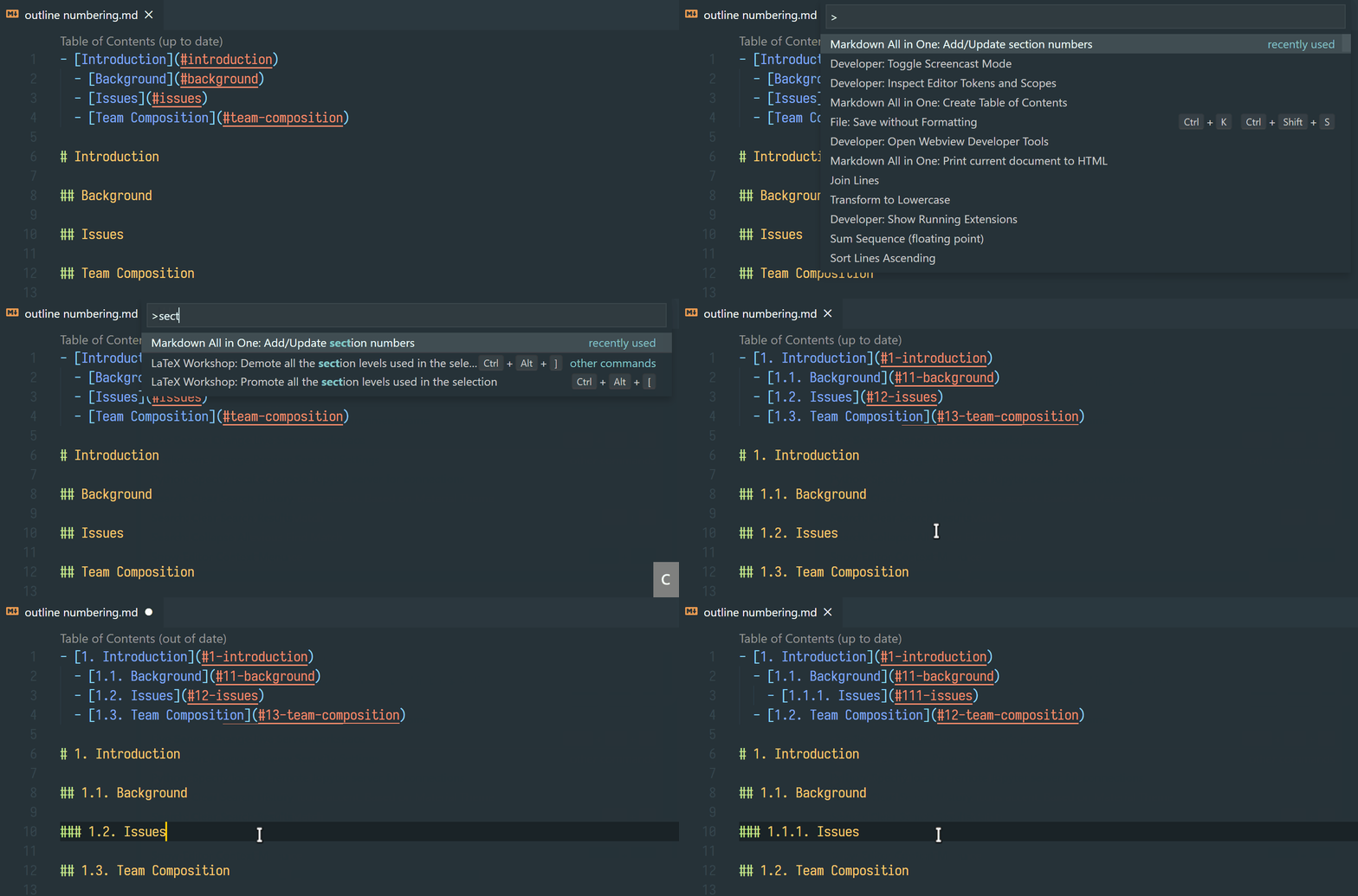
In case you are seeing unexpected TOC recognition, you can add a
<!-- no toc -->comment above the list.
List editing
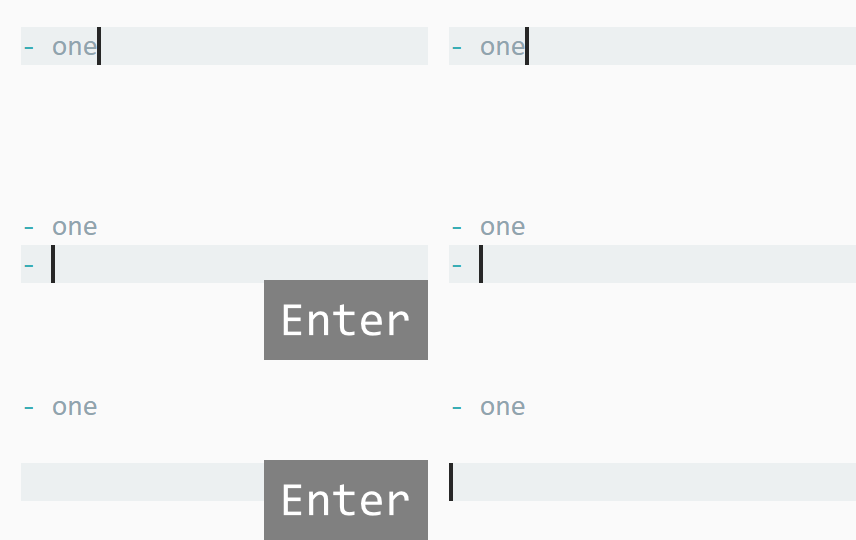
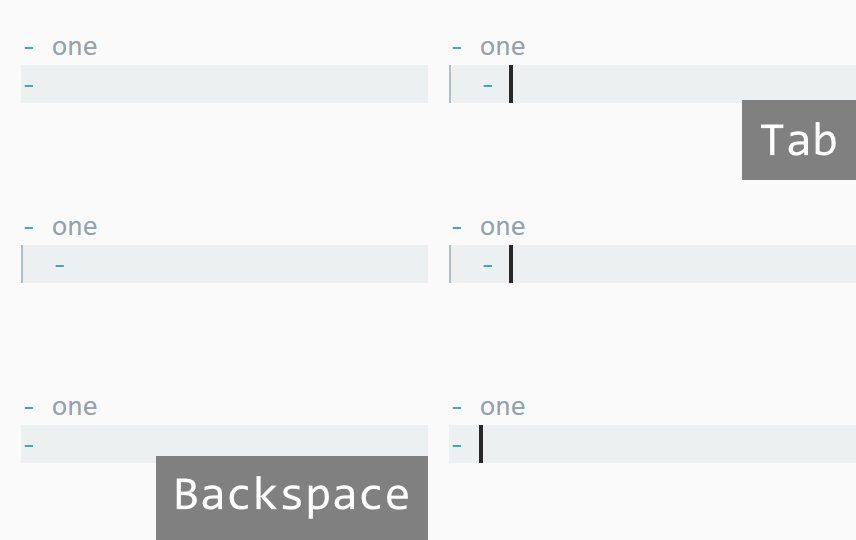

Note: By default, this extension tries to determine indentation size for different lists according to CommonMark Spec. If you prefer to use a fixed tab size, please change the list.indentationSize setting.
Print Markdown to HTML
Commands
Markdown: Print current document to HTMLandMarkdown: Print documents to HTML(batch mode)Compatible with other installed Markdown plugins (e.g. Markdown Footnotes). The exported HTML should look the same as inside VS Code (except for a few theme colors due to the limitations of APIs).
Use comment
<!-- title: Your Title -->(in the first line) to specify a title of the exported HTML.Plain links to
.mdfiles will be converted to.html.It's recommended to print the exported HTML to PDF with browser (e.g. Chrome) if you want to share your documents with others.
GitHub Flavored Markdown
Table formatter
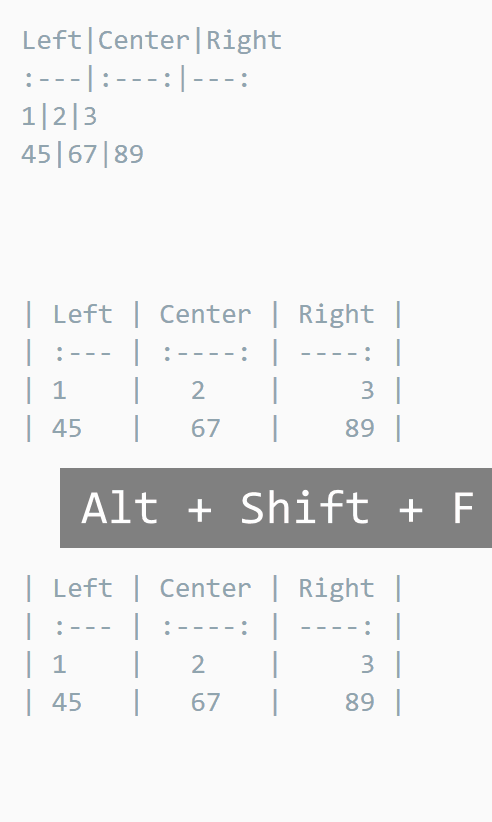
Note: The key binding is Ctrl + Shift + I on Linux. See Visual Studio Code Key Bindings.
Task lists
Math
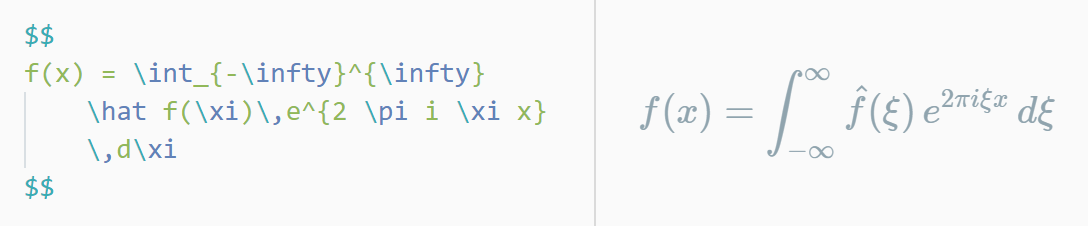
Please use Markdown+Math for dedicated math support. Be sure to disable math.enabled option of this extension.
Auto completions
Tip: also support the option completion.root
Images/Files (respects option
search.exclude)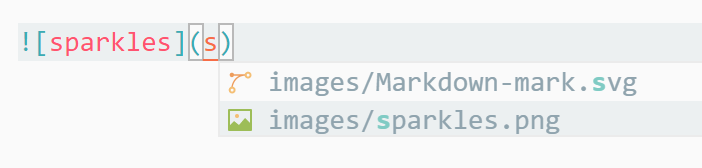
Math functions (including option
katex.macros)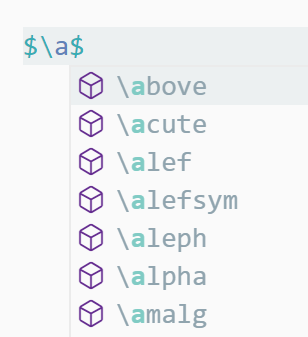
Reference links
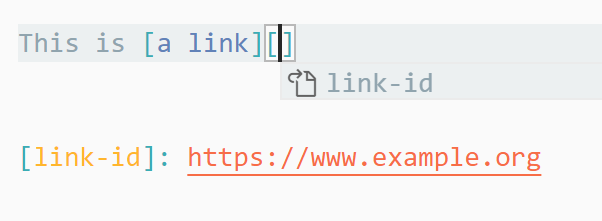
Others
Paste link on selected text
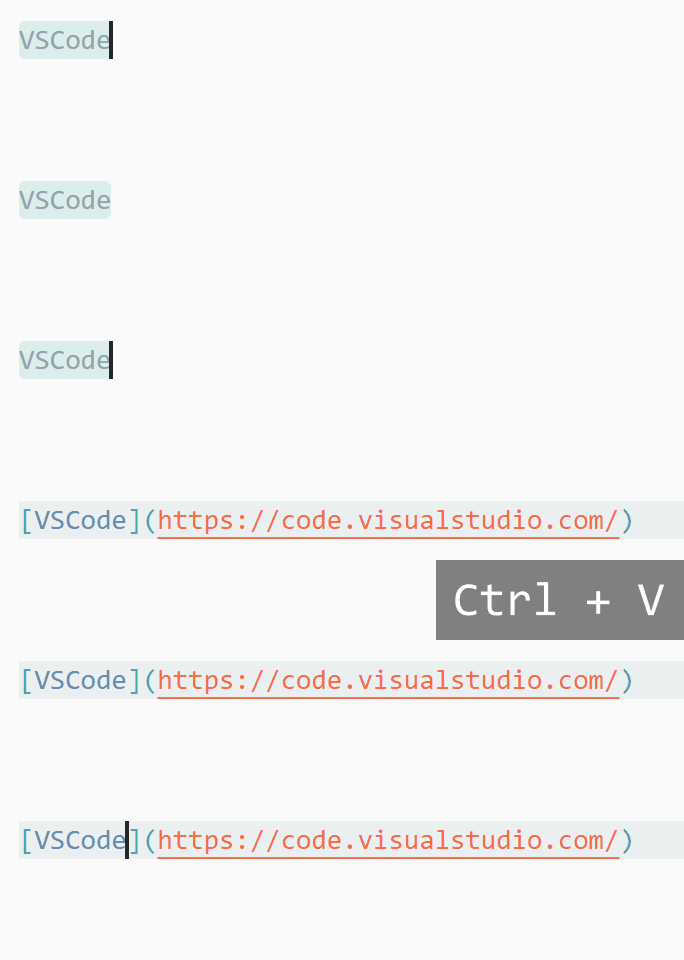
Add "Close Preview" keybinding, which allows you to close the preview tab using the same keybinding of "Open Preview" (Ctrl + Shift + V or Ctrl + K V).
Available Commands
- Markdown All in One: Create Table of Contents
- Markdown All in One: Update Table of Contents
- Markdown All in One: Add/Update section numbers
- Markdown All in One: Remove section numbers
- Markdown All in One: Toggle code span
- Markdown All in One: Toggle code block
- Markdown All in One: Print current document to HTML
- Markdown All in One: Print documents to HTML
- Markdown All in One: Toggle math environment
- Markdown All in One: Toggle list
- It will cycle through list markers (by default
-,*,+,1.and1), which can be changed with optionlist.toggle.candidate-markers).
- It will cycle through list markers (by default
Keyboard Shortcuts
Table
| Key | Command |
|---|---|
| Ctrl/Cmd + B | Toggle bold |
| Ctrl/Cmd + I | Toggle italic |
| Alt+S (on Windows) | Toggle strikethrough1 |
| Ctrl + Shift + ] | Toggle heading (uplevel) |
| Ctrl + Shift + [ | Toggle heading (downlevel) |
| Ctrl/Cmd + M | Toggle math environment |
| Alt + C | Check/Uncheck task list item |
| Ctrl/Cmd + Shift + V | Toggle preview |
| Ctrl/Cmd + K V | Toggle preview to side |
1. If the cursor is on a list/task item without selection, strikethrough will be added to the whole item (line)
Supported Settings
Table
| Name | Default | Description |
|---|---|---|
markdown.extension.completion.respectVscodeSearchExclude |
true |
Whether to consider search.exclude option when providing file path completions |
markdown.extension.completion.root |
Root folder when providing file path completions (It takes effect when the path starts with /) |
|
markdown.extension.italic.indicator |
* |
Use * or _ to wrap italic text |
markdown.extension.bold.indicator |
** |
Use ** or __ to wrap bold text |
markdown.extension.katex.macros |
{} |
KaTeX macros e.g. { "\\name": "expansion", ... } |
markdown.extension.list.indentationSize |
adaptive |
Use different indentation size for ordered and unordered list |
markdown.extension.list.toggle.candidate-markers |
[ "-", "*", "+", "1.", "1)" ] |
Use a array for toggle ordered list marker e.g. ["*", "1."] |
markdown.extension.orderedList.autoRenumber |
true |
Auto fix list markers as you edits |
markdown.extension.orderedList.marker |
ordered |
Or one: always use 1. as ordered list marker |
markdown.extension.preview.autoShowPreviewToSide |
false |
Automatically show preview when opening a Markdown file. |
markdown.extension.print.absoluteImgPath |
true |
Convert image path to absolute path |
markdown.extension.print.imgToBase64 |
false |
Convert images to base64 when printing to HTML |
markdown.extension.print.includeVscodeStylesheets |
true |
Whether to include VS Code's default styles |
markdown.extension.print.onFileSave |
false |
Print to HTML on file save |
markdown.extension.print.theme |
light |
Theme of the exported HTML |
markdown.extension.print.validateUrls |
true |
Enable/disable URL validation when printing |
markdown.extension.syntax.decorations |
true |
Add decorations to strikethrough and code span |
markdown.extension.syntax.decorationFileSizeLimit |
50000 | Don't render syntax decorations if a file is larger than this size (in byte/B) |
markdown.extension.syntax.plainTheme |
false |
A distraction-free theme |
markdown.extension.tableFormatter.enabled |
true |
Enable GFM table formatter |
markdown.extension.toc.slugifyMode |
github |
Slugify mode for TOC link generation (vscode, github, gitlab or gitea) |
markdown.extension.toc.omittedFromToc |
{} |
Lists of headings to omit by project file (e.g. { "README.md": ["# Introduction"] }) |
markdown.extension.toc.levels |
1..6 |
Control the heading levels to show in the table of contents. |
markdown.extension.toc.orderedList |
false |
Use ordered list in the table of contents. |
markdown.extension.toc.plaintext |
false |
Just plain text. |
markdown.extension.toc.unorderedList.marker |
- |
Use -, * or + in the table of contents (for unordered list) |
markdown.extension.toc.updateOnSave |
true |
Automatically update the table of contents on save. |
FAQ
Q: Error "command 'markdown.extension.onXXXKey' not found"
In most cases, it is because VS Code needs a few seconds to load this extension when you open a Markdown file for the first time. (You will see a message "Activating Extensions..." on the status bar.)
If you still see this "command not found" error after waiting for a long time, please try to restart VS Code. If needed, reinstall this extension:
- Uninstall this extension.
- Close and restart VS Code. (important!)
- Reinstall this extension.
If it doesn't help, feel free to open a new issue on GitHub. It would be better if you can report any suspicious error information to us: It's usually in VS Code's menubar Help > Toggle Developer Tools > Console.
(As a last resort, you may choose to delete
onXXXKeykeys through VS Code's Keyboard Shortcuts editor if you do not need the list editing feature at all.)
Q: Which Markdown syntax is supported?
- CommonMark
- Tables, strikethrough and task lists (from GitHub Flavored Markdown)
- Math support (from KaTeX)
- Front matter
For other Markdown syntax, you need to install the corresponding extensions from VS Code marketplace (e.g. Mermaid diagram, emoji, footnotes and superscript). Once installed, they will take effect in VS Code and also the exported HTML file.
Q: This extension has overridden some of my key bindings (e.g. Ctrl + B, Alt + C)
You can easily manage key bindings with VS Code's Keyboard Shortcuts editor. (Commands provided by this extension have prefix markdown.extension.)
Q: The extension is unresponsive, causing lag etc. (performance issues)
From experience, there is a good chance that the performance issues are caused by other extensions (e.g., some spell checker extensions).
This can be verified if you try again with all other extensions disabled (execute Developer: Reload with Extensions Disabled or Extensions: Disable All Installed Extensions for this Workspace in the VS Code command Palette) and then enable this extension.
To find out the root cause, you can install our development build (debug.vsix) and create a CPU profile following this official instruction from the VS Code. And then please open a GitHub issue with that profile (.cpuprofile.txt) attached.
Changelog
See CHANGELOG for more information.
Latest Development Build
Download it here, please click the latest passing event to download artifacts.
There are two versions: markdown-all-in-one-*.vsix is the regular build, while debug.vsix is used to create a verbose CPU profile.
To install, execute Extensions: Install from VSIX... in the VS Code Command Palette (ctrl + shift + p)
Contributing
- File bugs, feature requests in GitHub Issues.
- Leave a review on Visual Studio Marketplace.
- Buy me a coffee ☕ (via PayPal, Alipay or WeChat).
Special thanks to the collaborator @Lemmingh and all other contributors.
Related
Explore related projects
codecrafters-io/build-your-own-x
Master programming by recreating your favorite technologies from scratch.
561,743 starspublic-apis/public-apis
A collective list of free APIs
498,154 starsmorluto/rea
Reverse engineer anything with agents, from app behavior down to native binaries.
451,679 starsopenclaw/openclaw
The AI that really does things. Any OS. Any Platform. The lobster way. 🦞
394,332 stars