
yu4u/convnet-drawer
yu4u/convnet-drawer has 610 GitHub stars and 94 forks. GitHot measured 0 stars in 24 hours. Last checked 2026-11-15 06:21 UTC. Last push 2020-04-30.
Measured star growth
- in 24h
- 0
- in 7 days
- Collecting history
- in 15 days
- Collecting history
- in 1 month
- Collecting history
Net star changes over overlapping periods, not daily totals. Missing measurements are left blank. Stars measure attention, not software quality.
About
Python script for illustrating Convolutional Neural Networks (CNN) using Keras-like model definitions
Machine LearningREADME.md
OriginalConvNet Drawer
Python script for illustrating Convolutional Neural Networks (CNN). Inspired by the draw_convnet project [1].
Models can be visualized via Keras-like (Sequential) model definitions. The result can be saved as SVG file or pptx file!
Requirements
python-pptx (if you want to save models as pptx)
pip install python-pptx
Keras (if you want to convert Keras sequential model)
pip install keras
matplotlib (if you want to save models via matplotlib)
pip install matplotlib
Usage
Write a script to define and save a model. An example of visualizing AlexNet [2] is as follows.
Write and save convnet_drawer.Model
from convnet_drawer import Model, Conv2D, MaxPooling2D, Flatten, Dense
from pptx_util import save_model_to_pptx
from matplotlib_util import save_model_to_file

model = Model(input_shape=(227, 227, 3))
model.add(Conv2D(96, (11, 11), (4, 4)))
model.add(MaxPooling2D((3, 3), strides=(2, 2)))
model.add(Conv2D(256, (5, 5), padding="same"))
model.add(MaxPooling2D((3, 3), strides=(2, 2)))
model.add(Conv2D(384, (3, 3), padding="same"))
model.add(Conv2D(384, (3, 3), padding="same"))
model.add(Conv2D(256, (3, 3), padding="same"))
model.add(MaxPooling2D((3, 3), strides=(2, 2)))
model.add(Flatten())
model.add(Dense(4096))
model.add(Dense(4096))
model.add(Dense(1000))

# save as svg file
model.save_fig("example.svg")

# save as pptx file
save_model_to_pptx(model, "example.pptx")

# save via matplotlib
save_model_to_file(model, "example.pdf")
Result:
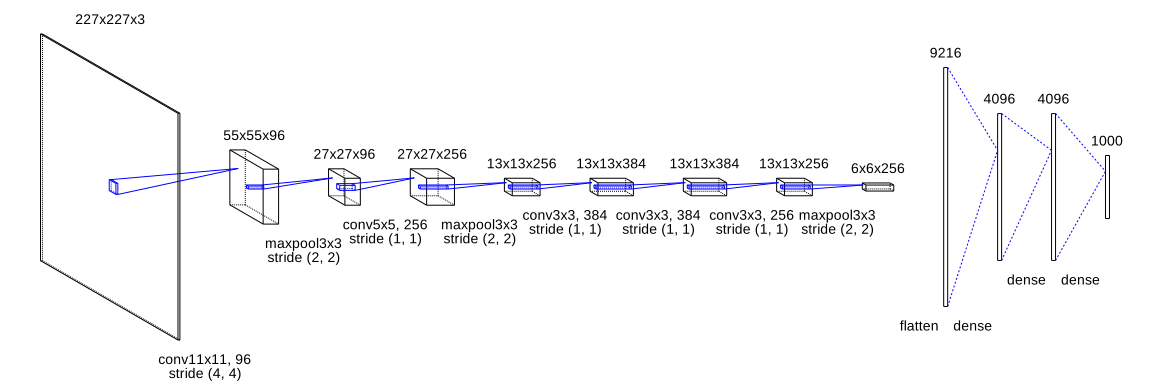
The other examples can be found here.
Convert Keras sequential model
Keras sequential model can be converted to convnet_drawer.Model (thanks to @wakamezake).
Only Conv2D, MaxPooling2D, GlobalAveragePooling2D, Flatten, Dense layers are supported for this conversion.
from keras_util import convert_drawer_model
from keras_models import AlexNet
from pptx_util import save_model_to_pptx
from matplotlib_util import save_model_to_file

# get Keras sequential model
keras_sequential_model = AlexNet.get_model()
model = convert_drawer_model(keras_sequential_model)

# save as svg file
model.save_fig("example.svg")

# save as pptx file
save_model_to_pptx(model, "example.pptx")

# save via matplotlib
save_model_to_file(model, "example.pdf")
Supported Layers
- Conv2D
Conv2D(filters=None, kernel_size=None, strides=(1, 1), padding="valid")- e.g.
Conv2D(96, (11, 11), (4, 4)))
- Deconv2D
Deconv2D(filters=None, kernel_size=None, strides=(1, 1), padding="valid")- e.g.
Deconv2D(256, (3, 3), (2, 2)))
- MaxPooling2D, AveragePooling2D
MaxPooling2D(pool_size=(2, 2), strides=None, padding="valid")- e.g.
MaxPooling2D((3, 3), strides=(2, 2)) - If
strides = None, stride is set to bepool_size.
- GlobalAveragePooling2D
GlobalAveragePooling2D()
- Flatten
Flatten()
- Dense
Dense(units)- e.g.
Dense(4096)
Visualization Parameters
Visualization Parameters can be found in config.py.
Please adjust these parameters before model definition (see LeNet.py).
The most important parameter is channel_scale = 3 / 5.
This parameter rescale actual channel size c to c_ for visualization as:
c_ = math.pow(c, channel_scale)
If the maximum channel size is small (e.g. 512), please increase channel_scale.
Check how the other parameters works:
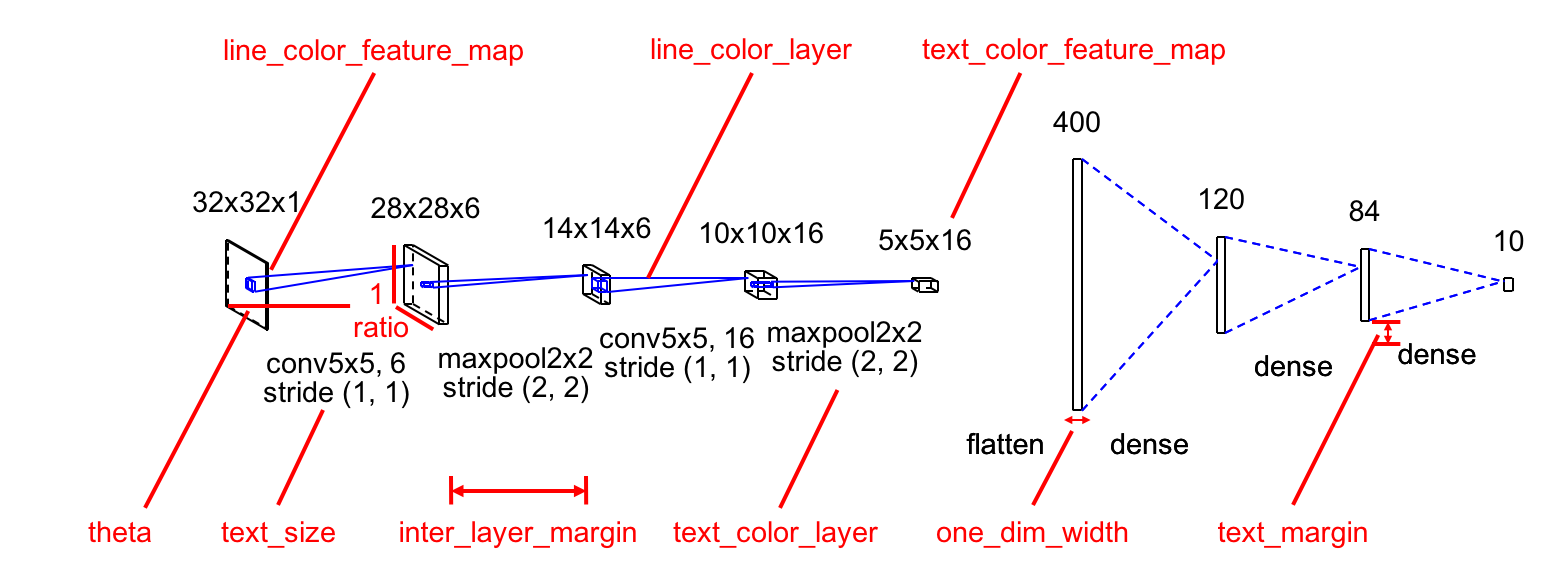
Default Values
theta = - math.pi / 6
ratio = 0.7
bounding_box_margin = 10
inter_layer_margin = 50
text_margin = 10
channel_scale = 3 / 5
text_size = 14
one_dim_width = 4
line_color_feature_map = (0, 0, 0)
line_color_layer = (0, 0, 255)
text_color_feature_map = (0, 0, 0)
text_color_layer = (0, 0, 0)
TODOs
- Implement padding option for Conv2D and Pooling layers.
- Add some effects to Dense layer (and Flatten / GlobalAveragePooling2D).
- Automatically calibrate the scale of feature maps for better visibility.
- Move hard-coded parameters to a config file or options.
- Refactor Layer classes.
- Draw with matplotlib? for other formats. The model is now directly saved as a pptx file.
Results
LeNet
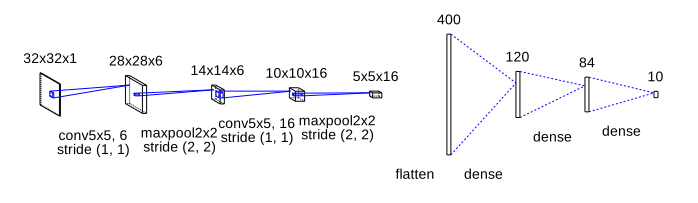
AlexNet
ZFNet
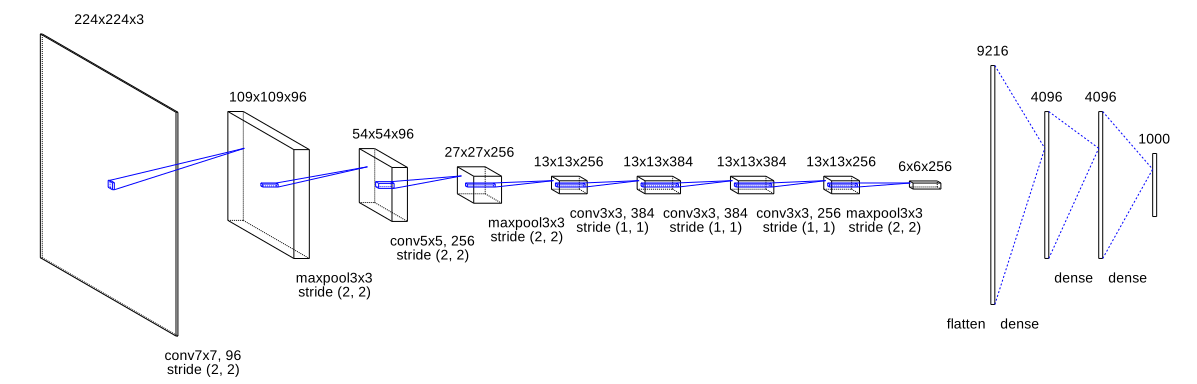
VGG16

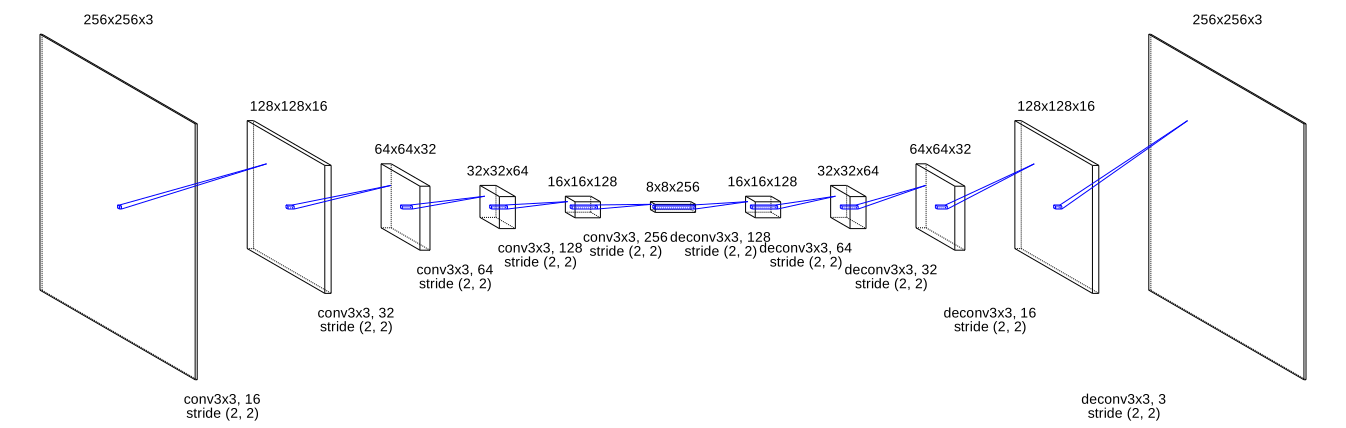
AutoEncoder
AlexNet saved by matplotlib with plt.xkcd()

References
[1] https://github.com/gwding/draw_convnet
[2] A. Krizhevsky, I. Sutskever, and G. E. Hinton, "ImageNet Classification with Deep Convolutional Neural Networks," in Proc. of NIPS, 2012.