
ysyx2008/SailFish
ysyx2008/SailFish has 26 GitHub stars and 12 forks. GitHot measured 0 stars in 24 hours and 0 in 7 days. Last checked 2026-11-14 06:23 UTC. Last push 2026-11-01.
Measured star growth
- in 24h
- 0
- in 7 days
- 0
- in 15 days
- Collecting history
- in 1 month
- Collecting history
Net star changes over overlapping periods, not daily totals. Missing measurements are left blank. Stars measure attention, not software quality.
About
一个优雅的桌面智能体
Developer ToolsREADME.md
Original███████╗ █████╗ ██╗██╗ ███████╗██╗███████╗██╗ ██╗ ██╔════╝██╔══██╗██║██║ ██╔════╝██║██╔════╝██║ ██║ ███████╗███████║██║██║ █████╗ ██║███████╗███████║ ╚════██║██╔══██║██║██║ ██╔══╝ ██║╚════██║██╔══██║ ███████║██║ ██║██║███████╗██║ ██║███████║██║ ██║ ╚══════╝╚═╝ ╚═╝╚═╝╚══════╝╚═╝ ╚═╝╚══════╝╚═╝ ╚═╝

SailFish
Your Personal Desktop Secretary
Not just chat — it runs your computer, reaches out first, and remembers what matters about you


Website · Download · Docs · Skill Market
Bring your own AI API · macOS / Windows
Why a Secretary, Not Just a Tool
SailFish isn't a chatbot waiting for commands. It's a personal secretary living on your desktop — with its own rhythm, proactive monitoring, the ability to reach out to you, memory of who you are and what you discussed, and the power to actually operate your computer.
| Pain Point | SailFish Approach |
|---|---|
| Chat-only AI can't act | Your secretary runs commands, reads/writes files, controls the browser, sends email, and makes documents |
| Every conversation starts from zero | Three-tier memory + knowledge base: knows you, recalls past work, files retrieved when needed |
| You have to watch and wait | Awaken + Watch: proactive monitoring, scheduled work, push notifications |
| Tied to your desk | The same secretary via WeChat, DingTalk, Feishu, WeCom, Slack, Telegram, or the web |
| Don't know the command? | Describe it in natural language; your secretary plans and executes. Risky steps ask first |
| Intranet / offline | Private models, local Ollama, and proxies |

Two Ways to Work, One Workspace
| Entry | Relationship | Character |
|---|---|---|
| Tasks | You delegate specific work | One-off, parallel, isolated; the desktop mainstay. Queue the next message while a task is still running; a task can carry a goal it keeps working toward on its own |
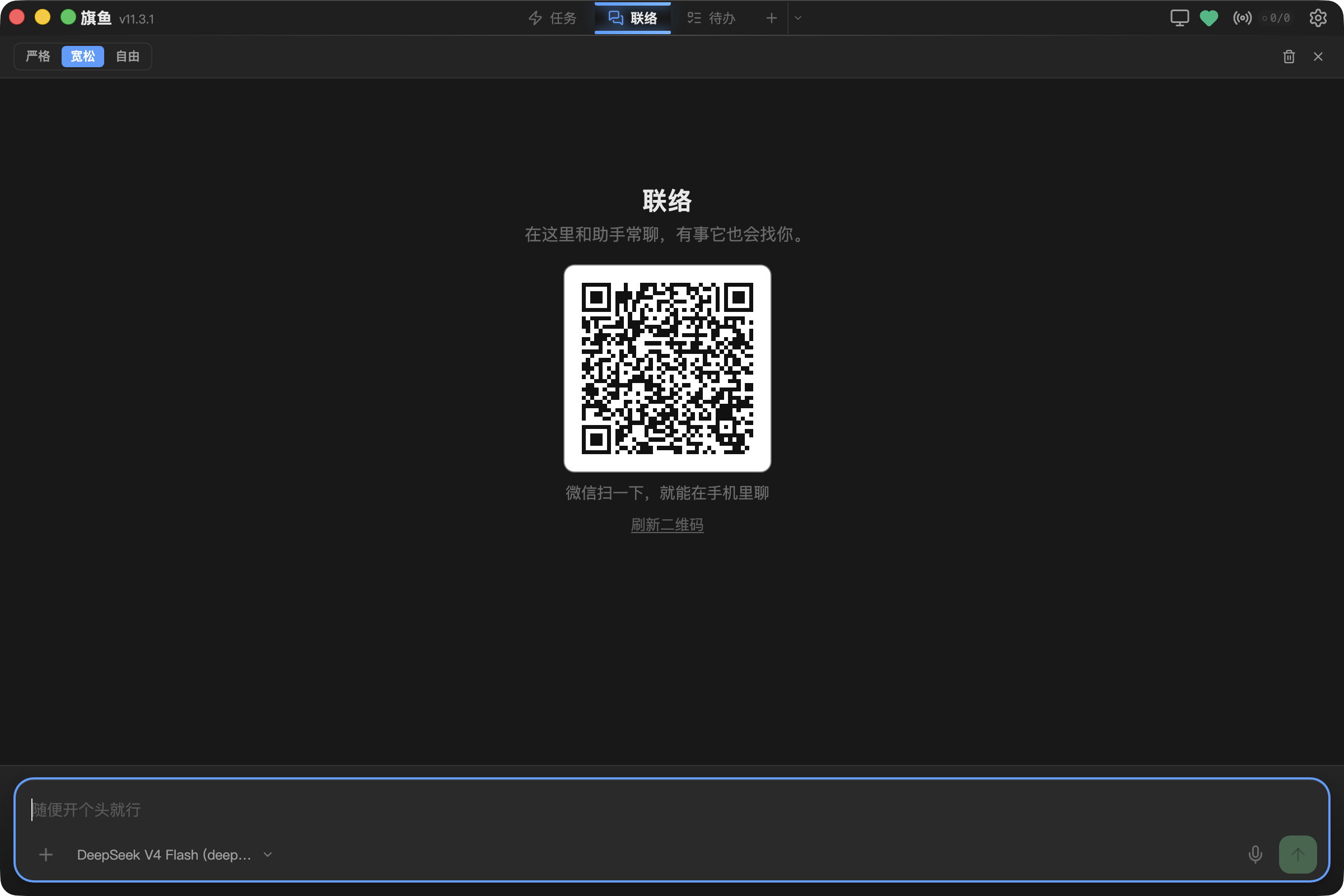
| Reach | Your ongoing relationship | Always-on, multi-channel; your secretary can reach out first; work can be handed off as its own task |
Tasks come first on desktop. All IM channels flow into one Reach line — not a different bot each time.
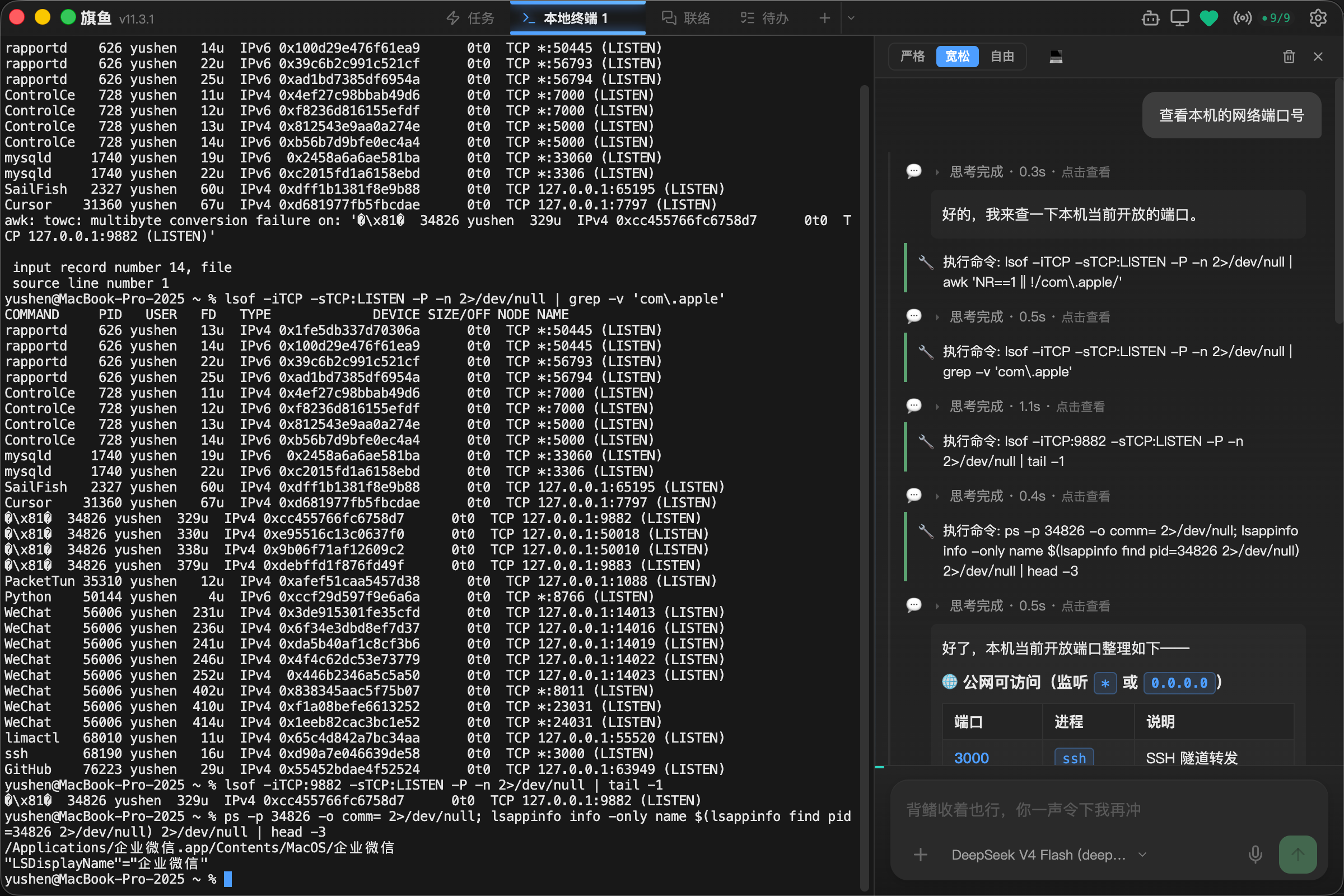
The window is three columns: new chat, Reach, Terminal, and recent conversations on the left; the current work in the middle; artifacts on the right, gone when collapsed. Watch, Todos, Contacts, and Memory have their own panels.
Core Capabilities
It remembers
| Feature | Description |
|---|---|
| 🧬 Identity & Personality | Your secretary has a character; a birth conversation on first launch, more “yours” the more you use it |
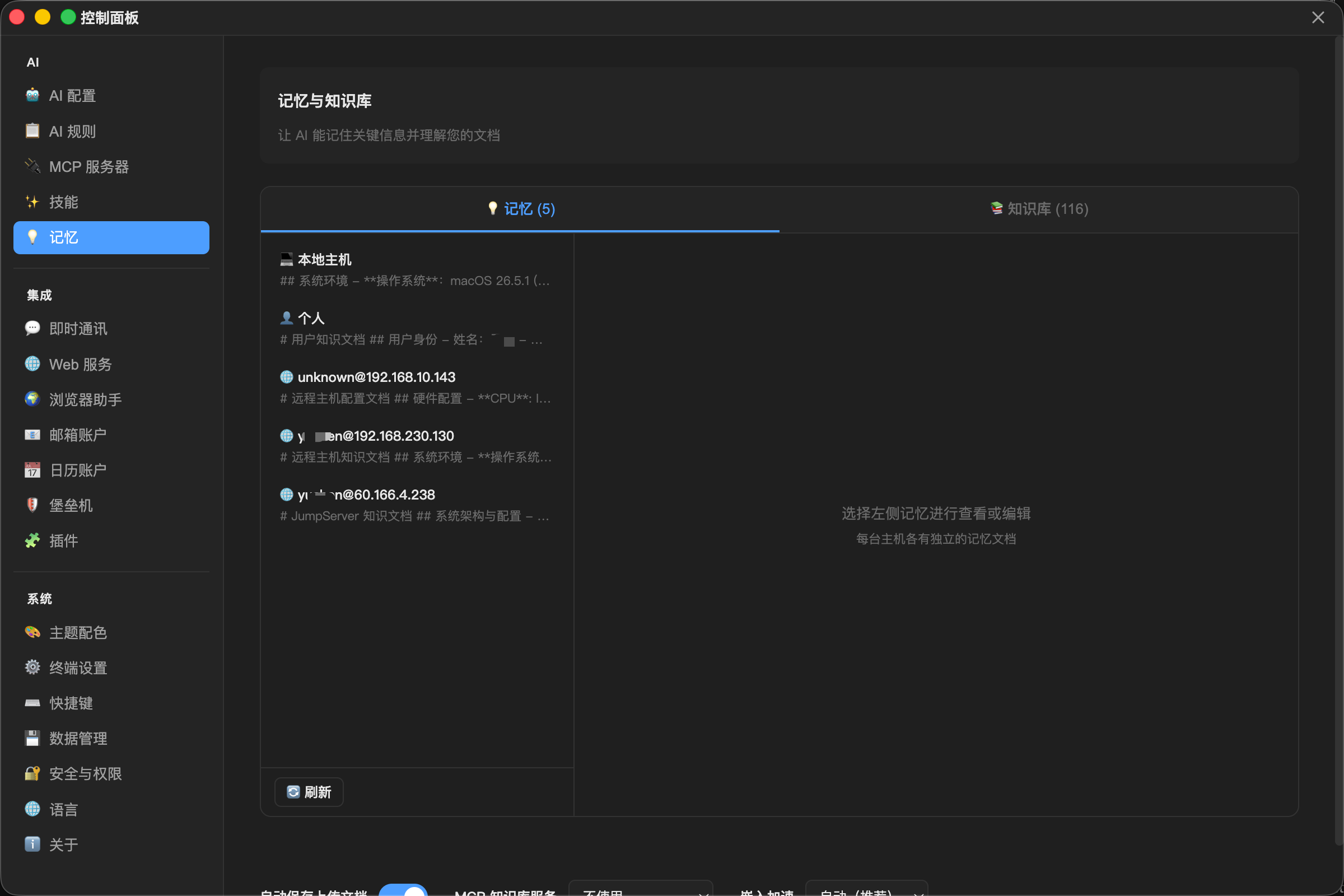
| 🧠 Three-Tier Memory | Knows your habits and facts; recalls past work on demand; view and edit it from the secretary menu |
| 📚 Knowledge Base | Documents stay on your machine, can be organized in folders, and are retrieved when needed |
It actually works
| Feature | Description |
|---|---|
| 🖥️ Local & SSH Terminal | Operates your machine and remote servers; an SSH session can also work on local files and commands; split panes can mix local and multiple hosts; reconnects after a drop |
| 👥 Sub-agents & Teams | Up to 1,000 unfinished helpers; organize specialists under team leaders, review results, and inspect progress, group conversations, and artifacts in the team overview; resume after interruptions |
| 📁 File Manager | Dual-pane local and remote files, drag-and-drop transfer |
| 🌐 Browser Bridge | Control the Chrome / Edge / Firefox you already have open — logins preserved |
| 📦 Artifacts | WYSIWYG Markdown, live HTML/URL preview, screenshot follow-ups, send to phone; Word / Excel / PDF / WPS open in place |
| 💻 Coding | Edit a local project, check syntax, and roll back by turn; off by default, for advanced users to enable |
| 🛡️ Safety | Command risk levels; dangerous steps ask first; strict / relaxed / free, or “Approve for me” |
Secretary work
| Feature | Description |
|---|---|
| 👤 Contacts | People and organizations, with an address and how to reach them; people mentioned in conversation are recognized |
| ✅ Todos | Local todos with due-soon reminders and importance sorting; hand one off into a new task |
| Read, search, write, reply — Gmail, Outlook, QQ Mail, 163, and more | |
| 📅 Calendar | Google, iCloud, Outlook, CalDAV — manage the schedule in natural language |
| 📊 Office Skills | Word, Excel, editable PowerPoint, charts, PDF; official-document styles and WPS formats |
| 🐦 Feishu / DingTalk / WeCom | Calendar, tasks, approvals, docs, Bitable, and other workplace skills |
It reaches you
| Feature | Description |
|---|---|
| 🌅 Awaken | Your secretary keeps its own rhythm and contacts you when it should |
| 👁️ Watch & Sensors | Heartbeat, file-watch, calendar, email, webhooks, and more; a dedicated ops panel so you see problems at a glance |
| 💬 Multi-Channel Reach | WeChat (scan to sign in), DingTalk, Feishu, WeCom, Slack, Telegram, web remote — one secretary |
| 🔊 Speech | Replies can be read aloud; speech recognition is download-on-demand so the installer stays small |
It can grow
| Feature | Description |
|---|---|
| 🛒 Skill Market & Plugins | One-click community skills; plugins extend tools, providers, and IM channels |
| 🔌 Connectors (MCP) | Databases, APIs, and other external tools; connect when enabled, load on demand |
| 🔍 Web Search | Bocha, Zhipu, Kimi, Tavily, Google, Jina, and more |
| 🖥️ CLI | sailfish runs the full backend headless; share desktop data or isolate with a sandbox |
| 💾 Your data | Full backup and restore; move the data directory to another disk; copy a redacted crash summary |
| 🔒 Always there | System tray and launch-at-login |
Quick Start
Download
Get the latest release from the website or GitHub Releases. In mainland China, the site’s Aliyun mirror is usually faster.
| Platform | Requirements | Packages |
|---|---|---|
| macOS | 13+, Intel and Apple Silicon | .dmg (arm64 / x64) |
| Windows | Windows 10 / 11, Server 2016+ | NSIS installer, plus a portable ZIP |
No official Linux desktop build. On Windows, if the installer fails (e.g. some Windows Server 2016 hosts), use the ZIP.
First launch on macOS may say the developer cannot be verified: System Settings → Privacy & Security → Open Anyway, or xattr -cr /Applications/SailFish.app.
AI Configuration
SailFish does not ship a model — you bring an API key. Settings include one-click presets; configure several and switch anytime.
{
  "name": "Daily DeepSeek",
  "apiUrl": "https://api.deepseek.com/chat/completions",
  "apiKey": "sk-xxx",
  "model": "deepseek-flash"
}
Recommended models (Function Calling required):
- Daily (fast, affordable, and can see images): DeepSeek V4.1 Flash · Qwen 3.7 Plus · Claude Sonnet 5 · Gemini 3.8 Flash
- Complex (long reasoning, multi-step): DeepSeek V4 Pro · GPT-5.6 · Claude Opus 5 · Grok 4.7
- Vision (screenshots, images, scanned PDFs): DeepSeek V4.1 Flash (enough as the default) · Doubao Seed 2.1 · Qwen 3.7 Plus · GPT-5.6 · Gemini 3.8 Flash · Claude Sonnet 5
- Local / offline: Ollama (preset
qwen3.5:9b; small context windows struggle with multi-step work) - More: Zhipu GLM-5.3 Flash, Kimi K3, MiniMax M3, and any OpenAI-compatible endpoint
A text-only model can be paired with a vision model: pictures go there, then conversation returns. For web search in China, Bocha, Zhipu, or Kimi all work. Step-by-step: First setup.
Development
npm install
npm run dev              # development
npm run build:mac        # macOS package
npm run build:win        # Windows package
npm run test             # unit tests
bash electron/cli/test-cli.sh --no-ai   # CLI regression (no model calls)
Dev Windows build (for the author’s cross-platform testing only):
npm run build:win:remotetriggers a GitHub Actions build; the artifact overwrites a fixed OSS path in 8–10 minutes. Stability is not guaranteed. https://sfterm-download.oss-cn-wuhan-lr.aliyuncs.com/dev/SailFish-Setup-dev.exe
See CONTRIBUTING.md. Day-to-day work is on develop; open PRs against develop, not main.
CLI
After install, add the sailfish command from Settings → Data Management. In a checkout, use npm run sailfish or npm run install:cli.
sailfish "list markdown files in this folder"
sailfish --sandbox "try this without touching desktop data"
sailfish models
sailfish --help
By default it shares desktop data and asks before dangerous steps (--mode relaxed). --sandbox isolates runtime data while still borrowing AI profiles and credentials. --mode free / --free skips confirmations — use with care.
Running from the repo defaults to the sandbox so desktop history is not overwritten.
Architecture
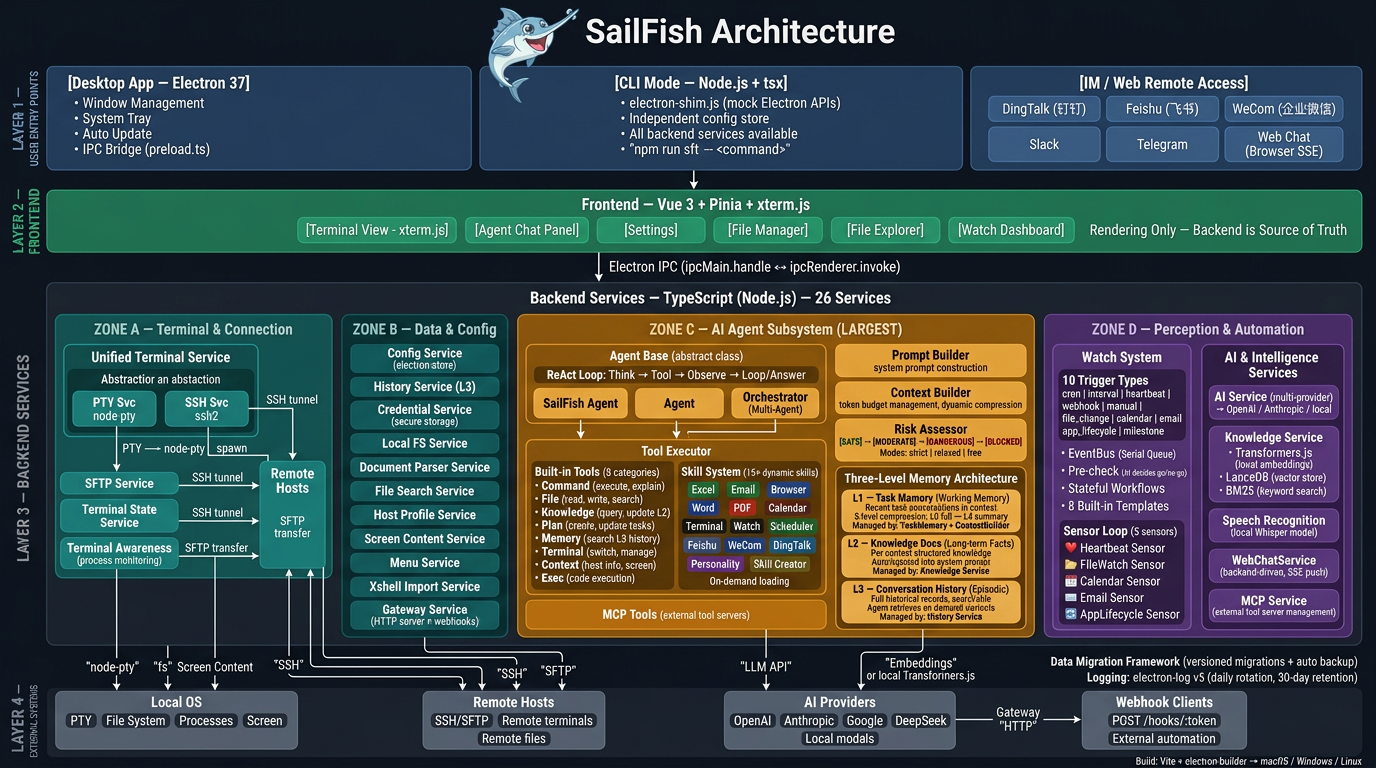
The desktop app (Electron) and the CLI share one backend. The UI renders; sessions, memory, and tool execution live in the backend. IM and web remote use that same backend — not a separate bot.
Documentation
For users
For developers and integrators
License
Dual licensing: AGPL v3.0 for open source use; commercial license available.
- ✅ Personal use, research, education
- ✅ Medical and non-profit organizations
- ✅ Enterprise internal use (≤1000 installations; modifications must be open-sourced under AGPL)
- 💼 Commercial license required for: >1000 installations, SaaS / product embedding, closed-source modifications, changing the logo or name, or removing “Support the author”
See LICENSE.
Links
Acknowledgements
Built with Electron, Vue.js, xterm.js, LanceDB, and many other open source projects.
Explore related projects
codecrafters-io/build-your-own-x
Master programming by recreating your favorite technologies from scratch.
562,431 starspublic-apis/public-apis
A collective list of free APIs
498,885 starsmorluto/rea
Reverse engineer anything with agents, from app behavior down to native binaries.
458,541 starsopenclaw/openclaw
The AI that really does things. Any OS. Any Platform. The lobster way. 🦞
394,419 stars