
yituorou/meatshell
yituorou/meatshell has 1,599 GitHub stars and 210 forks. GitHot measured 0 stars in 24 hours. Last checked 2026-11-07 04:18 UTC. Last push 2026-11-02.
一个轻量级、低内存占用的 SSH / 终端客户端(A lightweight, low-memory SSH / terminal client)
Measured star growth
- in 24h
- 0
- in 7 days
- Collecting history
- in 15 days
- Collecting history
- in 1 month
- Collecting history
Net star changes over overlapping periods, not daily totals. Missing measurements are left blank. Stars measure attention, not software quality.
README.en.md
Originalmeatshell
简体中文 | English
A lightweight, low-memory SSH / terminal client inspired by FinalShell, but written entirely in Rust + Slint. The goal is to keep FinalShell's core experience (resource-monitor sidebar, session management, tabbed terminals) while cutting memory use from the 400 MB+ of a JVM app down to the tens-of-MB range of a native binary.
Screenshots
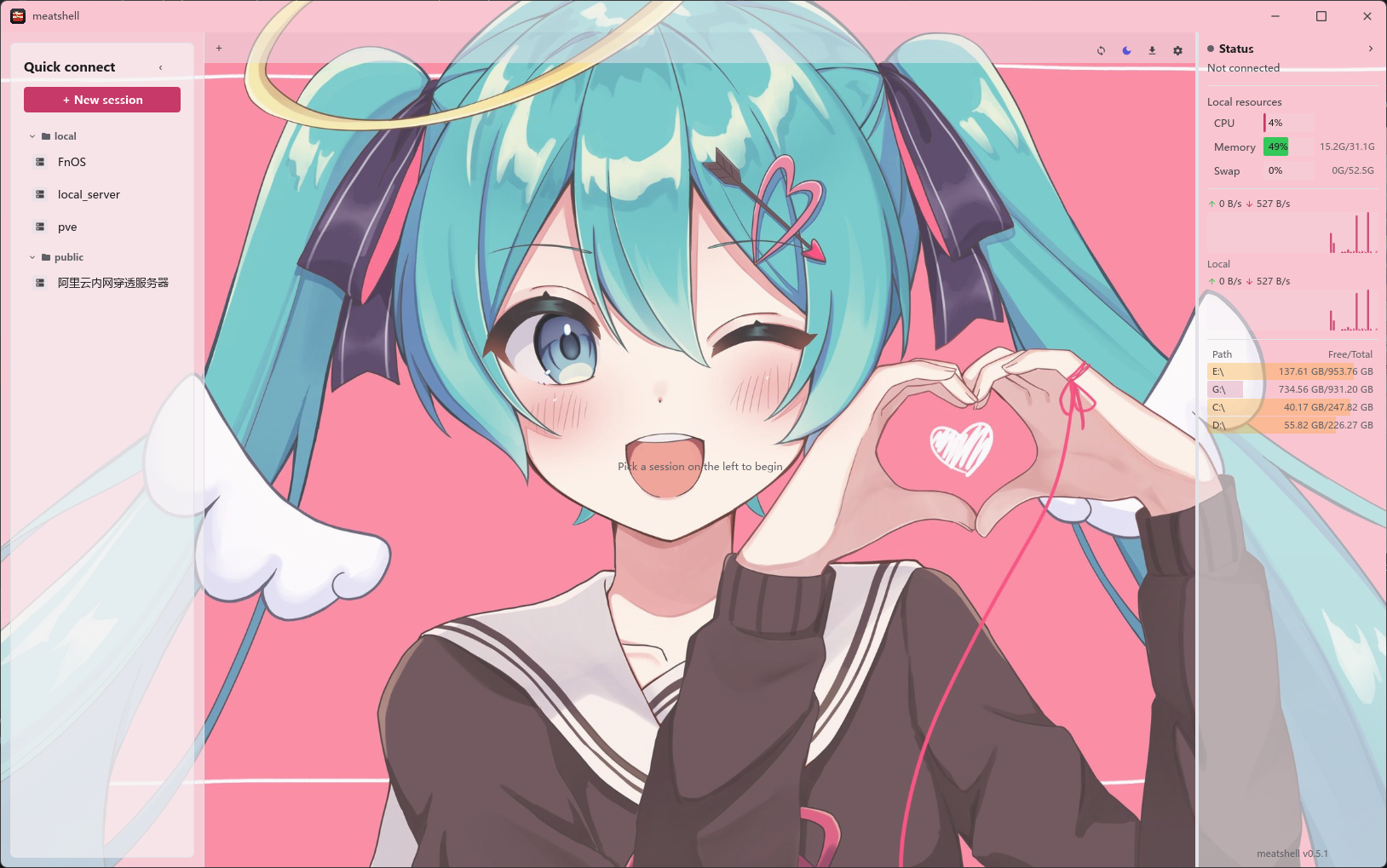
Welcome page: session management + local resource monitor sidebar
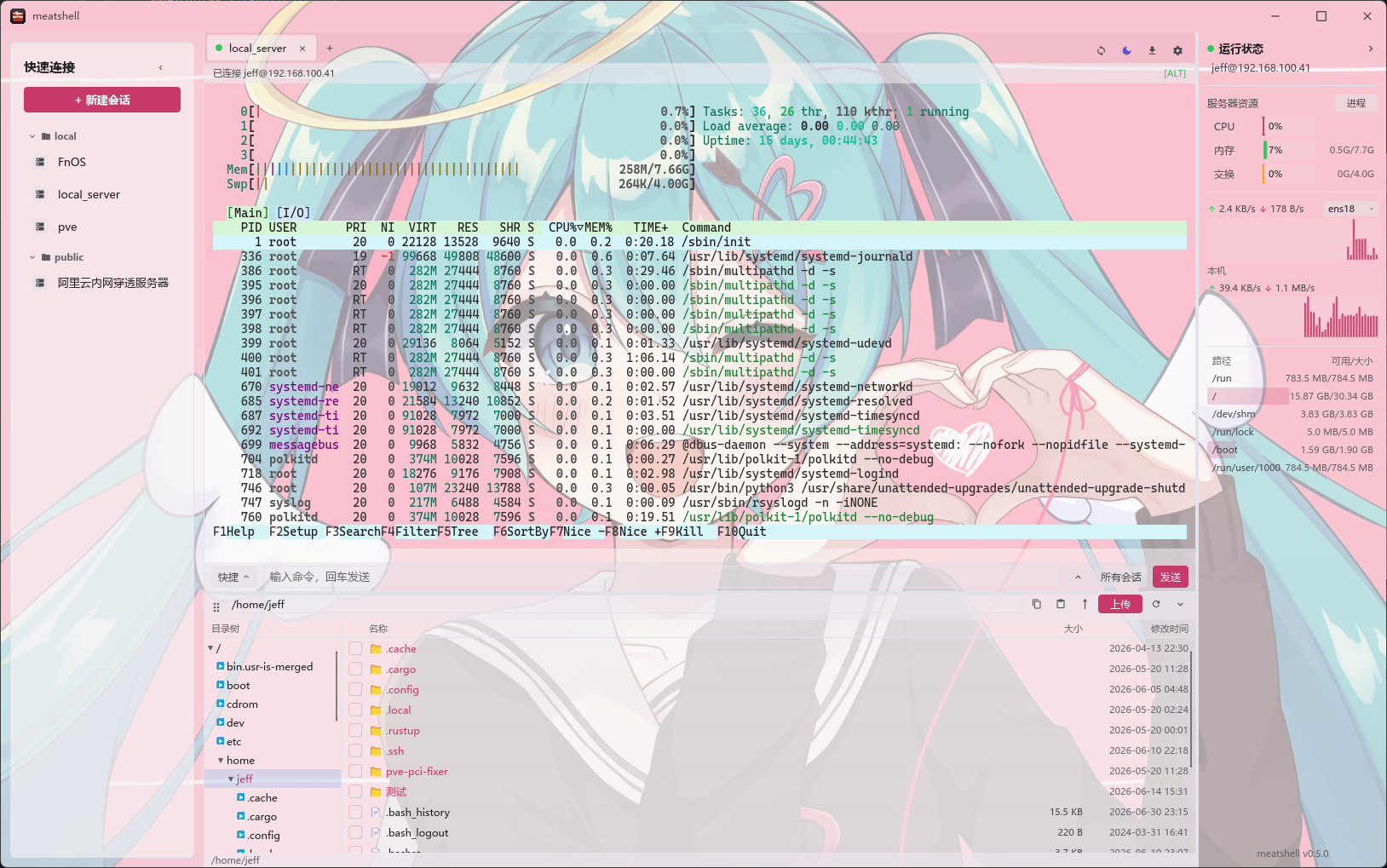
Tabbed terminal (full-screen btop) + SFTP file browser + remote resource monitoring
Download & install
Every v* tag triggers a GitHub Actions build that produces native binaries for
Windows / Linux / macOS, published on the
Releases page.
Windows
Download meatshell-*-windows-x86_64.zip, unzip, and run meatshell.exe.
Linux
tar -xzf meatshell-*-linux-x86_64.tar.gz
cd meatshell-*-linux-x86_64
./meatshell                                  # run it directly
# Optional: system-wide install of the binary, icon, and launcher (requires sudo)
chmod +x install-linux.sh && ./install-linux.sh
The installer places the binary at /usr/local/bin/meatshell, the launcher at
/usr/local/share/applications/meatshell.desktop, and the icon at
/usr/local/share/icons/hicolor/512x512/apps/meatshell.png. It also removes a
stale same-named user launcher left by older tarball installers.
Requires glibc ≥ 2.35 (Ubuntu 22.04+ / Debian 12+). On Wayland you may need to log out/in once after installing the icon.
Building from source with cargo run on Linux Mint / Ubuntu / Debian requires
the Slint/winit/rfd system development packages:
sudo apt update
sudo apt install -y --no-install-recommends \
  build-essential pkg-config cmake \
  libfontconfig1-dev libfreetype6-dev \
  libxcb1-dev libxcb-render0-dev libxcb-shape0-dev libxcb-xfixes0-dev \
  libxkbcommon-dev libxkbcommon-x11-dev libwayland-dev \
  libgl1-mesa-dev libegl1-mesa-dev libgtk-3-dev \
  libudev-dev
macOS
The download is a .zip containing the meatshell.app bundle:
# Unzip (aarch64 = Apple Silicon, x86_64 = Intel)
unzip meatshell-*-macos-*.zip
# Move it to Applications (optional — it also runs in place)
mv meatshell.app /Applications/
# Clear the quarantine flag, otherwise macOS says "meatshell is damaged and can't be opened"
xattr -dr com.apple.quarantine /Applications/meatshell.app
# Open it (or double-click in Finder)
open /Applications/meatshell.app
If you didn't move it to
/Applications, point both paths above at wherever the.appactually is (e.g.~/Downloads/meatshell.app).
Requires macOS 11 Big Sur or later. Both Apple Silicon and Intel Macs are supported.
To build from source, see Running below.
Features
Done
- FinalShell-style UI with dark / light / follow-system themes
- Local + remote resource monitoring (CPU / memory / swap / network / disk)
- Remote process monitor (CPU-sorted table with PID copy and permission-aware termination)
- Full VT/ANSI terminal emulation (btop / htop / vim render correctly)
- Color emoji, including skin tones, flags, and ZWJ sequences
- Tabs (welcome page + multiple sessions)
- Session management: create / edit / delete / groups, local JSON, export / import (including FinalShell connection files)
- Config location:
%APPDATA%/meatshell/sessions.json(Windows) /~/.config/meatshell/sessions.json(Linux) /~/Library/Application Support/meatshell/sessions.json(macOS)
- Config location:
- SSH (
russh, pure Rust): password / private key / encrypted key (passphrase) - SFTP browser + upload / download (drag-and-drop) + split local/remote view (drag between panes) + in-terminal ZMODEM (
szdownload /rzmulti-file upload) - SSH port forwarding / tunnels: local -L / remote -R / dynamic -D (SOCKS5)
- The connected session's Tunnels panel can add, stop, restart, and delete forwards. Rules can be saved to the SSH session with optional automatic startup on reconnect.
- System tray: closing the main window keeps sessions running; restore or create a window from the tray, or choose Quit to exit.
- Quick commands + command box (broadcast to all sessions) + command history
- Serial / Telnet sessions
- RDP remote desktop: stores host / port / user / password / domain with a resolution choice (full screen / common sizes / custom) and hands the session to a remote desktop client (
mstscon Windows; FreeRDP'sxfreerdp3/xfreerdpon Linux / macOS — install it yourself, or use the Flatpak build, which bundles it)- On Linux / macOS, each RDP session can select certificate policy, network profile, sound, clipboard, GFX, and legacy TLS compatibility. Advanced arguments accept one native FreeRDP argument per line (for example
/bpp:24or/drive:share,/tmp/path) or supported aliases such asnetwork=lan,sound=on,网络=局域网, and音频=开. Preview shows the final argument list without the saved password. Host, identity, certificate, and display switches cannot be overridden there; passwords stay on stdin. These FreeRDP options do not apply to Windowsmstsc.
- On Linux / macOS, each RDP session can select certificate policy, network profile, sound, clipboard, GFX, and legacy TLS compatibility. Advanced arguments accept one native FreeRDP argument per line (for example
- Outbound proxy (SOCKS5 / HTTP)
- Import
~/.ssh/config - Session passwords encrypted at rest (ChaCha20-Poly1305)
- Known-hosts (
known_hosts) verification + first-connect confirmation - Split panes for tabbed terminals
- Multiple windows: Ctrl+Shift+N (macOS ⌘⇧N) or the system "New window" entry (Windows taskbar / Linux desktop right-click), managed as a single Chrome-style process
Color emoji graphics are provided by Twemoji under CC BY 4.0. See THIRD_PARTY_NOTICES.md for the full attribution.
Planned
- Store session passwords in the OS keychain
Tech stack
| Module | Choice |
|---|---|
| UI | Slint (compiled pure Rust, no GC) |
| Async runtime | tokio |
| SSH protocol | russh (no libssh dependency) |
| System metrics | sysinfo |
| Serialization | serde + serde_json |
| Logging | tracing + tracing-subscriber |
Running
cargo run --release
On first launch an empty session store is created at
%APPDATA%/meatshell/sessions.json. Click "+ New Session" in the top-right
to add your first server.
CLI and MCP automation
The MeatShell CLI and MCP server share the sessions and SSH/SFTP implementation used by the GUI. The CLI is suited to scripts, CI, and explicit commands, while MCP lets an MCP-capable AI client perform server inspection, log analysis, and file transfers from natural-language requests. They are two entry points to the same saved server configuration.
Before using either interface, create the target session in the GUI and connect successfully once to complete host-key confirmation. Passwords, private keys, and other secrets are never returned by CLI/MCP. Do not put plaintext passwords in prompts or MCP configuration files.
CLI
Show every available command:
meatshell cli help
Common examples:
# List saved sessions; the first column is the session-id used below
meatshell cli sessions
meatshell cli sessions --json

# Show non-secret metadata for one session
meatshell cli session <session-id>

# Run a non-interactive SSH command; the remote command must follow --
meatshell cli exec <session-id> -- free -h
meatshell cli exec <session-id> --timeout 60 --json -- journalctl -n 100 --no-pager

# Browse, read, and transfer remote files
meatshell cli files <session-id> /var/log
meatshell cli read <session-id> /var/log/example.log
meatshell cli upload <session-id> ./local.txt /tmp
meatshell cli download <session-id> /tmp/result.txt ./downloads
Get <session-id> from meatshell cli sessions. A download requires an existing
local destination directory and will not overwrite a file with the same name.
Import saved sessions without the GUI
For a cloud/server build that omits the desktop UI, run cargo build --locked --features headless.
The same binary supports CLI/MCP and the same SSH/SFTP implementation; launching without
a subcommand returns a usage error. The default build still includes the desktop UI.
This option avoids compiling the generated application UI; the current Cargo dependency
graph still includes Slint, so normal platform build dependencies may still be required.
Use the JSON file produced by MeatShell's Export action directly:
meatshell --data-dir /absolute/path/to/profile cli import ./meatshell-connections.json --dry-run --json
meatshell --data-dir /absolute/path/to/profile cli import ./meatshell-connections.json --json
Import appends sessions and skips only equivalent configurations (ignoring local IDs
and last-used timestamps). Different names, groups, credentials, proxies and jump routes
remain separate profiles even on the same endpoint. Existing sessions and settings are never replaced. Imported
jump-host references are remapped to the new IDs, including forward references and
references to skipped duplicates. --dry-run validates and reports counts without
changing saved sessions; normal profile initialization may create the directory/key.
The limit is 16 MiB. MeatShell portable exports (meatshell_export: 1, including
enc:exp:v1: credentials), FinalShell exports, and native JSON profiles are supported.
Native profiles import sessions only. Machine-local enc:v1: credentials require the
matching profile key; undecryptable secrets and invalid jump chains reject the entire
import. A key-file path is preserved but its file is not copied: make that key available
on the destination separately. Portable export encryption is reversible with a built-in
key, so treat an export as a credential-bearing file and keep it private.
MCP exposes import_sessions with local_path and optional dry_run (default true).
It returns only added, skipped, and dry_run. The existing MCP enable/file-transfer
permissions apply. To permit writes, explicitly start the server with
meatshell --data-dir /absolute/path/to/profile mcp serve --allow-config-import, then
call with dry_run: false. Do not enable this flag for untrusted MCP clients. Importing
does not trust SSH host keys; connection verification is still required.
MCP
First open Settings → Interface → MCP in MeatShell:
- Enable MCP.
- Allow saved credentials when required.
- Allow arbitrary SSH commands for remote diagnostics.
- Allow file transfers when uploads or downloads are required.
To keep a server manual-only, untick Allow MCP access to this session in its session editor: MCP can then neither list nor connect to it, nor route through it as a jump host. The CLI is unaffected.
Then register a stdio MCP server named meatshell in your MCP-capable client:
{
  "mcpServers": {
    "meatshell": {
      "command": "/absolute/path/to/meatshell",
      "args": ["mcp", "serve"]
    }
  }
}
On Windows, command can be C:\\path\\to\\meatshell.exe. Restart or refresh
the MCP client; the meatshell server should expose tools for session lookup,
remote commands, directory listing, bounded text reads, uploads, and downloads.
MCP configuration locations vary by AI client, so consult that client's docs.
MCP JSON-RPC examples
An AI client normally creates these requests automatically; you do not need to enter them manually. When debugging the stdio connection, send each request as one complete line of JSON and complete initialization in this order:
{"jsonrpc":"2.0","id":1,"method":"initialize","params":{"protocolVersion":"2025-11-25","capabilities":{},"clientInfo":{"name":"example-client","version":"1.0.0"}}}
{"jsonrpc":"2.0","method":"notifications/initialized","params":{}}
{"jsonrpc":"2.0","id":2,"method":"tools/list","params":{}}
List saved sessions and obtain a <session-id>:
{"jsonrpc":"2.0","id":3,"method":"tools/call","params":{"name":"list_sessions","arguments":{}}}
{"jsonrpc":"2.0","id":4,"method":"tools/call","params":{"name":"get_session","arguments":{"session_id":"<session-id>"}}}
Run read-only OOM diagnostics and browse the heap-dump directory:
{"jsonrpc":"2.0","id":5,"method":"tools/call","params":{"name":"run_command","arguments":{"session_id":"<session-id>","command":"free -h; printf '\\n=== kernel OOM ===\\n'; dmesg 2>/dev/null | grep -iE 'oom|out of memory|killed process' | tail -50 || true; printf '\\n=== Java ===\\n'; ps -ef | grep '[j]ava'","timeout_seconds":30,"max_output_bytes":1048576}}}
{"jsonrpc":"2.0","id":6,"method":"tools/call","params":{"name":"list_remote_files","arguments":{"session_id":"<session-id>","path":"/home/jeff/test/heapdumps"}}}
Read a log or download a heap dump:
{"jsonrpc":"2.0","id":7,"method":"tools/call","params":{"name":"read_remote_text_file","arguments":{"session_id":"<session-id>","path":"/home/jeff/test/logs/meatshell-log-demo-error.log"}}}
{"jsonrpc":"2.0","id":8,"method":"tools/call","params":{"name":"download_file","arguments":{"session_id":"<session-id>","remote_path":"/home/jeff/test/heapdumps/example.hprof","local_directory":"/existing/local/directory","timeout_seconds":120}}}
read_remote_text_file accepts only bounded UTF-8 text. Use download_file for
binary files such as HPROF dumps. The local destination directory must already
exist, and the tool will not overwrite a file with the same name.
Once configured, give the AI client a request such as:
Use the
meatshellMCP to investigate an OOM on my192.168.100.41server. Heap dumps are in/home/jeff/test/heapdumps. Check system memory, kernel OOM records, Java processes, application logs, and the HPROF files, then identify the root cause. Perform read-only diagnostics first; do not restart services or delete files.
MCP first uses list_sessions to find the matching saved session, then invokes
remote-command or SFTP tools within the permissions you granted. If several
sessions use the same host, include the GUI session name in the prompt. A good
diagnostic prompt states the target host, log or dump paths, and whether restarts,
configuration changes, or file downloads are allowed.
Project layout
meatshell/
├── Cargo.toml
├── build.rs                 # Slint compiler entry point
├── ui/
│   ├── app.slint            # top-level window
│   ├── theme.slint          # design tokens
│   ├── widgets.slint        # reusable buttons / inputs / sparkline
│   ├── sidebar.slint        # left-hand system monitor panel
│   ├── tabs.slint           # top tab bar
│   ├── welcome.slint        # welcome page / quick connect
│   ├── session_dialog.slint # new / edit session dialog
│   └── terminal_view.slint  # terminal view (v0.1 line-buffered)
└── src/
    ├── main.rs
    ├── app.rs               # UI ↔ backend bridge
    ├── config.rs            # session JSON persistence
    ├── system.rs            # CPU / memory / network sampling
    └── ssh.rs               # SSH session worker
Development notes
- Slint widgets use a strict layout DSL; after editing a
.slintfile,cargo checkis the fastest feedback loop. - The application event loop is single-threaded (required by Slint); all
cross-thread UI updates go through
slint::invoke_from_event_loopcallbacks. - SSH / SFTP share the
known_hostsverification path: first contact asks for trust and remembers the host key, while later key changes prompt again.
Release
Do not bump Cargo.toml by hand and then create a tag. Use the release helper
so the tag points at a commit that already contains the matching Cargo version:
.\scripts\release.ps1 v0.6.0 -Push
The script updates Cargo.toml / Cargo.lock, runs cargo check --locked,
verifies meatshell --version, commits Release v0.6.0, creates an annotated
tag, and pushes the current branch plus the tag. See
docs/release.md for details.
Related Groups

Scan the QR code to join QQ groups to exchange user experiences, provide feedback, or get the latest updates
Friendly Links
- XenTerm (A new derivative fork, progressing together)
License
Dual-licensed under MIT OR Apache-2.0.
Authenticated remote MCP / 带认证的远程 MCP
Run the new opt-in Streamable HTTP service with an external OAuth 2.1 provider, HTTPS reverse proxy and an explicitly selected private profile. Existing GUI, CLI and stdio MCP remain unchanged. See deployment, authentication and security limits.
Explore related projects
codecrafters-io/build-your-own-x
Master programming by recreating your favorite technologies from scratch.
560,509 starspublic-apis/public-apis
A collective list of free APIs
496,801 starsmorluto/rea
Reverse engineer anything with agents, from app behavior down to native binaries.
438,679 starsopenclaw/openclaw
The AI that really does things. Any OS. Any Platform. The lobster way. 🦞
394,087 stars