
yeahhe365/AMC-WebUI
yeahhe365/AMC-WebUI has 929 GitHub stars and 188 forks. GitHot measured -1 in 7 days and -1 in 15 days. Last checked 2026-11-09 10:24 UTC. Last push 2026-11-04.
面向 Gemini 的 Local-First AI 工作流 WebUI,集成多模态聊天、Canvas、文件处理、实时搜索、代码执行与高级推理。
Measured star growth
- in 24h
- Update delayed
- in 7 days
- -1
- in 15 days
- -1
- in 1 month
- Update delayed
Net star changes over overlapping periods, not daily totals. Missing measurements are left blank. Stars measure attention, not software quality.
README.en.md
OriginalAMC WebUI
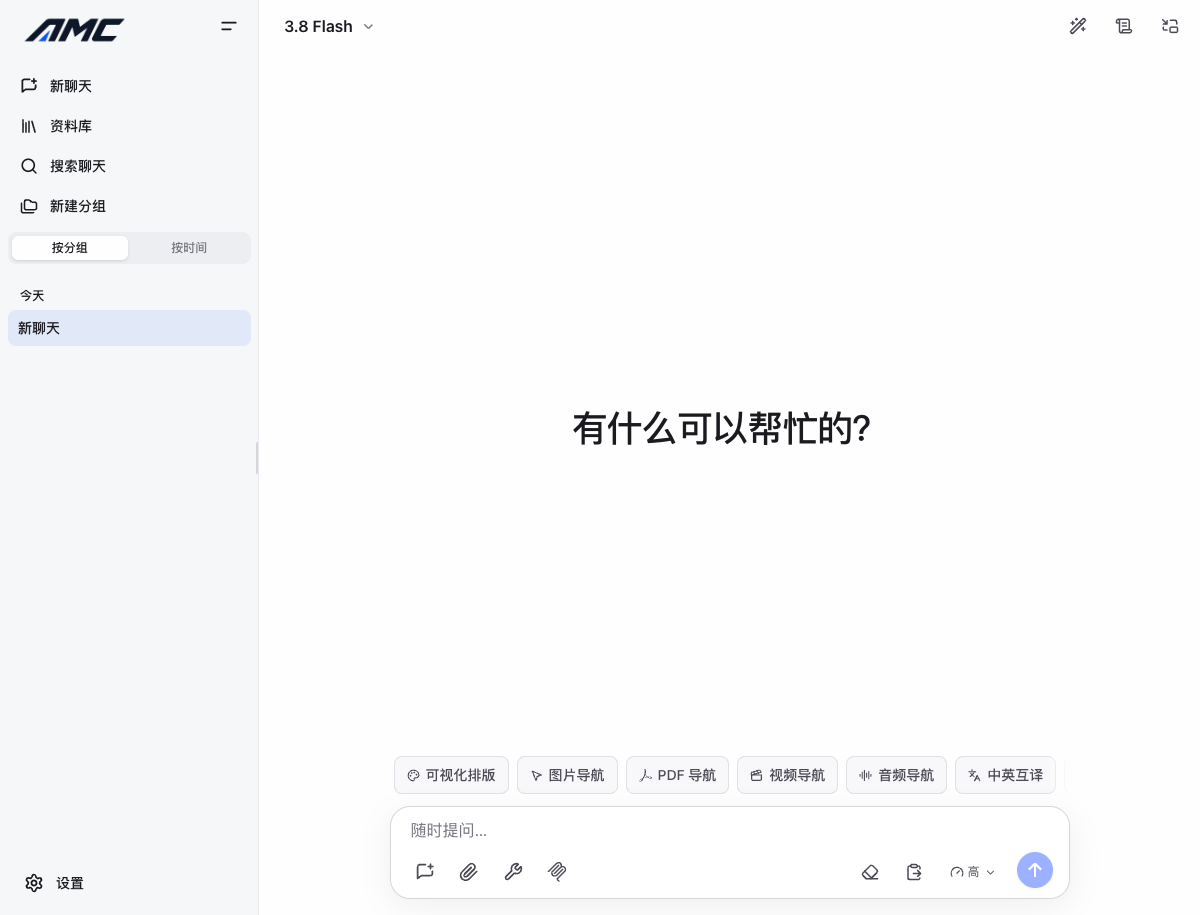
An all-in-one Model Console WebUI centered on Gemini native capabilities, with OpenAI-compatible standard chat support.









Preview
Overview
AMC WebUI is a React 18 based all-in-one Model Console WebUI built around Google Gemini native capabilities, with an additional OpenAI-compatible standard chat mode. It is designed as a Local-First AI workspace: conversations are stored in the browser's IndexedDB by default, while an optional standalone backend lets you host Gemini credentials server-side and proxy API requests safely in trusted deployments.
The project currently focuses on one main application shape: a Vite + React SPA.
- Standard mode: local Vite development and static builds for day-to-day development or static hosting.
- Docker mode: a
web + apideployment where regular Gemini requests call/api/gemini/*, third-party compatible requests go through/api/openai/*, and Live API uses the/api/liveWebSocket full proxy. - Static frontend + standalone API mode: deploy the frontend to Pages/CDN and run the Node API service separately.
📢 Gemini Robotics-ER model migration notice (2026-08-01) Support for
gemini-robotics-er-1.6-previewhas been dropped (the model was shut down on 2026-08-31). The built-in Robotics model is nowgemini-robotics-er-2-preview, defined once as theROBOTICS_MODELconstant (src/constants/modelConfiguration.ts). Before using Robotics models: 1) make sure yourGEMINI_API_KEYhas restrictions configured in AI Studio — unrestricted keys return403 Forbidden; 2) keepthinking_levelatmediumby default (best latency/performance balance), reservinghighfor high-precision spatial tasks; 3) for high-precision tasks, query multiple times and average the results to reduce variance.
API Modes
Gemini Native
- The main feature path for Thinking, Live API, Gemini Files API, Deep Search, Google Search, code execution, image generation, and other Gemini-specific capabilities.
- Can be combined with AMC's Gemini proxy and server-managed credential flow.
OpenAI Compatible
- A standard chat path with its own API keys, Base URL, and model list.
- Requests are sent to
POST {Base URL}/chat/completions, which fits the OpenAI API, Gemini's OpenAI-compatible endpoint, and other providers that supportchat/completions. - Supports both non-streaming and streaming chat, plus common settings such as system prompt,
temperature, andtop_p.
Important Notes
- OpenAI Compatible mode does not overwrite Gemini Native settings. Keys and model lists are managed separately.
- OpenAI Compatible mode currently does not use the Gemini-native tool/generation pipeline. Gemini-specific features mentioned in this README still depend on Gemini Native mode.
- The OpenAI-compatible Base URL should point to the API root, for example
https://api.openai.com/v1. AMC appends/chat/completionsautomatically.
Features
Deep Thinking
- Visualizes reasoning output for Gemini 3.x family models.
- Supports token budgets and reasoning levels: Off, Minimal, Low, Medium, High, XHigh, and Max.
- Streams model reasoning in real time when supported.
Realtime Audio and Video
- Two-way realtime streaming with voice conversations.
- Screen sharing and visual understanding workflows.
- Audio visualization based on AudioWorklet.
Live Artifacts
- Detects code blocks and renders interactive HTML previews.
- Supports safe inline HTML/SVG, form controls, and follow-up interactions.
- Supports Mermaid and Graphviz diagrams.
- Includes an automatic Live Artifacts generation mode with configurable trigger models, prompt versions, and custom prompts.
Advanced File Handling
- Browser-side audio preprocessing and compression to reduce upload cost.
- ZIP and folder import for codebase context.
- Supports images, PDFs, videos, audio files, text files, and more.
- Per-file-type control over Gemini Files API upload vs direct Base64 upload.
- Adjustable input detail levels: Unspecified, Low, Medium, and High. Ultra High is available for per-file image configuration.
Productivity Workflow
- Deep search powered by Google Search with planned search tasks and citations.
- URL context ingestion for adding web pages to conversations.
- Local Python sandbox based on Pyodide (WASM):
- Ships micropip; numpy, pandas, and matplotlib are installed on demand when imported.
- Detects imports automatically, and installs scipy and scikit-learn on demand when needed.
- File mounting and generated file download support.
- Automatic capture of matplotlib chart output.
- TTS with 30 voices.
- Speech transcription through the Gemini 3.5 Transcribe model.
- Gemini native image generation (Nano Banana) with aspect ratio, size, and quad-image options.
Model Context Protocol (MCP)
- Full standard Model Context Protocol (MCP) support bridged through Node API endpoints (
/api/mcp/*). - Supports stdio, SSE, and Streamable HTTP transports (HTTP/SSE connections adhere to the
ENABLE_MCP_PRIVATE_HTTPprivate-network security policy). - Human-in-the-loop tool execution approval dialogs before invoking external MCP tools.
- Complete browsing and management of MCP tools, Prompts, and Resources.
- Real-time connection status monitoring and developer logging.
API Management
- Dual API modes: switch between Gemini Native and OpenAI Compatible request paths.
- Multiple API key rotation for both Gemini-native keys and OpenAI-compatible keys.
- Isolated configuration: OpenAI Compatible mode uses its own keys, Base URL, and model list without mutating Gemini settings.
- Custom Gemini API proxy support through the native
baseUrlconfiguration in the SDK.
Internationalized UI
- Seven UI languages: English, Chinese, Japanese, Korean, Spanish, French, and German, plus a follow-system mode.
- Translated UI across chat, settings, sidebars, shortcuts, and related workflows.
PWA
- Web App Manifest, Service Worker, and install/update prompts.
- Installable on desktop and mobile.
- Offline application shell support. Model responses and remote API features still require network access.
- Picture-in-Picture mode support.
Usage and Pricing Logs
- Strict pricing mode: prices are shown only when stored usage data can reproduce official billing precisely.
- New chat, TTS, transcription, and some image generation requests record richer billing metadata.
- Text-only chats supplement
TEXT -> TEXTmodal evidence locally, so pricing can be shown for supported Gemini text models. - Historical records with incomplete pricing evidence continue to show
-.
Cross-tab Synchronization
- Cross-tab synchronization through BroadcastChannel, with Web Locks API protecting IndexedDB writes.
- Ensures data consistency when operating across multiple tabs simultaneously.
Custom Keyboard Shortcuts
- Built-in keyboard shortcuts for new chat, opening logs, switching models, Picture-in-Picture, and more.
- All shortcuts are fully customizable.
Safety Settings
- Five safety filter categories: harassment, hate speech, sexual content, dangerous content, and jailbreak protection.
- Each category can be independently configured with levels: Off / Block None / Block Few / Block Some / Block Most.
- All five default to Off, matching the Gemini API default for 2.5 and 3 models.
Theme System
- Built-in Onyx (dark), Graphite (gray), Pearl (light, default), and Sepia (warm beige) themes.
- Supports automatic switching to follow the system theme.
Data Management
- Full import/export for chat history, settings, and scenarios.
- Session grouping management.
- Session search (title + full-text content search).
- Developer log panel (API call monitoring, token usage statistics).
Quick Start
Option 1: Standard Development
Node.js 26 is recommended for local development. The repository includes .nvmrc, and the main CI flow uses the same major version. Node.js 24 is the minimum supported version, and the Docker images are built on node:24-slim. The repository uses pnpm for dependency management (specified in packageManager and locked with pnpm-lock.yaml), and enables engine-strict, so installation fails on Node 27+ or Node 23 and older; run nvm use first when you want the recommended version.
git clone https://github.com/yeahhe365/AMC-WebUI.git
cd AMC-WebUI

# Install dependencies (pnpm only — the repo ships pnpm-lock.yaml exclusively)
pnpm install
pnpm dev
To inspect production bundle size, run:
pnpm run build:analyze
The command writes dist/bundle-stats.html for reviewing the main bundle, lazy chunks, and PWA precache boundaries.
Open http://localhost:5175, then add your Gemini API key in Settings -> Third-Party Providers.
For local frontend development, you can also create .env.local in the repository root:
VITE_GEMINI_API_KEY=your_api_key_here
VITE_OPENAI_API_KEY=your_openai_compatible_key_here
To configure third-party providers (OpenAI compatible and more):
- Open Settings -> Third-Party Providers, select an existing provider (OpenAI, DeepSeek, Anthropic, OpenRouter, etc.) or click to add a new provider.
- Enter the provider API key, or preload
VITE_OPENAI_API_KEYin.env.local. - Set the provider Base URL (for example
https://api.openai.com/v1), and test connectivity and latency. - Open Settings -> Chat & Generation or synchronize the model catalog in the provider detail view to select or edit models.
Example Base URLs:
- OpenAI:
https://api.openai.com/v1 - Gemini OpenAI-compatible endpoint:
https://generativelanguage.googleapis.com/v1beta/openai - Any other compatible provider: use the
/v1root or equivalent root that serveschat/completions
Option 2: Docker Compose (Recommended for Personal Use)
The Docker deployment contains two services:
web: lightweight Node server serves the frontend and proxies/api/*to the API service.api: Node service providing Gemini proxy (/api/gemini/*), third-party compatible forwarding (/api/openai/*), Live API WebSocket proxy (/api/live), clipboard image reading, and MCP bridge.
pnpm run build:docker
docker compose up -d --build
The default URL is http://localhost:8080. Stop it with:
docker compose down
Notes:
- Docker defaults to BYOK for personal deployments. After startup, enter your Gemini API key in Settings -> Third-Party Providers to use both regular chat, Live API, and third-party compatible endpoints. You do not need to set
GEMINI_API_KEYorTHIRD_PARTY_ROUTESin.envordocker-compose.yml. - The
webimage packages the already built localdist/directory. - After frontend or backend API changes, run
pnpm run build:dockerbefore rebuilding the Docker services.
Security note
The
web + apiproxy setup is intended for trusted self-hosted deployments. The default BYOK mode uses the API key stored in the browser settings for requests, and it is not a complete public multi-user API gateway. Add authentication, quotas, rate limiting, abuse protection, audit logging, and tenant isolation before exposing it publicly.
Runtime Configuration and Environment Variables
| Variable | Purpose | Public | Docker default |
|---|---|---|---|
GEMINI_API_KEY |
Optional server-managed Gemini API key; the browser BYOK key wins, and this key is used as a fallback | Server only | Empty |
LIVE_GEMINI_API_KEY |
Optional dedicated server-managed Gemini API key for Live API; takes priority over GEMINI_API_KEY |
Server only | Empty |
PORT |
Port used by the API service | Server only | 3001 |
WEB_PORT |
Host port mapped to the web frontend service |
Host only | 8080 |
GEMINI_API_BASE |
Upstream Gemini API base URL | Server only | https://generativelanguage.googleapis.com |
ALLOWED_ORIGINS |
Comma-separated CORS allowlist for cross-origin deployments | Server only | Empty |
ENABLE_MCP_STDIO |
Enables stdio MCP server calls |
Server only | false |
ENABLE_MCP_PRIVATE_HTTP |
Allows the API service to call private or local HTTP MCP URLs | Server only | false |
ENABLE_LIVE_WS_PROXY |
Enables the /api/live WebSocket full proxy (on by default in Docker) |
Server only | true |
LIVE_WS_IDLE_TIMEOUT_MS |
Live WS idle reclamation timeout (milliseconds) | Server only | 300000 |
SERVER_KEY_PRIORITY |
Key priority: false = browser BYOK key wins with server fallback; true = server key wins |
Server only | false |
THIRD_PARTY_ROUTES |
JSON map of provider → { baseUrl, apiKey } for third-party routing (https, non-private hosts only) | Server only | Empty |
RUNTIME_SERVER_MANAGED_API |
Enables server-managed API mode by default in the frontend | Public runtime config | true |
RUNTIME_USE_CUSTOM_API_CONFIG |
Enables custom API configuration by default | Public runtime config | true |
RUNTIME_USE_API_PROXY |
Enables API proxy mode by default | Public runtime config | true |
RUNTIME_API_PROXY_URL |
Default Gemini proxy URL for the frontend | Public runtime config | /api/gemini |
RUNTIME_LIVE_API_BASE_URL |
Frontend Live API proxy base URL (blank = browser connects directly to the official WS) | Public runtime config | /api/live |
RUNTIME_THIRD_PARTY_PROXY_URL |
Frontend third-party compatible proxy base URL (blank = browser connects directly to the provider) | Public runtime config | /api/openai |
RUNTIME_PYODIDE_BASE_URL |
Optional Pyodide runtime asset URL; when blank, same-origin /pyodide/ is used |
Public runtime config | Empty |
The RUNTIME_* values are written into runtime-config.js at container startup and are readable by the browser. Only put public configuration there. The public/runtime-config.js template is used for static builds and keeps custom API configuration and proxy mode disabled by default; Docker overwrites it through docker/web-server.js at container startup using the defaults above.
MCP stdio and private/local HTTP access are disabled by default. Enable ENABLE_MCP_STDIO=true or ENABLE_MCP_PRIVATE_HTTP=true only for trusted self-hosted deployments.
Pyodide assets are copied to dist/pyodide/ during production builds and load from same-origin /pyodide/ by default. To use a CDN or a separate static host, set RUNTIME_PYODIDE_BASE_URL to a full directory URL such as https://cdn.jsdelivr.net/pyodide/v0.27.7/full/. The PWA precache excludes large pyodide/ assets by default, so local Python loads them on demand the first time it runs.
Docker defaults to BYOK: after you enter an API key in Settings, regular Gemini proxy requests use the browser-provided key, and Live API goes through the /api/live WebSocket full proxy, which the api container bridges to the official wss://generativelanguage…/BidiGenerateContent endpoint. A browser key is forwarded when present (BYOK fallback); otherwise the server-managed LIVE_GEMINI_API_KEY or GEMINI_API_KEY is used.
If you want server-managed credentials for regular Gemini requests, set GEMINI_API_KEY and RUNTIME_SERVER_MANAGED_API=true. Live API and third-party requests follow the same rule: the browser key wins, falling back to the server key (unless SERVER_KEY_PRIORITY=true). A browser-local key is suitable for personal or trusted deployments, but it is not a server secret: scripts running in the same browser context, extensions, XSS, or device compromise may still read it.
OpenAI Compatible and third-party requests route through /api/openai/* in Docker mode, using RUNTIME_THIRD_PARTY_PROXY_URL to select the proxy. The API container looks up the upstream from the THIRD_PARTY_ROUTES routing table using the x-third-party-provider header (https, non-private hosts only); a browser key wins, falling back to the route's server-side key. In static deployments (Pages) RUNTIME_THIRD_PARTY_PROXY_URL is not injected, so the browser connects to the provider directly. To pass OpenAI Compatible traffic through your own gateway, point the compatible Base URL at that gateway directly.
Option 3: Cloudflare Pages + Standalone API
You can deploy the frontend to Cloudflare Pages and run server/ as a separate Node service on a VM, container platform, or serverless container runtime.
- Build and publish the frontend
distdirectory:
pnpm run build
- Build and start the standalone API service:
pnpm run build:api
pnpm run start:api
- Point the frontend runtime config to your public API URL:
RUNTIME_API_PROXY_URL=https://your-api.example.com/api/gemini
- Set
GEMINI_API_KEYin the backend environment if you want server-managed credentials for regular Gemini requests. For BYOK, you can omit it. For cross-origin deployments, optionally setALLOWED_ORIGINS=https://your-pages-domain.pages.dev. In static deployments, Live API connects directly from the browser to the official service.
Additional notes:
server/currently serves the Gemini-native proxy path. OpenAI Compatible mode does not use that Node API by default.- If you want OpenAI Compatible traffic to use a self-hosted gateway, set that gateway's compatible Base URL in the frontend settings directly.
Optional: Use AIStudioToAPI as a Gemini-Compatible Backend
If you want to use a Google AI Studio web account as the API source, you can also try deploying AIStudioToAPI as a third-party Gemini-compatible backend. It exposes Gemini Native API style /v1beta/* endpoints and can be used as the custom API proxy for AMC WebUI.
Example:
RUNTIME_API_PROXY_URL=https://your-aistudio-to-api.example.com/v1beta
You can also open Settings -> Third-Party Providers (or API Configuration), enable custom API configuration and API proxy, then enter the AIStudioToAPI Gemini-compatible Base URL, such as http://localhost:7860/v1beta. The API key entered in AMC WebUI should match one of the API_KEYS configured for the AIStudioToAPI deployment.
Note: AIStudioToAPI is a third-party project, so review its account login, authentication, rate limiting, and public exposure risks before use. It can replace the regular Gemini API proxy source. AMC WebUI's Live API in static deployments connects directly from the browser to the official Live service.
Build and Preview
pnpm run build
pnpm run preview
Quality Checks
pnpm run typecheck
pnpm run lint
pnpm run test
pnpm run knip
pnpm run build
pnpm run build:api

# Or run the full verification pipeline
pnpm run verify
To verify Gemini Code Execution related behavior:
pnpm run test:code-execution
This covers:
- MIME and upload strategy handling for text, CSV, and code files.
- Code Execution request construction and multi-turn history replay.
- Streaming
thoughtSignaturepreservation. - Live API display for
codeExecutionResult.output.
For a manual API integration check with a real Gemini key:
GEMINI_API_KEY=your_key_here pnpm run verify:code-execution:api
Optional variable:
CODE_EXECUTION_MODEL: override the default model, which isgemini-3.8-flash.
Architecture
| Layer | Stack |
|---|---|
| Core framework | React 18 + TypeScript 5.5 + Vite 7 + pnpm |
| Styling | Tailwind CSS 4 + CSS variable based theme system |
| Persistence | Native IndexedDB wrapper with Web Locks for cross-tab write safety |
| Gemini SDK | @google/genai 2.20+ for streaming, non-streaming, file upload, image generation, TTS, and transcription |
| Audio | AudioWorklet API plus browser Worker based audio preprocessing and compression |
| Rendering | React-Markdown + KaTeX + Highlight.js + Mermaid + Graphviz |
| Python sandbox | Pyodide (WASM) in a Web Worker, installing scientific packages on demand at first import |
| API proxy | Gemini proxy through @google/genai httpOptions.baseUrl |
| PWA | Web App Manifest + install/update event handling |
| Deployment | Vite static build, Docker Compose (web + api), or Cloudflare Pages + standalone API |
When using server-managed mode for regular Gemini API requests in production, the frontend calls:
/api/gemini/*
In static deployments Live API uses the browser-local API key to connect directly to the official Live service; in Docker deployments it defaults to the /api/live WebSocket full proxy.
Project Structure
Core frontend areas include src/components/, src/features/, src/hooks/, src/services/, src/i18n/, src/pwa/, src/schemas/, and src/test/. At the repo root there are also shared web/API helpers in shared/, Vite plugin config in vite/, and helper scripts in scripts/.
Placement rules:
src/components/contains renderable UI and UI-specific view models; reusable controls belong incomponents/shared/.src/features/contains domain capability boundaries such as message sending, local Python, audio processing, and the standard chat tool loop.src/hooks/contains React orchestration; hooks that are only a React entry point for one domain should keep naming close to that domain.src/services/contains external-system and persistence boundaries such as API clients, IndexedDB, logging, and object URL lifecycle management.src/utils/contains small cross-domain helpers without React state. Group related helpers under domain subdirectories (for exampleutils/model/,utils/file/,utils/live-ui/,utils/export/) instead of catch-all*Helpersbuckets.src/test/architecture/contains structure and style guardrail tests that keep cleaned-up problems from returning.shared/contains pure logic used by both the web app and the Node API (image proxy, MCP config, private-network checks, and similar).- Cross-directory imports inside
srcuse the@/alias; same-directory imports keep./.
Chat and message directory boundaries:
components/chat/: session chrome (composer, message-list orchestration, drag-and-drop overlays).components/chat/message-list/: message list entry plus list-level UI (scroll, selection toolbar, welcome screen).components/message/: single-message bubble, Markdown, attachments, and per-message export controls.hooks/chat/message/: React orchestration for per-message actions and TTS.components/audio/+features/audio/: recorder UI and audio processing (sharedaudiodomain name).components/pwa/: PWA UI such as the update banner;src/pwa/: service worker and install runtime.
AMC-WebUI/
├── src/                        # Frontend source code (Vite SPA)
│   ├── assets/                 # Model icons and static assets (model-icons etc.)
│   ├── components/             # UI for chat, message, layout, settings, modals, audio, and more
│   ├── features/               # Local Python (src/features/local-python/), message sending, scenarios, audio, and standard chat features
│   ├── hooks/                  # App, chat, input, data management, live API, and UI hooks
│   ├── services/               # API, IndexedDB, logging, object URL, and infrastructure services
│   ├── stores/                 # Zustand stores for chat, settings, and UI state
│   ├── utils/                  # Domain-subdirectory helpers (model / file / live-ui / export / chat)
│   ├── i18n/                   # Translation aggregation, coverage tests, and multilingual copy
│   ├── pwa/                    # Service worker, PWA registration, and install state
│   ├── runtime/                # Runtime config loading and public config mapping
│   ├── schemas/                # Zod configuration schemas
│   ├── contexts/               # I18n, WindowContext, and related providers
│   ├── constants/              # Models, prompts, shortcuts, themes, and app constants
│   ├── test/                   # Test utilities, fixtures, and architecture regression tests
│   ├── types/                  # TypeScript types
│   ├── styles/                 # Global styles, animations, and Markdown styles
│   ├── App.tsx                 # App root component
│   └── index.tsx               # React mount entry
├── server/                     # Standalone Node API (Gemini/OpenAI proxy, Live WS, MCP, etc.)
│   ├── src/
│   └── tsconfig.json
├── shared/                     # Shared web/API pure logic (image proxy, MCP, private network)
├── vite/                       # Vite plugins and chunk config
├── scripts/                    # Test and verification helper scripts
├── public/                     # Static assets and runtime-config.js template
├── e2e/                        # Playwright tests
├── docs/                       # Screenshots and model-logos (runtime icons live in src/assets/model-icons/)
├── docs-site/                  # Astro Starlight official documentation site source
├── docker/                     # Deployment helper scripts (for example web-server.js)
├── Dockerfile.api              # Node API container image build config
├── Dockerfile.web              # Web frontend container image build config
├── docker-compose.yml          # web + api deployment entry
├── .env.example                # Environment variables template
├── .nvmrc                      # Node.js recommended version declaration (v26)
├── pnpm-lock.yaml              # pnpm lockfile
├── vite.config.ts              # Vite config
├── playwright.config.ts        # E2E config
├── vitest.config.ts            # Unit and integration test config
├── eslint.config.js            # ESLint config
├── knip.json                   # Unused file/export analysis config
└── package.json                # Dependencies and scripts
Gemini Native Default Models
📌 Prerequisite for Gemini Robotics-ER models (
gemini-robotics-er-2-previewand other Robotics endpoints): Google requires the API key to have restrictions configured in AI Studio. Requests with unrestricted keys are rejected with a403 Forbiddenerror. Configure restrictions (e.g. limit by project/domain) for any key used with Robotics models, and keep this requirement in sync in deployment docs and CI secrets.
OpenAI Compatible mode uses a separate model list that you can manage manually or fetch from a compatible endpoint. The table below lists the built-in Gemini Native defaults.
| Type | Models |
|---|---|
| Gemini 3.x | gemini-3.8-flash, gemini-3.7-flash, gemini-3.5-flash-lite, gemini-3.8-live, gemini-3.8-live-extended-thinking, gemini-3.5-live-translate-preview, gemini-3.1-pro-preview |
| Robotics | gemini-robotics-er-2-preview |
| Gemma 4 | gemma-4-31b-it, gemma-4-26b-a4b-it |
| Image generation | gemini-3-pro-image, gemini-3.1-flash-image, gemini-3.1-flash-lite-image |
| TTS | gemini-3.8-flash-tts (default, 30 voices); gemini-3.1-flash-tts-preview is a legacy ID migrated automatically |
| Transcription | gemini-3.5-transcribe, gemini-3.5-transcribe-live |
Contributing
Contributions are welcome.
- Report issues through GitHub Issues.
- Fork the repository, create a feature branch, and open a Pull Request.
- Support ongoing development by starring the project or visiting Afdian.
Related Community
- Linux.do: an active Chinese tech community focused on AI, software development, resource sharing, and frontier technology discussions. Its vision is "a new ideal community", and its community culture emphasizes sincerity, friendliness, unity, and professionalism.
Developed with :heart: by yeahhe365
Explore related projects
freeCodeCamp/freeCodeCamp
freeCodeCamp.org's open-source codebase and curriculum. Learn math, programming, and computer science for free.
458,946 starsdonnemartin/system-design-primer
Learn how to design large-scale systems. Prep for the system design interview. Includes Anki flashcards.
377,584 starsreact/react
The library for web and native user interfaces.
252,497 starsvuejs/vue
This is the repo for Vue 2. For Vue 3, go to https://github.com/vuejs/core
212,622 stars