
yarenty/kowalski
yarenty/kowalski has 66 GitHub stars and 15 forks. GitHot measured 0 stars in 24 hours. Last checked 2026-11-15 15:41 UTC. Last push 2026-11-13.
Measured star growth
- in 24h
- 0
- in 7 days
- Update delayed
- in 15 days
- Update delayed
- in 1 month
- Update delayed
Net star changes over overlapping periods, not daily totals. Missing measurements are left blank. Stars measure attention, not software quality.
About
You already have a local model. Kowalski gives it jobs: hordes of small steps where code does the fetching, SQL and file writing, and the model only writes a query or a paragraph. One binary, Ollama or your own key. Rust, MIT.
AIREADME.md
OriginalKowalski
"Kowalski, analysis!"
You already have a local model. Kowalski gives it jobs. A horde is a pipeline of small steps: ordinary code does the fetching, the SQL and the file writing, and the model only writes a query or a paragraph, so a 2B model on a laptop CPU finishes real chores. Kowalski is one binary: point it at Ollama (or any OpenAI-compatible endpoint with your key) and give a horde your spreadsheets, pages and documents. The answers come back as files you can open: a report workbook, a morning brief, a note with deadlines.
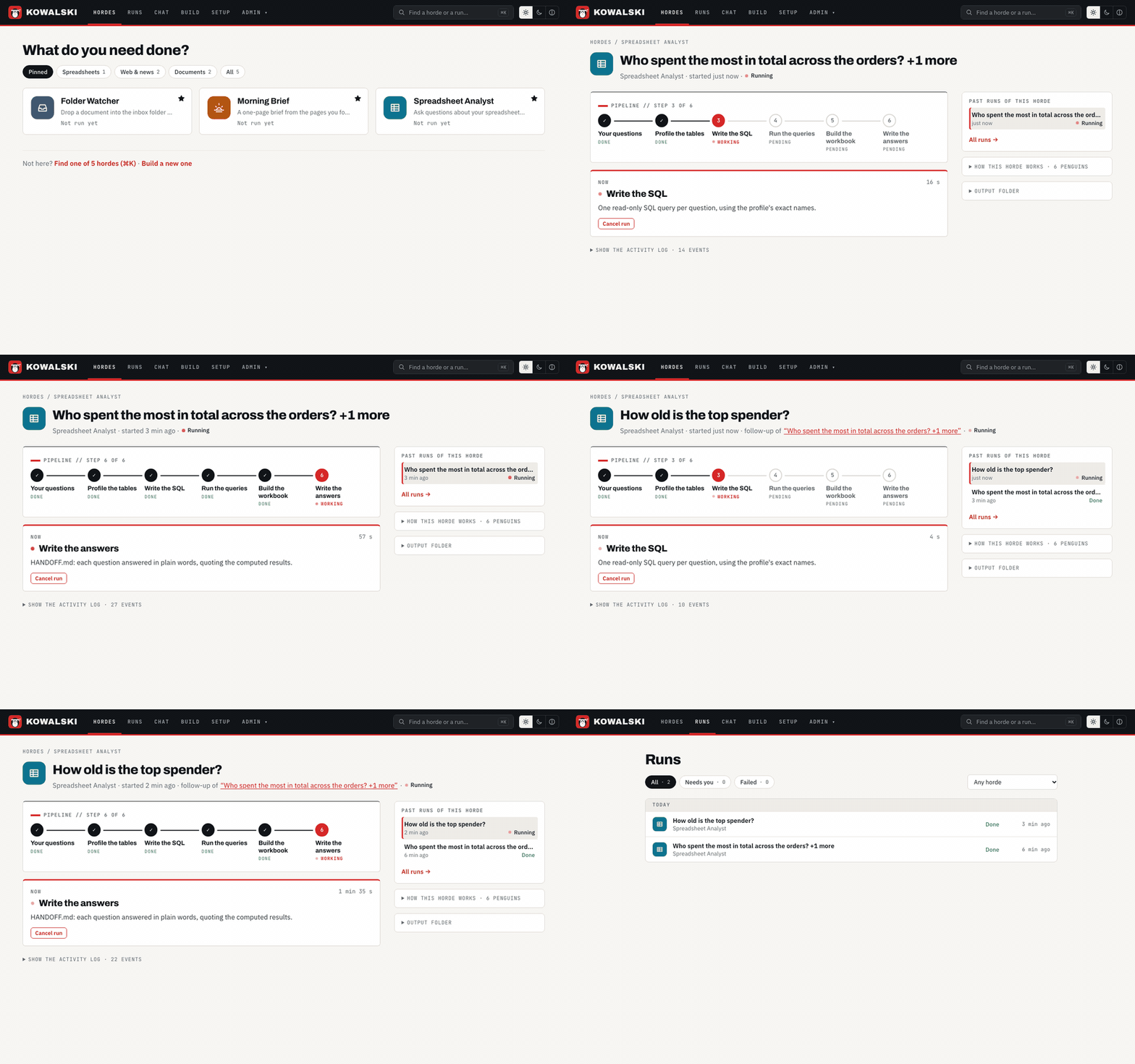
Three questions to the Spreadsheet analyst, on a local 7B model; the minutes it spends thinking are cut from the recording.
Current release: 2.6 — Field Notes. What changed and when: CHANGELOG.md · what is next: ROADMAP.md.
Tried it? Tell me what you ran and where it broke. One line is enough; there is no telemetry, so this is the only way I find out.

Install
Mac: download Kowalski.dmg, open it, drag Kowalski to Applications and open it. It starts kowalski and opens your browser; quit it from the Dock to stop. Apple Silicon and Intel, signed and notarized.
Mac or Linux, from a terminal:
curl -fsSL https://raw.githubusercontent.com/yarenty/kowalski/main/install.sh | bash
kowalski
macOS and Linux, Intel or ARM. The installer downloads the pre-built kowalski and kowalski-cli
from the latest release into ~/.local/bin, checks their checksum and adds that folder to your
shell's PATH for new terminals (it prints the full path to use right away); no Rust needed.
kowalski opens the app in your browser, where Setup asks for:
- A model — Ollama if it is running (its models are listed), or an OpenAI-compatible endpoint and key. A Check button tests it without spending tokens.
- A files folder — the only place the agents' file tools may read and write.
- tableski (optional) — sign in and your spreadsheets become SQL tables the agents can query.
Setup writes the config to ~/.config/kowalski/config.toml and restarts the server. Everything
kowalski keeps (the config, built-in hordes and their output, run history, memory) lives in that
folder, whichever folder you start it from. The archives are also on the
releases page.
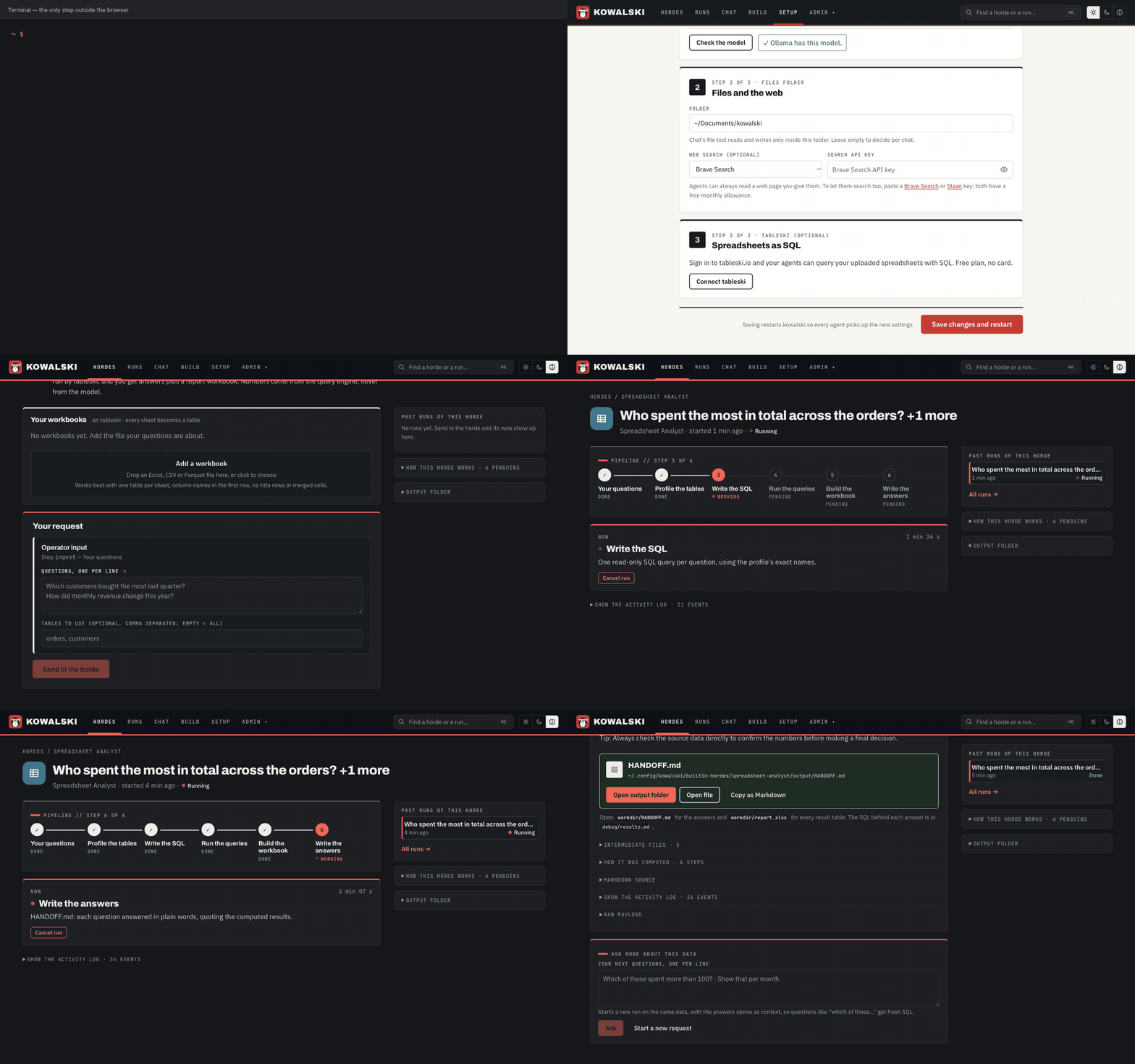
A first run, start to finish: the installer, Setup's three questions, signing in to tableski, a workbook dropped on the Spreadsheet analyst and its answers (the model's time is sped up; the tableski sign-in itself is not shown):
Installer options
| Variable | Effect |
|---|---|
KOWALSKI_BIN_DIR=~/.local/bin |
Where the binaries go |
KOWALSKI_RELEASE=v2.6.1 |
A specific release instead of the latest |
KOWALSKI_FROM_SOURCE=1 |
Build from crates.io with cargo instead (no UI inside) |
KOWALSKI_VERSION=2.6.1 |
crates.io version (source build) |
KOWALSKI_FEATURES=postgres |
cargo install --features postgres (source build) |
KOWALSKI_INSTALL_MCP=1 |
Also install kowalski-mcp-rookery (source build) |
KOWALSKI_NO_MODIFY_PATH=1 |
Leave your shell profile alone (download mode) |
KOWALSKI_SKIP_RUSTUP=1 |
Fail instead of auto-installing Rust (source build) |
What a horde does for you
Five hordes ship inside the binary and appear in the Hordes screen on first start.
| Horde | You give it | You get |
|---|---|---|
| Spreadsheet analyst | Questions in plain words, about workbooks loaded in tableski | report.xlsx (one sheet per question) and HANDOFF.md with short answers. The model writes SQL; every number comes from the query engine. |
| Morning brief | The pages you check every morning | BRIEF.md: a top pick and the items worth your time from each page, with links. A weekday 7:00 schedule is ready to switch on. |
| Folder watcher | Documents dropped into its inbox/ |
NOTE.md: what the document is, the key facts, and what to do by when. |
| URL summarizer | A list of links | A short summary per page. |
| Knowledge compiler | Articles, repos, notes | A compiled knowledge pack you can ask questions of. |
Scheduled and watching hordes ship switched off: nothing runs, or costs, until you turn it on. Steps that would run a command or write into a project stop and ask for your approval first; Always allow remembers it for a step you trust, until the step changes or you revoke it in Setup.
Try the analyst from a terminal against a running server:
examples/spreadsheet-analyst/demo.sh "Who spent the most?" "How many customers per city?"
Is Kowalski for you?
| You want… | Kowalski | Better elsewhere |
|---|---|---|
| Something useful to do with the model you already run in Ollama | ✓ | |
| Answers from your own spreadsheets, pages and documents, as files you open | ✓ | |
| To run on a laptop with a free local model, nothing leaving the machine | ✓ | |
| Every number in a report traced to a SQL query | ✓ (with tableski) | |
| One download, no Docker, no database server | ✓ (about 20 MB) | |
| A chat assistant with wide access to your machine and apps | a personal assistant such as OpenClaw | |
| To manage many paid coding agents as a team, with org charts and budgets | an agent control plane such as Paperclip | |
| Hundreds of SaaS connectors and click-built workflows | a workflow tool (n8n, Zapier) |
Penguins: no lobsters, no corporation. More in Meet Kowalski.
Your spreadsheets: tableski
The Spreadsheet analyst reads your workbooks through tableski, which turns every sheet into a SQL table an AI can query. Use the hosted service or run it yourself:
- Hosted at tableski.io. In Setup, Connect tableski signs you in once in the browser (no card, no token to copy); kowalski keeps the sign-in fresh. Then drop a workbook on the Workbooks card of the analyst's page and ask.
- Your own tableski. Start the local binary with your file,
tableski --file report.xlsx, and point kowalski at it; nothing leaves your machine.
Setup writes the config for you. By hand, it is one block in config.toml, with a token from
tableski.io/app/tokens or, for a local tableski, the local
address and no token:
[[mcp.servers]]
name = "tableski"
url = "https://mcp.tableski.io/"      # local: "http://127.0.0.1:8080/"
transport = "http"
headers = { Authorization = "Bearer tsk_your_token" }
New to tableski? Its five-minute demo loads a workbook and asks the first question.
Make your own
A horde is a folder of Markdown: horde.md (the pipeline and its triggers), agents/*.md (one
file per step: what kind of step, what it reads, where it writes) and prompts/. Copy a built-in
one next to your config and change it, or describe what you want in the Rookery tab and let
the builder write the folder. Hordes can run on a schedule, when a file lands, or from a webhook,
and travel between machines as a single .kwf.zip bundle.
How it works

One process holds the operator UI, the HTTP API, the horde runner and the agent core. Runs are
durable (every state change goes to SQLite, and runs survive restarts). Tools are a small built-in
set (web_fetch, web_search, files) plus anything that speaks MCP, starting with
tableski. Deterministic steps do the work models are bad
at — fetching, profiling tables, running SQL, building workbooks — so a small local model only
has to write a query or a paragraph from material it has been given.
The full picture, with diagrams of one run and the run lifecycle: docs/architecture.html.
Build from source
git clone https://github.com/yarenty/kowalski.git && cd kowalski
(cd ui && bun install && bun run build)      # the UI is compiled into the server
cargo build --release
./target/release/kowalski                    # http://127.0.0.1:3456, opens your browser
Rust stable and Bun for the UI; Ollama if you want a local
model. config.example.toml documents every setting; your own
config.toml is git-ignored. Build with --features postgres for Postgres memory (pgvector) and
graph queries.
| Command | What it does |
|---|---|
kowalski |
Server with the UI (--bind, --no-open, --auth) |
kowalski-cli / kowalski-cli chat |
Terminal chat with your model and MCP tools |
kowalski-cli chat "hello" |
Ask once, print the answer, exit |
kowalski-cli agent-app export <horde> / import <bundle> |
Move a horde as one file |
kowalski-cli mcp ping / mcp tools |
Check the MCP servers in your config |
kowalski-cli doctor |
Environment check |
UI development: run kowalski, then cd ui && bun run dev (Vite on :5173 proxies /api).
See ui/README.md.
Security defaults: no token is needed on 127.0.0.1; bound to any other address the API always requires the bearer token printed at first start. Imported hordes run their steps in a separate process with triggers switched off.
Rust API
use kowalski_core::agent::Agent;
use kowalski_core::config::Config;
use kowalski_core::template::TemplateAgent;

#[tokio::main]
async fn main() -> Result<(), Box<dyn std::error::Error>> {
    let config = Config::default();
    let model = config.ollama.model.clone();
    let mut agent = TemplateAgent::new(config).await?;
    let conv = agent.start_conversation(&model);
    let reply = agent.chat_with_history(&conv, "Hello", None).await?;
    println!("{reply}");
    Ok(())
}
Workspace
| Crate | Role |
|---|---|
kowalski |
The server binary: HTTP API, horde runner, triggers, Setup, embedded UI and hordes |
kowalski-core |
Agents, model providers, tools, MCP client, memory, step handlers, bundles |
kowalski-cli |
Terminal chat, bundles, MCP checks, isolated step runner |
kowalski-mcp-rookery |
The horde builder as an MCP server |
ui/ |
Vue 3 operator UI |
Ecosystem
| Project | What it is |
|---|---|
| tableski | Every spreadsheet is a table: Excel, CSV and Parquet as SQL over MCP. Local binary or hosted at tableski.io. |
| emperor-mcp | The MCP server framework first-party servers are built on (stateless HTTP, credential forwarding, output framing). |
| emperor-folder, -pdf, -mail, -vikunja | A folder, PDFs, mail and Vikunja tasks as MCP tools for agents; read-only unless started otherwise (guide). |
| Paperclip | Hire a horde as an employee in a Paperclip company: assign it an issue, the answers come back in the thread (guide). |
New first-party MCP servers get their own repositories on emperor-mcp; this repository stays
the runtime.
Documentation
- kowalski.yarenty.com — the blog
- docs/guide/ — the user guide (also built into kowalski, so Chat can answer from it)
- docs/architecture.html — how it is built
- docs/ — technical notes (
dev/), articles (blog/), ideas (concepts/) - examples/ — every built-in horde, readable as plain files
- CHANGELOG.md · ROADMAP.md · AGENTS.md for contributors and coding agents
Contributing
"Contributing is like dating – it's fun until someone suggests changes."
Issues and pull requests are welcome. Please add tests and update the docs that your change makes wrong.
License
MIT. See LICENSE.
"AI agents are like penguins – they look organised, but it's all improvisation."