
yannickuhrig1/plugarr
yannickuhrig1/plugarr has 82 GitHub stars and 0 forks. GitHot measured 0 stars in 24 hours, +1 in 7 days, and +1 in 15 days. Last checked 2026-11-15 08:34 UTC. Last push 2026-11-03.
Measured star growth
- in 24h
- 0
- in 7 days
- +1
- in 15 days
- +1
- in 1 month
- Collecting history
Net star changes over overlapping periods, not daily totals. Missing measurements are left blank. Stars measure attention, not software quality.
About
Installe ET cable automatiquement une stack media *arr : cles API echangees, indexeurs synchronises, profils de qualite TRaSH poses. Assistant TUI, page d'acces et d'administration.
Self-hostedREADME.en.md
OriginalFrançais · English
PlugArr
Deploys and wires a complete media stack. One command, zero clicks across eight web UIs.
plugarr
plugarr-site.vercel.app — the project site.
In English or French, down to the error messages. PlugArr follows your system language; your services have their own, chosen separately.
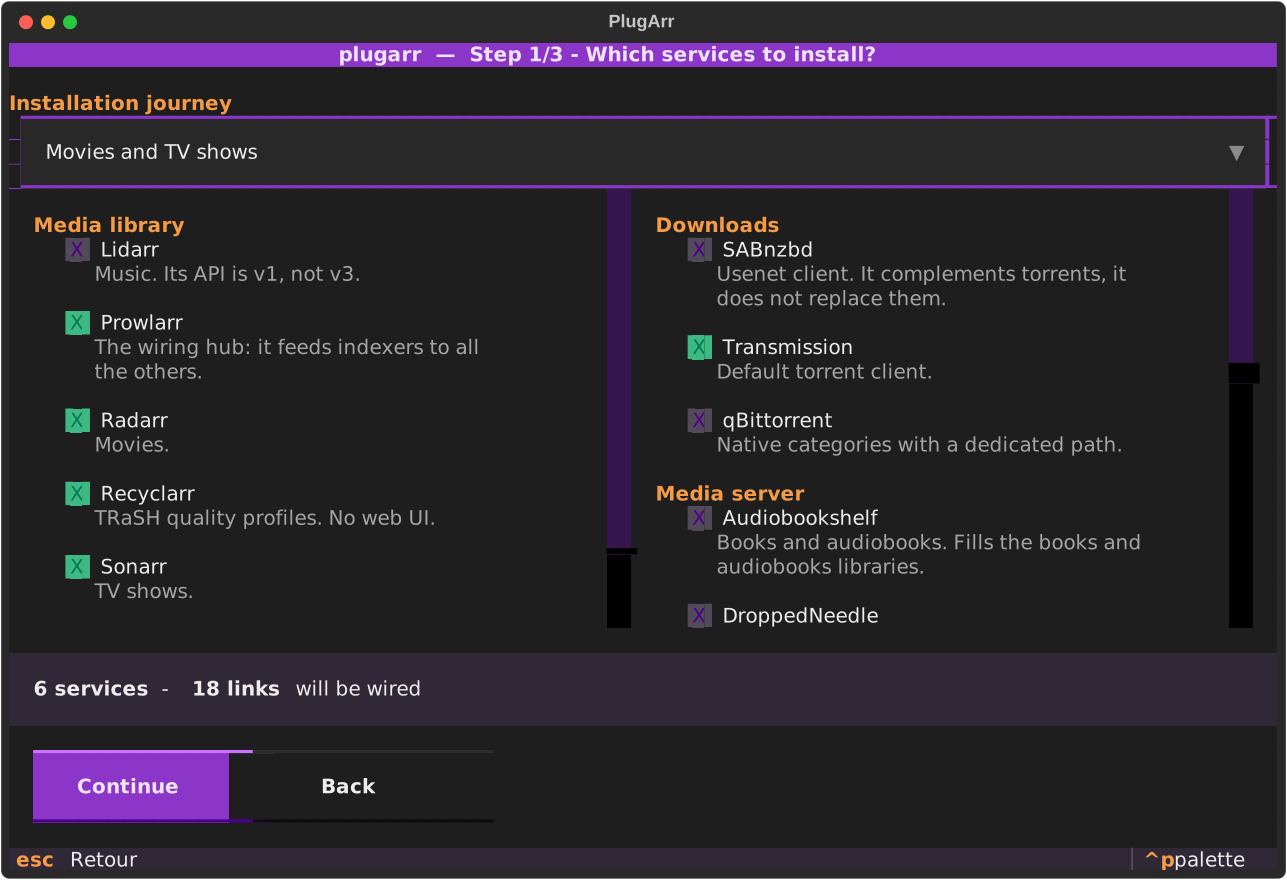
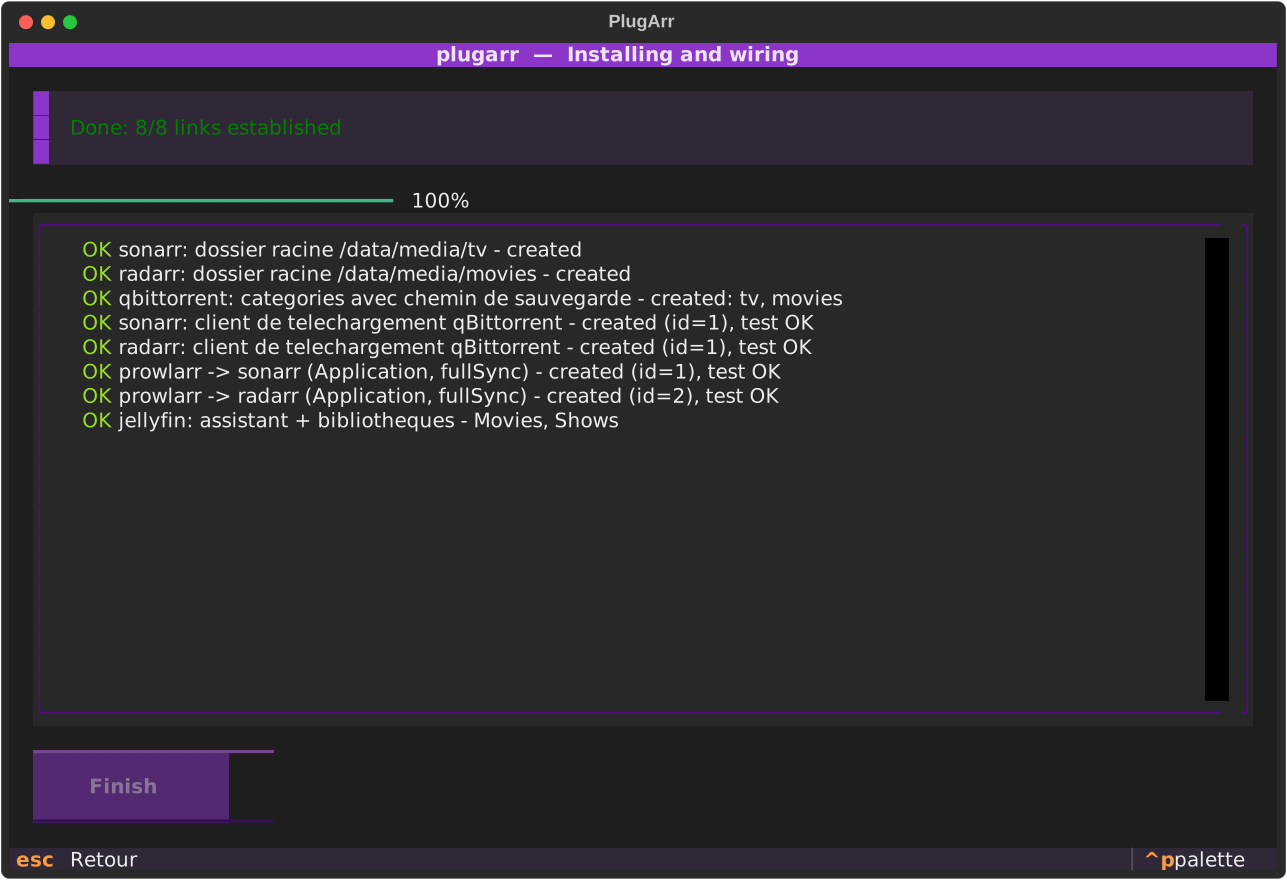
You tick what you want. By the end, Prowlarr is already pushing its indexers to Sonarr, Radarr and Lidarr, all three know how to talk to your download client, their root folders exist, and Jellyfin has its libraries and refreshes itself after every import.
No wizard? The same thing in one line, for a script or a CI job:
plugarr install --yes --data-root /srv/data --config-root /opt/plugarr/config
The problem
Standing up six containers with a docker-compose.yml is something everyone can do.
Dozens of repositories do it very well.
What takes three hours is what comes after: opening every UI, copying an API key, pasting it into another one, starting over, getting a port wrong, and finding out three days later that imports are copying 40 GB instead of making a link.
PlugArr automates that part.
| Deployment | Cross-app wiring | Quality profiles | Tool's language | |
|---|---|---|---|---|
| DockSTARTer | yes | no | no | English |
| Saltbox | yes | partial | no | English |
| Recyclarr / Configarr | no | no | yes | English |
| PlugArr | yes | yes | yes (via Recyclarr) | French and English |
That last column is checked, not assumed: none of the three carries a .po
file, an i18n directory, or a single occurrence of gettext. Recorded on
5 September 2026, method in docs/PRIOR-ART.en.md.
What gets wired automatically
| Source | Target | What is set up |
|---|---|---|
| Prowlarr | Sonarr, Radarr, Lidarr | registered as an Application, indexer fullSync |
| autobrr | Sonarr, Radarr, Lidarr, download client | declared in autobrr, connections tested |
| Prowlarr | download client | attachment + category |
| Sonarr, Radarr, Lidarr | download client | attachment + routing by category or directory |
| Sonarr, Radarr, Lidarr | filesystem | root folder under /data/media |
| qBittorrent | itself | categories created with their save path |
| Sonarr, Radarr | Jellyfin | refresh notification after import |
| Jellyfin | filesystem | startup wizard + Movies, Shows and Music libraries |
| Silo | filesystem | account, profile, Movies, Shows and Music libraries in read-only, scan started |
| Sonarr, Radarr, Lidarr, Prowlarr, Jellyfin, Silo | themselves | their own UI language, chosen once |
| Sonarr, Radarr, Lidarr, Prowlarr | web UI | account created, login actually tested |
| Recyclarr | Sonarr, Radarr | TRaSH Guides quality profiles and custom formats, URL and key written into the official template, first sync started |
| qui | qBittorrent | account created, instance declared, connection confirmed by qui |
| Flood | qBittorrent | URL and credentials passed at startup |
Both download clients can coexist: every *arr is attached to both, and routing adapts on its own. qBittorrent has native categories, Transmission does not.
Every link is read back from the target API after creation. The final report does not say "I sent a POST", it says "the link exists".
The trap everyone falls into: a single /data mount
This is mistake number one in media stacks. Mounting /downloads and /media separately
gives you two filesystems as seen from inside the container. Hardlinks become
impossible, and every import copies the file instead of linking it.
PlugArr enforces a single mount in every container:
${DATA_ROOT}/                    ->  /data   (in EVERY container)
├── torrents/
│   ├── movies/
│   ├── tv/
│   ├── music/
│   └── .incomplete/
└── media/
    ├── movies/                  <- Radarr root folder + Jellyfin library
    ├── tv/                      <- Sonarr root folder + Jellyfin library
    └── music/                   <- Lidarr root folder + Jellyfin library
The preflight does not merely hope for it: it creates a real hardlink between
torrents/ and media/ and tells you whether it worked.
Two languages, not one
PlugArr exists in French and English, and the two settings must not be confused:
| Where | What it changes | |
|---|---|---|
| PlugArr's language | welcome screen, or --lang fr|en |
the wizard, the command line, the report, the access page |
| The services' language | paths screen, or --langue <code> |
what Sonarr, Radarr, Prowlarr, Jellyfin and Silo will show in their interface |
With nothing set, PlugArr follows the system language, and the services follow PlugArr. Nothing forces you to keep them together: you may want the tool in English and your media library in French.
The choice is kept in stack.yml: plugarr serve and plugarr doctor then
answer in the installation's language, even on a server whose session is in
English.
Including when it breaks. That is the part everyone forgets: a phrase added
in French and missing from the catalogue breaks nothing, it simply shows up in
French to someone who asked for English, with no error and no warning. So a
check collects all 639 displayable phrases — error messages, wiring
warnings, the VPN check's verdict, down to the headers written into your .env
— and fails if one is missing, or if the catalogue holds an entry that has
gone dead:
python scripts/audit_traductions.py
It runs on every push.
Installation
Windows: the installer
Download PlugArr-Setup-x.y.z.exe from the
latest release and run it. It
does not ask for administrator rights: PlugArr installs for your account, in
%LOCALAPPDATA%\Programs\PlugArr, and shows up in "Installed apps".
The Start menu then offers:
- PlugArr: the manager of your installations, described below;
- PlugArr wizard: the installation wizard, directly.
For a local installation, Docker Desktop is the only requirement. PlugArr ships its own interpreter: Python does not need to be installed.
Where files go. Programs in %LOCALAPPDATA%\Programs\PlugArr, everything else in
%LOCALAPPDATA%\plugarr:
In %LOCALAPPDATA%\plugarr |
Contents |
|---|---|
instances\<name>\ |
stack.yml, docker-compose.yml, .env, access page, log |
installations.yml, distantes.yml |
the installations this computer knows, with no secret |
logs\, updates\ |
manager log, downloaded installers |
Service configuration and your media stay where the wizard put them
(C:\PlugArr\config and C:\PlugArr\data by default). Uninstalling removes the
programs and touches none of this: stack.yml is the only clear-text copy of the
passwords that Jellyfin or qBittorrent only keep hashed. Docker services keep
running; plugarr uninstall stops them first, if that is what you want.
Updates. The manager checks the latest published version when it opens. One click downloads the new installer, verifies its SHA256 checksum, closes the open consoles, installs silently and reopens PlugArr. Nothing installs without that click.
Windows: the portable executable
plugarr.exe is still published, for those who prefer a single file with no
installation. Open a terminal in its folder and run:
.\plugarr.exe
On launch, PlugArr offers the web wizard, which opens in your browser, or the
terminal, and can remember that choice. .\plugarr.exe --interface web or
--interface tui picks one directly.
A new installation is no longer written to the folder where you double-clicked,
often Downloads: it goes to %LOCALAPPDATA%\plugarr\instances\plugarr, as with the
installer. Two exceptions: a --project-dir given by hand, and a folder that already
holds a stack.yml. An installation that an earlier version placed elsewhere is found
and resumed where it is; the manager can move it afterwards.
The portable executable still updates itself when it closes.
Linux x86_64: portable archive or Debian package
The latest release contains two Linux x86_64 distributions, with no Python to install:
PlugArr-linux-x86_64.tar.gzholdsplugarr,plugarr-admin, and their shared runtime. Extract it, then run./PlugArr/plugarrin a terminal or./PlugArr/plugarr-adminto open the manager;plugarr_x.y.z_amd64.debinstalls the same programs under/opt/plugarr, theplugarrandplugarr-admincommands on PATH, and a “PlugArr Administration” menu entry on compatible desktops.
On Debian or Ubuntu:
sudo apt install ./plugarr_x.y.z_amd64.deb
Installing the package never creates or moves a stack, media file, or secret. Docker must already be usable by your account. Automatic updates remain specific to Windows executables for now: on Linux, install the newer archive or package after verifying its SHA-256 checksum.
Install on a server or NAS from Windows
The first page of the web wizard offers On this computer or On a server or NAS. For a remote target, enter its address, SSH port and user, then use a password or a private-key file. PlugArr then:
- displays the SSH fingerprint for confirmation;
- checks Linux, Docker and the remote account UID/GID without installing;
- proposes server-side paths;
- uploads
stack.yml, then runs the installation through the PlugArr admin image and the server's Docker socket; - streams progress back into the same web wizard.
Docker must already work for that user on the server. Python, pip, pipx and
PlugArr do not need to be installed there. The SSH password and key stay in the
EXE's memory until the wizard closes; they are written neither to stack.yml
nor to the report. An optional sudo password supports NAS folders such as
root-owned /volume1 without changing existing directories.
Windows SmartScreen may warn you on first launch: the binary is not signed, and a code signing certificate costs several hundred euros a year. "More info", then "Run anyway". With the installer, the warning only concerns the installer itself: the programs it places and the updates PlugArr downloads do not carry the "from the Internet" mark.
PlugArr Administration: all your installations
The manager (Start menu, or plugarr manager) lists the installations this computer
knows: the one on this computer, and those placed over SSH on a server or NAS. For
each one: its state, its console, the pack update, backup and diagnosis.
- On this computer, the console opens in its own window, with no command to run. "Move into the PlugArr folder" moves an installation that an earlier version placed in Downloads: the stack is stopped, its files moved (never copied then deleted), then it starts again from the new folder.
- On a server, signing in checks the SSH fingerprint confirmed at installation and
refuses if the server's key changed. The remote console opens through an SSH
tunnel, with no
ssh -Lto type. The password is asked at every sign-in; "Remember" keeps it encrypted by Windows (DPAPI), readable only by your account on this PC. - The pack update shows what this version's catalog moves forward, then applies it. Nothing goes back.
One local stack per Docker Desktop: two stacks on the same engine fight over container names and ports. An old entry whose containers run from another folder is flagged as such, and its buttons are removed.
Other platforms
Requirements: Docker Engine (or Docker Desktop) with the docker compose plugin, and
Python 3.12 or newer.
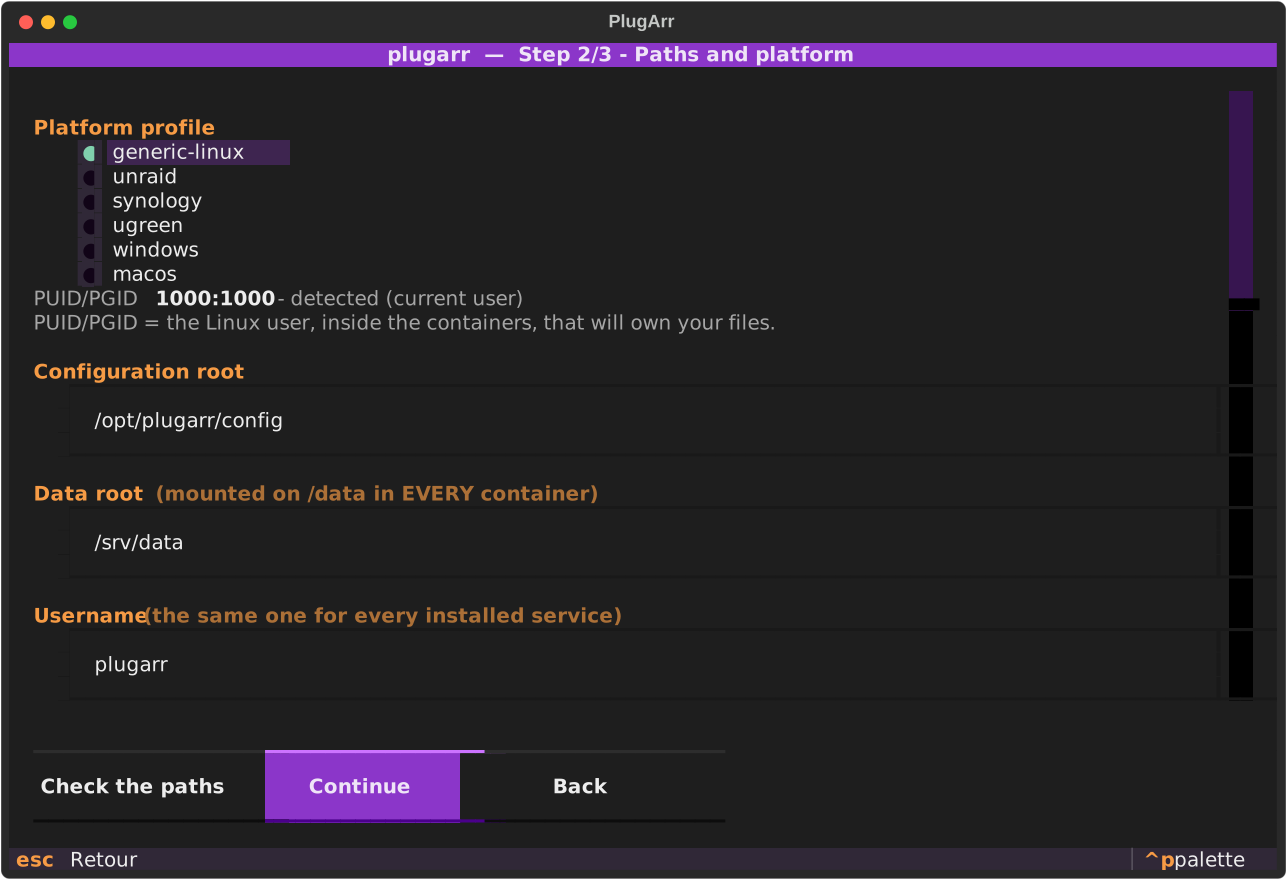
Four platform profiles: windows, generic-linux, unraid, synology. The one matching
your machine is preselected, along with the paths that go with it.
pipx install git+https://github.com/yannickuhrig1/plugarr
Without pipx, a virtual environment does the same:
python -m venv ~/.venvs/plugarr && ~/.venvs/plugarr/bin/pip install git+https://github.com/yannickuhrig1/plugarr
The package is not on PyPI yet: pipx install plugarr will only work after the first
publication.
Preview without writing anything:
plugarr install --dry-run
Pick and choose:
plugarr install --services prowlarr,sonarr,radarr,qbittorrent,jellyfin
Other commands:
plugarr             # interactive wizard
plugarr manager     # manager of every installation on this computer
plugarr list        # service catalogue
plugarr scan        # detect an existing stack
plugarr adopt       # wire an existing stack without recreating it
plugarr serve       # admin page: status, start / stop
plugarr indexers    # search and add your indexers
plugarr upgrade     # bring an older installation in line with this version
plugarr wire        # replay the wiring on an already running stack
plugarr doctor      # diagnose an existing installation
plugarr generate    # regenerate docker-compose.yml from stack.yml
plugarr uninstall   # stops the stack, never touches your media
After installation: the admin page
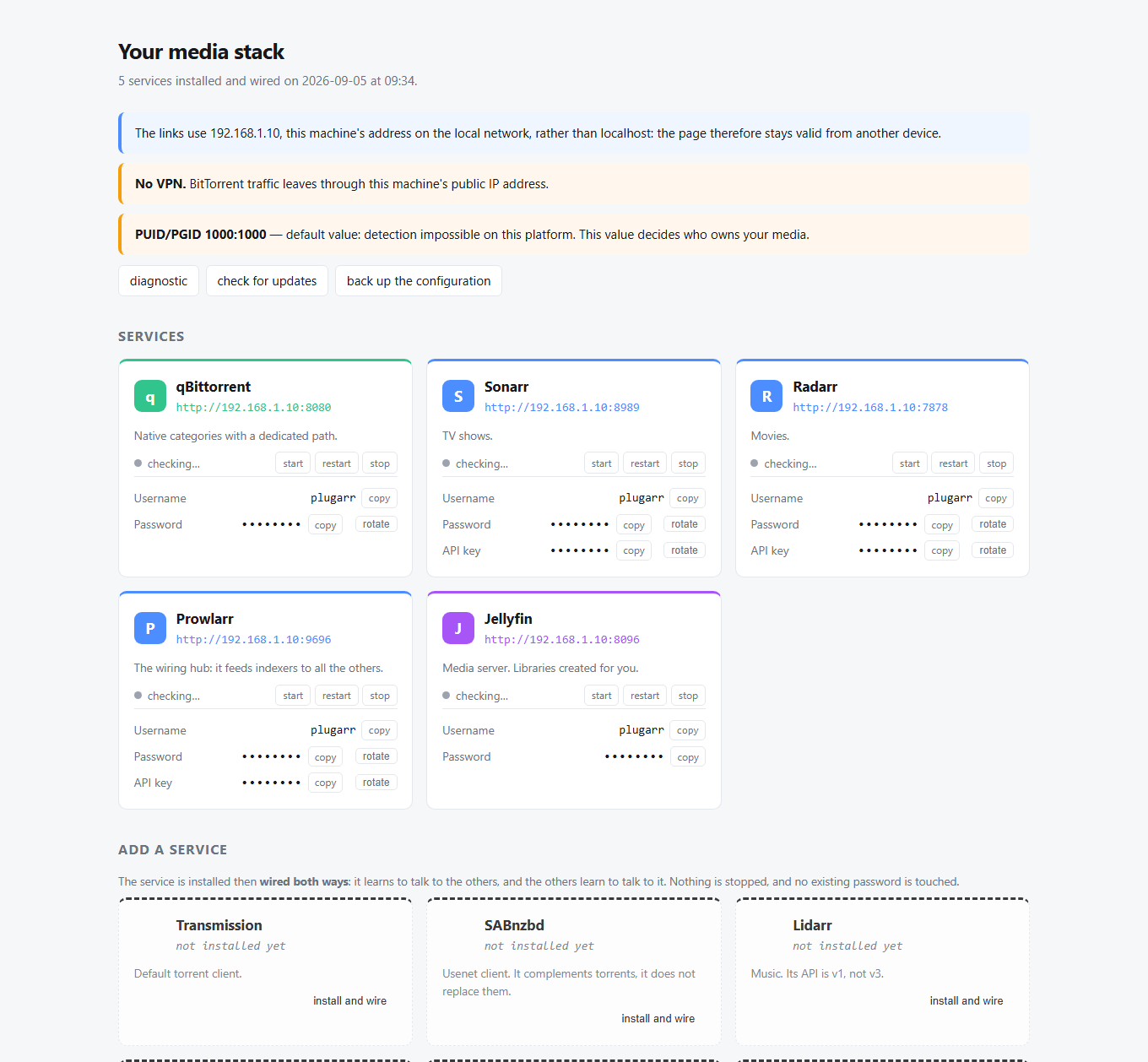
The access page is a frozen file: it lists addresses and credentials, nothing more. Service status, the start / stop / restart buttons and available updates come from a small local server.
An administration.cmd file (administration.sh elsewhere) is written next to the
artefacts: double-click it. It knows the path to your installation, so it works even
without plugarr on your PATH.
Access is granted by a token drawn at random on every start, displayed just above the URL. That is enough as long as you launch the console by hand. If you leave it running, set a password instead:
plugarr admin-password
Only its hash reaches stack.yml: PBKDF2, 600,000 iterations. Attempts are rate-limited,
and a session expires after twelve hours.
To stop having to launch it at all:
plugarr autostart
The console then starts with every login session, on the host, not in a container.
That is not an implementation detail: the console has to create and start containers, and
a container able to do that can mount the root of the machine and run as root. Locking it
inside one would mean exposing an all-powerful service on the network for nothing in
return. Here it runs under your own account, listens on 127.0.0.1, and stays outside the
Docker network.
Windows drops a script in your Startup folder; Linux installs a user systemd unit.
Neither asks for administrator rights. plugarr autostart --disable removes everything.
Administering a remote machine
A user unit waits for a login: on a server or an LXC where nobody logs in, it never starts. For those machines:
sudo plugarr autostart --systeme --host 0.0.0.0
The console then starts with the machine, under the account that owns stack.yml,
not as root for convenience. Outside 127.0.0.1 the command requires a password to be
set: without one, it refuses.
On a machine without systemd — Unraid, Synology, a BSD — there remains the console
in a container, an explicit option in the wizard or through --console-conteneur. It
then receives the Docker socket, hence every right on the machine: with the socket you can
create a privileged container that mounts the host's root. Enable it only where the system
service is impossible, and knowing what it grants.
If something goes wrong
Every installation writes a full log next to docker-compose.yml:
plugarr.log
It contains the version, the platform, every step, every warning and the full traceback of an error. No secret appears in it: passwords and API keys are replaced by their name before writing, so it can be attached to an issue without a second thought.
The version is also shown in the wizard's header, in the footer of the access page, and by
plugarr --version.
Every screenshot in this README is generated automatically by
python scripts/screenshots.py, without a terminal and without Docker, in both
languages. They are committed: a visual regression shows up in a pull request
diff.
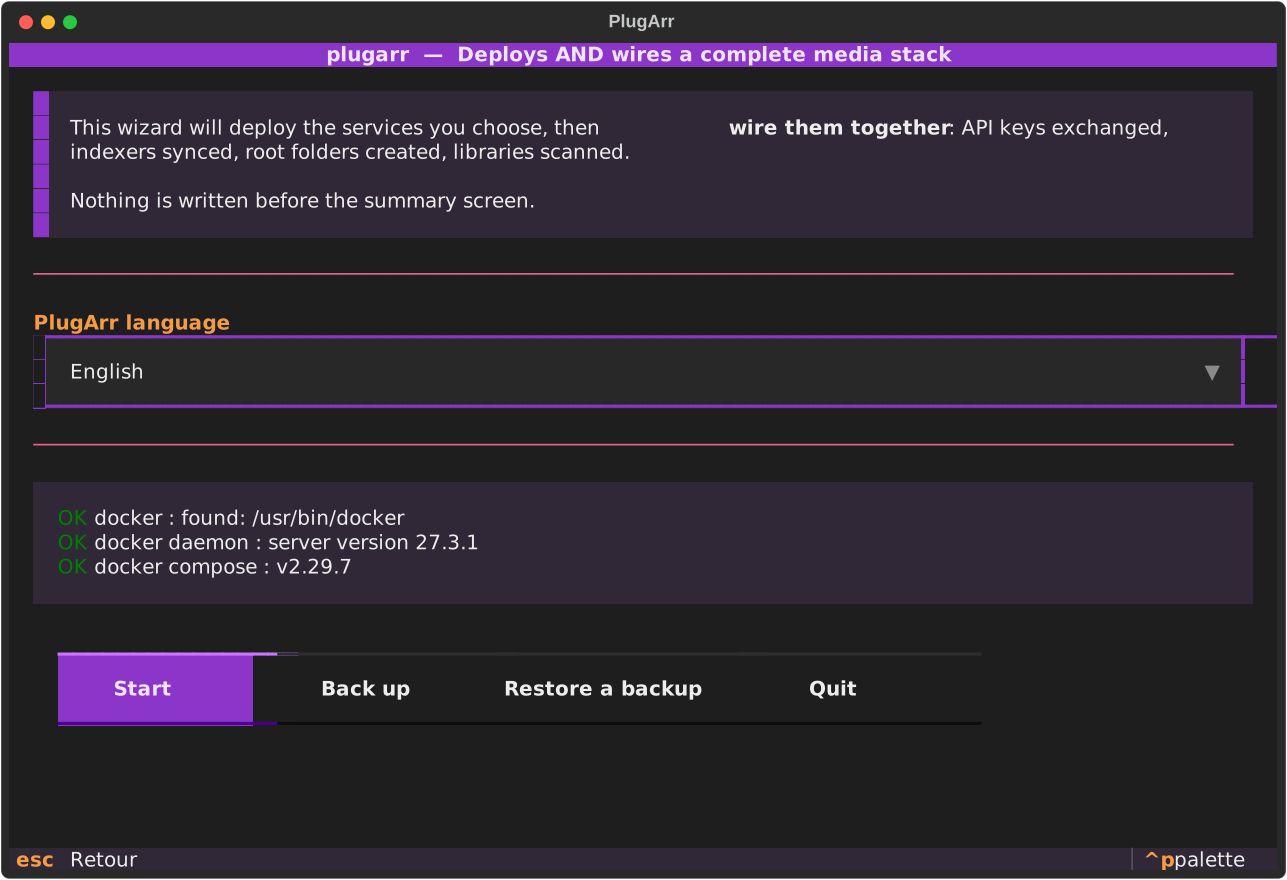
The other wizard screens
 |
 |
 |
 |
 |
 |
 |
Updating an older installation
You installed six months ago, you download today's binary. One command:
plugarr upgrade
It does four things, in this order — and the order matters: migrate stack.yml
if its schema changed, bring the images in line with this version's catalogue,
regenerate docker-compose.yml and .env, then replay the wiring. The wiring
comes last because a step added since may depend on a newer image; never the
other way round.
Before changing anything, the command shows a compatibility pre-report: affected services, possible recreation and interruption, compatibility limits, the proposed backup, and planned checks. The --dry-run preview creates no archive or container and rewrites no files. Execution makes a cold backup of the project, CONFIG_ROOT, and volumes, then reads the archive back and checks its integrity. A missing file or volume, an unreadable archive, or a failed restart blocks the update. The archive contains secrets and excludes media under DATA_ROOT and adopted-service configurations, which remain under their external installation's control. When the stack includes adopted services, wiring replay is blocked because it could change their configuration without a backup. Use --skip-wire to update only PlugArr-managed services.
After recreation, PlugArr reads live Docker state and health, probes available APIs, and tests essential connections. A failed check marks the operation as failed even when the new image started. The administration console shows the same pre-report before confirmation and requires a verified backup for every service. Automatic rollback is not promised: database migrations or data written since the update may be incompatible with the old state. Keep the archive and review the diagnosis before restoring manually to an isolated installation.
It never moves a version backwards. The deployed tag lives in stack.yml
and not in the code, precisely so you can update Sonarr without waiting for a
new PlugArr, or deliberately stay on an older version. So upgrade only offers
what moves forward, and the comparison is on numbers, not strings: 4.9.5
comes before 4.16.1, which alphabetical order reverses.
Whatever is set aside is shown with its reason, never skipped silently:
skipped : radarr: 9.9.9 is already newer than 6.3.0
skipped : prowlarr: maison and 2.5.2 cannot be compared
--dry-run shows the plan without writing anything, as install does.
In the manager, the "Update the pack" button does the same, one installation at a
time, servers included: the remote stack is read over SSH, aligned on this version's
catalog, then redeployed through the remote-installation path, which keeps the old
stack.yml and reuses existing accounts.
Reinstalling over an existing installation
install re-run in the same place carries over what the previous one held:
username, VPN, quality profiles, console password, and each service's
credentials.
That last point settles an old trap. qBittorrent, Jellyfin, autobrr and the
others store their password hashed only: PlugArr cannot read it back,
generated a new one, announced it, and the service refused it. But when PlugArr
did the installing, the password is in its own stack.yml: it never needed
to read it anywhere else.
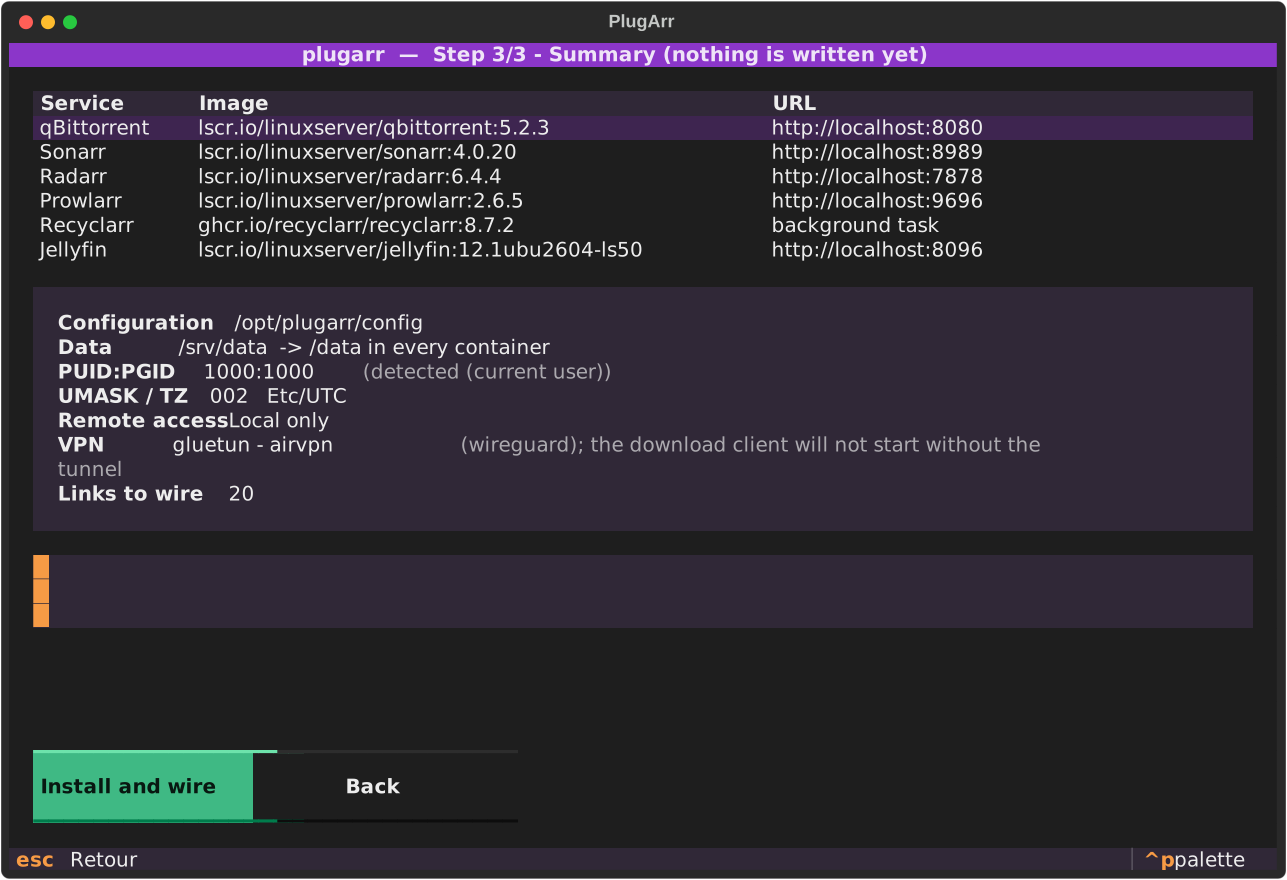
The carry-over is on by default — losing a VPN in silence is worse than reusing without asking — but never silent. The summary lists what was carried over, and a Start over choice refuses it. An option given by hand always wins over inheritance.
plugarr install --repartir-de-zero # ignore the previous installation
Gluetun is covered by this: all its settings live in stack.yml. Its
${CONFIG_ROOT}/gluetun directory holds only servers.json, a cache it
regenerates — checked, there is nothing in it to keep.
stack.yml carries a version, and it is finally read
The version field had existed since the project's first line and nothing
read it. Yet it guards against a measurable data loss: pydantic ignores fields
it does not know, so an older version reading a newer stack.yml threw part of
it away — and the first write destroyed it, since install, generate and
password rotation all rewrite that file.
The case comes up as soon as you go back: you try a new version, something displeases you, you run the old binary again.
PlugArr now refuses to read a stack.yml newer than itself. Version 0.9.0
writes it at version 3: once you have moved to 0.9.0, an older binary therefore
shows:
stack.yml is at version 3, this version of PlugArr reads up to 2.
Update PlugArr: going on would erase the settings it cannot read.
Already have a stack?
install is for people starting from scratch. If your services are already running, set up
by hand over the years, PlugArr can wire them without recreating anything:
plugarr scan     # what is detected on this machine, without writing anything
plugarr adopt --data-root /mnt/user/medias --config-root /mnt/user/appdata --dry-run
plugarr adopt --data-root /mnt/user/medias --config-root /mnt/user/appdata --only prowlarr/application/sonarr
It reads the API keys from your containers' config.xml files, then sets up the same links
as install. No container is started, stopped or recreated, and no docker-compose.yml
is generated: those services do not belong to it.
The report lists images, ports, data mounts, and planned operations. Repeat
--only to choose specific wiring steps; applying them requires confirmation.
Mounts alone cannot prove that existing files are hardlinked.
An existing stack may share /downloads without mounting /data: PlugArr
reports this but does not claim to have checked the paths actually used by
applications or the hardlinks. Likewise, sharing a Docker network namespace
with Gluetun is reported as observed topology, not proof of VPN leak protection
or the egress IP.
Before wiring, adopt reads the selected arr APIs and reports their versions;
it stops without writing if an API is unreachable or rejects its key. --dry-run
also checks the APIs without writing.
plugarr doctor first prints its raw checks, then consequence-oriented
findings. Each one gives the finding, what it means for you, the evidence
gathered and a proposed fix:
| Finding | Example evidence |
|---|---|
| BitTorrent client possibly outside the VPN | container network mode, exit seen from inside the tunnel |
| Suspicious volume or disk | missing root, read-only mount, missing arr config.xml, free space |
| Service unavailable | Docker state, unresponsive API, connections that can no longer be checked |
| Broken inter-service connection | real test run through the source service's API |
| Import not hardlinked | torrents/ and media/ on two filesystems, --deep-hardlinks sample |
| Configuration drift | differing services, sections and .env variable names, never their values |
| Incoming port out of sync | port announced by Gluetun, port the client listens on |
A root cause hides its symptoms: a stopped Sonarr is reported once, with the connections it makes uncheckable, rather than as three broken connections. No secret leaves the diagnosis: known keys and passwords, and URL parameters that carry one, are masked. The console shows the same findings under Maintenance.
Without --repair, the diagnosis is entirely read-only: it writes no test file
or test hardlink (the creation test stays with installation), replays no
connection and touches no port. plugarr doctor --repair offers only two
bounded fixes, confirmed one at a time: reapplying one *arr connection of a
service PlugArr manages, and rerunning the Gluetun port synchronization. After
each, the condition is read back, and the verdict shown (FIXED,
STILL FAILING) comes from that read-back.
plugarr doctor --deep-hardlinks inspects up to 20,000 existing files under
torrents/ and media/ without changing them, confirming links that share an
inode. No match is inconclusive, not proof of a broken import.
Three principles, learned by testing it against a real stack:
- Your directory tree is yours. Existing root folders are read and respected, never replaced. Same for your client's categories.
- Two Sonarrs? PlugArr does not guess. It stops and asks for
--pick sonarr=<container>. A silent choice would be worse than a question. - A container name proves nothing. PlugArr recognises its own services by a label it
writes, not by their name:
my-sonarris yours, it will not touch it.
The access page
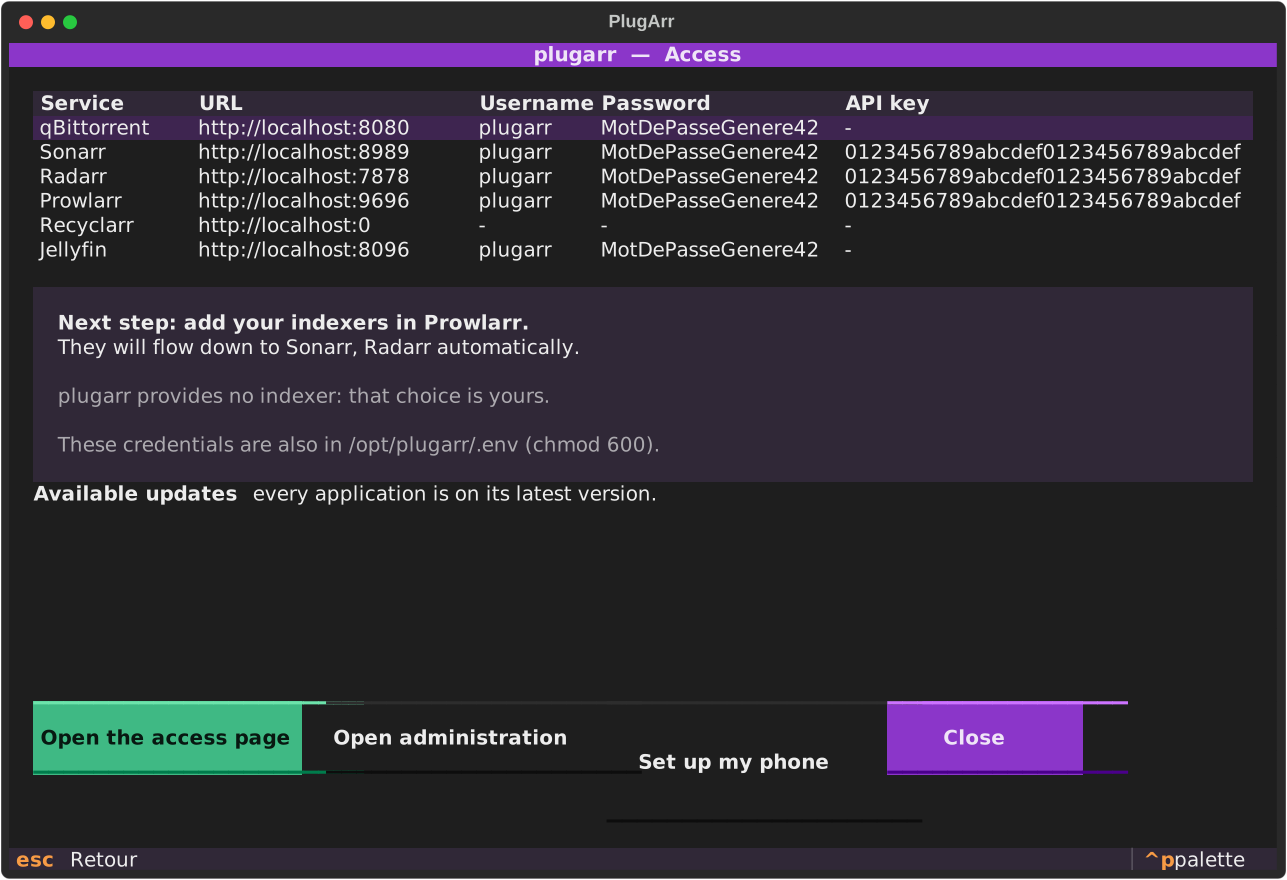
At the end of the installation, PlugArr generates a local HTML page and opens it in your browser. No more hunting for which service listens on which port: one card per service, the download and media folders, the credentials.
Three details that matter:
- Passwords and API keys are masked until you click. The page is still a local file in
chmod 600, excluded from the repository, but you sometimes show it to someone, and it must not display your Sonarr key straight away. - Links do not use
localhost. Installed on a NAS, a localhost URL would point at the machine doing the browsing. PlugArr detects the machine's address on the local network and generates the links with it. - Folder shortcuts are given both as a copyable path and as a link. A
file://link only works if the browser runs on the installation machine; that is written on the page rather than discovered through a dead link.
--no-open generates the page without opening the browser.
Driving the services
plugarr serve
The same page, but served: live status for every service, and buttons to start, stop or restart. A static file cannot do that. HTML executes nothing, you need a server.
A page able to stop your containers deserves to be taken seriously:
- listens on
127.0.0.1by default;--hostexposes it, with a warning; - a random token per start, never written to disk, passed through the URL then kept in
an
HttpOnlycookie; constant-time comparison; - closed lists: the service name is validated against your configuration and the action against three values, before either reaches a command line.
Updates
The page reports available updates and applies them in one click. Two distinct things, presented separately because they do not have the same consequences:
- a newer version exists: the deployed tag changes,
stack.ymlis rewritten; - the image was rebuilt: same version, contents republished upstream. LinuxServer does this very often, for base image security fixes.
The deployed tag lives in stack.yml, not in PlugArr's code: you can therefore update
Sonarr without waiting for a new version of the tool, or deliberately stay on an older one.
One update at a time, with confirmation, and --no-deps: updating Sonarr does not restart
your download client along the way. If the download fails, the tag is put back as it was.
How it works
API keys are pre-seeded, not guessed. Rather than starting the containers and then
chasing a randomly generated key, PlugArr writes config.xml itself before the first start.
The wiring becomes deterministic and replayable.
Payloads come from the schemas. No download client JSON is hardcoded. PlugArr asks the
application for its template (/api/v3/downloadclient/schema), fills the fields by name, and
sends the object back. When a new version renames a field, the template follows. Fields a
version does not expose are reported, never silently lost.
Everything is idempotent. Re-running install on an existing stack creates no duplicate
and overwrites no manual setting. An already present config.xml wins: PlugArr adopts its
key rather than imposing its own.
stack.yml is the source of truth. docker-compose.yml and .env are generated
artefacts from it, versionable and diffable. Do not edit them by hand.
Security
Web UIs are protected by a login (Forms + Enabled), with a password generated per
installation. The API stays reachable by key, which allows automatic wiring without leaving
Sonarr and Radarr open to the whole local network.
Credentials are written to .env in chmod 600, already covered by the generated
.gitignore, and masked in the logs.
The username is yours: PlugArr is only a default, changeable in the wizard or through
--username. The same one for every service, which keeps the access page readable.
Every installation generates its own secrets, drawn from secrets, Python's
cryptographic source. Nothing is reused from one machine to the next, and no default password
exists.
| Composition | Length | |
|---|---|---|
| Passwords | lowercase, uppercase, digits and !@%^*-_=+.,:?, at least one of each |
20 |
| API keys | hexadecimal, format imposed by the *arr | 32 |
75 possible characters across 20 positions, roughly 125 bits of entropy.
The special character alphabet is short on purpose: these values travel through a .env
read by Docker Compose, a container command line, an XML file, an INI file and several JSON
payloads. $ is excluded, because Compose reads it as variable interpolation, and a password
containing $HOME would arrive mangled inside the container. Also excluded: the apostrophe,
the double quote, the backslash, the backtick, # and every shell metacharacter. .env
values are additionally written between single quotes.
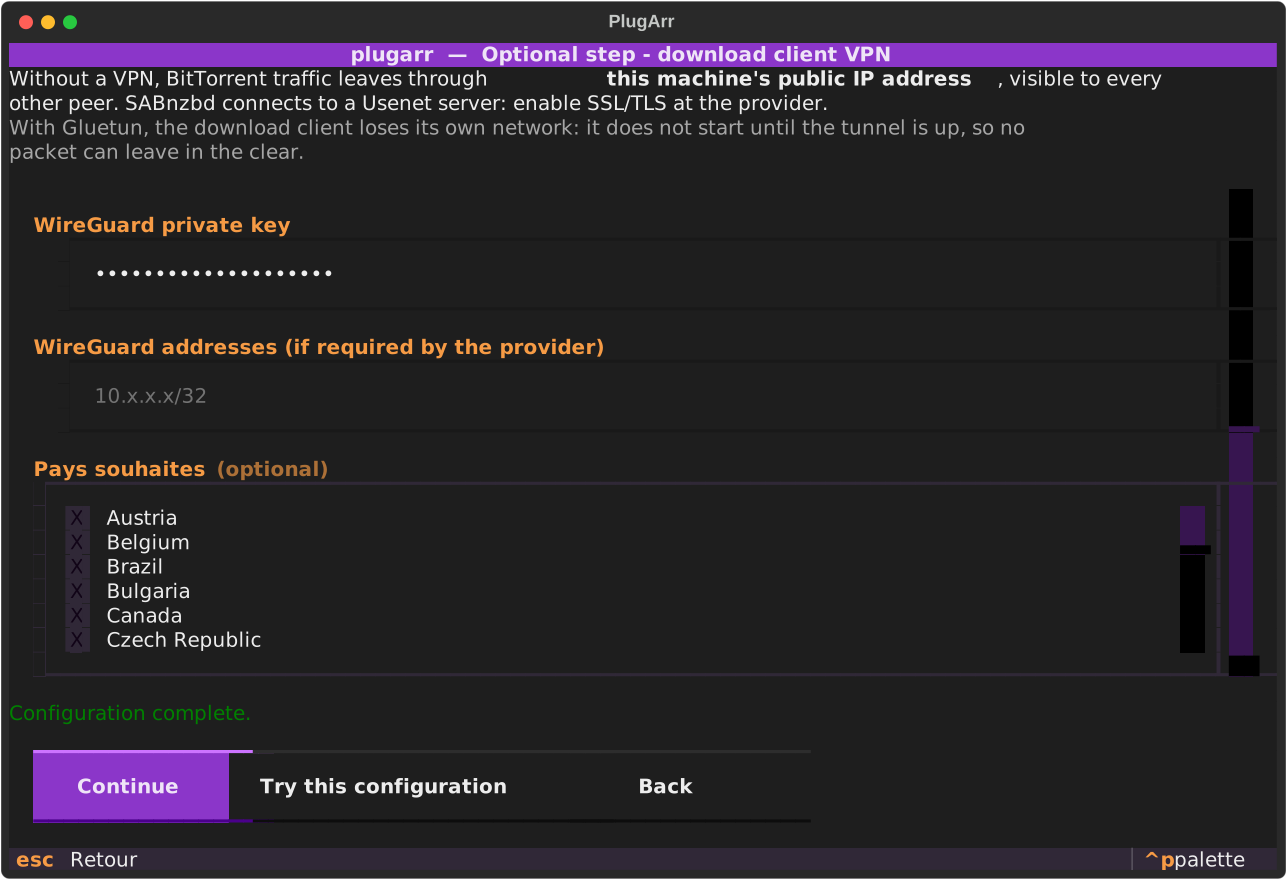
Without a VPN, BitTorrent traffic leaves through your public IP. PlugArr shows you that in the summary.
The wizard asks the question right after the paths, as soon as a download client is ticked. BitTorrent clients go through Gluetun when the VPN is enabled.
SABnzbd is handled separately: a direct connection using SSL/TLS at the Usenet provider is
recommended by default. Routing it through the VPN as well hides the Usenet server from the
ISP, but adds a Gluetun dependency and may reduce throughput; it never replaces SSL/TLS.
The wizard asks explicitly. On the command line, add --sabnzbd-vpn to select the tunnel.
plugarr install --vpn --vpn-provider nordvpn --vpn-key <your-wireguard-key>

# Also route SABnzbd through the tunnel (optional)
plugarr install --vpn --sabnzbd-vpn --vpn-provider nordvpn --vpn-key <your-wireguard-key>
plugarr vpn-providers # the 25 accepted providers
The wizard then offers the servers Gluetun knows for that provider, as a clickable list,
rather than a free text field where a made-up value would break the startup. Careful, not all
of them filter by country: Windscribe, VyprVPN, Giganews and Private Internet Access classify
their servers by region, Perfect Privacy by city. PlugArr therefore sets
SERVER_COUNTRIES, SERVER_REGIONS or SERVER_CITIES depending on the case. The lists are
extracted from the pinned image by python scripts/vpn_countries.py.
The incoming port
Without an incoming port, the client downloads perfectly well but only shares halfway: only the peers that accept your outgoing connections are reachable. This is not a matter of protection — the other twenty-one providers encrypt exactly the same — but of ratio, and nothing used to point it out.
Four providers out of twenty-five allow it. PlugArr then turns it on without asking: it is a gain with no downside, and the check will say whether the port actually arrived rather than assuming it did.
| Provider | Locations that offer it | Filter set |
|---|---|---|
| ProtonVPN | 125 countries out of 127 | SERVER_COUNTRIES |
| Private Internet Access | 110 regions out of 165 | SERVER_REGIONS |
| PrivateVPN | 56 countries out of 56 | SERVER_COUNTRIES |
| Perfect Privacy | 38 cities out of 38 | SERVER_CITIES |
Three consequences, each able to break everything silently.
The wizard only offers the locations that provide one. This is not display
comfort: VPN_PORT_FORWARDING=on restricts Gluetun's selection, and it then
refuses to start if it finds no server. At Private Internet Access, the 55
regions left out are the 55 US regions: an American user who picks their own
country would get a dead stack, with no message explaining why.
The port changes on its own, and the client does not follow. Observed on a
real stack: Proton changed port between two days, Gluetun announced 48406,
qBittorrent was still listening on 45270. No incoming connection at all, and
nothing anywhere said so. PlugArr therefore drops a script into
${CONFIG_ROOT}/gluetun that Gluetun runs on every assignment; it sets the new
port on qBittorrent or Transmission from inside the tunnel.
The check reads the port back from the client, and sets it again if it has
drifted. Same requirement as for wiring: we do not say "the port has been set",
we read the value back and compare. The verdict is separate from the
protection one, because a desynchronised port costs sharing and not exposure —
and it never blocks. After confirmation, plugarr doctor --repair can replay the
very script Gluetun runs, then reads back before concluding. That covers the
single blind spot of an event-driven mechanism — a client recreated between two
port attributions gets no call at all.
With ProtonVPN over OpenVPN, the port depends on the username suffix. On the
test account it arrived both with and without +pmp, so PlugArr does not
touch what you type; if the check reports that no port was obtained, it suggests
adding +pmp at the end of yours.
Try before you install
The wizard only checked that the fields were filled in: a wrong key went through without a word, and three screens later you found an unreachable client with no obvious link to what you had typed. The "Try this configuration" button brings up a throwaway Gluetun with exactly what was entered, waits for it to get out, and asks it which way. An empty public address counts as a failure: with a well-formed but invalid key, WireGuard "establishes" itself without a single packet going through. The container is removed in every case.
It is a warning, never a block: a trial can fail because one of the provider's servers is down, and refusing to install over that would be disproportionate. Three refusals are certain, though, and named as such: no server matches the requested location, an unreadable WireGuard key, rejected OpenVPN credentials.
Over OpenVPN, expect it to take longer. The protocol waits a firm sixty seconds on a silent server before moving on, where WireGuard notices in a few seconds — so the trial gives it two minutes instead of forty-five seconds. A valid configuration always answers in about fifteen seconds.
What matters is not that the tunnel exists, it is that no packet can leave without it.
A protected client does not start until Gluetun is healthy, verified with deliberately
wrong credentials: Gluetun stays unhealthy, and qBittorrent never leaves the created
state.
Two subtleties handled, each able to break everything silently: protected clients' ports move onto Gluetun (a container sharing a network stack can no longer publish a port), and wiring targets Gluetun because the client loses its DNS alias. Internal ports remain distinct: 8080 for qBittorrent and 8085 for SABnzbd.
Your indexers
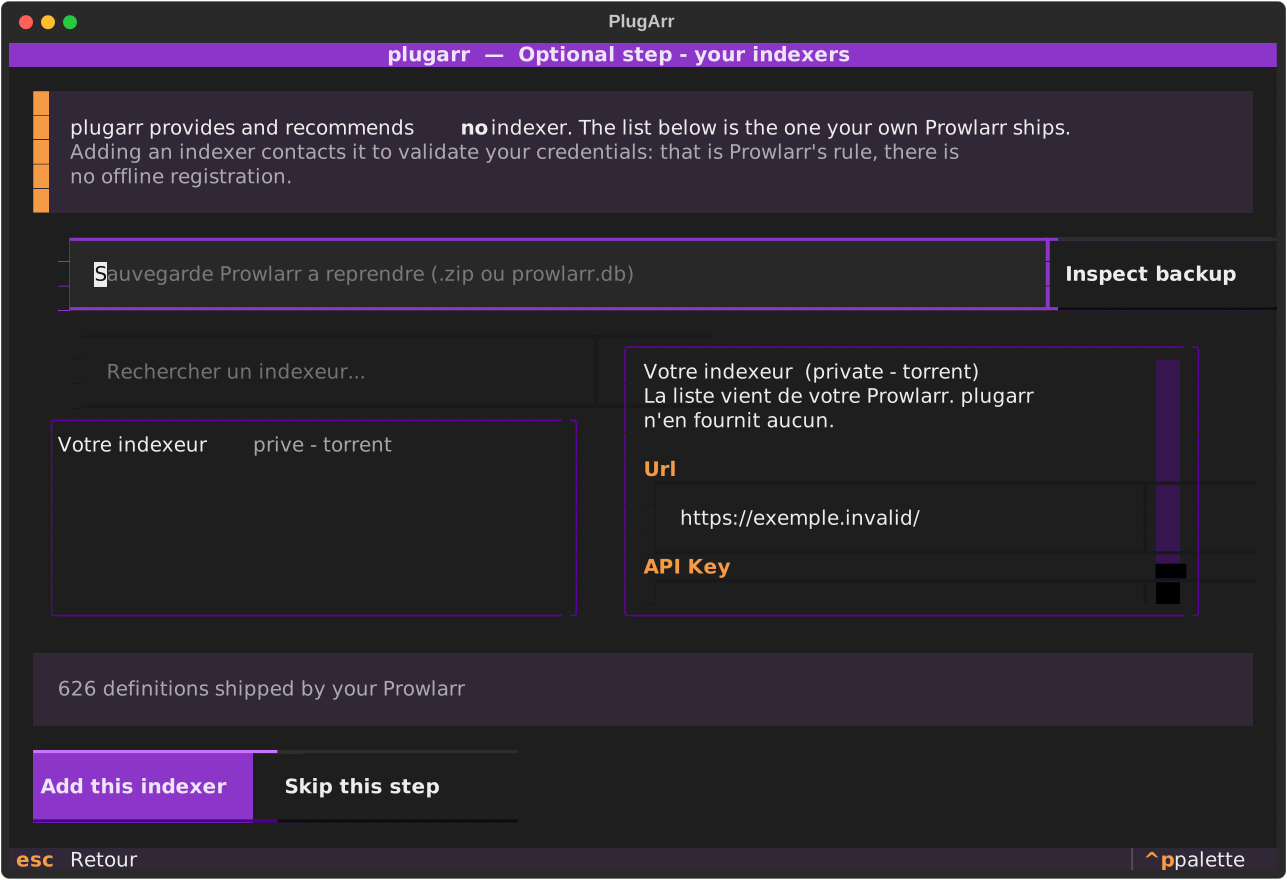
Once the stack is up, the wizard offers an optional step to enter the indexers you already use. It does not need a button.
The list offered is not ours: these are the 626 definitions your own Prowlarr ships. PlugArr is only a form on top of it, and preselects none of them. It works out which fields are credentials (API key, passkey, cookie, password) and shows only those, rather than drowning you in the dozen tuning options every definition carries.
On the command line, the same thing stays scriptable:
plugarr indexers search <term>            # search YOUR Prowlarr's definitions
plugarr indexers add "<name>" -f apiKey=… # add with YOUR credentials
plugarr indexers list                     # what is already configured
One thing to know: adding an indexer contacts it to validate your credentials. That is
Prowlarr's rule, forceSave changes nothing, offline registration does not exist. The
upside is pleasant: if the addition succeeds, your credentials are good.
Quality profiles
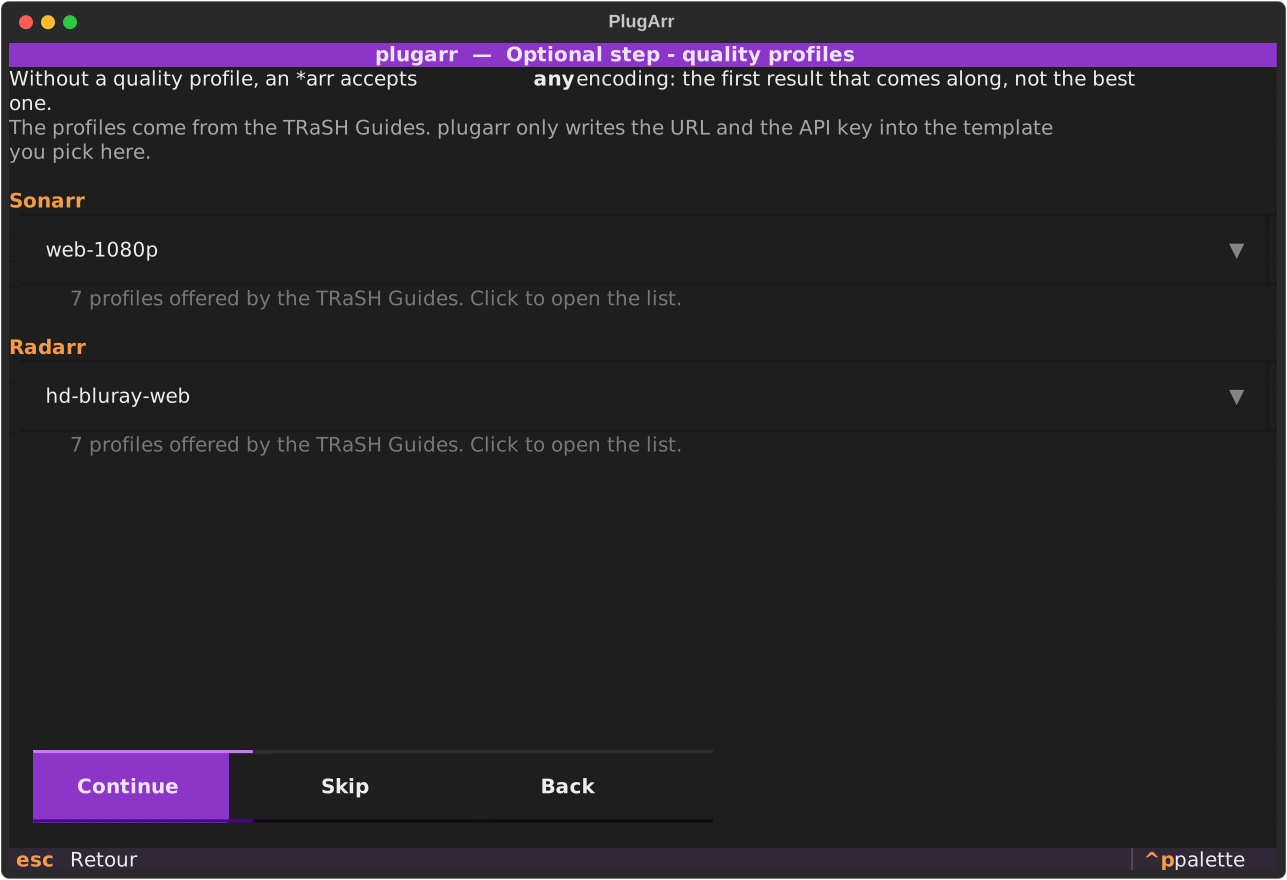
Without a quality profile, an *arr accepts any encoding: the first result that comes along, not the best one. That is the job of the TRaSH Guides, and PlugArr does not reimplement them. It installs Recyclarr, asks it to generate its configuration from an official template, and writes into it only the two lines it alone knows: the URL and the API key.
Recyclarr is ticked by default. It publishes no port, has no web UI, and wakes up once a day.
The wizard offers an optional step to choose the template, service by service. The list comes from the official manifest, not from a copy embedded here: 22 for Sonarr, 35 for Radarr, several of them French profiles.
plugarr templates                                            # the accepted names
plugarr install --recyclarr-radarr french-multi-vf-hd-bluray-web
An unknown name is rejected before anything is written. Without that check, the error would only surface at the very end of the wiring, with the stack already running.
Result measured on a fresh installation, read from each instance's API:
Sonarr web-1080p |
Radarr hd-bluray-web |
|
|---|---|---|
| Custom formats | 37 | 40 |
| Profile created | WEB-1080p |
HD Bluray + WEB |
What this project does not do
PlugArr provides, hosts and recommends no indexer, no tracker, no content, and preconfigures none. No list ships with the code: the wizard's comes from Prowlarr. It is a personal media library automation tool. What you plug into it, and its legality, are your business. See DISCLAIMER.en.md.
Current scope
Prowlarr · Sonarr · Radarr · Lidarr · Transmission · qBittorrent · SABnzbd · Jellyfin · Seerr · Audiobookshelf · DroppedNeedle · Silo (experimental) · Shelfarr (test integration) · autobrr · Recyclarr · Gluetun (optional VPN) · Flood and qui (optional UIs)
Shelfarr also installs its official Libation companion, without a public port and idle until Audible Backup is enabled. Prowlarr, Audiobookshelf and one download client are added automatically. After the first start, the first Shelfarr account becomes administrator and finishes these connections in its settings. This step remains manual until a public setup API has been verified.
Tested versions: see docs/COMPATIBILITY.en.md.
Two stacks on one machine. Docker identifies a stack by its name, never by its
directory: two installations sharing the name plugarr share their containers, and the
second recreates the first one's. Pass --project-name (or fill the matching field in the
wizard) to install a second one alongside. The preflight warns you if the case arises.
Roadmap
The detail lives in ROADMAP.en.md, kept up to date: what works, what is in progress, what will not be done and why. Summary below.
The PlugArr console is available. Run plugarr serve on the host to manage
services, updates, diagnostics, backups and credentials with authenticated access.
Since 0.9.0, PlugArr has a web wizard with a dynamic connection map, and the console gains targeted tests and repairs, scheduled maintenance, history and alerts. The Windows executable updates itself. With two torrent clients, the wizard asks which one the *arr should use first.
Services still under consideration:
| Service | Remaining work |
|---|
| Plex | A second media server, next to Jellyfin. Its token comes from plex.tv, not from the local API: that is the point to verify before adding it. |
| Notifiarr | Centralised notifications for the whole stack. Every *arr registers with an API key. |
| Bazarr | Subtitles. Studied, but its configuration goes through a YAML file rather than an API, so nothing is verified yet. |
| Wizarr | Invitations and account management for Jellyfin, Plex and Emby. The most self-contained service on this list: one container, and the wiring boils down to the media server and its key. |
| Tautulli | Plex monitoring and statistics. It therefore cannot come before Plex, which is already above: without a Plex token, it has nothing to watch. |
| Jellystat | Jellyfin statistics. Known obstacle: the service requires a PostgreSQL database in a second container, where the entire current catalogue fits in one. JS_USER / JS_PASSWORD do give hope of pre-seeding the credentials, though. |
| Tracearr | Playback tracking and account sharing detection, for Plex, Jellyfin and Emby. The latest image demands an external database and Redis; the supervised tag bundles everything into one container, and that is the one to verify. |
| Shelfmark | Books and audiobooks, next to Shelfarr and Audiobookshelf which are already in the catalogue. |
A service only enters the catalogue once it is wired and verified against a real instance. See PROMPT.md for the detail.
Readarr is not on the list: the project has been archived since 27 June 2025.
Contributing
One rule above all: do not guess any endpoint, any image tag, any port. Verify against
the official documentation or against a real instance. When it is not verifiable, mark
TODO(verify) rather than writing plausible but wrong code. The reliability of the wiring
is this project's only reason to exist.
During phase 1 alone, five perfectly reasonable assumptions turned out to be false on first contact with a real container. They are all recorded, with their HTTP codes, in docs/COMPATIBILITY.en.md, the most useful document in the repository.
The rest is in CONTRIBUTING.en.md: setup, how the code is split, how to add a service. And docs/PRIOR-ART.en.md explains where PlugArr sits relative to DockSTARTer, Saltbox and Recyclarr, and why it does not try to replace them.
Acknowledgements
TRaSH Guides, Servarr and LinuxServer.io, without whom none of this would exist.
License
MIT