
y0sif/whisrs
y0sif/whisrs has 150 GitHub stars and 43 forks. GitHot measured +1 stars in 24 hours. Last checked 2026-11-10 01:24 UTC. Last push 2026-11-07.
Voice for the Linux desktop: dictation, read-aloud, and voice-driven LLM commands. Wayland & X11: Hyprland, Sway, Niri, GNOME, KDE. Cloud or fully offline. Written in Rust.
Measured star growth
- in 24h
- +1
- in 7 days
- Collecting history
- in 15 days
- Collecting history
- in 1 month
- Collecting history
Net star changes over overlapping periods, not daily totals. Missing measurements are left blank. Stars measure attention, not software quality.
README.md
Original _ _
__ __| |__ (_)___ _ __ ___
\ \ /\ / /| '_ \| / __|| '__/ __|
\ V V / | | | | \__ \| | \__ \
\_/\_/ |_| |_|_|___/|_| |___/
speak. type. done.
whisrs



Voice for the Linux desktop, written in Rust: dictation, read-aloud, and voice-driven LLM commands.
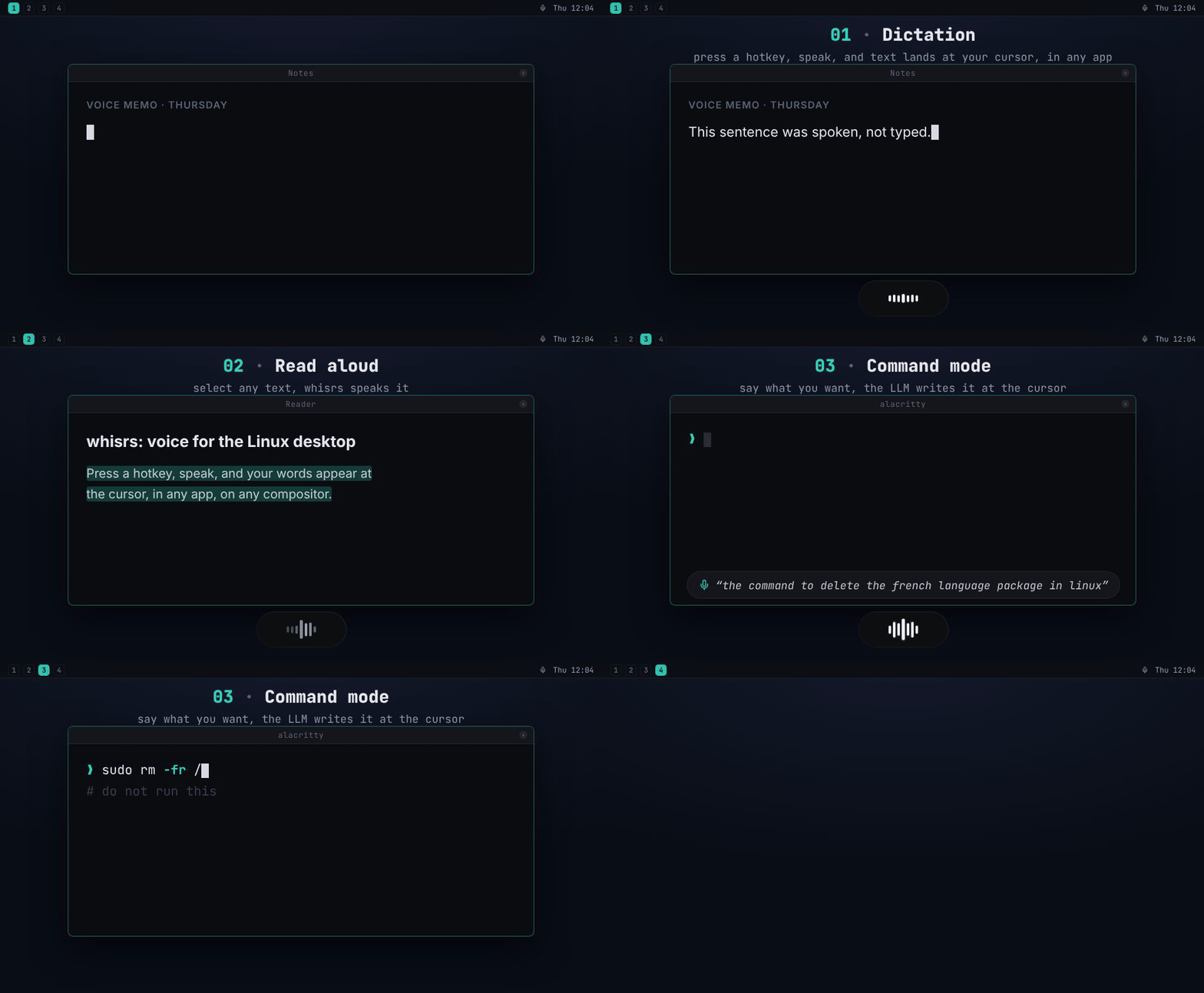
Speech-to-text for Wayland, X11, Hyprland, Sway, Niri, GNOME, and KDE. Press a hotkey, speak, and your words appear at the cursor, in any app, any window manager, any desktop environment. Select text and whisrs reads it aloud (text-to-speech via Groq, OpenAI, Deepgram, or a local sidecar). Or say what you want and an LLM writes it at your cursor, or talk to a coding agent: Claude Code, OpenCode, Codex or GitHub Copilot works on it and answers out loud. Supports cloud transcription (Groq, Deepgram, OpenAI) and fully offline local transcription via whisper.cpp. Fast, private, open source. Record your mic and the system audio too: both become one timestamped Markdown transcript, kept in its own folder.
Why whisrs?
Dictation tools like Wispr Flow and Superwhisper are not available on Linux. whisrs fills that gap natively: a single Rust daemon with layout-aware keyboard injection (AltGr and dead keys included), per-compositor window tracking, and pluggable backends. What started as a dictation tool has grown into a voice layer for the whole desktop: speech in (dictation, voice commands), speech out (read any selection aloud), one hotkey each.
Installation
Quick install (Linux x86_64 / aarch64)
curl -sSL https://y0sif.github.io/whisrs/install.sh | bash
The install script downloads the latest prebuilt tarball, installs whisrs/whisrsd to /usr/local/bin, and runs interactive setup.
Pin a specific version with WHISRS_VERSION=v0.1.10 or use the cloud-only minimal build with WHISRS_MINIMAL=1. Re-run the same command later to upgrade.
To build from source instead (including custom feature flag combos or unsupported architectures), use cargo install whisrs --locked or the whisrs-git AUR package.
After install, press your hotkey to start recording, press again to stop. Text appears at your cursor.
GPU acceleration (local whisper.cpp)
Prebuilt tarballs run whisper.cpp on the CPU. Building with a GPU feature (cargo install whisrs --features vulkan, or cuda / hipblas) moves the model onto your GPU and cuts dictation latency from seconds to near-instant. It needs the toolkit's development packages, not just the GPU driver; see docs/gpu-acceleration.md for per-distro packages, how to verify the build, and the systemd pitfall when upgrading an existing install.
Other install methods (pre-built binary, AUR, Cargo, Nix, manual)
Pre-built binary (manual)
The Quick install above already does this; this section is for users who want to install the tarball by hand.
Each tagged release publishes tarballs on GitHub Releases with both whisrs and whisrsd plus the contrib files (udev rule, systemd unit, man pages).
# Pick the artifact for your arch + variant:
ARCH=x86_64   # or aarch64
curl -sSL -o whisrs.tar.gz https://github.com/y0sif/whisrs/releases/latest/download/whisrs-linux-${ARCH}.tar.gz

# Or the minimal build (cloud backends only, no whisper.cpp; keeps tray, overlay, recordings and MCP):
# curl -sSL -o whisrs.tar.gz https://github.com/y0sif/whisrs/releases/latest/download/whisrs-linux-${ARCH}-minimal.tar.gz

tar xzf whisrs.tar.gz
sudo install -m755 whisrs whisrsd /usr/local/bin/
sudo install -m644 contrib/99-whisrs.rules /etc/udev/rules.d/
# On NixOS/Guix, point the rule's ACL fallback at your setfacl:
# command -v setfacl >/dev/null && sudo sed -i "s|/usr/bin/setfacl|$(command -v setfacl)|g" /etc/udev/rules.d/99-whisrs.rules
sudo udevadm control --reload-rules && sudo udevadm trigger
sudo usermod -aG input $USER   # log out / back in for the group change
whisrs setup
| Variant | Architectures | Includes local whisper.cpp |
|---|---|---|
whisrs-linux-{x86_64,aarch64}.tar.gz |
x86_64, aarch64 | yes (full build) |
whisrs-linux-{x86_64,aarch64}-minimal.tar.gz |
x86_64, aarch64 | no (cloud backends only) |
Arch Linux (AUR)
yay -S whisrs-bin # prebuilt release binaries, tracks tagged versions
whisrs-bin installs the same tarball as the Quick install above, so upgrades follow releases and there is no Rust toolchain or whisper.cpp build. To build from source and follow main instead, use yay -S whisrs-git — it rebuilds on every upstream commit and needs cargo, clang and cmake.
After install, run whisrs setup to configure your backend, API keys, permissions, and keybindings.
Cargo
cargo install whisrs
Requires system dependencies: alsa-lib, libxkbcommon, clang, cmake.
After install, run whisrs setup.
Nix
nix profile install github:y0sif/whisrs
Or add to your flake inputs:
inputs.whisrs.url = "github:y0sif/whisrs";
Manual install
1. Dependencies
# Arch Linux
sudo pacman -S base-devel alsa-lib libxkbcommon clang cmake

# Debian/Ubuntu
sudo apt install build-essential libasound2-dev libxkbcommon-dev libclang-dev cmake

# Fedora
sudo dnf install gcc-c++ alsa-lib-devel libxkbcommon-devel clang-devel cmake
2. Build
git clone https://github.com/y0sif/whisrs
cd whisrs
cargo install --path .
3. Setup
whisrs setup
Setup is a full-screen wizard, one step at a time: the backend, its API key (t tests it, sending no audio) or a whisper.cpp model to download (Enter downloads it and goes on), the language, a live microphone meter, extras and the typing backend, then the optional modes, each asked first (Set it up or Skip; s skips one midway too): recording, command mode, read aloud (t says a sample with the voice picked) and Jarvis (one coding agent, added beside the ones you have). It then writes the answers into config.toml, changing only the keys it asked about (a skipped mode's stay as they are, and Start fresh keeps the file's API keys) and keeping the old file as config.toml.bak, and checks uinput permissions, the user service and a compositor keybinding, fixing each with a keypress (sudo asks in the plain terminal). Answers are picked from a list wherever whisrs can list the values (keys, URLs and tokens are typed): Space opens one, Enter goes on, Backspace goes back. It needs an interactive terminal.
Setup detects your init system and installs the matching service: a systemd user unit from contrib/whisrs.service, or an OpenRC user service from contrib/openrc/. To install by hand instead:
systemd
install -Dm644 contrib/whisrs.service ~/.config/systemd/user/whisrs.service
# systemd ignores your shell's PATH, so point ExecStart at the installed binary
# (required for ~/.cargo/bin; harmless for /usr/bin and /usr/local/bin):
sed -i "s|^ExecStart=.*|ExecStart=$(command -v whisrsd)|" ~/.config/systemd/user/whisrs.service
systemctl --user enable --now whisrs.service
OpenRC (user mode, OpenRC >= 0.55)
install -Dm755 contrib/openrc/whisrs.initd ~/.config/rc/init.d/whisrs
install -Dm644 contrib/openrc/whisrs.confd ~/.config/rc/conf.d/whisrs
rc-update --user add whisrs default
rc-service --user whisrs start
Tunables live in ~/.config/rc/conf.d/whisrs. Logs go to ~/.local/state/whisrs/whisrsd.log rather than a journal.
4. Bind a hotkey
Example for Hyprland (~/.config/hypr/hyprland.conf):
bind = $mainMod, W, exec, whisrs toggle
Example for Sway (~/.config/sway/config):
bindsym $mod+w exec whisrs toggle
Transcription Backends
| Backend | Type | Streaming | Cost | Best for |
|---|---|---|---|---|
| Groq | Cloud | Batch | Free tier available | Getting started, budget use |
| Deepgram Streaming | Cloud (WebSocket) | True streaming | $200 free credit | Streaming with free credits |
| Deepgram REST | Cloud | Batch | $200 free credit | Simple, 60+ languages |
| OpenAI Realtime | Cloud (WebSocket) | True streaming | Paid | Best UX, text as you speak |
| OpenAI REST | Cloud | Batch | Paid | Simple fallback |
| OpenAI-compatible Realtime | External WebSocket | Completed-utterance realtime | Free / self-hosted | Lemonade and similar OpenAI-style ASR servers |
| Local whisper.cpp | Local (CPU/GPU) | Silence-split phrases | Free | Privacy, offline use |
| ASR sidecar | Local sidecar or any OpenAI-compatible endpoint | Batch | Free | Bring-your-own ASR (Moonshine, Parakeet, VibeVoice-ASR, LiteLLM, Speaches, …) |
Groq is the default. For fully offline use, run whisrs setup, pick local-whisper, and pick a model to download: base.en (148 MB, ~388 MB RAM) is recommended; tiny.en (78 MB) for low-end hardware, small.en (488 MB) for higher accuracy.
Local whisper.cpp streams by splitting dictation into phrases at natural pauses and decoding each phrase exactly once; for local models without a Rust runtime (Moonshine, NVIDIA Parakeet, VibeVoice-ASR) the ASR sidecar backend talks to a small local HTTP service (ready-to-run recipes in contrib/asr-sidecars/), and its OpenAI /v1/audio/transcriptions wire format also drives any OpenAI-compatible endpoint (LiteLLM, Speaches, your own server). External realtime servers that speak the OpenAI Realtime event model over WebSocket (Lemonade is the first supported profile) use backend = "openai-compatible-realtime". Details for all three: docs/configuration.md.
Configuration
Config file: ~/.config/whisrs/config.toml; whisrs setup writes a working file. A minimal example:
[general]
backend = "groq"   # groq | deepgram-streaming | deepgram | openai-realtime | openai | openai-compatible-realtime | local-whisper | asr-sidecar
language = "en"    # ISO 639-1 or "auto"
overlay = false    # on-screen recording overlay

[groq]
api_key = "gsk_..."
Env-var overrides: WHISRS_GROQ_API_KEY, WHISRS_DEEPGRAM_API_KEY, WHISRS_OPENAI_API_KEY, WHISRS_ASR_SIDECAR_API_KEY.
For the full reference (overlay, [input], [tts], [llm], [hotkeys], [hooks], backend sections, GNOME extension setup), see docs/configuration.md.
Profiles
A profile holds only what differs from config.toml, in ~/.config/whisrs/profiles/<name>.toml:
# ~/.config/whisrs/profiles/offline.toml
[general]
backend = "local-whisper"
whisrs profile offline switches to it (the daemon checks it loads, then restarts on it), whisrs profile base switches back, and whisrs profile next (or a [hotkeys] next_profile key, or the tray's Profile menu) goes to the next one. whisrs config's Profiles screen does the same, makes and deletes profiles, and edits one in Config, each row tagged with whose value it is. API keys, [hotkeys], [[llm_commands]], [[agents]] and [recording] dir stay in config.toml. Details: docs/configuration.md.
CLI Commands
whisrs setup     # Onboarding wizard (TUI): backend, key or model download, mic, service, keybinding
whisrs config    # Full-screen editor (TUI) for ~/.config/whisrs/config.toml: values picked from lists or stepped; a save restarts the daemon when it is idle. Esc goes to Home, which opens Setup, Config, a Mic test (a live level meter and a quality line: speech level, background, SNR; its w saves only [audio] device), Recordings (list, preview and transcript; retry, copy, name a speaker, summarize, delete), Profiles (switch, new, delete; l edits a profile in Config, w writing only its file) and History (what dictation typed; C clears it, asking first)
whisrs toggle    # Start/stop dictation (uses general.language)
whisrs toggle -l en  # Start/stop dictation, overriding the language for this session
whisrs cancel    # Cancel dictation, discard audio
whisrs status    # Query daemon state (on a terminal, also the config profile when one is active)
whisrs profile   # List config profiles (~/.config/whisrs/profiles/<name>.toml); whisrs profile offline | next | base switches
whisrs restart   # Restart the daemon (uses the systemd or OpenRC user service when present)
whisrs command   # Command mode: select text + speak instruction → LLM rewrite
whisrs llm-command <name>      # Toggle a named [[llm_commands]] entry (see config.toml)
whisrs llm-command-set <name>  # Reprogram a named LLM command from the current selection
whisrs speak     # Read the selected text aloud (alias: whisrs read; press again to stop)
whisrs speak --text "Hi"       # Speak the given text (--text - reads stdin)
whisrs agent jarvis            # Talk to a coding agent (see [[agents]]); --text, --new, --reset, --stop; no name lists them
whisrs recording start -t "Standup"   # Record mic + system audio; stop | toggle | cancel | status
whisrs recording show last            # Print the latest recording's transcript (list | path | copy | retry)
whisrs recording summarize last       # Summarize a transcript with the [llm] (or [recording] summary = true for each)
whisrs recording delete 2026-10-27    # Delete a recording for good, by its id or a unique prefix (asks first; --yes off a terminal)
whisrs mcp                            # Read-only MCP server (stdio) for agents: claude mcp add whisrs -- whisrs mcp
whisrs log       # Show recent transcription history
whisrs log -n 5  # Show last 5 entries
whisrs log --clear  # Clear all history
whisrs transcribe-recovery  # Transcribe the audio a failed dictation saved (newest, or a file in ~/.cache/whisrs/recovery/); prints it, copies it, removes the file
Per-language keys
toggle accepts --language/-l <CODE> (ISO 639-1, or auto) to override general.language for that one session, with no config edit or daemon restart. Bind a separate key per language to dictate in each without switching settings:
bind = , F1, exec, whisrs toggle -l en   # Hyprland
bind = , F2, exec, whisrs toggle -l pl
Voice + LLM
Three ways to put an LLM between your voice and the cursor, all sharing the one [llm] section (any OpenAI-compatible /chat/completions endpoint works, including a local LM Studio / Ollama / llama.cpp server):
whisrs command: select text, speak an instruction ("make this formal"), and the selection is rewritten in place.[[llm_commands]]: a named instruction on its own hotkey. Dictate, the LLM applies it, the result is typed. A generic entry turns speech into artifacts: say "the command to install steam on arch" andsudo pacman -S steamlands at your cursor.[general] llm_post_process: the same rewrite applied to every dictation on the normal toggle key, no extra binding.
llm_post_process works with batch backends only (deepgram, groq, openai, asr-sidecar). Streaming backends (including local-whisper) type text as it arrives, so no whole transcript ever exists to post-process and the flag is a silent no-op; whisrsd warns at startup if you pair them. Use an [[llm_commands]] hotkey instead, which works whatever the backend.
If the LLM call fails, times out, or returns nothing, the raw transcript is typed instead, so a dictation is never lost to post-processing. Post-processed entries show up in whisrs log tagged <backend>+llm. Full reference: docs/configuration.md.
Voice + coding agent
An [[agents]] entry gives a coding agent its own hotkey. Press it, say what you want, press again: whisrs sends it to a Claude Code background session (or, with harness = "opencode", an OpenCode session; with harness = "codex", a Codex CLI session; with harness = "copilot", a GitHub Copilot CLI session, where each turn uses your Copilot plan's usage (AI credits, or premium requests on the legacy billing platform); Codex and Copilot were tested against a local mock model only) in the agent's directory and goes back to dictation. When the turn ends, you hear a short spoken reply (through [tts]), and the next press continues the same session, so answering the agent's question is one press. Press it while a reply plays to cut in; while that agent is still working, a press only silences its own reply.
[[agents]]
name = "jarvis"
hotkey = "Super+Shift+J"
dir = "~/Projects/whisrs"
permissions = "auto"   # auto | bypass | ask
feedback = "brief"     # summary | brief | conversational
While it works, a small overlay in a screen corner ([agent_overlay], an orb or a face) shows each agent listening, working, waiting for your approval or speaking, with what it does ("Running a command") and for how long. feedback sets what you hear before the reply: nothing (summary), a short "On it." (brief, the default), or that and short updates at milestones (conversational).
whisrs agent lists the agents and what they are doing; whisrs agent jarvis --text "..." sends a typed turn, and whisrs agent jarvis --new (or an optional new_session_hotkey) records one that starts a fresh session. Sessions are named whisrs-<name> (in claude agents, or OpenCode's session list; Codex's and Copilot's are known by their id, which whisrs agent shows), and whisrs never touches a session it did not start. Setup and details: Agent mode.
Drive the TUI with an agent
whisrs config and whisrs setup publish their screens to an AI agent through taria: install the bridge (cargo install taria-mcp), register it (for Claude Code, claude mcp add taria -- taria-mcp --app whisrs) and the agent reads each screen's rows, values and state, and acts on them with the keys a person presses there. Typed text goes only into an input or a picker's filter, never into the key bindings. Nothing is served until a bridge connects; the socket is $XDG_RUNTIME_DIR/taria/whisrs.sock (0600), or $TARIA_SOCK. Three things stay with the person at the keyboard: typing an API key, e ($EDITOR), and setup's sudo step for /dev/uinput.
Supported Environments
| Component | Support |
|---|---|
| Hyprland | Tested by maintainer and community (Arch Linux) |
| Sway / i3 | Implemented; additional reports welcome |
| Niri | Implemented; tested by contributor on Niri 26.04 (CachyOS) |
| X11 (any WM) | Tested by community on Ubuntu 24.04 (Xorg) |
| GNOME Wayland | Tested by community on Ubuntu 24.04 and Arch (mutter); overlay via the bundled GNOME Shell extension |
| KDE Wayland | Implemented via D-Bus; reports welcome |
| Audio | ALSA default input (follows the PipeWire/PulseAudio default source via pipewire-alsa/pulseaudio-alsa), or a specific PipeWire/PulseAudio source or ALSA device via [audio] device |
| Distros | Confirmed on Arch Linux and Ubuntu 24.04; any Linux with the system dependencies above |
Note: whisrs is daily-driven on Hyprland (Arch Linux), with community confirmation on GNOME Wayland (Ubuntu 24.04 + Arch), Xorg (Ubuntu 24.04), and Niri (CachyOS). Sway, i3, and KDE reports are still wanted; if you use whisrs there, please open an issue with what works and what doesn't.
Project Status
whisrs is functional and daily-driven. Streaming transcription, command mode, read-selection-aloud (TTS via Groq, OpenAI, Deepgram, or a local sidecar), LLM post-processing and named voice commands, multi-language support, system tray, OSD overlay, layout-aware injection (incl. AltGr + dead keys), the generic ASR sidecar backend, and packaging for AUR / Nix / crates.io all ship today. Native local Vosk and Parakeet backends are next.
Per-release details: docs/version-roadmap.md.
Troubleshooting
See docs/troubleshooting.md for the full list. The two issues that come up most:
- Garbled output / wrong characters on non-US layouts: whisrs auto-detects your XKB layout (compositor →
setxkbmap→localectl→ env vars) and falls back to US/QWERTY when all of those fail. How to fix the detection. - Hotkeys fire on physical key positions, not layout characters: intentional; the listener reads raw evdev events before any XKB translation, like every evdev-based hotkey tool. On non-US layouts, pick triggers by their QWERTY position. Details.
Contributing
The biggest way to help right now:
- Test on your compositor: Sway, i3, KDE, GNOME. Report what works and what doesn't.
- Test on your distro: Ubuntu, Fedora, NixOS, etc. Build issues, missing deps, etc.
- Bug reports: if text goes to the wrong window, characters get dropped, or audio doesn't capture, open an issue.
See CONTRIBUTING.md for development setup and project structure.
How whisrs Compares
FAQ
License
MIT
Explore related projects
affaan-m/ECC
The agent harness performance optimization system. Skills, instincts, memory, security, and research-first development for Claude Code, Codex, Opencode, Cursor and beyond.
300,313 starsNousResearch/hermes-agent
The agent that grows with you
262,134 starsmultica-ai/andrej-karpathy-skills
A single CLAUDE.md file to improve Claude Code behavior, derived from Andrej Karpathy's observations on LLM coding pitfalls.
231,460 starsfirecrawl/firecrawl
Supercharge your AI agents with data from the web and beyond. Building the library for superintelligence. 🔥
200,178 stars