
xorq-labs/xorq has 558 GitHub stars and 40 forks. GitHot measured 0 stars in 24 hours. Last checked 2026-11-12 18:19 UTC. Last push 2026-11-05.
The ledger for agentic data work.
Measured star growth
- in 24h
- 0
- in 7 days
- Update delayed
- in 15 days
- Update delayed
- in 1 month
- Update delayed
Net star changes over overlapping periods, not daily totals. Missing measurements are left blank. Stars measure attention, not software quality.
README.md
Original




Xorq is three interlinked things, plus the interfaces built on them.
- An IR. An agent-native intermediate representation for cross-engine, composable, cacheable, declarative execution. A pipeline is an expression that compiles to many engines, caches at any node, and composes with other expressions.
- A ledger. The IR makes every pipeline a durable artifact that is cheap to verify: one computation, defined before it runs, named by a hash of its definition, with human-interpretable lineage alongside. The ledger steers agent work. An agent selects a reviewed entry instead of re-deriving it from source files.
- A CLI. It governs execution against the ledger: build, add, run, check, pin, rebase, compose. Arbitrary compute enters the deterministic system the ledger builds through UDXFs, Python functions that exchange Arrow tables over Flight.
Interfaces on top serve different kinds of users. The CLI doubles as the
headless mode for agents, and xorq catalog tui is the view for humans.
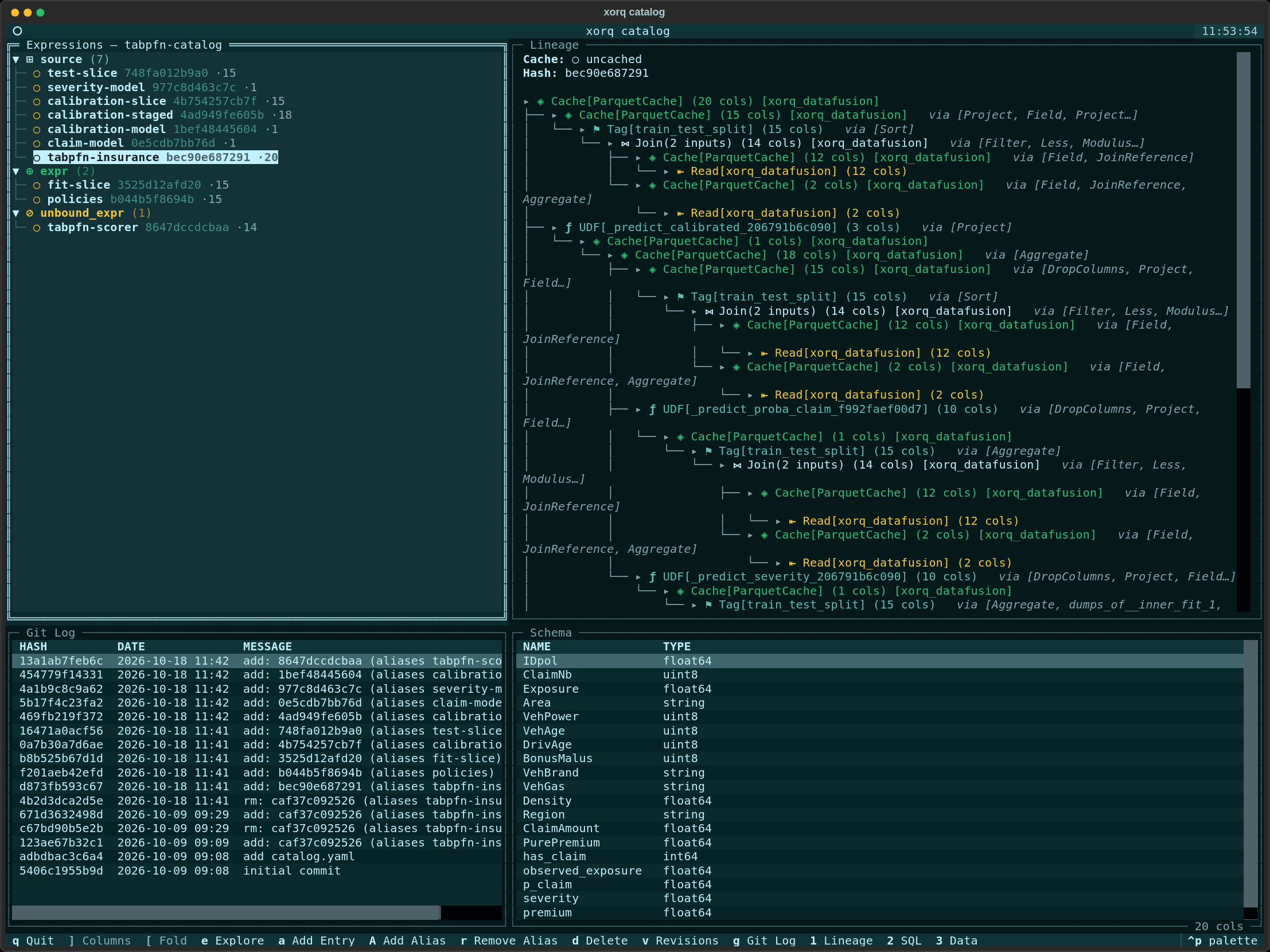
Below, the ten-entry ledger of an insurance pricing pipeline from A Commit vs. a Ledger Entry. The selected entry is the scored test set: its lineage runs through three fitted models down to the two source reads, next to its schema and a git log with one commit per change.
Why a ledger steers agents
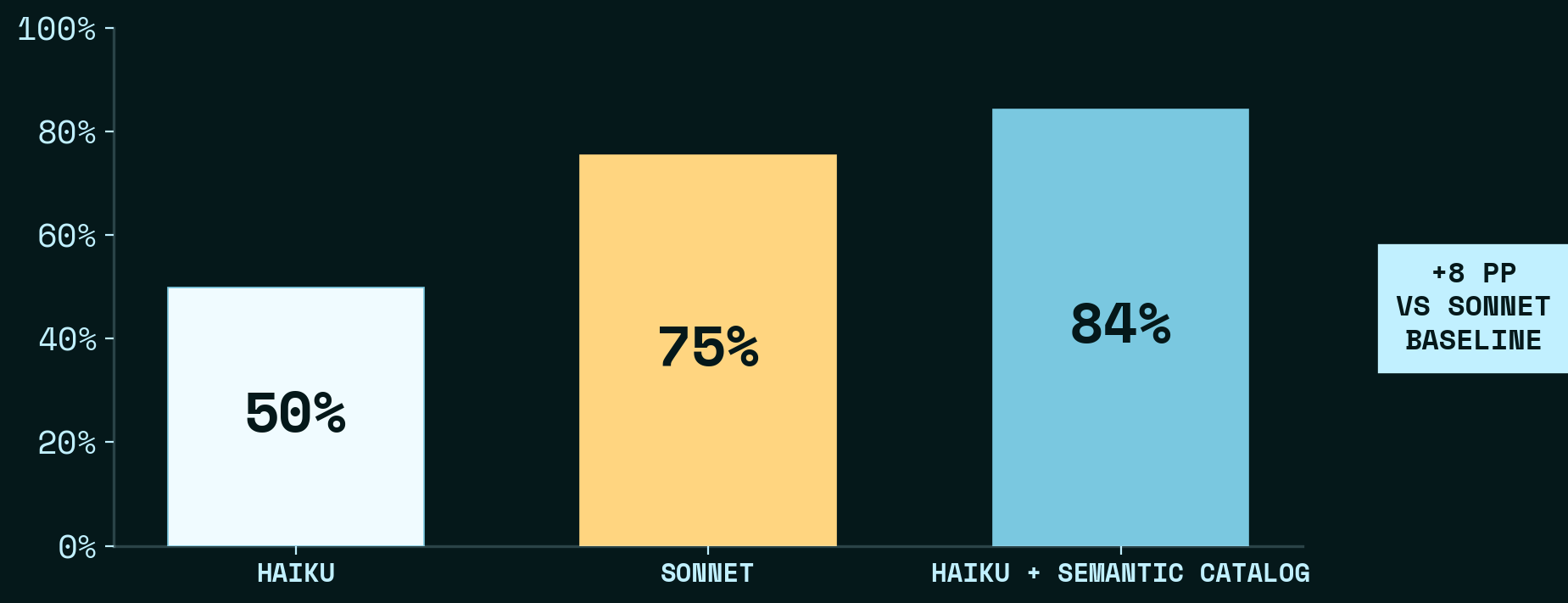
On DABStep, 450 data-analysis questions over payment transaction data, a Xorq ledger of 33 named expressions takes Haiku from 50% to 84%, 9 points above the Sonnet baseline (Orientation Over Reasoning).
One metric question, 100 runs per configuration (Faithful, Reproducible, Wrong). Two of the post's nine configurations, both Haiku running with Xorq, differing only in whether a reviewed definition of the metric was preloaded:
| Re-derived from source files | Selected from a reviewed entry | |
|---|---|---|
| Correct | 0 of 100 | 100 of 100 |
| Median turns | 21 | 4 |
| Cost per run | $0.09 | $0.02 |
Getting started
❯ pip install "xorq[examples]"
❯ xorq init -t penguins && cd xorq-template
❯ xorq uv build expr.py
builds/4c915297a711
❯ xorq catalog init
Initialized catalog at ~/.local/share/xorq/catalogs/default
❯ xorq catalog add builds/4c915297a711/ -a penguins-predict
Added 4c915297a711
❯ xorq catalog run penguins-predict -o out.parquet
Build turns an expression into a directory named by its hash, holding the
manifest, the project wheel, and pinned requirements. Add puts that directory
in the ledger under its hash and an alias. Run executes the entry in the
environment it pins. The template's build needs Python 3.11 or newer; if uv
picks a 3.10 interpreter, set UV_PYTHON_PREFERENCE=only-managed.
The IR
Xorq expressions support caching, multi-engine execution, and UDFs. xo._
is the row reference, so xo._.species is the species column of the current
table.
import xorq.api as xo

penguins = xo.examples.penguins.fetch()
expr = (
    penguins
    .filter(xo._.species.notnull())
    .group_by("species")
    .agg(avg_bill_length=xo._.bill_length_mm.mean())
)
.cache(xo.ParquetCache.from_kwargs()) materializes any node.
.into_backend(xo.duckdb.connect()) moves its data to another engine. The
same expression runs on DataFusion, DuckDB, SQLite, pandas, Snowflake,
Databricks, BigQuery, Trino, Postgres, PyIceberg, and GizmoSQL. Operators
exchange Arrow RecordBatches, with no DAG of tasks to checkpoint.
xo.Pipeline.from_instance turns a scikit-learn pipeline into a deferred
expression.
The ledger
The ledger is a git repo on the filesystem, which the CLI calls a catalog. Aliases are symlinks, entries are zipped builds, and metadata sidecars are plain YAML, so an agent that clones it can discover everything with file operations. The hashes below come from one build and will not match yours:
❯ tree git-catalogs/penguins
git-catalogs/penguins
├── aliases
│   └── penguins-agg.zip -> ../entries/b45d9db8189a.zip
├── catalog.yaml
├── entries
│   └── b45d9db8189a.zip
└── metadata
    └── b45d9db8189a.zip.metadata.yaml

❯ git -C git-catalogs/penguins log --format=%s
add: b45d9db8189a (aliases penguins-agg)
add catalog.yaml
initial commit
An entry is a manifest plus the environment to run it. The manifest is the
content-addressed specification of the pipeline: one node per operation, each
referenced by hash, with schema, lineage, and inputs read straight off it.
The wheel and pinned requirements.txt next to it make the entry portable to
another sandbox, your machine, or production.
Abridged expr.yaml for the expression above
definitions:
  nodes:
    '@read_dbd8d81198f1':
      op: Read
      method_name: read_parquet
      name: penguins
      schema_ref: schema_11039d461f5b

    '@filter_f7eedc0c6f85':
      op: Filter
      parent: { node_ref: '@read_dbd8d81198f1' }
      predicates:
        - { op: NotNull, arg: { op: Field, name: species, ... } }

    '@aggregate_b45d9db8189a':
      op: Aggregate
      parent: { node_ref: '@filter_f7eedc0c6f85' }
      by:
        species: { op: Field, name: species, ... }
      metrics:
        avg_bill_length: { op: Mean, arg: { op: Field, name: bill_length_mm, ... } }

expression:
  node_ref: '@aggregate_b45d9db8189a'
  schema_ref: { schema_ref: schema_cdf21e46eb8a }
The CLI
Verbs that act on an entry take its hash or an alias such as prod. The ones
that produce a pipeline (pin, rebase, compose) write it back as a new entry;
entries are never edited in place, though aliases can move. Writes push the
catalog to its remotes by default.
❯ xorq catalog run prod -o out.parquet          # execute in the entry's pinned environment
❯ xorq catalog run-cached prod -o out.parquet   # run, wrapping the result in a parquet cache
❯ xorq catalog check                            # entries, aliases and metadata agree with disk
❯ xorq catalog check-sources prod               # did a source schema drift? reports, never repairs
❯ xorq catalog rebase prod                      # rebuild over drifted source schemas as a new entry
❯ xorq catalog pin prod -e --alias prod-pinned  # materialize and freeze the caches as a new entry
❯ xorq catalog compose src transform -a pipeline  # source entry + unbound transform entry, as one
❯ xorq serve-flight-udxf builds/<hash>          # serve a build's UDXF nodes over Arrow Flight
A UDXF is how arbitrary compute joins the system: a Python function that takes an Arrow table and returns one, run in its own process behind Flight, named and cataloged like any other node. See User-Defined Exchange Functions.
Learn more
- Quickstart
- Scikit-learn template
- xorq-gallery: end-to-end examples
- Orientation Over Reasoning: Haiku with a Xorq catalog hits 84% on DABStep, above the Sonnet baseline
Pre-1.0. Expect breaking changes with migration guides.
Explore related projects
Asabeneh/30-Days-Of-Python
The 30 Days of Python programming challenge is a step-by-step guide to learn the Python programming language in 30 days. This challenge may take more than 100 days. Follow your own pace. These videos may help too: https://www.youtube.com/channel/UC7PNRuno1rzYPb1xLa4yktw
78,618 starsgrafana/grafana
The open and composable observability and data visualization platform. Visualize metrics, logs, and traces from multiple sources like Prometheus, Loki, Elasticsearch, InfluxDB, Postgres and many more.
77,859 starsredis/redis
For developers, who are building real-time data-driven applications, Redis is the preferred, fastest, and most feature-rich cache, data structure server, and document and vector query engine.
77,472 starsapache/superset
Apache Superset is a Data Visualization and Data Exploration Platform
75,495 stars