
xlollx/Trackhop
xlollx/Trackhop has 234 GitHub stars and 8 forks. GitHot measured +8 stars in 24 hours. Last checked 2026-11-15 23:48 UTC. Last push 2026-11-15.
What you can do
- Sync - Source → target between any two services - Same service too (playlist copy).
- Existing playlist or automatic creation of the target - Created playlists are private.
- Manual ("Run", "Sync all") - Manual syncs run as a foreground job with a progress notification.
- Scheduled: hourly, every 6 hours, daily, weekly - WorkManager, survives reboots; "Wi-Fi only" option.
Measured star growth
- in 24h
- +8
- in 7 days
- Collecting history
- in 15 days
- Collecting history
- in 1 month
- Collecting history
Net star changes over overlapping periods, not daily totals. Missing measurements are left blank. Stars measure attention, not software quality.
About
Free, open-source playlist sync for Android, Windows, macOS, Linux and Docker. Keeps playlists identical across Spotify, YouTube Music, Apple Music, Amazon Music, TIDAL, Deezer, LiveOne, Anghami, Navidrome, Jellyfin and Plex. Scheduled syncs, easy review of tracks not found. No Trackhop account or server: everything stays on your devices.
Self-hostedREADME.md
Original
Trackhop
Your playlists, in sync across music services.
On your phone, on a schedule. No account, no server, no subscription.
















Google Play or AppGallery? Install Trackhop Bridge too.
The store versions use official APIs only. The free Bridge plugin adds the rest: YouTube Music, Amazon Music, SoundCloud, quick sign-ins with no keys, TikTok and more.
F-Droid, Obtainium and GitHub already have everything built in: no Bridge needed.
On a computer or a server? (Docker and Azure: beta)






♥ Thank you to the people who keep Trackhop free:
THE ICON · Michel Henke · Pisqui❤️ · BjörnH. · Bougtib · Anonymous Mixtape · Anonymous Encore · Anonymous B-side · Ingo Wolf · Villordsutch · Il terronazzo · Alan · Anonymous Bassline
Want your name here? Ko-fi (card or PayPal) or GitHub Sponsors.
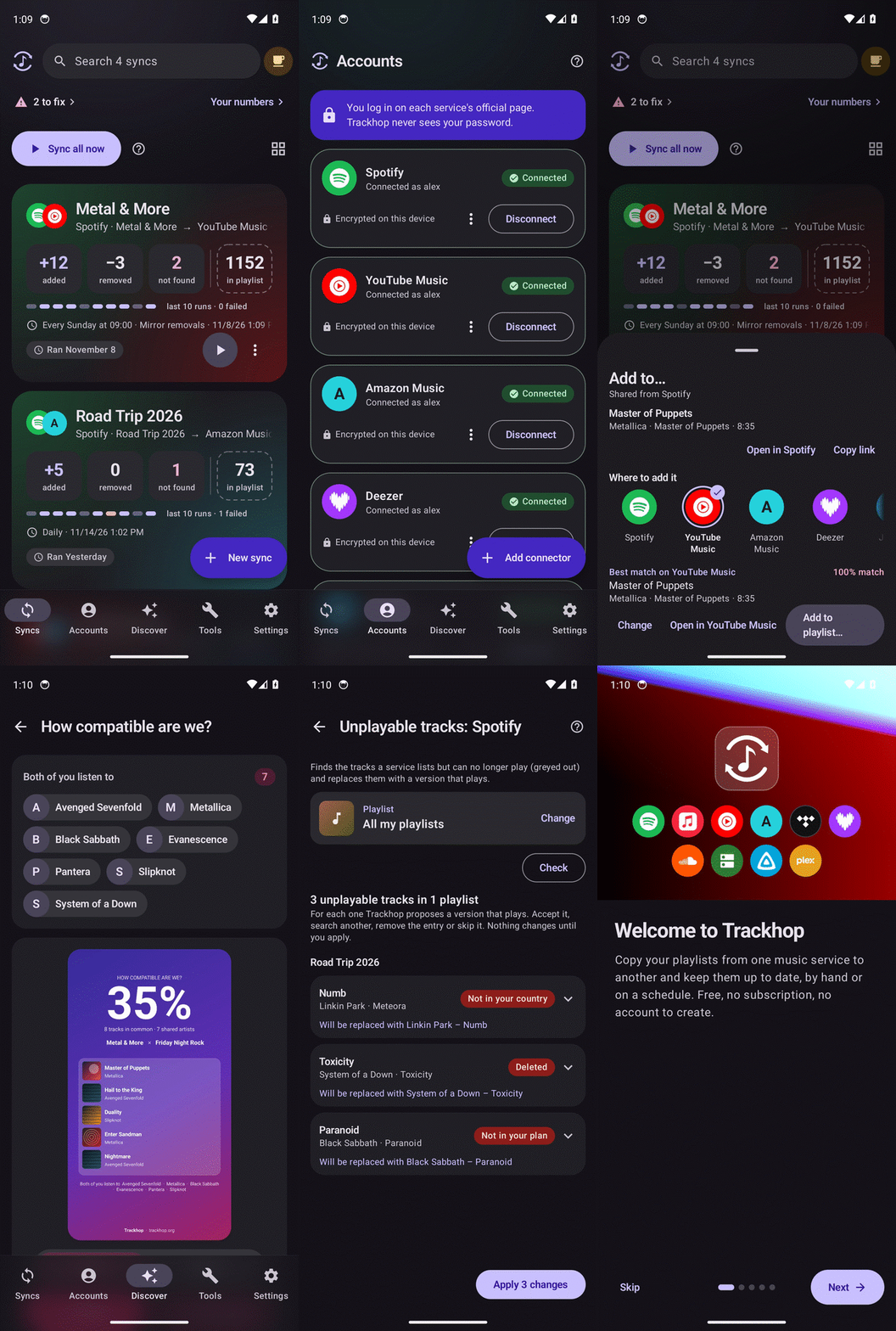
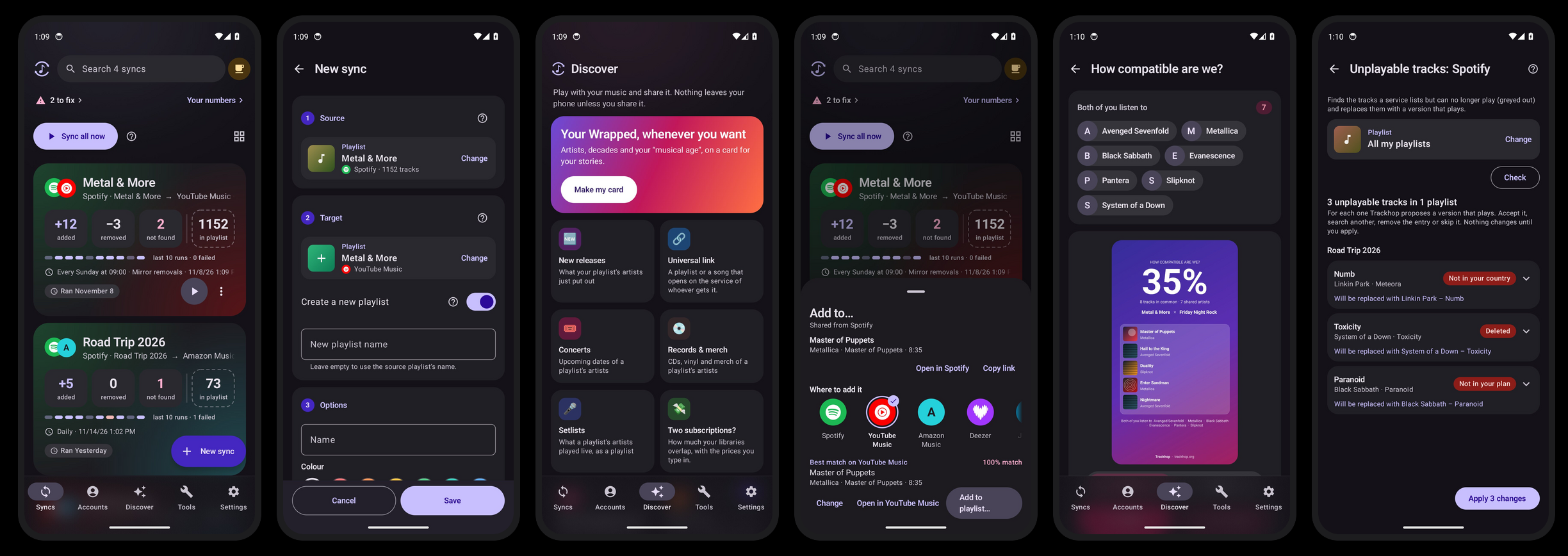
More pictures, upcoming features included: Gallery.
Trackhop keeps playlists identical across Spotify, Apple Music, YouTube Music, Amazon Music, TIDAL, Deezer, SoundCloud, LiveOne, Subsonic/Navidrome, Jellyfin, Emby and Plex, with Last.fm, ListenBrainz and public NetEase Cloud Music and QQ Music links as sources and playlist files (CSV, TSV, M3U, iTunes XML, JSON, pasted text) as a bridge to everything else. Everything runs on the phone: there is no Trackhop server, and access tokens never leave the device. Free, no ads in any build: development lives on voluntary donations. Listed in the Navidrome app catalog.
Music services at a glance
Read = use it as a source · Write = create playlists and add tracks · Remove = mirror removals. "All builds" means the Google Play, GitHub and F-Droid apps, Trackhop Desktop and Docker. The quick sign-in routes go through the service's own web player: they are not official interfaces and live in the GitHub and F-Droid builds, Desktop and Docker (and, for the store apps on Google Play and AppGallery, in the Trackhop Bridge plugin).
| Service | Read | Write | Remove | How you connect | Where |
|---|---|---|---|---|---|
| Spotify | ✓ | ✓ | ✓ | Quick sign-in with your usual account, no key, no Premium | GitHub, F-Droid, Desktop, Docker · plugin |
| ✓ | ✓ | ✓ | Official: your own free developer key (Spotify requires Premium for it) | All builds | |
| YouTube Music | ✓ | ✓ | ✓ | Quick sign-in with your Google account | GitHub, F-Droid, Desktop, Docker · plugin |
| ✓ | ✓ | ✓ | Official: your own Google API key | All builds | |
| Apple Music | ✓ | ✓ | ✓ | Quick sign-in with your Apple ID | GitHub, F-Droid · plugin |
| ✓ | ✓ | — | Official: Apple developer token (Apple's API cannot remove tracks) | All apps (not Desktop or Docker) | |
| Amazon Music | ✓ | ✓ | ✓ | Quick sign-in with your Amazon account (no public API) | GitHub, F-Droid · plugin |
| TIDAL | ✓ | ✓ | ✓ | Official: your own free developer key | All builds |
| Deezer | ✓ | ✓ | ✓ | Official (beta), or quick sign-in | All builds · quick sign-in: GitHub, F-Droid, Desktop, Docker, plugin |
| LiveOne | ✓ | ✓ | — | Quick sign-in (liked songs only, alpha) | GitHub, F-Droid, Desktop, Docker · plugin |
| Navidrome / Subsonic (Airsonic, Gonic, Ampache, LMS, Funkwhale) | ✓ | ✓ | ✓ | Your server's address and login | All builds |
| Jellyfin | ✓ | ✓ | ✓ | Your server's address and login | All builds |
| Emby (beta) | ✓ | ✓ | ✓ | Your server's address and login | All builds |
| Plex | ✓ | ✓ | ✓ | Your server's address and token | All builds |
| Last.fm | ✓ | ✓ (loved tracks) | ✓ (loved tracks) | Your username (loved tracks, scrobbles, top tracks); your password too to love tracks | All builds |
| ListenBrainz | ✓ | — | — | Your username (playlists, loved tracks) | All builds |
| SoundCloud | ✓ | ✓ | ✓ | Quick sign-in with your SoundCloud account: your sets and likes (beta) | GitHub, F-Droid · plugin |
| ✓ | — | — | Paste a public set or likes link, no account | GitHub, F-Droid, Desktop, Docker | |
| NetEase Cloud Music, QQ Music | ✓ | — | — | Paste a public playlist link | GitHub, F-Droid, Desktop, Docker · plugin |
| Anghami | ✓ | ✓ | ✓ | Quick sign-in with your Anghami account: your playlists and likes (alpha) | GitHub, F-Droid, Desktop, Docker · plugin |
| Qobuz | ✓ | ✓ | ✓ | Quick sign-in with your Qobuz account (Google too): your playlists and favourite tracks (alpha) | GitHub, F-Droid, Desktop, Docker · plugin |
| ✓ | — | — | Paste a public playlist link, no account | GitHub, F-Droid, Desktop, Docker · plugin | |
| TikTok | ✓ | — | — | Share a video: Trackhop reads the song it uses, or recognises it from the audio | GitHub, F-Droid, Desktop, Docker · plugin |
| Internet radio, Shazam | ✓ | — | — | What a station plays, or every song you Shazam | All builds |
| Charts (Apple Music, Deezer) | ✓ | — | — | A country's Top 100, refreshed as it changes, no account | All builds |
| Files (CSV, M3U, XSPF, JSPF, iTunes XML, JSON, text) | ✓ | ✓ | ✓ | Import and export | All builds |
Details, keys and limits of each service: Supported services and their limits. Not connectable: Pandora (no public API, United States only): use files.
Why not an online transfer service? Soundiiz, TuneMyMusic and FreeYourMusic are good at a one-off move. Trackhop is for keeping playlists in step over time, without handing your accounts to anyone:
| Trackhop | Online transfer services | |
|---|---|---|
| Where it runs | On your phone | On their servers |
| Who holds your service logins | Only your phone, encrypted | The service |
| Account, subscription | None | Account; limits on the free plan |
| Scheduled sync, removals mirrored | Yes | Mostly paid plans |
| Personal servers (Navidrome, Jellyfin, Plex) | Yes | Rarely |
| Source code | Open (AGPL-3.0-only) | Closed |
Install
- F-Droid: built from source, signed with the same key as the GitHub APK, so the two update each other.
- Obtainium: add
https://github.com/xlollx/Trackhopand each release reaches the phone by itself. - Releases: the signed APK of every version.
- Google Play and AppGallery versions: the same app limited to official APIs (store rules). Using one and want YouTube Music, Amazon Music, or Spotify and Apple Music without developer keys? Install the companion plugin Trackhop Bridge (GitHub only, read its notes first), or switch to the F-Droid/GitHub build above, which has them built in. Which Trackhop? compares them.
- Desktop (Windows, macOS, Linux): the same engine as a program on your
computer, with its own Java runtime (no Java or Docker to install, no administrator rights), an icon
next to the clock and the same web page as the server. Version 1.9.2 (what's in it):
Windows installer ·
Windows, no install (.zip) ·
macOS, Apple silicon ·
macOS, Intel ·
Linux .deb ·
Linux .tar.gz ·
Linux Flatpak. See the
Desktop guide; every version is in the
Desktop & Server releases (
server-v…). With Scoop:scoop bucket add xlollx https://github.com/xlollx/scoop-bucketthenscoop install xlollx/trackhop; with Homebrew on a Mac:brew install --cask xlollx/tap/trackhop. The Mac app is not signed by Apple: the first time, System Settings › Privacy & Security › Open Anyway (how). On the Microsoft Store (official connections only), also withwinget install 9PFX74Q2XN9P. With Chocolatey:choco install trackhop. Coming soon, not live yet:winget install xlollx.Trackhop(in review), andflatpak install flathub io.github.xlollx.Trackhop(packaging/). - Server (Docker, beta): works for everyday use, still young. The same engine on a home server or a NAS, with a web page and
scheduled syncs:
docker run -p 8080:8080 -v trackhop-data:/data ghcr.io/xlollx/trackhop. Official APIs, personal servers and YouTube Music with pasted cookies (unofficial); see the Docker guide. To update:docker pull ghcr.io/xlollx/trackhop, then remove and start the container again (the data stays in its volume). The same image is also on Docker Hub:docker pull xlollx/trackhop. For the whole household,SONGPORT_MULTIUSER=true: each person signs in and has their own services and syncs (how). - On Azure (beta): no server at home?
creates Trackhop on Azure Container Apps in your own subscription: always on, with an HTTPS address and its data on an Azure Files share. Billed to your subscription: about $5 a month in most regions when it sits idle between syncs, up to about $15 if it is busy all the time (estimate from Azure's list prices for Container Apps after its monthly free grant; storage costs cents). Remove it by deleting the resource group (details).
- Desktop and Docker also have radio syncs: Trackhop listens to an internet radio in the hours you choose and saves the songs it plays to a playlist on any service (how), and Shazam syncs, like the app's (how).
- Desktop and Docker also have a REST API and a webhook, for Home Assistant, n8n, Node-RED or a script: list and start syncs, read their results, add and remove tracks in any connected service's playlists, get notified when a run ends. See Automation: REST API and webhook.
- And a command line,
trackhop:trackhop run --all --wait,trackhop add spotify Focus "Bonobo - Kerala", from a terminal, cron or Task Scheduler, with nothing to set up on the same machine or in the container (docker exec trackhop trackhop syncs). See the trackhop command. - Desktop and Docker have their own version (now 1.9.2), separate from the app's.
Android 8.0 or newer. Languages: English, Italian, French, German, Spanish, Portuguese (Brazil), Polish, Russian, Turkish, Chinese, Japanese, Korean. New here? The guide covers getting started and the common errors.
Good to know
- Apple Music, TIDAL, Deezer, SoundCloud and ListenBrainz are marked beta in the app: written against each service's documented API and working, but with far less real-world use than the rest, so a report about them is especially welcome.
- Deezer (web) is marked alpha: covered by offline tests but not yet tried on real accounts. Try it on a test playlist first and report what goes wrong. SoundCloud with your account is beta.
- The app ships without service credentials of its own: on the services that require one (Spotify, YouTube Music, TIDAL, Deezer, Last.fm) each user creates a free developer key, and the app walks them through it in about two minutes. Or use the quick route: sign in on the service's own page. Personal servers and files need nothing.
- License: AGPL-3.0-only, see LICENSE. Security reports: SECURITY.md.
They talk about Trackhop
Videos and articles that mention Trackhop (made one? open an issue and tell me):
- ✎ A look at Trackhop: syncing playlists across music services on Android: Saudi Android (Arabic; title translated)
- ✎ Trackhop ~ FOSS Playlist Syncronization: The Audio File (English)
- ▶ Spotify, Apple Music, YouTube Music… what if your playlists could live across ALL of them?: Levi (@leviackermanft), X (English)
- ▶ 5 Android Apps You Didn't Know Your Phone Could Use: NextTech Hub, YouTube (English)
- ▶ 5 apps that make Android feel new | Part 1: palidev21, TikTok (English)
- ✎ The 15 Best Android Apps You Need in November 2026: Geeky Gadgets (English)
- ▶ Top 15 Best Android Apps - November 2026!: HowToMen, YouTube (English)
- ▶ Melhores 8 APLICATIVOS para CELULAR em 2026 #44 Grátis: ODORIZZI, YouTube (Portuguese)
What people say
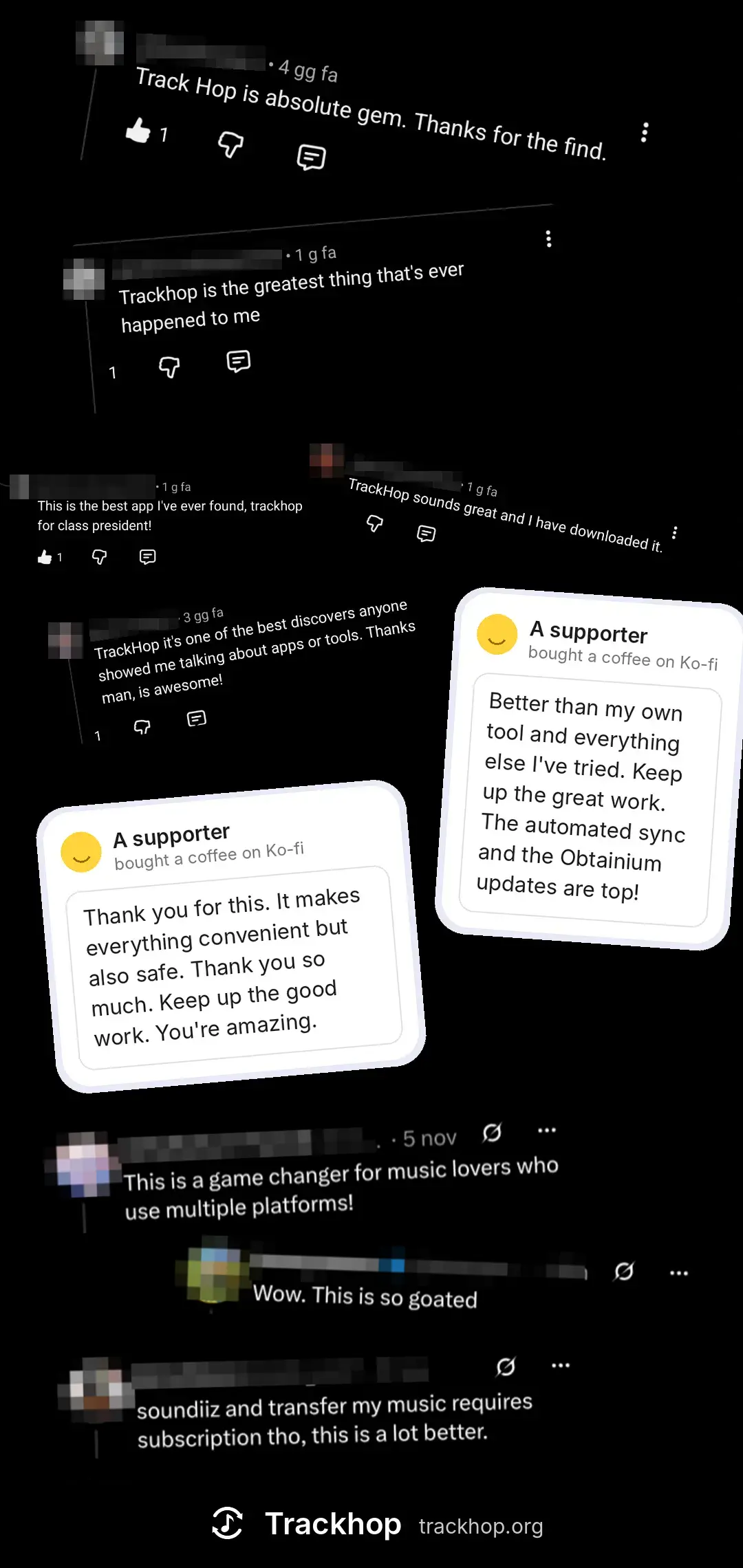
Comments under videos and posts about Trackhop, and messages from supporters (names and pictures hidden):
Follow Trackhop
New versions, tips and what's coming next, in English:


Feedback
Trackhop is stable and used every day. Every library, phone and habit is a little different, so reports are what make it better: if something does not work as it should, say so.
- Install: the signed APK from the Releases page (updates install over it), F-Droid or Obtainium. This build includes YouTube Music, Amazon Music and the Spotify/Apple Music web sign-in; no second app is needed.
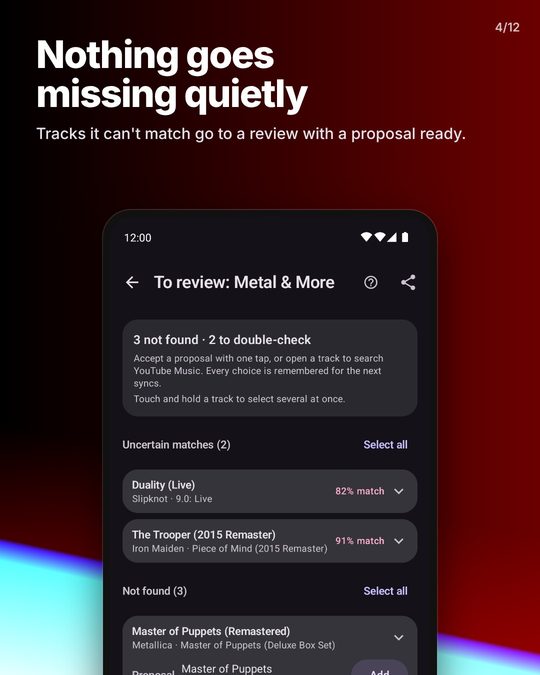
- What helps most: the connectors marked beta in Accounts, a sync of a big playlist (a thousand tracks and more), the review of the tracks that were not found (one-tap proposals, the "likeliest" list, pasting a track link), scheduled syncs surviving the night, and backups of a whole account.
- How to report: open an issue and attach the technical details report (Settings → Sync log → Share technical details): versions, connectors, the last sync steps and plugin statistics, never tokens or track lists. Italian is welcome.
- Known rough edges: see Known limits. Matching depends on each catalogue's search: a track "not found" is usually missing or titled differently on the destination, and the review screen exists for those.
Contents
- Music services at a glance
- They talk about Trackhop
- What people say
- Follow Trackhop
- Feedback
- Features
- Gallery
- Supported services and their limits
- Connector plugins
- Automation: REST API and webhook (Desktop and Docker)
- How tracks are matched
- How logins are protected
- Architecture
- Project layout
- Building
- API configuration
- Donations
- Publishing on Google Play
- Contributing
- Formerly Songport
- License, copyright and trademark
- Known limits
Features
| Area | Feature | Notes |
|---|---|---|
| Sync | Source → target between any two services | Same service too (playlist copy). |
| Existing playlist or automatic creation of the target | Created playlists are private. | |
| Manual ("Run", "Sync all") | Manual syncs run as a foreground job with a progress notification. | |
| Scheduled: hourly, every 6 hours, daily, weekly | WorkManager, survives reboots; "Wi-Fi only" option. | |
| Additions only (default) or mirror removals | Removals are skipped when the source comes back empty. | |
| Keep every track (archive) | For playlists that change by themselves (Discover Weekly, Release Radar, daylist, charts): nothing is ever removed from the target, new tracks are added at the end. The editor offers "Copy the latest version (replace)" or "Keep every track (archive)" right under such a source. Also on Desktop and Docker (web page, API, command line). | |
| Ideas for one service | With a single service connected, ready-made syncs and tools a tap away: the weekly playlist kept whole, backup, liked songs as a shareable playlist, the country's chart, duplicates, Wrapped. Syncs between two playlists of the same account need no search. | |
| Bidirectional | One switch creates the reverse twin sync without removals; the two are deleted together. | |
| Keep the source order | After the adds, the target is put in the source's order; Spotify (both routes), YouTube Music and Deezer can move tracks. | |
| "Liked songs" as source or target | Spotify, Deezer, Subsonic, Jellyfin, Last.fm, ListenBrainz. | |
| Shazam sync | Every song you Shazam, in a playlist of your choice on any service. Shazam has no API for your library, so nothing unofficial is used: in Shazam's settings, connect Spotify or Apple Music and Shazam keeps every Shazam in a "My Shazam Tracks" playlist there; "Shazam" as the source in the editor finds that playlist on your connected account (or says how to turn it on) and syncs it hourly. The card wears Shazam's mark. Also on Desktop and Docker (Spotify). Guide. | |
| Radio sync | The songs an internet radio plays in the hours you choose (days, from, to; past midnight too), in a playlist on any service. Find the station by name in radio-browser.info or paste its stream; only the song title the station sends with its stream is read, never the audio, and adverts, news and the station's name are left out. On the phone the stream is sampled every 2 minutes (a few seconds each, a few MB an hour), on Wi‑Fi by default, from a quiet "Listening to …" notification; the songs are synced every 10 minutes and when the window closes. The card wears a radio and says what is on air. Also on Desktop and Docker. Guide. | |
| Saved albums, followed artists, podcasts | Sync or transfer them like a playlist (Spotify, Deezer, TIDAL, YouTube Music, Subsonic/Navidrome, Jellyfin; Apple Music albums, add only). Matched by UPC where available, then title and artist; the review works the same. | |
| Preview | What would change, before doing it | Already present, to add, to remove, not found, uncertain. |
| Matching | Rules per sync | Strictness, explicit or clean preference, same album, studio versions only. |
| ISRC, then title + artist + duration | Match cache; penalises live, karaoke, cover and sped-up versions when the original is not one. | |
| Review | Uncertain matches to confirm | Below 86% similarity a match is accepted but flagged; confirm or replace it. |
| Not found | Manual fix | Free search on the target, pick the result, or "ignore". Tracks the service has no trace of are marked so and listed last. |
| Restore | Put back tracks removed by a mirror sync | From the log. |
| YouTube quota | Ring with the units used today | Search 100, write 50 out of 10,000 per day; the app shows what is left and what a sync will cost. |
| Multiple accounts | Several accounts of the same service | Also for migrating between two accounts. |
| Tools | Playlist generator (beta) | No key needed: start from artists you like (or a playlist of yours), pick a length and familiar or discovery; Trackhop takes similar artists and their most played songs from MusicBrainz and ListenBrainz (Deezer's public catalogue fills gaps), mixes them a few per artist and creates the playlist on the chosen service. Or describe a playlist; your own AI (OpenAI, Anthropic, Gemini or any OpenAI-compatible server, even local) proposes the tracks, Trackhop finds them on the chosen service through a normal sync. The proposal is reviewed before anything is created, the sync is marked with a spark and can be extended later with more AI picks. No AI of Trackhop's: your key, stored encrypted; only the text you type is sent. |
| Manage playlists | Your playlists on a service in one list: rename, delete, make public or private (where the API allows it), search the tracks and remove them by track, artist or album, extend with AI, export. | |
| Batch transfer | Pick many playlists of one service and send them all to another: one sync each, run one after the other, kept in Syncs. | |
| Playlist tools | Copy, merge (skipping duplicates), split into parts, sort by artist/title/album/year/date added/duration, shuffle; always into a new playlist, the originals untouched. | |
| Repeats across playlists | Tracks in more than one playlist and liked songs in no playlist, per service; each list can become a file. | |
| Backup to a folder | The dated backups also copied to a folder you pick (SD card, Nextcloud, Drive…), daily or weekly. | |
| Full backup of a service | Playlists and likes into local files, with dated versions. | |
| Duplicate removal | Same track even with a different id or version; keeps the first copy. | |
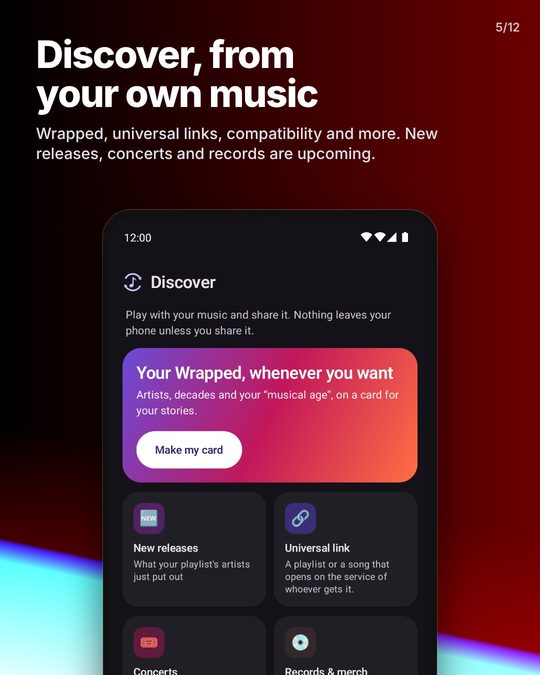
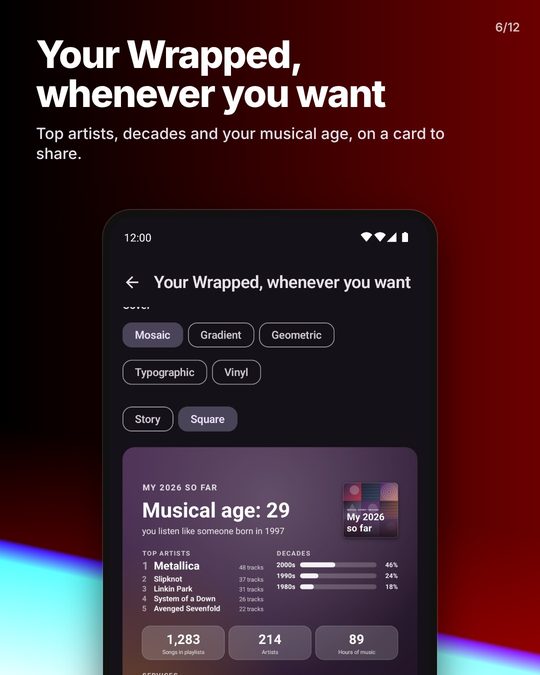
| "How compatible are we?" | Two playlists, from any services or public links: tracks in common, shared artists, a 0–100 score and "for you" picks, as a shareable card (story or square). Share two playlist links at once to open it. | |
| Playlist poster | Covers (four different albums), title, numbers and a QR code that opens the playlist on its service, as a card to share or save. The QR is made on the phone. Optional: a cover drawn by your own AI (OpenAI or Gemini, or an OpenAI-compatible server with an image model), on your key; only the title, the main artists and the description are sent. | |
| Unplayable tracks | The tracks a service lists but can no longer play (greyed out: pulled from the catalogue, not licensed in your country): found across your playlists, each with a playable version proposed by the same matching the sync uses (ISRC, then title, artist, duration), to accept, change, remove or skip; put back in the dead entry's spot where the service can move tracks; undoable. Spotify, Deezer, TIDAL, Apple Music library, YouTube, YouTube Music. An optional weekly check notifies, never changes anything. | |
| Links | Paste or share a public playlist link | Spotify, Apple Music, YouTube, Deezer, TIDAL; short share links too. "From link" is a source of its own in the editor. |
| Share a single track or a text list | A track link from any music app goes into one of your playlists on any connected service, Navidrome, Jellyfin and Plex included: the same recording is found with the sync's matching, shown with its score before adding, with "Open in…" and "Copy link" next to it. Several "Artist - Title" lines become a file playlist and a new sync. | |
| Music links open with Trackhop (optional) | Settings › "Offer Trackhop for music links": Android then lists Trackhop among the apps for a Spotify, Apple Music, YouTube Music, Amazon Music, Deezer or TIDAL link. Off by default; Trackhop never takes a link by itself. | |
| Files | Import/export | Reads CSV, TSV, M3U/M3U8, XSPF, JSPF, OPML (podcasts), Apple Music/iTunes XML, JSON, Shazam exports, plain text lists; writes CSV, M3U, XSPF, JSPF and plain text. |
| setlist.fm | Share or paste a setlist.fm link: the concert becomes a playlist to sync anywhere. | |
| Shazam | Share a song from the Shazam app: title and artist are read from the shared text (nothing is asked of Shazam) and the song goes into a playlist on any connected service. To have every Shazam everywhere, make a Shazam sync (above): "Sync my Shazams" in the sheet opens one. | |
| TikTok | Share a TikTok video (GitHub and F-Droid builds, store builds with the plugin): the song it uses is read from the video's public page (no account) and goes into a playlist on any connected service. A sound the creator recorded ("original sound") names no song: Trackhop then listens to the sound itself (a short audio signature sent to Shazam, see Credits below) and often finds the song playing in it, marked as recognised so you can check it. Also in Desktop and Docker: paste the link in a review search. | |
| Widget and shortcuts | Home widget and long-press on the icon | Last sync, "Sync all", "New sync". |
| Diagnostics | "Share technical details" in the log | Version, device, services, last runs, error log; no tokens. |
| "Test the connection" per account | Account, playlist list and one search, with the service's answer on failure. | |
| Appearance | Theme and Material You | Settings › Appearance: system, light or dark; "Dynamic colours" takes the phone's wallpaper palette (Android 12+) instead of the brand's, off by default. |
| Security | Connections log | Settings › Developer options lists every host the app has contacted and how often, so "no Trackhop server" is something to check, not to believe. |
| Info sheet before every login, encrypted tokens, fingerprint or PIN lock | See How logins are protected. |
Gallery
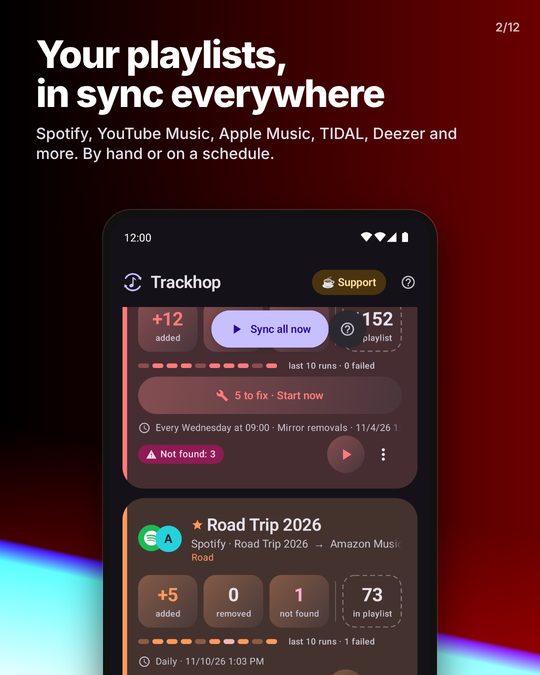
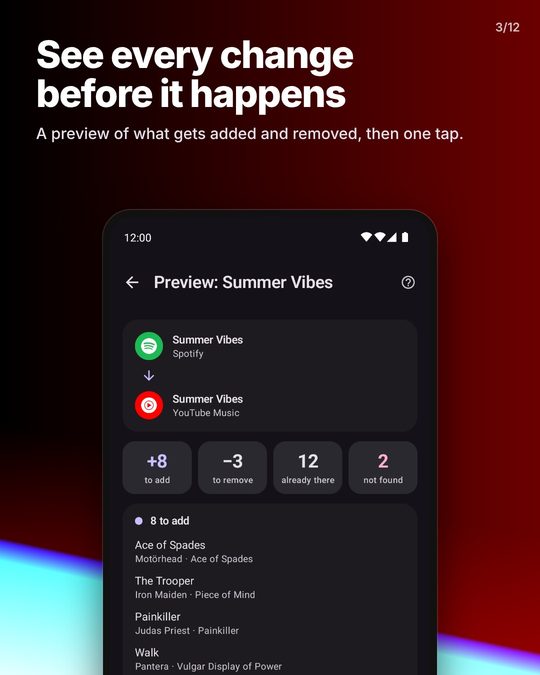
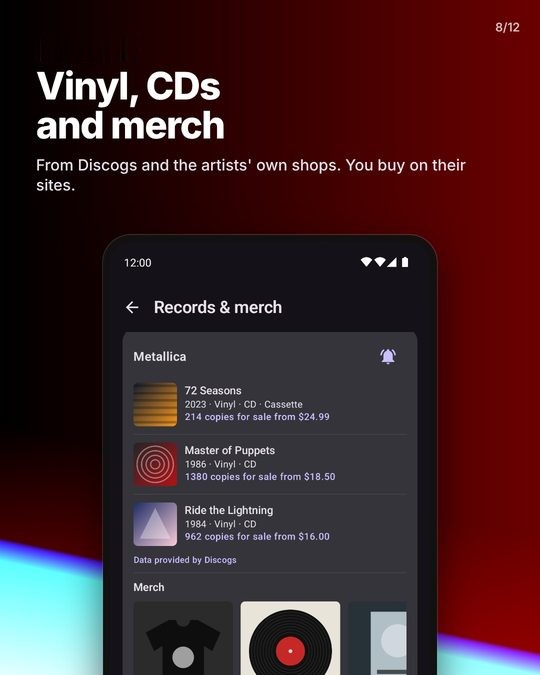
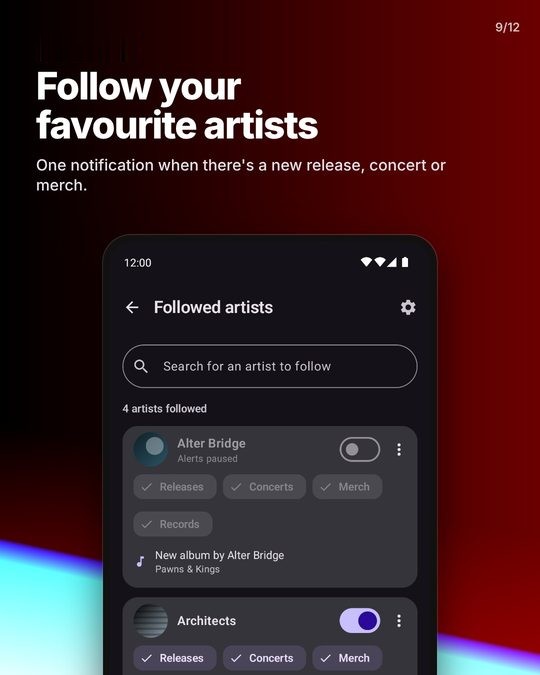
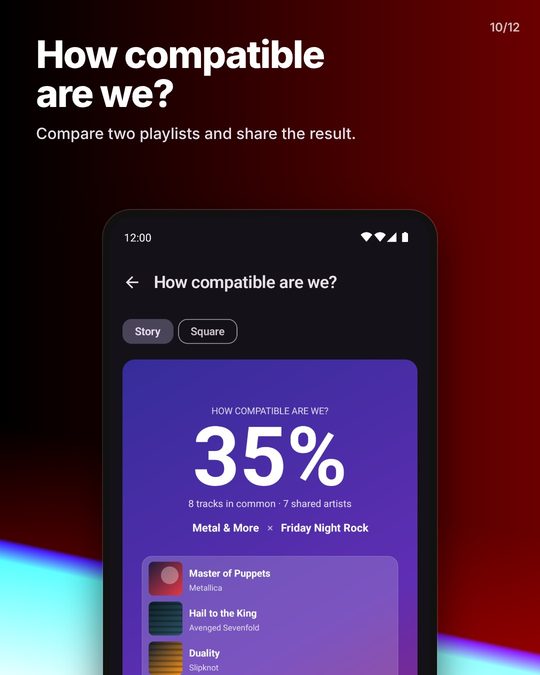
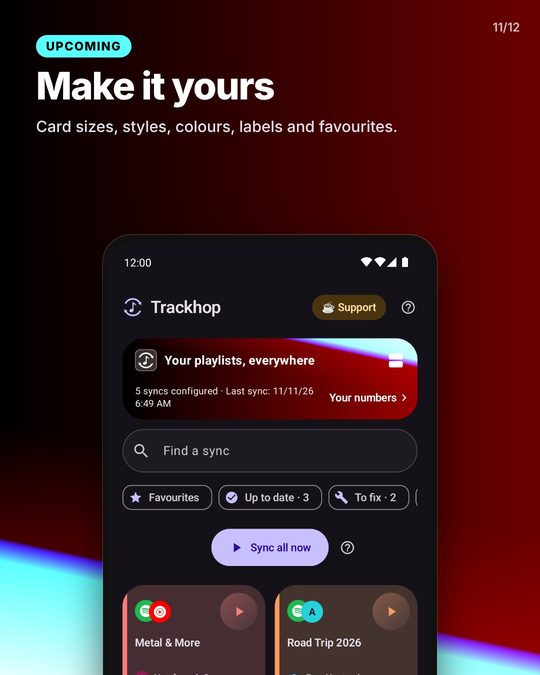
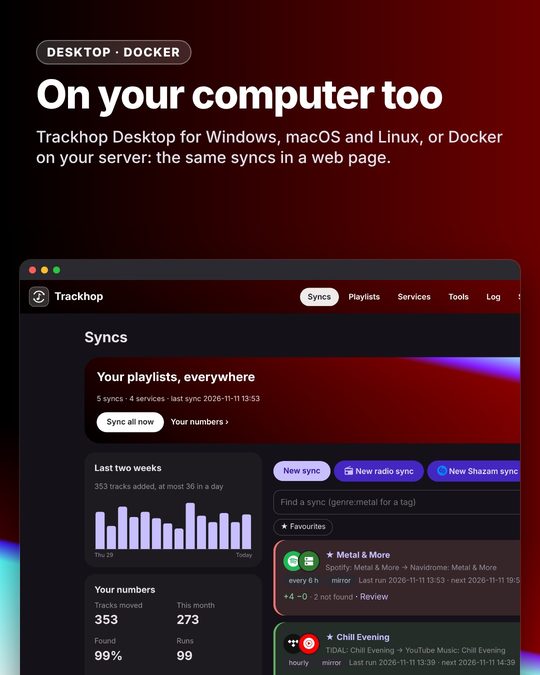
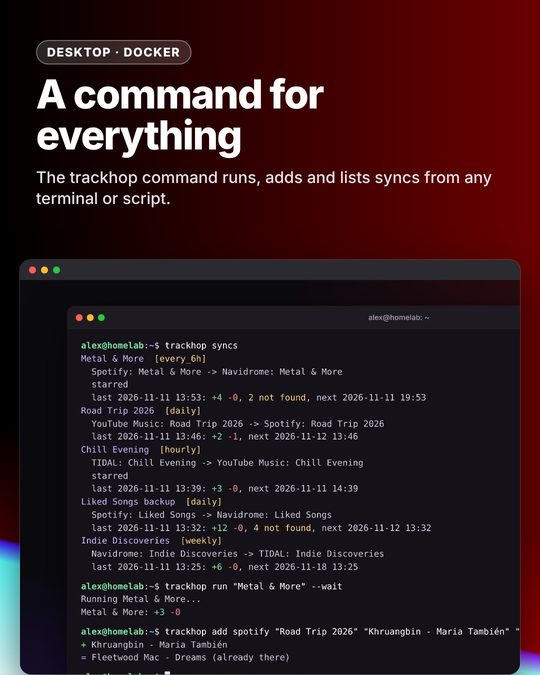
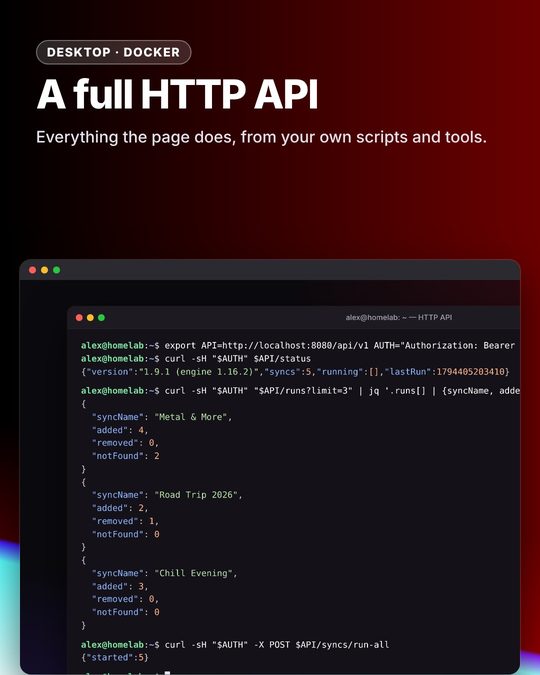
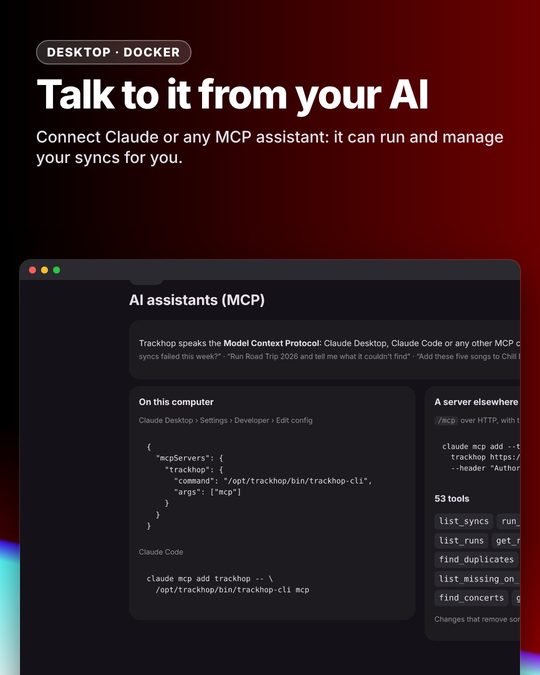
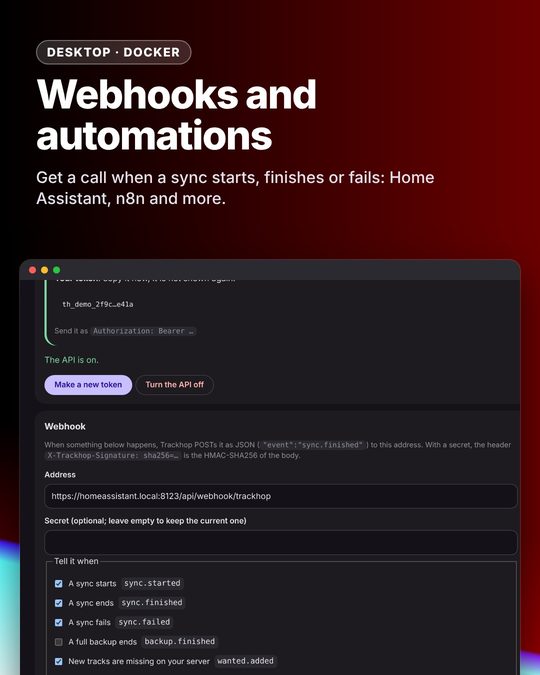
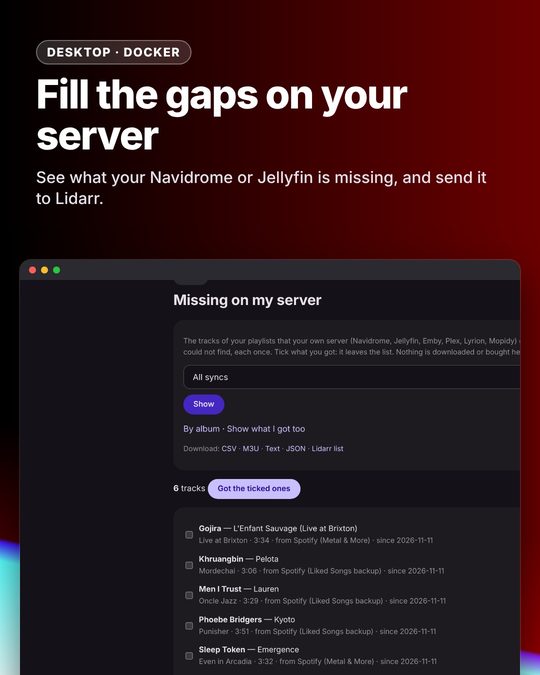
Pictures marked Upcoming show what arrives in the next updates.
Supported services and their limits
The technical side of each connector (for a quick overview, see Music services at a glance).
| Service | Status | Login | What the build needs | Limits |
|---|---|---|---|---|
| Spotify | complete | OAuth PKCE on Spotify's sign-in page, shown inside the app (a browser tab handed "Continue with Facebook" to the Facebook app, which then failed) | SPOTIFY_CLIENT_ID, redirect songport://callback |
An app in Development Mode accepts 5 users and its owner needs Spotify Premium (February 2026 rules). Extended Quota Mode requires a registered company and 250,000 monthly active users. Since July 2026 the quota is counted per developer account, not per client ID. That is why the app walks each user through creating their own client ID: on Spotify this is the normal path. |
| Apple Music | read and add, beta | MusicKit JS in an in-app WebView | APPLE_DEVELOPER_TOKEN (ES256 JWT, Apple Developer Program) |
The API cannot remove tracks from a playlist: mirror syncs towards Apple Music only add and say so in the report. The developer token expires after at most 6 months. An Apple Music subscription is required. Library tracks do not expose an ISRC. |
| YouTube Music | built into the GitHub/F-Droid build; in the store builds (Play, AppGallery) via the Trackhop Bridge | Google sign-in on Google's page | nothing: the Bridge is installed separately, outside Google Play | Uses the web player's internal interface: not an official API, against the YouTube Terms of Service, may break without notice. No quota. The Bridge shows the notice before sign-in. |
| YouTube Music (Google API) | via YouTube Data API v3 | Google OAuth | GOOGLE_CLIENT_ID (Android OAuth client: package + SHA-1), YouTube Data API enabled, OAuth verification for the youtube scope |
10,000 units per day per project (search 100, insert 50), shared by every user of the same build. With own credentials the quota is the user's. No ISRC. |
| Spotify (web) | complete, built in (GitHub/F-Droid) or via the Trackhop Bridge | Spotify sign-in on Spotify's page | nothing, and no Premium | Talks to the web player's own backend (the GraphQL gateway and the playlist store open.spotify.com uses), with the player's session token and client token; the query hashes are read from the player's own code. Since December 2025 Spotify refuses first-party tokens on the public Web API, which is why this route no longer touches it. No ISRC on this route: matching is by title, artist and duration. Not an official route, against Spotify's terms, may break without notice. |
| Apple Music (web) | read, add and remove; rename and delete playlists; built in (GitHub/F-Droid) or via the Trackhop Bridge | Apple ID sign-in on Apple's page | nothing | The Bridge reads the web player's developer token and the music user token cookie; Trackhop then runs the same Apple Music code as above, with removals, renames and deletions sent to the web player's own backend (amp-api.music.apple.com), as music.apple.com does. Not an official route, against Apple's terms, may break without notice. |
| Amazon Music | complete, built in (GitHub/F-Droid) or via the Trackhop Bridge | Amazon sign-in on Amazon's page | nothing | Amazon's official Web API is a closed beta for approved partners, so the Bridge uses the web player's interface (library playlists, playlist rows with their entry ids, search, create, add, remove, rename, delete). Not an official API, may break without notice. |
| TIDAL | complete | OAuth PKCE | TIDAL_CLIENT_ID |
API v2 (JSON:API) still evolving; endpoints isolated in TidalProvider.kt. |
| Deezer | beta | OAuth implicit | DEEZER_APP_ID and an https redirect page (docs/deezer-redirect.html) |
Registration of new apps may be closed. Playlists read from Deezer carry no ISRC. Beta: limited real-world use. |
| LiveOne (web) | presets (liked songs): read and add, alpha; GitHub/F-Droid, Docker and Desktop only | LiveOne's own page in the app (Docker/Desktop: paste the slackerUser entry) |
nothing | No public API: the web player's backend, unofficial. Playlists of one's own need LiveOne's paid plan (not handled yet); no removal; stations play only in the US. |
| Subsonic / Navidrome (Airsonic, Gonic, Ampache, LMS, Funkwhale) | complete | server URL, user, password (md5+salt token) | nothing | Starred tracks = likes. Ampache checks the token against the separate Subsonic password (or the API key) from Preferences → Account, not the account password; the app says so when Ampache refuses the login. |
| Jellyfin | complete | server URL, user, password | nothing | Favourites supported. |
| Emby | beta | server URL, user, password | nothing | Jellyfin's API (Emby is where Jellyfin forked from) under /emby, with X-Emby-Authorization/X-Emby-Token; favourites supported. Not yet tried on a real Emby server. |
| Plex | complete | server URL and X-Plex-Token | nothing | Music playlists only. A new playlist is created empty on the server's library, then filled (checked on Plex 1.43). |
| Last.fm | read; loves with a session | username (+ password once, for a session) | LASTFM_API_KEY + LASTFM_SHARED_SECRET, or a key and secret entered by the user |
Loved tracks, recent scrobbles and the month's most played as sources; Loved tracks as a target (track.love / track.unlove) once signed in with the password, which is used once for auth.getMobileSession and not kept. |
| ListenBrainz | read-only, beta | username | nothing | Playlists and loved tracks, source only. |
| Files | complete | Import/export through the system file picker, or "Paste a list". | ||
| SoundCloud | your account (sets, likes: read, create, add, remove; beta) built into the GitHub/F-Droid build and in the Trackhop Bridge; public links read-only on every non-Play build and the server; unofficial | none: paste a public set or likes link | nothing | No public API for new apps, so the link is read the way soundcloud.com's web player reads it, with the client id the site ships in its scripts. Sets (playlists, albums, EPs, unlisted ones with their secret link) and a user's public likes page; nothing to sign in to, never a destination. ISRC and album only where the uploader filled in the label metadata; otherwise "Artist - Title" is split from the title. Not an official route, may break without notice: the app then says it needs an update. |
| NetEase Cloud Music, QQ Music | public links, read-only, unofficial; GitHub/F-Droid build, Docker and Desktop from the site only | none: paste a public playlist link | nothing | No interface for third-party apps, so a public playlist is read the way the sites' own pages read it, with no account: title, artists, album and duration, no ISRC. Never a destination, never a sign-in. Not an official route, may break without notice: the app then says it needs an update. More. |
| Qobuz, Pandora | not connectable | Partner-only or closed-beta APIs. Use files. |
Own credentials are entered from Accounts → service card → Use your own credentials: numbered steps, link to the developer portal, redirect URI to copy, verification with a real login.
Google/YouTube: an Android OAuth client is tied to the APK signature, so the user cannot override
it. With own credentials the app switches to the installed app flow: a Desktop client and a
redirect to http://127.0.0.1:<port>, where the app listens on loopback only for the duration of the
authorisation (auth/LoopbackServer.kt).
Apple Music works without a backend because Apple provides MusicKit JS: the app opens a WebView on a
page served from its own assets (a real https origin through WebViewAssetLoader), MusicKit handles
the Apple ID sign-in and returns the music user token. Amazon Music has no open equivalent, which is
why it is offered through a connector plugin.
Connector plugins
Some services have no open API, and on others the official route is heavy for a single user: a developer account to register, a paid program, a daily quota to share. For those, Trackhop defines an open connector interface: a separate app, a plugin, holds the sign-in to a service and answers Trackhop's requests for playlists and tracks.
The store builds (Google Play, AppGallery) never include, download or install a plugin. It discovers one that the user has already installed and then offers its services in the account picker, next to the official routes, which stay available and unchanged. The GitHub and F-Droid build carries the reference plugin's connectors inside instead (see below), so it needs no second app.
How discovery works
A plugin declares an activity handling the intent action com.xlollx.songport.action.CONNECTOR, with
a <meta-data> entry named com.xlollx.songport.connector.authority holding the authority of its
ContentProvider. Trackhop queries that action (providers/BridgePlugin.kt), then calls the provider
with ContentResolver.call(); each provider in providers/*BridgeProvider.kt maps those calls onto
the usual MusicProvider interface, so the sync engine treats a plugin service like any other. The
plugin must verify the caller's package name and signing certificate before answering.
Trackhop Bridge and the built-in web connectors
Trackhop Bridge is the reference plugin, by the
same author, free and open source (GPL-3.0-only), distributed on GitHub only and never on Google Play.
Its connectors are also built into Trackhop's GitHub and F-Droid build, as the :bridge library module
(android/bridge, included with fullImplementation): the same code runs inside Trackhop, called
in-process through BridgeCore instead of a ContentProvider (providers/BuiltIn.kt in src/full,
an empty twin in src/play). The separate Bridge app stays for the Play build. The connectors add:
| Service | What it adds |
|---|---|
| YouTube Music | playlists, liked songs, search and writing without a Google Cloud project and without quota |
| Amazon Music | the only way to connect it: Amazon's Web API is a closed beta for approved partners |
| Spotify | sign-in without registering a developer app |
| Apple Music | sign-in without the Apple Developer Program |
It works by using the same web interfaces the services' own players use. That is against those services' terms of use, it can stop working whenever a service changes something, and in the worst case a service could restrict the account signed in. A disclaimer asks for acceptance before the first sign-in, in the Bridge and in the built-in connectors alike. Passwords are typed only on the services' own pages and are never seen or stored; the session cookies stay encrypted on the phone, and the sync engine gets only data or short-lived tokens.
User-facing page: trackhop.org/plugins.
Store builds and direct downloads
The store flavors (play for Google Play, appgallery for Huawei AppGallery)
never name, link to or describe any plugin; plugin
services appear only when a plugin is already installed, with generic wording, and it contains no
code that uses unofficial interfaces. The full flavor (GitHub Releases) and the fdroid flavor
(F-Droid, without ML Kit) have the web connectors built in. No build has ads. See
Publishing on Google Play.
Automation: REST API and webhook
Trackhop Desktop and the Docker server expose a REST API, so other tools (Home Assistant, n8n,
Node-RED, a cron script) can do what the web page does: make, change, run and review syncs, and
work on the playlists of every connected service: create them, add tracks by title and artist or by
a link from any service (matched as a sync matches them), remove tracks, rename and delete; bring in
files, set up notifications. Every call is described in /api/v1/openapi.json. The Android
app has none: it has no server to answer.
Turn it on in Tools › API on the web page: make a token (shown once, only its SHA-256 hash is
stored) and send it as Authorization: Bearer <token>. It is separate from the page's password.
On Trackhop Desktop only the computer itself can reach it (loopback only).
| Call | What it does |
|---|---|
GET /api/v1/status |
Version, number of syncs, the ones running, the last run's time |
GET /api/v1/syncs |
Every sync: source, target, schedule, running, last result |
GET /api/v1/syncs/<id> |
One sync and its last 20 runs |
POST /api/v1/syncs/<id>/run |
Starts it (202 Accepted) |
POST /api/v1/syncs/run-all |
Starts every enabled sync |
GET /api/v1/runs/<id> |
A run: added, removed, not found, with the tracks |
GET /api/v1/services |
The services and whether they are connected |
GET /api/v1/files, GET /api/v1/files/<name>.csv?format=m3u |
The File playlists, in any export format |
POST /api/v1/files/<name> |
Adds a playlist file sent as the body (CSV, M3U, XSPF, JSPF, iTunes XML, JSON or text), ready to sync (201) |
POST /api/v1/syncs/<id>/enable, …/disable |
Turns a sync on or off |
GET /api/v1/backup, POST /api/v1/backup |
The last full backup and its schedule; starts one (202, with a task id) |
GET /api/v1/tasks/<id> |
A background task (a backup): progress, done, error |
GET /api/v1/config (?history=true) |
The whole set-up as a .trackhop file, as Tools › Backup & restore saves it |
GET /api/v1/metrics |
Prometheus metrics: syncs, running, and per sync the last run's time, result, added, removed and not found |
GET /api/v1/services/<service>/playlists |
A connected service's playlists (and its liked songs, saved albums… where it has them) |
POST /api/v1/services/<service>/playlists |
Creates a playlist: {"name": "…"} (201, with its id) |
GET /api/v1/services/<service>/playlists/<id>/tracks |
The playlist's tracks: id, title, artists, album, duration, ISRC |
POST /api/v1/services/<service>/playlists/<id>/tracks |
Adds tracks, searched and matched as a sync does: {"tracks": [{"title": "…", "artist": "…"}, {"link": "https://open.spotify.com/track/…"}, {"id": "…"}, "Artist - Title"]}. Tracks already there are skipped ("allowDuplicates": true to add them anyway); the answer lists what was added, already there and not found |
DELETE /api/v1/services/<service>/playlists/<id>/tracks |
Removes tracks named by id, or by title and artist matched against the playlist (POST …/tracks/remove does the same, for tools that cannot send a body with DELETE) |
PATCH, DELETE /api/v1/services/<service>/playlists/<id> |
Renames ({"name": "…"}) or deletes a playlist, where the service allows it |
GET /health |
ok, with no token: for Docker's health check, Uptime Kuma or a reverse proxy |
curl -H "Authorization: Bearer $TOKEN" http://127.0.0.1:8080/api/v1/syncs
curl -X POST -H "Authorization: Bearer $TOKEN" http://127.0.0.1:8080/api/v1/syncs/run-all
Webhook. With an address set in Tools › API, every finished run is POSTed there as JSON
("event": "sync.finished", the sync, and the run with its added and not-found tracks), and every
full backup as "event": "backup.finished". With a secret, the X-Trackhop-Signature: sha256=<hex> header is the HMAC-SHA256 of the body, to check
that the call came from your Trackhop. Example: a Home Assistant Webhook trigger that sends a
notification when tracks were not found, and a rest_command that starts every sync.
Grafana. Point Prometheus at /api/v1/metrics with the token as bearer_token to chart what
every sync adds and misses, and alert when one fails.
Details and more examples: Docker guide › API.
How tracks are matched
sync/Matcher.kt is plain Kotlin and covered by tests:
- Identical ISRC → same track (score 1.0). Spotify, TIDAL and Deezer expose it.
- Otherwise the normalised title (lowercase, no accents, without
(feat. …),- Remastered 2011,[Official Video]; "remix" is kept) is compared with Levenshtein and token Jaccard; artists are compared with each other; duration is a factor (±3 s full, beyond 25 s strong penalty). Threshold 0.70 for search results, 0.82 to recognise tracks already in the target, 0.86 below which a match is flagged as uncertain. - YouTube video titles are split into artist/title (
sync/TitleParser.kt). - Every match goes into a local cache (
Store.matchCache, up to 20,000 entries).
How logins are protected
- The password is typed on the service's own site (Custom Tab with a visible address bar) or in Apple's official window. Personal server credentials stay on the phone.
- The app only receives a revocable token, encrypted with
EncryptedSharedPreferences(key in the Android Keystore) and excluded from backups. Disconnecting deletes it; every card links to the service's revocation page. - No intermediate server: requests go from the phone to the connected services.
- Before every "Connect" a sheet shows the domain that will open and what the app receives.
- Optional fingerprint, face or PIN lock on launch (
BiometricPrompt). - No key or secret in the repository: client IDs, developer token and signing keys come from the build (GitHub Actions variables and secrets).
Architecture
MainActivity (tabs: Syncs, Accounts, Tools, Log, Settings)
    │
    ├── SyncEditor / Preview / Review ──▶ Store (store.json: jobs, reports, match cache, settings)
    │
    └── Scheduler (WorkManager: periodic per job, one-shot "run now") ──▶ SyncWorker ──▶ SyncEngine
                                                                                        │
                                                       MusicProvider (interface, one instance per account)
                                                       Spotify · AppleMusic · YouTube · Tidal · Deezer
                                                       Subsonic · Jellyfin · Plex · LastFm · ListenBrainz · SoundCloud · Netease · QqMusic · LocalFiles
                                                                                        │
AuthFlow (PKCE, loopback) · AppleAuthActivity (MusicKit JS) · ServerLoginActivity · TokenStore (encrypted)
                                                                                        ▼
                                             Official service APIs, called directly from the phone
Project layout
Trackhop/
├── README.md, LICENSE, SECURITY.md
├── docs/
│   ├── privacy-policy.md          # privacy policy (EN + IT) to publish and link in the Play listing
│   ├── play-store-listing.md      # store texts, Data safety answers, release checklist
│   ├── deezer-redirect.html       # https page → songport://callback
│   ├── google-shared-client.md    # shipping a shared Google client: verification and quota
│   ├── guide/                     # the guide on the site (getting started, troubleshooting, Docker…)
│   └── store/                     # 512×512 icon and 1024×500 feature graphic (en/it)
├── server/                        # Trackhop on a server and on the desktop: JVM build on android/core and android/ytm, web page, Dockerfile, desktop/ (packaging)
├── packaging/                     # Desktop and Docker for winget, Chocolatey, Scoop, the Microsoft Store (MSIX), Flathub, Docker Hub
└── android/
    ├── build.gradle, settings.gradle, gradle.properties
    ├── core/                      # the engine without Android (model, matching, connectors, sync), shared with server/
    ├── ytm/                       # the YouTube Music web client without Android, shared by bridge/ and server/
    ├── bridge/                    # the built-in web connectors (GitHub/F-Droid build): WebView sign-ins and players
    └── app/
        ├── build.gradle           # build parameters: client IDs, release signing from env/secrets
        ├── proguard-rules.pro
        └── src/
            ├── main/AndroidManifest.xml
            ├── main/java/com/xlollx/songport/
            │   ├── MainActivity.kt, SongportApp.kt, Notifications.kt
            │   ├── ai/AiClient.kt             # Playlist generator: the user's own AI provider (OpenAI-compatible, Anthropic, Gemini)
            │   ├── auth/                      # Pkce, AuthFlow, AuthCallbackActivity, AppleAuthActivity, LoopbackServer, ServerLoginActivity, LockActivity
            │   ├── data/                      # Store (JSON, coalesced writes), TokenStore (encrypted), Diagnostics
            │   ├── model/Models.kt            # Track, Playlist, SyncJob, SyncReport, SyncPlan
            │   ├── net/                       # Http (OkHttp, 429 retry), JSON helpers
            │   ├── providers/                 # MusicProvider and its implementations
            │   ├── sync/                      # Matcher, Duplicates, TitleParser, CsvCodec, PlaylistFiles, PlaylistLinks, SyncEngine, Tools, Scheduler, QuotaMeter
            │   ├── ui/                        # Compose screens and shared components (Common.kt, Theme.kt)
            │   └── widget/SyncWidget.kt
            ├── main/assets/applemusic/auth.html  # MusicKit JS page for the Apple Music login
            ├── main/res/values(-it,-fr,-de,-es,-zh,-ja)/strings.xml
            └── test/…/sync/                   # JUnit tests (matcher, parsers, CSV, links)
Building
Requirements: JDK 17, Android SDK with platform 36. From android/:
./gradlew testFullDebugUnitTest   # unit tests (plain Kotlin, no emulator)
./gradlew assembleFullDebug       # GitHub build, APK in app/build/outputs/apk/full/debug/
./gradlew assemblePlayDebug       # Google Play build
Or open android/ in Android Studio. Without build variables the OAuth services show as
"Not configured" and can be used with own credentials entered in the app; files and personal servers
always work.
Toolchain: AGP 8.11.1, Gradle 8.14.3, Kotlin 2.1.21, compileSdk/targetSdk 36, minSdk 26.
GitHub Actions
.github/workflows/build.yml runs on every push to main, on pull requests and manually. It runs the
tests, builds the debug APK and, when the upload key secrets are present, the signed AAB and APK. A
push to main whose versionName in app/build.gradle has no tag yet creates the tag and publishes
both as a GitHub Release: to release, bump versionCode and versionName and push. With the
DEBUG_KEYSTORE_BASE64 secret (a debug keystore in base64) the debug APK keeps the same signature
across builds so updates install over each other; the file itself is not in the repository.
API configuration
By default the build contains no service credentials. In the app, a service without a key shows a Set up button that opens a guided wizard: why the key is needed, a link to the developer portal, the redirect URI to copy, the field to paste the key, and a real login to verify it. This is the intended distribution model: every user stays within their own quota and the project never holds a shared key.
- Spotify: a client ID created on developer.spotify.com (the user needs Spotify Premium, a Spotify rule).
- YouTube Music: either the optional Bridge app (no key at all; its repository explains what it is and what it risks) or, on the "YouTube Music (Google API)" card, a Desktop OAuth client from a Google Cloud project with YouTube Data API v3 enabled (client ID and secret); the app then uses the loopback flow.
- TIDAL: a client ID from developer.tidal.com.
- Deezer: an application ID from developers.deezer.com; the https redirect page is provided by the
project (
docs/deezer-redirect.html, published on GitHub Pages) and prefilled. - Last.fm: a free API key.
- Apple Music: a MusicKit developer token, which requires the paid Apple Developer Program.
A maintainer who wants to ship shared credentials can set the build variables below; for Google
the full procedure (Android client, verification, quota) is in docs/google-shared-client.md. Set them
(Settings → Secrets and variables → Actions). Users can still override them in the app.
| Variable | Where to get it | Redirect URI to register |
|---|---|---|
SPOTIFY_CLIENT_ID |
developer.spotify.com → Dashboard → Create app (Web API) | songport://callback |
GOOGLE_CLIENT_ID |
console.cloud.google.com → Credentials → Android OAuth client (package com.xlollx.songport + SHA-1 of the release signature). Enable YouTube Data API v3, configure the consent screen, request verification for the youtube scope. |
automatic (com.googleusercontent.apps.<id> scheme) |
APPLE_DEVELOPER_TOKEN (secret) |
Apple Developer → Keys → MusicKit → .p8 key, Key ID and Team ID, then the JWT below |
none |
TIDAL_CLIENT_ID |
developer.tidal.com → Dashboard → Create app | songport://callback |
DEEZER_APP_ID, DEEZER_REDIRECT_URL |
developers.deezer.com → My Apps. Publish docs/deezer-redirect.html on an https host and use that URL as redirect and "Application domain". |
the https URL of the page |
LASTFM_API_KEY, LASTFM_SHARED_SECRET (secret) |
last.fm/api/account/create (the secret is the key's "Shared secret": only for loving tracks) | none |
PRIVACY_POLICY_URL, KOFI_URL |
public URLs of the privacy policy and the donation page; an empty KOFI_URL hides the button |
With a public repository, register only the SHA-1 of the upload key and of Play App Signing in the Google OAuth client, never the debug one.
Generating the Apple Music developer token (expires after at most 6 months):
pip install pyjwt cryptography
python - <<'PY'
import jwt, time
KEY_ID, TEAM_ID, P8 = "ABCD123456", "TEAM123456", "AuthKey_ABCD123456.p8"
print(jwt.encode({"iss": TEAM_ID, "iat": int(time.time()), "exp": int(time.time()) + 15777000},
                 open(P8).read(), algorithm="ES256", headers={"kid": KEY_ID}))
PY
Donations
- Ko-fi (card or PayPal) and GitHub Sponsors. No other channel: a direct PayPal link would show the developer's full name, so PayPal goes through Ko-fi.
- In the GitHub build only, the first successful sync that adds at least 100 tracks arms a one-time
card on the Syncs screen ("You just moved 1,322 tracks") with a coffee button (
sync/SupportPrompt.kt). Either answer closes it for good. - The Play build shows no donation button, card or coffee text (
BuildConfig.FLAVOR == "play"): it never points to payments outside Google Play.
Builds
One code base, four flavors (android/app/build.gradle), same package id and signing key:
full (GitHub Releases: web connectors built in, Gemini Nano, Ko-fi), fdroid (as full
without Google's ML Kit, so without Gemini Nano: F-Droid allows no non-free library),
play (Google Play: official APIs only, web connectors through the Bridge, no external payments),
appgallery (Huawei AppGallery: as play without Google Play's update library and without ML Kit).
No Samsung Galaxy Store: it takes Android apps from companies only. Each release v<version> carries the full APK and the
play AAB (one APK only, for Obtainium); the fdroid and appgallery APKs go to the
prerelease builds-v<version>. Store steps: docs/other-stores.md.
Publishing on Google Play
Two distributions: play and full
The app has two product flavors of the same code:
playis what goes to Google Play. It never names, links to or describes any companion app. Services that rely on a connector plugin (an app installed separately that implements Trackhop's open connector interface, discovered through the intent actioncom.xlollx.songport.action.CONNECTOR) are offered only when such a plugin is already installed, with generic wording, and are otherwise absent from the service picker. Trackhop itself only ever calls official APIs and local files, so the Play review sees exactly that. The AAB in the CI artifacts and in every release (Trackhop-vX-play.aab) is this flavor: upload only that to the Play Console.fullis the direct-download build on GitHub Releases (Trackhop-vX.apk). It can point to where a plugin is available and recognises older plugin versions by package name.
Keep the Play listing consistent with the play flavor: describe official-API services and file
import/export only; do not mention plugins or companion apps there.
Both flavors are called Trackhop, as are this repository, the site and the Docker image. Up to
version 1.1 the app was called Songport outside Google Play; the name changed because "SongPort" is
also an unrelated, active service in the same niche (songport.link). What existing installs and
setups depend on keeps the old name: the package id com.xlollx.songport, the songport://callback
redirect, the APK's old name Songport-vX.apk on the releases up to 1.5.2 (F-Droid's metadata names
those, and Trackhop-vX.apk from then on), the Deezer
redirect page at https://xlollx.github.io/Songport/deezer-redirect.html, the server's SONGPORT_*
variables and the ghcr.io/xlollx/songport image, which is still published next to
ghcr.io/xlollx/trackhop.
- Upload key (never in the repository):
Secrets:keytool -genkeypair -v -keystore upload.jks -alias upload -keyalg RSA -keysize 2048 -validity 10000 base64 -w0 upload.jks # value of the UPLOAD_KEYSTORE_BASE64 secretUPLOAD_KEYSTORE_BASE64,UPLOAD_KEYSTORE_PASSWORD,UPLOAD_KEY_ALIAS,UPLOAD_KEY_PASSWORD. With Play App Signing, also register Play's SHA-1 in the Google OAuth client. - Variables:
PRIVACY_POLICY_URL,KOFI_URL. Service client IDs are optional (see API configuration). - Bump
versionCodeandversionNameinapp/build.gradlefor every release. - Play Console: fill in Data safety and the foreground service declaration
(
dataSynctype, user-initiated); the policy is indocs/privacy-policy.md. Texts, answers, Data safety rows and the step-by-step checklist (including the closed test that personal developer accounts must run first) are indocs/play-store-listing.md. How to find the twelve testers that test needs:docs/play-testers.md. - Do not use the services' official logos in the icon or screenshots; name them in the description only to indicate compatibility.
Contributing
Issues and pull requests are welcome: see CONTRIBUTING.md for building, testing and what a pull request needs. Report vulnerabilities as described in SECURITY.md, not in a public issue.
Formerly Songport
Same app, same code, same updates. The name changed because an unrelated service called "SongPort", a music link converter, works in the same space, and two apps with one name confuse people. Your installed app updates normally and keeps all its data; only the name and the web addresses changed (github.com/xlollx/Trackhop, trackhop.org), and old links keep working.
License, copyright and trademark
Trackhop is free software: you can redistribute it and/or modify it under the terms of the GNU
Affero General Public License, version 3 only (SPDX AGPL-3.0-only, see LICENSE). Copyright (C) 2026 xlollx and
contributors. Any distributed build of this code or of a modified version must ship its complete
source code under the same license, and so must a modified version that people use over a network
(a hosted Trackhop server, for example): its users are offered its source code. Releases up to app
1.6.2 and server 1.0.0 were published under the GPL-3.0-only and stay available under it.
The app icon (android/app/src/main/res/mipmap*, android/app/src/main/res/drawable/ic_launcher*,
fastlane/metadata/android/en-US/images/icon.png, docs/store/icon512.png, docs/store/logo.svg) and the feature
graphics (fastlane/metadata/android/*/images/featureGraphic.png, docs/store/feature_*.png) are
© 2026 xlollx and licensed under Creative Commons Attribution-ShareAlike 4.0
(CC BY-SA 4.0): they may be copied, redistributed and adapted with attribution and under the same
licence, so that repositories such as F-Droid can ship them as they are. Unmodified rebuilds of this
project may keep them.
Attribution (additional terms, see NOTICE). Every copy or modified version, as source, APK, desktop package or container image, must keep the line "Trackhop by xlollx · AGPL-3.0 · github.com/xlollx/Trackhop" where the program shows it (Settings › About in the app, the page footer on Desktop and Docker), and a modified version must say that it was modified and by whom.
The name "Trackhop" (and "Songport", its former name) is not licensed: it identifies this project's official releases. A fork that changes the app and distributes it should use a name of its own, as section 7(c) of the license permits to require, so users can tell the two apart. Names of the music services mentioned in this project are trademarks of their respective owners.
Credits. The audio signature that recognises the song in a TikTok "original sound"
(android/ytm/.../Shazam.kt) is a port to Kotlin of SongRec
by Marin M. (GPL-3.0), whose author worked out Shazam's signature format. It talks to Shazam's
unofficial endpoint, so it is only in the builds that use unofficial services (GitHub, F-Droid,
Docker, Desktop outside the Microsoft Store, and the store builds through the plugin). MP3s are
decoded on Docker and Desktop with JLayer (LGPL-2.1).
Known limits
- The connectors marked beta in the app (Apple Music, Deezer, SoundCloud with an account, ListenBrainz) follow each service's documented API and work, but have had limited real-world use: the app says so on the connector's card and asks for reports.
- YouTube (official API): the daily quota is 10,000 units per key, about 100 searches; long syncs need the Bridge or several days. Video title parsing is not perfect (doubtful tracks end up in "not found", never added by guesswork).
- YouTube Music through the Bridge: Google's abuse detection can block the address for a few minutes after many searches; the app waits the declared time and resumes, so a first sync of a thousand tracks can take an hour or two.
- Spotify: a Spotify developer client in development mode serves 5 users only; each user needs their own, or the Bridge sign-in.
- Apple Music with a developer token: tracks can be added but not removed, and the token must be regenerated every 6 months. The Apple ID sign-in removes tracks too.
- Amazon Music: through the Bridge only, mapped from the web player's own calls; search results are what its player would show, playlist by playlist.
- Qobuz: no open API, files only.
- SoundCloud: public sets and likes pages only, read-only, through the web player's interface (not official). Private playlists still go through files. Not in the Google Play build.
- Matching is by title, artists and duration (and ISRC when both sides expose it): remixes, live versions and covers are kept apart on purpose, and a track with a different title on the destination ends up in the review screen rather than being guessed.
- Minimum schedule offered: 1 hour (WorkManager would allow 15 minutes, API quotas would not).
- Scheduled syncs run on the phone: some manufacturers kill background apps. Settings has a button to exclude the app from battery optimisation.