
xixihhhh/clipforge
xixihhhh/clipforge has 1,222 GitHub stars and 277 forks. GitHot measured +8 stars in 24 hours. Last checked 2026-11-09 08:48 UTC. Last push 2026-10-26.
ClipForge(原『带货剪手』/ daihuo-jianshou):开源 AI 带货短视频神器——上传一张商品图,AI 自动提炼卖点 + 写种草脚本 + 锁定商品原图不变形 + 配画面/配音/字幕,一键产出抖音小店 / 快手 / 小红书 / TikTok Shop 卖货短视频。0 成本批量出片、开源无水印、本地自部署。也支持一句话主题成片。Open-source AI e-commerce/UGC short-video generator.
Measured star growth
- in 24h
- +8
- in 7 days
- Update delayed
- in 15 days
- Update delayed
- in 1 month
- Update delayed
Net star changes over overlapping periods, not daily totals. Missing measurements are left blank. Stars measure attention, not software quality.
README.en.md
Original
ClipForge — Open-source AI shopping-video maker | One product photo, an auto-generated video that sells
Turn one product photo into a short video that actually converts. Upload a product image → AI extracts selling points · writes the script · locks your product so it never gets distorted · adds voiceover + subtitles + BGM → in tens of seconds you get a video ready to post to TikTok Shop / Reels / Shorts / Douyin / Kuaishou / Xiaohongshu. One person, dozens of videos a day · 0-cost batch production · open-source, no watermark.
📌 Formerly『带货剪手 / daihuo-jianshou』— repo · stars · history all carried over; also does "one-sentence topic → video" for any non-commerce subject.
🌐 Website: xixihhhh.github.io/clipforge — see what ClipForge can sell for you in 30 seconds
🧑🎓 First time here? Start with the 👉 beginner tutorial (every step spelled out) · 中文教程
Install · add one key · your first free video in 3 minutes · troubleshooting table · where your data lives
English · 中文







✨ Why ClipForge
| Exclusive | In one line |
|---|---|
| 🚀 Two paths to a finished video | Render at $0 with free stock, voiceover, and local compose—or confirm the price before AI generation |
| 🧭 Easy / Director modes | One-tap automation for beginners; storyboard, model, cost, version, and repair controls for pros |
| 🧬 Cross-shot consistency | Character, product, and previous-tail references adapt per model, with synced dialogue and ambience where supported |
| 🔬 Repair only the bad segment | Keep every take; QC timestamps a precise retake, and spending needs confirmation |
| 🎬 Generate and edit | Real image-to-video, then import footage to cut by text, remove silence, and burn captions |
| 🛡️ Protected spending | Preview and validate before payment; recover tasks; run QC before choosing a rerender |
| 📦 Built to scale | 391 templates, trend picks, viral replication, A/B variants, and batch production |
| 🚦 Compliance by default | AIGC labels, banned-ad-term scanning, and publish checks ship enabled |
| 🤖 Agent-ready | Web, MCP, CLI, and Skill share the same production capabilities |
- Framing and platform export: pin a finished version, preview blur / black padding / positioned crop, then export to selected destinations. Local processing with cancellation and per-platform retry, shared by Web / CLI / MCP.
📖 Optional: full feature and release details
📁 Local material library (v0.9.3): batch-upload your images and videos, deduplicate identical content, edit names and tags, search and preview, then assign materials to shots. Fill empty shots using only the current project's library; earlier takes are retained, and uploads can be cancelled or retried.
🎞️ One-tap full film: before generation costs a cent, four narrow judges (pacing / spoken voice / freshness / structure) tear the lines per shot and produce length-preserving rewrites, applied in one click (also a standalone script-judges skill); the storyboard grid paints ≤9 shots into one 3x3 image — person, outfit, room and light physically consistent — auto-cropped into per-shot keyframes; all keyframes then ride one Seedance 2.5 reference-to-video call into a complete film (≤30s) — native cuts, lines spoken verbatim, continuous audio (real-product samples below).
🎬 Real moving shots: i2v + keyframe-chained seamless transitions; 18 named camera presets per shot with Mix two-preset overlays; 8 one-click visual looks; redo any shot keeping its keyframe.
🎭 Mini-drama selling: ten script styles across four forms with a free voice per character; six built-in ordinary-person presenters + a real-face constraint; UGC realism trio — spoken-not-written lines (hooks start mid-conversation, no punchline endings), named-light lived-in first frames, behavior beats rotating per talking shot.
🧭 Two-mode workspace: a persistent sidebar (home/projects/products/presenters — one logo, one language toggle) with an Easy ⇄ Director switch at the bottom. Easy mode runs hands-off from the workspace: script → free stock visuals → free voice-over & compose → straight to the finished video, with a single progress card in between; Director mode reveals the storyboard, the director desk (presenter/look/motion intensity), the 3x3 grid and per-shot camera tools.
🧠 Intelligent production system (v0.8.93): ① Director mode gains one production console for the nine-stage workflow, execution location, billing status, real model-price ranges, time estimates, and goal-based model routing; applying a recommendation changes the real default video model, while unknown prices stay honest ranges. ② Project-level structured intent and a visual bible compile into actual image and image-to-video prompts, carrying character/product/outfit/environment/lighting anchors across shots and blocking explicit forbidden changes before a paid request. ③ The media-analysis workspace reads subjects, light, palette, composition, camera motion, and pacing from any image/video, derives a reusable prompt, and saves the finding into a project. ④ Scripts, assets, cloud tasks, compositions, and manual snapshots form one version tree; failures are classified into auth/parameter/moderation/input-limit/media/detached-task recovery paths. ⑤ Instant preview reuses the real local 720p / veryfast / CRF26 compose tier without regenerating AI assets; finished-video QC turns black/frozen frames, silence, loudness, and spec drift into a repair plan, with confirmed free recomposition and no silent paid reruns.
🔬 Shot quality gate (v0.8.98): every generated take remains available. Per-shot review scores visible evidence across visual fidelity, temporal coherence, script alignment, subject identity, action binding, continuity, and text; only the candidate a human accepts becomes the real compose input. Project-local acceptance history improves model routing, while regeneration or model switching is suggested but never purchased automatically.
🧬 Adaptive shot conditioning (v0.8.99): each shot compiles its keyframe, character sheet, product image, and previous real tail frame into the strongest reference pack the selected model can accept. Capable models generate exact dialogue, lip sync, ambience, and object sounds together; others fall back before spending to keyframes or post voice. Every take records its real anchor count, audio path, and capability fallback for inspection in the quality gate.
🩺 Precision shot repair (v0.9.0): quality evidence becomes a bounded retake window with optional timed identity, product, composition, or continuity anchors. Preview the real window, billed model duration, price, and fallbacks before confirming; ClipForge generates only that segment, splices it into the untouched source while preserving source audio, keeps the original take, and can resume local finalization after a remote task completes.
🎚️ Cut continuity & local mastering (v0.9.1): samples both sides of real splice points and reports time-specific, inspectable exposure, chroma, and saturation deltas, plus whole-film EBU R128 loudness. Analysis is the default and calls no model. When explicitly selected, two-pass loudness normalization or temporal deflicker creates a new master version without overwriting the source; deflicker is never enabled automatically.
🧾 Reliable edit queue and caption corrections: name and batch-preview clips, track progress, cancel individual renders, and retry immutable saved plans after interruption. Search long transcripts with bounded sections and playback location; versioned phrase corrections flow into captions. Details.
🧪 Local ASR quality checks: timestamp-capable Tiny / Base / Small weights with a repeatable local CER, timing and memory benchmark. Small is optional; the lightweight default remains. Evaluation.
✂️ Clip workbench: find sections in transcribed footage by spoken phrase and target duration, preview source excerpts, then keep a selected or manually entered range. Undo, retimed captions, and NLE exports share the same range across the web app, CLI and MCP. Runs locally with existing transcripts; no new model needed.
✂️ Long-form text editing (v0.8.97): bounded-memory local transcription now handles up to two hours with cancel/resume checkpoints. Remove words to remove video, review diffs and versions, then hand editable OTIO / EDL / CSV timelines to a professional NLE. Sources and earlier transcripts remain untouched.
🚦 Free / AI dual path: creation asks exactly two questions — how the visuals get made (🆓 free quick cut, $0 in ~2 min / ✨ AI-generated film, per-second cost printed right on the option) and the format (smart pick / talking presenter with your own presenter / mini drama / graphic montage). The free path runs fully hands-off; the AI path treats the free script as a text-level confirmation gate — read the voice-over, click "Generate with AI" once, and the grid-locked storyboard → one-call film (native cuts + spoken lines) runs automatically. Open-source BYOK: usage is billed by your chosen model platform; ClipForge itself stays free.
⚖️ Easy mode, full quality: hands-off removes the operating, not the quality features. All five one-tap chains (web free quick cut / AI film / batch / CLI create / MCP create_video) automatically run the judge panel before any footage or generation money — four judges tear the lines apart and length-preserving rewrites are applied in place (the report stays visible in the editor; no LLM configured → silently skipped, never blocking the chain). On the AI path, a presenter picked without a reference sheet gets their four-view sheet generated on the spot and saved back to the library for reuse across videos; the one-tap film's timecoded prompt now carries each shot's camera move. The default LLM tier also moves up to DeepSeek V4 Pro (the old v3.2 default leaked thinking text into JSON output in field tests) — the settings model picker still lets you choose any model.
🎭 Realism kit (built to kill the "obviously AI" look): ① a new "real" look family — phone raw / front-cam selfie (26mm edge distortion, arm in frame) / propped static — with the camera-identity opener injected at the FRONT of the video prompt where tokens weigh most; ② voice grounding on by default — TTS narration passes a phone-mic band + AGC-style compression + light exciter chain, with a room-tone bed under the whole timeline so gaps never drop to digital silence (measured: -91dB → -58dB between sentences; native model voices are never touched); ③ three new native-feel layers: a walking strength (micro-rotation), lens halation, and a platform-transcode look (720p generational loss + CRF27 — reads like an upload that already survived one re-encode); ④ the one-tap film prompt adopts Seedance 2.5's official syntax —
{}dialogue brackets, an up-front reference-mapping + keyframe-order declaration, the official no-captions/no-bgm negative channel, and a dialogue-density check against lip-sync drift.🪝 Attention upgrade (how commerce videos keep people watching): the hook library grows from 10 to 16 patterns with six trust/social-proof types — confession, honest-flaw opener, elimination haul, cost math, comment reply, hype-confirm (ad-platform data: non-stop praise is the #1 "this is an ad" signal); the script prompt gains retention-and-conversion hard rules — product visible in the first 3 seconds (63% of top-CTR videos do), a mandatory mid-video re-hook at 40–60% for scripts over 20s, dual CTA placement (a casual first mention around 70% + a final-shot repeat with a pointing gesture), and tiered urgency (personal-experience soft urgency by default; fabricated scarcity is an ad-law violation) with the structure judge checking the mid-hook; the publish pack adds a comment-ops kit — a pinned self-Q&A plus objection reply templates (comments are the video's second landing page; seeded fake comments deliberately NOT included, with a compliance note). Field-tested with a real LLM: the rules land — the generated script drops its first CTA mention at ~70% and adopts the soft-urgency line.
👤 Presenter library · multi-view sheets: build multiple presenter personas (name / persona / appearance / voice) in Settings and generate a front / side / back / close-up reference sheet with GPT Image in one shot — physically the same person; pick the presenter on the assets page and the storyboard grid + one-tap film anchor to the sheet (@Image1 identity reference), keeping the same face across shots and across videos.
🎁 Ad templates: 391 commerce recipes (Turntable Hero / Factory Story / Egg-Drop Proof / Sassy Granfluencer…) from 3C to travel deals, browsable across six groups; product-aware recommendations plus ✨AI-custom recipes; one click pre-fills script style + camera plan + look + caption/BGM, all still editable; recipes travel — save to "My templates", export/import JSON, pack sharing, fork via "Edit recipe".
🔥 What to post today: live Douyin hot search (Toutiao fallback; Google Trends on the English UI), filterable by category; tap to prefill a one-sentence video or jump into viral-clone; 📅 persona picker + cron recipe = hands-free daily machine. No key, no login.
🔁 Viral replication: ffmpeg detects the reference's real scene cuts into a rhythm skeleton, the script matches its shot count and durations; ≤15s references can one-shot replicate via Seedance reference-to-video.
🧪 Variant matrix: same assets, hook × caption × BGM mood combos batch-rendered as labeled outputs, compared in the export history; compose-only reruns.
🔁 Server-side pipeline & breakpoint resume (v0.8.92): ① the free one-tap chain (judge → footage → compose) moves from browser fetches into a persistent server-side run (pipeline_runs) — closing or switching tabs no longer kills it, and reopening the project re-attaches to live progress; ② a failed or restart-interrupted run offers a "resume from breakpoint (default) / start over" single-select — finished stages never re-run; ③ batch runs persist per item per stage (batch_jobs/batch_job_items): progress and produced project/composition back-links survive refresh/crash, reopening offers "continue last batch" that skips finished items and replays the original config and anti-homogenization slots, plus a stop button; ④ everything a batch produced stays reachable through its back-links.
🔔 Global task center: monitor pipelines, renders, cloud tasks and every active batch across projects. Idle polling discovers new work; returning to the page or opening the panel refreshes immediately. Failed refreshes retain the last known status with a retry action. Failed and interrupted runs remain visible until a newer run replaces them. Model lists reset when the endpoint or key changes, and late responses cannot overwrite the current selection list.
🖼 Works feed & posters (v0.8.92): ① every successful render auto-extracts its first frame as a local poster (never an expiring third-party URL), history is backfilled lazily; ② the projects page gains a Projects/Works dual view — the Works tab is a cross-project feed of finished videos with posters, variant labels, timestamps and direct download, clicking lands on that video's export page; ③ project cards gain posters (latest render's frame, product photo fallback) and a delete entrance with a text-level confirm.
🔗 Product-link library import (v0.8.92): paste a product URL into the library — real page fetch (SSRF-guarded) extracts name/selling points/price/images into the SAME editable form as a review gate (fix the category especially); nothing enters the library until you confirm, failures fall back to manual entry in one click, and success links straight to batch. Fix: composing now survives GIF stock footage (ffmpeg 8's gif demuxer rejects the image2-only
-loopoption; GIFs take a loop-free input path).🧑⚖️ Judge panel v2 (v0.8.91): ① a fifth "visual judge" audits every shot for "who does what in this second" — purpose sentences ("shows product quality", "builds trust") are not frames; they get named per shot and rewritten into visible actions, written straight back into the shot description; ② every issue must quote the offending fragment and state what fails — quoteless complaints are discarded; ③ all issues and rewrites carry an adoption tier (invariant / default / taste): the five hands-off chains (web free / AI / batch / CLI / MCP) auto-apply only the first two, taste-tier stays display-only — hard defects get caught without steamrolling creative choices; ④ rewrites are fact-checked server-side: every numeric token (price, spec) of the original must survive verbatim or the rewrite is dropped; ⑤ style-specific criteria: a one-sentence formula check for reversals, action-verb + speaker-swap tests for dialogue skits.
🎬 Script & prompt discipline pack (v0.8.91): ① action-generability rules enter the script prompt — four un-filmable patterns banned (dual-subject precision interaction / inner psychology / negated actions / 3+ step hand chains) with a five-step rewrite ladder; ② three hard shot-design rules (one committing shot per key product action, adjacent shots must vary framing/angle/relation, shot size decided by what must be readable); ③ scene-driven camera language per style (shot-reverse-shot for dialogue, slow push-in on turns, tracking for conflict); ④ emotion iron rule: end-state words banned, always trigger → body-first → restrained face; ⑤ character appearance requires a wearable state anchor (rolled sleeve, pen in collar) and context traces; ⑥ multi-character film prompts attribute every line to its named speaker with a screen-direction convention and sheet-backdrop stripping; ⑦ keyframe prompts get a static lint (time-sequence wording warning) plus a "freeze the instant before the action" directive; ⑧ the camera vocabulary gains shot size / focal length / mood notes and three new presets (locked-on / FPV dive / close orbit walk); ⑨ look presets gain color-temperature & aperture parameters, and the real family adds dashcam / old DV / store CCTV low-credibility-medium looks.
🔊 Voice expressiveness & seams (v0.8.91): ① TTS carries a per-shot emotional register automatically (hook eager / pain-point troubled / CTA confident — MiniMax via its official emotion enum, OpenAI-compatible via instructions, other engines silently ignore); ② lines may carry a
[pause]breath marker — the free Edge engine renders a real SSML break while captions/karaoke/paid TTS/native-voice paths all strip it; ③ adjacent native-audio cuts get 20ms edge micro-fades (drift-free, unlike acrossfade) and the room-tone bed now also covers native-audio-only timelines at a fainter level; ④ every generated motion clip saves its REAL last frame, and a new three-way seam mode single-select ships: Pin (default) / Continue (next shot starts from the previous clip's real tail frame — pixel-continuous) / Off; ⑤ the VolcEngine (Ark) direct connection now speaks the full official content protocol (first/last frame, ≤9 reference images, ≤3 reference videos, ≤3 reference audios, two-phase submit, real tail frame returned).💸 Pre-spend gate & retake diagnosis (v0.8.91): ① the AI film path gains a free dryRun preview — the full film prompt, shot count/duration, reference count and dialogue-density flags, with money moving only after an explicit confirm; edits between preview and submit invalidate the confirmation and refresh the preview; ② reference-image quota is hard-checked before submission (e.g. Seedance caps at 9 — the classic 9 keyframes + 1 presenter sheet = 10 overflow is caught before a guaranteed-to-fail paid task); ③ six-symptom retake diagnosis (broken face / waxy skin / dead background / wrong light / blur / warped product): each retake changes exactly ONE prompt variable and says so; ④ MCP completions:
wait:falsenon-blocking compose against client timeouts, aclipforge_update_shotssurgical-edit tool, and a routing priority table in the skill.🎤 True karaoke sync + zero freeze-frames (v0.8.90): ① the free Edge voiceover now enables word-boundary events — karaoke highlights follow the engine's real per-word timestamps (comma pauses, tempo changes and all) instead of an even per-character estimate, caption cards snap their flips to the nearest word edge, and thousands-grouped prices (¥1,299) or times (3:45) are never split, with closing punctuation banned from line starts; ② stock search binds to each shot's slot length (clips under 70% of the slot are filtered), moderately-short clips are slow-fitted (≤1.43x) at compose time, fallback searches try the video's topic anchor before generic filler, and shots that did receive generic filler are named in the result so you know exactly which to swap; ③ image camera moves render through a 2x supersampled zoompan then downscale — per-pixel stutter on slow pans and zoom blur both gone.
🧱 Triple reliability gate (v0.8.90): ① every downloaded asset (stock / AI output / BGM) is decode-validated on landing — truncated CDN streams and error pages saved as fake .mp4 are deleted on the spot with the next candidate picked automatically, and undecodable videos degrade to the product image before compose, so one rotten file can no longer void an entire single-pass render; ② TTS gains transient-failure retries (deterministic key errors fail fast) and a paid-to-free engine fallback so a shot is never silent, with degradations logged into the output's timeline sidecar; ③ reasoning-model
<think>residue is scrubbed at every LLM parse point (known endpoints also disable thinking request-side and get JSON mode), and an unparseable reply is echoed back to the model with the error for one repair round — script generation, the judge panel, semantic footage matching and translation all benefit.🧩 Infinite Canvas: canvas plugin — product images in, finished video back as a canvas node for further remixing.
🚦 Compliance: explicit + implicit AIGC labeling, ad-law banned-term scan, publish-gate report — all on by default.
🎚️ Editing handoff upgrade (v0.9.5): adjustable BGM level and voice ducking; transcript edit plans now support JSON import, batch OTIO/EDL/CSV export, rhythm markers and an editable caption track; composition sidecars expose A1/A2/A3 audio mappings with optional dialogue/BGM WAV stems; CLI/MCP can pin platform exports to a specific composition and carry audio options through.
🩹 Fix (v0.8.94): Atlas Cloud one-key onboarding wrote the media gateway
/api/v1into the script-model endpoint while chat lives on/v1, so every script generation 404'd and the error blamed the model name (issue #24). One-key now writes the chat gateway, existing settings are repaired on upgrade, a hand-typed media base is corrected before the request, and the key-connectivity test hits the chat gateway so a valid key no longer reads as "cannot determine".
🧩 More from the same author
- 🎭 Dramake: a director-level AI short-drama Agent Skill that turns an idea, novel, or screenplay into a traceable workflow covering scripts, character bibles, storyboards, model and budget routing, voices, editing, and QA. It supports Codex, Claude Code, and WorkBuddy. Install it with
npx skills add xixihhhh/ai-short-drama-skill --skill dramake.
Want higher quality? Add one key: a single interface aggregates 7 platforms, 30+ curated models (GPT Image 2 / Seedance 2.5 / MiniMax H3 / Kling O3 / Veo 3.1…), plus 200+ video models dynamically discovered from the whole Atlas catalog — new models show up without upgrading the app. Self-hosted, open-source (AGPL-3.0) — your data never leaves your machine.
🎬 Sample: one product photo in, a postable video out (Seedance 2.5 field test)
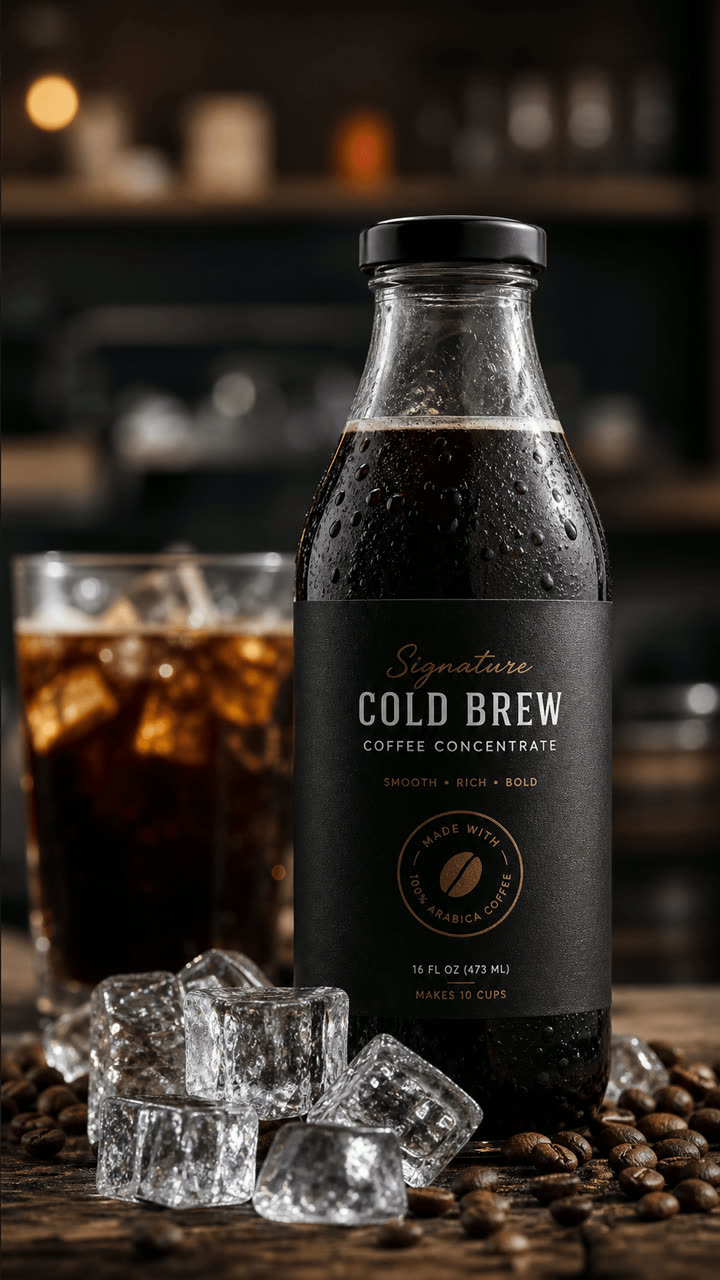
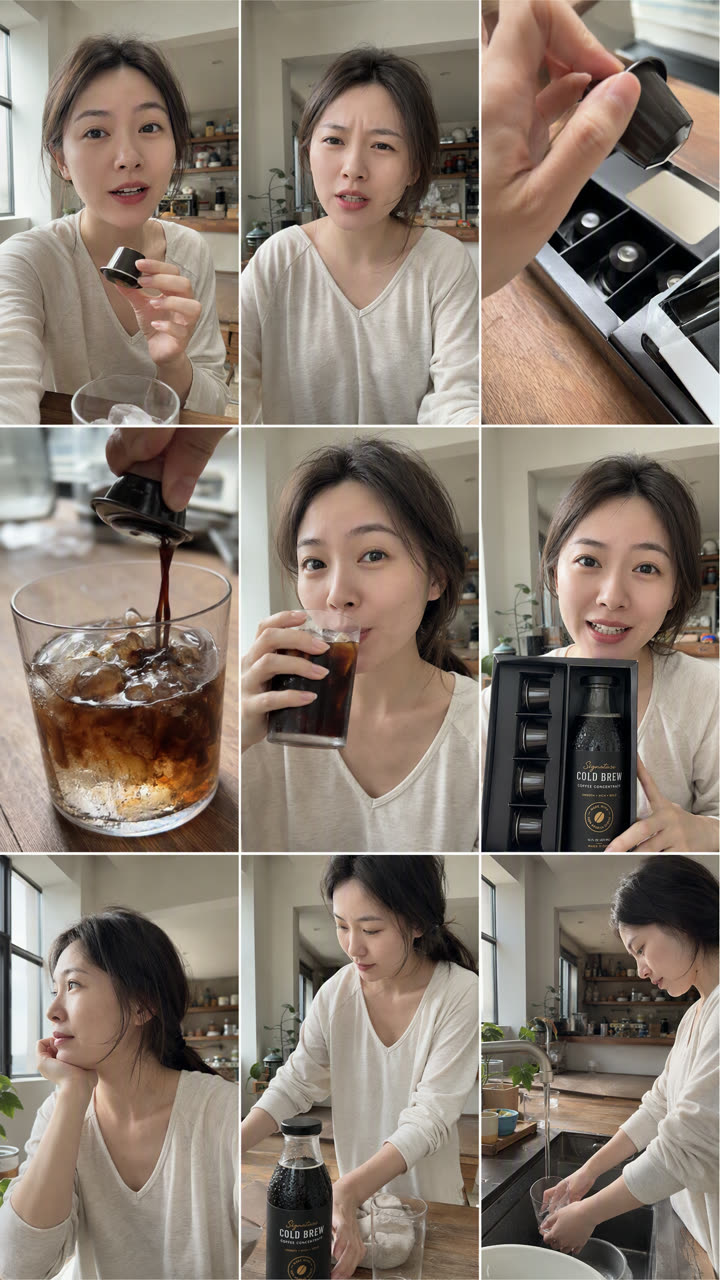
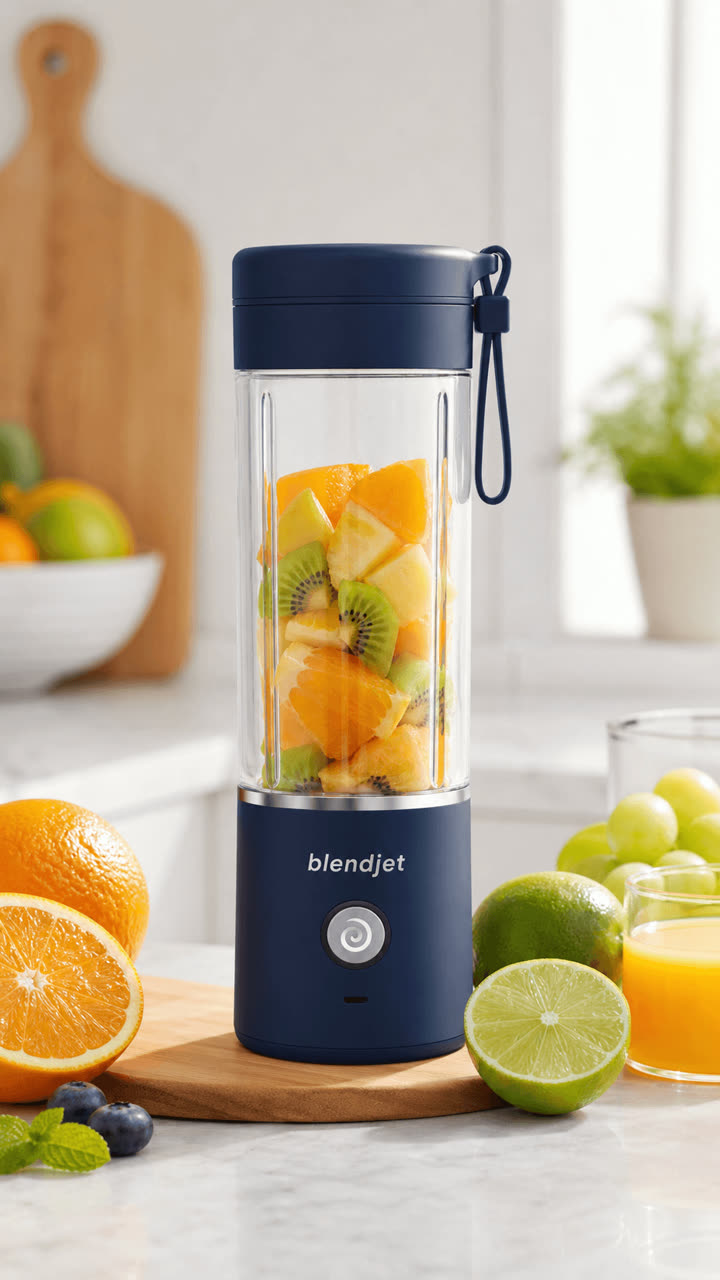
The input is just the product photo below plus a one-sentence request. Script, storyboard, visuals and voice are all generated by ClipForge: the judge panel tears up the "hi everyone" draft lines → one storyboard-grid generation locks the person/scene/product → one-tap full film:
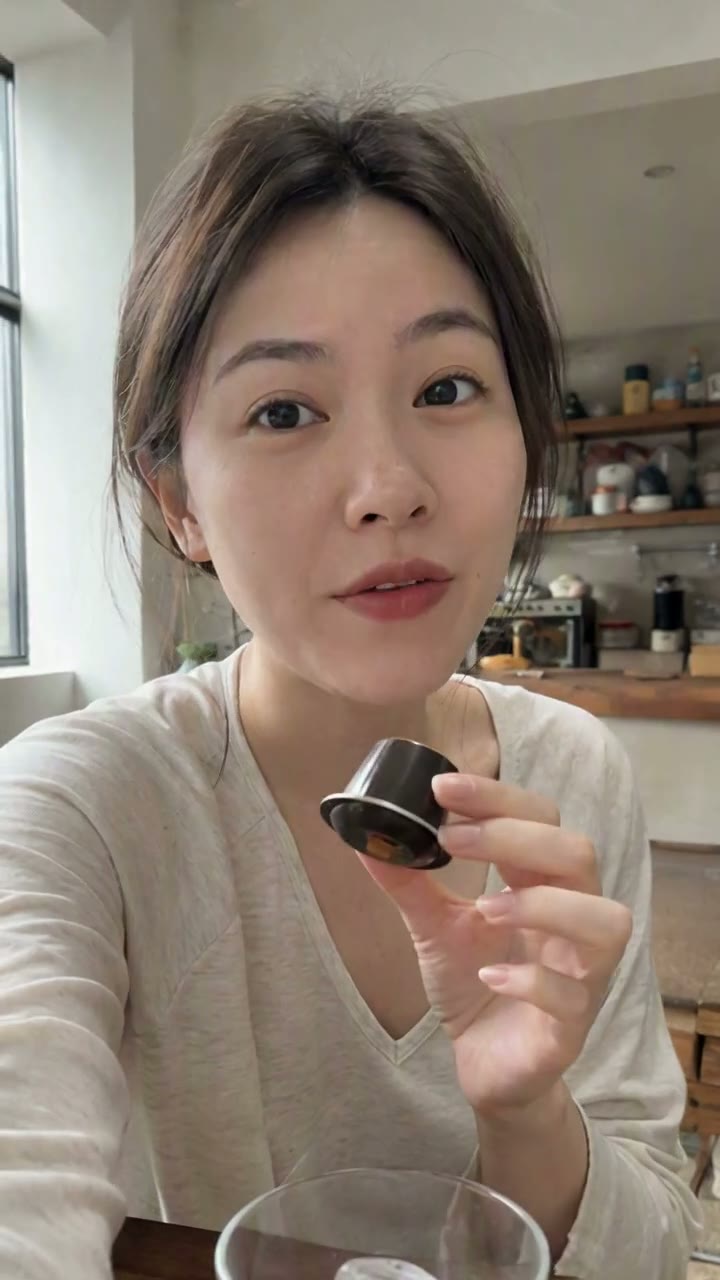
| ① Input: one product photo | ② Auto storyboard grid (one generation) | ③ Output: one-tap full film (4 cuts · own voice) |
|---|---|---|
 |
 |
 ▶️ Click to play (sound on) |
The lines aren't templated either — the judge panel rewrote the draft's "hi everyone, today I'm recommending…" into the film's "this thing saved my Starbucks budget" (Chinese VO); the film's 4 shots (talking hook → pour → sip → box reveal) are cut natively in a single generation, with the lines spoken verbatim in the character's own voice.
Two more outputs from the same pipeline (input → output):
|
→ | 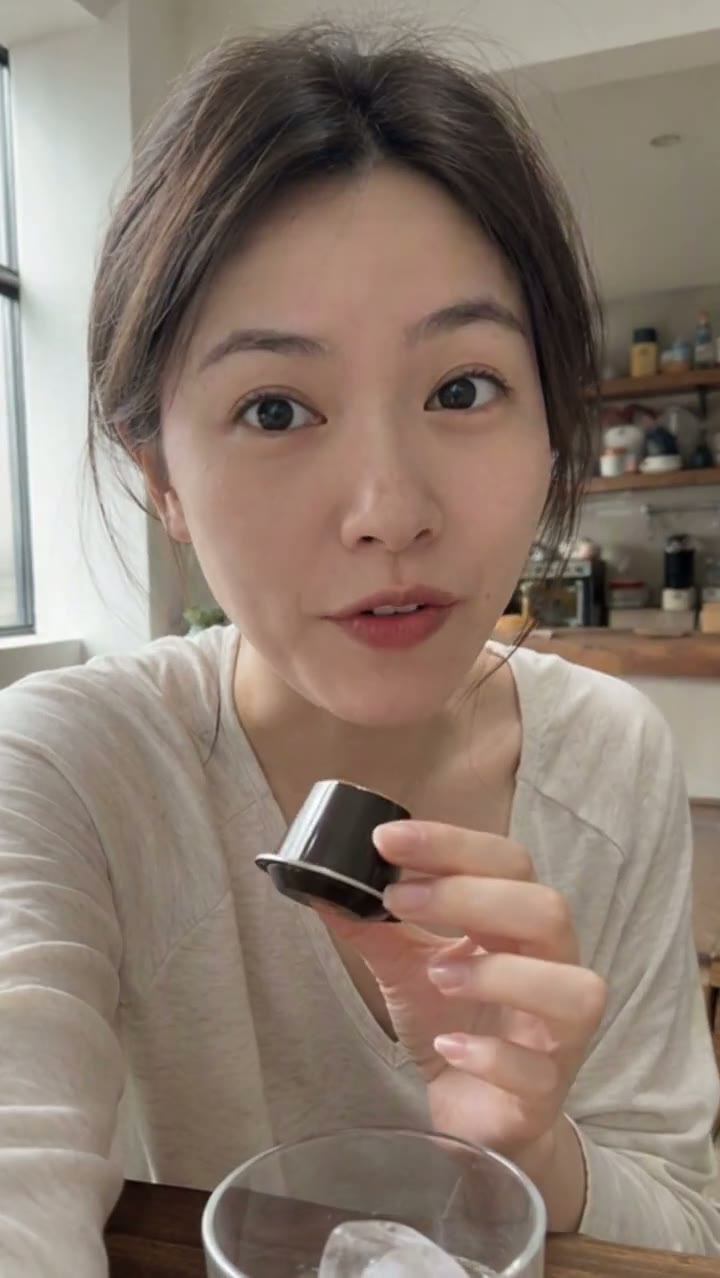 🎙️ Chinese talking-head, 12s |
 |
→ | 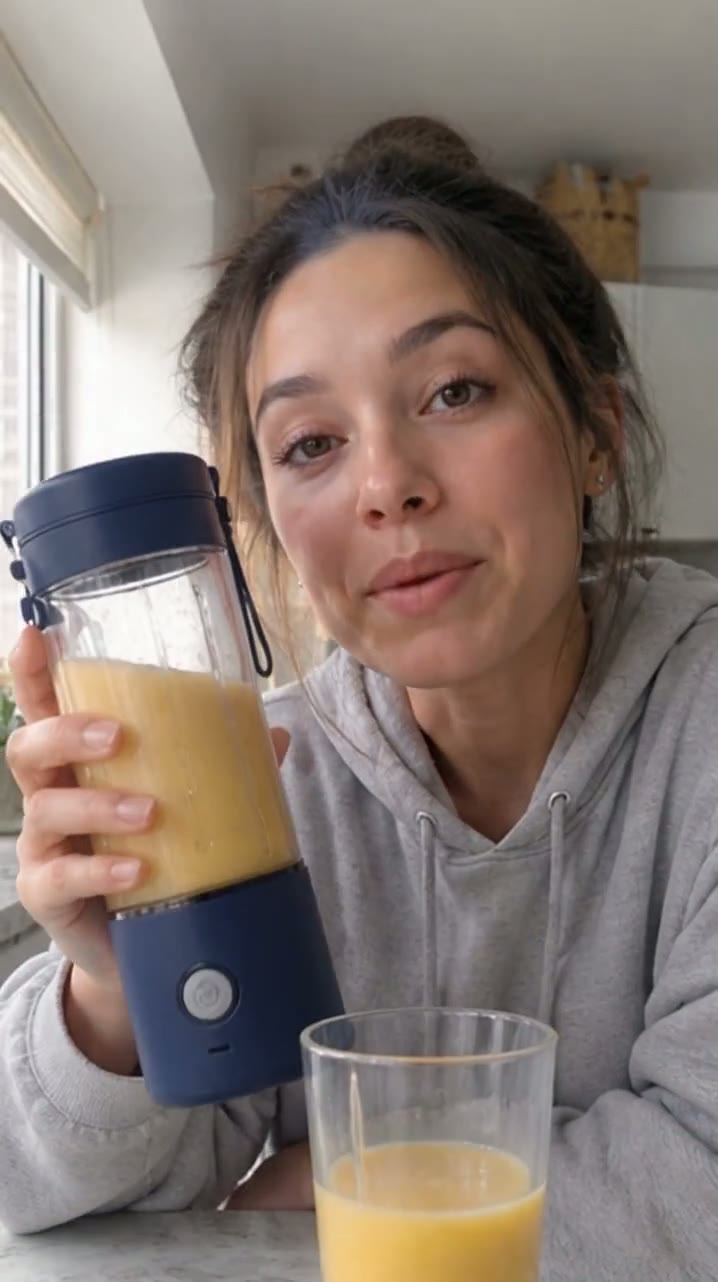 🌍 English UGC talking-head, 12s |
Voices, dialogue and lip-sync are native model output, untouched; they autoplay on the website.
🚀 Run it in 30 seconds
docker run -d -p 3000:3000 -v clipforge-data:/data ghcr.io/xixihhhh/clipforge
Open http://localhost:3000 — render your first video with no key at all (free stock + free voiceover). Local dev / desktop app / model setup: see Quick start.
🧑🎓 Not a developer? Don't start here — read the beginner tutorial: from downloading the desktop app to your first video, every click spelled out.
UI preview
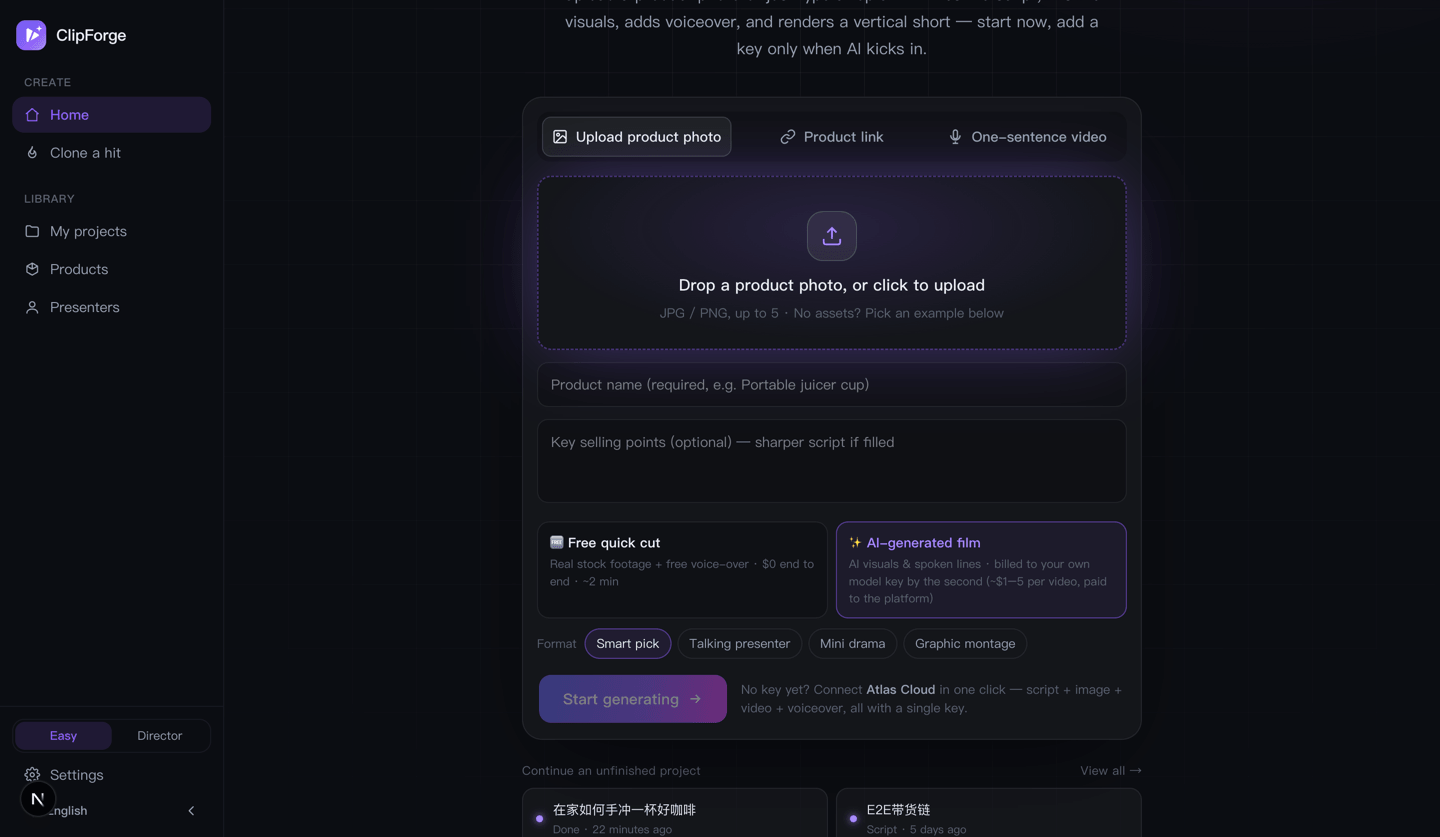
| Studio · free-vs-AI fork | Script gate · one paid click | Advanced form (Director) |
|---|---|---|
 |
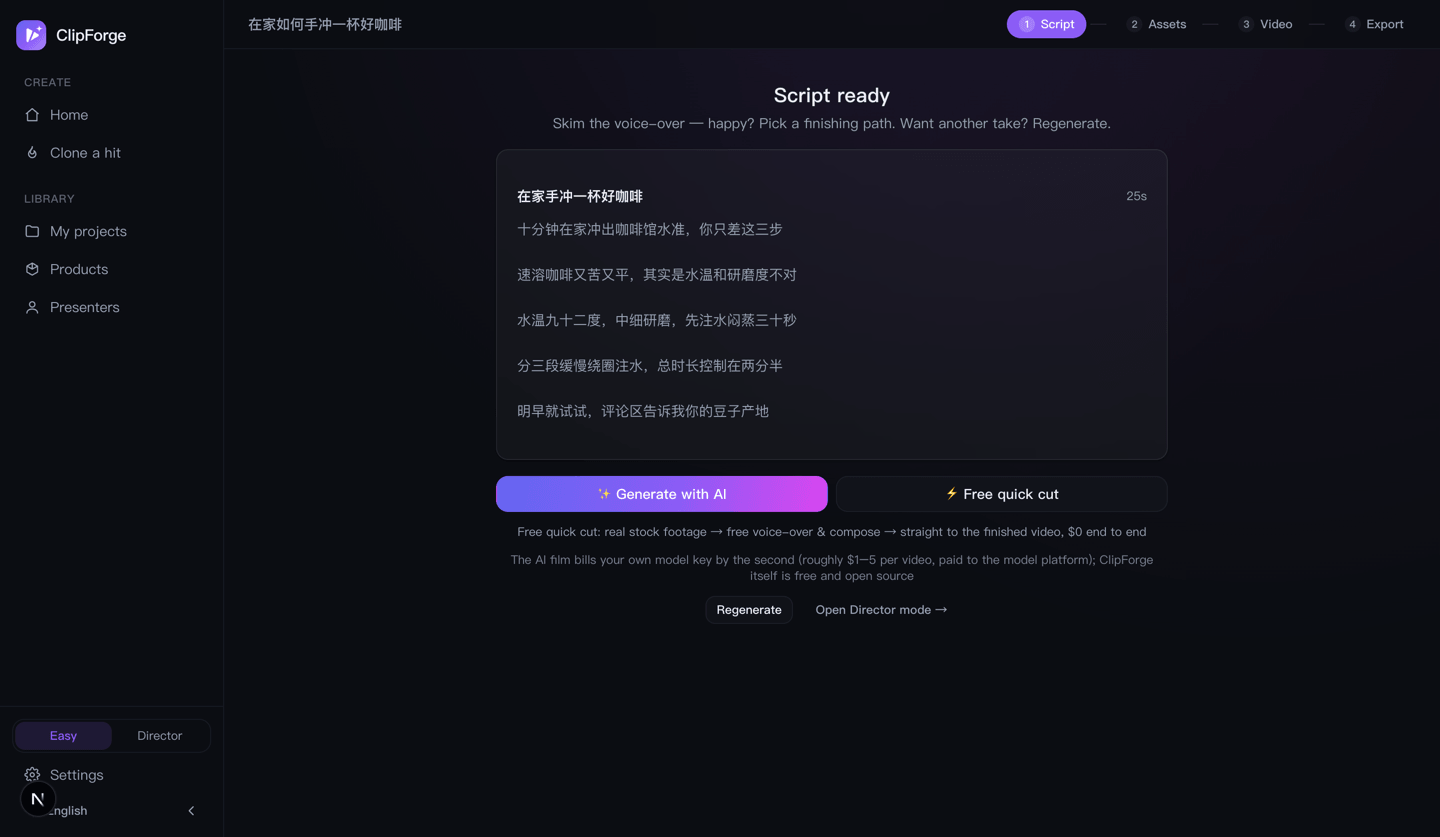 |
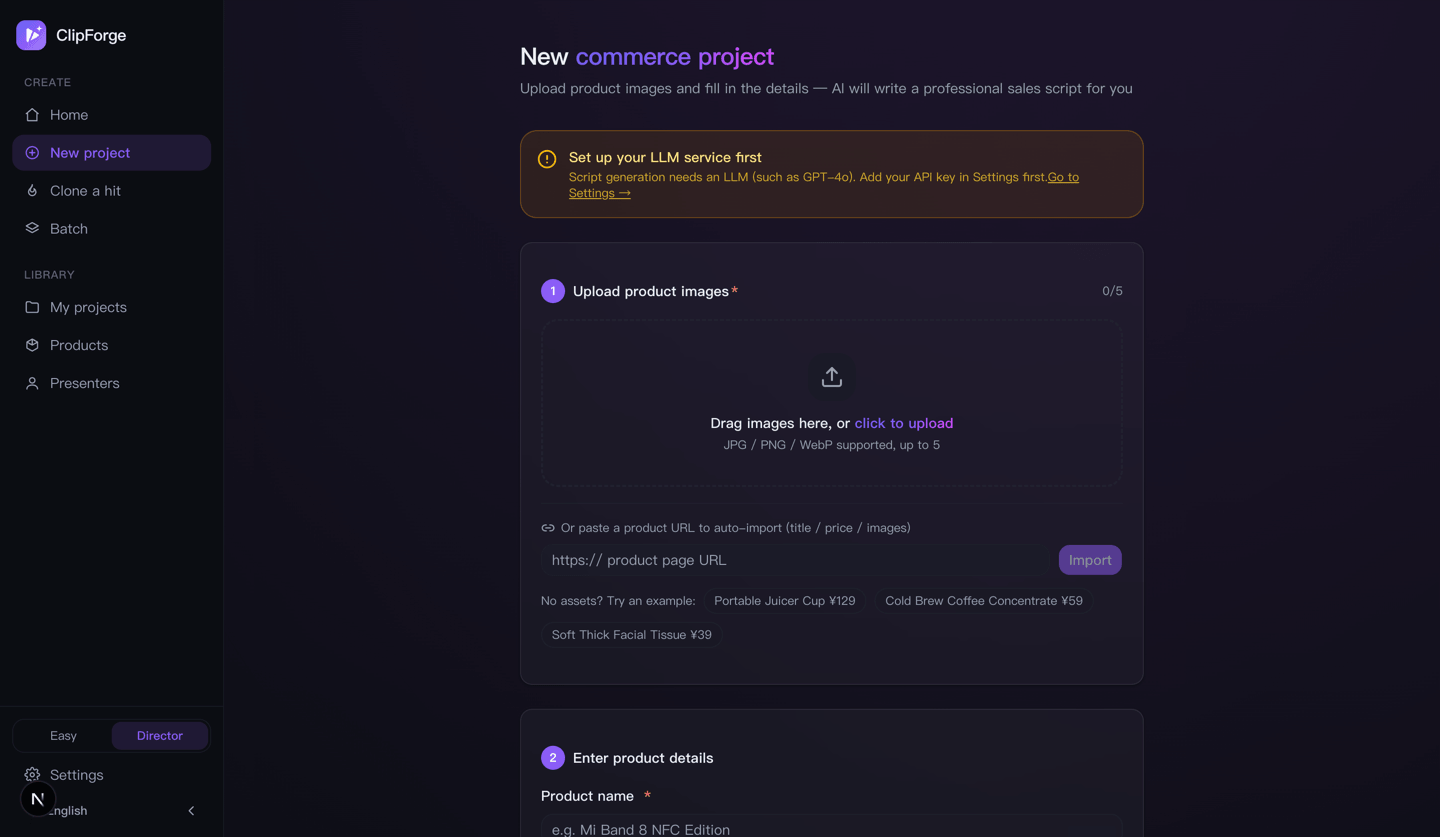 |
| Compose · voiceover/subtitles/BGM | Export · multi-platform | Batch production |
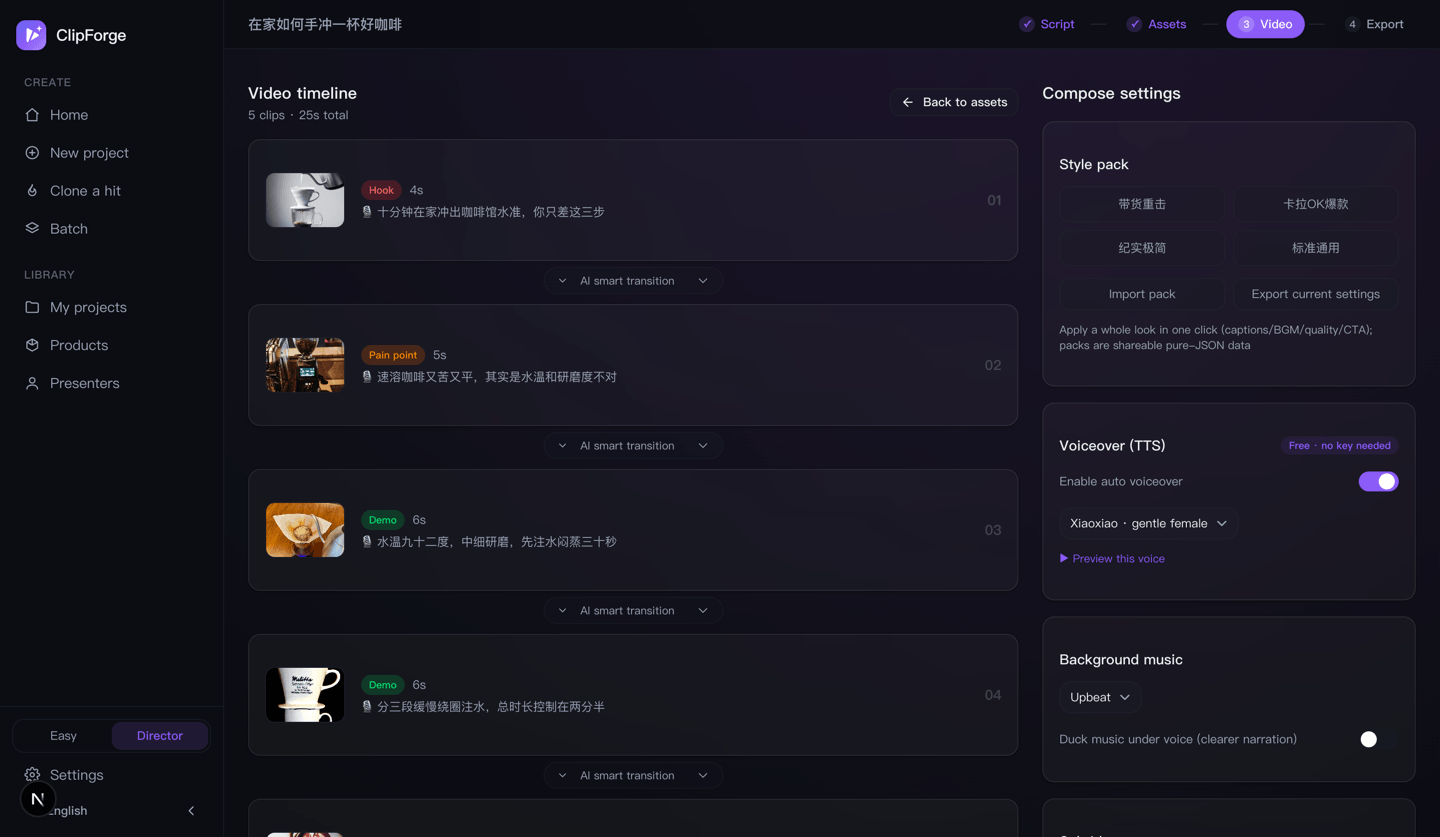 |
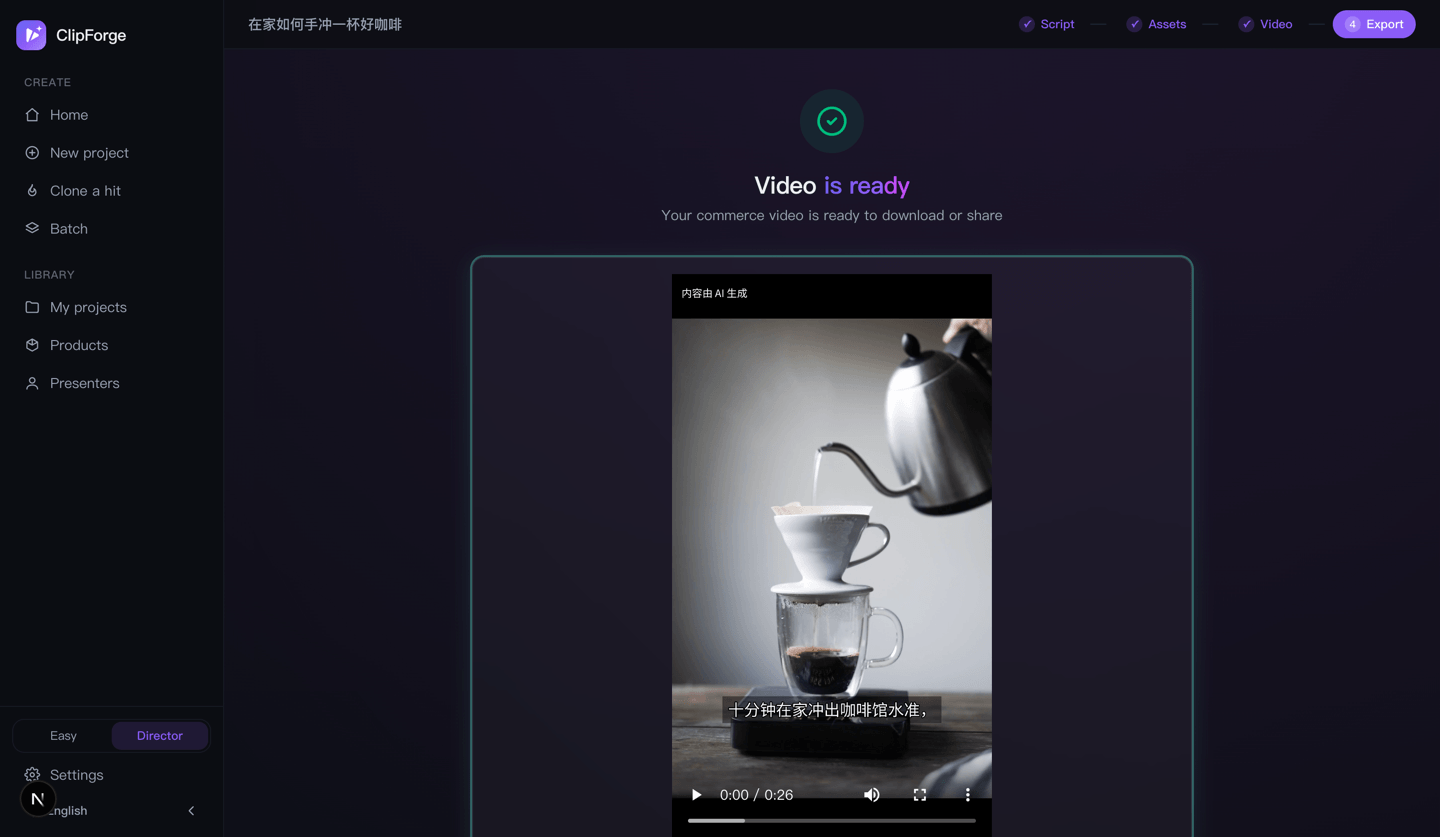 |
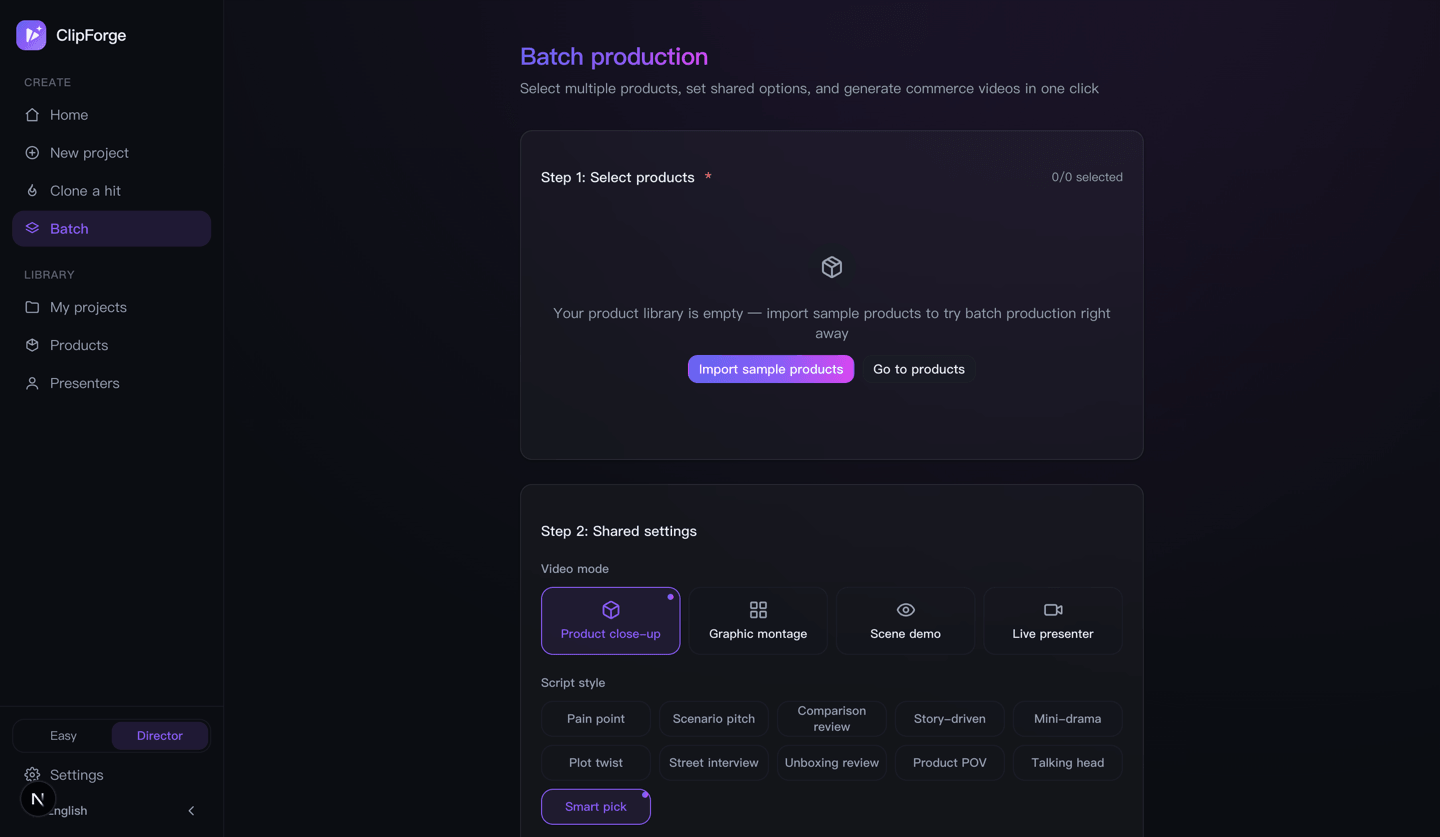 |
Top-left is the whole creation flow: photo / URL / topic → pick a path (🆓 free quick cut at $0 / ✨ AI film with the per-second price on the option) → pick a format → start. Step-by-step: beginner tutorial; condensed web version: User Guide.
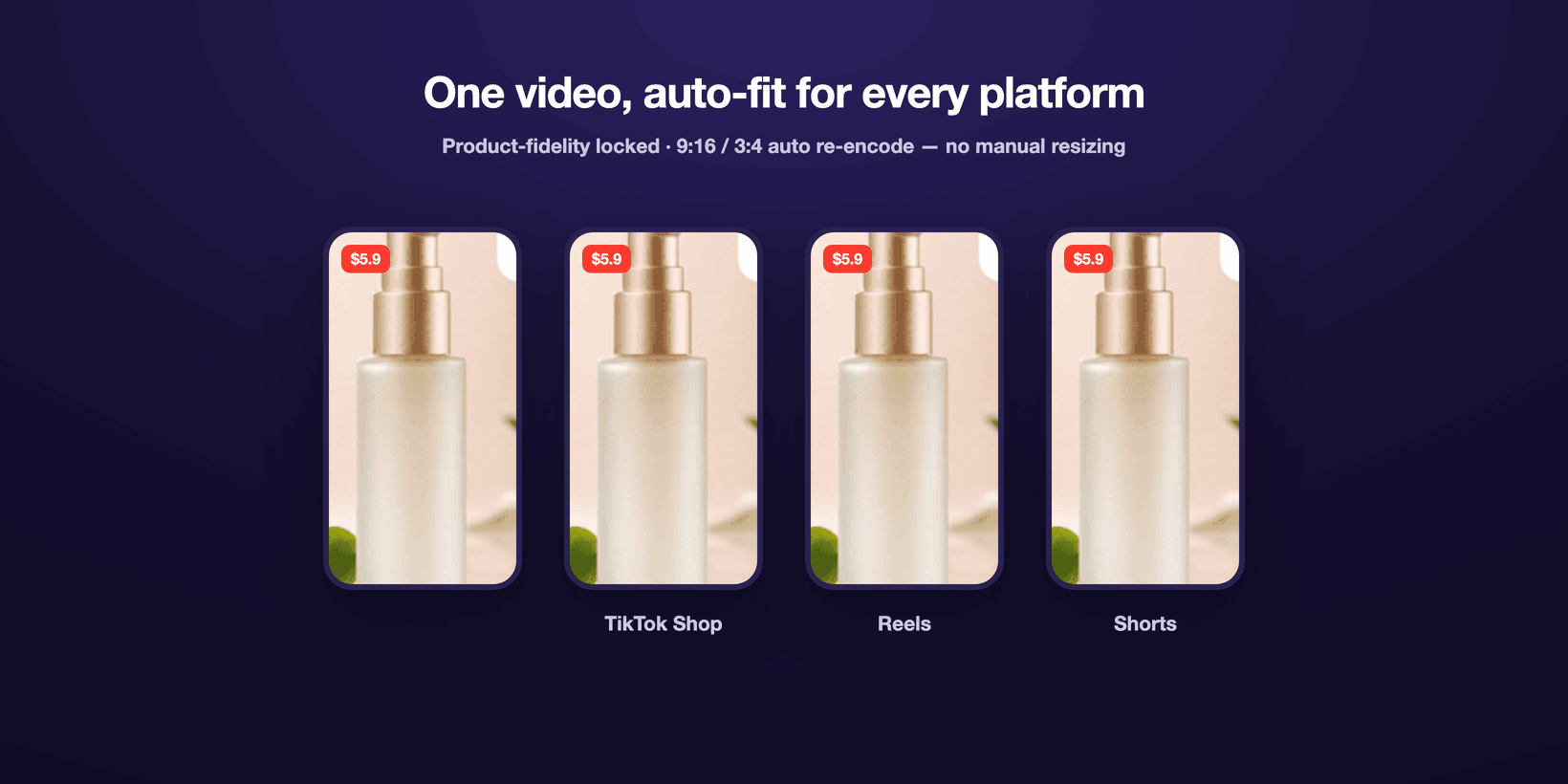
📚 Detailed docs below: Compliance · What it can do · Core features · Quick start · FAQ · Roadmap
✅ Compliance-first by default (ship to China without getting throttled)
Chinese platforms (Douyin / Kuaishou / Xiaohongshu) silently throttle unlabeled AI content and suppress ad-law banned terms. ClipForge makes compliance on by default, zero config — it ships compliant, you don't patch it afterward:
- AIGC labeling (explicit + implicit, aligned with China's GB 45438-2025): every render burns a default-on "内容由 AI 生成" opening badge (top-left, >=2s — Douyin's 2026-07 rules require it, and AI voice-over alone triggers the requirement; opt-out is flagged by the release gate) plus auto-written implicit file metadata (generation/synthesis tags, service provider, content ID), and the export page provides a copy-ready "AI-generated" declaration line — dodging the throttle platforms apply to unlabeled AI content.
- Pre-publish self-check: ad-law risk terms / opening hook / duration sweet-spot / subtitle readability / call-to-action / e-commerce 3-act structure / AIGC-label status, each flagged ✓⚠✗ with a concrete fix (no fake score) — spot throttling risk before you render.
- Ad-law banned-term scan: absolute-superlative wording (Ad Law art. 9, incl. price absolutes like "lowest price ever") / medical or false-efficacy claims / claims needing certification / false urgency ("last day", "price goes up tomorrow") are highlighted instantly with compliant rewrite hints — never overstate.
- In-video QR off-site-diversion gate: since 2026-07 Douyin treats any in-video QR as off-site diversion (1st offense: shop window closed 7 days; 2nd: commerce rights permanently revoked) — the scan-to-buy end-card refuses
platform=douyinby default (forceoverrides, private-channel distribution only), warns on other Chinese platforms, and passes clean for TikTok / Reels / Shorts. - AI-commerce policy guardrail 🆕 (warn-only, nothing removed): the publish gate raises three Douyin-2026-07 risk warnings — ① comparison/unboxing review styles are exactly the "AI-generated review content" form Douyin forbids (styles stay fully available; prefer talking-head/drama for Douyin) ② digital-human banned categories (medical / finance / beauty-efficacy / health-efficacy / education-outcome) flagged from product text ③ AI-character "personally tested" claims edge into the fabricated-usage-results red line, with recommendation-style rewrites suggested. All warn-level for human review — no style or feature is restricted.
- AI + real-footage mix metering 🆕: Douyin's recommendation weighting favors AI+real hybrid content (≥50% real footage earns a traffic tilt) — the assets page shows a live duration-weighted real/AI ratio bar plus per-shot "real / AI" chips, and the publish gate reports threshold status with add-real-footage advice; product photos / uploads / free real-shot stock all count as real. Informative only — labeled pure-AI publishing is unaffected.
- Product-fidelity: image-to-image locks the product itself — you can swap background / lighting without altering the product, which is both the conversion linchpin and a guard against "not-as-advertised" compliance/returns risk.
When going overseas to TikTok / Reels / Shorts, scripts also carry the platform compliance reminder to "label AI-generated content and avoid exaggerated / unproven efficacy claims."
🎬 Two ways to use it (commerce-first, but any subject works)
- 🛍️ Product commerce video (main use case): upload a product photo, or just paste a product URL (it auto-extracts title/price/images) → AI extracts selling points and writes several sales scripts → your original product appears with fidelity + free stock B-roll → free voiceover + subtitles + BGM → one-click export in TikTok Shop / Reels / Shorts / Douyin / Kuaishou / Xiaohongshu specs.
- 🗣️ One-sentence topic video: works even when you're not selling — type a one-line topic, AI writes the narration → free stock auto-fills the visuals (incl. key-free real footage) → free voiceover → renders a vertical short.
- ✅ Compliance + conversion switches: AIGC metadata labeling + pre-publish self-check + ad-law banned-term scan, all on by default (see Compliance-first by default above), plus an end-card "tap the cart below" CTA — so you ship without violations and viewers buy on finish.
- 🛒 Product-card overlay (cart feel): optionally overlay a product card in the lower-left — thumbnail + name + a yellow "tap below to buy →" prompt, shown for the first few seconds to reinforce conversion.
- 📋 Copy-and-post pack: the export page generates catchy titles + #hashtags + caption copy in one click; even without an AI key, a key-free template version outputs per category/platform — just copy and post.
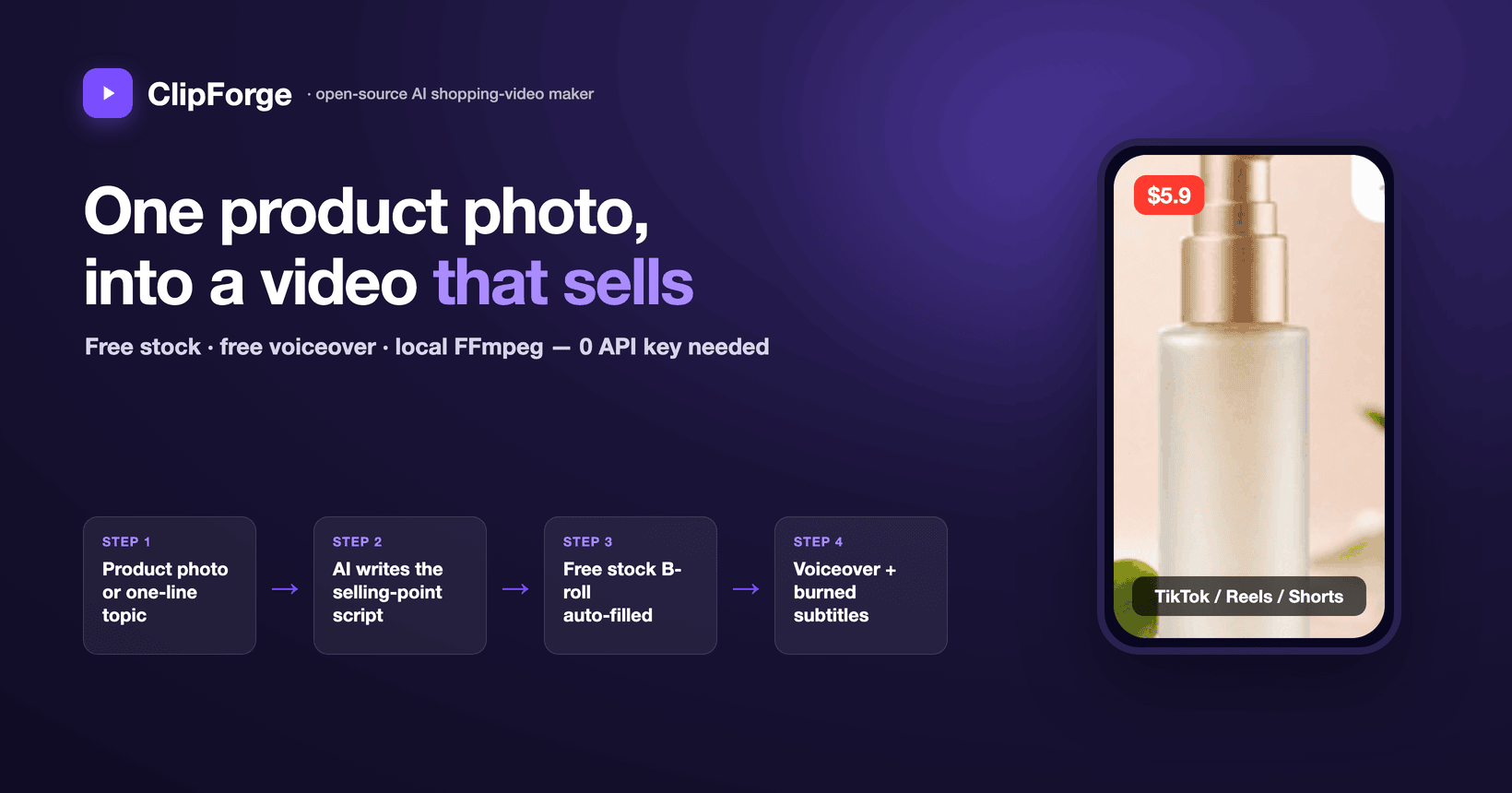
💡 In practice: one product photo → a video in 30 seconds
Using the sample "Soft Thick Facial Tissue":
- Upload & name — upload the product photo, fill in the name, pick platforms (TikTok / Reels / Shorts / Douyin).
- AI writes the script (~30s) — outputs 3 sales scripts (pain-point / scenario / comparison) with golden-3-seconds hooks, hashtags, cover copy, and engagement prompts.
- Fill the visuals — your product appears with fidelity + the free stock library auto-fills lifestyle B-roll (no AI key burned).
- Auto-render — auto voiceover + burned subtitles + price tag + background music, composited for real by FFmpeg.
- One-click export — toggle 9:16 / 3:4, post to your shop, and start selling.
The whole thing is fully automated, watermark-free; before a big sale you can pick 10 products to batch-render, apply viral templates, and A/B multiple cuts.
Keywords: AI shopping video · short-video ad maker · e-commerce short video · product-to-video · faceless UGC ads · TikTok Shop / Reels / Shorts / Douyin / Kuaishou / Xiaohongshu · AI selling-point extraction · batch rendering · viral remix · product video generator · AI voiceover · open-source self-hosted · MCP · GPT Image 2 / Seedance 2.5
🆚 Making a shopping video: traditional outsourcing vs ClipForge
| Pain point | Traditional way | ClipForge |
|---|---|---|
| Scriptwriting | Director writes for 1–2 hours | AI generates 3 scripts in 30s |
| Asset creation | Shoot + retouch, 1–3 days | AI image/video, render in minutes |
| Video editing | Editor, 2–4 hours | Auto compositing + transitions + subtitles + voiceover |
| Multi-platform | Manually adjust ratio/subtitles | One-click export TikTok / Reels / Shorts / Douyin |
| Batch output | 3–5 videos a day at most | Pick 10 products, batch in one click |
| Cost | Director + shoot + edit, thousands per video | API cost, cents to a few dollars per video |
💡 The free path (free stock + free voiceover + local compositing) costs $0; you're only billed (a few dollars per video) when you opt into paid AI image/video models.
And against similar tools?
| What you care about | ClipForge | Traditional OSS stitchers | Commercial AI video SaaS | Manual-first editors |
|---|---|---|---|---|
| Product fidelity (your real product, undistorted) | ✅ image-to-image lock | ❌ keyword-matched stock, product never appears | ⚠️ partial, model-dependent | ➖ paste it manually |
| Moving-shot quality | ✅ i2v + seamless chained transitions + adjustable/redo-able camera | ❌ stills / stock clips stitched | ✅ mostly i2v | ➖ depends on your footage |
| Mini-drama + multi-voice cast | ✅ ten styles, a free voice per character | ❌ single narrator | ⚠️ mostly avatar talking-heads | ❌ all manual |
| China-platform compliance (AIGC label / ad-law scan / publish gate) | ✅ on by default | ❌ | ❌ (mostly overseas-focused) | ⚠️ partial labeling |
| Full video at $0 | ✅ key-free stock + voiceover | ✅ free paths exist | ❌ per-video / subscription | ⚠️ free base, paid pro |
| No watermark + data stays local | ✅ open-source, self-hosted | ✅ | ❌ cloud upload, watermarked free tier | ❌ cloud processing |
| Agents / automation (MCP · CLI · batch) | ✅ MCP + CLI + Skill + batch | ⚠️ some have APIs | ⚠️ some have APIs | ❌ |
Based on public materials as of 2026-07; features evolve with each product's releases. ClipForge is unaffiliated with all of the above — comparison for evaluation only.
❓ FAQ
What is ClipForge? ClipForge (formerly 带货剪手 / daihuo-jianshou) is an open-source, free AI shopping-video tool: upload one product photo and AI extracts selling points, writes a sales script, keeps your product undistorted, fills visuals + voiceover + subtitles, and outputs a TikTok Shop / Reels / Shorts / Douyin / Kuaishou / Xiaohongshu video in one click; it also does "one-sentence topic → video" for any non-commerce subject.
Is it really free? Do I need an API key? The free path is 0-key: assets from free commercial-use CC libraries (Openverse images + Wikimedia real footage), voiceover from free Microsoft Edge TTS, compositing from local FFmpeg. You only need a key for the platform you choose when you want paid AI image/video models.
Can it make commerce / e-commerce shorts? Yes. Upload a product photo and AI analyzes selling points, writes multiple sales scripts, keeps the product undistorted, and exports TikTok Shop / Reels / Shorts / Douyin / Kuaishou / Xiaohongshu specs in one click.
Is there a watermark? Can I use it commercially? No watermark. Self-hosted + open-source (AGPL-3.0); output is clean and commercially usable (third-party assets follow their own licenses; exports can include attribution credits).
How is it different from CapCut / commercial AI video SaaS? ClipForge is open-source, runs locally, no watermark, zero-cost on the free path, and your data never leaves your machine; commercial SaaS usually charges per video, watermarks output, and requires uploading assets to the cloud.
I've never used anything like this — is there a hand-holding guide? Yes: TUTORIAL.en.md (中文) — three install options, three ways to add a key, your first free video in 3 minutes, what the AI path costs before you spend, Director mode page by page, a troubleshooting table, and where your data lives.
Can I use it if I can't write scripts or edit? Yes. The whole flow is automatic — AI writes the script, fills visuals, adds voiceover, burns subtitles, adds transitions. No on-camera presence, no shooting, no editing.
Which platforms and languages are supported? One-click fit for TikTok / Reels / Shorts (9:16) / Douyin / Kuaishou / Xiaohongshu (3:4); the UI and docs support 中文 / English, auto-switching by system language.
Can an AI assistant (Claude / Cursor) generate videos directly?
Yes. ClipForge ships an MCP Server (clipforge_product_script turns a product link straight into a sales script — see mcp/README.md) plus an agent Skill (skills/clipforge-video) that teaches an assistant the whole pipeline. Install any way you like: npx skills add xixihhhh/clipforge; or /plugin marketplace add xixihhhh/clipforge in Claude Code for skill + MCP in one; or paste the Setup prompt from skills/README to your agent and it installs itself.
Core features
1. AI sales-script generation
- 5 deep category templates: beauty & skincare / food & snacks / home & daily / fashion & apparel / digital & 3C
- 10 script styles (four forms): drama (mini-drama / plot twist / street interview / storyline) · product (unboxing / product POV / comparison) · talking-head (persona pitch / pain-point) · scene (scenario); dialogue styles auto-cast characters with distinct free voices
- Built-in ordinary-person presenters + real-face constraint: six presenter presets (girl-next-door / commuter / tech bro / honest uncle…) whose looks bake in real-skin, subtly-asymmetric ordinary features; any shot with a cast character automatically appends an anti-influencer-face realism constraint to image and i2v prompts — the demo videos on the website are raw output of this mechanism
- Golden-3-seconds library: visual shock / suspense question / sharp contrast / benefit promise / emotional resonance
- Platform SEO: auto-generates hashtags, cover copy, engagement prompts tuned to TikTok / Reels / Shorts / Douyin / Kuaishou / Xiaohongshu algorithms
- Precise targeting: set the target audience, price range, and platforms — the script matches automatically
2. AI asset generation (multi-model aggregation)
🎬 Image-to-video is the quality path: with a video model configured, each generated image is automatically turned into a real moving shot via image-to-video (the product photo is the first frame, so it stays faithful), replacing the "still + fake pan" look. The quality machinery is built in: a motion-prompt engine (script camera language + per-shot-type moves + product-fidelity and stability constraints — verified in real A/B calls: the unconstrained prompt grew a hand and pushed the product out of frame, the motion prompt kept it locked); keyframe chaining (each clip's last frame is pinned to the next shot's keyframe so transitions are generated inside the clip and hard cuts become seamless, with the composer speed-fitting moderately-long clips so chained endings survive); three camera-intensity tiers (soft / mid / bold, one click — the same keyframe can feel restrained or punchy); per-shot motion redo (keep the keyframe, re-run only the motion, never throw away the batch); a named camera-preset library (18 commerce-tuned named moves — crash push-in, slow orbit, turntable, macro glide, whip pan, dolly zoom… — pickable and editable per shot on the assets page, with per-shot-type recommendations, inline free-text editing, instant persistence into the script, and the same vocabulary injected into the script LLM so first drafts already read like camera direction; plus Mix two-preset overlays — compound paths like orbit + push-in in one click, with conflicting combinations auto-excluded, two moves max); a visual-look panel (8 lighting/palette presets — clean daylight, warm lifestyle, studio product, appetizing warm… — applied globally in one click, unifying keyframe lighting and pinning it through the i2v pass so it doesn't drift); and an i2v prompt-engineering pack (explicit single-take declaration against mid-clip cuts, an ambience-only sound line against gibberish speech, and a lint for self-contradictory camera directions). Toggle it off anytime; it falls back to the still on failure, and to the 0-cost keyless stitching path with no video model at all.
💰 Paid-task safety: every cloud video task is persisted with its provider task ID the moment it is accepted — a poll timeout, network drop, or restart can no longer lose a task you already paid for (the assets page offers "resume query", preventing duplicate billing); task-creating requests are never auto-retried; image-to-video requests are validated and mapped to a true i2v model, so "add motion" can never be billed as text-to-video; image sizes are auto-adapted to each model's protocol (exact aspect ratios), eliminating "invalid size but already billed" failures.
One interface aggregates 7 image/video platforms + OpenRouter LLMs and 30+ curated models, plus 200+ dynamically discovered video models on Atlas (the live model catalog is fetched at runtime and request params are derived from each model's published schema — every new model the platform ships appears in the picker without an app upgrade):
| Platform | Image models | Video models | Highlights |
|---|---|---|---|
| Atlas Cloud ⭐ recommended | GPT Image 2, Seedream 5.0, Nano Banana 2 | Seedance 2.5 (4-30s · native speech), Seedance 2.0, MiniMax H3 (Hailuo 3.0 · 2K · native stereo), Kling O3, Veo 3.1, Wan 2.7, Hailuo 2.3, Vidu Q3 + 200+ discovered live | One key for LLM + image + video; widest models, best price |
| fal.ai | GPT Image 2 (+edit), FLUX.1/2 Pro, Recraft V4, Seedream V5 Edit | Kling 3.0 Pro, Veo 3, Hailuo 2.3, Luma Ray 2, Vidu Q2 | Broad model set, incl. OpenAI image gen & product-fidelity edit |
| Replicate | FLUX 1.1 Pro/Kontext, Imagen 4, Seedream 4 | Kling v2.1, Seedance 1 Pro, Hailuo 02, Veo 3 Fast | Largest model library, unified predictions API |
| Volcengine (Ark) | Seedream 5.0/4.0 | Seedance 2.0/1.0 Pro (native audio) | ByteDance flagship models, cinematic quality, fast |
| Alibaba Bailian | Tongyi Wanxiang | Wanxiang 2.6/2.5/2.2/2.1 | Strong product image-to-video |
| SiliconFlow | Kolors, Qwen-Image | - | Cost-effective, China-made |
| OpenAI | gpt-image-2 (any resolution + image edit), gpt-image-1.5 | - | 2026 flagship image model, strong text rendering, native 9:16, product-fidelity edit |
LLM (script generation) uses the OpenAI-compatible protocol, with built-in presets for Atlas Cloud / OpenRouter (400+ models) / DeepSeek / Kimi / Zhipu / Doubao / OpenAI.
3. Multi-source free asset engine 🆕 (not just AI generation)
One English search term pulls video/image/music from multiple free commercial-use asset sites, auto-downloading, storing, and keeping compliance attribution — so you can fill every shot even without a product photo and without burning AI credits:
| Source | Key-free | Media | Notes |
|---|---|---|---|
| Openverse | ✅ | image / music / SFX | Maintained by WordPress, CC-licensed, zero-config (best for beginners) |
| Wikimedia Commons | ✅ | image / video / audio | CC/public-domain, the only key-free video source (takes ≤720p webm, transcoded) + free BGM source, direct-downloadable |
| Pixabay | free key | video / image | Main real-footage B-roll supplement |
| Pexels | free key | video / image | High-quality, commercial-use |
| Coverr 🆕 | free key | video | Curated real footage with less "stocky" feel (2000 req/h); attribution flows into the credits manifest automatically |
| Jamendo 🆕 | free key | music BGM | Huge CC music library, hard-filtered to pure CC-BY (NC/ND/SA all excluded — syncing music into video is an adaptation, so this is the commerce-safe subset) |
| Freesound 🆕 | free key | SFX | 500k+ sound effects (unboxing rustles / clicks / ambience), hard-filtered to CC0/CC-BY, 128kbps HQ preview direct links |
| Local pool | ✅ | video / image | Upload your own B-roll; auto-fill prefers your footage first, free stock fills the gaps |
- Unified
/api/stock/search:sourcefor a single source orallfor aggregated search (prefers the requested media type, key-free sources, and portrait orientation) - Key-free real-footage B-roll via Wikimedia Commons — fill shots with motion video without any key (
footage:"auto"does "video first, image if missing" per shot) - Free background music: optionally add a CC track at compositing time (with a Jamendo key it searches a real music library by mood; key-free falls back to Wikimedia Commons audio), mixed under the narration and auto-ducked
- Stores the source page / author / license for compliance (CC sources come with ready attribution); exports can generate credits; English search terms recall better
- Always has a fallback: if a term returns nothing, it retries with broader fallback terms, so even niche topics never leave a shot blank
- Per-shot auto-fill
/api/project/[id]/stock-fill: after each shot produces an English search term, it pulls visuals from the free libraries shot by shot. The assets page has a one-click "Auto-fill visuals (free stock)": always available for topic videos; for commerce projects it also fills B-roll (hooks, social proof) when no image model is configured, and automatically skips product-image shots (protecting product fidelity) — so even users without an AI key can ship. - Plus NASA imagery / Internet Archive — two key-free public-domain archive sources (documentary/science topics, opt-in, excluded from default aggregation)
- Great API-less free sites (Mixkit / Videezy / Mazwai etc.) work via the "manual download → local pool" route: drop files into the project pool and they join auto-fill (verify each site's license per clip)
3b. One-sentence topic video 🆕 (no product, zero barrier)
You don't need to be selling: type a one-line topic (e.g. "how to brew a pour-over coffee at home") on the home page and it runs end-to-end:
- Write the script
/api/topic/script: a de-commercialized narration engine, 5 styles (knowledge / emotional story / lifestyle / motivational / travel scenery), each shot producing an English search term - Auto-fill visuals
/api/project/[id]/stock-fill: pulls visuals shot-by-shot from the free libraries (Openverse, key-free), with the "always has a fallback." The assets page offers one-click "Auto-fill visuals (free stock)" — no image key needed to give every shot real footage - Composite
/api/project/[id]/compose: FFmpeg adds motion + burned subtitles + free AI voiceover (Microsoft Edge keyless TTS, no key) into a vertical short with sound
New projects are tagged contentType=topic and share the second half of the commerce pipeline; truly "type one sentence → get a video."
4. Four video modes
| Mode | Best for | Strategy | Realism |
|---|---|---|---|
| Product close-up | High-ticket items | Product image + motion FX, no AI face anywhere | Highest |
| Image montage | FMCG / daily goods | Fast-paced product images + text cards + transitions | High |
| Scene demo | Skincare / kitchen / fitness | AI-generated usage scenes (hands/back, avoiding fake faces) | Mid-high |
| On-camera presenter | IP accounts | Character system + user-uploaded real footage | Depends on footage |
5. Video compositing engine
- Professional FFmpeg pipeline: H.264 High Profile, faststart, 256k AAC — real output
- Burned subtitles: auto-detects a CJK font (a full CJK subtitle font is bundled so zh/ja/ko render consistently on every OS); two viral subtitle styles — ① rapid short-card flashes (cards break at punctuation into natural phrases — never mid-word; punctuation-pause-weighted timing follows the voice; only punctuation-free lines fall back to even char/word splits); ② karaoke per-character highlight (sentence stays on screen, each character lights up as the voiceover "sings" past it, libass-rendered, aligned to TTS timing with no ASR). CJK by character, English by word — built for "80% watch on mute" retention
- Caption style presets: four one-click looks — Standard boxed (white on a translucent box) / Bold punch (big type, heavy outline, no box — the high-retention creator look) / Minimal (small, thin stroke, clean documentary feel) / Karaoke; selectable everywhere (video page, CLI
--caption, MCPcaptionPreset), guarded by a pixel-level real-render regression test - Style packs: apply a whole finished-video look in one click (caption preset / BGM mood / ducking / quality / CTA / product card) — 4 built-in packs (Commerce Punch / Karaoke Viral / Clean Documentary / Standard) plus import/export of JSON pack files for team sharing; packs are purely declarative data (whitelist-validated, nothing executable) — the novice-safe way to "install an external skill"
- Contact sheet: the whole finished video condensed into one PNG — an evenly-sampled filmstrip plus the audio waveform — so black frames, caption collisions, audio spikes and dead-air endings show at a glance; agents can call it via MCP and look at the image to self-check a render before delivering (export page / CLI
clipforge sheet/ MCPclipforge_contact_sheet) - Smart transitions: AI first/last-frame (Seedance 2.0 / Vidu) / AI reference (Kling) / crossfade / hard cut
- Ken Burns motion: slow push / pan / depth drift — makes a static product image feel alive without altering the product
- Dual voiceover: paid OpenAI-compatible TTS (more controllable), or free Edge keyless TTS (no key, multilingual voices with preview) as a zero-config fallback, generating per-shot narration and aligning subtitles to its timing; narration is never cut mid-sentence — text-based duration estimate backs up a failed probe, a natural breathing gap sits between segments, and fades only ever consume tail silence
- Mixed-source normalization: unifies pixel format / SAR / frame rate across sources so xfade/concat don't fail on mismatches
- Smart audio: audio-capable models output narrated video directly; BGM is auto-mixed and ducked
- Optional motion elements (opt-in): remotion/ renders animated title cards / per-character kinetic captions — the smooth motion FFmpeg can't do; not part of the base install (
npm run render:element)
6. E-commerce efficiency tools
| Feature | Notes |
|---|---|
| Product library | Enter product info once, generate many video styles repeatedly |
| Batch rendering | Before a big sale, pick multiple products and batch-render everything in one click — script → visuals → compositing runs fully automatically (0-key on the free path), built for 2026's "mass variants + A/B" playbook |
| Viral templates | Save data-proven scripts as templates, apply to new products in one click |
| Viral remix | Paste a competitor's viral video link, AI extracts the script logic, re-shoot with your product |
| Brand settings | Logo watermark / brand color / consistent end-card across all videos |
| Character management | Reuse on-camera characters across projects, AI keeps appearance consistent |
| Multi-platform export | One video auto-fits TikTok / Reels / Shorts (9:16) / Douyin / Kuaishou / Xiaohongshu (3:4) |
| A/B variants | The export page re-renders the same video into different subtitle styles + BGM variants (karaoke/short-card × upbeat/energetic) and downloads each, so you can test which converts (all key-free) |
7. Platform SEO
Scripts auto-adapt to platform algorithms; every video outputs a full SEO pack:
{
  "title": "Video title (with core keyword)",
  "hashtags": ["#hashtag1", "#hashtag2", "#hashtag3"],
  "coverText": "Bold cover text",
  "interactionGuide": "Tell me in the comments — worth it or not?",
  "description": "Video description (with keywords)"
}
- TikTok / Douyin: strong hook in the first 3s, an info high-point every 5s, price anchor, cart prompt
- Kuaishou: down-to-earth scenes, value-for-money core, casual community tone
- Xiaohongshu (RED): polished tutorial feel, "save first" prompt, keyword-optimized titles
Quick start
🐳 Self-host with Docker (fastest — no Node / FFmpeg needed)
docker run -d -p 3000:3000 -v clipforge-data:/data ghcr.io/xixihhhh/clipforge
# Open http://localhost:3000 — make videos keyless (free stock + Edge TTS)
The image bundles ffmpeg and the CJK subtitle font; your data (projects / product images / renders) persists in the clipforge-data volume. To enable AI image/video or paid TTS, open Settings and add the relevant provider key. Image: ghcr.io/xixihhhh/clipforge (see the repo Packages), auto-built and smoke-tested on every Release.
Local development
This project uses pnpm (declared in
packageManager). Don't usenpm install— pnpm's symlink layout makes npm error. No pnpm? Runcorepack enableornpm i -g pnpm.
# Clone
git clone https://github.com/xixihhhh/clipforge.git
cd clipforge

# Install (pnpm required)
pnpm install

# Start the dev server
pnpm dev

# Open the browser
open http://localhost:3000
Every push / PR runs
lint → test → buildvia GitHub Actions (see.github/workflows/ci.yml); it merges only when green.
First-time setup
- Click Settings (top-right) and configure at least one AI platform's API key (we recommend Atlas Cloud — one key for LLM + image + video)
- Configure the LLM (needed for script generation; any OpenAI-compatible endpoint works)
- In "Defaults," pick your default image / video models (e.g. GPT Image 2, Seedance 2.5)
- (Optional) Add a character under "On-camera" and brand visuals under "Brand"
- Back on the home page, click New project to start
Compositing needs local FFmpeg (install it yourself:
brew install ffmpeg/apt install ffmpeg).
Tech architecture
┌─────────────────────────────────────────────────┐
│  Frontend (Next.js 16 + React 19 + Tailwind 4)  │
│  Pages: Home/Topic/Products/Batch/New/Script/Assets/Compose/Export/Settings │
└──────────────────┬──────────────────────────────┘
                   │
┌──────────────────▼──────────────────────────────┐
│  API layer (Next.js Route Handlers)             │
│  /api/llm/script  /api/ai/image  /api/ai/video  │
└──────────────────┬──────────────────────────────┘
                   │
┌──────────────────▼──────────────────────────────┐
│  Business logic                                  │
│  Script engine (prompt + templates + SEO)        │
│  AI provider abstraction (7 platforms, 30+ models)│
│  Multi-source asset engine (Openverse/Pixabay/Pexels)│
│  Video compositing (FFmpeg + transitions + motion + mix)│
└──────────────────┬──────────────────────────────┘
                   │
┌──────────────────▼──────────────────────────────┐
│  Data layer                                      │
│  SQLite + Drizzle ORM / Zustand (frontend persist)│
└─────────────────────────────────────────────────┘
| Layer | Tech |
|---|---|
| Framework | Next.js 16 + React 19 |
| Language | TypeScript 5 (strict mode) |
| Styling | Tailwind CSS 4 + shadcn/ui |
| State | Zustand (localStorage persist) |
| Database | SQLite + Drizzle ORM (auto-migrates on start, runs even with no tables) |
| Compositing | FFmpeg (fluent-ffmpeg) |
| AI integration | OpenAI SDK (LLM) + 7-platform image/video providers |
| Asset engine | Multi-source licensed assets (Openverse key-free / Pixabay / Pexels), registry-style aggregated search |
| Testing | Vitest + Playwright (E2E) |
| CI/CD | GitHub Actions (lint + test + build) |
| Desktop packaging | Electron + electron-builder (Win/Mac; packaged app verified to launch with working DB routes) |
| Icons | react-icons (Lucide) |
Project structure
src/
├── app/                              # Page routes
│   ├── page.tsx                      # Home (project list + quick entries)
│   ├── products/                     # Product library
│   ├── batch/                        # Batch rendering
│   ├── settings/                     # Settings (AI platform / LLM / character / brand)
│   ├── project/
│   │   ├── new/                      # New project (form + video mode + character + template)
│   │   ├── clone/                    # Viral remix
│   │   └── [id]/
│   │       ├── script/               # Script editor (3 variants + save as template)
│   │       ├── assets/               # Asset generation (per-shot + batch)
│   │       ├── video/                # Compositing (transitions + voiceover + BGM + subtitles)
│   │       └── export/               # Export (multi-platform + A/B + download)
│   └── api/                          # API routes
│
├── lib/
│   ├── providers/                    # AI provider abstraction (7 platforms) + multi-source asset engine
│   ├── script-engine/                # Script engine (prompt + templates + SEO)
│   ├── video-composer/               # FFmpeg compositing engine
│   ├── paths.ts ffmpeg-path.ts       # Injectable paths (for Electron packaging)
│   ├── stores/                       # Zustand state
│   └── db/                           # SQLite + Drizzle (migrate on start)
│
├── electron/                         # Electron main process + packaging hooks
└── components/ui/                    # shadcn/ui component library
Supported AI models (confirmed against official docs, 2026.08)
Video generation
| Model | Platform | Audio | Mode | Notes |
|---|---|---|---|---|
| Seedance 2.5 ⭐ | Atlas Cloud | Native | T2V / I2V / ref / first-last | ByteDance flagship, native audio & speech, 4–30s, default for one-tap full film |
| Seedance 2.0 | Atlas Cloud | Native | T2V / I2V / ref / first-last | Native audio, 4–15s, up to 1440p |
| MiniMax H3 🆕 | Atlas Cloud | Native stereo | T2V / I2V / ref / first-last | Hailuo 3.0 omni-modal (launched 2026-07-31), 2K, 4–15s, mixed image/video/audio references |
| Kling O3 🆕 | Atlas Cloud | Native | T2V / I2V / ref / first-last | Kuaishou omni-modal MVL, multi-shot narrative, 3–15s |
| Veo 3.1 🆕 | Atlas Cloud / fal.ai | Native | T2V / I2V / first-last | Google flagship, 4/6/8s, up to 4K |
| Wan 2.7 🆕 | Atlas Cloud | Native | T2V / I2V / ref / first-last | Multi-shot narrative + AV sync, voice-clone references |
| Seedance 2.0 Mini 🆕 | Atlas Cloud | Native | T2V / I2V / ref / first-last | Lightweight & economical for high-volume output |
| Kling 3.0 Pro | fal.ai / Atlas Cloud | Native | T2V / I2V | Kling, multi-shot + face binding |
| Vidu Q3 Pro | Atlas Cloud | - | T2V / I2V / first-last | First/last-frame transitions (transition magic) |
| Hailuo 2.3 | Atlas Cloud / fal.ai | - | T2V / I2V | MiniMax, lifelike motion physics, 6/10s |
| Luma Ray 2 | fal.ai | - | T2V / I2V | Realistic motion & physics |
| Seedance 1.5 Pro | Volcengine / Atlas Cloud | - | T2V / I2V | ByteDance, cinematic quality |
| Wanxiang 2.6 | Alibaba Bailian | - | I2V | Strong product image-to-video |
The table above is the built-in curated set (with capability guards). With Atlas Cloud enabled, the settings page also dynamically discovers 200+ video models across the catalog (Youchuan, HappyHorse, Grok Imagine, Gemini Omni Flash… with per-request pricing shown), and request bodies are built from each model's published schema at submit time — new platform models need no app upgrade.
Image generation
| Model | Platform | Notes |
|---|---|---|
| GPT Image 2 ⭐ | Atlas Cloud | OpenAI's latest, any resolution, great product texture, natural-language edits (background/lighting/text) |
| Nano Banana 2 | Atlas Cloud | Google, strong-consistency image editing |
| FLUX.2 Pro | fal.ai | Latest-gen high-quality generation |
| Recraft V4 Pro | fal.ai | Strong design styling |
| Seedream 5.0 Lite | Volcengine / Atlas Cloud | ByteDance, CJK-optimized, edit to relight while locking the subject |
| Wanxiang | Alibaba Bailian | Product-scene friendly |
T2V = text-to-video, I2V = image-to-video. Audio-capable models output narrated video directly; others output silent. For commerce, prefer edit-class models (GPT Image 2 / Seedream edit) to relight the product background while locking the subject from being altered.
Development
# Run tests
pnpm test

# Lint
pnpm lint

# DB migration (after editing the schema)
pnpm drizzle-kit generate

# Production build (incl. .next/standalone, for Electron packaging)
pnpm build

# Package the desktop app (mac; first run lets pnpm fetch electron/ffmpeg binaries)
pnpm pack:dir   # unpacked .app to release/ (fast, layout check)
pnpm dist       # .dmg installer
Use cases
- E-commerce sellers: Taobao / Pinduoduo / TikTok Shop / Douyin shops — quickly batch-produce product promo videos
- Short-video operators: MCN agencies, creator studios — boost content output efficiency
- Brands: fast multi-platform launch assets for new products
- Indie developers: build an AI video SaaS on top of this project
Roadmap
Per-version history lives in GitHub Releases; usage details for each capability are in Core features above.
Done
- ✅ Main pipeline: AI scripts (5 categories × ten styles in four forms + golden-3s + platform SEO) → product-faithful assets (7 platforms, 30+ models) → i2v moving shots (motion-prompt engine / named camera presets per shot / visual looks / keyframe chaining / intensity tiers / per-shot redo) → FFmpeg compositing (viral captions / free multi-voice TTS / BGM / smart transitions / style recipes / quality presets) → multi-platform export (bitrate pinned under re-compression thresholds)
- ✅ Zero-cost loop: key-free asset engine (Openverse / Wikimedia real footage / NASA / local asset pool, semantic matching + cross-shot dedup + same-source continuity) + free Edge TTS (self-built keyless client) + local compositing — a full video with no API key at all; one-sentence topic videos / bring-your-own-script / dubbing for going global
- ✅ Publish gatekeeping: one-click publish gate (ad-law wordlist / video QC / asset license credits,
--strictCI-ready) + AIGC labeling (explicit badge + implicit metadata per the Chinese national standard) + product-visible-in-3s precheck + off-site QR policy guard + anti-homogenization variant engine + native-feel post-processing + contact-sheet review image - ✅ Scale & growth: batch rendering / viral templates & remix / A/B variants / data flywheel (feed real conversion numbers back into script generation) / trending topics / cover images / Xiaohongshu card decks / preview GIFs / shop-link QR with UTM tracking
- ✅ Integrations & distribution: MCP Server (one-sentence video for agents) / CLI / agent Skill / Docker image / Electron desktop app (mac verified; CI-built .dmg/.exe pending) / bilingual UI / CI pipeline
Next (deepen the real editing workflow)
- ✅ Local text editing: import video, transcribe locally in the browser with Transformers.js, remove words or silence, correct captions, import/export edit-plan JSON, download OTIO / EDL / CSV timelines together, and keep the source and history untouched.
- ✅ Long-video clip workbench: search the real transcript and target duration to propose clips, preview before rendering, and cancel, resume, or retry jobs through the same plan in the web UI, CLI, and MCP.
- ✅ Cross-platform audio control: adjust music level, default to ducking under narration, clamp external requests to a safe range, and save the mix in shareable style packs.
- ✅ Rhythm markers: transcript sentence starts are mapped into OTIO markers, EDL notes, and a CSV rhythm column, so a professional editor can align dialogue and music without another transcription pass.
- ✅ Editable caption track: transcript sentences are emitted as an OTIO C1 text track and mirrored in EDL notes and a CSV caption column.
- ✅ Audio-track sidecar: every composition records A1/A2/A3 mappings for dialogue, native audio, and BGM; CLI / MCP can read it through
timelineUrl, with file names only and no local absolute paths. - ✅ Editable audio stems: pass
--audio-stems/audioStems: truefrom CLI or MCP to add downloadable dialogue and BGM WAV stems to the sidecar; disabled by default so ordinary renders keep the same cost. - Multi-track timeline (dialogue / BGM / SFX / captions)
- Digital-human lip-sync (fal.ai Lipsync) and finer region-level repairs
From the same author
✂️ HotClip — open-source AI long-video clipper: drop in a podcast or stream VOD, AI finds the highlights and cuts publish-ready vertical clips with word-level captions, all on your own machine. ClipForge builds short videos from a single image; HotClip clips highlights out of long videos — the "cut long video into viral clips" item above, available today.
License
AGPL-3.0 © 2026 xixihhhh
Modification / redistribution (incl. SaaS) must stay open-source and keep attribution.
Keywords: AI short-video generator · AI shopping video · one-sentence to video · text to video · faceless video generator · AI short video maker · TikTok / Reels / Shorts / Douyin / Kuaishou / Xiaohongshu maker · AI UGC e-commerce ads · AI voiceover · free-stock auto editing · open-source / self-hosted video tool · AI script generation · MCP server · ClipForge (formerly 带货剪手 / daihuo-jianshou).
ClipForge is an independent open-source project, not officially affiliated with TikTok, Douyin, Kuaishou, Xiaohongshu, YouTube, Shopify, Amazon, Microsoft, OpenAI or any model provider; follow each third-party model's and asset's terms when using them.
Explore related projects
awesome-selfhosted/awesome-selfhosted
A list of Free Software network services and web applications which can be hosted on your own servers
335,549 starsimmich-app/immich
High performance self-hosted photo and video management solution.
118,645 starsStirling-Tools/Stirling-PDF
#1 PDF Application on GitHub that lets you edit PDFs on any device anywhere
96,149 starslouislam/uptime-kuma
A fancy self-hosted monitoring tool
93,425 stars