
xiaYuTian11/maskit
xiaYuTian11/maskit has 346 GitHub stars and 52 forks. GitHot measured +1 stars in 24 hours and +12 in 7 days. Last checked 2026-11-18 20:03 UTC. Last push 2026-11-12.
Measured star growth
- in 24h
- +1
- in 7 days
- +12
- in 15 days
- Collecting history
- in 1 month
- Collecting history
Net star changes over overlapping periods, not daily totals. Missing measurements are left blank. Stars measure attention, not software quality.
About
数据面具 Data Maskit — 专为大模型打造的本地隐私脱敏网关(请求自动打码,回复流式还原;支持 Cursor / Claude Code / Codex / Pi 等任意可配 Base URL 工具)
SecurityREADME_EN.md
Original

Data Maskit
Local Privacy Masking & Real-Time Restoration Gateway for LLMs · Physical Redaction + Seamless Stream Restoration · 100% Local & Zero Telemetry




English Documentation | 简体中文
💡 Why Maskit?
When using Cursor, Claude Code, Codex, ChatGPT, or AI coding assistants, confidential data is often silently sent to external cloud providers:
- 🔑 Code Credentials & Secrets:
sk-proj-...,ghp_..., Cloud AccessKeys, JWTs, PEM private keys; - 🌐 Internal Infrastructure: Database strings (
mysql://root:[email protected]:3306/db), private IPs, internal domains; - 👤 Business Privacy (PII): Phone numbers, ID numbers, personal names, emails, credit cards, codenames;
- 🖼️ Screenshots & Attachments: Error screenshots, ID badges, images embedded in Word / PPT, scanned PDFs — visually exposed yet invisible to standard regex.
Maskit's Mission: A zero-overhead local privacy gateway between your developer tools and external LLMs — mask secrets into structured tokens (and black out sensitive pixels) before egress, then restore them in real-time typewriter stream as answers arrive!
🔄 How It Works: Real-World Comparison
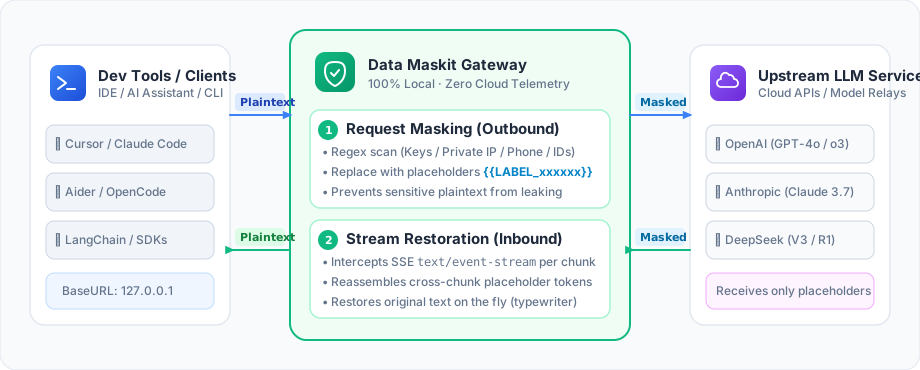
| Stage | Example Content | Practical Effect |
|---|---|---|
| What You Typed | Connect to DB: mysql://root:[email protected]:3306/db, contact Alice 13800138000 |
Contains real DB credentials and telephone numbers |
| What LLM Receives | Connect to DB: {{CONNSTR_zkpmqx}}, contact {{TERM_fnqtsw}} {{PHONE_bcdfgh}} |
Sensitive data replaced; external model never sees raw secrets |
| What LLM Answers | Check connectivity for {{CONNSTR_zkpmqx}} and verify permissions with {{TERM_fnqtsw}} |
Model reasons, plans, and writes code naturally using placeholders |
| What You Actually See | Check connectivity for mysql://root:[email protected]:3306/db and verify permissions with Alice |
Restored in real-time typewriter stream with zero workflow disruption! |
🔍 Click to expand: View real-world masking & restoration dialog screenshot (with CoT & highlight mode)
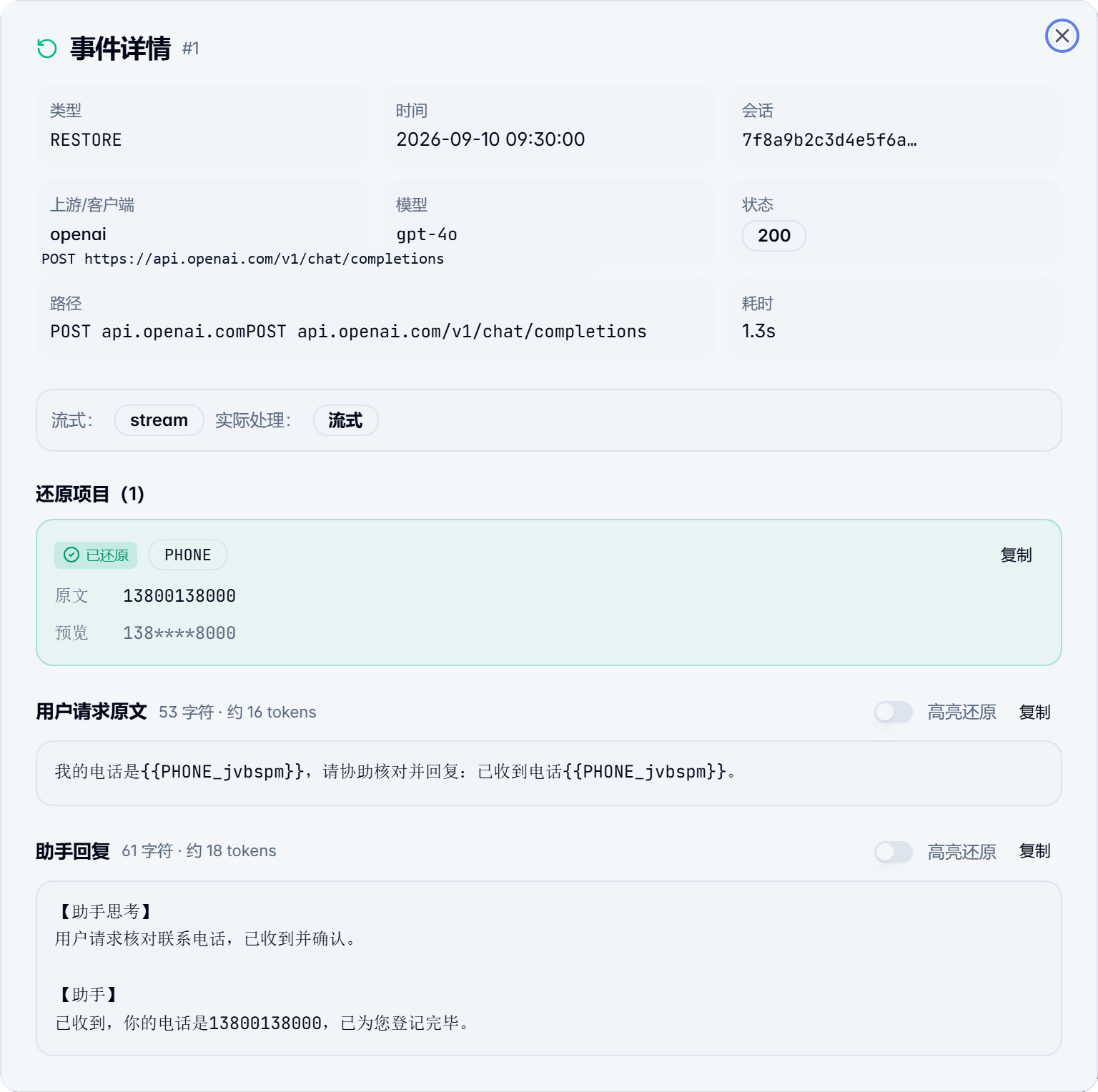
✨ Key Highlights
🛡️ 1. Deep Text Masking & Multi-turn Consistency
- 21 Built-in Scanner Rules: Core privacy & credentials (API Key, bank card, DB connection string, email, ID card, landline, phone) enabled by default; 14 additional rules (PEM keys, JWT, cloud AccessKeys, IP addresses) available with one click;
- Custom Wordlists & Regex: Categorized dictionary management for proprietary terms, codenames, and custom regex;
- Sliding-window Placeholder Reuse: Placeholders stay identical across long conversations. "Alice" receives the same token in turn 1 and turn 20, preserving model reasoning consistency;
- Local AI Entity Recognition (NER): Lightweight on-device ONNX model detects unstructured Chinese names, organizations, and addresses.
🖼️ 2. On-Device Multimodal Masking (OCR Entity-Level Redaction)
- Universal Multi-Format Coverage: Chat screenshots, browser extension uploads, Word (
.docx) embedded pictures, and scanned/vector PDF pages; - Entity-Level Precise Redaction: Targets only sensitive strings with physical blacked-out pixel masking, leaving structural labels (e.g. "Name:", "Phone:", "Dept:") intact so models understand layouts;
- PDF Text Layer Sanitization: Sensitive PDF pages are rasterized and masked, while underlying invisible text layers are stripped (preventing copy-paste leaks). Clean pages retain crisp vector text;
- Physical & Non-Restorable by Design: Images are permanently masked before upload (models cannot answer with secrets they never saw); uses an optional, on-demand RapidOCR + ONNX Runtime local engine with sha256 verification.
🌐 3. Universal Developer Tool Compatibility
- All Coding Assistants: Cursor, Claude Code, Codex, Pi, OpenCode, Aider, and any tool/SDK supporting custom Base URLs;
- Browser Extension (Chrome / Edge): Seamless privacy masking and typewriter stream restoration for ChatGPT, Claude, and DeepSeek web versions, including direct attachment masking;
- Millisecond SSE Stream Takeover: Incremental chunk-by-chunk token reassembly preserves native typewriter responsiveness without lag.
🔒 4. 100% Local Processing & High Availability
- No Untrusted Root CA Required: Standard local reverse proxy architecture avoids installing self-signed root certificates;
- Passthrough Fallback Guarantee: If the proxy is stopped or closed, local ports maintain listeners and automatically passthrough raw traffic — your AI tools never disconnect;
- Zero Telemetry & Compliance: Runs 100% locally with zero external telemetry or user tracking; credentials are saved as hashes only.
🛠️ 1-Minute Quick Start
Simply point your tool's API Base URL to Maskit's local port:
Default ports: OpenAI protocol
http://127.0.0.1:18701/v1| DeepSeek protocolhttp://127.0.0.1:18702/v1| Anthropic protocolhttp://127.0.0.1:18703
1. Cursor
Open Cursor → Settings → Models:
- OpenAI Base URL:
http://127.0.0.1:18701/v1 - Enter your API Key (Maskit forwards it securely to upstream providers).
2. Claude Code
In cc-switch, change the channel Base URL to http://127.0.0.1:18703, or launch via terminal:
export ANTHROPIC_BASE_URL="http://127.0.0.1:18703"
claude
3. CLI / Environment Variables (Codex, Pi, Aider)
# Linux / macOS
export OPENAI_BASE_URL="http://127.0.0.1:18701/v1"
export OPENAI_API_KEY="your-api-key"

# Windows PowerShell
$env:OPENAI_BASE_URL = "http://127.0.0.1:18701/v1"
$env:OPENAI_API_KEY = "your-api-key"
4. SDK Integration (Python / LangChain)
from openai import OpenAI

client = OpenAI(base_url="http://127.0.0.1:18701/v1", api_key="your-api-key")

# Standard call: automatically masked and restored in stream
response = client.chat.completions.create(
    model="gpt-4o",
    messages=[{"role": "user", "content": "Connect to DB: mysql://root:[email protected]:3306"}]
)
print(response.choices[0].message.content)
5. Browser Extension (Web AI)
Download Maskit_<version>_extension.zip from Releases, enable "Developer mode" in chrome://extensions, load the unpacked directory, and enable the extension bridge in Maskit Settings.
📸 Interface Preview
| Dashboard Overview | Client Port Management |
|---|---|
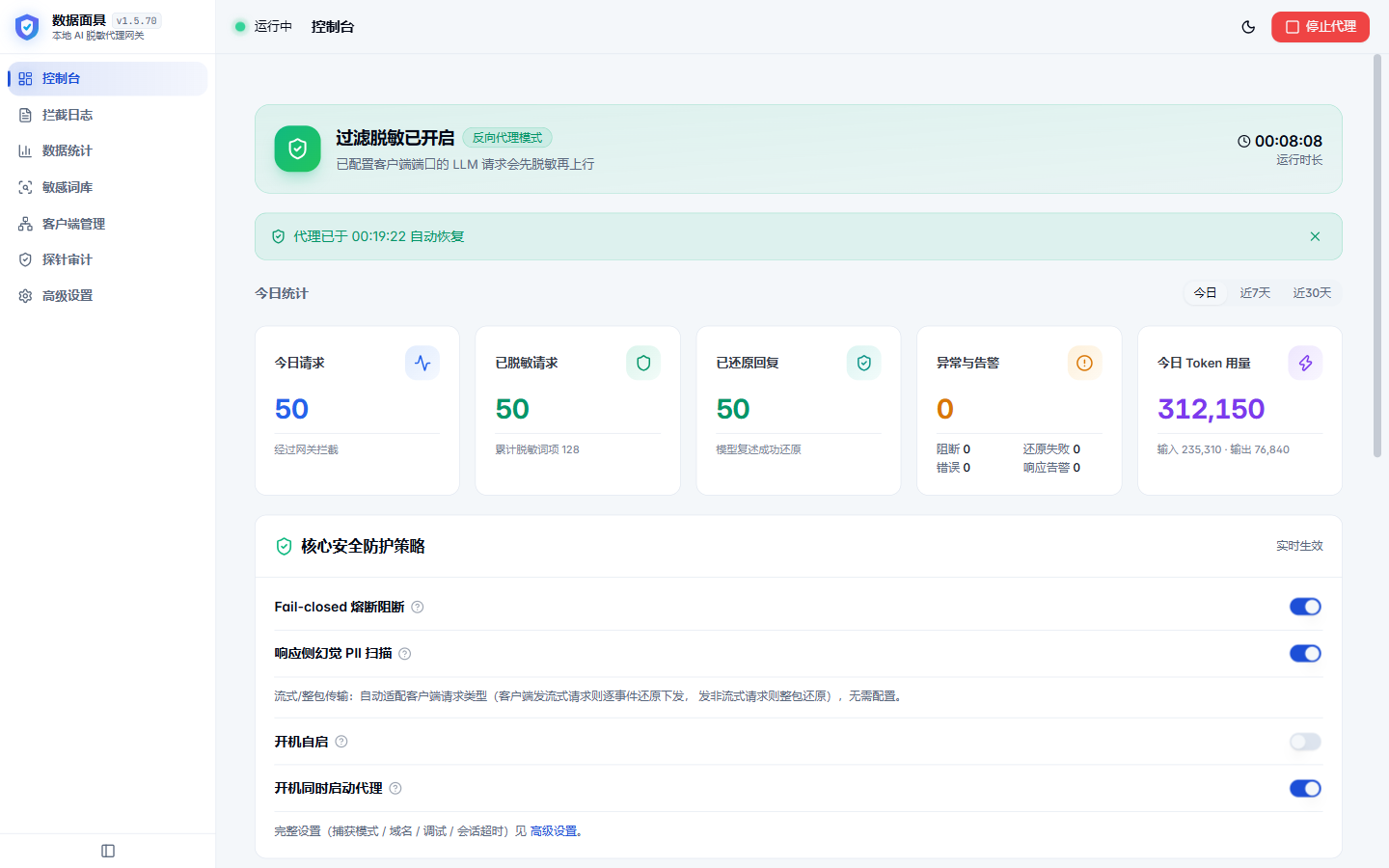 |
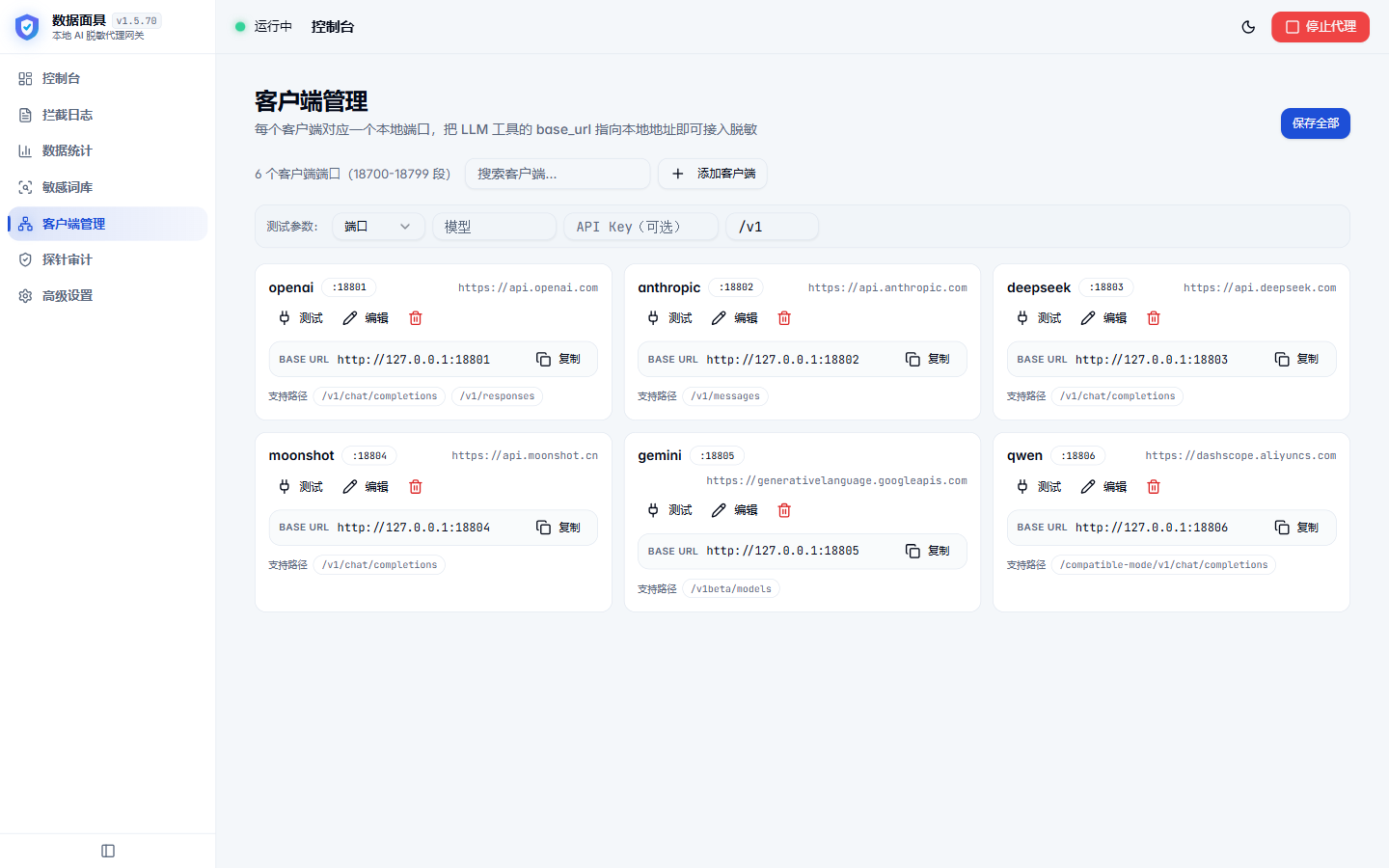 |
| Real-time Logs | Custom Words & Regex |
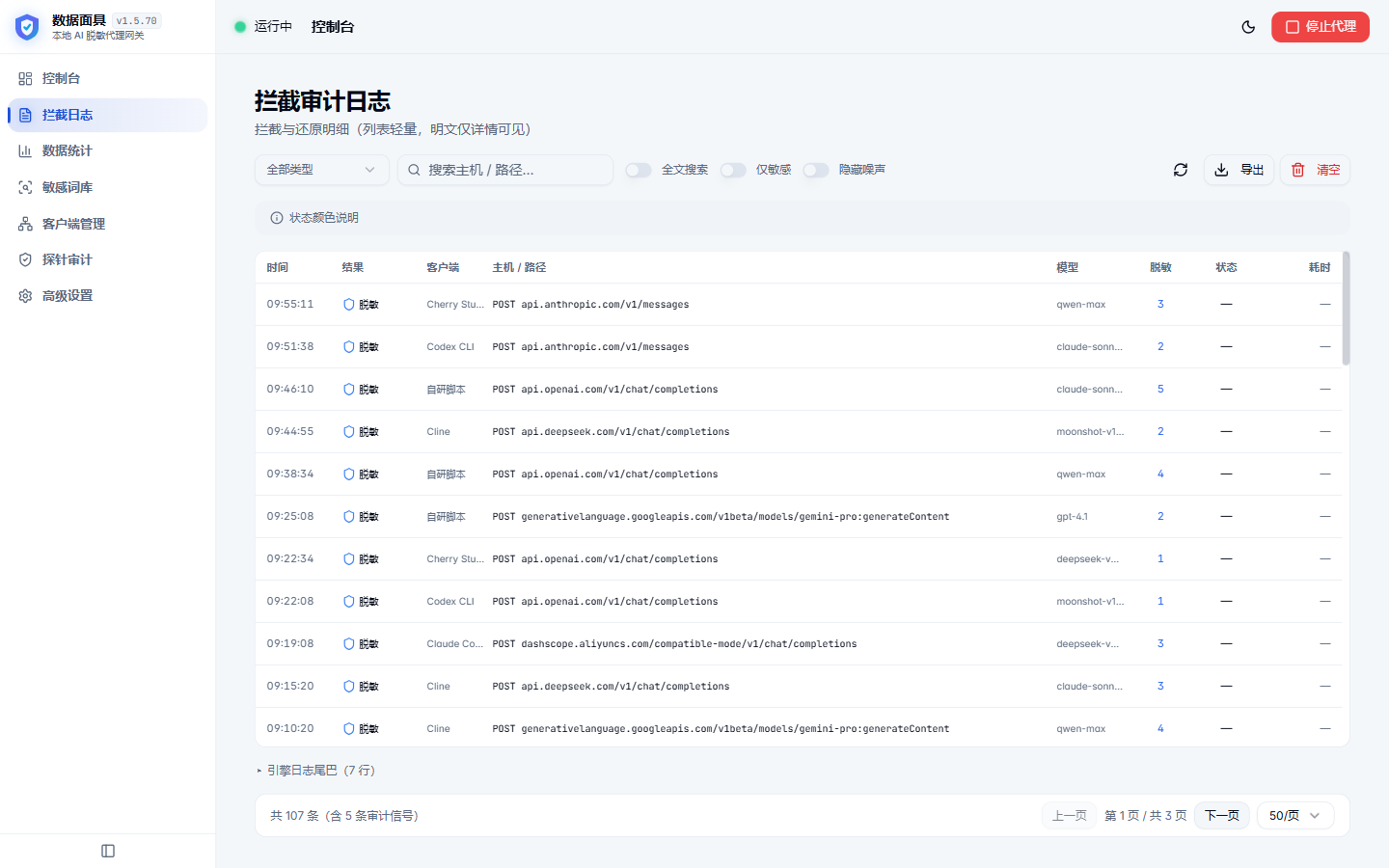 |
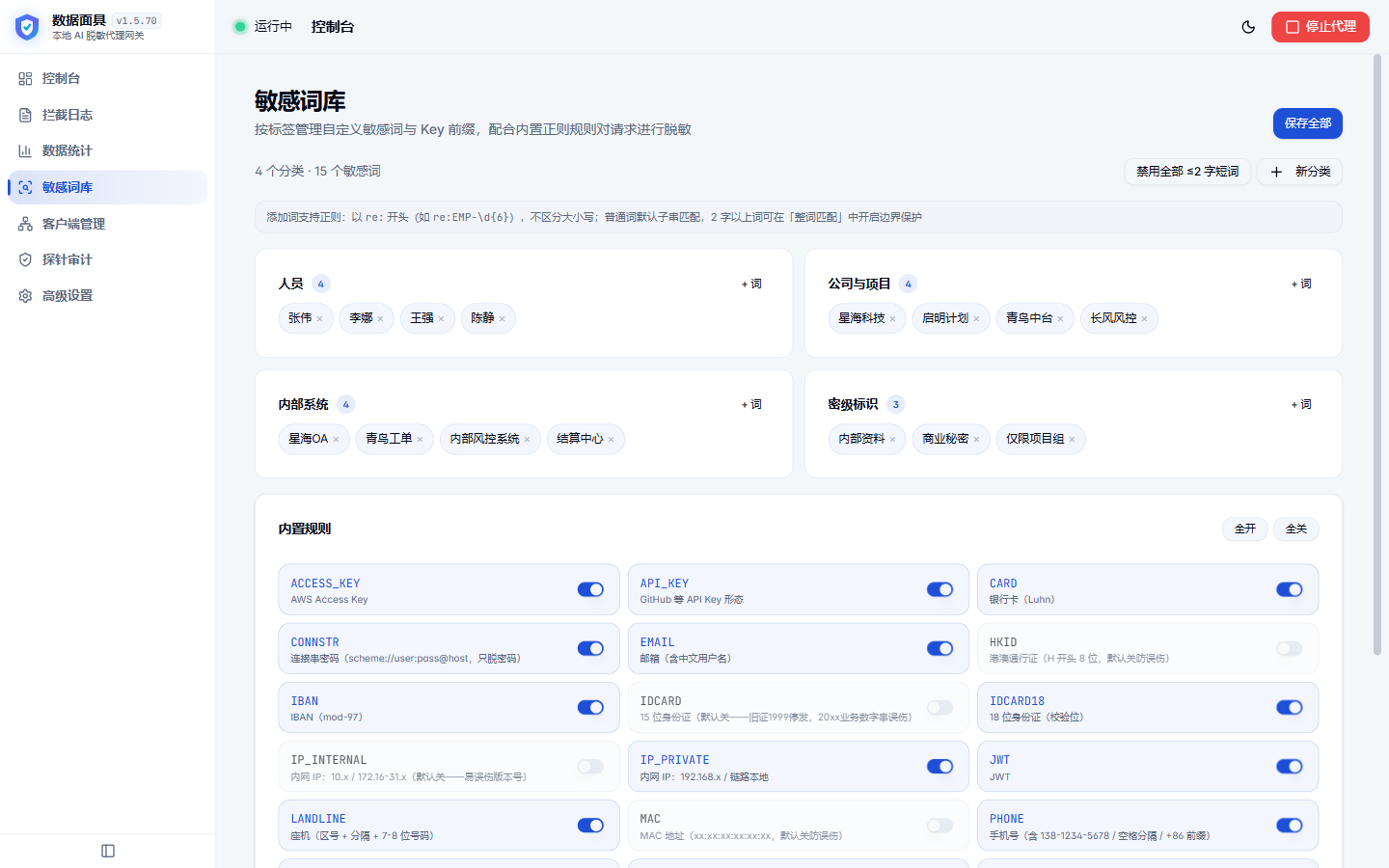 |
| Stats & Token Costs | Security Audit Center |
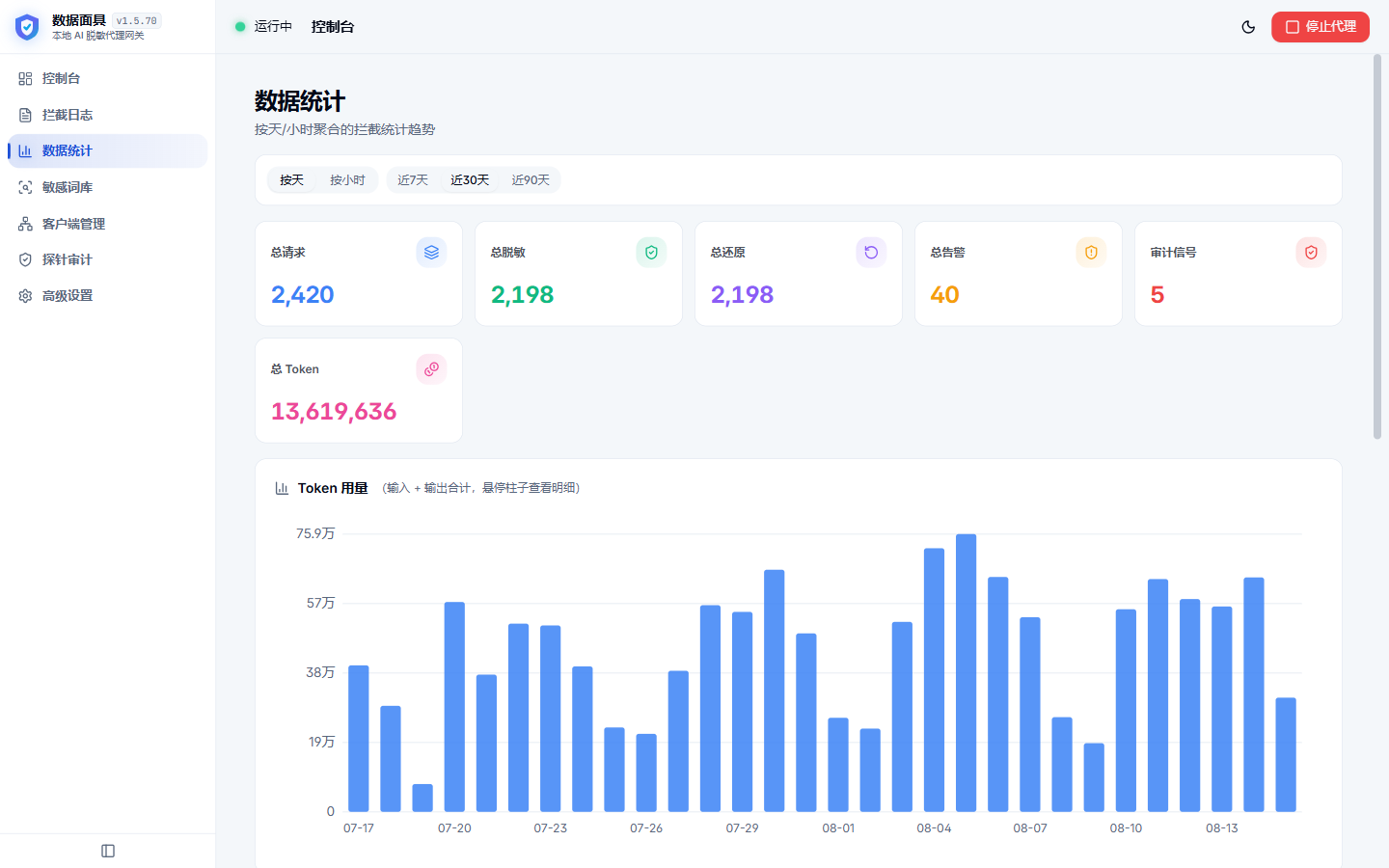 |
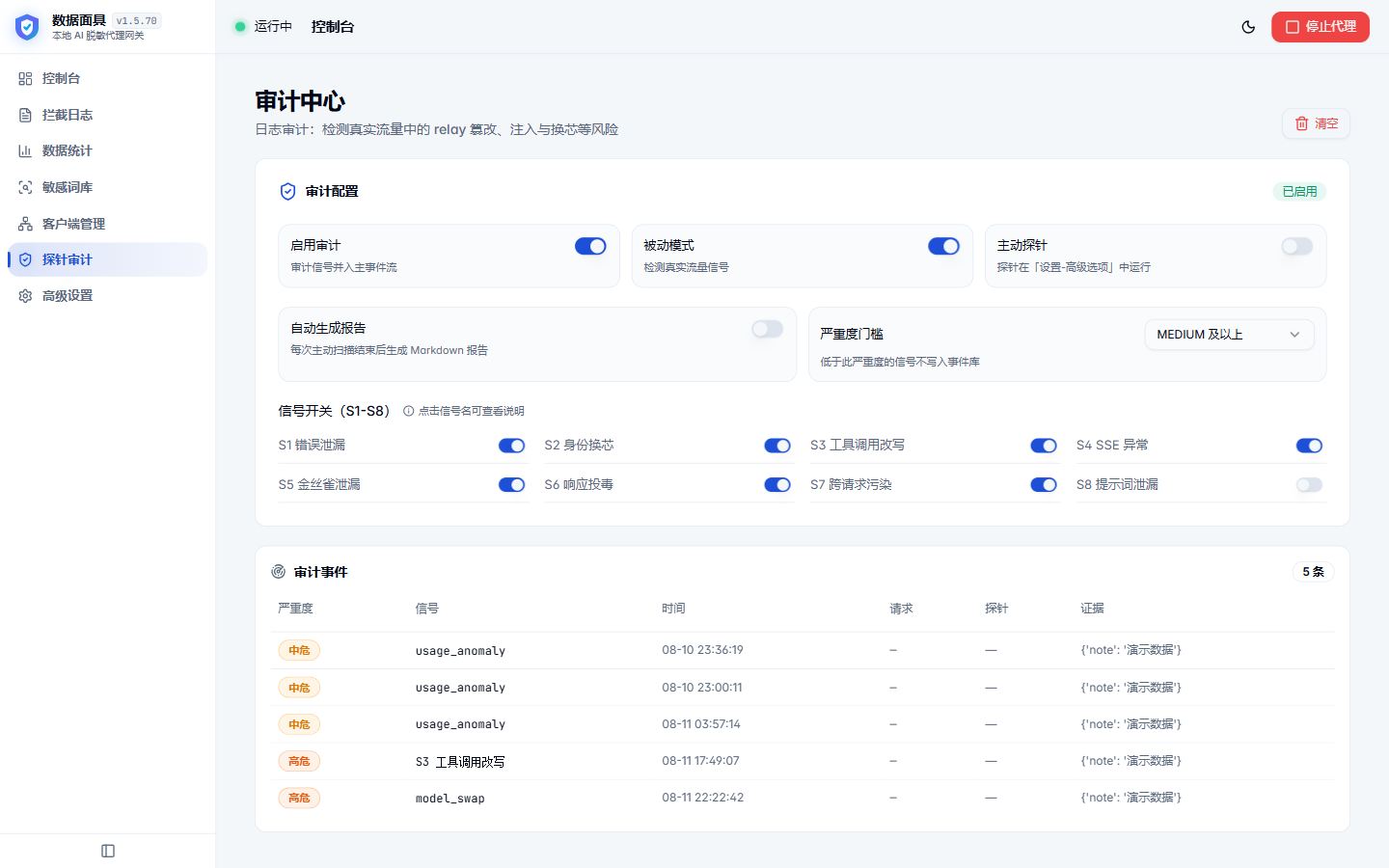 |
🚀 Download & Installation
Option A: Desktop App (Recommended for Personal Use)
Download installers from GitHub Releases:
- Windows: Download
Maskit_<version>_x64-setup.exe(tray resident, Minisign-signed auto-updates); - macOS (Apple Silicon): Download
Maskit_<version>_aarch64.dmgand drag to Applications.💡 macOS Gatekeeper notice: If prompted about an unidentified developer, right-click and choose "Open", or run:
xattr -cr /Applications/Maskit.app - Linux:
.deband.AppImageavailable for x86_64 and aarch64.
Option B: Docker Private Gateway (Recommended for Teams & NAS)
Pull the official multi-arch image (supports linux/amd64 and linux/arm64) with an embedded Web Console:
docker run -d \
  --name maskit \
  --restart unless-stopped \
  -p 127.0.0.1:5801:5801 \
  -p 127.0.0.1:18701:18701 \
  -p 127.0.0.1:18702:18702 \
  -p 127.0.0.1:18703:18703 \
  -v maskit_data:/data \
  ghcr.io/xiayutian11/maskit:latest
Open http://127.0.0.1:5801 to access the management dashboard.
🔧 Click to expand: Build from Source & Local Development
Prerequisites
- Python 3.13+
- Node.js 20+
- Rust 1.80+ (if compiling the desktop shell)
Quick Run
# 1. Clone repo
git clone https://github.com/xiaYuTian11/maskit.git
cd maskit

# 2. Install Python dependencies
pip install -r requirements.txt

# 3. Build Web frontend
cd frontend && npm install && npm run build && cd ..

# 4. Launch engine service (default port 5801)
python engine/panel.py
🛡️ Click to expand: Security Boundaries & Advanced Notes
- Reasoning Traces (Thinking Blocks): Anthropic signed thinking blocks are passed unmasked to preserve signature validity (preventing HTTP 400 conversation breaks); unsigned body and other model reasoning traces are masked and restored as usual;
- Multimodal Masking Behavior: Image redaction applies physical pixel coverage; external models cannot reconstruct masked secrets;
- Command Interception Scope: Acts as a secondary safety net inspecting plaintext high-risk shell commands (e.g.
rm -rf /,DROP DATABASE), logged or blocked only when configured; - Log Privacy Levels: Supports "Minimal (no plaintext stored)", "Local Detailed", and "15-minute diagnostic" modes; credentials are only ever stored as hash digests.
🤝 Contributing & Community
Issues and Pull Requests are warmly welcome! Please review CONTRIBUTING.md for workflow details.
- GitHub Issues: Bug Reports & Suggestions
- License: Released under the AGPL-3.0 License.