
xi-zhao/OpenQuantum
xi-zhao/OpenQuantum has 72 GitHub stars and 12 forks. GitHot measured 0 stars in 24 hours. Last checked 2026-11-18 08:10 UTC. Last push 2026-11-10.
Measured star growth
- in 24h
- 0
- in 7 days
- Collecting history
- in 15 days
- Collecting history
- in 1 month
- Collecting history
Net star changes over overlapping periods, not daily totals. Missing measurements are left blank. Stars measure attention, not software quality.
About
Open-source quantum Agent workspace with a desktop client, Web UI, messaging, Qiskit/MCP tools, and scientific validation
AIdocs/readme/README.en.md
Original
简体中文 · English · 日本語 · 한국어 · Español · Français · Deutsch · Português · Русский · العربية
OpenQuantum — Building trustworthy AI for quantum research, together.
The expertise of quantum research, brought together in OpenQuantum



OpenQuantum is an open-source AI platform for quantum research, open to collaboration. It connects software, algorithms and published research from the open-source community, so AI can analyze your research question, choose methods, run calculations and check results. Shared expertise becomes a research capability you can actually use.
Start from a research question, a paper or an existing program, and bring AI into the investigation. Programs, parameters and checks are kept, so one investigation becomes the starting point for the next.
OpenQuantum is built around a shared quantum research plugin: Skills, Tools and MCP servers, connected to each Harness through an adapter. Choose the entry point that suits you; both share the same domain capabilities. The Codex plugin brings quantum Skills and scientific Tools into native Codex conversations, with a settings page for capability switches, MCP connections and tokens. Desktop is a simple personal Harness for conversations, workspaces, files, tools and history, with model services you configure yourself.
Install the Codex plugin · Install Desktop · See calculations and results · Visit the website
Start with the measured cases: a PennyLane Pauli commutator runs 5.09× faster as a complete call, and a QuTiP Wigner-function calculation runs 5.69× faster. Both keep performance comparisons, result checks and reproduction records.
Desktop 0.8.11: standalone Mac Apple Silicon installer · Codex plugin 0.8.11: download and release notes. See each release for its artifacts.
- Easier to find capabilities: Tools, MCP and Skills are grouped into eight use categories, with search and status filters.
- A simpler personal desktop:
OpenQuantum.appfor Mac Apple Silicon includes its runtimes. Settings contains General, Models and OpenQuantum. The plugin page uses Home, Skills and MCP tabs; expand a card to configure environments, accounts and tool restrictions.
Why OpenQuantum · Measured optimizations · Capabilities · Codex plugin · Quick start · Results · Extend · Roadmap and RSI · Contribute · Open source
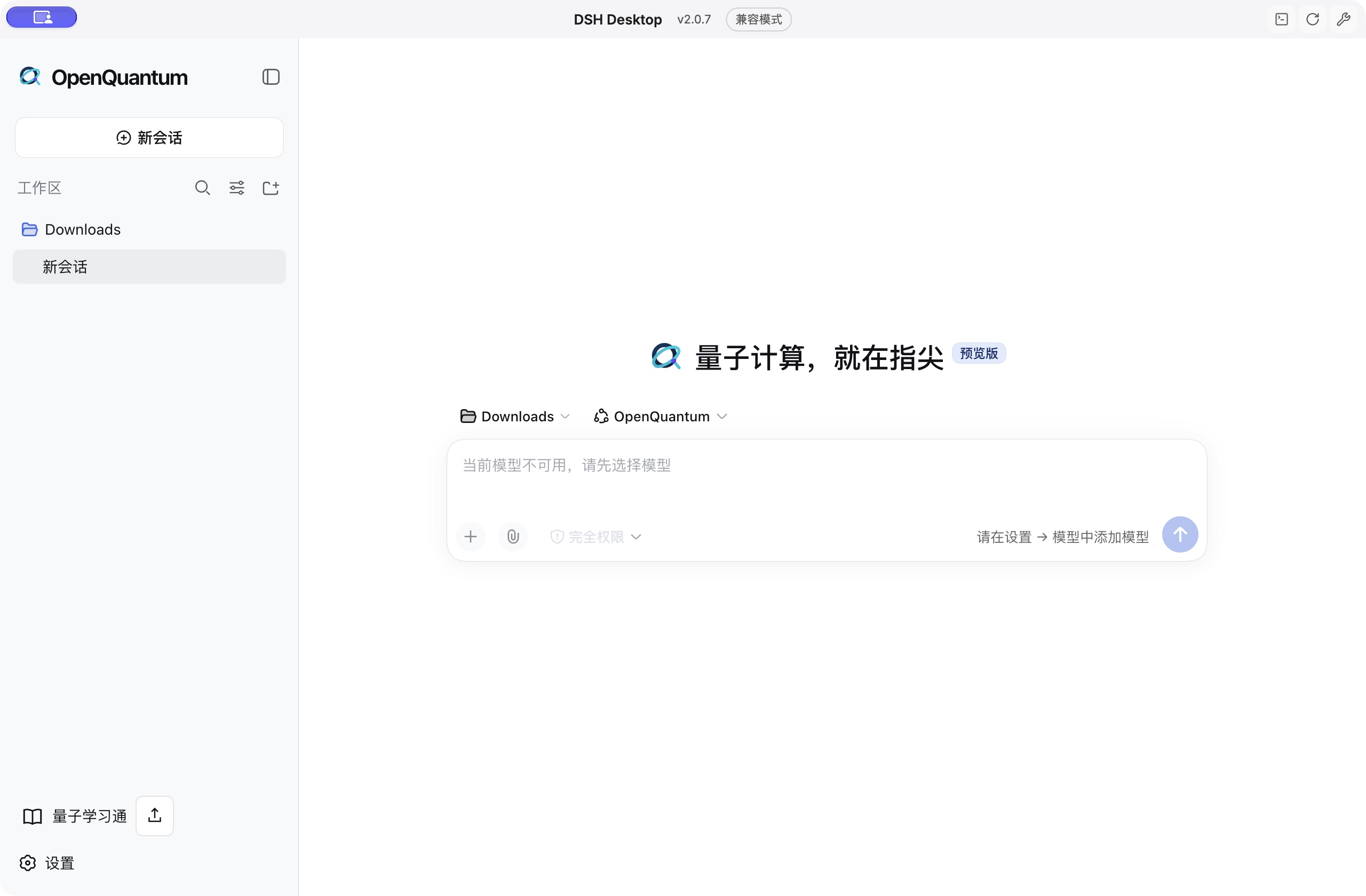
Earlier interface shown for reference; version 0.8.11 simplifies the sidebar and settings. Add your own model service in settings to start a new session.
See the categorized Tools, MCP and Skills settings
Expand the group you need, then narrow it down with search or the enabled-state filter. Tools lists callable actions, MCP manages service connections, and Skills selects task methods and guides.
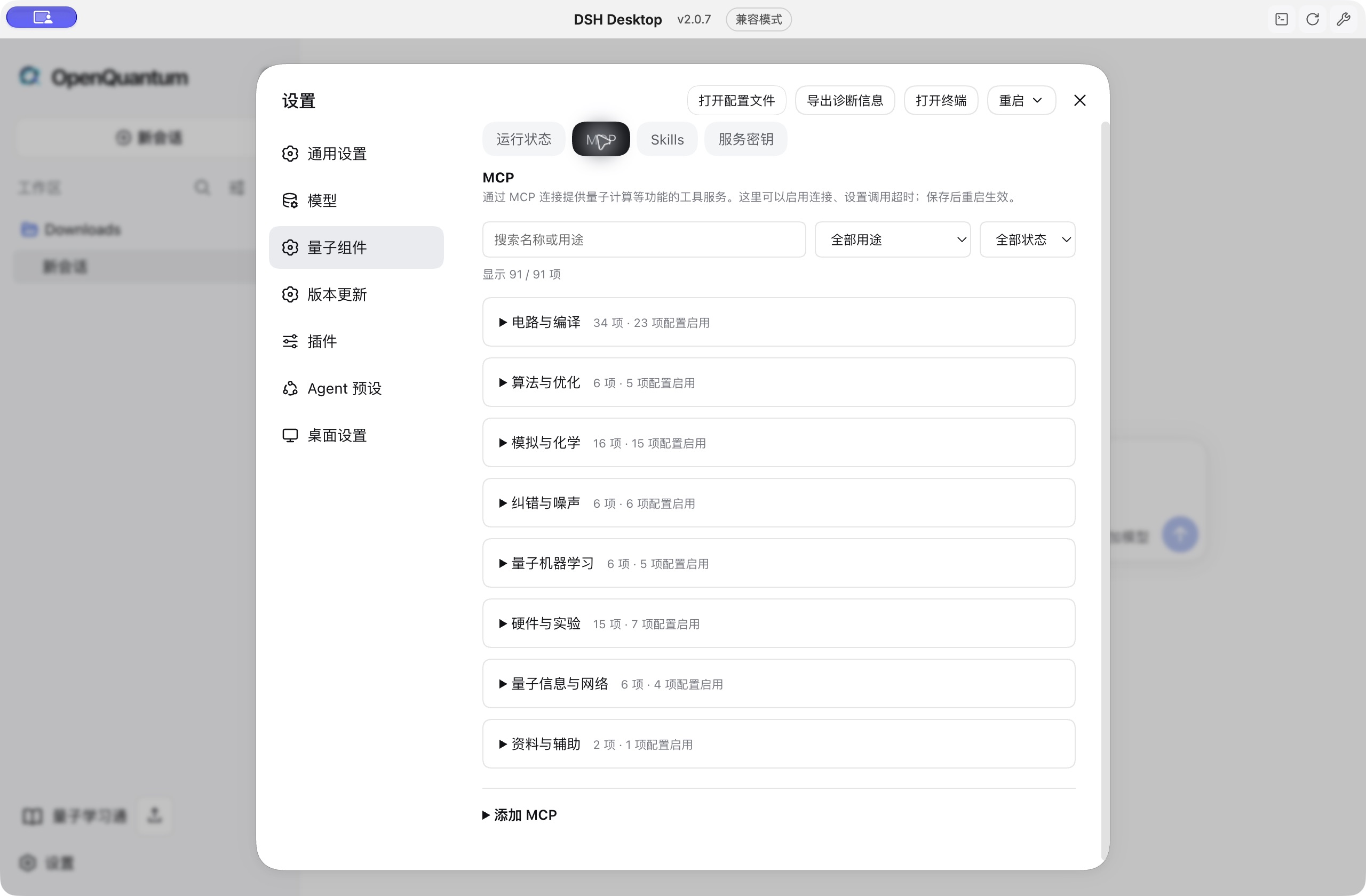
The screenshot was taken on 2026-10-13 while verifying the categories in the original client; see the image notes. An enabled setting does not mean the service is online.
Why OpenQuantum
Broad coverage gives research ideas room to develop
From quantum algorithms and circuit simulation to quantum chemistry, many-body calculations and error correction, OpenQuantum keeps expanding into specialist areas and connecting tools with methods. Researchers spend less time preparing tools and more time exploring questions. Community projects such as Qiskit, PennyLane, QuTiP, PyZX, TeNPy and Stim / PyMatching provide the expertise behind these areas.
Faster calculations let you test more ideas
We keep optimizing key computational steps to shorten waiting and make room for more comparisons. In targeted optimization cases, complete calls for a PennyLane Pauli commutator and a QuTiP Wigner function became 5.09× and 5.69× faster. Both results were checked against the original library and independent reference calculations.
Open collaboration keeps research capabilities growing
We keep bringing in valuable open-source projects and published methods, and improve them through adaptation, optimization and real use. OpenQuantum builds agent workflows, computing interfaces and verification records around this work, so new tools, methods and experience keep the platform growing. Everyone is welcome to take part in turning the community's expertise into quantum research AI that researchers can use, check and trust.
Start from your work
| Your work | The hard part | What OpenQuantum adds |
|---|---|---|
| Research and algorithm work | Testing a new idea often means reimplementing methods, finding baselines and checking results again and again. | Start from algorithm examples and specialist SDKs, change inputs, build comparisons, use the supported independent checks and keep reusable programs and results. See results. |
| Application and agent development | You want quantum computing inside an existing application but lack specialist methods and a usable call path. | Connect existing Skills, Tools and native SDKs so your application uses specialist software while keeping its own interface and workflow. See extend the platform. |
| Industrial R&D and technology assessment | You have an application direction and need evidence to choose methods, estimate resources and plan a roadmap. | Run first comparisons on supported tasks and inspect method conditions, resource assumptions and result sources. See reference material and selection. |
| Teaching and course design | Turning abstract concepts into hands-on courses is hard when materials, experiments and slides are scattered. | Design experiments from open examples and organize materials and courseware with Quantum Learning. See Quantum Learning for features and course progress. |
| Learning by doing | You understand the concepts but not yet how to run an algorithm, change inputs and interpret results. | Run examples, change parameters and use guides and available reference results to see why a method applies and where it stops. See algorithm examples. |
| Research software and ecosystems | You have a published method, research code or an SDK and need workflows, interfaces and examples so others can use it. | Write the method as a Skill, connect executable actions as Tools or integrate a complete application, keeping sources and credit. See extend the platform. |
Open source: keep the capability in your hands
You can read the platform and integration code, see where each method comes from, and modify, deploy and maintain your own combination under the applicable licenses. Model services and computing backends are chosen separately, and you decide whether to share research data. Authors, licenses and contribution credit stay visible so existing work carries forward with the project.
Comprehensive: more methods for one question
OpenQuantum brings together software and research methods for algorithms, compilation, simulation, quantum information, chemistry and many-body physics, optimization, error correction, dynamics, control and networks. From guides and open examples to native SDKs and computing Tools, you can choose what a task needs or combine tools into new comparisons. Inputs, preparation and supported scope are listed in the capability catalog.
For example, optimize a circuit with PyZX, check equivalence with QCEC and study its noisy behaviour with a noise simulator to ask whether a simpler circuit also performs better. Combining tools still requires aligning models, units, bit order and budgets; see the current scope in the computing guide.
Give AI access to specialist research capabilities
Agents can read material, write programs and call tools. With OpenQuantum installed, you prepare the dependencies and service settings a supported task needs, and AI can use quantum methods and computing capabilities. Skills describe methods and steps, Tools carry out specific actions, and native SDKs can also be used through the host's code tools.
Programs, results and applicable checks are recorded, so later work has something to build on. Well-supported negative results are worth keeping too: they show when a method applies and when to take another route. Program failures and scientific results are separate outcomes; records support review and reuse, while scientific judgment stays with the user.
Turning open-source libraries and published methods into usable agent capabilities is the ongoing work behind the platform. We organize methods, write workflows, connect software and keep sources and conditions of use. You can bring your own methods, programs or complete applications, so one piece of development becomes a starting point for many people.
This accumulated work also lays the ground for improving the next round of research capabilities, described in the long-term roadmap.
Run a first task · Bring your capability in
Measured case: a 5.09× faster PennyLane calculation
Set a research task, receive a runnable result you can check. We gave OpenQuantum a task: apply targeted optimization to a PennyLane research calculation, measure the actual speedup and verify the results. On 2026-10-20 the experiment was completed in Codex with OpenQuantum 0.8.4, delivering an optimized program, a performance comparison, correctness checks and reproduction records.
| Calculation | Complete call |
|---|---|
| Native PennyLane | 30.62 ms |
| After OpenQuantum optimization | 6.02 ms |
A 5.09× complete-call speedup. The measured task is one Pauli commutator calculation in a 32-qubit local model. Timings are medians of nine warm rounds on an Apple M4 with PennyLane 0.45.1. They include input and output conversion and exclude environment preparation and compilation.
The results were checked as well. Outputs for all nine benchmark inputs match PennyLane's reference outputs exactly, term by term. Independent exhaustive matrices checked 4,368 pairs of Pauli words and 40 random complex-coefficient operator sums, with a maximum matrix absolute error of 1.42×10⁻¹⁴. Calculations and timings were independently reviewed, and all 405 raw timing samples and complete inputs and outputs are retained.
The 5.09× figure is the measured gain for this calculation. The case report gives all results, methods and supported scope.
Full case and reproduction steps · Raw timings · Result checks · Independent review
Measured case: a 5.69× faster QuTiP calculation
Turn a specialist method into a faster calculation you can check. In Codex with OpenQuantum 0.8.4, we applied targeted optimization to QuTiP's Wigner-function calculation and delivered a runnable program, complete phase-space output, a performance comparison and independent checks.
| Calculation | Complete call |
|---|---|
| Default QuTiP method | 171.77 ms |
| After OpenQuantum optimization | 30.18 ms |
A 5.69× complete-call speedup. The task computes a density matrix's Wigner function in a 64-dimensional single-mode Fock space on a 201×201 phase-space grid. Timings are medians of nine interleaved warm rounds on an Apple M4 with QuTiP 5.3.1 and single-thread settings. They include input reading, conversion, validation and complete double-precision output; environment preparation, compilation and result checks are outside the timed region.
All 272 result checks passed. Across four sizes, the maximum absolute difference from default QuTiP output is 6.52×10⁻¹⁶, and from independent Laguerre-polynomial sums and analytic formulas 6.33×10⁻¹⁵. Checks cover random complex density matrices, vacuum and Fock states, superpositions with complex coherences and rejected inputs. All 144 raw timing samples and complete inputs and outputs are retained and were independently reviewed.
Full case and reproduction steps · Raw timings · Result checks · Independent review
What you can do
Pick an area and tell the workbench your question, your inputs and the results you want checked. The OpenQuantum agent follows the method in the relevant Skill and calls the matching Tool to compute; Quantum Learning provides a separate teaching interface.
Algorithms · Circuits and quantum information · Ground states, chemistry and optimization · Error mitigation and correction · Hamiltonian simulation and open systems · Experiments and hardware · Photonics and networks · Reference material · Quantum Learning
Local calculations can start without a quantum-cloud account. Real hardware and paid services are configured on demand; each method's input range, preparation and verification status are kept in the detailed catalog.
The current source provides full native-API paths for 117 SDK/source environments, 26 of them from the latest ecosystem expansion shipped with 0.8.4. Agents can write custom programs, combine public APIs and save complete results, going beyond the preset cases of the convenience Tools.
SlowQuant adds molecular linear-response and transition-property workflows through a fixed source SDK. See setup and validation limits; molecular Qiskit qLR and hardware remain unvalidated.
TNQS adds native Julia APIs for tensor networks on irregular graphs, planar CTMRG and sampling. Explicit setup: node scripts/setup-sdk.mjs tnqs-dynamics. See geometry, convergence and validation limits.
RcmpsCore provides native Julia CPU APIs for continuous 1+1-dimensional scalar-field RCMPS, optimization and same-vacuum excitations. Prepare explicitly with node scripts/setup-sdk.mjs rcmps-field-theory. Conventions and validation limits; the transfer gap is distinct from the Hamiltonian rest gap.
Formal mathematics and physics: Lean 4, mathlib and physlib provide a fixed Lean 4.35.0 project for checking proofs and their axioms. Explicit preparation builds the small Pauli example and its imports; other modules are prepared as needed. Proof checking does not install dependencies. A formal proof covers its stated definitions and assumptions, not the physical validity of a model or scientific acceptance.
DEM diagnostics: emlint inspects Stim detector error models through an explicitly prepared SDK environment. Reports retain counterexamples, skipped checks and inconclusive or vacuous results. These structural checks do not prove code distance, decoding correctness or scientific acceptance.
Each environment is prepared explicitly per task, and platform, account, license and optional-backend limits still apply. Engineering checks per library are in the full SDK access record; these environments have not been accepted on real research tasks, and their scientific status remains not_evaluated.
SDKs from companies and institutions integrated in v0.6.0 span differentiable circuits, fault-tolerant resource estimation, photonics, pulse compilation and quantum networks. The three batches are 17 vendor SDKs, 20 company and institution capabilities and 15 network, control and cloud interfaces, plus QuEra Bloqade Analog. Each adapter exposes only its documented actions; users configure accounts, credentials, service permissions and applicable licenses.
Algorithm learning and method comparison
Start from runnable algorithm examples, change inputs and check numerical results, then carry the method over to your own problem. UnitaryLab's 66 quantum-skills guides are adapted as native Skills: 49 provide executable examples covering all 39 modules of the original algorithm library plus methods unique to the guides; the rest support algorithm classification, backend selection and migration.
| Direction | Runnable methods and examples |
|---|---|
| Foundations and search | QFT, QPE, Hadamard test, amplitude amplification and estimation, Grover, Shor, Simon, discrete logarithm and graph walks |
| Linear systems and matrix methods | HHL, VQLS, QSVT linear solving, adiabatic solving, LCU and QSP, with classical eigensolver references |
| Hamiltonian simulation | Trotter–Suzuki, qDrift, QSP, Taylor LCU and a Cartan example with disclosed substitutions |
| Variational computing and machine learning | VQE, VQD, QAOA, VQC, QCBM, CVQNN, gradients and quantum Fisher information |
| State preparation and many-body | Möttönen, MPS, isometry and variational state preparation; molecular DMRG, Fermi–Hubbard VQE and Ising evolution |
| Code construction and differential equations | qLDPC code construction and syndromes; Schrödingerization examples for 1D and 2D heat equations and periodic advection |
The examples use open backends such as Qiskit, PennyLane, quimb, PySCF and NumPy/SciPy. Run them directly or let the agent call them through existing code tools. Default parameters are teaching cases; check real inputs, reference errors and convergence per task.
The adaptation keeps upstream sources and licenses and does not depend on the proprietary UnitaryLab runtime. Workflow coverage does not mean full compatibility with the upstream Python API, optimizers or backends; differences for Cartan, CVQNN, DMRG and others are listed in the per-method coverage table and the example guide.
Run an algorithm example · Choose between similar methods
Circuits and quantum information
| Direction | Tasks you can start | Results you can inspect |
|---|---|---|
| Quantum circuits | Analyze or convert OpenQASM / QPY circuits, compare transpilation, check equivalence, simulate circuits | Circuit structure, transpiled output, equivalence result, state vector or sample distribution |
| Local compilation and simulation | Compile or map circuits with TKET, QSteed or MQT QMAP; simulate locally with Braket LocalSimulator, QCompute, Qibo and others | Gate sets and mapping, state vectors or probabilities, with each SDK's bit-order convention |
| Differentiable and hybrid programs | Expectations and gradients with PennyLane, DeepQuantum, TensorCircuit, MindQuantum or VQNet; measurement, reset and classical feedback with Guppy / Selene | Parameter gradients, probabilities and program results |
| Fault-tolerant resources | Physical resource estimates with Microsoft QDK, gate resources for a given Bloq with Qualtran | Qubits, runtime or gate counts with hardware and decomposition assumptions |
| Qiskit / Cirq interoperability | Convert supported unitary circuits through a fixed OpenQASM 2 path with qBraid | Converted circuit with preserved qubit numbering and idle qubits; optional full-unitary comparison |
| Circuit optimization and measurement-based computing | ZX rewriting and extraction with PyZX; MBQC pattern conversion and simulation with Graphix | Circuits and gate counts before and after, resource graphs and measurement patterns; optional independent comparison |
| Circuit optimization and cutting | Optimize gate sequences with Compact; cut circuits and rebuild expectations with QCut | Circuits before and after with an independent equivalence check; cutting overhead, actual samples and optional uncut reference |
| Clifford+T noisy sampling | Study T-gate interference and noise with Clifft, or sample supported Stim-format circuits | Final bit-string counts and optional density-matrix reference; mid-circuit measurements and raw detector / observable parities |
| States and measurement | Audit density matrices and entanglement measures; simulate local randomized measurements on known product / GHZ states | State measures with independent checks; subsystem purity estimates with finite-sample error |
Ground states, chemistry and optimization
| Direction | Tasks you can start | Results you can inspect |
|---|---|---|
| Ground-state solving and validation | Run VQE on a two-qubit real Pauli Hamiltonian in a fixed particle sector and check it against an exact reference | Energy, convergence trace, independent checks and, in the complete flow, a scientific acceptance report |
| Quantum chemistry and many-body ground states | Study molecules and active spaces with SQD, or XYZ spin-chain ground states with TeNPy | SQD energy and orbital occupation; DMRG energy, magnetization, entanglement entropy and convergence; optional exact reference |
| Variational parameter learning | Train Flow-VQE on a Pauli Hamiltonian to learn low-energy circuit parameters | Flow learning compared with random search at an equal evaluation budget |
| Excited states and kernel classification | Search several low-energy states with OpenQARP VQD, or train a QSVM with a cqlib angle kernel | Energies, residuals, orthogonality and optional exact spectrum; held-out classification, analytic kernel and classical baseline |
| Symmetry and control algebra | Taper qubits in a chosen symmetry sector with Symmer; analyze Pauli generators with PauLie | Reduced Hamiltonian, Lie-algebra classification and dimension; optional spectrum comparison or closure |
| Combinatorial optimization | Build and solve local optimization problems with QPanda, Ocean or Kaiwu; evaluate given QAOA parameters with Qcover | Solution, constraint checks, energies and correlations, with classical comparison where the interface provides it |
| Chemistry operators and existing data | Map fermion operators with OpenFermion / pyChemiQ; query existing QCArchive single-point records through QCPortal on demand | Pauli terms; molecule, energy, method and source, with units and missing fields kept |
Error mitigation and error correction
| Direction | Tasks you can start | Results you can inspect |
|---|---|---|
| Error mitigation | Run ZNE, REM, PEC or CDR with Mitiq and compare raw and mitigated results at the same sampling budget | Ideal reference, empirical bias, variance and RMSE, plus calibration, training and sampling cost |
| Quantum error correction | Run surface-code memory experiments with Stim / PyMatching, build rectangular patches with Deltakit, or decode with BP+LSD | Actual noisy circuits, logical error rates and intervals at fixed shots; syndrome consistency checks for LSD |
Hamiltonian simulation and open systems
| Direction | Tasks you can start | Results you can inspect |
|---|---|---|
| Hamiltonian simulation | Build evolution circuits or final states for a real Pauli Hamiltonian with Trotter–Suzuki or qDrift | Circuits, resource metrics, state vectors and optional independent matrix reference; steps, order, time and seed are configurable |
| Open-system dynamics | Open Ising chains with TJM, single-qubit drive sweeps and gradients with Dynamiqs, environmental memory with OQuPy | Observable trajectories, independent references, gradients, time steps and memory cut-offs |
Experiment simulation and hardware
| Direction | Tasks you can start | Results you can inspect |
|---|---|---|
| Superconducting and atomic experiments | Simulate calibration workflows, native-gate constraints and transmon leakage; study supported atom arrays and pulses with Bloqade Analog / Pulser | Synthetic data, dynamics trajectories, per-atom populations and final probabilities |
| Pulse programs and control | Build, schedule and compile programs offline with QUA, LabOne Q, Qblox Scheduler, Qililab or OQC QAT | Programs, timing, target instructions or waveforms; these adapters do not run laboratory devices |
| Quantum hardware access | Discover backends and check topology and credentials; enable cloud job query, submission and cancellation on demand | Device candidates and conditions of use; results and status from enabled job interfaces |
| Local device interface | Query a configured C driver through QDMI | Devices, qubits, gates and couplings reported by the driver; the official example driver validates the interface and is not an online QPU |
Photonics and quantum networks
| Direction | Tasks you can start | Results you can inspect |
|---|---|---|
| Photonic circuits and learning | Compute linear-optical outputs with Perceval and Lightworks; batch inference and phase-shift gradients with MerLin; optional MrMustard Gaussian models | Fock probabilities, gradients or optical moments, with explicit mode order and cut-offs |
| Network modelling and programs | Simulate single-link loss and decoherence with SimQN; generate two-node programs with NetQASM | Link statistics and compiled programs; SquidASM simulation needs a separately licensed NetSquid environment |
Reference material and selection
| Direction | Tasks you can start | Results you can inspect |
|---|---|---|
| Algorithm references and tool selection | Search the 66 Quantum-Practices algorithm guides, compare quantum SDKs and reuse research steps | Pinned reference material, assumptions and selection advice |
| Public device benchmarks | Query 410 fixed historical Metriq records by vendor, device or benchmark type | Original parameters, metrics, dates, sources and licenses, with simulator labels kept |
Quantum Learning
Materials, courseware and classrooms in one place: learners work hands-on, and teachers organize their own teaching content.
| Learning and teaching | Available features |
|---|---|
| Prepare materials | Home page, course library, attachments, course import and PPTX import |
| Build courses | Course preview, courseware editor and the Pro workbench |
| Learn in class | Slides, quizzes, interactive Q&A and project-based learning |
| Keep learning | Local courses, tasks, materials and server-side learning records, with migration from earlier classrooms |
The goal is coverage from secondary-school foundations to frontier research, organized into beginner, intermediate and advanced levels, with learning across levels. Public resources are still being organized and the complete curriculum is not yet produced or published. Application assembly, startup and local persistence are verified; real online AI course building, Q&A and editing still await full acceptance.
Pro teaching tasks use the upstream application's own tools and records and are not yet connected to the workbench's quantum tools. Optional media, speech and search need their own services. Installation, backup, migration and verification are described in the Quantum Learning integration guide.
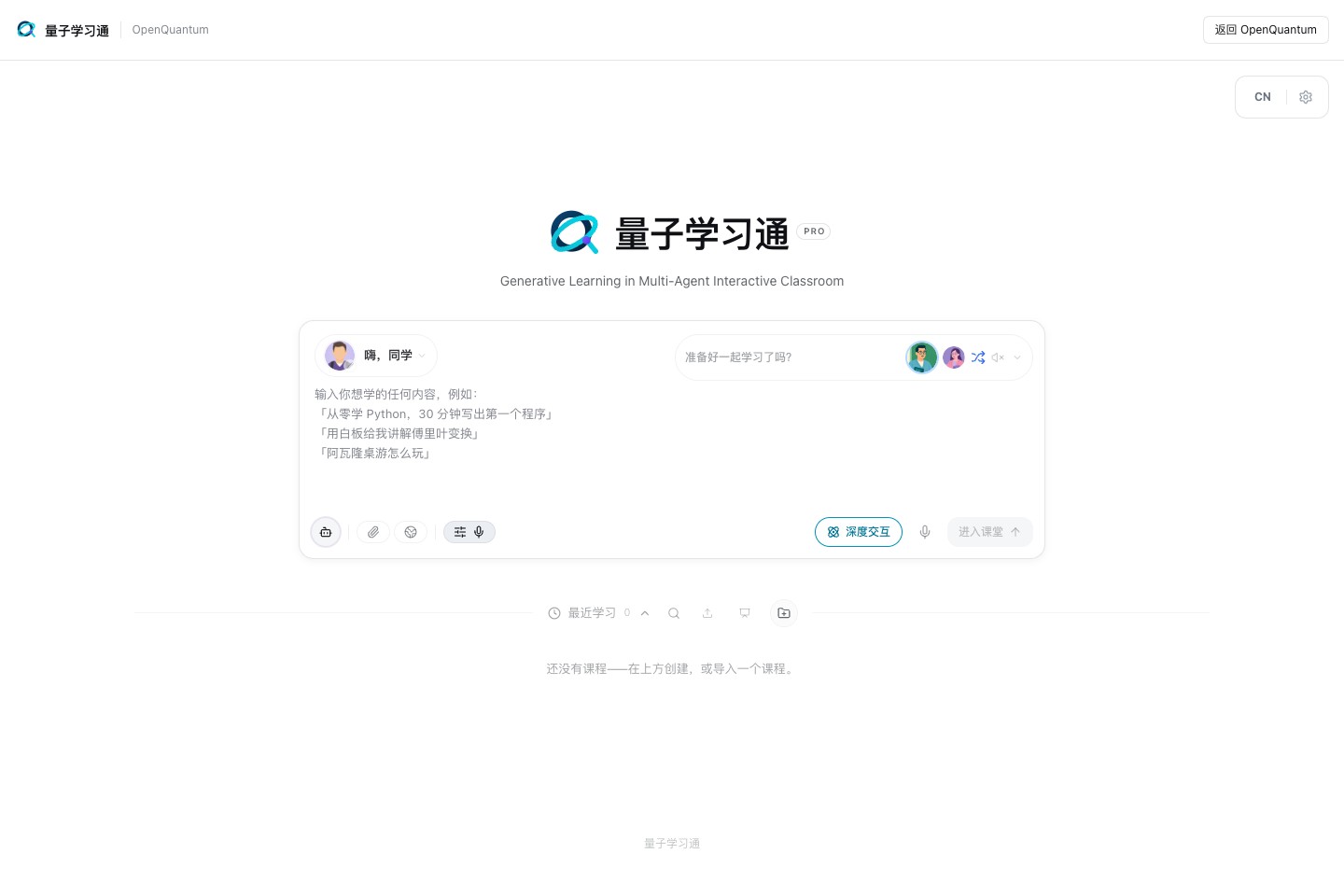
Set up Quantum Learning and open a classroom.
Desktop, messaging and languages
Desktop. The OpenQuantum desktop provides a native window, a simple menu bar and notifications, and reuses the workbench's models, quantum Skills, computing tools and execution records. The menu bar offers only Open OpenQuantum and Quit OpenQuantum, following the Chinese or English language setting; the Agent can still use its terminal Tool within the selected permissions. Mac Apple Silicon uses the standalone OpenQuantum 0.8.11 app. Intel Mac and Windows retain the 0.8.4 capability packages with their pinned third-party client; source builds are also available. Install Desktop · Build Desktop from source.
Messaging. Through CC Connect you can start tasks from WeChat, Feishu, DingTalk, Slack, Telegram, Discord and other channels, reusing the workbench's Skills, Tools and execution records. Configure messaging channels.
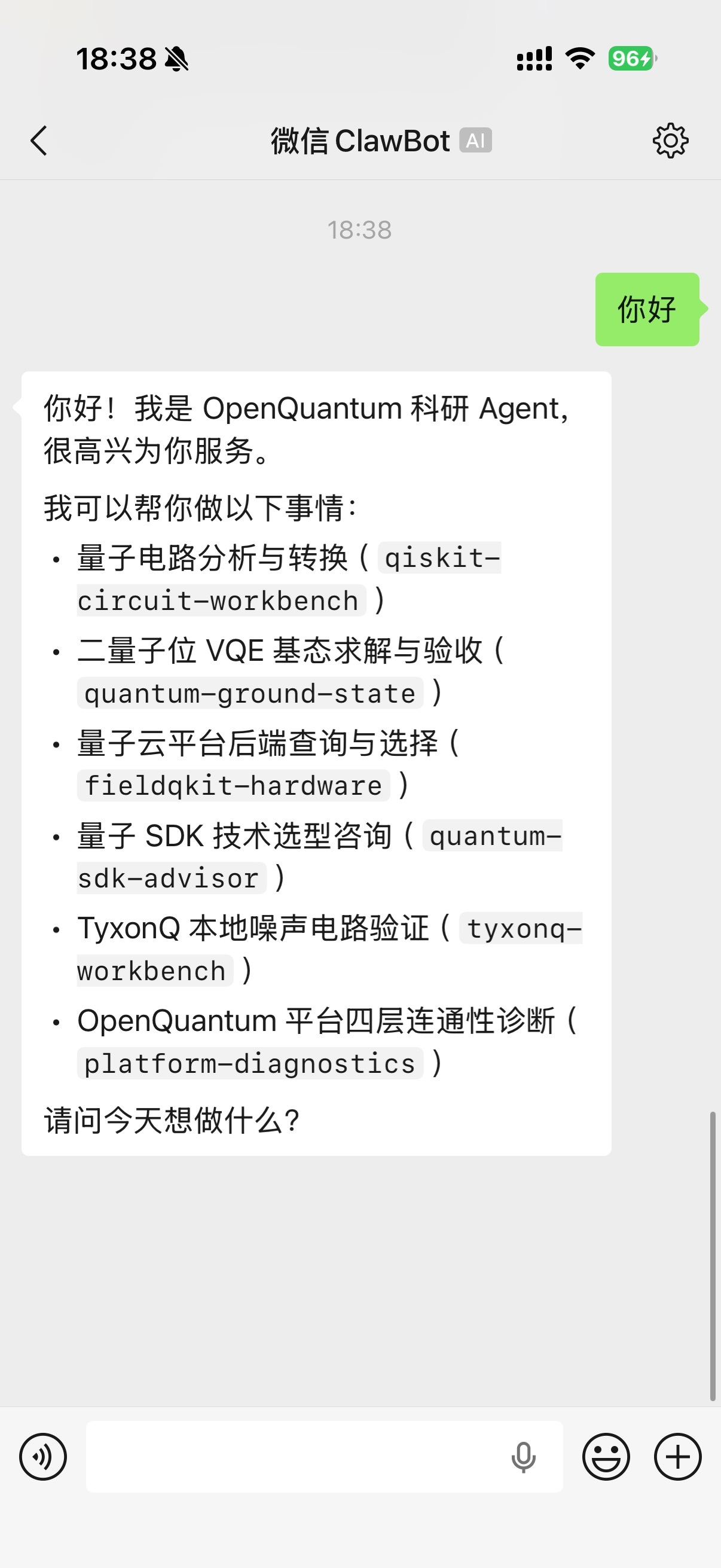
A task and reply in the WeChat channel.
Interface languages. The restored 0.8.11 desktop offers the original Simplified Chinese and English options under Settings → General → Language, with persistent selection. The other eight README editions, translation catalogs and review records are retained; they are not selectable Desktop languages in this baseline.
Historical screenshot of the earlier ten-language interface
The interface language does not rewrite existing conversations, course materials, user Skills or tool output. Some native system dialogs fall back to English outside Chinese and English.
Quick start
Choose one entry point: install the plugin in Codex, install the standalone Desktop app on Mac Apple Silicon, or run the workbench from source. Desktop and the source workbench are intended for single-user local use; choose source for development or to use capabilities on main.
Codex plugin: install and use
Installing the OpenQuantum plugin once registers Skills, local MCP services, scientific Tools and the OpenQuantum settings page together. You keep asking questions, managing projects and reading results in native Codex chats; the settings page configures OpenQuantum's capabilities.
Let Codex install it for you: open Codex, start a new chat and paste the request below.
Please install the OpenQuantum Codex plugin 0.8.11. First read the installation guide:
https://github.com/xi-zhao/OpenQuantum/blob/codex-v0.8.11/docs/integrations/CODEX_AGENT_INSTALL.md
Download the complete installer and SHA256SUMS from https://github.com/xi-zhao/OpenQuantum/releases/tag/codex-v0.8.11,
verify the checksum, check Codex, Node.js 24+ and npm, and install with the bundled installer.
Keep existing plugins and user settings, and check the Skills, MCP tools and the global "OpenQuantum settings" entry.
Tell me exactly what to do if the app needs reloading. Finally, report what was actually verified and which scientific dependencies still need preparation.
Desktop and the Codex plugin share OpenQuantum 0.8.11 and the same source commit. This release improves Tool shutdown and preparation progress, shares bounded execution across hosts, and adds SlowQuant, TNQS and RcmpsCore SDK workflows. Shared plugin and host boundaries remain unchanged. Skill and Tool counts, package checksums and verification results are recorded in the release attachments.
Download the Codex plugin 0.8.11 complete installer (release notes and SHA256SUMS).
The installer contains the plugin ZIP, install script and dependency lockfile; no source checkout is needed. It requires Node.js 24+, npm and a Codex version that supports plugins and global settings pages; an agent can check and handle these using the installation guide. Local installation is verified on macOS; check compatibility on other platforms and host versions.
After installation:
- Reload Codex when prompted, then open a new chat so the new Skills and tools load.
- Ask directly in chat, for example: "Use OpenQuantum to find quantum error-correction methods and recommend a first experiment."
- Open "…" → "OpenQuantum settings" and manage capabilities in the Home / Skills / MCP tabs; environments, credentials and Tool switches are grouped in the related cards. Built-in services come configured with the plugin; to add your own MCP server, enter its connection details and save tokens through the dedicated credential dialog.
The plugin installs capability code and configuration entry points; some calculations still need Python, quantum SDKs or third-party accounts prepared on demand. See the plugin guide.
Manual installation (optional)
Download and verify the complete installer, extract it and run the following in its directory (requires Node.js 24+, npm and a Codex CLI with plugin support):
npm ci --ignore-scripts
npm run plugin:install
If the installer cannot find the current Codex app's CLI, set OPENQUANTUM_CODEX_CLI to its path. With an existing plugin ZIP, use npm run plugin:install -- /full/path/plugin.zip. Installation, failure handling and step-by-step checks are in the agent installation guide.
Desktop installer
On Mac Apple Silicon, download OpenQuantum 0.8.11 DMG. Verify it against SHA256SUMS in the Release, open the DMG and drag OpenQuantum.app into Applications. The desktop, Node / uv and locked dependencies are included; no separate client is needed.
Built on DSH Desktop 2.0.0 / Harness 0.1.0-rc.6, this personal desktop focuses on conversations, workspaces, files, tools, safety and history. Configure your own model service. The app is ad-hoc signed and has no Apple Developer ID distribution signature or notarization. See the installation and migration guide for first launch and backup steps.
Intel Mac and Windows still use the 0.8.4 capability packages and their installation instructions. Those older artifacts do not include this simplified desktop update. Computing environments, accounts and licenses remain specific to each capability.
Install from source
Prepare Git and Node.js 24; Python quantum tools also need uv / uvx. Other dependencies depend on the capability, for example Julia 1.12.7 for RandomMeas.
git clone https://github.com/xi-zhao/openQuantum.git
cd openQuantum
npm ci
Without a model key you can already run the fixed local example. To start tasks through the agent, choose a workbench entry and configure a model.
Choose a workbench entry
Web and Desktop launched from the same source checkout share the same model settings, quantum capabilities and execution records in .openquantum/dsh. Quit the running entry before switching.
Web workbench
npm run dev
Open the address with the login token printed by the launcher; after authentication the workbench is at http://127.0.0.1:3000.
Build and launch Desktop from source
After installing the source dependencies and preparing Corepack and system C++ build tools:
npm run desktop:setup
npm run desktop:verify-install
npm run desktop -- --source
desktop:setup builds the pinned upstream source, downloads Electron and compiles native modules without modifying third-party interfaces or assets. Use the repository launch command so model and quantum-capability settings load. Platform requirements are in deployment.
Configure a model
A fresh Desktop installation has an empty model list. In Settings → Models, add a provider with an OpenAI-compatible Chat Completions endpoint, model name and API key, and keep OpenQuantum as the default agent preset. The model must support Tool Calling to call quantum computing tools. This configures the model service only; quantum-cloud credentials are configured with their backends.
Advanced model configuration and command-line diagnostics
The source includes optional openquantum-public / openquantum-private debugging examples whose addresses are .invalid placeholders. They are not prefilled in a new Desktop model list and need real addresses and credentials only for the diagnostics below.
Route overrides saved in the interface are written to the Git-ignored $DSH_HOME/settings.yaml; keys stay in the local environment or the Harness credential store, and project configuration records only credential references. To use .env, run cp .env.example .env on macOS or Copy-Item .env.example .env in Windows PowerShell and fill it in as commented. .env does not override model names; configure other model names under Settings → Models.
The command below checks the public route from .env or environment variables with the script's fixed kimi-k2.7-code and glm5.2 model names, testing text generation and Tool Calling. It does not read route overrides saved in the interface; verify other models with the workbench task below.
npm run models:probe -- --provider openquantum-public
Prepare computing environments per task
Local Python computing tools use explicitly prepared, pinned dependencies. After npm ci, run the preparation command for the capability you need from the repository root. Preparation may download and build; computing calls no longer install dependencies automatically.
| What to prepare | Command or entry point |
|---|---|
| The first Bell-state experiment | node scripts/setup-paper-tools.mjs fatqat-workbench |
| Static interaction of an Rb atom pair | npm run capability:pairinteraction:setup; model and version governance |
| Trotter / qDrift Hamiltonian simulation | npm run capability:hamiltonian:setup |
| Clifft sampling and qBraid circuit conversion | npm run capability:interop:setup |
| Any other Python capability | node scripts/setup-paper-tools.mjs <capability-id>, for example qec-memory-experiment; each Skill lists its own command |
| Algorithm examples | Start from the minimal environment and add gradient, PennyLane, tensor or chemistry groups as needed |
Environment preparation, connection enablement and model configuration are independent steps. Even a connection that is on by default needs its dependencies prepared before first use; if an environment is missing or its lockfile changed, the Tool returns the exact preparation command. Julia, QDMI drivers and upstream MCP services follow their own guides; see local environments.
Run a first task
No model key needed: recompute a fixed case
With the repository's fixed two-qubit Pauli Hamiltonian as input, the native solve_and_validate_ground_state Tool runs noiseless VQE in the specified particle sector and checks the result with an independent closed-form calculation. After git clone and npm ci, run this in the repository; no model key or quantum-cloud credential is needed:
npm run demo:quantum-ground-state
| -1.85727503 Ha VQE energy |
-1.85727503 Ha Independent exact reference |
4.44 × 10⁻¹⁶ Ha Energy difference |
15 passed Local computation checks |
These values come from a local rerun on 2026-09-12; the raw output and run record contains full values, check status, time, source commit, input digest and Node.js version.
What this run checked, and what is still missing
In this record, 15 local computation checks passed and 1 session-provenance check was not run, so no complete scientific acceptance conclusion exists. The energy difference shows agreement with the exact reference for this numerical case; scientific scope is limited to the given Hamiltonian and particle sector.
Complete scientific acceptance also requires running the task through Harness, saving result files and session provenance, and producing a re-readable acceptance report. The verification entry points after model configuration are in development and verification.
Let the agent run a task: prepare and sample a Bell state
After configuring a model and preparing FatQat with node scripts/setup-paper-tools.mjs fatqat-workbench, start a new session and send:
Use FatQat to start from the two-qubit all-zero state, apply H to q0, then CX with q0 as control and q1 as target. Return the exact noiseless probabilities and compare them with 1024 samples using seed=7.
The agent can call FatQat's circuit tool, and the workbench keeps the tool input and returned result. Inspect the exact probabilities and sample counts, then follow up:
Keep the circuit and seed, change the sample count to 8192, and compare how far both runs' frequencies are from the exact probabilities.
The ideal probabilities are 50% each for 00 and 11; finite-sample frequencies fluctuate. Comparing two runs shows that fluctuation; a single increase in samples does not guarantee every frequency moves closer to the ideal value. Without a Tool Calling model the agent cannot call computing Tools. Interface details and local verification are in the FatQat guide.
Run an algorithm example directly
No model key or quantum-cloud account is required. Start with NumPy, SciPy and Qiskit:
npm run capability:algorithms:setup -- --minimal
On macOS / Linux, list methods, read the input contract and run the default HHL example:
examples/quantum-algorithms/.venv/bin/python examples/quantum-algorithms/run.py --list
examples/quantum-algorithms/.venv/bin/python examples/quantum-algorithms/run.py --describe hhl
examples/quantum-algorithms/.venv/bin/python examples/quantum-algorithms/run.py --algorithm hhl
On Windows PowerShell:
& examples/quantum-algorithms/.venv/Scripts/python.exe examples/quantum-algorithms/run.py --algorithm hhl
For QSP/QSVT and similar methods, run npm run capability:algorithms:setup -- --group pennylane; other groups are gradients, tensor and chemistry, and adding a group keeps the others. npm run capability:algorithms:setup without arguments prepares everything. The full environment includes PySCF, for which WSL is recommended on Windows; numerical verification was done on macOS CPU.
Pass your own parameters as a JSON file with --input and save results with --output, or, after configuring a model, let the agent use quantum-algorithms or a specific method Skill. Parameters, bit order, method differences and dependency groups are in the algorithm example guide.
Upgrade an existing source installation
Update the source and project dependencies following the update guide, then rerun the preparation command once for each capability you use. Python bridges verify and synchronize pinned dependencies in their existing environment directories, so nothing needs deleting; algorithm examples can keep adding groups.
Restart the workbench and start a new session. Existing Skill and Tool names and parameters remain valid; the 13 category indexes can still be called manually, while automatic tasks choose quantum-algorithms or a specific method. To restore an optional service's full tool range, use the default full profile; see capability selection and compatibility.
Optional entry points
Set up Quantum Learning
After installing source dependencies, run in the same checkout:
npm run learning:ui:setup
Then start Web and open Quantum Learning from the sidebar. The simplified Desktop does not include this entry by default. The first launch starts a local database and course service, with no global PostgreSQL needed; model requests use the model currently selected in OpenQuantum.
Installation and startup are verified on macOS. The installer depends on /bin/sh and is not yet adapted to ordinary Windows; Linux is not yet verified. A new Git worktree needs its own installation. Backup, migration and platform status are in the integration guide.
Configure WeChat, Feishu and other messaging channels
npm run cc-connect:setup
npm run cc-connect:feishu
npm run cc-connect:start
Configure the first platform as upstream describes; run npm run cc-connect:web in another terminal to manage other platforms and credentials. Tokens are stored in Git-ignored local configuration; see the messaging guide.
Deployment and startup problems are covered in deployment and troubleshooting.
Use and inspect results
Once a task runs, you can choose other backends, change the problem size and carry the results into further research.
Choose the right entry point
Use runnable examples when learning or changing an algorithm, and specialist tools when you need a defined input/output contract. Overlapping entry points for Trotter / qDrift, VQD, Qiskit and eigensolvers have a shared selection guide; original names are kept, and implementations with different physical assumptions or numerical methods remain separate.
Qiskit Gym, Quantum Hardware and FlagQuantum are off by default. When you need them, configure a smaller tool profile for training, device queries, compilation or simulation; without a choice, the backward-compatible full profile applies. Tools callable in a session depend on enabled connections, actual registration and the selected profile.
Local computing and quantum clouds
Local numerical calculations need no quantum-cloud account. To use other tools, configure the connection under Settings → Quantum components → MCP Server connections, restart the workbench and name the backend in the task. Default switches are listed in the MCP service catalog.
For real hardware, prepare credentials, permissions and quota for the target service. Device discovery, real job submission and local simulation each have their own scope. A configuration does not mean the service is online; check the actual run record to see whether a job succeeded.
| Backend | Current capability | Credentials or conditions |
|---|---|---|
| Local computing | Circuit and noise simulation, ground-state references, state audits, error-correction sampling, optimization and experiment simulation, each with its own input range | No cloud credentials; prepare pinned dependencies before computing |
| IBM Quantum | Runtime, AI Transpiler, hardware queries; optional real job submission and cancellation | QISKIT_IBM_TOKEN; job MCP Server connections are opt-in |
| IonQ | Hardware queries; optional real job submission, cancellation and cost estimates | IONQ_API_KEY; job MCP Server connections are opt-in |
| Origin Quantum cloud | Read-only backend discovery (FieldQKit); Wukong QPU queries through the QPanda3 Runtime MCP Server with optional sampling, expectation and batch jobs | ORIGIN_API_TOKEN for discovery; QPANDA3_API_KEY for optional hardware jobs |
| Quafu, Tianyan, Guodun, Tencent and LogicalQubit clouds | Credential checks, backend discovery, qubit filtering, topology and calibration summaries | Each service's API token; read-only |
| FieldQuantum | Cloud simulator backend discovery | FIELDQUANTUM_API_TOKEN; read-only |
Hardware jobs and paid services are enabled on demand. Read-only discovery lets you learn about devices, topology and calibration before deciding whether to run real jobs. "Read-only" means the remote cloud or QPU state is not changed; local Python bridges still keep their workspace-write contract because SDK caches and result materialization can write to the local workspace.
Computing parameters
Within each tool's supported models and inputs, you choose qubit counts, circuit depth, Hamiltonian terms, sample counts and iteration budgets. Available parameters and sizes follow each tool interface and depend on the algorithm, backend and computing resources; a bounded reference case does not define every tool's scope.
The main computation and exact comparison are separate: you can optimize circuits, generate MBQC patterns, taper symmetries, analyze Lie algebras or run tensor algorithms directly, and choose automatic, forced or skipped independent references with referenceMode. Parameters, return values and resource settings are in the local computing guide. Local verification inputs, versions and results are kept in each integration's records for reproduction.
More copyable tasks for circuits, ground states, noise, dynamics and benchmark queries are in the Chinese reference documentation.
Methods and results you can keep using
The workbench saves each task's request, tool calls and returned results, so you can review the process and keep asking. Adjust parameters, choose another connected backend, or turn common research steps into a Skill for later tasks.
In supported capabilities, results come with exact references, independent checks or statistical error information. Ground-state solving and quantum-information audits also provide a complete scientific acceptance flow linking inputs, result files and session provenance for review.
Execution records and scientific acceptance in detail
The research workbench records task requests, Skill loading, tool calls, permission state and returned results. "Enabled" in settings is only a configuration policy; whether a tool is callable and a service reachable is shown by run evidence.
Run completion and scientific acceptance are shown as separate states. Capabilities with a complete acceptance flow link inputs, result files, independent checks and session records into an acceptance report listing passed, failed and unchecked items; other tools report numerical results and check status within their own scope.
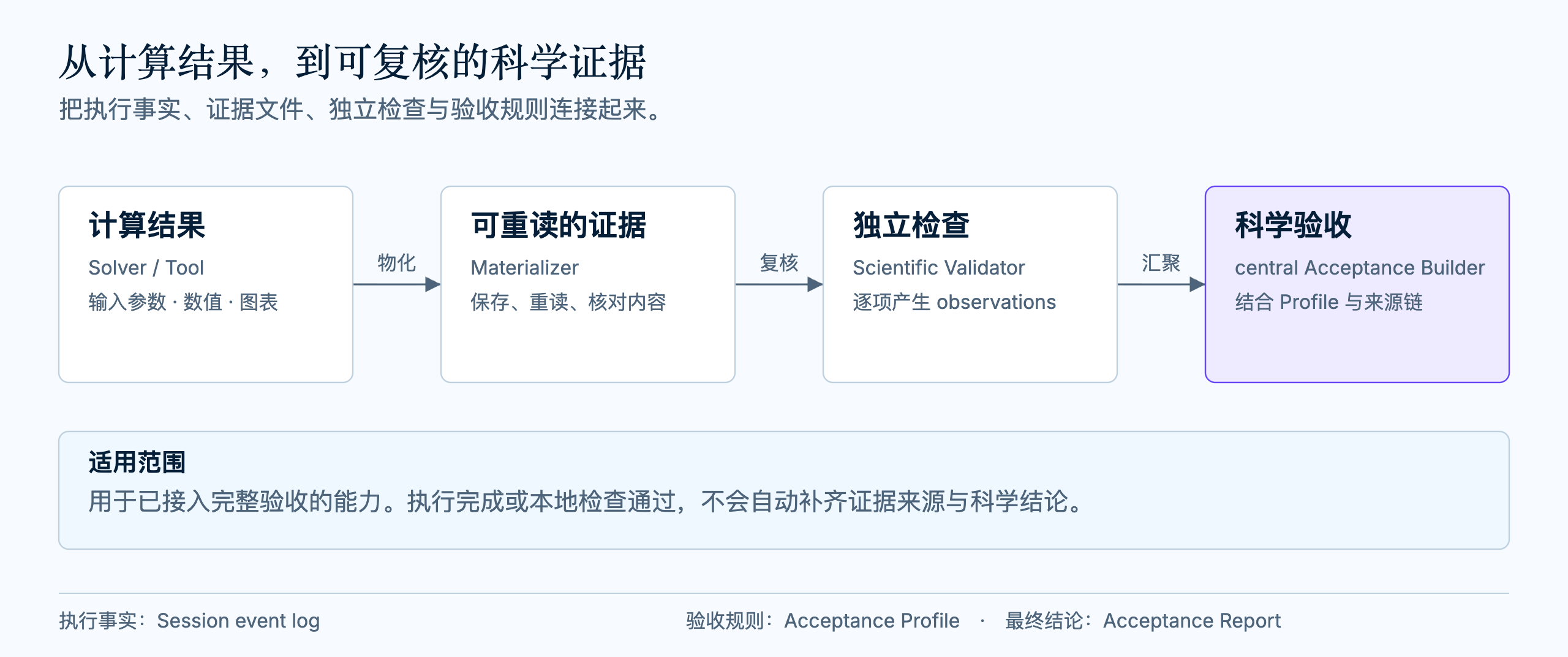
The diagram shows how capabilities with complete acceptance form evidence; see the editable source. Bounded ground-state solving and quantum-information audits provide the complete flow; QUBO, circuit equivalence and error-correction memory experiments report results and checks under their own rules. Evidence is in the capability declarations, architecture audit and fixed quantum capability benchmark.
Frequently asked questions
- Do I need a quantum-computer account or a model key? See the local example, model configuration and quantum clouds.
- Do I have to learn every SDK first?
- Does a text-only reply mean the calculation ran?
- After upgrading I am asked to prepare an environment. What now?
- Algorithm examples or specialist computing tools?
- Does Quantum Learning already have complete courses?
Extend the platform
Make your quantum software a capability agents can use, and bring complete applications onto an open platform. OpenQuantum's agent-ready extension paths are: describe working methods in a Skill; connect computing programs as native Tools or through an MCP Server; and, where independent scientific checks are needed, add a Validator and its evidence flow. Complete applications integrate along their own business and data boundaries instead of being split into single Tools.
OpenQuantum's domain capabilities run on DeepSeek Harness, which handles general agent execution, tool scheduling, model connections and execution records. It does not introduce a second agent runtime. Start from the task users need to solve, then choose the extension:
| What to add | Where it belongs |
|---|---|
| Domain knowledge, steps, tool choice and result interpretation | A Skill, which can reuse existing general or quantum Tools |
| A stable computation, query or operation | A Tool, registered by a native Tool Provider or the Harness MCP Client |
| A quantum application or teaching product with its own interface and workflow | Integrate along the application boundary, keeping its business, data, permission and backend responsibilities; Quantum Learning is the existing example |
| Independent scientific checking and acceptance | A Validator; for final acceptance, add an Acceptance Profile, evidence materialization and the central Acceptance Builder |
Existing Skills, bridges and native Tools serve as references. Read the documentation and architecture entry first, then the contribution guide, extension model and module map as needed.
Quantum applications for practical problems
OpenQuantum integrates not only SDKs, algorithms and computing services but also complete applications for defined users and problems. An application can keep its own interface, workflow, data management and result display, and connect to agents through explicit execution interfaces when collaboration is useful.
Future applications could cover scheduling optimization or molecular and materials calculations, letting users submit a real problem, check input conditions and read results with their scope, instead of assembling a workflow from single algorithms. These are directions, not a list of delivered applications. Quantum Learning is the existing complete-application integration; others need their data permissions, backends, costs and verification scope worked out case by case. Whether an application uses a real QPU or beats classical methods is decided by its own run records and comparisons.
Architecture and responsibilities
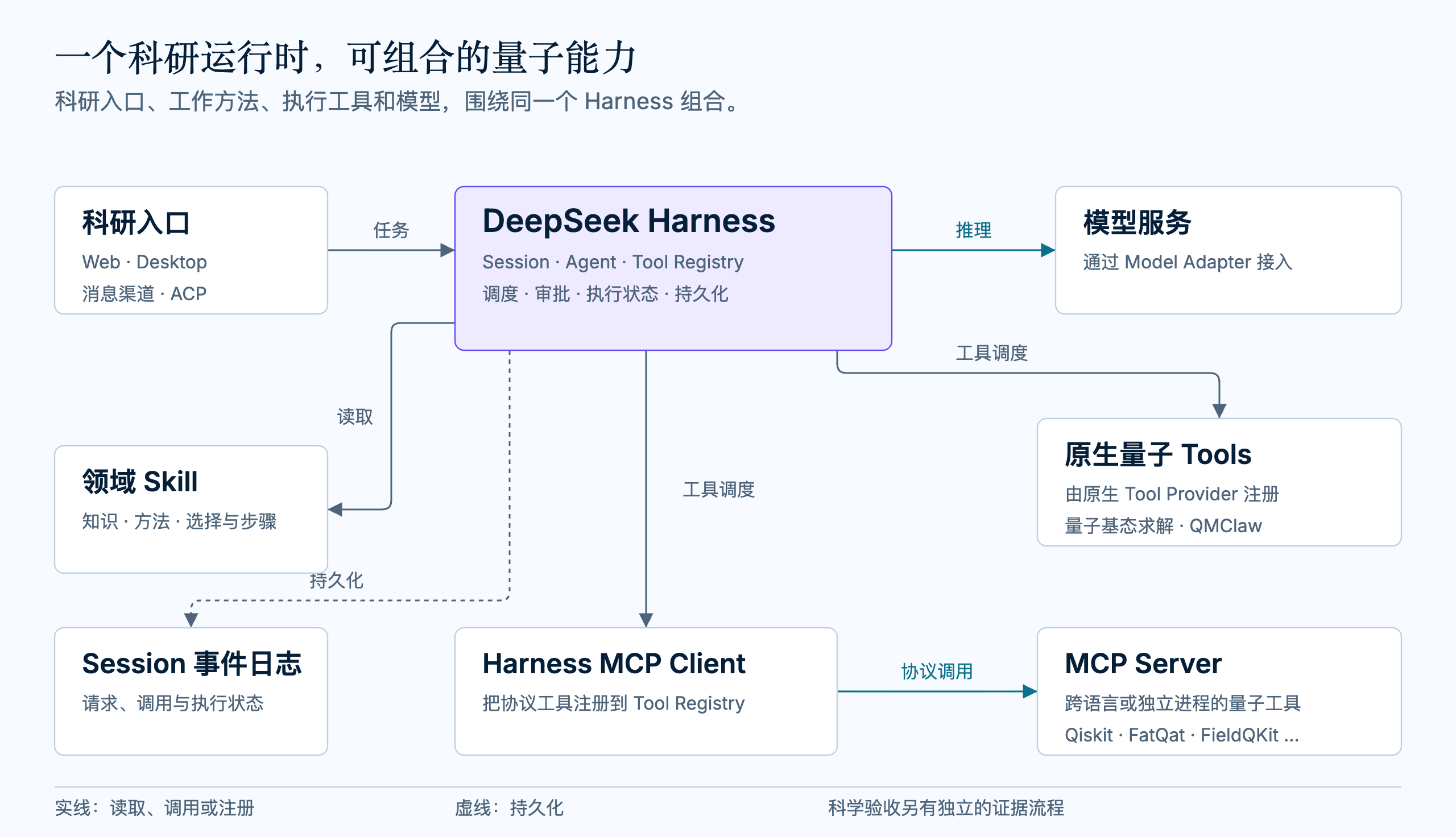
The diagram shows the workbench's core call relationships; see the editable source.
- A Skill supplies knowledge and workflow instructions; it does not execute code or hold credentials.
- A Tool Provider registers executable tools, natively in-process or through the Harness MCP Client for an MCP Server.
- A Scientific Validator produces observations; an Acceptance Profile defines rules, and only the central Acceptance Builder derives final acceptance from observations and provenance. In development documents,
L3means a replayable complete acceptance flow; it does not mean every call has been accepted. - An Agent Preset combines the required Skill Providers, Tool Providers and agent policies.
Prefer native Tool Providers for in-process, same-language actions without isolation needs; use an MCP Server for cross-language, separate-process or remote deployments. Harness assembles extensions through Cordis Plugins, and UI, model connections, quantum computation and scientific judgment keep separate responsibilities.
The full Skill, MCP service and native Tool catalog is maintained in the Chinese reference documentation: the current source ships 189 built-in Skills (176 automatically selectable, 13 manual category indexes), 91 MCP service connections (66 on by default, 25 opt-in) and 5 native quantum Tools.
Development and verification
Configuration checks, numerical regressions and end-to-end tests
# Check the Harness composition
npm run harness:config

# Run the complete offline quality check
npm run check

# macOS/Linux: local numerical regressions and Harness wiring with pinned dependencies
npm run capability:mitiq:live
npm run capability:unitary:live
npm run capability:hamiltonian:live
npm run capability:algorithms:live

# Real agent end-to-end test after configuring a model
npm run e2e:quantum-harness -- --provider openquantum-public
Choose the checks relevant to your change; the full list is in the Chinese reference documentation. Tests and local evidence are distinct from a published release or scientific acceptance. Release changes are in the v0.8.4 release notes.
The official OriginQ pyqpanda3 Skill is an optional upstream Skill: it is not counted among the 189 built-in Skills and is not installed automatically. npm run skill:qpanda:setup installs the reviewed version; it does not enable qpanda_runtime or grant cloud-job permissions.
Roadmap and RSI
From using existing capabilities to creating new ones together. We will keep building an open quantum agent and application platform where specialist methods, computing resources, complete applications, laboratory instruments and learning resources each have an entry point and work together within their scope. These are long-term directions, not a delivery list; capabilities arrive through individual integration and verification.
Platform foundations
| Long-term track | What we will keep building |
|---|---|
| 0 · A more useful quantum agent | Improve task understanding, method selection, tool calls, result interpretation and failure recovery, from a request to an actual calculation. Measure progress by the quality, time and cost of completing real tasks. |
| 1 · An agent-ready quantum software ecosystem | Keep connecting specialist software and improving execution interfaces, domain Skills and dependency preparation so tools can be called and methods reused, with applicability conditions and verification records kept. |
| 2 · Quantum, HPC and AI workflows | Connect local CPUs, remote GPUs, HPC, quantum simulators and QPUs, and explore agent-organized quantum–classical computation. Choose resources by size, precision, time and budget, verifying backends, orchestration and coordinated execution step by step. |
| 3 · Interfaces for intelligent laboratory instruments | Prepare standardized device interfaces, connect programmable instruments step by step and explore device discovery, experimental control, measurement analysis and feedback, linking computation with real experiments. |
Applications and teaching
| Long-term track | What we will keep building |
|---|---|
| 4 · More high-quality courses | Build a knowledge map from foundations to the frontier, with beginner, intermediate and advanced courses, learning across levels by background and interest, and connected explanation, hands-on experiments and assessment. |
| 5 · Quantum applications for practical problems | Integrate or co-build complete applications around defined problems, with problem input, computing workflow and result display, so users need not assemble the underlying tools. Document each application's backends, costs, scope and verification results. |
Personalization and improvement
| Long-term track | What we will keep building |
|---|---|
| 6 · Proactive, personalized support | Understand each person's background, interests and goals from learning and research, suggest what to learn or which method to use next, and fill in missing prerequisites, so courses and tools adapt to the person. Users control which records are used, where they are stored and how to turn this off. |
| 7 · Research capabilities that keep improving | Explore the path from task experience to improved methods and tools, and then to improving the research process itself. Test improvements with new-task comparisons, independent checks, full costs and versions that can be rolled back, as in the RSI direction below. |
Instrument interfaces will draw on explorations such as Anthropic's Model Hardware Standard (MHS), starting with simulated devices and collaborative experiments; real-time control and device constraints stay with the corresponding drivers and control systems.
Research that improves how research is done
Current status: the platform has methods, execution and part of the scientific checking infrastructure; the RSI loop is not implemented. Improvement proposals, independent evaluation, version acceptance and benefits across rounds still have to be built and verified; the architecture and evidence boundaries remain the basis for what exists today.
Research should leave not only answers but also methods and tools that improve the next investigation. We want to explore recursive self-improvement (RSI) for quantum science: the system finds its own limits, proposes candidate improvements and uses them in later tasks after testing; the improved system then produces and verifies the next round of improvements more effectively.
| Level | Change we want to accumulate |
|---|---|
| Across tasks | Turn authorized task experience into reusable methods, cases and failure boundaries, not just chat logs. |
| Capability improvement | Propose changes to method selection, tool implementation or workflow and test on new tasks whether quality, reliability or cost improve. |
| Recursive self-improvement | Improve the methods that produce improvements, such as experiment design, candidate search and independent verification, and test whether the next round becomes more efficient. |
The envisioned loop is real task → candidate improvement → independent checks and new-task comparisons → authorized version update → next round of research.
For example, a circuit task could yield not only an optimized circuit but also a better way to choose optimization strategies. Candidate strategies need independent equivalence checks and comparison with the previous version on circuits not used in development; improving the experiments that find such strategies reaches the recursive core. What matters is whether later tasks actually benefit, not how many Skills were added, how much code changed or whether a stronger model was swapped in.
An improvement must be compared with a version that did not inherit it, reporting the base model, human involvement and total improvement and usage cost under comparable conditions, and checking for regressions. A candidate system must not relax its own acceptance rules, delete failure evidence or extend its permissions; independent evaluation, user authorization, data boundaries and rollback are conditions for accepting a change. Community contributions and human guidance take part and should not all be credited to autonomous AI progress.
OpenQuantum aims to provide a quantum working environment for this exploration: executable tools, reusable methods, checkable results and open interfaces for other research agents, without building a new general agent runtime or training a new foundation model. Collaboration with CyberEinstein, PRAgent and RunThePaper is a possibility for later, not an existing automatic loop across projects. Whether AI and quantum capabilities reinforce each other must be tested on concrete tasks counting preparation, measurement, error-correction and data-transfer costs; we do not assume quantum computing accelerates foundation-model training or allows unlimited self-improvement.
What we ultimately want: one investigation produces a new result and leaves capabilities that help the next one succeed.
Documentation and support
Everyone is welcome to help build trustworthy AI for quantum research. Report problems, contribute code, connect tools, share methods and reproduction cases, and help the community's expertise reach more researchers. A reproducible case, a checked negative result, a fix that removes repeated setup or an experiment that gets learners hands-on can all start the next piece of work.
| What you want to do | Start here |
|---|---|
| Use the platform and understand its capabilities | Documentation index, deployment, troubleshooting |
| Contribute Skills, tools and scientific checks | Extend the platform, contribution guide |
| Integrate applications, build courses and experiments | Practical applications, Quantum Learning |
| Report issues or learn the project background | GitHub Issues, project story (Chinese) |
When contributing, state sources, authors, licenses, conditions and verification scope, and share only authorized material. Private sessions and unpublished data are not public by default, and credentials never belong in contributions. Report security issues privately under the security policy.
Detailed technical documents are mainly in Chinese; corrections to this translation are welcome.
Start a quantum exploration · Bring your methods and applications
OpenQuantum · Quantum computing at your fingertips.
License and acknowledgments
OpenQuantum's quantum capabilities build on open science and open-source software. We maintain domain Skills, MCP bridges, native Tools and applicable scientific checks; underlying algorithm libraries, external services and application foundations keep their own authors, project names and licenses.
| Project used or adapted | Role in OpenQuantum |
|---|---|
| DeepSeek Harness | Agent runtime and native Web UI of the research workbench: sessions, model calls, tool scheduling and execution records |
| DSH Desktop | Desktop client foundation; OpenQuantum adapts branding and launch configuration and reuses the workbench |
| CC Connect | Messaging bridge that brings requests from WeChat, Feishu and other channels into the workbench |
| OpenMAIC | Teaching foundation of Quantum Learning, keeping its full interface, server and teaching workflows, with OpenQuantum naming, theme and model connection |
The computing, device and reference projects behind each capability, and how each is adapted, are listed in the Chinese reference documentation.
OpenQuantum's own code is under the MIT License, except for separately licensed directories. The Mitiq error-mitigation capability directory is GPL-3.0-only, and the Metriq public data snapshot is CC-BY-4.0, each with its own LICENSE and NOTICE. DeepSeek Harness, DSH Desktop, OpenMAIC, FatQat, Qiskit MCP Servers, FieldQKit, Quantum Hardware MCP and other third-party components keep their own licenses; see THIRD_PARTY_NOTICES.md before redistributing or enabling an optional integration. Screenshot and diagram sources are in the image notes.