
xguot/difi
xguot/difi has 367 GitHub stars and 15 forks. GitHot measured 0 stars in 24 hours and +1 in 7 days. Last checked 2026-11-09 07:33 UTC. Last push 2026-10-28.
Review and refine Git diffs before you push
Measured star growth
- in 24h
- 0
- in 7 days
- +1
- in 15 days
- Update delayed
- in 1 month
- Update delayed
Net star changes over overlapping periods, not daily totals. Missing measurements are left blank. Stars measure attention, not software quality.
README.md
Original

Review and refine Git diffs before you push.


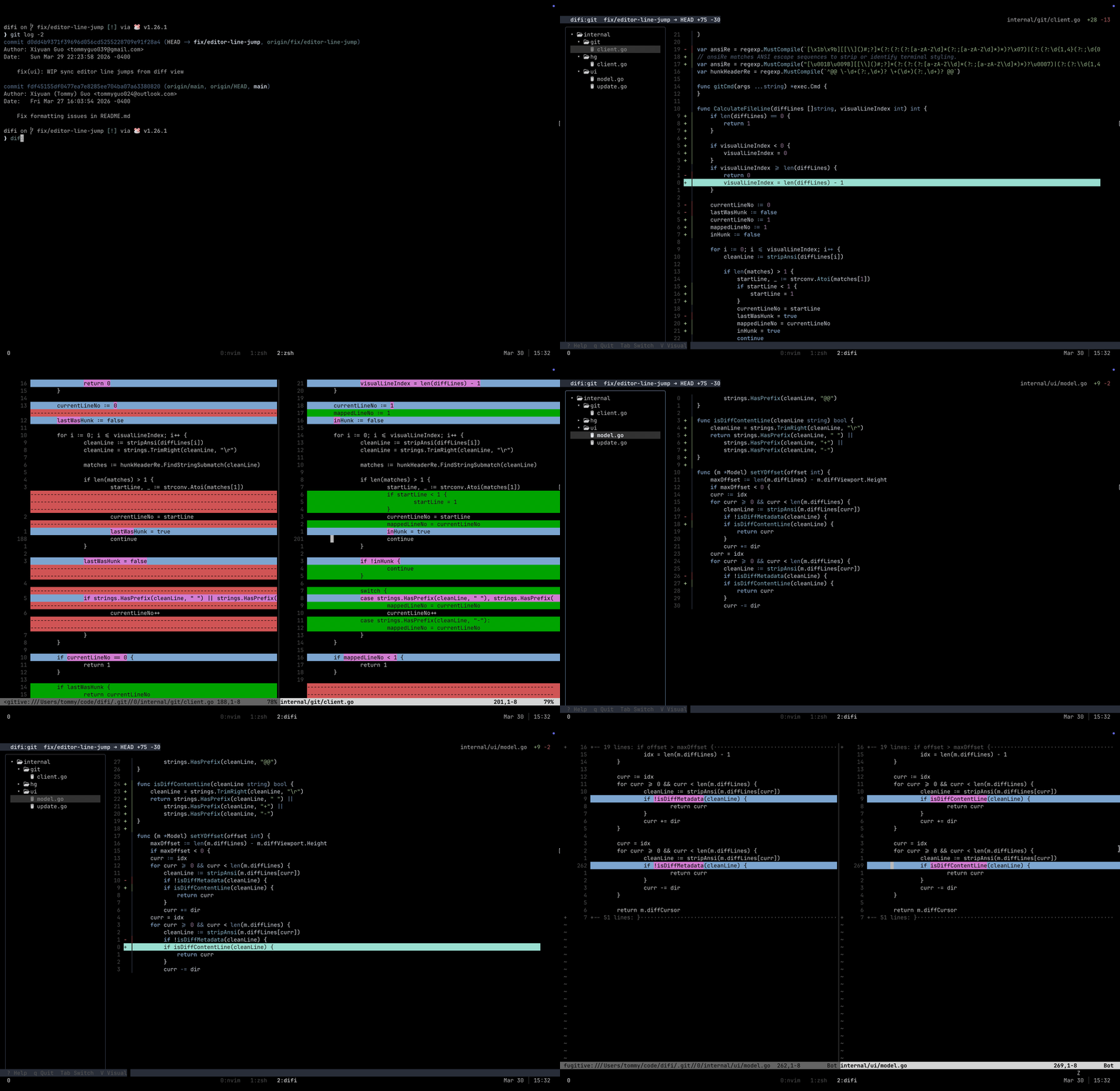
Installation
Homebrew (macOS & Linux)
brew install difi
Go Install
go install github.com/xguot/difi/cmd/difi@latest
AUR (Arch Linux)
Binary (pre-built):
pikaur -S difi-bin
Build from source:
pikaur -S difi
Manual (Linux / Windows)
- Download the binary from Releases and add it to your
$PATH.
Workflow
Run difi in any Git repository against HEAD:
cd my-project
difi
To compare against a specific branch or commit, just pass it as an argument:
# Compare against the main branch
difi main

# Compare against the previous commit
difi HEAD~1
Choose What to Review
The default remains working files compared with HEAD, including untracked files.
Use these flags to narrow the review:
| Command | Comparison | Untracked files |
|---|---|---|
difi |
Working tree against HEAD |
Included |
difi --staged / difi -s |
Git index against HEAD |
Excluded |
difi --staged main |
Git index against main |
Excluded |
difi --unstaged / difi -u |
Working tree against the Git index | Included |
difi --no-untracked |
Default comparison, tracked files only | Excluded |
difi -u --no-untracked |
Unstaged changes to tracked files | Excluded |
Put flags before the optional target. --staged and --unstaged are Git-only
and cannot be combined. --unstaged takes no target. --no-untracked also
works with Mercurial. Staged reviews work before the first commit.
The header identifies the comparison. Editing a file and using :w refreshes
the same scope. The editor always opens the working file; in staged mode,
editing does not stage the result. Difi does not stage or discard changes.
Add --plain / -p to print file paths without opening the UI:
difi --plain --staged
difi --plain --unstaged --no-untracked
Piping & Alternative VCS
You can also pass raw diffs directly into difi via standard input. This is perfect for patch files or other version control systems like Jujutsu:
# Review a saved patch file
difi < changes.patch

# Review changes in Jujutsu (jj)
jj diff --git | difi

# Pipe standard git diff output
git diff | difi
For a headless list of the files in a patch:
git diff --cached | difi --plain
A piped patch defines its own comparison. Scope flags and positional targets
cannot be combined with stdin. Refresh re-reads the supplied patch in memory;
use a native scope such as difi -u to refresh changes from disk. An empty patch
stays empty instead of falling back to the current repository.
Controls
| Key | Action |
|---|---|
Tab |
Toggle focus between File Tree and Diff View |
j / k |
Move cursor down / up |
h / l |
Focus Left (Tree) / Focus Right (Diff) |
e / Enter |
Edit file (opens editor at selected line) |
/ |
Filter files in the tree; search text in the diff |
n / N |
Next / previous matching diff line (wraps) |
]c / [c |
Next / previous hunk (} / { also work) |
Esc |
Cancel input, or clear the focused pane’s filter/search |
: |
Open vim-style command line |
? |
Toggle help drawer |
q / ZZ |
Quit |
Find Files and Changes
In the file tree, press / and type part of a path. Matching is literal and
case insensitive, including directory names. Results show full paths, including
files in collapsed folders. Enter keeps the filter; Esc during input restores
the previous filter and selection. Press Esc in the tree to clear an applied
filter. Filters survive refreshes.
In the diff pane, press / to search the selected file’s diff. Matching lines
are underlined and marked with ◆; n and N move forward and backward,
wrapping at the ends. The footer shows matching-line counts. Search is literal
and case insensitive; hunk headers are excluded. Esc cancels input or clears
the applied search; :noh also clears it. Use Ctrl-u to clear prompt input.
Use ]c / [c (or } / {) to move between the first changed lines of hunks.
Hunk navigation stops at the first and last hunk. Vim counts work, such as
3]c or 5n. In terminals narrower than 60 columns, the focused pane fills the
screen; use Tab or h / l to switch panes.
Git editor sessions export DIFI_SCOPE as working, staged, or unstaged.
DIFI_TARGET contains the target ref; it is empty for the index baseline in
unstaged mode. Staged line positions are mapped through unstaged edits before
the working file is opened.
Configuration
difi can be configured using a YAML file located at ~/.config/difi/config.yaml. If the file doesn't exist, difi will use sensible defaults.
Example config.yaml
editor: "nvim"

ui:
  line_numbers: "hybrid"
  theme: "nord"
  diff_add_bg: "#2b3328" # Optional: Custom background for added lines
  diff_del_bg: "#4a2323" # Optional: Custom background for deleted lines
Options
| Key | Default | Description |
|---|---|---|
editor |
$DIFI_EDITOR, $EDITOR, $VISUAL, or vi |
The editor to open when pressing e on a file. |
ui.line_numbers |
"hybrid" |
The style of line numbers in the diff view. |
ui.theme |
"nord" |
The vim colorscheme used for syntax highlighting and UI. |
ui.diff_add_bg |
"" |
Hex code or terminal color for added line backgrounds. |
ui.diff_del_bg |
"" |
Hex code or terminal color for deleted line backgrounds. |
Command Line
Press : to open a vim-style command line at the bottom of the screen. Available commands:
| Command | Action |
|---|---|
:colorscheme <name> |
Switch to a different theme |
:theme <name> |
Alias for :colorscheme |
:set <option> |
Change a setting live (e.g. :set number) |
:w, :write |
Refresh files, statistics, and diff |
:help, :h |
Toggle the help drawer |
:noh, :nohlsearch |
Clear search and visual selection |
:<number> |
Jump to line N in the diff |
:$ |
Jump to last line in the diff |
:q, :quit |
Exit (same as pressing q in normal mode) |
Tab cycles through matching commands, theme names, and :set options. Press Esc to cancel.
:set Options
| Option | Effect |
|---|---|
number / nu |
Absolute line numbers |
nonumber / nonu |
Hide line numbers |
relativenumber / rnu |
Relative line numbers |
norelativenumber |
Disable relative line numbers |
hybrid |
Hybrid (absolute on cursor) |
relative |
Relative mode |
absolute |
Absolute mode |
hidden |
No line numbers |
Available Themes
| Theme | Description |
|---|---|
nord (default) |
Nord dark |
gruvbox |
Gruvbox dark |
catppuccin-mocha |
Catppuccin Mocha |
catppuccin-latte |
Catppuccin Latte |
dracula |
Dracula |
monokai |
Monokai |
onedark |
OneDark |
github |
GitHub Light |
github-dark |
GitHub Dark |
rose-pine |
Rosé Pine |
rose-pine-dawn |
Rosé Pine Dawn |
solarized-dark |
Solarized Dark |
tokyonight-night |
Tokyo Night |
tokyonight-storm |
Tokyo Night Storm |
evergarden |
Evergarden |
doom-one |
Doom One |
quiet |
Quiet (minimal) |
Set a default theme in ~/.config/difi/config.yaml:
ui:
  theme: "dracula"
Integrations
vim-fugitive
- The "Unix philosophy" approach: Uses the industry-standard Git wrapper to provide a robust, side-by-side editing experience.
- Side-by-Side Editing: Instantly opens a vertical split (:Gvdiffsplit!) against the index.
- Merge Conflicts: Automatically detects conflicts and opens a 3-way merge view for resolution.
- Config: Add the line below to if using lazy.nvim.
{
  "tpope/vim-fugitive",
  cmd = { "Gvdiffsplit", "Git" }, -- Add this line
}

difi.nvim
Get the ultimate review experience with difi.nvim.
- Auto-Open: Instantly jumps to the file and line when you press
ein the CLI. - Visual Diff: Renders diffs inline with familiar green/red highlights—just like reviewing a PR on GitHub.
- Interactive Review: Restore a "deleted" line by simply removing the
-marker. Discard an added line by deleting it entirely. - Context Aware: Automatically syncs with your
difisession target.

Git Integration
To use difi as a native git command (e.g., git difi), add it as an alias in your global git config:
git config --global alias.difi '!difi'
Now you can run it directly from git:
git difi
Contributors
- Abraham Joy (@abraham-1672) - Logo and Wordmark Design
Star History
Explore related projects
codecrafters-io/build-your-own-x
Master programming by recreating your favorite technologies from scratch.
561,366 starspublic-apis/public-apis
A collective list of free APIs
497,639 starsmorluto/rea
Reverse engineer anything with agents, from app behavior down to native binaries.
447,132 starsopenclaw/openclaw
The AI that really does things. Any OS. Any Platform. The lobster way. 🦞
394,258 stars