
xfirefly/Airplay-SDK
xfirefly/Airplay-SDK has 4,019 GitHub stars and 327 forks. GitHot measured -1 stars in 24 hours and -3 in 7 days. Last checked 2026-11-09 14:34 UTC. Last push 2026-09-26.
The Best Airplay SDK supports Airplay Mirroring and AirPlay Casting to a receiver device.
Measured star growth
- in 24h
- -1
- in 7 days
- -3
- in 15 days
- Update delayed
- in 1 month
- Update delayed
Net star changes over overlapping periods, not daily totals. Missing measurements are left blank. Stars measure attention, not software quality.
README_EN.md
OriginalAirplay Receiver For Android & Windows
- Android Receiver | Android Sender | Download from official website
- Windows receiver
- Miracast receiver, Universal Wi-Fi Display receiver compatible with multiple platforms
- AirPlay protocol source code for sale, compatible with Rockchip Linux, Windows, and Android platforms.
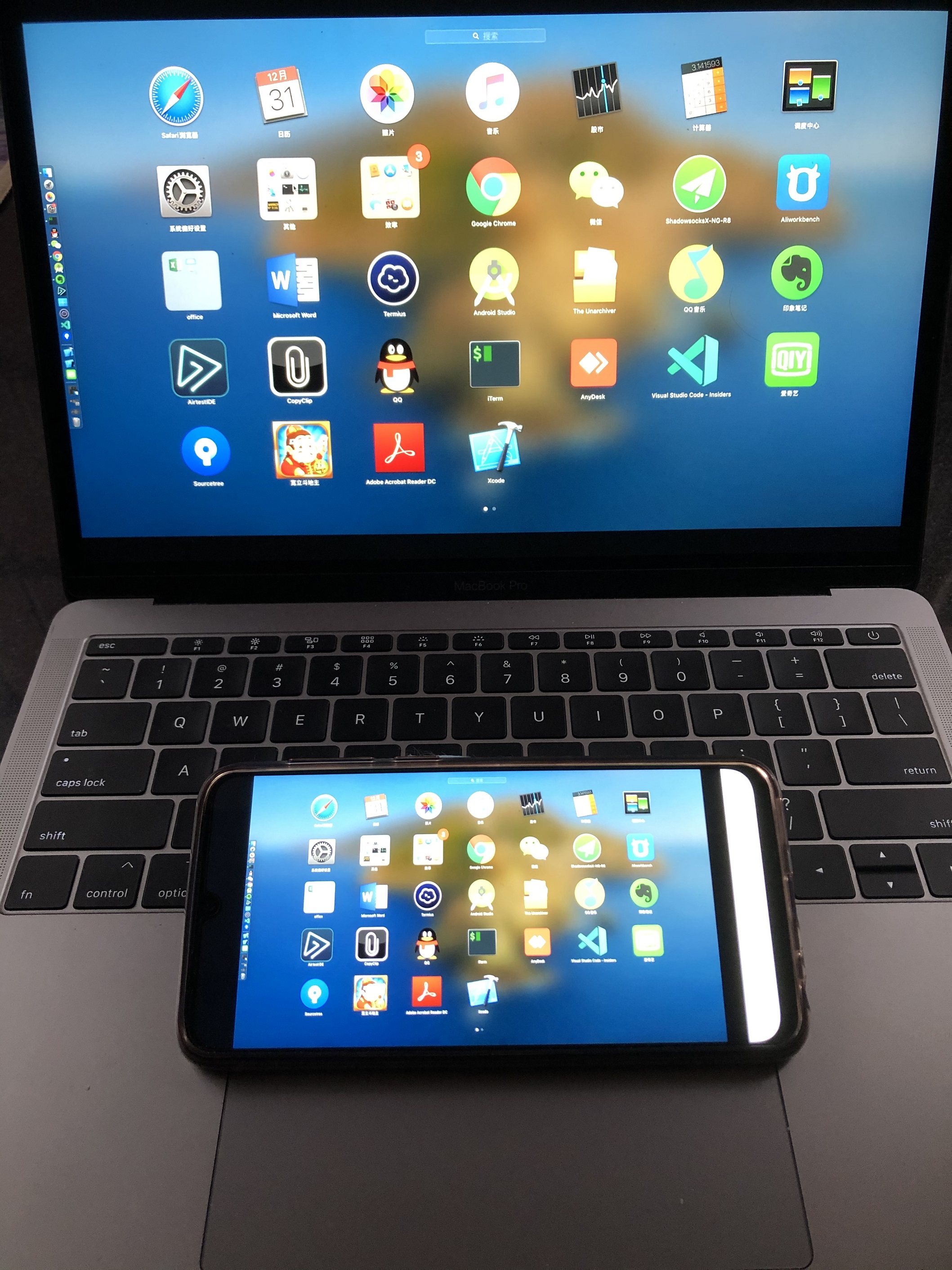
- Supports the wired AirPlay mirroring protocol. Simply connect the data cable to start mirroring, with no root required.
- Supports AirPlay, Android mirroring, and DLNA; supports simultaneous mirroring for multiple AirPlay devices.
- Supports wired casting for iPhone/iPad via USB cable, maintaining connection even when the screen is off, with a stable 60fps frame rate; ideal for large-screen gaming, live education, live gaming, and in-car casting scenarios.
- Supports Android USB wired screen casting with synchronized audio and video mirroring, delivering clear, lag-free performance.
- For iOS and macOS, utilize the AirPlay protocol for direct screen mirroring without needing to install any software.
- The Android client app enables screen casting with split-screen display functionality.
- Reverse screen control: The Android receiver can control the sender device.
- Supports variable speed playback and 4K video playback; enables casting of 4K content from apps like iQiyi, Tencent Video, and Youku (dependent on receiver hardware specifications).
- Deeply optimized protocol and decoding layers ensure low latency, providing a responsive experience for racing games (120ms latency).
- Supports vertical displays, allowing smartphone screens to be magnified and displayed on vertical screens such as advertising kiosks or digital signage.
- Install the screen casting client on Windows systems to easily cast your screen to a corresponding receiver using a casting code. Supports simultaneous mirroring from one computer to multiple receivers, and a single receiver can display multiple screens concurrently (one-to-many and many-to-one casting). Ideal for meetings, office use, and PPT presentations.
Specifications
- Supports 1080p/2K/4K resolution and 30/60 fps frame rate negotiation for mirroring.
- Supports AirPlay H.265, crucial for high-resolution (e.g., 4K) mirroring.
- Supports preset or random AirPlay passwords for enhanced security.
- Supports YouTube video casting (AirPlay HLS protocol).
- Supports AirPlay ALAC lossless audio transmission.
- Supports AirPlay, Android mirroring, DLNA, and multiple simultaneous AirPlay streams.
- Supports wired casting for iPhone/iPad via USB; stays connected even when the screen is off, with a stable 60fps.
- Supports Android USB wired casting with synchronized audio/video, low latency, and no lag.
- Native AirPlay mirroring for iOS/macOS (no app installation required).
- Android client app for mirroring with split-screen display support.
- Reverse control: Android receiver controls the sender.
- Supports variable speed playback, 4K video playback, and casting 4K content from various applications.
- Deeply optimized protocol and decoding layers for low latency (120ms), enabling a responsive experience for racing game mirroring.
Android App
- To see the full capabilities of this SDK/Source, check out the showcase Android app in the repository.
Contact us
- Contact us for purchases or inquiries.
- Telegram: https://t.me/maxguguji
- Wechat: maxfirefly
- Email: [email protected]
Use Cases
Meeting Room Collaboration: The SDK enables presenters to control presentations while moving freely, fostering more audience interaction, rather than being tethered to a laptop connected to the large screen. Mobile displays can also be broadcast during video conferences or webinars using this technology.
Education: The SDK can be used to share content from Apple devices in the classroom. This allows instructors to walk around the room during demonstrations, and students can present their work to the entire class using this technology. The password protection feature restricts unauthorized access.
Home Entertainment: The SDK allows users to stream stored videos, songs, and YouTube free content directly to a receiver device over Wi-Fi. It also facilitates easy viewing of photos and videos on a large screen during gatherings with family and friends.
Car Infotainment: The SDK allows for wireless screen sharing, playback of audio/video/movies, and photo slideshows from iOS/Mac devices to Android/Embedded Linux-based car infotainment units for viewing by all occupants. This transforms the car into a mobile presentation space, where iOS users can control presentations on the car's display directly from their iOS device.
Picture
Explore related projects
codecrafters-io/build-your-own-x
Master programming by recreating your favorite technologies from scratch.
561,398 starspublic-apis/public-apis
A collective list of free APIs
497,679 starsmorluto/rea
Reverse engineer anything with agents, from app behavior down to native binaries.
447,495 starsopenclaw/openclaw
The AI that really does things. Any OS. Any Platform. The lobster way. 🦞
394,261 stars