
xbzbing/dsh-git-panel
xbzbing/dsh-git-panel has 51 GitHub stars and 5 forks. Star changes are not measured yet. Last checked 2026-11-13 19:58 UTC. Last push 2026-11-12.
Measured star growth
- in 24h
- Collecting history
- in 7 days
- Collecting history
- in 15 days
- Collecting history
- in 1 month
- Collecting history
Net star changes over overlapping periods, not daily totals. Missing measurements are left blank. Stars measure attention, not software quality.
About
Web GUI 里的 IDE 风格 Git 面板——分支/提交历史总览、变更提交与 amend、AI 生成提交信息、文件浏览、代码与图片新旧差异对照、输入框分支标记、针对移动端优化 | an IDE-style Git panel for the Web GUI — branches & history, commit/amend for local changes, AI-generated commit messages, a file browser, code & image before/after diffs, an input-bar branch marker, optimized for mobile
Developer ToolsREADME.en.md
Originaldsh-git-panel
English | 简体中文
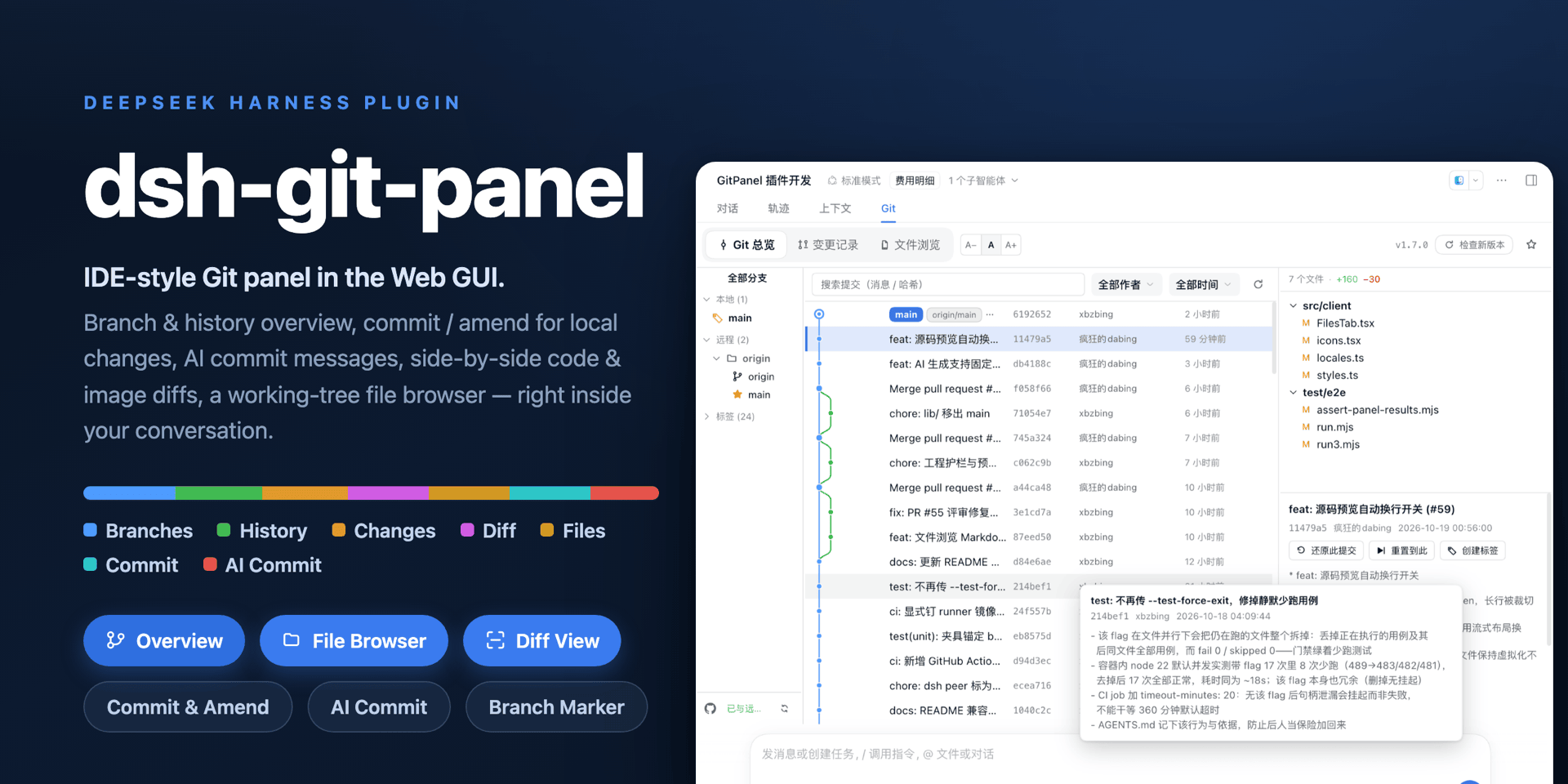
dsh-git-panel is a DSH Web GUI plugin that brings an IDE-style Git panel into the conversation workspace. It gathers the branch list, commit history graph, uncommitted-change commit & amend, and syntax-highlighted diffs into one resident tab, and puts a zsh-style branch marker at the left of the input bar — so you can check repo status and commit changes mid-conversation without switching to a terminal or a separate IDE.
The panel only reads the Git repository at the current session's working directory: every git command runs through the host subprocess service as an argv array — no shell string concatenation — with the working directory locked to the repository root and per-command timeout and output caps. The plugin leaves your git config alone by default, and every write (commit, amend, stage, discard) has an explicit entry point. The finer boundaries are under "Permissions and data boundaries" below.
Install
# Stable release (npm)
dsh plugin --profile web add @xbzbing/dsh-git-panel@latest

# Pre-release (GitHub Release asset; never published to npm)
dsh plugin --profile web add https://github.com/xbzbing/dsh-git-panel/releases/download/v1.8.0-rc.1/xbzbing-dsh-git-panel-1.8.0-rc.1.tgz
Pre-release versions carry a - suffix (e.g. 1.8.0-rc.1): they ship only as GitHub prereleases, never to npm, and never trigger the in-panel "update available" prompt. lib/ is not committed, so dsh plugin add github:… does not work.
After a first install the Git panel appears in the workspace tab bar with no restart or page refresh. On update, a version that only changes the client half takes effect immediately; one that changes the host half needs a dsh restart. Settings on the detail page apply immediately.
Compatibility: verified on
[email protected]and[email protected]— installation, the Git panel, the input-bar marker, the host RPC, and the plugin detail page all work normally.
Features
- Overview — branch / tag list, commit history graph and commit details; click a file to see its diff in that commit. History offers “message / hash” and “file / path” search, combined with author, date and branch filters. The relative-time column is sized from the active language's own labels; as the panel narrows, rows drop the author first and then the hash.
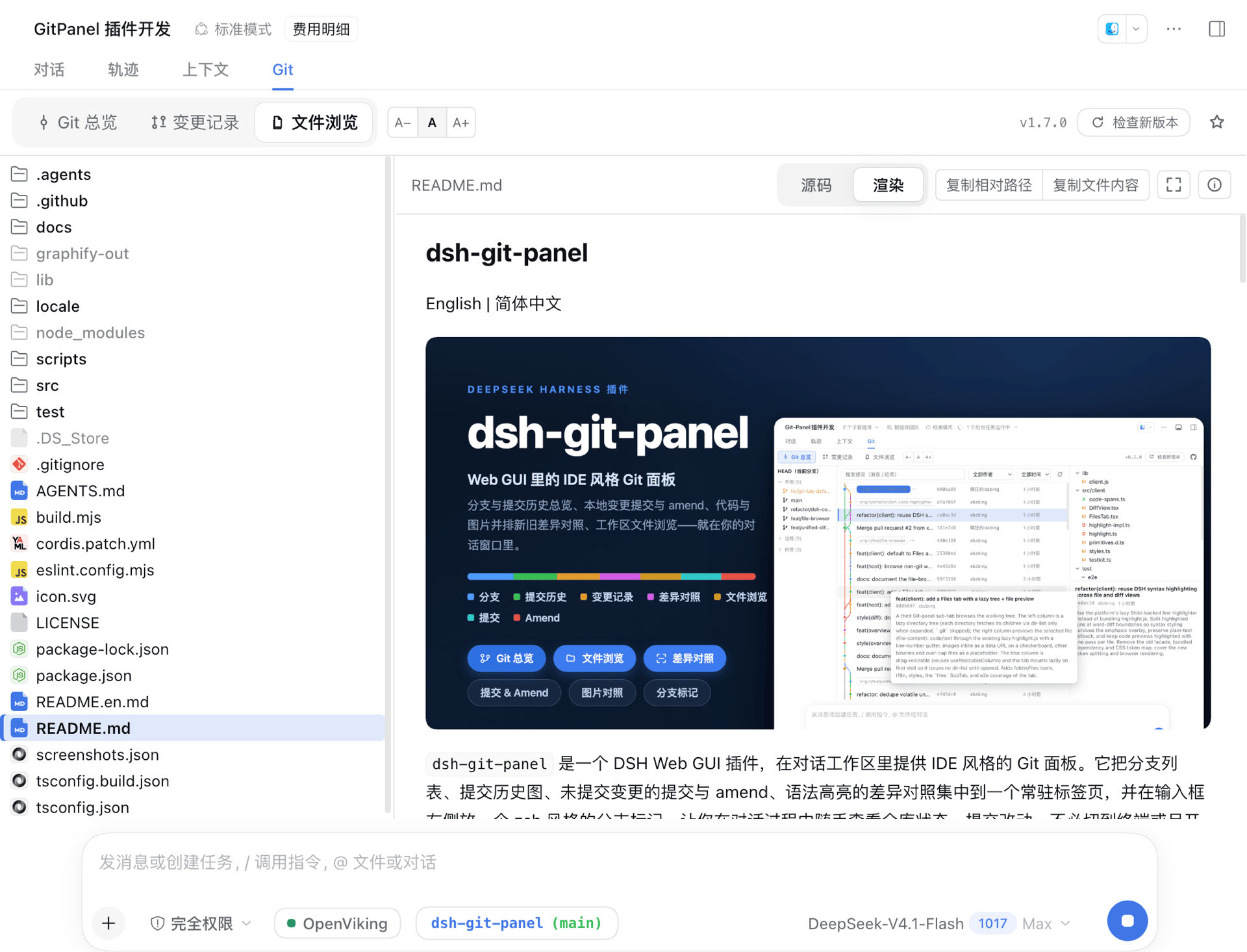
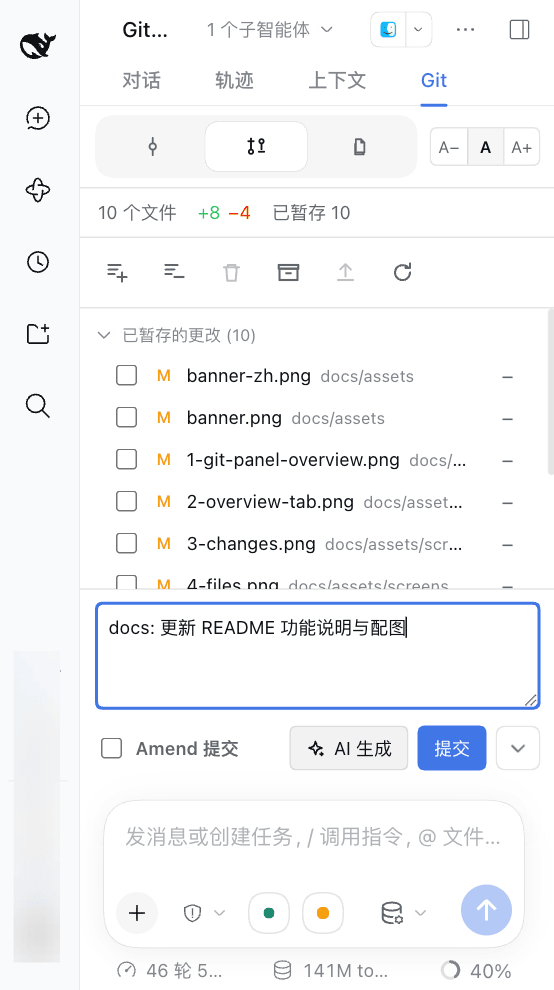
- Changes — stage and discard per file or in batches, commit and Amend, stash, added·deleted statistics. The list switches between a flat and a folder-tree view, with folder-level stage and discard; a pick carries the side it was made on, so selecting only the staged row commits what the index already holds.
- Common Git actions — switch, create, merge and delete branches, cherry-pick a commit, create and delete tags, revert / reset. Destructive actions ask for confirmation; a conflicting merge or cherry-pick is aborted and the previous state restored; apart from deleting a remote branch nothing is pushed automatically. When there is no upstream but a remote already has a same-named branch, the sync control offers "Set upstream" (tracking config only, no push, no network) and "Publish" otherwise.
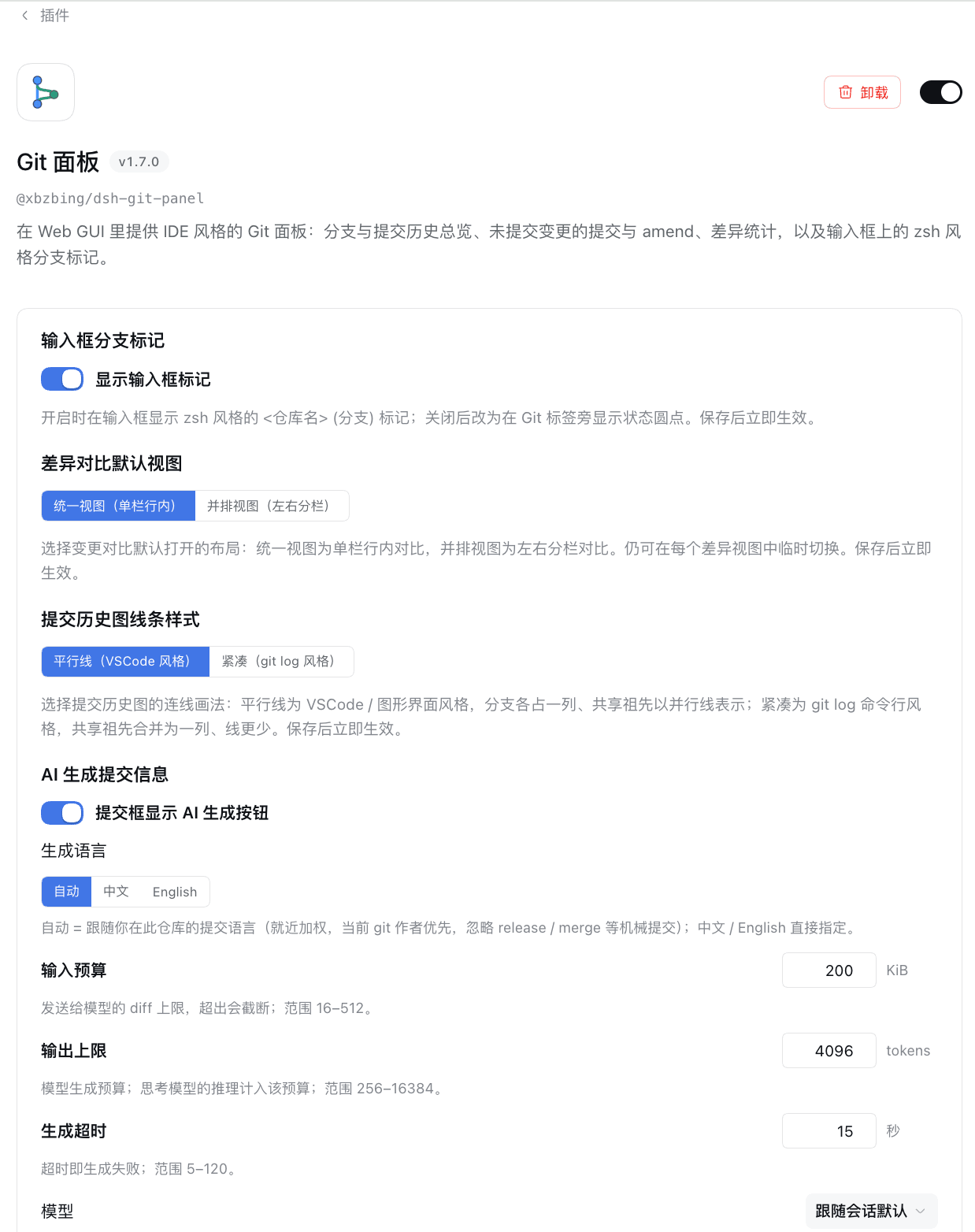
- AI commit-message suggestion — follows the style of the repository's existing commits; the model follows the current session by default and can be pinned on the detail page. Generation sends your diff content to the provider of the model you picked.
- Input-bar Git marker — a zsh-style
<repo> (<branch>), green when in sync and orange with uncommitted changes; a click jumps to the panel, and in a blank conversation it opens the Git page in the right sidebar instead. - Multiple repositories — worktrees and independent repositories in subdirectories are detected automatically; with
codeWorkspaceenabled, the folders a.code-workspacefile names — including repositories outside the workspace — join the switcher too. - File browser — browse the workspace tree and preview code, Markdown (including mermaid diagrams), HTML and images; config and document files can be edited and saved in place; Java/Kotlin projects fold package paths by convention.
- Context menus — right-click files, directories, images, branches, commits, changes, stashes, repository rows and the input-bar marker; destructive actions still ask for confirmation. Requires dsh ≥ 0.2.2-alpha.3; older versions keep the browser's native menu.
- Diff and source viewing — unified / split / before / after views with syntax highlighting, word-level emphasis, on-demand context expansion and Ctrl/⌘+F find-in-place; images can be zoomed, panned and shown fullscreen.
- Narrow panel / mobile — the layout adapts to the panel size, so it works in the sidebar and on a phone.
- Languages — the UI follows the DSH system language: Simplified Chinese, English, 日本語, Español, Français, Deutsch, Русский and Português; any other language falls back to English.
Permissions and data boundaries
The panel runs with the DSH process's privileges. These are the boundaries worth knowing before installing:
- Git commands — every git command goes through the host
subprocessservice: argv arrays, no shell string concatenation, cwd locked to the repository root, with a per-command timeout and output caps. It never force-pushes or force-resets; local branch deletion uses git's safe-dfirst and switches to-Donly after the extra acknowledgement, and a remote delete always requires one. Merging and cherry-picking stick to git's own behaviour, and a conflict is aborted to restore the previous state. Apart from "Set upstream", a confirmed "Publish" (git push -u) and creating a local branch from a remote branch (--track), your git config is never touched. - File access — it only reads files inside the workspace (diffs, file browser, the AI-suggestion input) after validation plus a realpath containment check: symlinks pointing outside the repository are refused and
.gitis not browsable. The one exception iscodeWorkspace(off by default): each repository a.code-workspacefile names must passgit rev-parse --show-toplevelbefore it becomes a switcher row, and selecting it moves the file browser and editing to that root under the same rules. - Two write paths only — discarding an untracked entry deletes the working-tree file after your confirmation and refuses the whole batch when an entry is itself a Git repository; editing an existing file in the file browser is limited to a suffix allowlist, 2 MiB and UTF-8, compares the file version first and replaces it atomically, and also covers secret-bearing variants such as
.env. It can be turned off in the plugin config. - Network — the plugin itself makes exactly one request,
GET https://api.github.com/repos/<owner>/<repo>/releases/latest, for the "new version available" notice (5 s timeout, cached in-process).fetch/pull/push/publish/push --deletereach the network only after you click, through git; "Set upstream" never contacts the network. Credentials stay with git: the plugin never reads, stores or returns a token. - External service — only "AI commit message" sends diff content to the model provider you configured in DSH; the host performs the call and the plugin holds no credentials.
- System dependency — the
gitCLI. Without git, or outside a Git repository, only the file browser is shown.
The client bundle (lib/client.js) makes no network requests of its own — it talks to the host over same-origin RPC — and the plugin collects no telemetry. UI-only preferences such as the panel font size and pane widths live in browser localStorage and never contain repository content.
Screenshots
| Overview | File-diff modal |
|---|---|
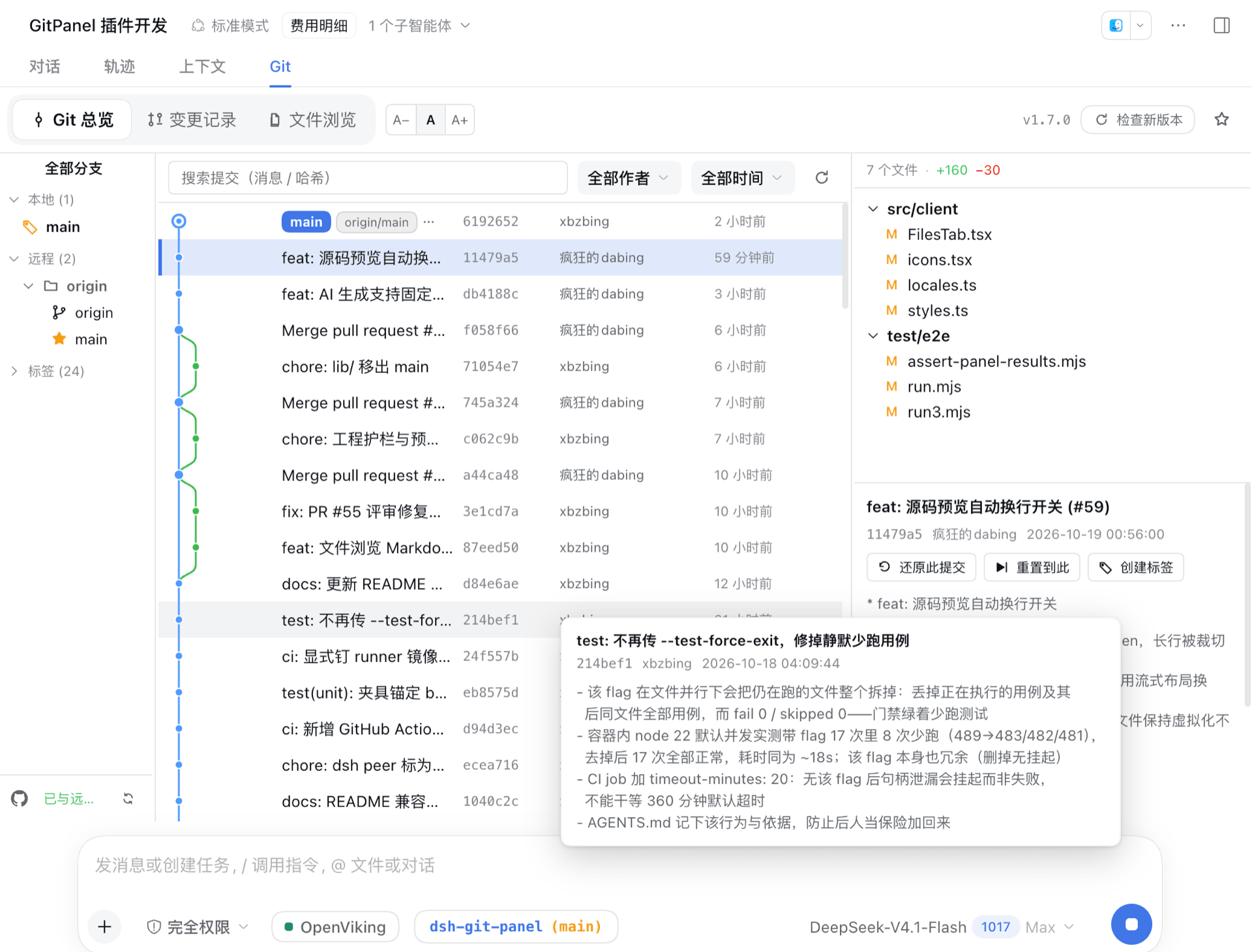 |
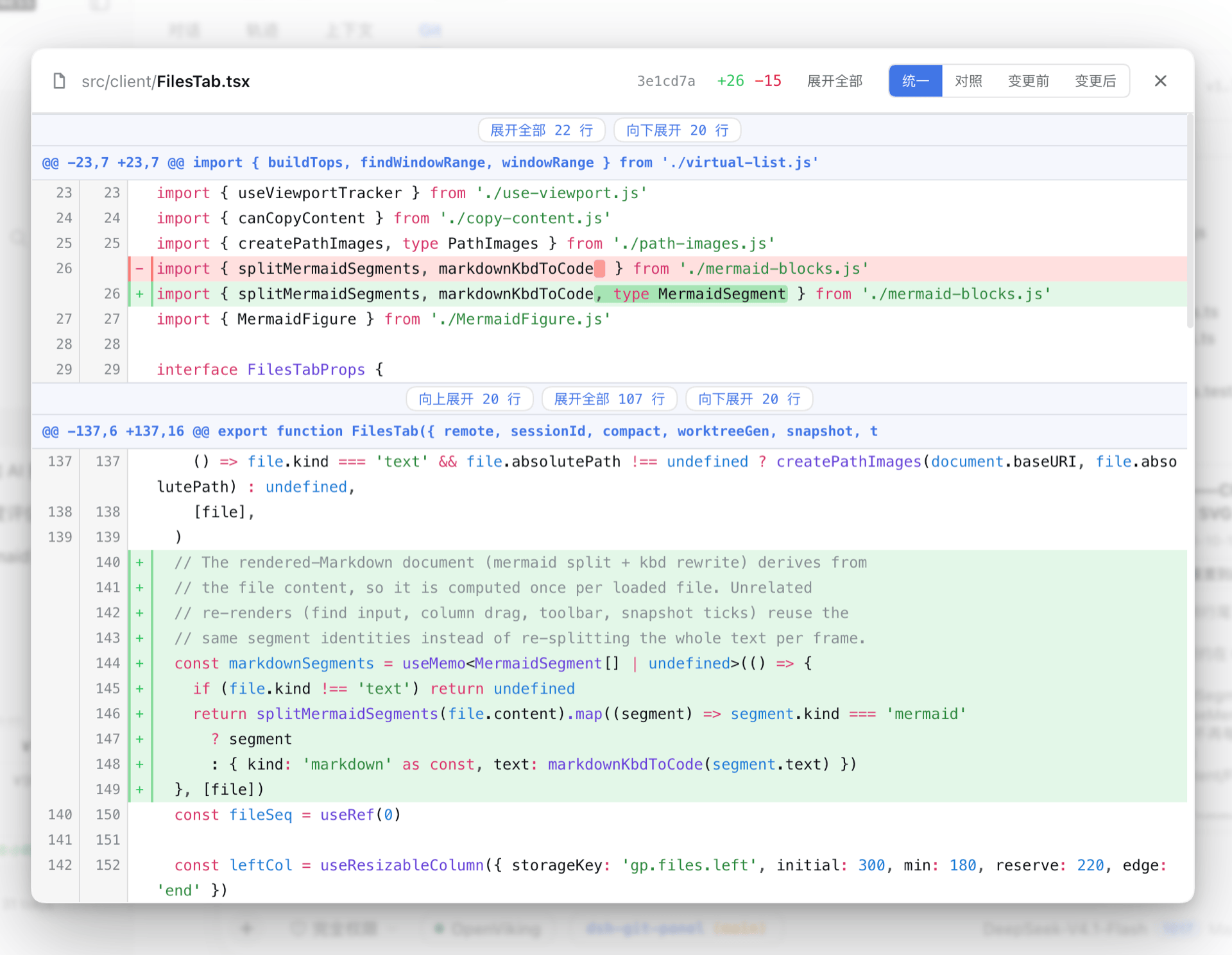 |
| Changes | File browser |
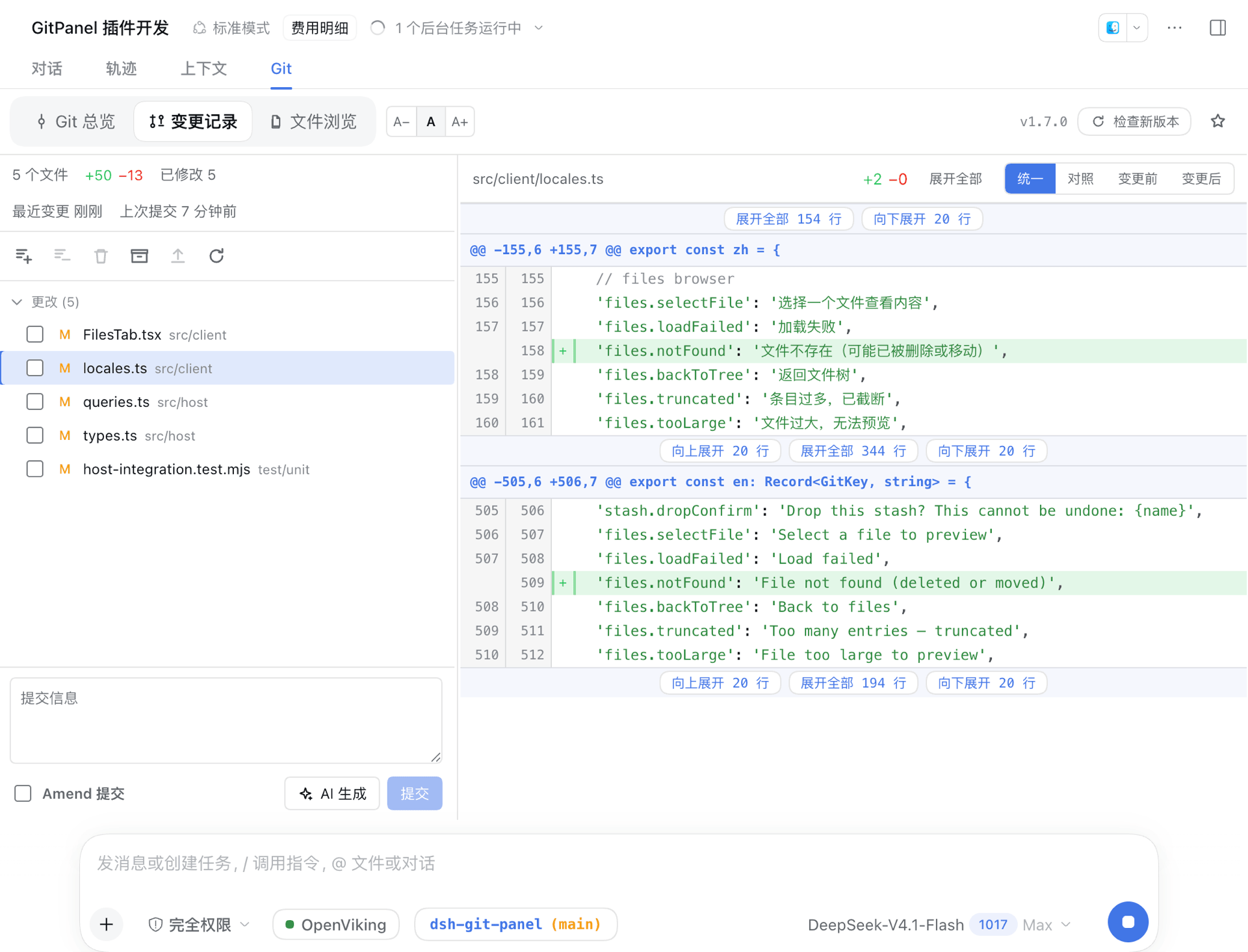 |
 |
| Narrow / mobile | Plugin config |
 |
 |
Architecture
Two halves communicating over the typert Remote gateway.
- Host (
lib/host/) — a Cordis + typertGitPanelServiceon thedbGitPanelnamespace (the service key is globally unique; a duplicate mount stays inert instead of failing to activate), exposingsnapshot/run/query/suggest/version/openFile/writeFileand doing only endpoint delegation and lifecycle wiring; git runs through the hostsubprocessservice (argv arrays, no shell, cwd locked to the repository root, timeout + output caps); thesuggestendpoint makes a one-shot commit-message call through the hostllmservice with your configured model. - Client (
lib/client.js) — a React bundle that registers theconversation.viewpanel and theconversation.input.leftmarker. One snapshot controller per session (polling + a refresh after each turn + a reload on connection reset) feeds the marker, the changes page, and the stats bar from a single snapshot, avoiding duplicate git commands.
Development
node build.mjs      # tsc (host d.ts) + esbuild (per-module host js + client bundle + testkit)
npm run typecheck   # type check
npm run test:unit   # pure-algorithm and host-endpoint unit tests (node --test)
npm run test:e2e    # isolated file:// headless-browser e2e (never touches a running instance)
npm test            # unit + e2e
The host output is emitted one file per src/host/ module (stack traces land in the module that raised) and is never minified: the typert gateway validates arguments by method parameter name, and minification would rename them and break the wire contract. Client changes are hot-reloaded: after rebuilding lib/client.js, the running dsh detects the file change within a second and pushes it to the browser for an in-place swap (old fiber torn down, new code remounted) — no page refresh needed; host changes still need a restart, since loaded modules keep running their previous code. lib/ is local build output and is not committed; for local development, add the plugin to a dsh web profile's dsh.profile.bundles with a file: dependency pointing at this directory, then run node build.mjs.
Project structure
src/
  host/
    types.ts        the single source of truth for the wire data model (reused by the client)
    index.ts        GitPanelService: endpoint delegation + lifecycle wiring
    git.ts          subprocess → a GitRunner with timeouts
    core.ts         workspace resolution + snapshotForSession
    actions.ts      GitAction → git command sequences (commit / amend / stage …)
    queries.ts      history / diff / file-lines / image-diff / dir-list / file-content / show / branches / tags / worktree-stats
    package-tree.ts source-root detection, package-chain folding and src projection (the file browser's Java/Kotlin view)
    suggest.ts      AI commit-message suggestion (diff collection + language inference + one ctx.llm call)
    parser.ts       git output parsed into structured data
    version.ts      package version + GitHub release update check
  client/
    rpc.ts          the client face of the dbGitPanel endpoints
    controller.ts   per-session snapshot controller
    Panel.tsx       panel shell: sub-tab routing + version bar
    OverviewTab.tsx Overview three columns + hover card
    ChangesTab.tsx  changes page
    FilesTab.tsx    file browser (lazy directory tree + file preview)
    DiffView.tsx    diff view (unified / split / before / after)
    GitPill.tsx     input-bar marker
    code-spans.ts   split syntax tokens at word-level change ranges
    git-graph.ts    commit-graph lane layout
    file-tree.ts    file paths folded into a tree
    diff.ts         unified diff → side-by-side rows + inline rows + stats
Acknowledgements
Thanks to @ivanant for the many optimization suggestions and iteration requests filed against this project. Mobile layout, batch selection in the changes page, AI commit messages, commit-graph and icon polish, and publishing a branch that has no upstream all came mostly from his real-world usage reports — feedback that moved the panel well past "it works".
Thanks to @QianYI-Yan for the foundation of workspace multi-repo support (#83): scanning the workspace's subdirectories for independent repositories, carrying an optional repo field on every RPC request to switch work trees, and dimming the old contents while a switch is in flight — his PR (#85) was the first implementation of all three, and this release's worktree detection and file-browser roots are built on top of it.
Thanks to @homily707 for removing the confirmation prompts from high-frequency operations (#109): fast-forward pull, fast-forward push, and switching branches on a clean worktree now run immediately; when an operation fails after it starts, the error is reported against the repository it came from. PushModal, the pull / push dialog copy, and their preview queries are gone as well.
Thanks to @GandzyTM for letting a session stay in its hub directory (#121): he proposed and implemented .code-workspace support (#122) from real multi-root workspace usage — the codeWorkspace setting, the JSONC parser and folder certification, the third gate for repositories outside the workspace (ADR-0030), and browsing and editing following the selected root; the later scan-cache TTL, attempt ceiling and .code-workspace editing are built on top of that implementation.
License
Explore related projects
codecrafters-io/build-your-own-x
Master programming by recreating your favorite technologies from scratch.
562,324 starspublic-apis/public-apis
A collective list of free APIs
498,756 starsmorluto/rea
Reverse engineer anything with agents, from app behavior down to native binaries.
457,350 starsopenclaw/openclaw
The AI that really does things. Any OS. Any Platform. The lobster way. 🦞
394,391 stars