
wppconnect-team/wppconnect-manager
wppconnect-team/wppconnect-manager has 244 GitHub stars and 85 forks. GitHot measured 0 stars in 24 hours and 0 in 7 days. Last checked 2026-11-12 08:28 UTC. Last push 2026-11-05.
Self-hosted web workspace for WPPConnect Server: manage sessions, QR pairing, chats, contacts, groups and media. React and TypeScript, with English/Portuguese and light/dark themes.
What you can do
- Multiple server profiles; session inventory, QR refresh, start/reconnect, close, logout and cleanup.
- Administrator or session-restricted access; credentials remain in memory.
- Chats, contacts, groups and media with a 20 MB UI attachment limit; authenticated real-time events.
- English/Portuguese, light/dark themes and desktop/mobile layouts.
Measured star growth
- in 24h
- 0
- in 7 days
- 0
- in 15 days
- Collecting history
- in 1 month
- Collecting history
Net star changes over overlapping periods, not daily totals. Missing measurements are left blank. Stars measure attention, not software quality.
README.md
OriginalEnglish | Português (Brasil)

WPPConnect Manager
Manage WPPConnect Server sessions and conversations in a self-hosted web workspace.
A project in the WPPConnect ecosystem, maintained by WPPConnect Team.
Getting started | Documentation | Contributing | Support WPPConnect




Overview
For operators of WPPConnect Server. Previously wppconnect-frontend, version 2 replaces the demonstration frontend with React, TypeScript, Vite and Material UI while preserving history and licensing. This UI requires a separate Server implementing Manager protocol 1 (GET /api/manager/info).
Features
- Multiple server profiles; session inventory, QR refresh, start/reconnect, close, logout and cleanup.
- Administrator or session-restricted access; credentials remain in memory.
- Chats, contacts, groups and media with a 20 MB UI attachment limit; authenticated real-time events.
- English/Portuguese, light/dark themes and desktop/mobile layouts.
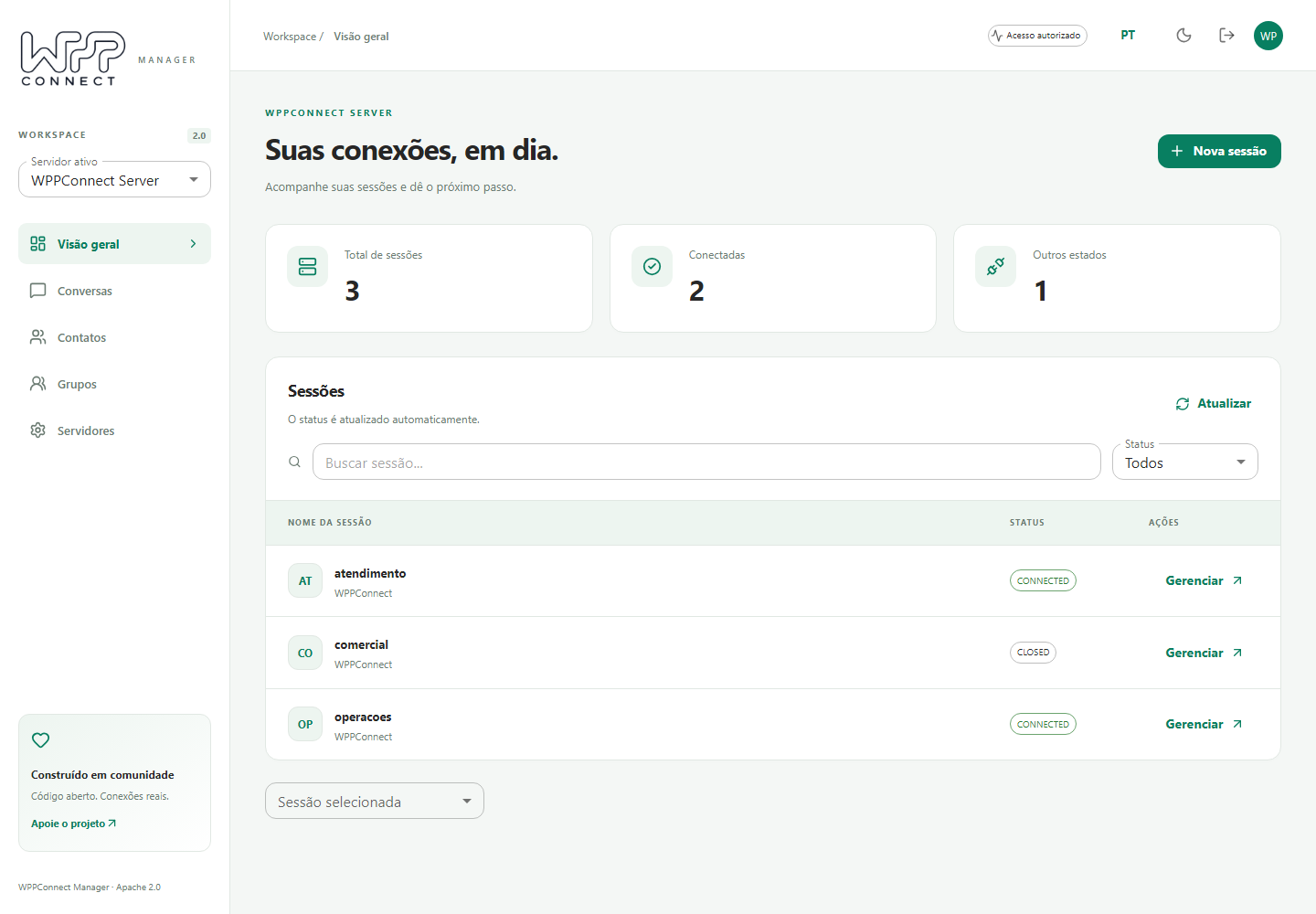
Screenshots and browser tests use synthetic data. Live pairing, send/receive and media availability depend on the connected Server and WhatsApp; unavailable history/media are reported as errors.
Getting started
Use an existing WPPConnect Server with Manager protocol 1 and Docker:
docker run --rm -p 8080:80 \
  -e MANAGER_SERVER_URL=http://localhost:21465 \
  ghcr.io/wppconnect-team/wppconnect-manager:2.0.0
Open http://localhost:8080/manager/. Provide the server secret for administration, or a session name/token for restricted access. The integrated Server image serves the UI at http://localhost:21465/manager/. For local UI development use Node.js >=22.12 (CI uses 22.22.2), then npm ci and npm run dev.
Configuration
MANAGER_SERVER_URL must be reachable by the browser, without credentials in the URL. The container creates /manager/config.js at startup; restart/recreate to change it. Source builds use public/config.js. Use HTTPS for both UI and API remotely. Proxies must forward /api/, /manager/ and /socket.io/ with WebSocket upgrades. Only profile names/URLs, language and theme persist in browser storage. Reloading requires credentials again. Old window.IP_SERVER, window.IP_SOCKET_IO and @WPPConnect-Token settings are not imported. Close a session before clearing its data. Pin image versions; rollback requires a Server and UI with compatible protocols.
Documentation
- Standalone Compose setup
- Server integration
- Release bundles and checksums
- Retained technical details and acknowledgments
WPPConnect ecosystem
| Project | Purpose | When to use it |
|---|---|---|
| WPPConnect Server | Run a REST API for WhatsApp sessions, messages and webhooks. | Expose session and messaging operations over HTTP. |
| WPPConnect Server CLI | Start WPPConnect Server from the wppserver command. |
Launch the Node.js Server from a terminal. |
Support the project
WPPConnect is maintained by an open-source community. Your support helps fund maintenance, infrastructure, documentation, and the people working on the ecosystem.
If WPPConnect helps your project or business, consider making a one-time contribution or becoming a recurring supporter.
Support WPPConnect on Open Collective
Contributions are voluntary. See the official page for current financial information. You can also help with code, tests, documentation, translations and well-described issue reports.
Additional official beneficiaries in .github/FUNDING.yml: joaosouz4dev, manfe.
Contributing
Contributions of code, tests, examples, documentation and translations are welcome. For larger changes, discuss the approach in an issue first. Include the project/runtime versions, a minimal reproduction and sanitized logs when reporting a problem. Update both README.md and README.pt-BR.md in the same change when installation, configuration, features, examples, licensing or funding changes.
After installing the development dependencies, use the repository checks relevant to your change:
npm run lint
npm run typecheck
npm test
npm run build
npm run test:e2e
Account-dependent examples and tests require separate validation with an authorized test account. Never attach credentials or session files to an issue.
Community and support
Use repository issues for reproducible bugs and feature proposals. For usage questions, join the community through the official channels:
This project is independent and is not affiliated with or endorsed by WhatsApp or Meta. Follow applicable terms and obtain authorization for account and messaging operations.
License
Apache License 2.0 (Apache-2.0).
Copyright WPPConnect Team and contributors.
The original legal document and existing copyright notices are preserved. Third-party components retain their own terms.
Explore related projects
freeCodeCamp/freeCodeCamp
freeCodeCamp.org's open-source codebase and curriculum. Learn math, programming, and computer science for free.
459,025 starsdonnemartin/system-design-primer
Learn how to design large-scale systems. Prep for the system design interview. Includes Anki flashcards.
377,653 starsreact/react
The library for web and native user interfaces.
252,536 starsvuejs/vue
This is the repo for Vue 2. For Vue 3, go to https://github.com/vuejs/core
212,530 stars