
workingprototype/Fuobe has 96 GitHub stars and 20 forks. Star changes are not measured yet. Last checked 2026-11-14 05:11 UTC. Last push 2026-11-13.
What you can do
- 29 studios, 132 apps, 363 effects and moves 108 camera motions (mix any two), 255 effects and 132 apps, grouped in the menus by what you want to make. - Before and after Turn one photo into a new scene, look or shot with an app, an effect or an edit in plain words.
Measured star growth
- in 24h
- Collecting history
- in 7 days
- Collecting history
- in 15 days
- Collecting history
- in 1 month
- Collecting history
Net star changes over overlapping periods, not daily totals. Missing measurements are left blank. Stars measure attention, not software quality.
About
The open creative studio on ComfyUI: images, video, 3D and audio on open weights, on your own GPU or the cloud. Camera motions, effects, apps, Cinema, Layers, Image to 3D and an AI agent.
Creative & MediaREADME.md
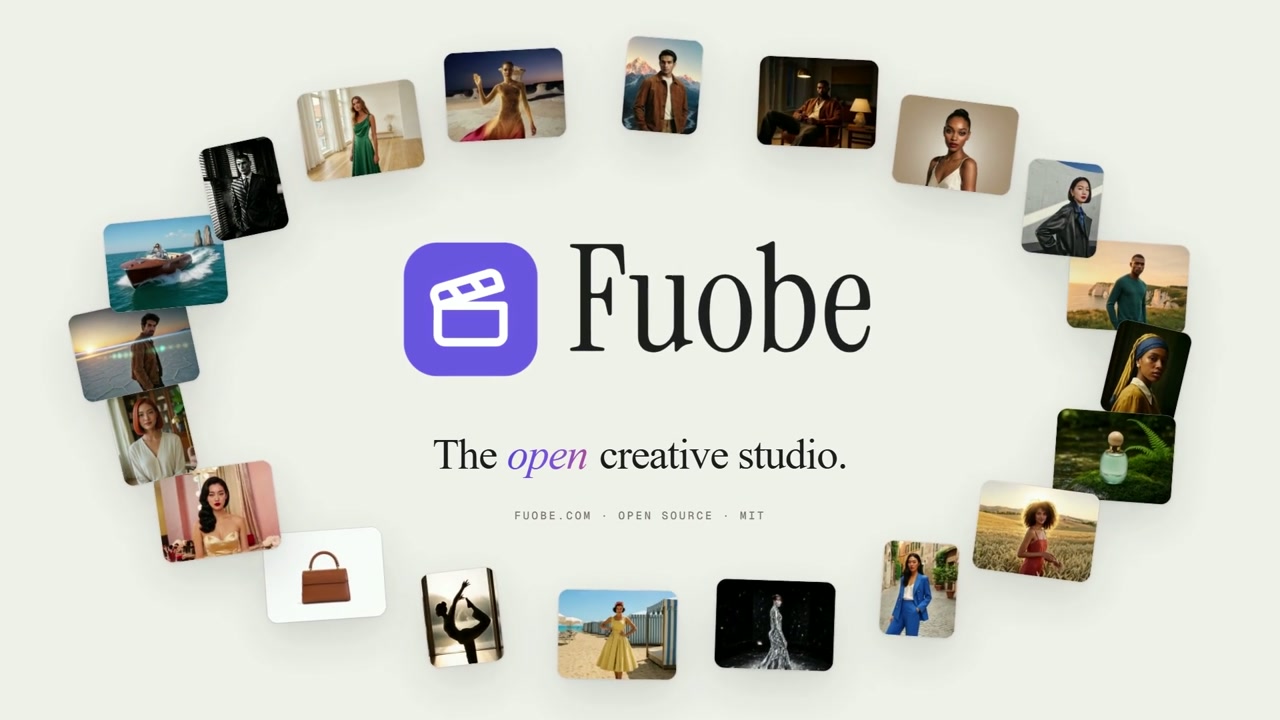
OriginalFuobe
The open creative studio on ComfyUI.
Images, video, 3D and audio on open weights, on your own GPU or in the cloud.







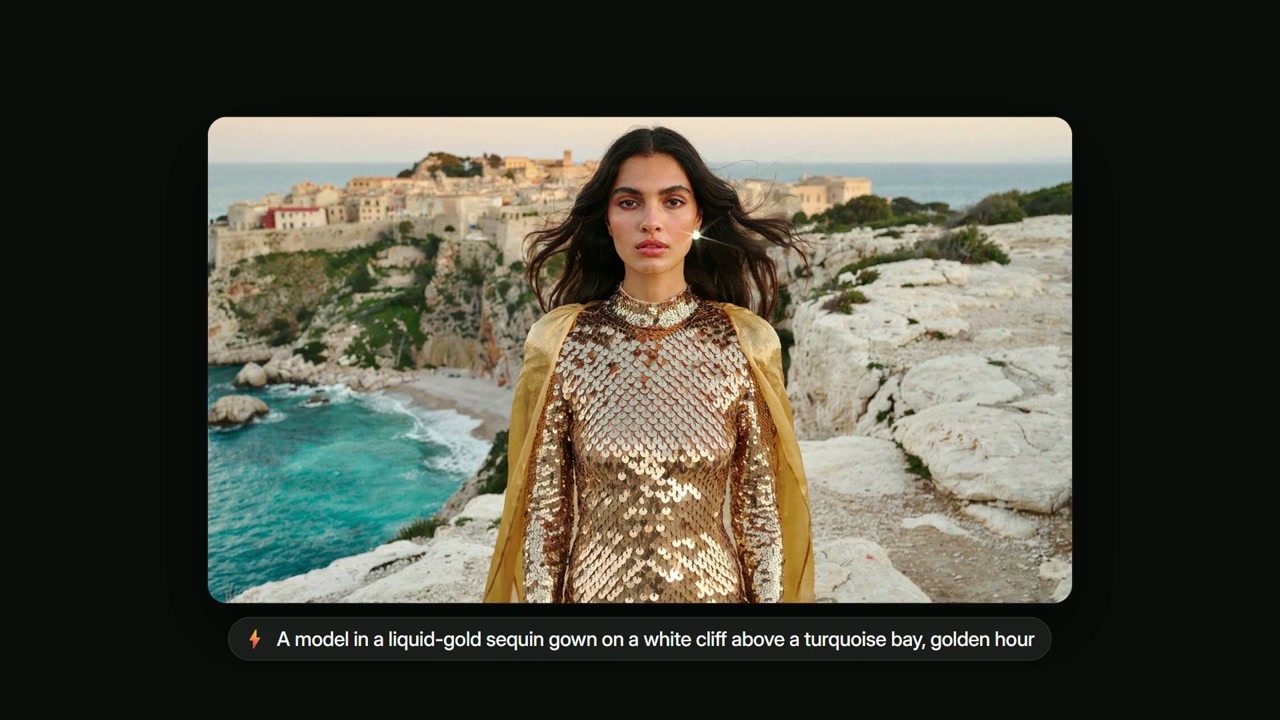
Fuobe is a complete creative studio that you run yourself.
Use open-weight models through ComfyUI on your own GPU, or frontier models with your own fal.ai or Replicate key.
Every preview clip and still was rendered locally on ComfyUI, on one RTX 5090.
|
|
Showcase
Real covers from the galleries. Every clip and still below was rendered locally on ComfyUI.
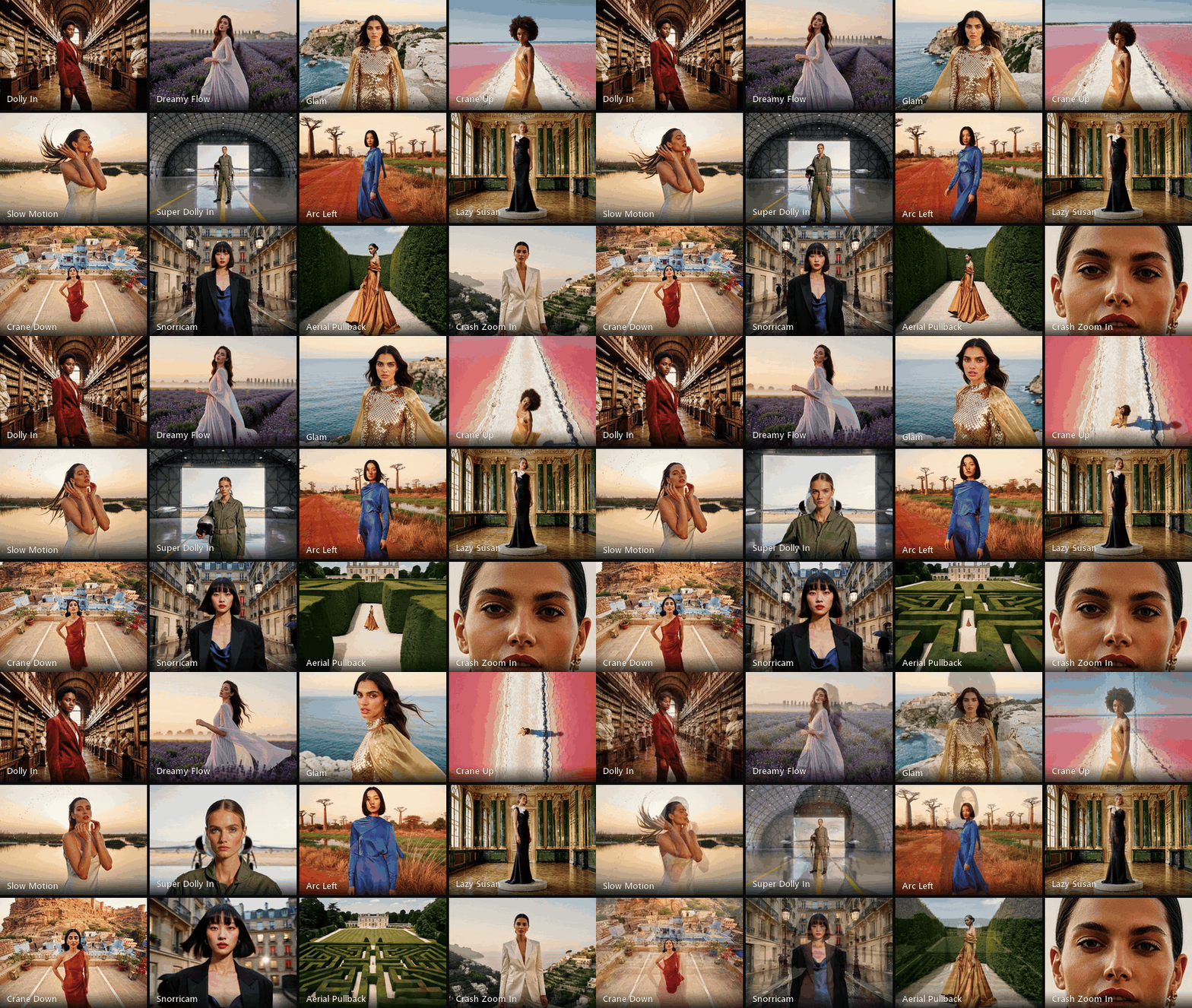
108 camera motions. Dollies, cranes, arcs, orbits, drones and crash zooms; mix any two in one clip.

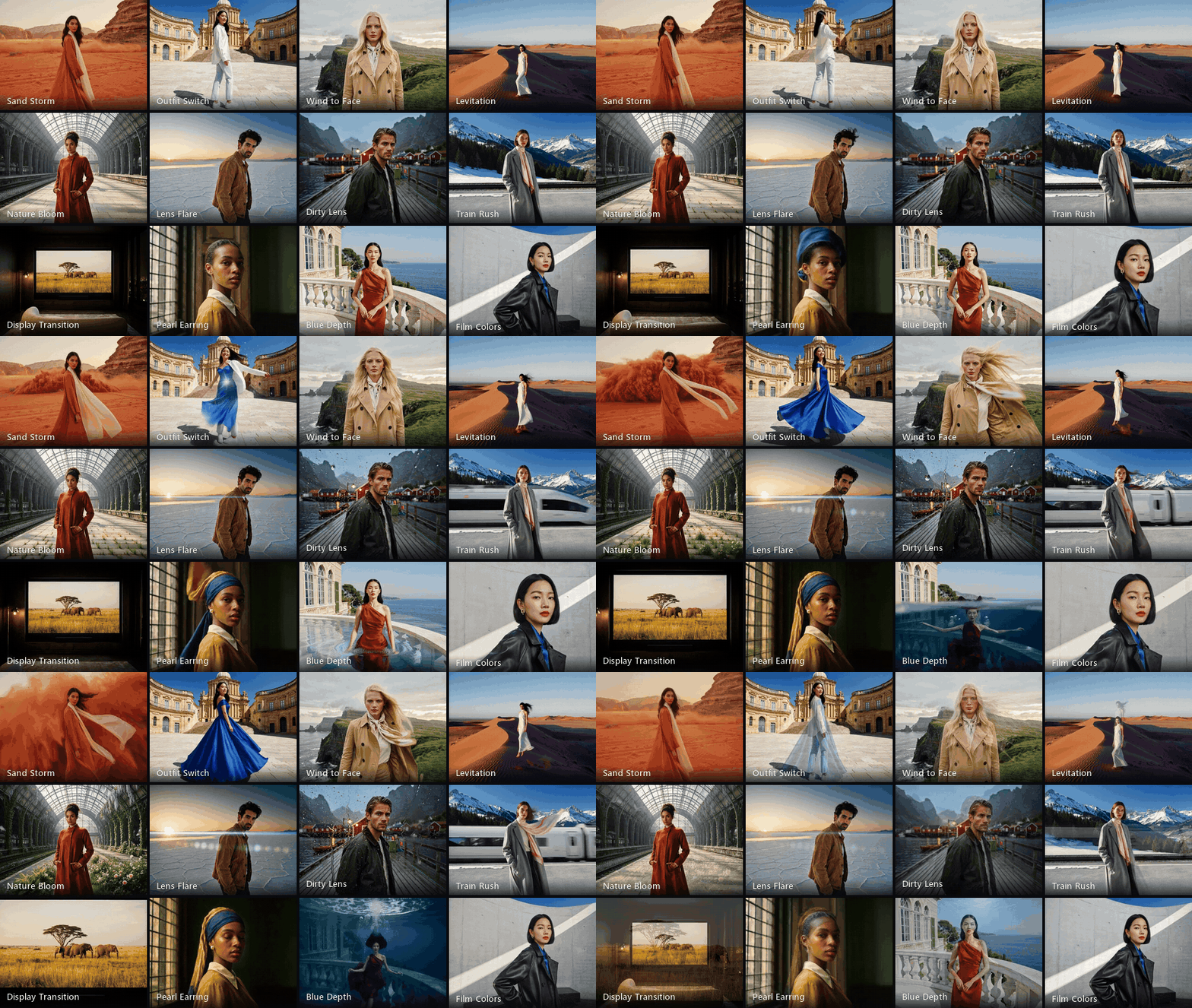
255 effects. Weather, transitions, lens looks, film grades and transformations, on any photo or clip.

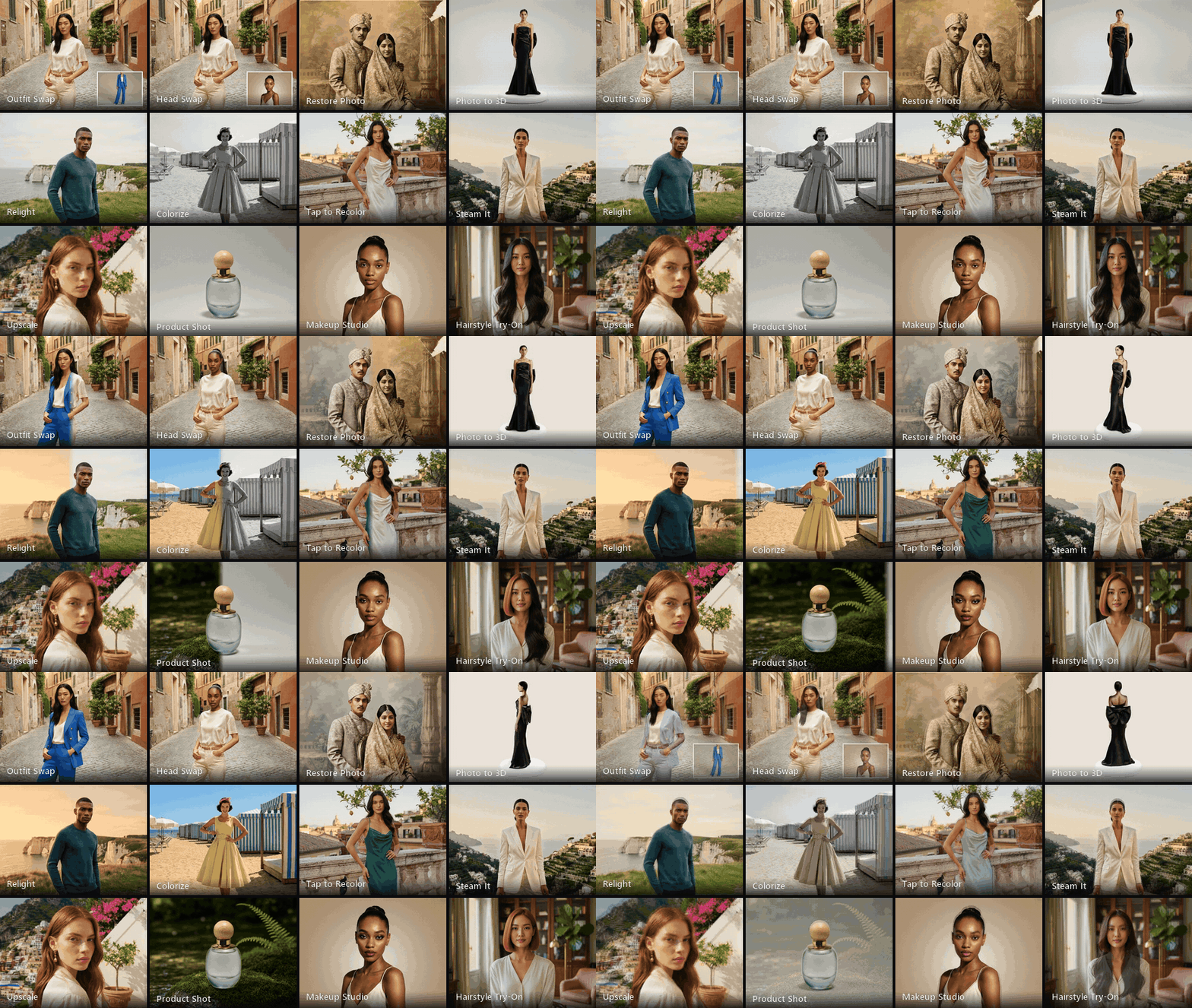
132 apps. One-click tools for fashion, portraits, products and ads: swap, restore, relight, recolor, upscale and more.

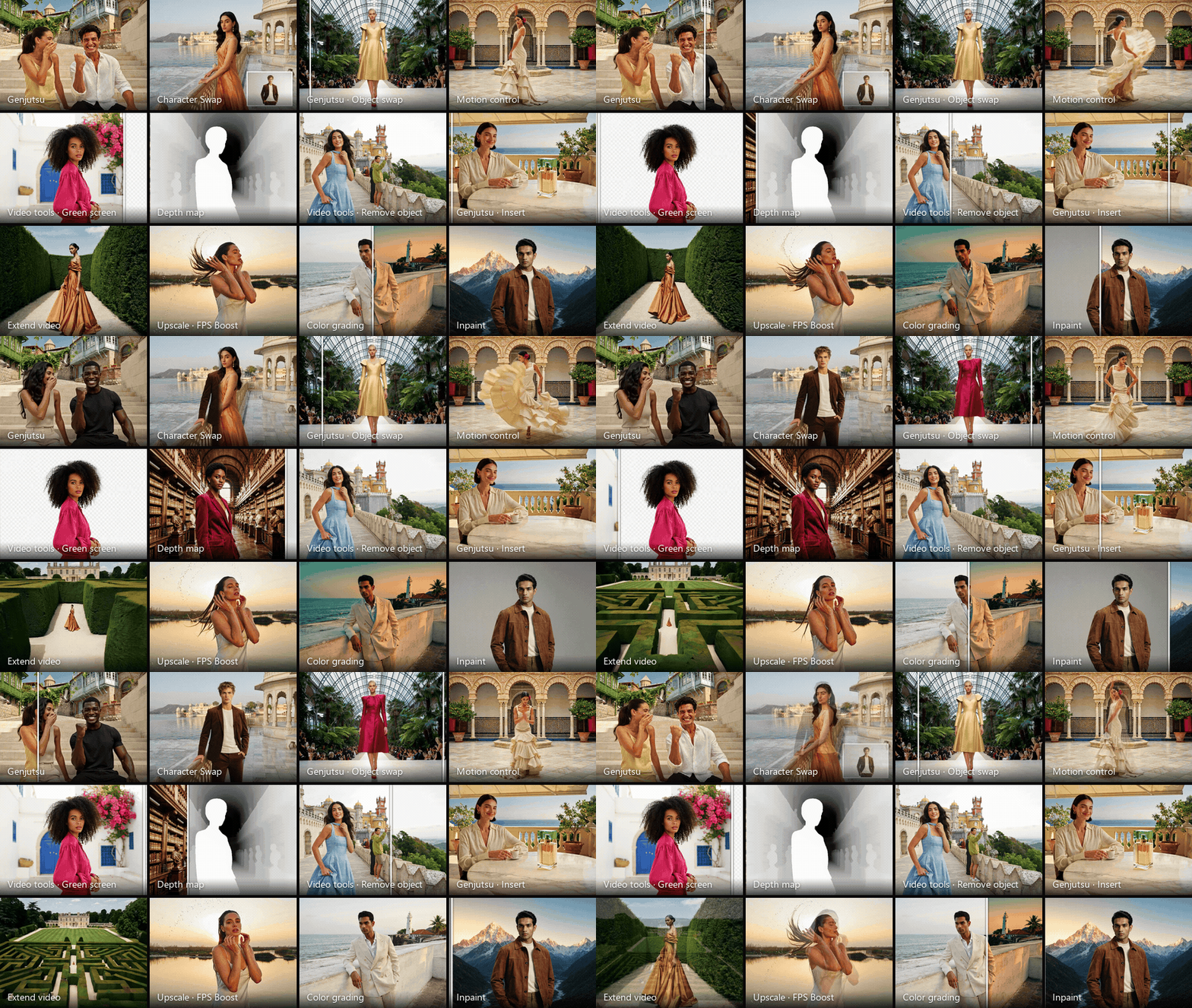
62 tools in Fuobe FX. For FX artists and teams: recast a plate, pull a matte, clean it, extend, retime, relight and grade, with the camera and the motion kept as shot.

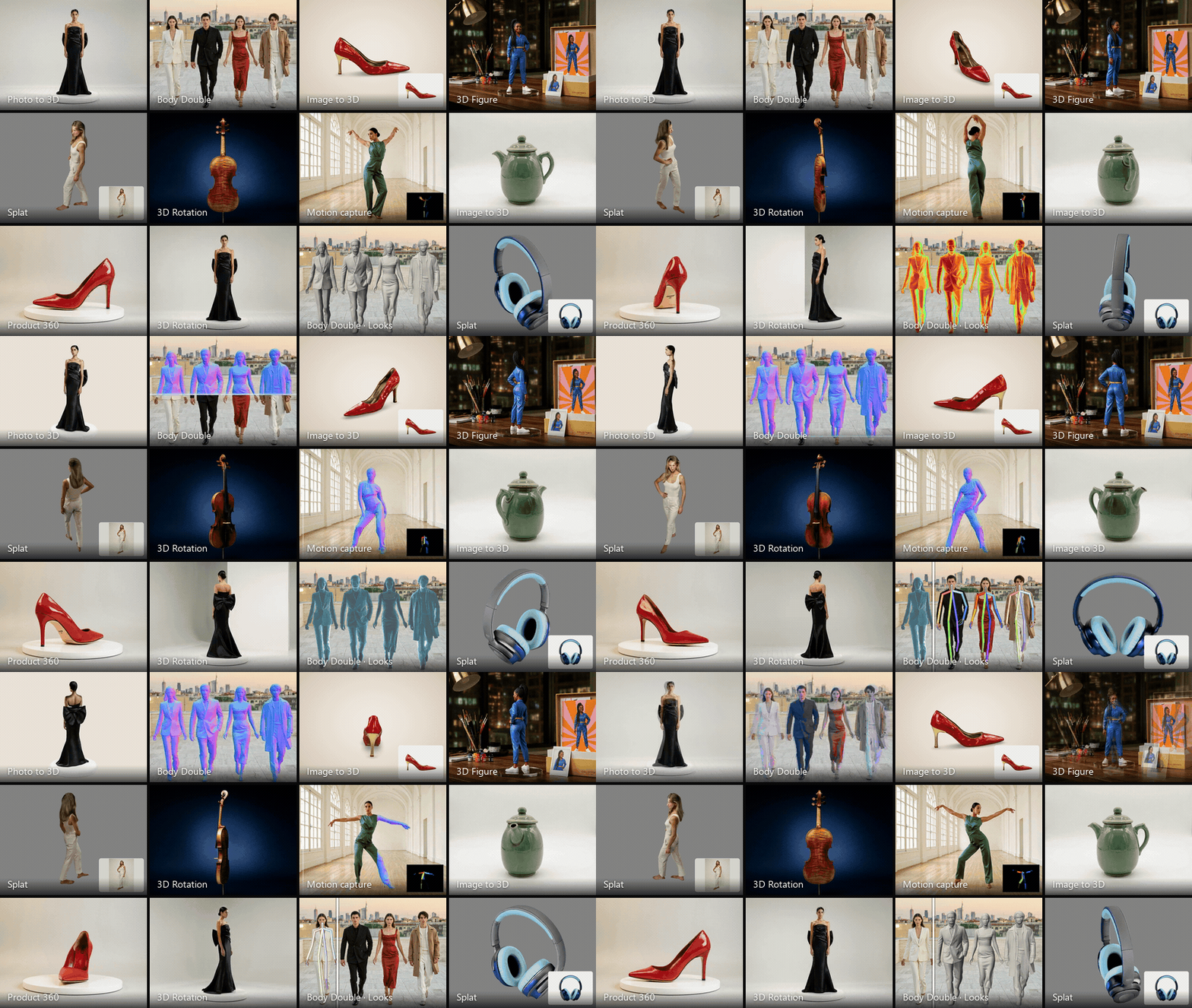
3D in five modes. A model from one photo, several photos, a sentence or one object in a picture, or a soft splat; and Body Double, a 3D body for every person, with motion capture in six looks.

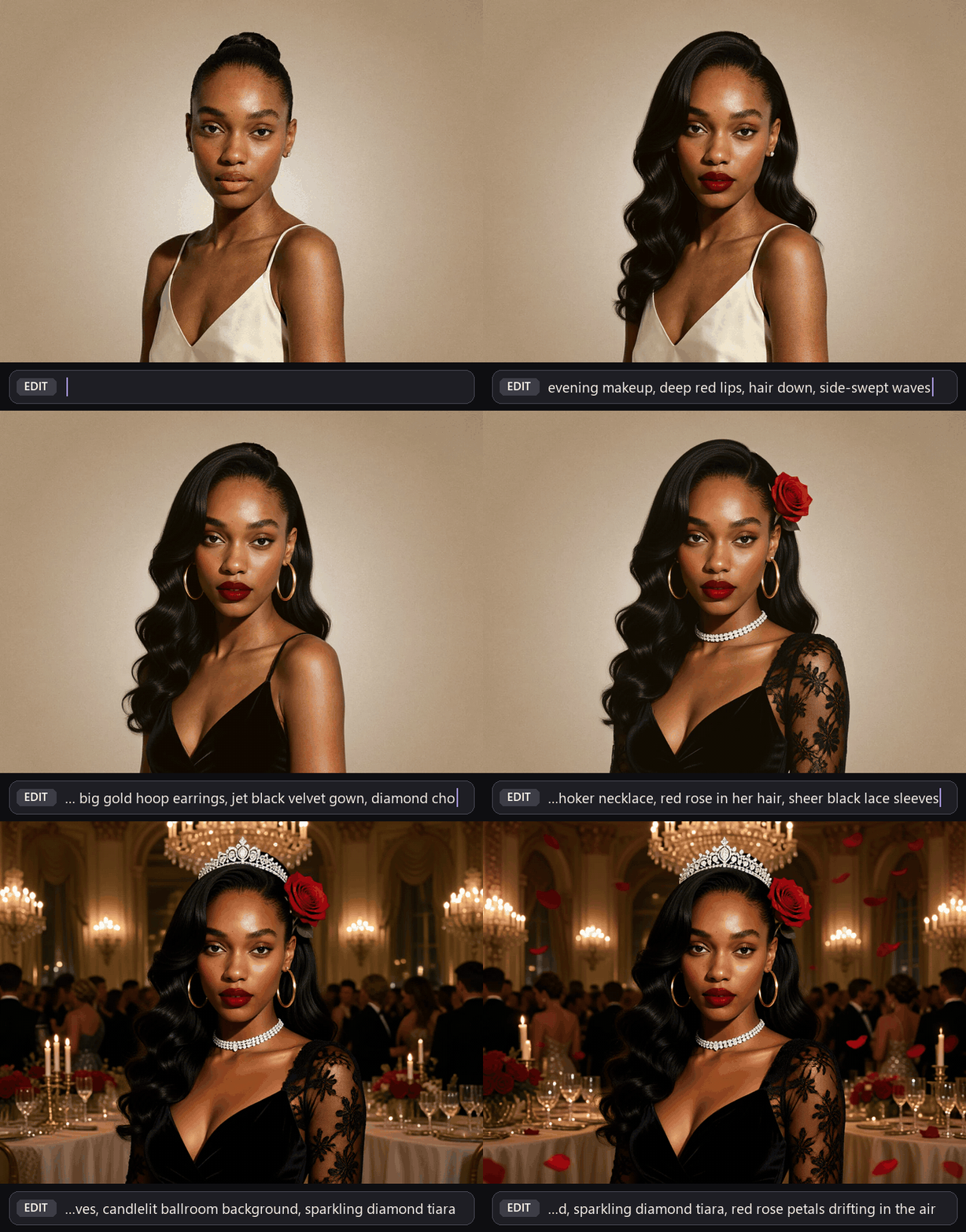
Live edit. The picture changes as you type, on your own GPU. Here, ten changes to one photo in one growing prompt.

New this week
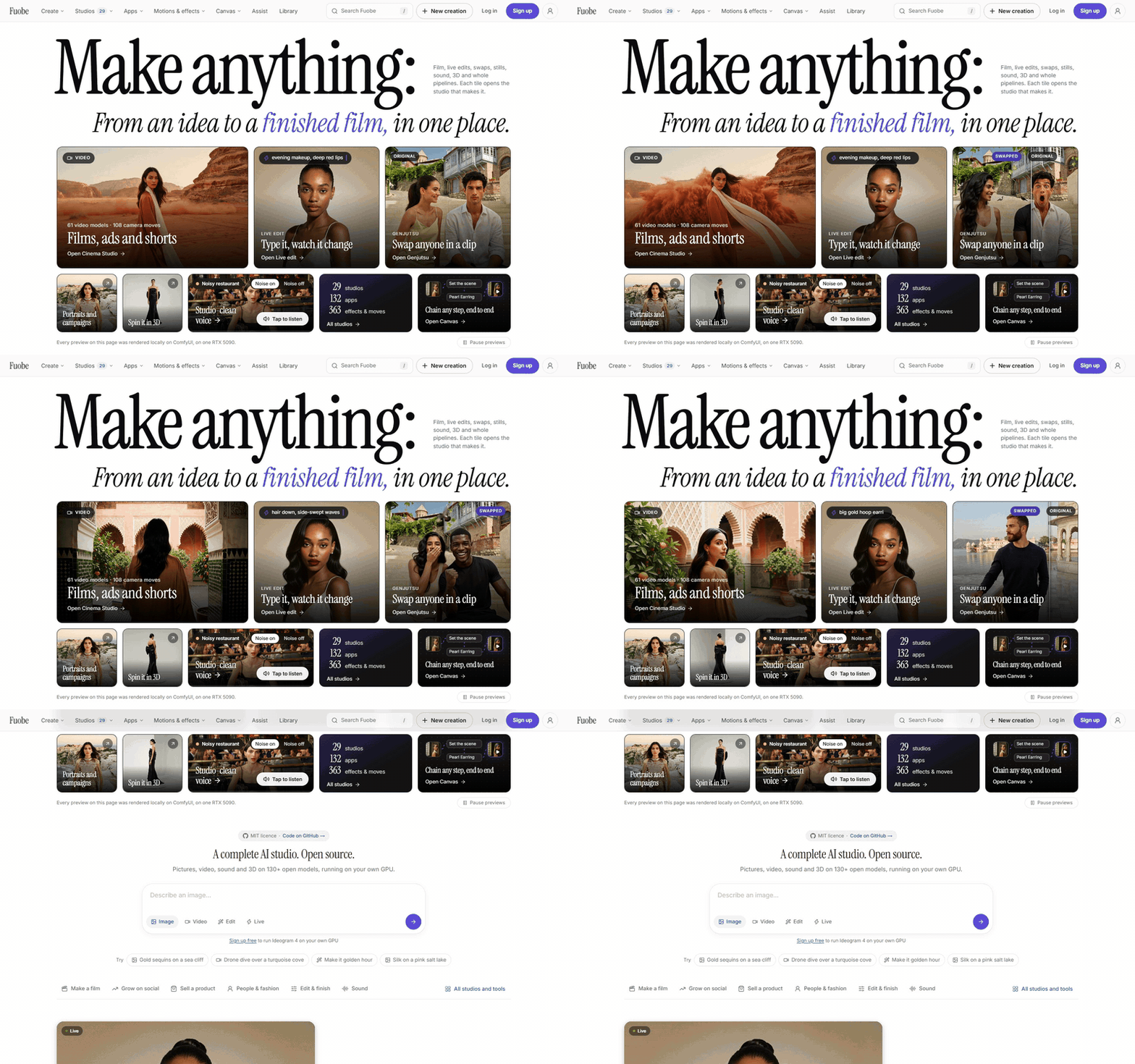
- A new Home. One first screen shows every kind of media (film, stills, sound, 3D, live edit and whole pipelines), and each tile opens the studio that makes it.
- Grouped menus. Create, Studios, Apps, Motions & effects and Canvas show everything inside them, grouped by what you want to make, with a cover on each.
- Kinetic Motion. Motion graphics in your brand, set in your exact words and drawn live in the browser, with presets, timing and versions.
- Marketing templates. Ten text templates drawn live in your brand, next to product shots, UGC, TikTok, ads and posters.
- New apps on your GPU: Outfit Swap, Head Swap, Restore Photo, Steam It, Tap to Recolor, Photo to 3D and Any Angle, plus MiniMax H3 motion transfer.
- Body Double: a 3D body for every person in a photo, motion capture from a clip as an animated, skinned GLB, and a live 3D mirror of your camera that runs in the browser with no GPU.
- Fuobe FX. A new menu for FX artists and teams: 62 tools grouped by the stage of the shot, from recast and clean plates to retime, relight and 3D, with before and after cards.
- Fix faces: sharper, truer faces in MiniMax H3 clips made from a start picture, with one opt-in switch, and a Fix Faces app for any video.
- 3D previews. Every 3D result plays as a turning model on Home, in the Library, in studio feeds and on Canvas, on a light or dark studio to match your theme.
- Film looks for MOSS-Image: 30 film and camera looks, each with a thumbnail, in the Image studio and on Canvas.
Features
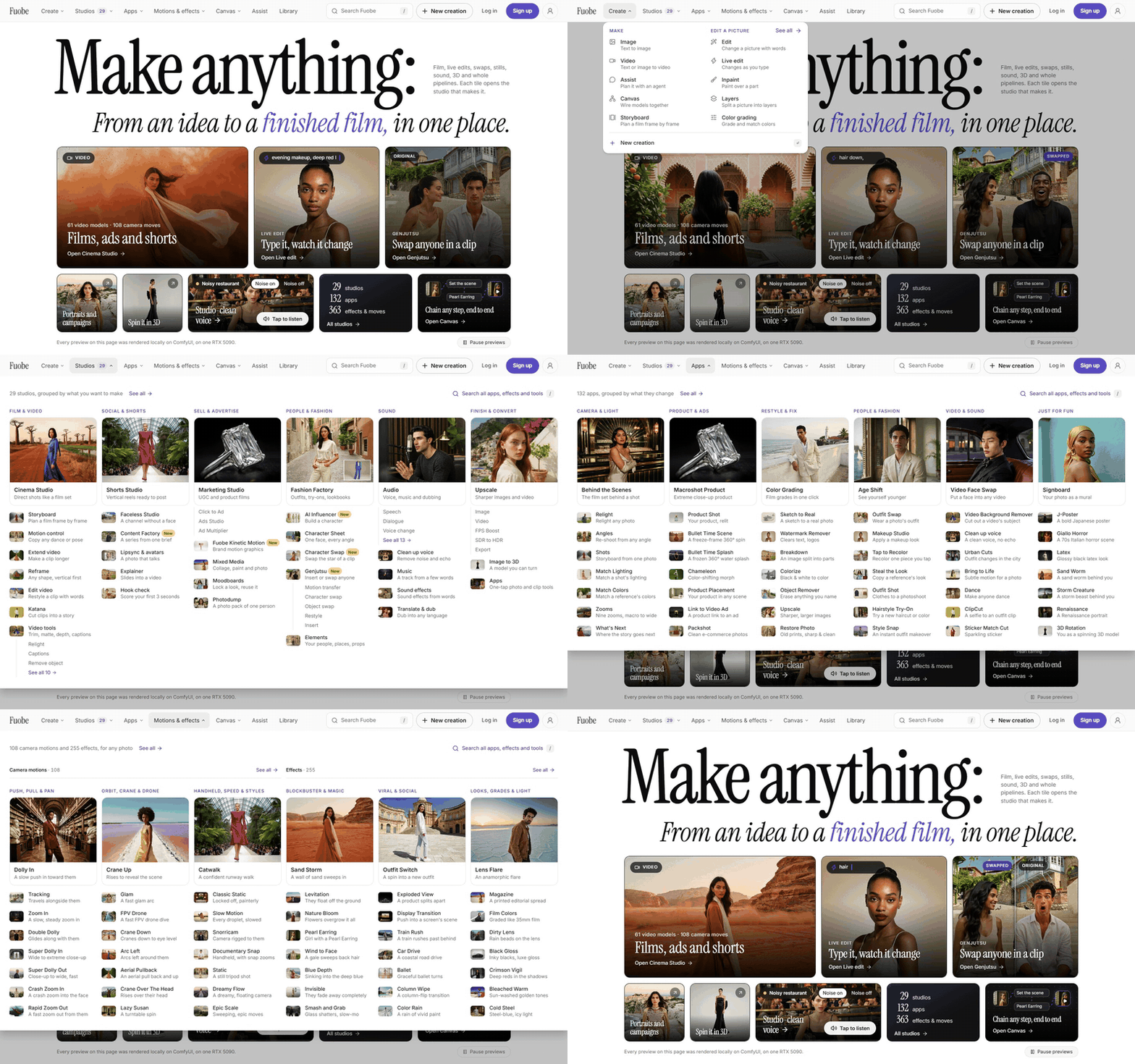
29 studios, 132 apps, 363 effects and moves108 camera motions (mix any two), 255 effects and 132 apps, grouped in the menus by what you want to make. |
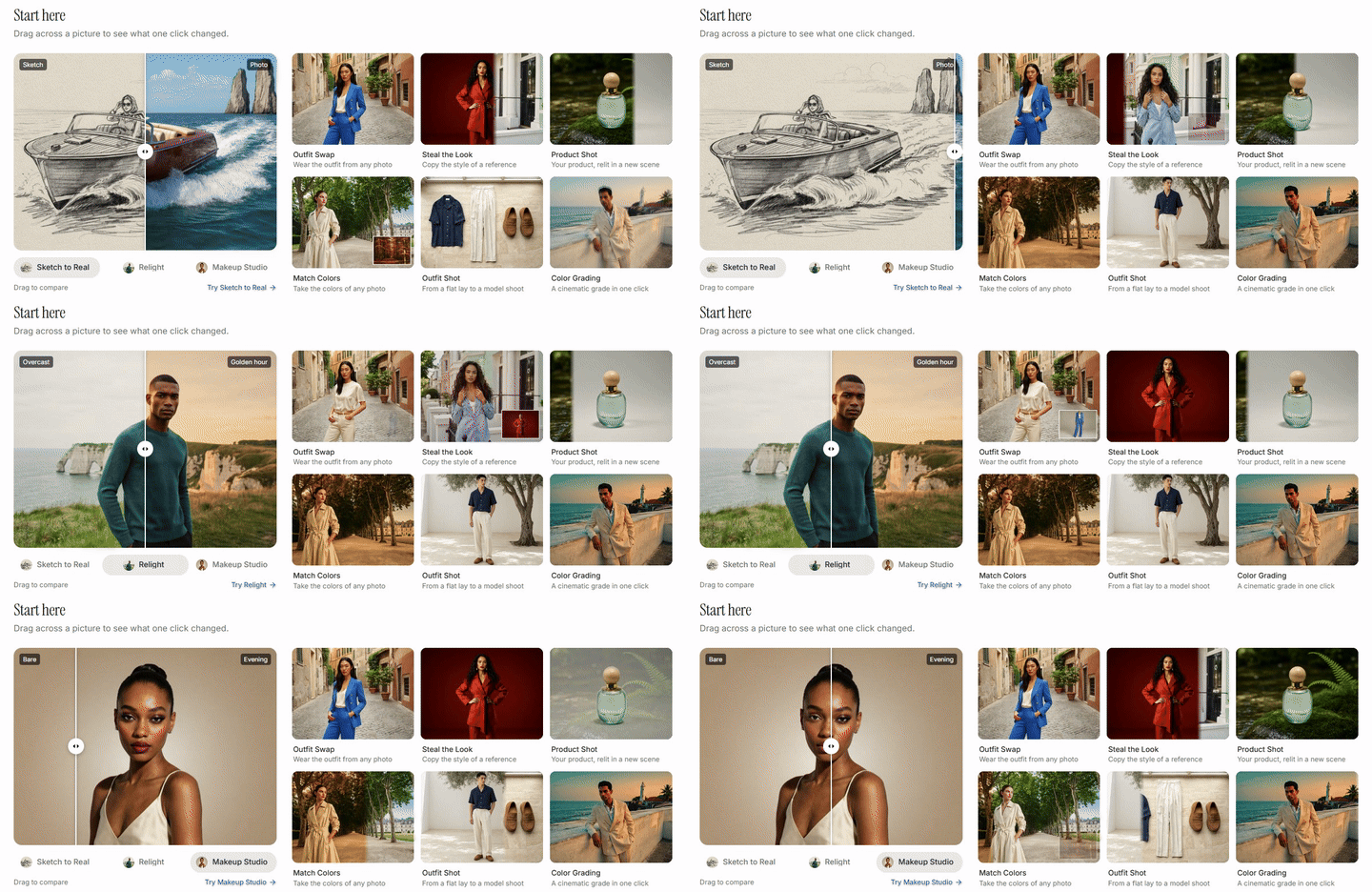
Before and afterTurn one photo into a new scene, look or shot with an app, an effect or an edit in plain words. |
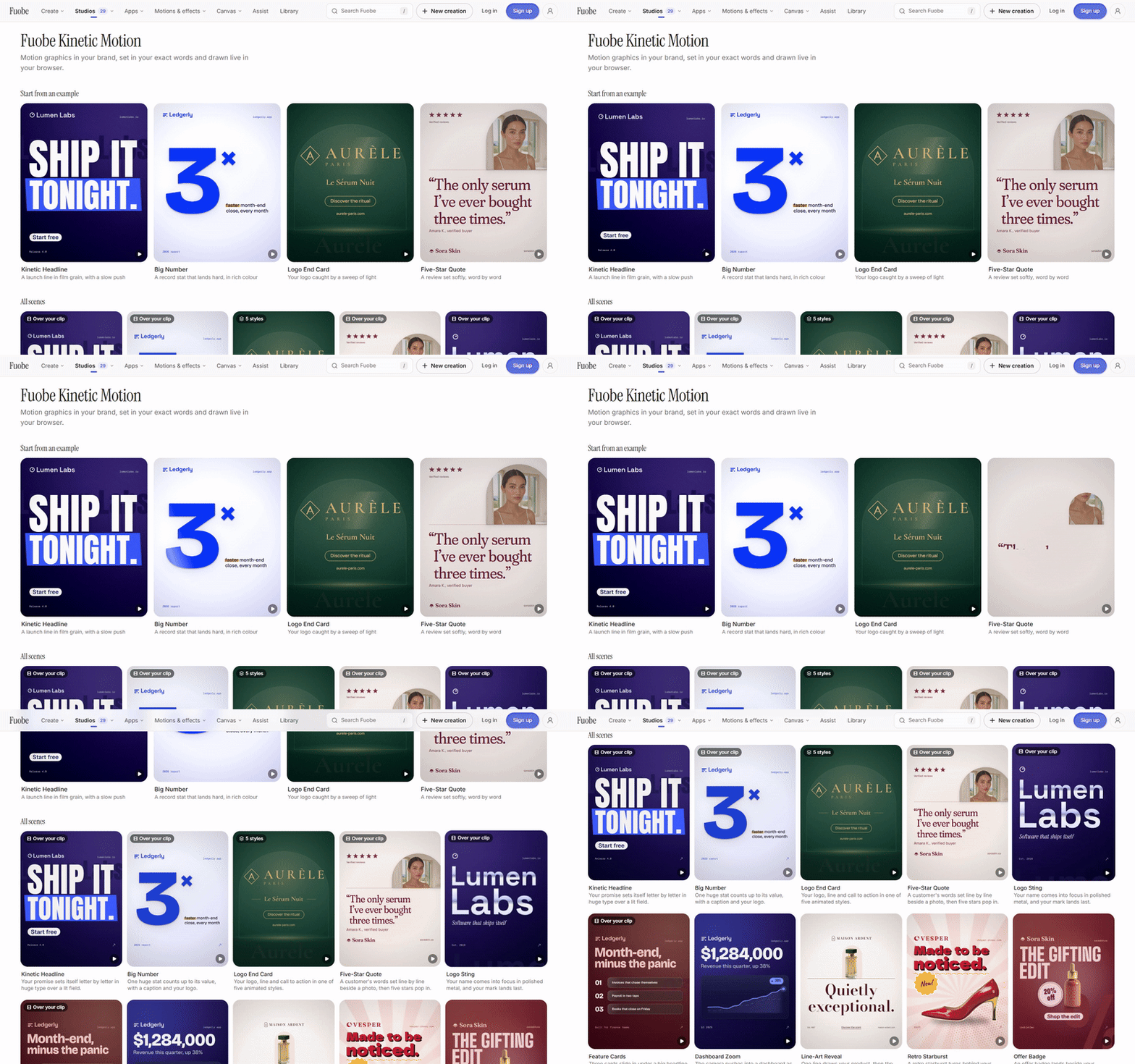
Kinetic MotionHeadlines, big numbers, logo end cards and five-star quotes, animated in your brand and your exact words. |
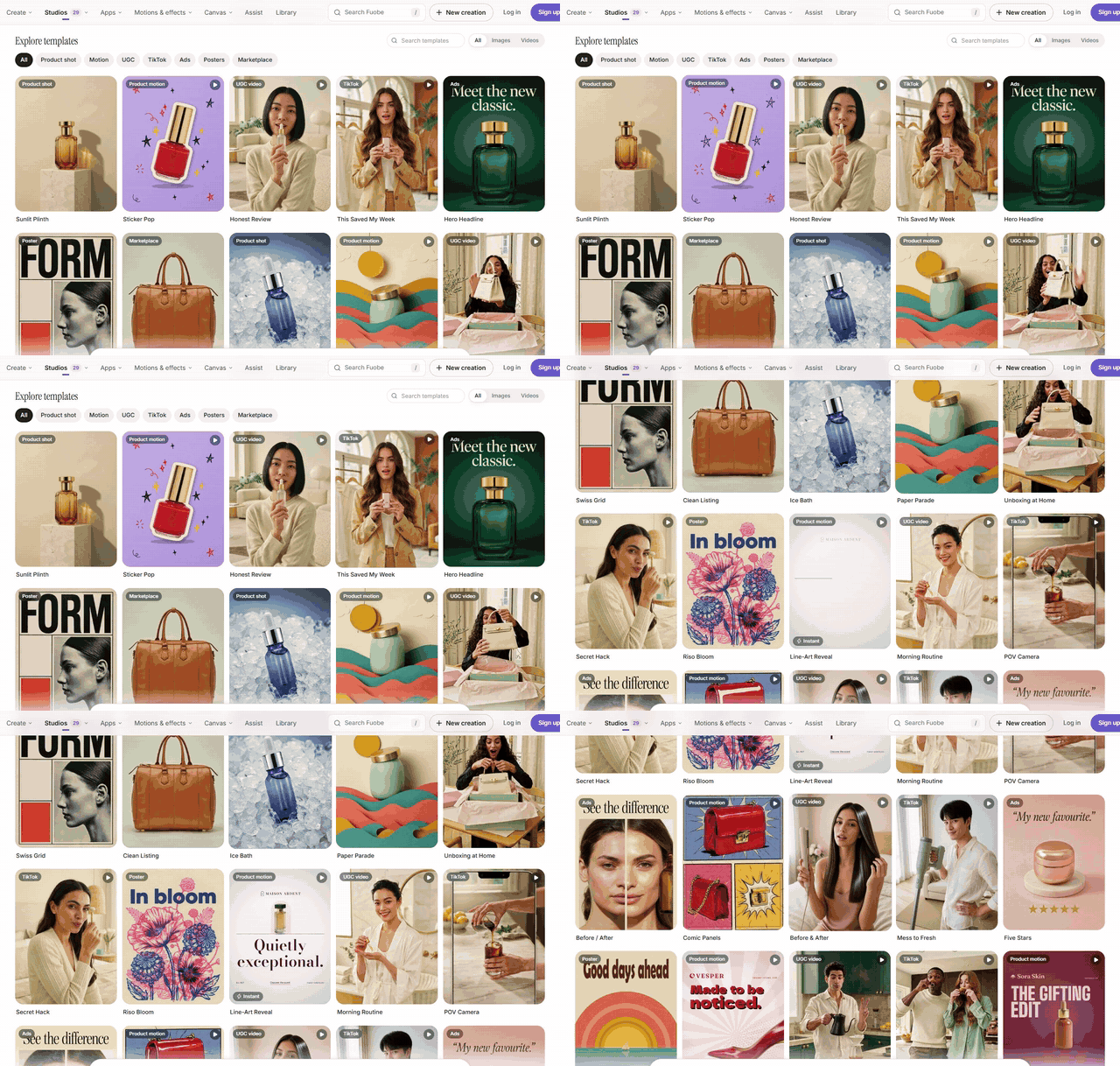
Marketing templatesProduct shots, UGC, TikTok, ads, posters and marketplace listings, each ready for your product and brand kit. |
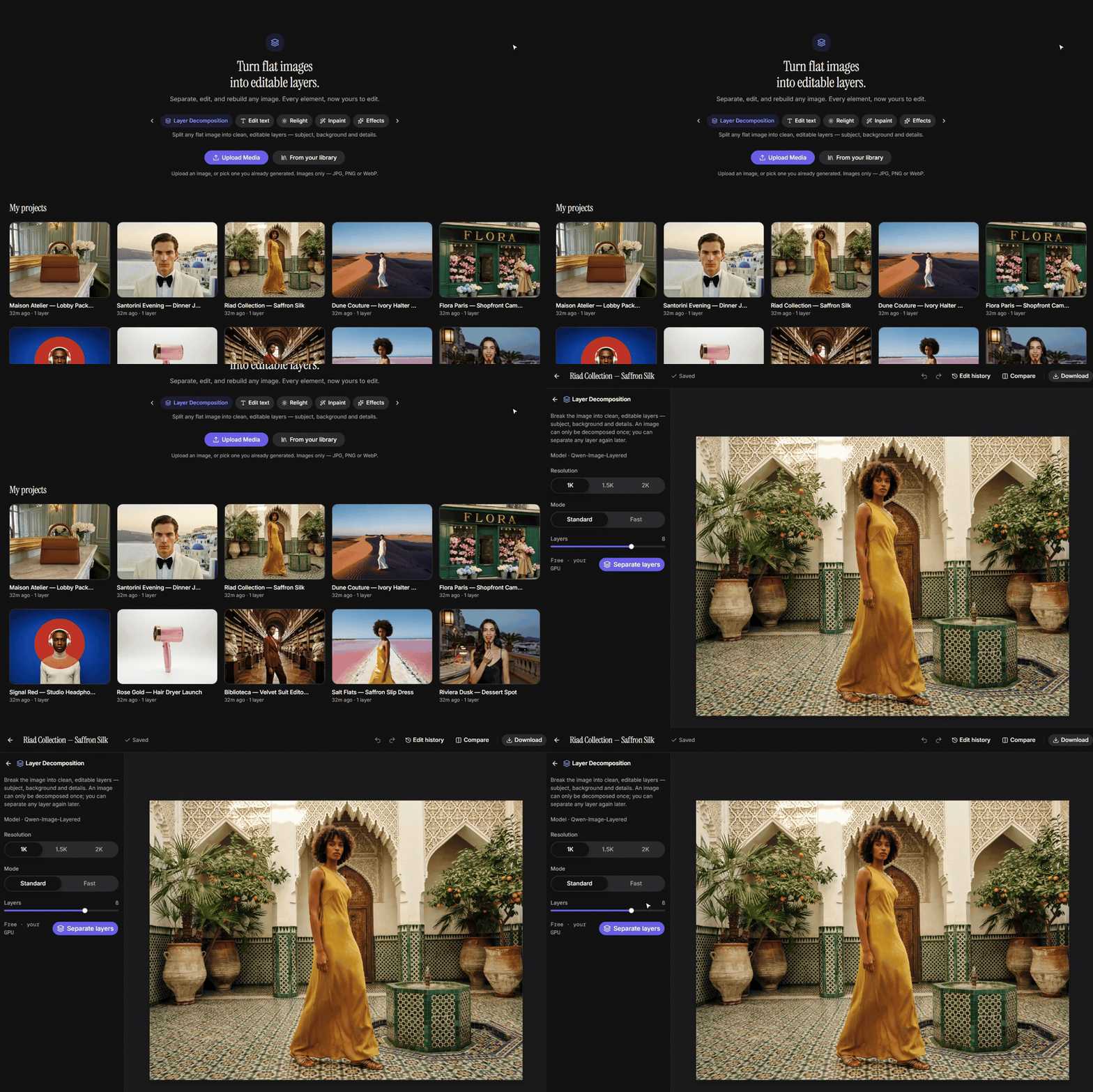
LayersSplit a flat image into editable layers, then change its text, repaint an area or save a layer as an element. |
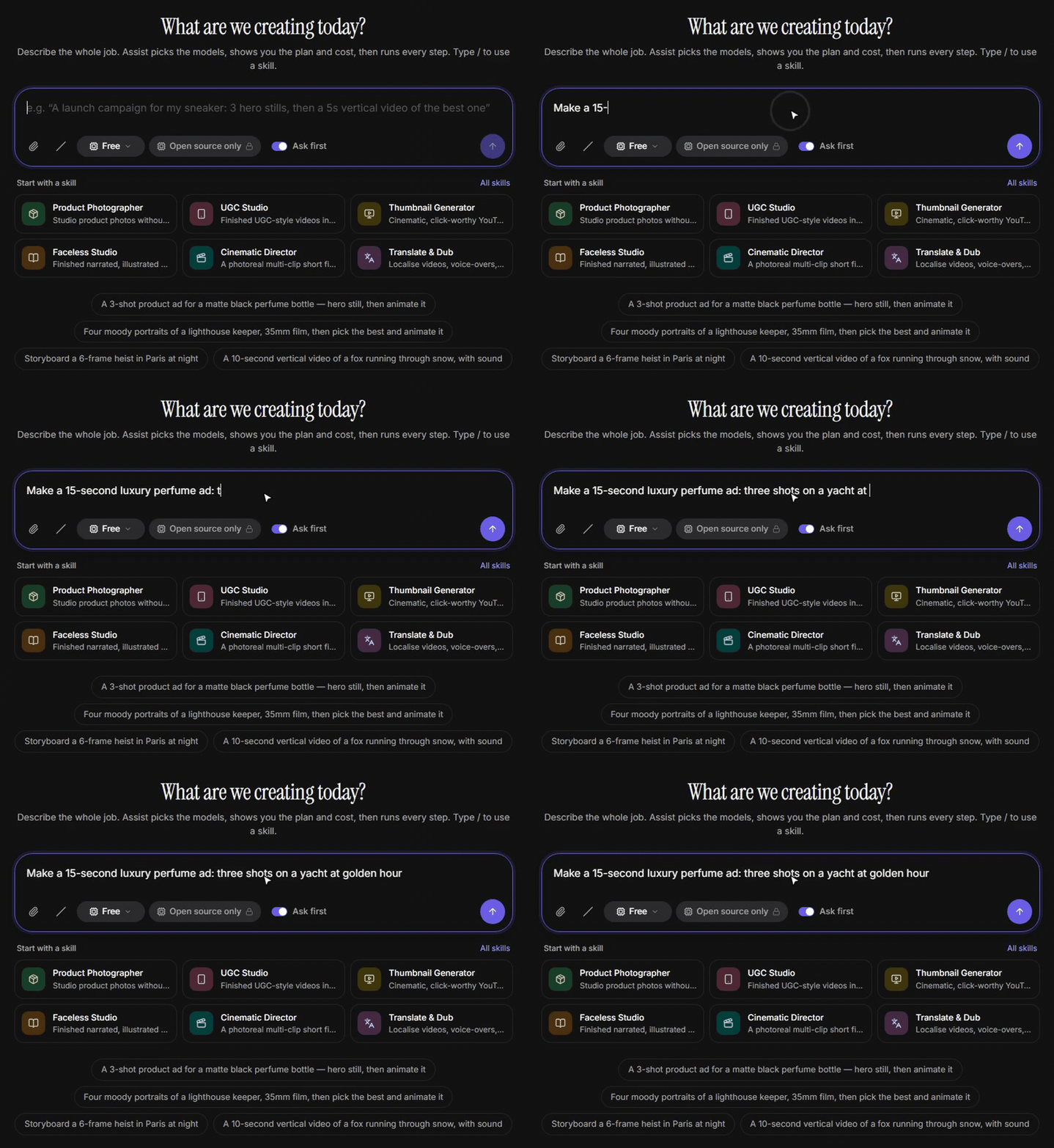
Assist agentDescribe the whole job in a chat. Assist shows the plan and its cost, and runs it when you approve. |
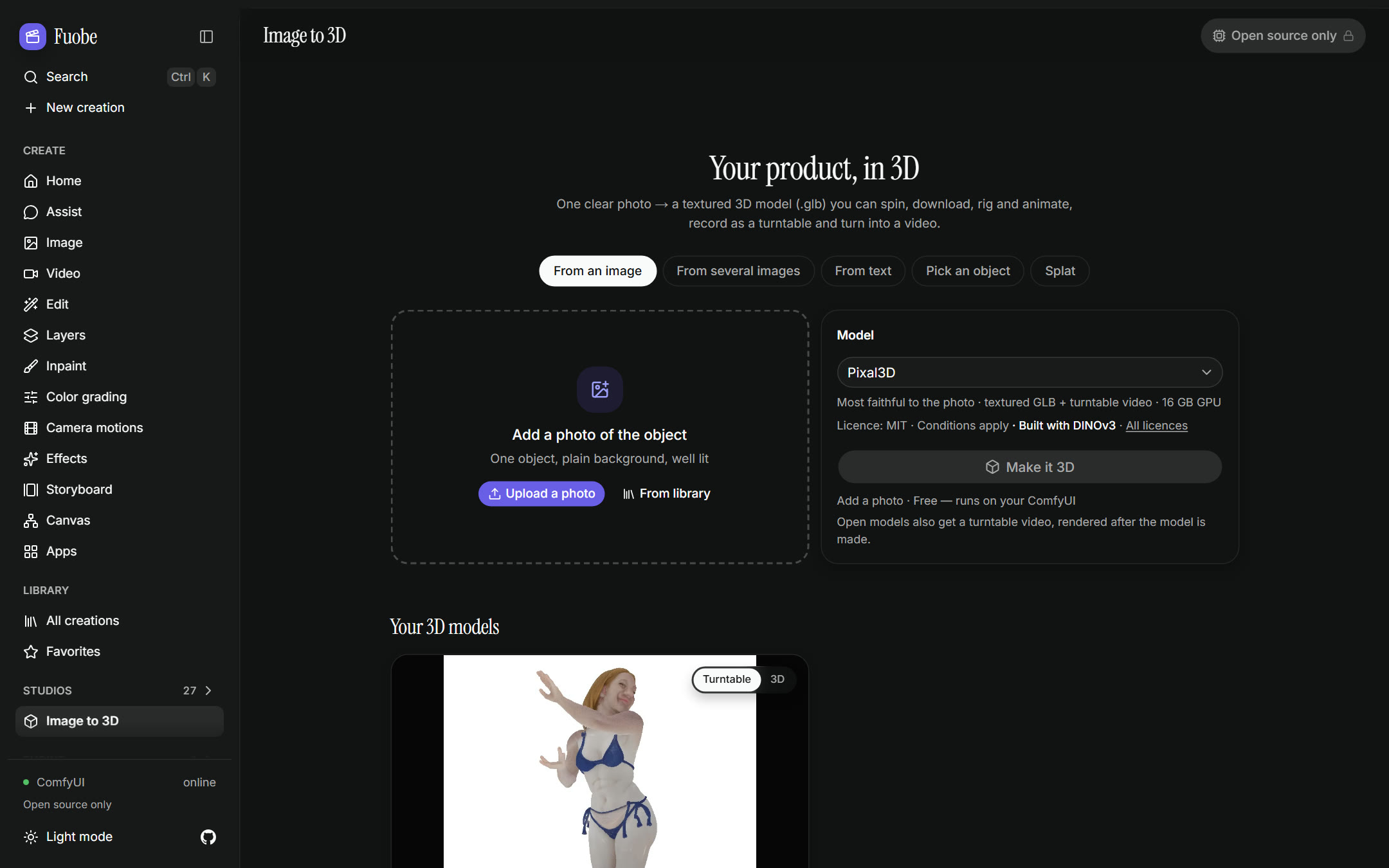
Image to 3DTurn a photo, several photos or a few words into a 3D model or a Gaussian splat, and look around splats in the browser. |
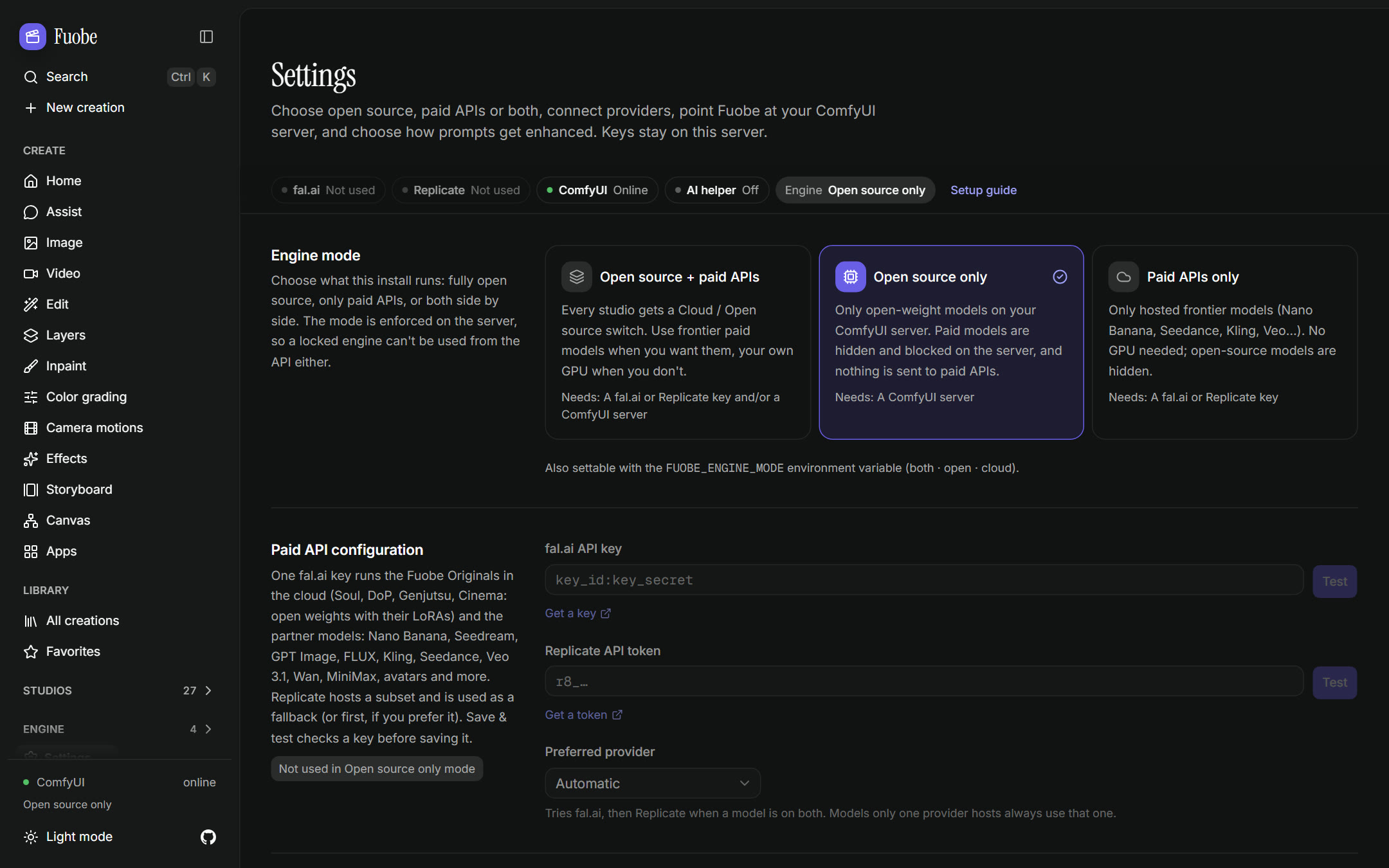
Your GPU or the cloudOne switch picks open weights on ComfyUI, frontier models with your key, or both. |
Also inside: Live edit (the picture changes as you type, on your own GPU), Cinema (with a Fly path through 3D scenes, and a World mode you steer turn by turn), Shorts, Marketing and Ads studios, Canvas node workflows, Storyboard, Turnaround video, Kandinsky 6.0 clips with spoken lines and sound, a green screen keyer, voice and music tools (Split soundtrack takes any soundtrack apart into dialogue, music and effects, and Edit speech changes the words in a recording), skills, MCP and a CLI. See every feature →
Quick start
git clone https://github.com/workingprototype/fuobe.git && cd fuobe
pnpm install
pnpm dev          # http://localhost:3000  (production: pnpm build && pnpm start)
Open Settings → Engine mode and connect what you have: a ComfyUI server, a fal.ai or Replicate key, or nothing at all. With nothing connected, a run asks you to connect one. To give a tour without keys or a GPU, turn on Settings → Show placeholder results (for a tour): every run then makes a labelled placeholder.
Requirements: Windows, macOS or Linux · Node 22+ · pnpm · for the open engine, a GPU running ComfyUI (24 GB of VRAM covers almost every workflow). On Windows, start.bat installs and starts everything for you.
Run on ComfyUI
Choose Open source only and Fuobe runs every generation on open weights through your ComfyUI: 268 API-format workflows, 191 of them validated against real node definitions. scripts/comfy/install-comfyui.sh installs ComfyUI and its node packs at pinned commits. In Fuobe, the ComfyUI workflows page lists the model files each workflow needs and copies the exact install commands.
Set up the open-source engine → · ComfyUI scripts
Your own ComfyUI with fuobe.com
An account on fuobe.com can run its jobs on the ComfyUI on its own computer. Open Connect your GPU, or Settings → Your GPU. You can connect ComfyUI in one of three ways:
- No install. Start ComfyUI with
--enable-cors-header https://fuobe.comand add Fuobe's guard, a small file in ComfyUI'scustom_nodesfolder. The guard keeps every other website out. Fuobe gives you both. This works in Chrome, Edge and Firefox on the computer that runs ComfyUI. - Fuobe Connect, an optional ComfyUI add-on. Install it once and restart ComfyUI. It needs no start setting and no other file. It works from any browser, Safari and phones included. A computer with no screen can pair with your account by a code, and your runs then go to it with no Fuobe tab open.
- A web address. A cloudflared quick tunnel gives ComfyUI a web address, with no Cloudflare account. The address changes each time the tunnel starts.
You do not need any of them. Your own fal.ai or Replicate key also works, and so do the studio's own GPUs where it offers them. Set it up with my AI, on the same screen, gives your own AI the steps for each way.
To install Fuobe Connect, run this in ComfyUI's custom_nodes folder, then restart ComfyUI:
git clone https://github.com/workingprototype/ComfyUI-Fuobe-Connect
You can also enter the same address in ComfyUI-Manager's Install via Git URL, or search for Fuobe Connect in ComfyUI-Manager, which installs it from the Comfy Registry (if the Manager shows no version to install, use the git address). Fuobe Connect trusts https://fuobe.com by default. If you run your own Fuobe studio, add its address in ComfyUI under Settings → Fuobe Connect. The source of Fuobe Connect is integrations/fuobe-connect in this repository, and the ComfyUI-Fuobe-Connect repository is published from it. How it works →
Local models and cloud keys
| For | Works with | Set it in |
|---|---|---|
| Prompt help and the Assist agent | Ollama · LM Studio · Unsloth Studio · any OpenAI-compatible server | Settings → AI helper |
| Hosted image, video and audio models (optional) | fal.ai · Replicate | Settings, or FAL_KEY / REPLICATE_API_TOKEN |
| Claude in Assist and text steps (optional) | Anthropic | Settings, or ANTHROPIC_API_KEY |
Every connection, step by step →
Self-hosting and security
Fuobe keeps your keys, settings and results on your machine (in data/ by default). Before you open it to a network, set a password in Settings → Security (or FUOBE_PASSWORD). Every page and API call then needs a sign-in or an API token. Share links are the one exception.
Security and environment variables → · Public sign-up and guest browsing →
Upgrading from an earlier version
Show what changed in each update, and what to do
- Get the new code and rebuild. Pull
main. On Windows, runstart.batas usual: it installs packages on every start and rebuilds because the code changed. On Mac or Linux, runpnpm install, thenpnpm build(or justpnpm dev). Round 4 adds only one dependency,@types/three(for development; PR #9, PR #10, PR #12, PR #13, PR #14 and PR #15 add none, sopnpm installhas nothing new for them). PR #16 adds@sparkjsdev/spark2.3.1 (MIT), the splat viewer, which a page loads only when it opens a splat, so runpnpm installfor it. Round 3 added@xyflow/react,@google/model-viewer,threeandunpdf. The local model servers and the Image to 3D finish (below) add@gltf-transform/core,@gltf-transform/extensions,@gltf-transform/functions,meshoptimizer,sharpandplaywright-core, so runpnpm installfor them. In a checkout without.next, runpnpm exec next typegen(or a dev or build run) beforepnpm typecheck. - Your data upgrades on its own. The database migrations run once each at start-up, in order, and an existing
data/folder (orFUOBE_DATA_DIR) keeps everything it holds. Round 4 adds seven migrations: one for the Library's nested folders, pins and review status (PR #6), two new tables in PR #9,lora_mirrors(each LoRA copy Fuobe makes) andcontent_series(Content Factory), two in PR #12:shares(share links; only a hash of each link's token is stored) and Assist'sassist_schedulesandassist_connectors, with four new columns onassist_thread_state, and two in PR #13:swap_projects(one document per Character Swap Studio project) and the O7 cleanup, which deletes the retired cloud provider's saved key, turns a Preferred provider that named it into Automatic and marks the ads it drewbaked. They are added at the first start. PR #12's andswap_projectsonly add tables and columns, but the O7 cleanup can't be undone, so back updata/(orFUOBE_DATA_DIR) first if you might go back to an earlier version. PR #7, PR #10 and PR #14 add none (still 23 migrations). Since PR #14, main's GPU pre-flight (gpu_snapshotsandgpu_audit) and public sign-up's file owners (assets.account_id) add two more, and PR #15 adds none (25 migrations). Main's updates after PR #15 add three: a character's designed voice (characters.voice_json), a scheduled task's skill (assist_schedules.skill_json) and the sign-in tables (Sign-in data). PR #16 adds none (28 migrations) and needs no data step on a folder that only ran main. Settings → Models & licences keeps its switches in the existing settings table (models.access), Soul ID uses the existing trainings table, and since PR #14 a skill's recipe lives with its other files in the skills table. The list is indocs/ARCHITECTURE.md. - Canvases are saved in a new form (PR #10). A board is rewritten with pages the next time it is saved, and older Fuobe builds can't read it after that. Back up the data folder if you might go back to an earlier version. Scripts that read a canvas through the API:
GET /api/canvases/:idnow returnscanvas.pages(each page with its graph), notcanvas.graph. - If you ran one of the round-3 package branches (
r3/*,r3b/*) before they were merged, start with a fresh data folder. Those branches numbered their migrations differently, so tables can be missing. Move the old folder aside rather than deleting it if it holds results you want. A folder used by ther4/assist-connectorsbranch before its review fixes needs the same: its migration changed in place. The same goes for a folder used by ther4/content-factorybranch on its own: there Content Factory's table took the Library migration's number, so the Library's folders, pins and review status would never be added. - If your data folder ran the old PR #15 branch (
claude/fuobe-parity-4up tof7c6d8e, orclaude/fuobe-r5-batch-7up toc9cd489), back it up first. That branch used places 23 and 24 of the migration list for its accounts packages (identity tables and an audit-log trigger), which the owner later dropped, so main's two migrations in those places would be skipped. Since PR #15 the first start repairs such a folder and runs main's two (the GPU pre-flight's tables andassets.account_id). The old accounts tables,data/secret.keyanddata/backups/stay, unused. Sign-in goes back todata/auth.json, so a password or token changed on that branch is lost, and itsFUOBE_MODE,FUOBE_SIGNIN,FUOBE_SECRET,FUOBE_OWNER_PASSWORDandFUOBE_TRUSTED_PROXIESare ignored (main readsFUOBE_PASSWORDandFUOBE_TRUST_PROXY). - If your data folder ran
claude/fuobe-parity-4before 11-04 (the round 5 integration branch, before main came in), where both had built the same thing, main's build replaces the branch's (PR #16). The branch's skill History, suggestion and step-by-step cards, the Library's run-batch filter, the CLI's--waitover a skill's runs, its priced voice-first steps, its Original sound and "Make it 3D (quick)" are gone. At the first start, itsskill_runstable is renamedskill_runs_earlier, so main's skill runs start from an empty table; nothing is deleted. - Start on Home now runs the job in Image, Video or Edit instead of only opening the studio. With a saved key for the default model this is a paid run; the line under the box says first what will run and what it costs. ⌘K / Ctrl+K opens the search palette instead of going Home.
- Topaz Video is priced by size: $0.01/s at 720p, $0.02/s at 1080p and $0.06/s above, doubled at 60 fps (it was a flat $0.02/s at 2×). The default target is 1080p, and a size that wouldn't enlarge the clip moves up, so a 1080p clip now goes to 1440p at $0.06/s. Open-source video upscaling (SeedVR2, Real-ESRGAN) also asks for a size now, 720p to 2160p, instead of 2× or 4×.
- Cloud Mixed Media costs more by default. It now redraws each sampled frame (Per frame): about $6 for 10 s at 1K, where the video-to-video pass was one call. Pick Fast under Restyle to keep the old behaviour. API calls with no
modelIdand nomodenow get Per frame; a model sent for the wrong mode gets a 422. - Click to Ad ends on a logo card by default when the product kit has a logo: 2.5 s longer, included in the price. Switch End card off to keep the old ads. API calls without
endCardare unchanged. - Motion and effect links open on the move's model (PR #10). Picking a camera motion or effect in the Video studio, or arriving from Motions or Effects, now switches to the model its move runs on: Fuobe DoP or Fuobe DoP · LTX, a few on LTX-2.5. In the cloud, 152 presets change model and price; the other 211 keep Kling 2.5 Turbo as their route and leave the model you picked alone. Moodboards' curated looks open on Fuobe Soul. Per-megapixel cloud prices (Z-Image Turbo, Qwen-Image 2512, FLUX.1 Fill [pro]…) now count every picture, so n pictures quote about n× the old estimate. On a Canvas board, dragging the empty board now draws a selection box; scroll, Space-drag, the middle button or H pans.
- Open-engine motions and effects no longer all run on Wan 2.2 (PR #10). 17 open on Fuobe DoP · LTX (FPV Drone, Wind to Face, Earth Zoom Out, Flying Cam Transition and 13 transitions) and need the LTX-2.3 checkpoint (29.53 GB, plus the 9.45 GB Gemma 3 text encoder if LTX-2 isn't set up) and a 32 GB GPU. On 24 GB, pick Fuobe DoP: it runs their words. Slow Motion, Car Drive and Wild Ride open on LTX-2.5. Relight effects first run the existing Qwen-Image-Edit 2509 Relight workflow (about 31 GB of model files).
- Cloud keys for the Originals (PR #10). The presets that moved to Fuobe DoP, Fuobe Soul HD, the relight step and Focus Change need a fal key; Fuobe DoP (start frame only) and Fuobe Soul's text to image also run on Replicate. None runs on the retired cloud provider: with only its key, motion links and curated looks opened on a model that couldn't run. Since PR #13 that key does nothing, so add a fal key (see the O7 note below).
- Licences are information, not gates (PR #12). Everything is switched on by default: LoRAs licensed for your GPU only (civitai files without the "Rent" permission) now go to fal or Replicate with a note, Assist and automatic picks can choose non-commercial models, and re-running the install script adds the non-commercial ComfyUI-Whisper. Studio defaults don't change with it. To stay commercial-only, or keep GPU-only LoRAs at home, use Settings → Models & licences: switch off licence classes, providers, node packs, LoRAs or models, and turn on Keep them on your GPU. There is no admin role: anyone who can sign in (or anyone who can reach a password-less install) can change it.
- MiniMax H3 (PR #12) is Character swap's default on both engines and runs H3 Person Removal. Its licence excludes the US, the EU, the UK and South Korea, needs MiniMax's written authorization above US$20M yearly revenue, and asks commercial products to show "MiniMax H3". If that doesn't fit, switch off "Fuobe Character swap", "H3 Character Swap · Relay 2.0" and "H3 Person Removal · Relay 2.0" in Settings → Models & licences. The Restricted regions switch covers only your GPU, because fal's H3 is classed as a paid API.
- Share links skip sign-in (PR #12). Nothing is shared until you make a link. Set
FUOBE_PASSWORDso the rest of the studio stays locked (the Share dialog warns when there is none), and behind a reverse proxy setFUOBE_TRUST_PROXY=1so a visitor who guesses wrong links is locked out alone. Copy a link when you make it: only the browser that made it can copy it again. Revoking a link deletes it at once, though a browser may keep files it already fetched for 5 minutes. - Scheduled tasks (PR #12) run only while Fuobe runs; a run missed while it was off happens once after the next start. A sweep every 30 s starts at boot, and every Fuobe server on the same database runs due tasks, so a dev server on your real data folder runs, and spends on, your schedules too. A task asks first by default; one that runs on its own counts Fuobe's generation jobs against its cap, not Claude's tokens. Connectors are offered in every Claude chat, the ones you already have included; a scheduled task uses them only when you tick "Let runs use my connectors".
- New defaults in Cinema, Genjutsu and Soul ID (PR #12). Cinema's video default is Fuobe Cinema on both engines, so a cloud take costs LTX-2.3's price per megapixel of video on fal (about $0.18 for 5 s at 720p), and stills default to Fuobe Soul Cinema. Cinema Studio 4.0, Soul 2.0 and the earlier Soul Cinema leave Cinema's menus, and a saved pick falls back to the Original. Genjutsu's modes (all but Insert) default to the Fuobe Originals instead of the earlier Genjutsu models; old setup codes open the replacing Original (without their earlier look), and Katana's Genjutsu motion option takes 1 reference instead of the earlier model's 8. In the cloud, Fuobe Cinema and the Genjutsu Originals need a fal key. Soul ID no longer trains on the retired cloud provider: a training still queued or running there fails with a note to retrain for Fuobe Soul. fal's Z-Image training is now 2,000 steps for about $1.70 (it was 1,000 for $0.85), elements hold up to 80 photos (was 20), and Photodump, Fashion and trained moodboards run on Fuobe Soul.
- Scripts that call the API (PR #12): training a character needs
consent: true(POST /api/elements/[id]/trainingstakes{target, consent}),/loratakesfamilyinstead ofmodelIdand/training-kitafamily;POST /api/genjutsutakes modecharacter, and look kindsoulreplaces the retired provider's look kind; Cinema'sGET /api/cinema/projects/[id]returnscontextas{cloudAllowed, civitai}(no retired-provider flag);GET /api/modelslists only models that are on, andPOST /api/generationsanswers 422, naming the switch, for one that is off. - The retired cloud provider is no longer called (O7, PR #13). Its saved key is deleted, and Preferred provider goes back to Automatic if it named that provider (its choices are now Automatic, fal.ai first and Replicate first). Remove that provider's key variables from
.env: Fuobe no longer reads them, and aFUOBE_CLOUD_PROVIDERvalue Fuobe doesn't offer counts asauto. If that provider was your only cloud key, add a fal.ai (or Replicate) key; until then, cloud runs come back as demos (with Demo mode on Auto). Reuse, saved Canvas boards and Cinema projects, Genjutsu setup codes, Katana jobs, Assist plans, retries and API, CLI or MCP calls that name Soul, Soul 2.0, Soul Cinema, Cinema Studio 4.0 or a Genjutsu model run on the Fuobe Original that replaced it, on your engine (Marketing Studio Image ran on GPT Image 2.5, and Ads Studio and the AI Influencer app on Nano Banana Pro, until their Originals landed in PR #14: see below), and the API's notes say so. In an API, CLI or MCP call and a retry, Cinema Studio's Director settings become words in the prompt (Reuse leaves them out and says so), and its reference takes run on Seedance 2.5. Seedance 2.5's video edit and LTX 2.5's start/end-frame clip only ran there: they now run on Kling O3 and Fuobe Cinema. Past results stay in the Library under the name they ran as ("Soul 2.0 (earlier version)"). A job still running there when you upgrade fails on its next check with a note to run it again, a Soul ID training still queued or running fails with a note to retrain for Fuobe Soul, and an Ads Studio batch made there is remade the Fuobe way on retry. Switches you set in Settings → Models & licences on a retired model or on the retired provider no longer apply to anything: if you had switched off, say, Soul 2.0, switch off its replacement too. - Other O7 changes (PR #13). Happy Horse 1.1 (text, image and reference to video) now runs with a fal key: $0.14/s at 720p, $0.18/s at 1080p. The Ad Multiplier's cloud choices are Kling O3 edit (the default) and Happy Horse video edit, which keep the ad's sound but recreate at most its first 15 s (a longer selection is cut, with a note), and Gemini Omni Flash. Character Sheet → Build from scratch in the cloud runs on Fuobe Soul in Cinema's casting look (Nano Banana Pro if that is switched off); it used Soul 2.0 or Nano Banana Pro, so its price and look change. The AI Influencer app used Nano Banana Pro in the cloud, and the GPU path was unchanged (since PR #14 both draw in Fuobe Soul's Realistic look: Fuobe Soul in the cloud, the Soul Cast sheet on your GPU). Grok Imagine Image 2.0 takes 5 references (was 10). Old Soul IDs are labelled "Older Soul ID". If you installed Fuobe's skills into another agent (Cursor, Codex…), re-run
npx skills add workingprototype/Fuobe: four playbooks now name other models. - Scripts that call the API (PR #13): the retired provider's presets route is gone;
POST /api/providers/testwith its id answers 400,GET /api/statusno longer lists it, andPUT /api/settingsignores its key setting and refuses it ascloudProvider(400).POST /api/generationsmay answer with a replacementmodelIdandnotessaying what changed. Ads batch and estimate bodies andPOST /api/brands/[id]/chat/confirmignorerouteandratio, and/api/ads/estimateno longer returnsroute.POST /api/uploadsalso takes MKV and AVI (200 MB as before): the Character Swap Studio's picker lists them, other pickers still list MP4, MOV and WebM, and browsers can't play AVI. The Character Swap Studio's routes are new, under/api/swap-studio/projects. - Character Swap Studio on your GPU (PR #13) needs the H3 Relay 2.0 node pack (
akatz-ai/h3-relayate2a7665): re-runscripts/comfy/install-comfyui.shwithH3_RELAY=1, or on Windows or ComfyUI Desktop clone it intocustom_nodesand check out that commit. It also needs VideoHelperSuite and FFmpeg on the ComfyUI machine, a 24 GB GPU with offloading and 64–128 GB of RAM (48 GB+ advised for 768p), and ComfyUI started with a higher--max-upload-size(100 MB by default) for continuations with more than about 30 frames of history at 1 MP; an upload ComfyUI refuses as too large now says so. It adds no model files: it uses PR #12's MiniMax H3 files. In the cloud it needs a fal key. MiniMax H3's licence (above) applies to it too. Its swap runs on "Fuobe Character swap" in the cloud and on "H3 Character Swap · studio segment" on your GPU (listed in Settings → Models & licences as a helper step studios run), and it refuses only what is switched off there: if H3's licence doesn't fit, switch off that second one too. A sweep every 3 s, from server start, starts takes that were waiting on the one before; like scheduled tasks, it runs in every Fuobe server on the same data folder, so a dev server on your real data can launch (and pay for) them too. - A busy ComfyUI no longer counts as down (PR #13). Before, one 1.5–2 s check decided, so a ComfyUI busy with a job could send new runs to demo. Now it counts as up if it answered in the last 2 minutes, or if its port accepts a connection and it answers a longer 10 s check. A refused connection, an unknown host or an HTTP error still means down at once; a port that accepts connections but never answers (a hung ComfyUI, a tunnel to a dead box) is down after the 10 s check. A chain step after real ComfyUI steps (such as the Canvas concatenator's join) waits up to 60 s for ComfyUI before failing; cloud steps don't wait. The local was unchanged until PR #14 (below).
- New defaults and prices (PR #14). Marketing Studio, Ads Studio, the AI Influencer builder and app, Photodump, Fashion Factory, Mixed Media, Shorts, cloud Storyboard boards and DoP's 32 Mixed Media effects now start on Fuobe Originals or hosted open models, so their results and prices change; the partner models stay as choices. None of these defaults has been measured by the evaluation harness yet. Lipsync prices talking avatars on the voice's length, not 5 s (Fuobe Speak with a 12 s voice: $2.40). Edit video prices the edits that keep the clip's length (Happy Horse, Runway Aleph 2, Lucy Edit Pro, Kling O3 4K edit, Gemini Omni Flash, Grok Imagine edit) on the clip's seconds, not a flat 5 s, and refuses a clip outside a model's window, in the app and the API: Happy Horse and Kling O3 4K edit 3–15 s, Runway Aleph 2 2–30 s, Wan 2.7 2–10 s, Gemini Omni Flash up to 10 s. Happy Horse video edit shows half its old price: $0.28 per second of clip at 720p, $0.56 at 1080p (Fuobe counted each second twice; fal's bill was not doubled). Cloud PixeletedFace adds $0.01 a picture for its face mosaic, and InfiniteTalk Long on your GPU runs up to 40 s (was 20 s) and refuses longer voices.
- Retries and API scripts (PR #14). Retrying a run stored as
marketing-studio-imageorads-studiolands on Fuobe Marketing Image, andai-influenceron Fuobe Soul, at their prices. Cloud boards use the open models unless the body sendspartner: "nano-banana-pro", andoss-wan22-vace-restyleon your GPU now runs Fuobe Shorts.POST /api/generationsdropsskill,demoandaskedfrom its input (the server sets them), and a PixeletedFace picture comes back as two rows, the mosaic first. New routes:/api/evolution(with/estimateand/direction),/api/storyboards/estimate,/api/influencer/estimate, and for skills/api/assist/skills/[name]/recipe,/estimate,/runand/verify(its paidreallevel is API only and needsconfirm: true) and/api/assist/skills/draft(with/check,/nameand/save);GET /api/assist/skills/[name]/download?format=zipgives a skill with its files. - A user skill named
draft? Rename it before you upgrade: the skill builder now owns that address, so Fuobe can't open, edit, rename or delete a skill with that name afterwards (read from the code, not tested). Files a skill's recipe names now count as in use, so Empty trash keeps them, and an uploadedrecipe.jsonloses its checks and has to be checked again on your install. - The new Originals on your GPU (PR #14). Set a LoRA folder in Settings → LoRAs so Fuobe can fetch the new LoRAs; six Mixed Media looks need a civitai key for theirs. Without a LoRA folder, Mixed Media leaves a missing look LoRA out with a note, but DoP's Mixed Media stills for the 14 looks with a LoRA fail when they're sent. Evolution, Fuobe Angles, Fuobe Shorts and Smooth need 24 GB of VRAM; Mixed Media per frame and Fuobe Speak 16 GB (the manifest's figures, not measured). In the cloud, the new Originals need a fal key; Replicate also serves Fuobe Marketing Image's edits.
- Ollama, busy or down (PR #14). Ollama now follows ComfyUI's rule: one that answered in the last 2 minutes, or whose port takes a connection and answers a longer 10 s check, counts as up, so a busy Ollama no longer sends Assist to the offline planner. Opening Assist waits at most 1.5 s for an Ollama that never answers.
- AI-Toolkit in Settings (PR #14). Settings → Training · AI-Toolkit holds the address, an optional token and the photos folder, which must be a full path, each with Save & test; it is greyed out in Paid APIs only mode. The Train dialogs' "Open Settings" goes to the section that clears their blocker.
- Settings → Prompt enhancement is now AI helper. Besides Claude and Ollama it talks to LM Studio, Unsloth Studio and any other OpenAI-compatible server (see the table above). Nothing needs changing:
FUOBE_ENHANCE_PROVIDER=ollamaand a saved Ollama choice now mean "a local model", the Ollama settings and environment variables are read as before, and Assist chats saved on Ollama open on the local model. With Automatic, Fuobe uses the first local server that answers with a model (Ollama first); pin one withFUOBE_LLM_PROVIDER. A model LM Studio loads for Fuobe gets 16k of context (FUOBE_LLM_CONTEXT). - Image to 3D on your GPU: Pixal3D and the finish. From an image now runs Pixal3D by default (
image-to-3d-pixal3d: MoGe 2 estimates the camera, about 250k triangles); TRELLIS.2 stays in the menu. It needs one new model file, Pixal3D's single-view weights (pixal3d_int8_convrot, 5.58 GB; the multi-view graph uses its own), plus MoGe 2 and the files TRELLIS.2 already uses; the Workflows page lists them. Like TRELLIS.2, it encodes with DINOv3, so its results show "Built with DINOv3". Before a job shows as done, the server makes a web copy of each open-engine GLB (meshopt geometry, WebP textures, the pivot at the bottom); the raw GLB stays the download. After it, the server renders a 4 s turntable on the CPU, one at a time, when ffmpeg and a Playwright Chromium are there (npx playwright-core install chromium-headless-shell); without them the 3D page records one in your browser. - LoRAs on the open engine: set the LoRA folder in Settings → LoRAs, plus a civitai key for 72 of the 128 library LoRAs. Fuobe writes the files itself, so the folder must be one the Fuobe machine can write to (ComfyUI on the same PC, or its
models/lorasshared); otherwise place the files by hand, as you must for the four gated Hugging Face LoRAs. With no folder set, a run that needs a LoRA ComfyUI doesn't have stops and says what to do. A LoRA sent to a workflow with no model loader to attach it to now fails the run instead of being dropped silently. Since PR #10 the presets use many more LoRAs on the open engine: 84 files (was 43), 36 of them from civitai (was none). Without the civitai key, a motion, an effect or one of six Cinema Studio moves (Handheld, POV, Robot Arm, Snorricam, Tracking and Side Tracking) that needs a civitai file ComfyUI doesn't have stops before the job; Fuobe Soul leaves those LoRAs out and says so. - Cloud runs with LoRAs: when a model runs on both fal and Replicate, Fuobe picks the one that can take every LoRA and the clip length asked, even over Preferred provider. LoRAs a run can't take are left out with a warning.
- Password-less installs reached by a domain name (a reverse proxy, a tunnel, a Tailscale name) get 403 since round 3. Set a password, or add the name to
FUOBE_ALLOWED_ORIGINS. - Inputs from LAN addresses (an image URL on your NAS, say) are refused unless
FUOBE_ALLOW_PRIVATE_URLS=1(also since round 3). - ComfyUI node packs: re-run
scripts/comfy/install-comfyui.sh(it keeps what's installed and pins each pack to the commit Fuobe was validated with). Round 3 added ComfyUI-MelBandRoFormer, ComfyUI-QwenASR and ComfyUI-HunyuanVideo-Foley; round 4 adds ComfyUI-ToSVG for the open Vectorize app (PR #9 and PR #10 add none). Open-source video upscaling and FPS Boost now also need ComfyUI-VideoHelperSuite (before, core ComfyUI was enough), which the script installs too. Since PR #12 the script also installs the non-commercial ComfyUI-Whisper by default (NC_PACKS=0leaves it out) and Akatz Labs' GPL-3.0h3_character_swappack for Genjutsu's Character swap (H3_PACK=0leaves it out; it needsffmpegandffprobeon PATH). H3 Relay 2.0, for H3 Person Removal and the Relay swap, adds its own HTTP routes to ComfyUI, so it is opt-in:H3_RELAY=1(or install it on the isolated worker). PR #13 adds no pack: the Character Swap Studio's GPU graphs use H3 Relay 2.0 and VideoHelperSuite. PR #14 adds none either. Until PR #14, Workflows → Copy install commands gavegit clone …/tree/<commit>/…lines for the two H3 packs, which git can't clone; now it clones H3 Relay and checks out its pinned commit, copiesh3_character_swapout of a sparse checkout at its pinned commit, and can be pasted twice (an olderh3_character_swapcopy already there isn't updated, by these commands or by the script). PR #15 adds ComfyUI-DBS for Split soundtrack (below), and Copy install commands now makes a file's subfolder first (DBS's files sit inmodels/dbs/<model>/). If you set up ComfyUI another way (ComfyUI Desktop, for example, or on Windows), install these packs yourself. ComfyUI itself needs no upgrade: the library still targets 0.41.0. - Models for the new tools. Round 4 adds about 28 GB of model files to the library in PR #6 (PR #7 adds none): VOID with its CogVideoX VAE (22.73 GB, Remove object's "Shadows and reflections too"), MoGe 2 (0.66 GB, 3D scenes, and since PR #10 multi-view 3D too), OvisOCR3 (1.71 GB, Layers' text detection since PR #9) and TripoSplat (Image to 3D's Splat mode since PR #10). PR #10 adds about 35 GB more, both optional: the LTX-2.3 22B distilled checkpoint (29.53 GB, plus the Gemma 3 text encoder, 9.45 GB, if LTX-2 isn't set up) for Fuobe DoP · LTX, and Pixal3D multi-view (5.58 GB, plus MoGe 2 if the 3D scene isn't set up) for TRELLIS.2 Multi-view. Fuobe Soul's image to image and the Canvas Video concatenator need no new files. The new tools also use files the library already listed, which you may not have downloaded: Wan 2.1 VACE 14B (34.68 GB) and SAM 3.1 (Remove object; Genjutsu's swap and insert), Wan Animate 2 (Genjutsu's motion transfer), Qwen-Image-Edit 2511 with the Multiple-Angles LoRA (3D scenes) and RIFE 4.26 (FPS Boost). PR #9 adds no files to the library, but its tools use these: OvisOCR3 for Layers' text detection; Gemma 4 E4B (9.06 GB) plus ComfyUI-VideoHelperSuite for Content Factory's reading of a reference clip; FLUX.1 Fill [dev] (23.8 GB) for Layers' Inpaint. The Workflows page lists them with their install commands. GPU memory, from the manifest and not measured: Wan VACE 24 GB, VOID 24–40 GB, SeedVR2 in passes 16 GB, Gemma 4 E4B 12 GB, OvisOCR3 3 GB; since PR #10, LTX-2.3 22B 32 GB, TRELLIS.2 Multi-view 16 GB, Z-Image Turbo image to image 12 GB.
- Models for Character swap (PR #12). About 45 GB of new model files, all optional and pinned: MiniMax H3's INT8 model (20.97 GB), its NVFP4 Qwen3-VL 32B text encoder (15.69 GB), H3's video and audio VAEs (5.21 and 0.61 GB), lightx2v's FL2V Turbo 8-step LoRA (1.96 GB) and Akatz Labs' swap or person-remover LoRAs (0.16 GB each), plus SAM 3.1, which the library already listed. Fuobe downloads the LoRAs into your LoRA folder before a run. They serve Genjutsu's Character swap and Remove object's H3 Person Removal on your GPU; the Workflows page lists them. GPU memory, Fuobe's advice and not measured: 24 GB of VRAM with offloading and 64–128 GB of RAM, and 48 GB+ for 768p, Character swap's default. Fuobe Cinema on your GPU needs no new files (it uses the Wan 2.2 14B Lightning graphs already in the library), and AI-Toolkit downloads Soul ID's base weights itself. The Character Swap Studio (PR #13) adds none either: its two graphs use these files and SAM 3.1.
- Models for PR #14. Two new files, both LoRAs Fuobe downloads into your LoRA folder: dx8152's Multiple-angles LoRA for Fuobe Angles (0.24 GB) and the optional FusioniX LoRA for Fuobe Speak (0.37 GB). The four new graphs otherwise use files the library already lists, which you may not have downloaded: Evolution the Wan 2.2 Fun VACE set (45.49 GB), Fuobe Angles Qwen-Image-Edit 2509 with its text encoder and the Lightning LoRA (31.15 GB with the new LoRA), the face mosaic SAM 3.1 (1.75 GB). Video Depth Anything large downloads about 1.5 GB on its first run. Fuobe Mixed Media, Fuobe Shorts, Fuobe Marketing Image, Fuobe Try-On and Popcorn run graphs that were already in the library (Try-On's LoRA is in Settings → LoRAs as an adapter). GPU memory, from the manifest and not measured: Evolution and Fuobe Angles 24 GB, Fuobe Speak 16 GB, Video Depth Anything large 8 GB, the face mosaic 4 GB.
- New tools and prices (PR #15). Split soundtrack (Audio → Split soundtrack) runs only on the open engine, on your ComfyUI (GPU or CPU): DBS isn't hosted on fal or Replicate, so the cloud engine says so and offers "Use open source". MOSS-Image (Image studio), the fly path (Cinema's 3D scene) and the turnaround video run on both engines; see Features. MiniMax H3 Max is now priced by resolution: $0.05, $0.08 and $0.16 per second at 480P, 768P and 1080P, and $0.32 at 2K (extend only), not a flat $0.0325/s; until 2026-10-31 its image and text to video quote the list price, above fal's launch price. A launch price is read on the day: a run is priced on the day it is planned, and a page shows that day's price once it loads (pages built by
pnpm buildshow none until then), so a server started before FLUX 3 Max's launch price ends (2026-11-07) no longer keeps quoting it. Canvas node prices now count LoRAs (a Fuobe Soul node with look LoRAs showed $0.005/MP for a $0.0085/MP run). A clip that already has sound (Sound for video, a mux, Lipsync, Trim, Captions) offers Split soundtrack as a next step instead of Add sound, and the Image studio's controls chip reads Options instead of "Director". - Scripts that call the API (PR #15): new routes
POST /api/turnaround(?preview=1plans and prices),POST /api/turnaround/estimateandPOST /api/audio-tools/export(Export mix, sent in 16 MB parts, up to 2 GiB);POST /api/audio-toolsgainssplit(open engine) andremux, andPOST /api/cinema/projects/[id]/generatethe actionspathandturnaround. InGET /api/models,priceis now the day's price, and a launch-priced item gainslaunch(until,price). - Split soundtrack on your ComfyUI (PR #15) needs the ComfyUI-DBS node pack (
hiroki-abe-58/ComfyUI-DBSatf656e53, MIT) and four DBS files (23 MB). On Mac or Linux, re-runscripts/comfy/install-comfyui.sh: it installs the pack and fetches the files, checked against their SHA-256 (a mismatch only warns;DBS_WEIGHTS=0skips the files, but then Split soundtrack can't run). On Windows or ComfyUI Desktop, clone the pack intocustom_nodesand check out that commit, then putconfig.jsonandmodel.safetensorsfromJusperLee/DBS-BSRNN-DnRandJusperLee/DBS-TIGER-DnRintomodels/dbs/<that name>/(the Workflows page's "Split a soundtrack" card lists them). It runs on a CPU too. The Comfy Registry flags the pack's only version without giving a reason; its code was read at the pinned commit. - Models for PR #15. MOSS-Image needs about 13 GB of new files (its int8 model, 5.41 GB; the Qwen3.5 9B w4a8 text encoder, 7.34 GB; the small FLUX.2 decoder, 0.25 GB), plus 5.41 GB for its optional Fast setting. The fly path needs 18.4 GB of new files (Wan 2.1 I2V 14B 720P, 16.4 GB, and the Uni3C model, 2 GB), with a 16.64 GB 480P file as an optional drop-in. Both use only nodes built into the ComfyUI version Fuobe pins (unchanged), so an older ComfyUI may not run them. MOSS-Image's int8 and w4a8 files run on kernels that need a PyTorch built for CUDA 13 (cu130); without it ComfyUI logs a warning and probably runs slower (untested). The turnaround adds no files: it uses Frames mode's Wan 2.2 14B graphs and the Angles app's Qwen-Image-Edit 2511 with the Multiple-Angles LoRA. The Workflows page lists every file. GPU memory, not measured: the fly path about 48 GB (the library's highest; Uni3C's own figures are 46–51 GB with offloading), MOSS-Image 16 GB (a guess), the turnaround about 24 GB; DBS runs on a CPU.
- New tools in PR #16 (round 5, part 3). Kandinsky 6.0 (Video studio: 5 s clips with spoken lines and sound) and Kandinsky VSR (Upscale → Video) run on both engines. On your GPU only: Pika H3 Flex (MiniMax H3 in 6 steps, with references), NVIDIA RTX Video (RTX cards only), Green screen with CorridorKey 2.0, Bria VRMBG 3.0 and FeyNoBg cut-outs, Edit speech (Tencent AuK), Idol 3D's clean splats, quick mesh and other sides, Hi3D refine, World mode (Hy-Nomas) and the optional WorldCast worker. In the cloud: Bria green screen ($0.05 a second), Bria guided cut-out ($0.03 a picture) and Kandinsky 6.0 on fal (Pro · Standard by default, $0.56 for a 5 s clip; Lite from $0.08). Cinema's fal MiniMax H3 takes can be 2K, and a finished one offers Finish in 2K ($0.13 a second), once per take. Splats open in a viewer on their cards and in the Library. See Features. Nothing in PR #16 has run on a GPU or with a paid key.
- Held with Regenerate (PR #16). Regenerate on your GPU (Open-H3 Regenerate) stays off until it has run on a card that fits it. Built but hidden with it: Faceless's "Regenerate to 1080p", Enhance in Shorts and Edit video, MiniMax H3's 2K and Finish in 2K on your GPU, and Upscale → Video's "Quick · RTX" card (RTX Video Super Resolution stays in the model picker). The server refuses each of them while Regenerate is held, however it is asked for, and says it isn't available yet.
- Changes to tools you have (PR #16). MiniMax H3's Quality now reads "Standard · 8 steps" and "Sharper · 20 steps". The stored values don't change, so in API and Assist calls
quality: "fast"means Standard, and the fastest is the newflex(Pika H3 Flex, on your GPU). A video run that would quietly drop an attached clip, or reference clips beside an end frame, is now refused in words. Upscalers that scale by a factor (Topaz, FLUX Upscale…) size the output from the clip itself. Split soundtrack's time estimate on a CPU uses the separation suite's speeds (0.25x for Fast, 0.10x for Best). Canvas boards with a Restore & colourise node save again. With public sign-up, accounts run the new open models only on their own ComfyUI (or this install's GPUs when hosted runs are on) and the new cloud models only on their own fal.ai key; Cinema, Storyboard, Layers, 3D runs, Edit speech and the WorldCast worker stay the owner's. - Scripts that call the API (PR #16): new routes
POST /api/cinema/projects/[id]/items/[generationId]/finish(Finish in 2K) andPOST /api/shorts/sessions/[id]/segments/[index]/enhance, Faceless's actionPOST /api/faceless/episodes/[id]/regenerate, and the toolspeech-editonPOST /api/audio-tools. The fly-around and turnaround routes plan on the WorldCast worker while it answers.POST /api/generationsdrops a client'slatentDraftandlatentFrom, and usesparams.sourceSizeonly for the price. Accounts get 403own-gpu-toolon the new run paths. With hosted runs on (FUOBE_HOSTED_RUNS=1), every step of a run is checked, not only the main model, and the facts a billing service gets gain an optionalstepslist of{ model, op }(billing-hook.md); a service that ignores it prices only the main model, as before. - ComfyUI node packs for PR #16. Re-run
scripts/comfy/install-comfyui.sh. By default it adds ComfyUI-CorridorKey2 (Green screen), ComfyUI-Idol (Idol 3D's clean splats and other sides), ComfyUI-HyNomas (World mode) and Kandinsky Lab'skandinsky6andkandinsky6-srpacks (K6_PACKS=0leaves them out; they pip-installsafetensors>=0.8.0), and moves ComfyUI-RMBG toa66a5e64(for VRMBG 3.0 and FeyNoBg). On an x86_64 machine whosenvidia-sminames an RTX card, it also adds Comfy-Org's NVIDIA VFX nodes with NVIDIA'snvidia-vfxruntime (RTX_VIDEO=0leaves them out,RTX_VIDEO=1adds them anyway). They need a CUDA 13 PyTorch (cu130), which the script only warns about, and a recent driver, and there is no arm64 build. Opt-in:HI3D=1for Hi3D refine (Comfyui-Hi3d-T8 and its 10.66 GB of weights, checked against their SHA-256;HI3D_WEIGHTS=0skips the weights; it needs an NVIDIA Ampere GPU or newer with CUDA 12), andAUK=1for Edit speech (Tencent's AuK with ComfyUI-AuK;AUK_WEIGHTS=1also downloads AuK-Flash and Qwen2.5-Omni-3B, about 19 GB). The library now pins 52 packs (44 before), each by commit inworkflows/comfyui/packs.json. On Windows or ComfyUI Desktop, where the script doesn't run, add the new ones tocustom_nodesby hand at those commits. The ComfyUI version the library targets doesn't change. - Models for PR #16. About 182 GB of new model files, all optional;
/connectand the Workflows page list what each tool needs. Kandinsky 6.0 on your GPU needs about 25 GB (the Lite model, 6.38 GB; the Qwen2.5-VL 7B text encoder, 16.58 GB; its VAE, sound decoder and vocoder), plus 60.34 GB for Pro and 19.31 GB for the Prompt helper. Kandinsky VSR needs 17.46 GB, World mode's Hy-Nomas 24.75 GB plus the same Qwen2.5-VL encoder (17.11 GB more for its optional bf16 model), Hi3D 10.66 GB, and Pika H3 Flex's two adapters 1.96 GB each, which Fuobe downloads before a run that needs one. Bria VRMBG 3.0 (0.88 GB) is gated: Bria approves the download, and you put the files inmodels/RMBG/VRMBG-3.0/by hand. Not in that total: AuK's weights (about 19 GB, throughAUK_WEIGHTS=1), CorridorKey 2.0's download on its first Green screen run (about 5.1 GB, from a revision that isn't pinned;CORRIDORKEY2_NO_DOWNLOAD=1on the ComfyUI machine turns it off) and the WorldCast worker (about 95 GB of disk; docs/workers/worldcast.md). GPU memory, not measured: Kandinsky 6.0 Lite 24 GB and Pro about 80 GB (the GPU check records 24 GB for both), Pika H3 Flex 32 GB, Hi3D and World mode 24 GB, AuK 24 GB (17 GB with offloading), Idol 3D 8 GB, CorridorKey 2.0 4–6 GB on an NVIDIA RTX 30-series card or newer, and the WorldCast worker 48 GB or more. - Licences of PR #16's parts. Settings → Models & licences gains 16 open models, 4 cloud models, 8 packs and 3 LoRAs, all on by default. Non-commercial: Kandinsky's sound decoder, VRMBG 3.0, AuK's encoder, the Hy-Nomas decoder, and Depth Pro and VGGT-Omega (optional depth models for WorldCast). Regions: Kandinsky 6.0 on your GPU is marked not available in the EU, the UK and South Korea, and Pika H3 Flex falls under the MiniMax H3 licence (above), which also excludes the US. Other terms: CorridorKey 2.0 may not be offered as a paid API; Hi3D 1.0 asks for "Powered by Hi3D 1.0" (Fuobe shows it on a refined model) and a separate licence above 200,000 monthly users or US$1M monthly revenue; RTX Video's runtime is under NVIDIA's own licence; FeyNoBg's weights state no licence.
pnpm testalso runs the evaluation harness's Python metric tests, in the harness's own venv or through uv (which may download numpy, Pillow and pytest once); with neither, they are skipped. Nothing is removed in PR #9 or PR #10: no route, setting, environment variable, workflow or provider. PR #10 adds no setting or environment variable either, andpnpm gen:catalognow also writes Fuobe Soul's looks. PR #12 removes no route, environment variable, workflow or provider either, and adds no app environment variable (its new settings are Settings → Models & licences and Assist's connectors); the install script gainsH3_PACK(default 1) andH3_RELAY(default 0), andNC_PACKSnow defaults to 1.pnpm gen:catalogalso runsscripts/gen-trainers.py, and the LoRA and Soul generators print licence notes instead of stopping. PR #13 removes the retired cloud provider: its key setting with its environment variables, its Preferred provider value and its presets route. It adds no setting or environment variable,pnpm gen:catalogrunsscripts/gen-studio-packs.pyinstead of the two retired provider generators, andpnpm buildno longer prints the 4 Turbopack tracing warnings. PR #14 removes no route, setting, environment variable, workflow or provider, and adds no setting or environment variable either: Settings → Training puts the existingAI_TOOLKIT_*settings on the page, and Settings → LoRAs gains the adapters group. PR #15 removes no route, setting, environment variable, workflow or provider, and adds no setting or app environment variable: Settings → Models & licences gains a switch for each new model and for ComfyUI-DBS, and the install script gainsDBS_WEIGHTS(default 1). PR #16 removes no route, setting, environment variable, workflow or provider. It adds two settings: Settings → Open-source engine · ComfyUI → WorldCast worker URL (orWORLDCAST_URL), andWORLDCAST_TOKEN, the worker's shared secret, which has no field in Settings yet (set it in the environment). The install script gainsK6_PACKS(default 1),RTX_VIDEO(default: on where an RTX card is found),HI3DandAUK(default 0),HI3D_WEIGHTS(default 1) andAUK_WEIGHTSandAUK_BASE(default 0).
Development
pnpm typecheck && pnpm lint && pnpm test
Browser checks, catalog generation, the evaluation harness and the project layout are in docs/DEVELOPMENT.md. Issues and pull requests are welcome: see Contributing.
Documentation
| Guide | What it covers |
|---|---|
| Features | Every studio, tool and Fuobe Original, in detail |
| Setup and self-hosting | Engine modes, keys, local models, security, environment variables, ComfyUI |
| Command line | The fuobe CLI, plus MCP and skills for other agents |
| Architecture | How a request flows from the composer to the providers and back |
| Development | Tests, browser checks, the evaluation harness, project layout |
| Status | What works, what is verified and what is left |
License
Fuobe's code is MIT licensed. Model weights, LoRAs and ComfyUI node packs have their own licences. CREDITS.md lists the notices and attributions they ask for and the licence of every open model Fuobe runs (node scripts/credits.mjs writes it). Settings → Models & licences shows each one with a switch, and Model licences lists the ones to check before commercial use.
Every preview rendered locally on ComfyUI: stills with Ideogram 4, edits with Qwen Image 2.1, motion with MiniMax H3.
Explore related projects
ytdl-org/youtube-dl
Command-line program to download videos from YouTube.com and other video sites
141,560 starsexcalidraw/excalidraw
Virtual whiteboard for sketching hand-drawn like diagrams
135,657 starsgodotengine/godot
Godot Engine – Multi-platform 2D and 3D game engine
120,113 starsmrdoob/three.js
JavaScript 3D Library.
118,345 stars