
wanvfx/ProxyNodeHub
wanvfx/ProxyNodeHub has 641 GitHub stars and 108 forks. GitHot measured +1 stars in 24 hours. Last checked 2026-11-15 15:00 UTC. Last push 2026-10-08.
Measured star growth
- in 24h
- +1
- in 7 days
- Update delayed
- in 15 days
- Update delayed
- in 1 month
- Update delayed
Net star changes over overlapping periods, not daily totals. Missing measurements are left blank. Stars measure attention, not software quality.
About
ProxyNodeHub 用于发现 GitHub 上活跃的免费节点仓库:分析活跃度、去重分散的节点、直接给出可用的订阅链接。点一次「搜索并分析」,剩下的梳理工作全部由它完成。
Developer ToolsREADME.en.md
Original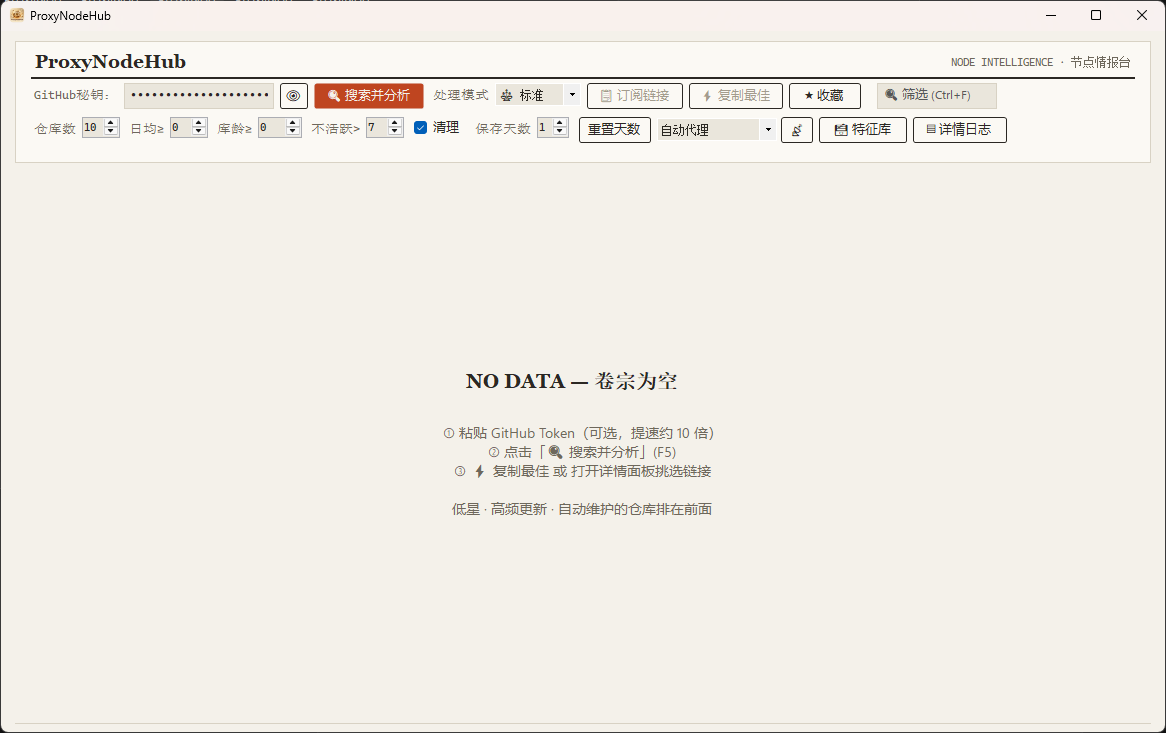
⭐ If ProxyNodeHub is useful to you, please consider leaving a Star — it is the biggest motivation I have to keep this project going.
Overview
ProxyNodeHub finds active free-node repositories on GitHub: it profiles their activity, de-duplicates the nodes they publish, and hands you a ready-to-use subscription link. One click on Search & analyse, and the rest of the triage is done for you.
No more opening repository after repository, comparing by hand, stitching a subscription together yourself. ProxyNodeHub surfaces the repositories that are maintained hardest and updated most often, then merges and de-duplicates their nodes into a single export. It also digs out the quiet, easy-to-miss repositories — in this domain, low traffic usually means low load and a longer-lived node. The overlooked repository is often the good one.
Features
The table describes the Windows client. Docker Web shares the discovery core and adds a browser UI, persistent scheduling, favorites, exports and optional control of an existing subs-check service; it does not run WinForms or another checker engine.
| Six-layer detection engine | Feature library → hardcoded mapping → file-tree scan → common-path probe → README parse → fallback candidates |
| Concurrent search | 8 keyword queries issued in parallel across GitHub's REST API |
| Activity scoring | 100-point model over commit frequency, regularity, automation and obscurity |
| Node de-duplication | Keyed on server:port, merged into one subscription export |
| Four processing modes | 🚀 Turbo / ⚖️ Standard / 🔍 Deep / 🐢 Compatible, with per-mode concurrency |
| Auto proxy | 13 accel mirrors, automatic latency test, fail-over and 5-minute result caching |
| Search-history filter | Recently searched repositories are skipped automatically (1–30 days, adjustable) |
| Favourites | Separate view, persisted across restarts |
| Feature library | Learns the paths that worked, so the next run is faster |
| Persistent logs | Rolling log with configurable retention and one-click purge |
Requirements
- Self-contained build — Windows 10 or later (x64). Nothing else to install.
- Framework-dependent build — Windows 10 or later (x64) plus .NET 8 Desktop Runtime.
Getting started
- Grab a build from Releases —
ProxyNodeHub_v0.0.1_self-contained.zipif you want zero prerequisites. - Unzip anywhere and run
ProxyNodeHub.exe. - Press F5 (or click 搜索并分析) to search and analyse.
A GitHub token is optional. The desktop currently stores it as plaintext in settings.json next to the EXE, not in the Windows credential store. Do not commit or share this file. Search has its own API rate limit; use GitHub's response headers as the authority.
Docker Web
Web edition overview
This fork retains the Windows client and adds a Docker Web workspace for always-on servers, NAS devices and compatible routers. It is a separate ASP.NET Core service, not a remote desktop: the browser handles interaction, while discovery, scheduling and persistence run in the container even after the browser closes.
| Edition | Intended use | Implementation |
|---|---|---|
| Windows client | Local discovery, export and local checker-kernel management | src/, WinForms / .NET 8 |
| Docker Web | Shared LAN workspace, scheduled discovery and centralized results | web/, ASP.NET Core / .NET 10; CI currently publishes linux/amd64 |
| Shared core | GitHub search, scoring, subscription discovery, parsing and learning | core/, reused by both hosts |
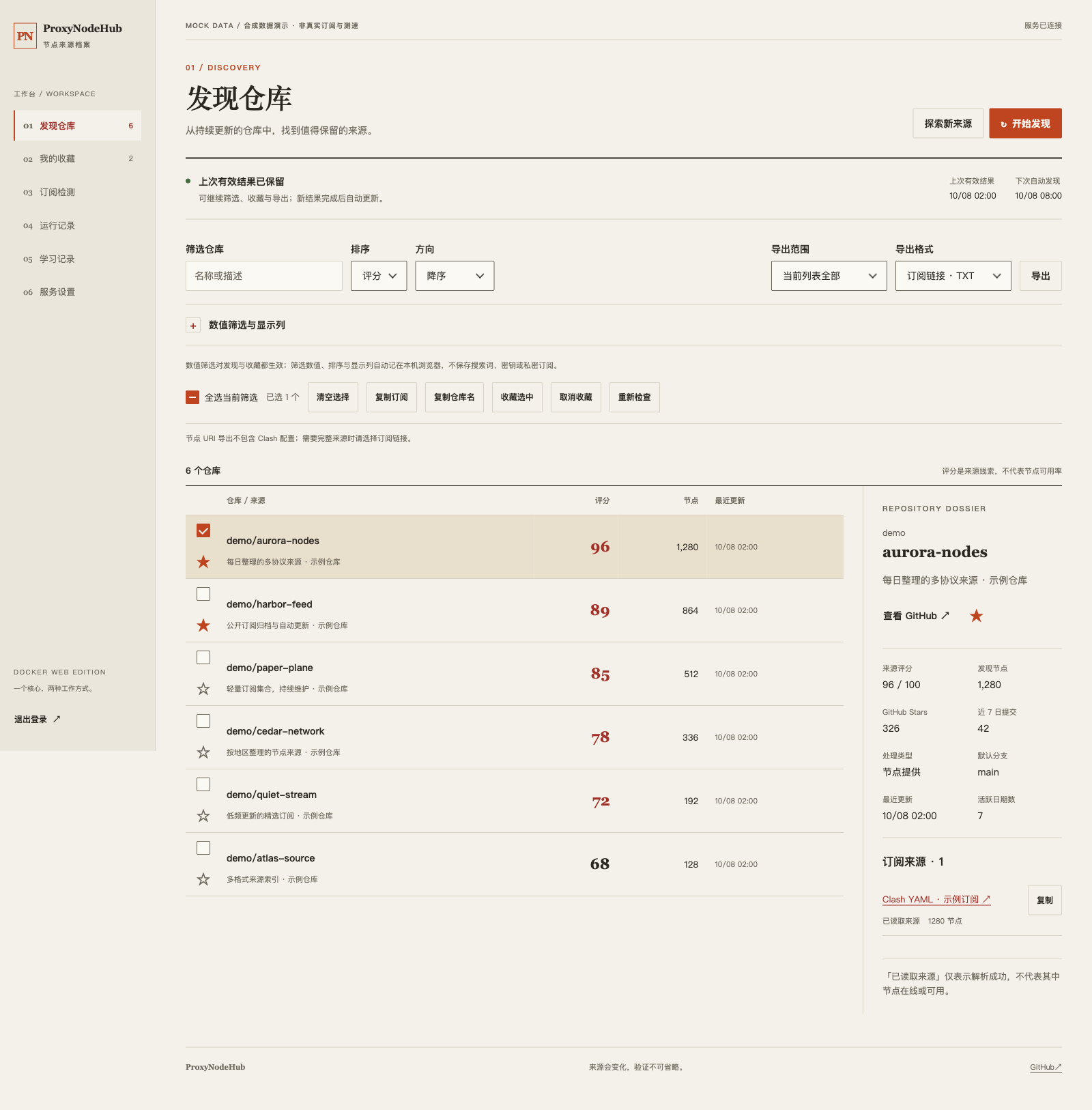
Six pages cover discovery, favorites, subscription checking, run history, learned paths and service settings. Web supports filtering/sorting, batch favorites/rechecks, scoped exports, online GitHub Token and checker configuration, and persistent scheduling. Custom-styled dropdowns, checkboxes and confirmation dialogs match the warm-paper palette while retaining semantic HTML and keyboard operation.
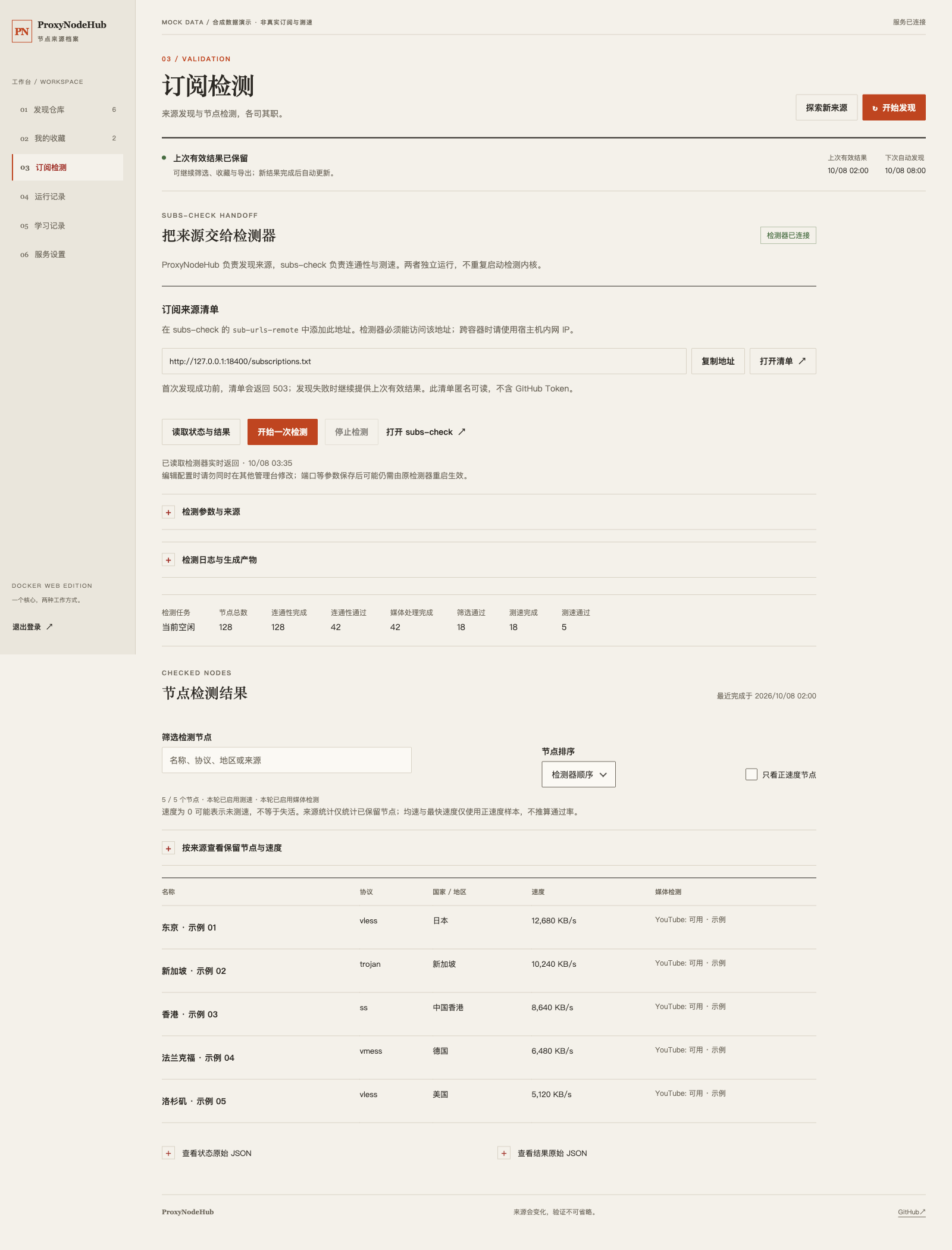
subs-check is an optional, separate service, not bundled into this image. Discovery, favorites and source exports work without it. Connecting it adds checker status, speed/media results, allowlisted settings, logs and artifact downloads. /subscriptions.txt lists source URLs for the checker; it is not a subscription of tested nodes.
Web is not fully equivalent to the desktop client: local kernel installation/upgrades, full checker YAML editing and per-run historical reinjection are not replicated. See the full capability review; opening another admin UI does not count as an integrated Web feature.
The image supports linux/amd64 and includes the .NET 10 runtime; no host runtime is required. ARM64 images are not currently published.
Web screenshots (mock data)
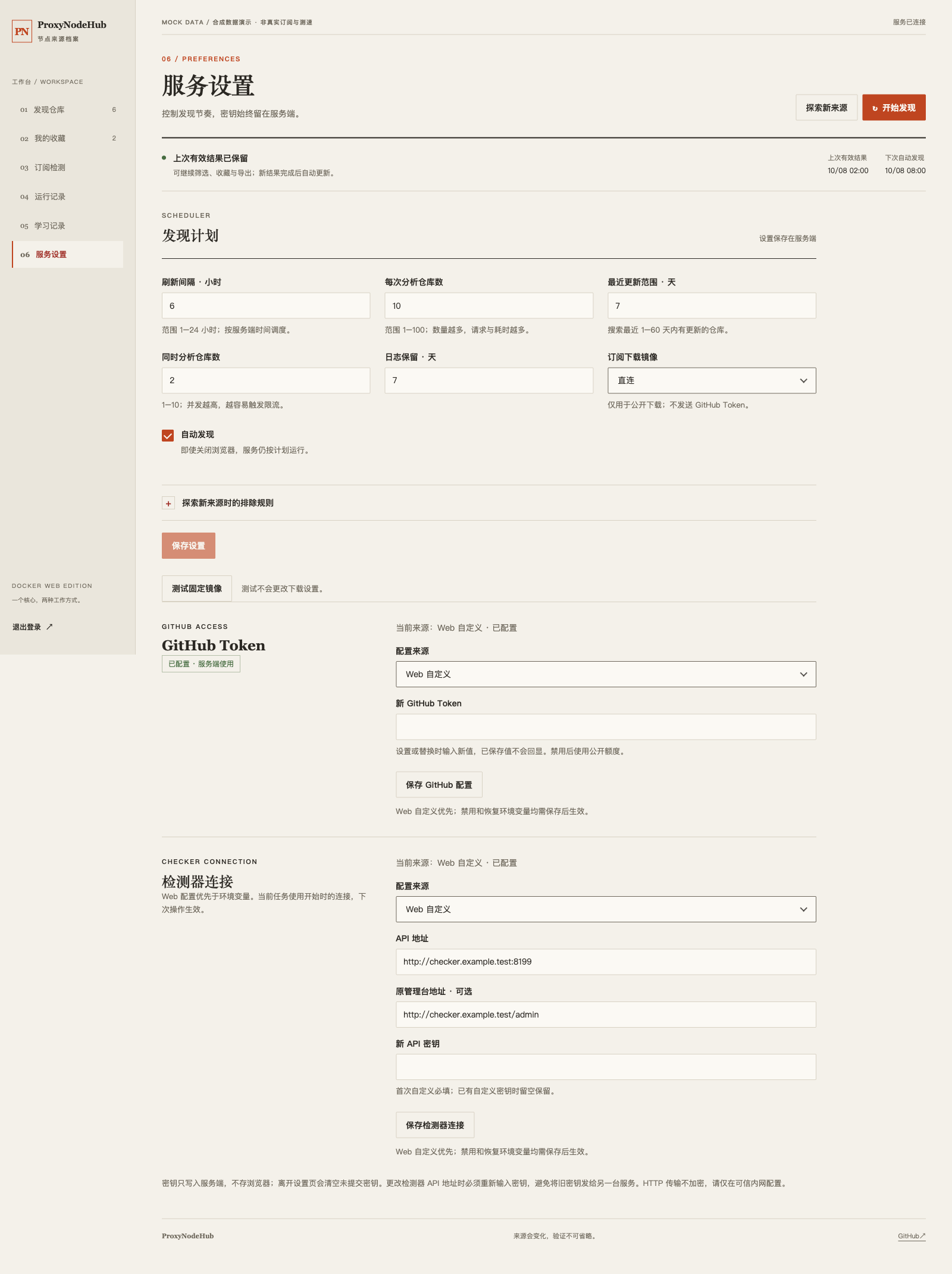
These are screenshots of the current frontend, with API responses intercepted in an isolated browser. Repositories, example.com / example.test addresses, nodes, speeds and media results are fictional. No production API, real token, password or private subscription was used. The loopback feed URL in the preview is for screenshots only; use a host address reachable by the checker when deploying.
Service settings: discovery schedule, GitHub Token and checker connection
Subscription checking: simulated status and results from a separate subs-check service
Pull and run
Use the Docker Hub image; the server does not need a source checkout or .NET installation. Confirm the target commit has a successful Actions publication, then pull:
docker pull helloworldz1024/proxynodehub:latest
latest means the most recently pushed image, not necessarily the current GitHub commit. Prefer sha-<full-commit> for pinned production upgrades. To build locally instead, run docker build -t proxynodehub:local . at the repository root and substitute that tag below. The root Dockerfile builds the service; tests/Dockerfile does not.
The example uses 192.168.31.122 and /mnt/usb1-1/proxynodehub; adapt addresses and paths for your host. Keep persistent data outside /script. Prepare the directories and password file once, without overwriting an existing password:
mkdir -p /mnt/usb1-1/proxynodehub/data /mnt/usb1-1/proxynodehub/secrets
test -e /mnt/usb1-1/proxynodehub/secrets/admin-password || \
  (umask 077; openssl rand -base64 -out /mnt/usb1-1/proxynodehub/secrets/admin-password 32)
chown -R 1654:1654 /mnt/usb1-1/proxynodehub/data /mnt/usb1-1/proxynodehub/secrets
chmod 750 /mnt/usb1-1/proxynodehub/data /mnt/usb1-1/proxynodehub/secrets
chmod 600 /mnt/usb1-1/proxynodehub/secrets/admin-password
Start the container. If that name already exists, stop the old writer and preserve its data before recreating it:
docker run -d \
  --name proxynodehub --restart always \
  --read-only --tmpfs /tmp:rw,noexec,nosuid,size=64m \
  --cap-drop ALL --security-opt no-new-privileges \
  --memory 512m --cpus 1 --pids-limit 128 \
  --log-opt max-size=5m --log-opt max-file=2 \
  -p 192.168.31.122:8388:8080 \
  -p 172.17.0.1:8388:8080 \
  -e ADMIN_PASSWORD_FILE=/run/secrets/admin-password \
  -e GITHUB_TOKEN="${GITHUB_TOKEN:-}" \
  -e REFRESH_HOURS=6 -e REPO_COUNT=10 -e INACTIVE_DAYS=7 -e AUTO_REFRESH=true \
  -v /mnt/usb1-1/proxynodehub/data:/data \
  -v /mnt/usb1-1/proxynodehub/secrets/admin-password:/run/secrets/admin-password:ro \
  helloworldz1024/proxynodehub:latest
Open http://192.168.31.122:8388. The second port binding preserves the existing checker's Docker-bridge feed address; adjust these addresses for other hosts. Do not expose this HTTP endpoint to the Internet; use a trusted HTTPS reverse proxy for untrusted networks. Cookie authentication, CSRF protection and login rate limiting protect management APIs. GitHub tokens are server-only and never included in browser state or sent to subscription sources.
Log in with the password stored in the server-side file; do not share it in chat or commit it. Alternatively, supply ADMIN_PASSWORD from the host environment (12–1024 characters) instead of ADMIN_PASSWORD_FILE; do not set both. The password file must be readable by UID1654.
On a fresh volume discovery starts immediately. Subsequent runs begin six hours after the previous attempt finishes, including failed attempts; timing survives restarts. The UI can change the interval (1–24 hours), candidate count (1–100), active-date range (1–60 days), concurrency (1–10) and automatic scheduling. These environment variables initialize new data only; persisted UI settings take precedence thereafter. Runs are mutually exclusive, cancellable and capped at 15 minutes. Failures/empty results never replace the last valid snapshot; partially successful discovery is explicitly marked.
/data/state.json owns settings, up to200 favorites, the current snapshot, search memory and the last20 runs (up to200 log entries each, with 1–30-day retention). features.json contains learned paths. connections.protected encrypts online connection settings using the persisted keys/ key ring, also used for login protection. Protect and back up the whole volume: losing the key ring prevents decryption, while an administrator with the entire volume can decrypt it. One container per volume; an existing headless current.json is imported once only when state.json does not exist and is left untouched for rollback.
/live is process liveness (Docker healthcheck); /health returns503 until a valid snapshot exists, or after25 hours without a new snapshot. Anonymous /subscriptions.txt lists public subscription URLs, not merged nodes or tokens. Add its reachable URL to the existing subs-check sub-urls-remote list; no image modification or API key is required for this feed. URI/Base64 export retains the core's server:port deduplication and refuses unsupported YAML input rather than producing an incomplete merge.
Configure GitHub Token and checker connections online under Service Settings, without recreating the container. Each connection explicitly uses a Web override, environment defaults, or disabled mode. Disabled never falls back to environment credentials. Stored secrets are write-only and never persisted in the browser; changing the checker address requires a new key. GitHub changes apply to the next run. Saving does not validate network access or start a task. Updating environment variables themselves or the administrator password still requires updating the container; a new administrator password invalidates old sessions.
Optional checker environment defaults are SUBSCHECK_API_URL=http://192.168.31.122:8199, SUBSCHECK_API_KEY and browser-facing SUBSCHECK_WEB_URL=http://192.168.31.122:8199/admin. Fixed protocol routes provide status/results, start/stop, redacted logs, version, allowlisted parameter editing, explicit source append, and existing Clash/Mihomo/Base64 artifact downloads. Private manual sources never enter the public feed. Raw YAML stays on the server; unrelated fields and unknown keys are preserved verbatim. The upstream has no compare-and-swap API: do not edit concurrently in another admin panel. Some changes still require the checker administrator to restart it. Full configuration, process management and upgrades remain with the independent checker; no Docker socket is mounted.
Discovery includes numeric filtering, bidirectional sorting, cross-filter selection, batch copying/favorites/rechecks and scoped exports. Only non-sensitive display preferences are saved in the browser. Explicit exploration applies recent-search/favorite exclusions and merges sources; ordinary discovery keeps full-snapshot semantics. Fixed mirrors never receive GitHub tokens. Per-run log download/cleanup and search-memory management preserve scheduling timestamps. See the capability comparison and design for evidence and desktop limitations that should not be copied.
Before upgrading, record the current image digest and runtime settings. Preserve the data/password mounts, port bindings and security limits, stop the old writer before starting the new one, then check health and feed access from the checker container. Refresh discovery through the authenticated UI. This parser change does not migrate the data format; rollback should not overwrite newer favorites or settings. Historical backup containers may have been removed, so do not depend on fixed backup names.
GitHub Actions
The workflow tests Core/Web and the frontend, publishes a Windows artifact, builds a Linux amd64 image and performs HTTP/restart checks. Only that tested image is pushed to Docker Hub. Pull requests and manual builds on other branches never publish images. Enable Actions and configure these under Settings → Secrets and variables → Actions:
| Name | Location | Value |
|---|---|---|
DOCKERHUB_USERNAME |
Variables → New repository variable | helloworldz1024 |
DOCKERHUB_TOKEN |
Secrets → New repository secret | A Docker Hub token with push access to the target image repository |
A DOCKERHUB_TOKEN entry in Variables alone does not work: the workflow reads secrets.DOCKERHUB_TOKEN. Missing credentials fail publication explicitly. Never commit or share tokens in chat; revoke and rotate exposed tokens. The optional runtime GITHUB_TOKEN is unrelated, and changing Actions configuration does not update existing container environment variables.
Successful main/master builds publish helloworldz1024/proxynodehub:latest and sha-<full-commit>; v* tags publish version and SHA tags. OCI labels identify the source repository and revision. Wait for the matching Actions run, then deploy its SHA tag and verify the registry digest. The earlier web-20261008-d6db08ef image was built from uncommitted local source using the server Docker daemon and pushed directly, not by Actions.
Subscription validation
The checker reads /subscriptions.txt once at the start of each run. First distinguish an unreachable feed from individual download, parsing or node-probe failures. Successful per-link downloads may only appear at debug log level. Core now parses complete YAML and counts only actual top-level proxies entries with a name, type, server and valid port; empty templates, proxy-group names and malformed YAML are not nodes. This does not validate credentials or reachability. Refresh discovery after upgrading without deleting favorites or history.
The checker settings expose sub-urls-timeout in seconds and subscription-fetch concurrency separately from node-probe timeout in milliseconds. Adjust only after measuring slow requests, for example30 seconds and concurrency10; do not permanently blacklist a valid subscription after a transient timeout. Configuration changes require an idle checker and do not start a run.
Building
# self-contained single file (~68 MB, includes the runtime)
dotnet publish src/ProxyNodeHub.csproj -c Release -r win-x64 -p:SelfContained=true -o dist/self-contained

# framework-dependent (~3 MB, needs the .NET 8 runtime on the machine)
dotnet publish src/ProxyNodeHub.csproj -c Release -r win-x64 -p:SelfContained=false -o dist/framework-dependent
Requires the .NET 8 SDK with the Windows Desktop workload.
Note on size: the self-contained build cannot be trimmed.
PublishTrimmedis unsupported for WinForms (NETSDK1175), so ~65 MB is the floor for a .NET 8 WinForms single-file package.
Keyboard shortcuts
| Shortcut | Action |
|---|---|
F5 |
Start / cancel search |
Ctrl+C |
Copy the best subscription link |
Ctrl+L |
Toggle the detail panel |
Ctrl+D |
Toggle favourites |
Ctrl+F |
Focus the filter box |
Esc |
Close dialogs |
Configuration
Everything the tool learns lives outside the binary, under %AppData%\ProxyNodeHub\:
| File / path | Purpose |
|---|---|
known_repos.json |
Bundled next to the EXE — known repository → subscription-path mappings |
searched_repos.json |
Search history, with a per-entry expiry |
log.txt |
Rolling log, trimmed to the retention window on launch |
| feature library JSON | Successful probe paths, reused by layer L1 |
Project structure
The dependency direction is Desktop → Core ← Web. Both hosts share one discovery pipeline. The Web UI is plain HTML/CSS/JavaScript with no frontend build dependencies. The root Dockerfile builds the service; tests/Dockerfile only verifies builds.
Use .NET 10 SDK for regression checks; the core and desktop still target .NET 8:
dotnet run --project tests/ProxyNodeHub.Tests -c Release
node web/wwwroot/app.js --self-test
dotnet build src/ProxyNodeHub.csproj -c Release -p:EnableWindowsTargeting=true
docker build -f tests/Dockerfile --target verify -t proxynodehub-verify:local .
The shared core now reports API failures, propagates cancellation, honors default branches and persists feature fields atomically with synchronized writes. Failed writes do not publish new in-memory state. Desktop configuration paths are unchanged; known mappings still ship alongside the app.
core/                       # net8.0 shared core; no WinForms / ASP.NET dependency
├── DiscoveryEngine.cs      # Shared queries and analysis pipeline
├── GitHubService.cs        # HTTP, desktop mirrors and server source restrictions
├── SubscriptionFinder.cs  # Six-layer subscription discovery
├── GitHubAnalyzer.cs       # Statistics and scoring
├── FeatureLibrary.cs       # Instance-owned, synchronized atomic persistence
├── NodeParser.cs           # Existing parsing and deduplication
├── KnownRepoLoader.cs      # Known subscription mappings
├── known_repos.json        # Single source, published with each host
└── Models.cs / AtomicFile.cs
src/                        # Windows UI, settings, proxies and speed tests
web/                        # ASP.NET API, scheduler and static browser UI
Dockerfile                  # Multi-stage, non-root Web service image
tests/ProxyNodeHub.Tests/    # Dependency-free Core and Web regression executable
tests/http-smoke.mjs         # Real HTTP authentication and persistence checks
tests/Dockerfile            # Core checks and Windows cross-build; NOT a service image
Tech stack
- C# / WinForms on .NET 8 (
net8.0-windows,win-x64) - Windows 10 or later, x64
- Docker Web: ASP.NET Core / .NET 10, non-root Alpine Linux image; custom HTML/CSS/JavaScript controls with no frontend build dependencies
- Core uses YamlDotNet 18.1.0 to validate node YAML; desktop and Web share that dependency, and Web also uses it to preserve checker configuration
Author
Zoyaya — github.com/wanvfx
License
Released under the MIT License.